Motion vs Reclaim: which AI time management tool wins?
Being behind major reports like The Mother of All Breaches and RockYou2024, our in-house cybersecurity experts and journalists provide unbiased, real-world testing and in-depth analysis.
We maintain complete transparency by openly sharing our testing methodologies with our audience.
Learn more

Reclaim and Motion are both AI-driven tools designed to help you and your team manage your day-to-day work. They share a few features and ideas, but in the end, they are different in terms of what they can accomplish for you or your organization.
Reclaim focuses more on individual scheduling, helping users manage their calendars and avoid overwhelming them with meetings, allowing for breaks, and focus time. Motion, on the other hand, handles general project management, including creating so-called AI employees that help manage a lot of the tasks in the background.
In this comparison, I look at the key features of both products, their pros and cons, use cases, and who they're best for.
Overview of Motion vs Reclaim
To start off, with the help of the Cybernews research team I looked at what each provider offered in terms of features, pricing, and additional features. To help you show the differences between each of the providers, I created a short summary:
| Motion | Reclaim AI | |
| Rating | ||
| Price | Starting from $19.00/month | Starting from $18.00 (free version available) |
| Main Features | Task management, task automation, calendar automation | Automatic meeting scheduling, day planning |
| Free Trial | ✅ Yes, credit card required | ✅ Yes, no credit card required |
| Mobile App | ✅ Yes | ❌ No |
| Learning curve and UI | A bit of a learning curve present, too many videos in the onboarding process. The UX/UI could be improved in some places | Very easy to use, no prior knowledge required, comprehensive onboarding and tips when navigating for the first time |
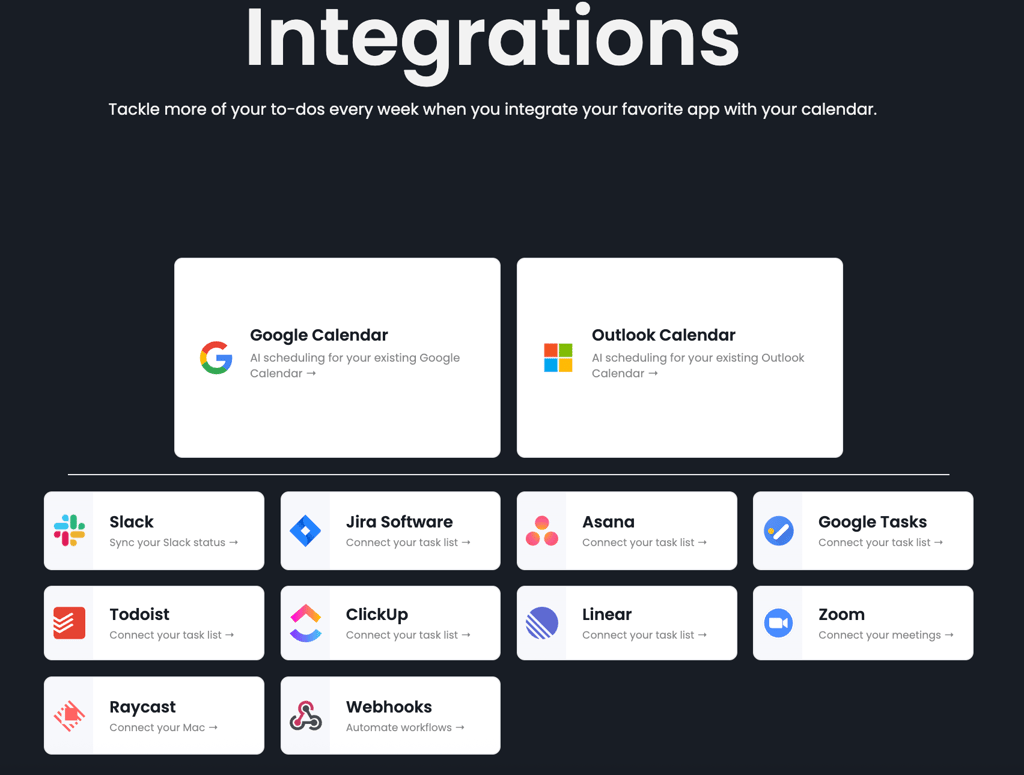
| Integrations | Google Calendars, Zapier, Zoom, Google Meet, Gmail, Outlook, Siri, HubSpot, Salesforce, Teams, Slack, and many more | Google Calendar, Outlook Calendar, Slack, Jira, Asana, Google Tasks, Todoist, Clickup, Linear, Zoom, Raycast, Webhooks |
| Ideal For | Having an all-in-one place for productivity and organizing | Reclaiming your time for productivity and organizing |

Motion vs Reclaim: are they similar?
Despite some differences, Motion and Reclaim also share a few features with each other. Here’s a breakdown of the main similarities between the two products’ features:
- AI-assisted scheduling. Both tools integrate with calendars like Google Calendar, Outlook Calendar, or Apple Calendar.
- Task auto-scheduling. Both Motion and Reclaim automatically schedule your tasks, whether added manually or via integrations.
- Booking links for external scheduling. Motion and Reclaim allow you to send others scheduling links that will show your availability and let them easily book meetings.
- Multi-calendar sync. Both tools allow you to sync multiple calendars with each other, so that your meetings appear on both.
- Video-conferencing integrations. Both Motion and Reclaim are integrated with Zoom, and Google Meet. Motion adds Microsoft Teams support to its integrations.
Motion vs Reclaim: reviewing the differences
Motion and Reclaim both advertise some very similar features related to time management and automating meeting scheduling. However, while Reclaim focuses on individual time management, Motion goes way further. Here are the main differences:
- Product focus. Reclaim focuses on meeting and scheduling automations. Motion, meanwhile, has those tools as a part of a full project management suite that includes task planning, management, and even AI employees.
- Task and project management. While Reclaim doesn’t offer its own task management suite, it integrates with tools like Asana, ClickUp, JIRA, Todoist, and other task management software. Motion provides its very own native suite that includes project management.
- Mobile app. Reclaim doesn’t feature a mobile app, instead relying on integrations with Google Calendar and project management software. Motion has its very own app, which you can download on iOS or Android.
Motion vs Reclaim: comparing the features
To help you further understand what Motion and Reclaim have to offer exactly, I’m going to take a look at a few categories to help you understand which tool will suit your needs better:
| Feature | Motion | Reclaim |
| Product scope | All-in-one task management and automation platform | Scheduling and time management platform focused on calendar optimization |
| AI scheduling engine | Automatic meeting scheduling, including an automatic AI agenda | Smart meetings, focus time, automatic buffers between meetings |
| Tasks and projects | Built-in task management with AI employees for additional help | Basic task management and scheduling, with advanced features available through integrations |
| External scheduling | One-time and reusable external links | External scheduling links for personal and team use |
| Integrations | Integrations with popular calendar software like Google Meet and Outlook. More available through Zapier, but task management is focused on Motion's internal solutions | Integration with popular calendar software like Google Meet and Outlook, and task management software like Asana, ClickUp, or JIRA |
| Security, privacy, and compliance | Strong privacy policy with SOC II audit | SOC II and GDPR compliance |
Product scope
The scope is the primary difference between the two products. Motion offers an entire suite of tools related to task scheduling, management, and event automation thanks to its AI Employees feature. Reclaim, meanwhile, focuses on providing you with the tools to manage your time properly.
Motion’s scope can be a blessing and a curse. Its suite of features makes it an extremely powerful tool, but in my experience, getting to the powerful part took a lot of tutorials, questionnaires, and reading. Since Motion often markets itself towards people with ADHD, it’s extremely unfortunate that its first-time user experience can be overwhelming and off-putting.
Once you get through the tutorials, however, Motion is impressive and robust. Essentially, I feel like it’s a more powerful version of software like Asana or ClickUp, integrating task management with my calendar, work automation, and scheduling.
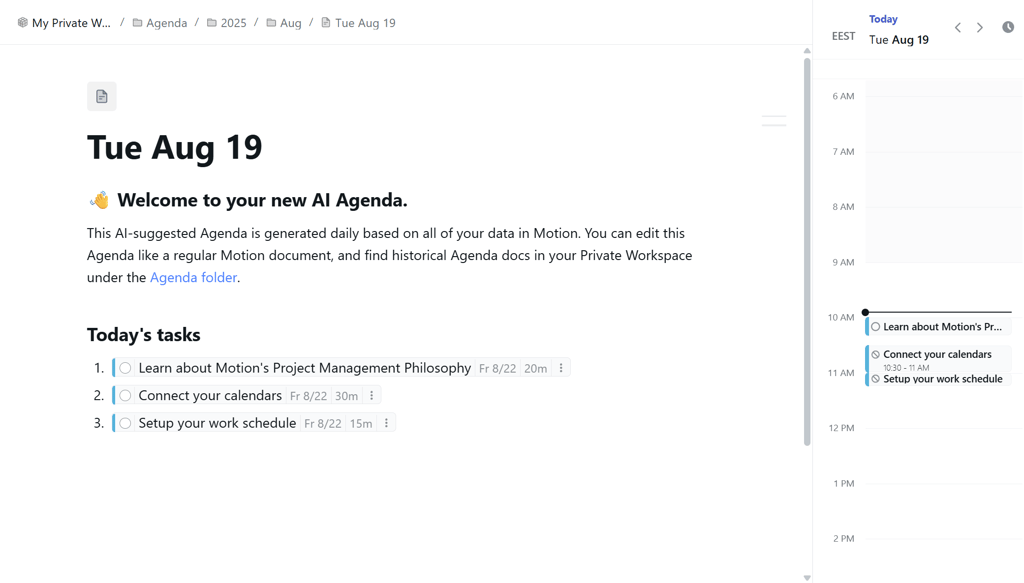
Motion also offers pre-built and custom AI Employees for day-to-day use. These can automatically manage your project, handle customer tickets, or even post to social media for you. The automations can also help you create daily agendas, which summarize your daily tasks into one simple document.
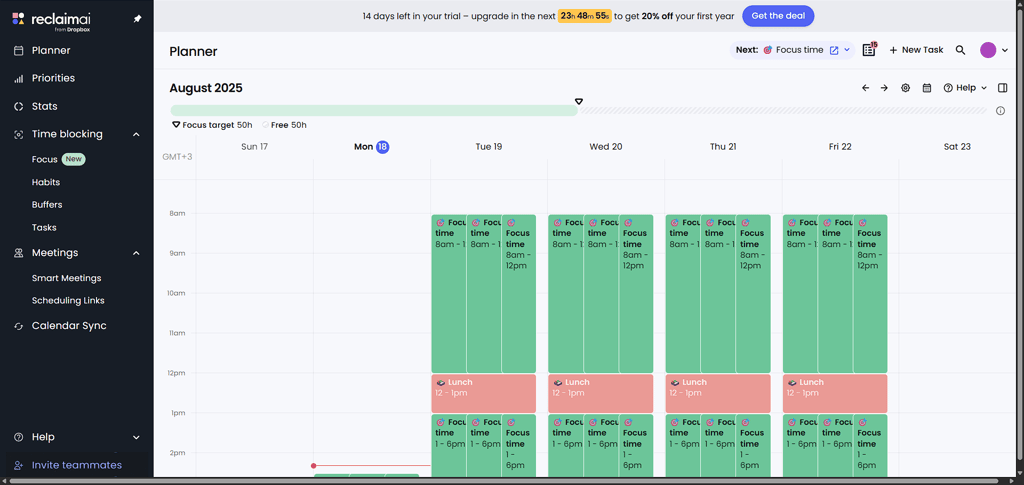
Reclaim, on the other hand, is purely focused on time management of tasks and excels at it. It syncs with your calendar and starts building on it based on your presets. While it does offer manual task management, it’s elementary compared to Motion’s advanced project management suite. Unfortunately, unlike Motion, Reclaim doesn’t offer a mobile app, which I find to be a big missing piece for the product.
AI scheduling engine
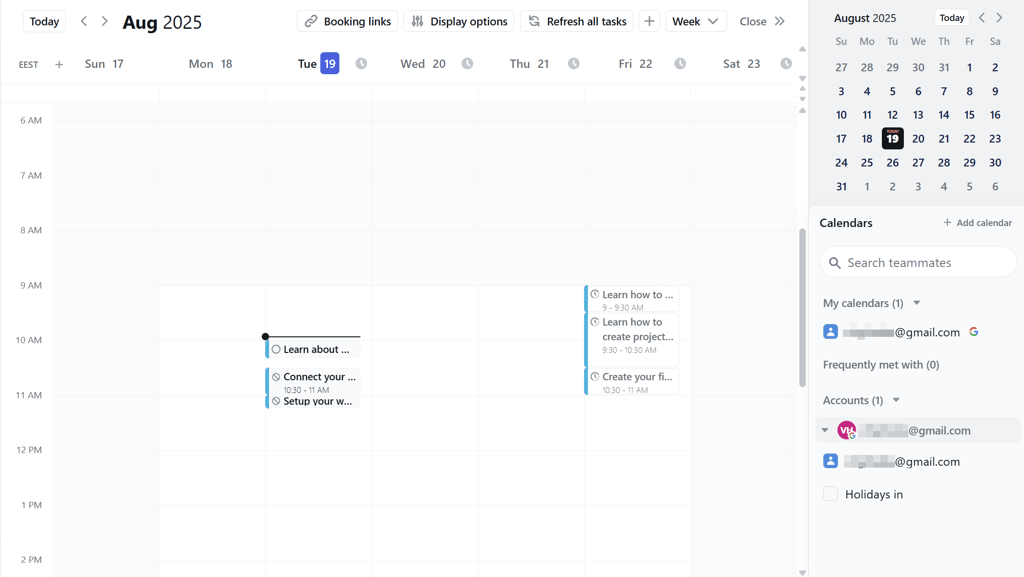
Motion’s scheduling features are robust and integrated into its overall project management workflow. When scheduling a task or a meeting, Motion takes multiple factors into account, including other meeting deadlines, participant availability, and static events. I also appreciate the fact that you could customize your time blocking settings to include various popular time management techniques like the Pomodoro technique or task batching. While not as intuitive as Reclaim, Motion really had a lot of advanced features working for it.
Reclaim is far simpler than Motion in terms of how it works. It focuses on quickly scheduling your tasks and doesn’t have any additional task-related automations. You can customize each task by adding priorities, which also adds the option to create Habits, which are routines that you’d want you or your team to integrate into the working day. It also offers Smart Meetings, which essentially let you set up recurring meetings automatically, without having to go through the hassle of coordinating multiple participants.Reclaim Smart Meeting creation screen
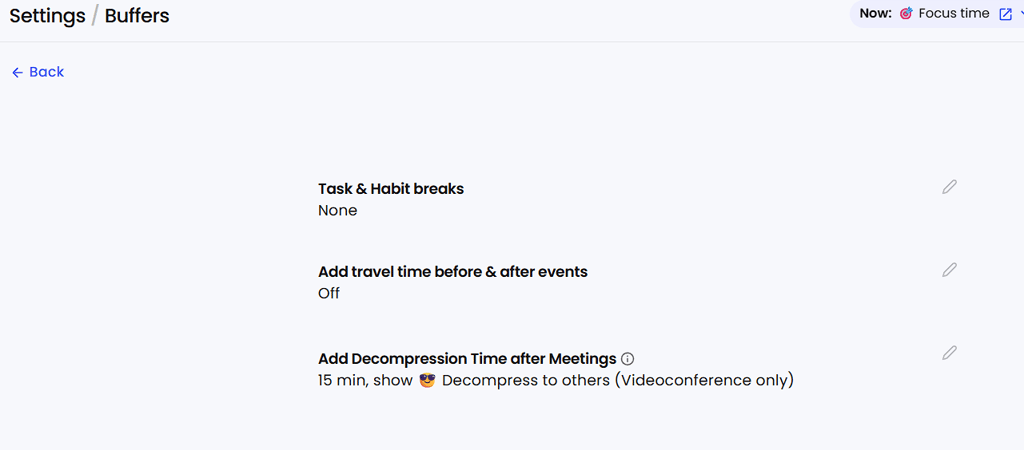
What I really appreciate about Reclaim’s scheduling solution is its customizable buffer times, including travel times and decompression time. This means that if you’re anything like me and need to take a step back after a meeting, Reclaim will take that into account when scheduling your day.
Tasks and projects
Task and project management are definitely my favorite features in Motion. Thanks to its AI automations, it was able to generate an entire task plan, which it then divided into stages and suggested how to assign to roles, solely based on a few sentences I used as a prompt.
Motion AI project stages during onboarding
Motion then transferred all the tasks into its project management suite, allowing me to set deadlines, assign team members, and set priorities.
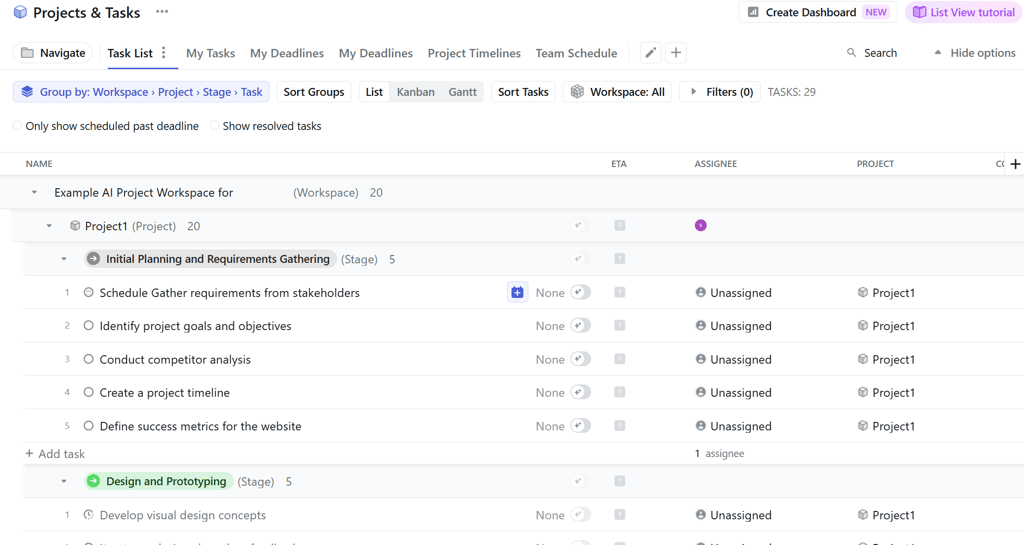
The deadlines and priorities you set for the tasks then contribute to how Motion schedules them in each team member’s calendar, which I found very useful.
Reclaim, on the other hand, doesn’t really deal with task management as much as task scheduling. While you can create tasks in Reclaim or import them through an integration, the management side is pretty basic, only allowing you to set priorities for a given task.
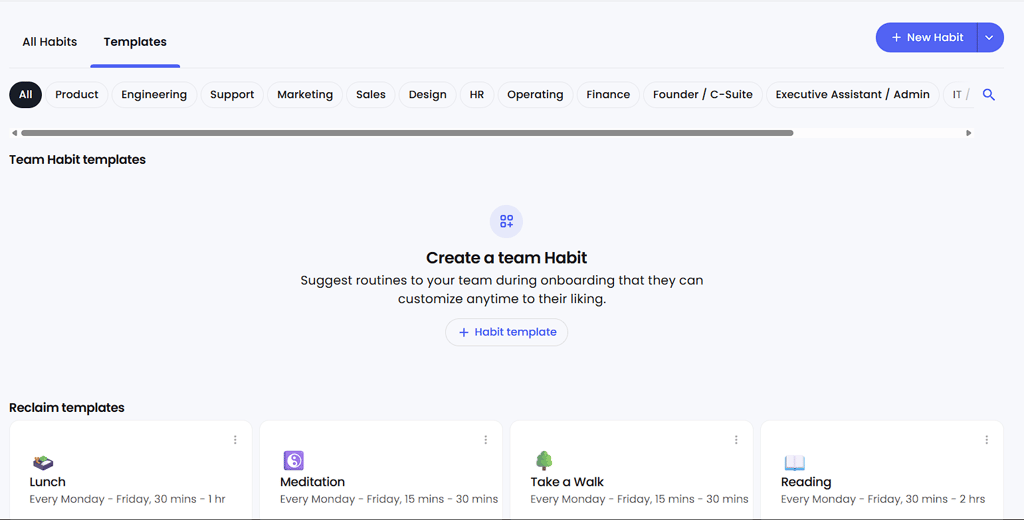
The one thing I really see as applicable on the task management side is Habits, which allow you to set templates for a task type. This can be anything from encouraging your team to take a walk to giving them a baseline for stand-ups and retrospectives. Otherwise, however, its features can’t really match Motion’s robust setup.
External scheduling
Both Motion and Reclaim offer external scheduling tools, helping you integrate your work calendar with clients, prospective employees, or other people from outside your organization.
Motion gives you the option to create a one-time booking link that includes all your available time slots. The link comes with a ready-made message you can copy to your email to send to external recipients.
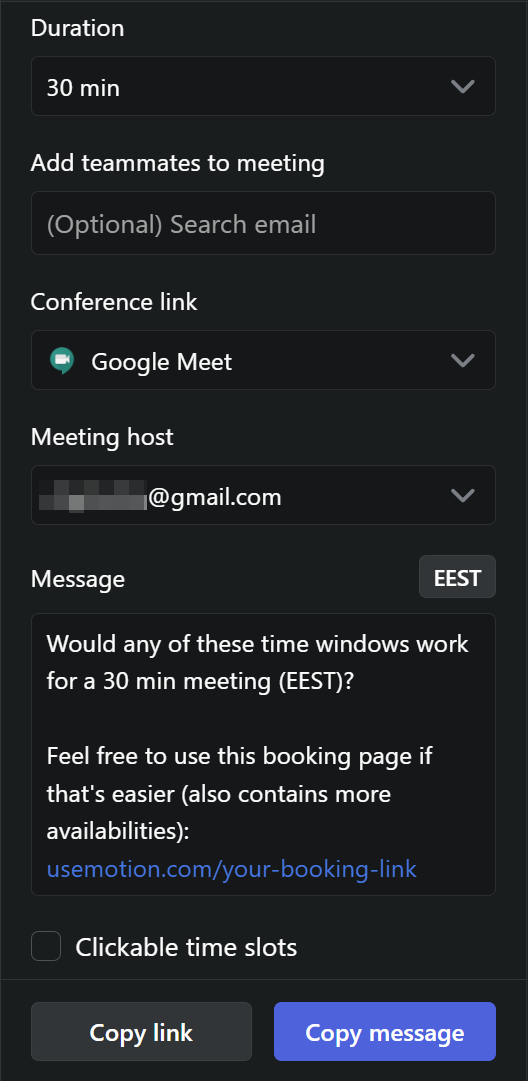
Reclaim works similarly to Motion in that regard, allowing you to set up links that include your availability and can be used externally. It’s rather intuitive, and works without any hiccups.

Integrations
Motion’s integrations are pretty limited compared to Reclaim. Since it has its own software management suite, it doesn’t really focus on bringing other software into the fray, with its integrations being mostly limited to calendar and communication apps. That said, this can be extended, with a bit of a hassle, thanks to its integration with Zapier, which can bring some additional automation features.
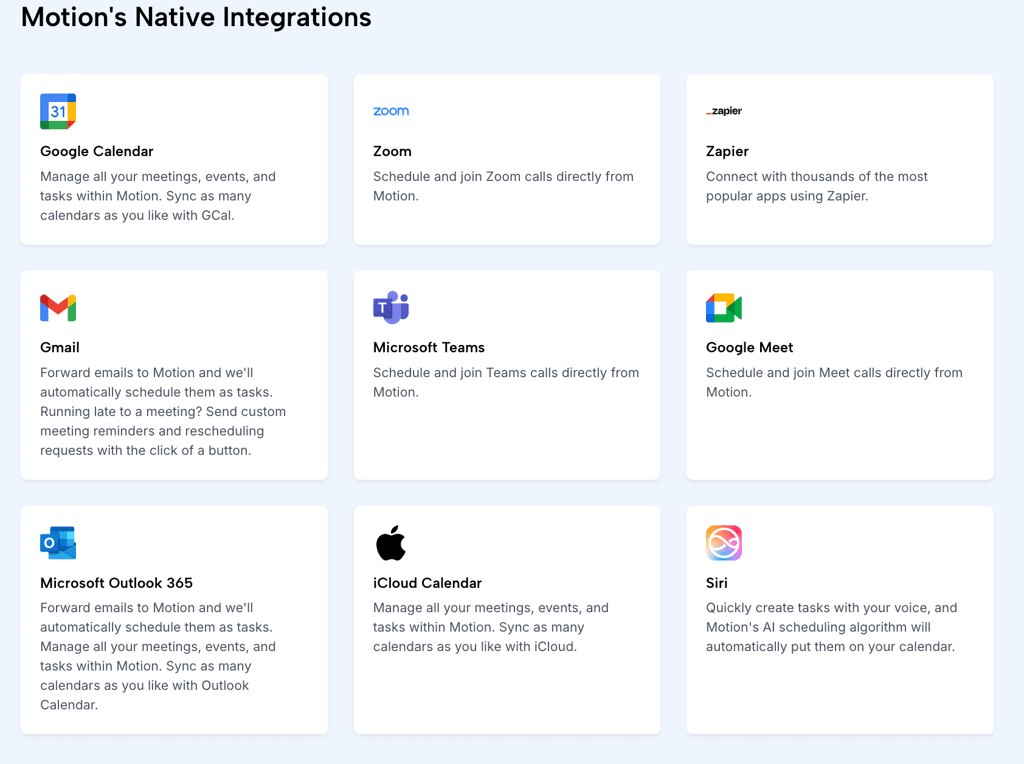
Reclaim, on the other hand, uses integrations to provide better task management features, which is why it offers native integrations with Asana, ClickUp, and JIRA, the three most popular project management tools on the market. It also integrates with calendars and video conferencing apps, including Google Calendar/Google Meet and Zoom, making it easier to schedule meetings.

Security, privacy, and compliance
Both Reclaim and Motion offer rock-solid security and privacy, obtaining SOC Type II certification. Both also offer self-data deletion, which is a nice touch, making purging your private information much easier. Security-wise, both products focus on integrating logins from providers like Google, adding a valuable security layer, especially when combined with 2FA.
The one red flag I found was that Motion notes that it shares its data “with trusted partners” in its Privacy Policy. The partners are not named, and if this clause is overused, it could be dangerous for your data. On the flip side, Motion allows you to compartmentalize your information, splitting it between personal knowledge and team knowledge, which is very useful to avoid giving away too much information to unauthorized team members.
On top of its compliance and policies, Reclaim also commits to collecting as little data as possible from users and encrypts data when it's transferred between integrations. This further reduces opportunities for critical breaches and makes it less likely that one will hurt your business.
Why would you need an AI time management tool?
AI time management tools are pretty helpful for both individuals and teams. Personally, in my line of work, task scheduling isn’t as important, given that I don’t have a lot of meetings, and most of my work is quite linear. However, I like to use time scheduling apps to manage time outside of work, whether it be chores, planned activities, or making sure to get some exercise in. In fact, Motion has targeted its advertising towards people suffering from ADHD as a potential solution for the executive dysfunction aspect of the disorder. Unfortunately, the price tag may be a turn-off for many individual users, and Reclaim should be enough for day-to-day use in that context.
That said, many organizations that work in meeting-heavy fields swear by tools like Reclaim and Motion. That’s because they allow them to limit the time they spend on admin work, coordinating meetings between participants, and rescheduling. All while maintaining their employees' ability to focus on their tasks and not get swamped by constant distractions.
Finally, I see a lot of potential in Motion for solopreneurs. With AI employees being able to do a lot of the stuff you may not be good at, or don’t have time for, you’ll be able to focus on doing the job you like to do. For example, if I were a freelance writer, I’d definitely use Motion to have an AI do cold emailing and client outreach, so that I could focus on the creative side of the job.
Plans and pricing
Pricing is the first spot where Motion and Reclaim differ drastically. Reclaim offers a forever-free plan for individual users, which, while having some limitations, should be enough to handle a home calendar. Motion, on the other hand, doesn’t offer a free version, featuring only a 7-day free trial.Here are the plans Motion has on offer:
| Plan | 1-year term price | 1-month term price | Features |
| AI Workplace | $39.00/month | N/A | 1 seat, 1,000 AI credits/month, 3 integration connections, no AI Employees |
| AI Employee Light | $99.00/month | $148.00/month | 3 seats, 25,000 AI credits/month, 10 integration connections, AI Employees |
| AI Employee Standard | $299.00/month | $446.00/month | 10 seats, 100,000 AI credits/month, 10 integration connections, AI Employees, HTTP blocks |
| AI Employee Plus | $599.00/month | $894.00/month | 25 seats, 250,000 AI credits/month, 10 integration connections, AI Employees, HTTP blocks, priority support |
Motion also offers custom plans, tailor-made to a given organization’s needs. Reclaim, in contrast, is much cheaper, matching its limited featureset:
| Plan | 1-year term price | 1-month term price | Features |
| Free | Free | Free | 1 user, 1-week scheduling range, 1 scheduling link and Smart Meeting, 1 Habit, 1 calendar sync |
| Starter | $8.00/month | $10.00/month | 10 users, 8-week scheduling range, 3 scheduling links and Smart Meetings, unlimited Habits, and calendar syncs |
| Business | $12.00/month | $15.00/month | 100 users, 12-week scheduling range, unlimited scheduling links, Smart Meetings, Habits, and calendar syncs, delegated access |
| Enterprise | $18.00/month | N/A | 100 users, 12-week scheduling range, unlimited scheduling links, Smart Meetings, Habits, and calendar syncs, delegated access, SSO sign-in |
Final word on the Motion vs Reclaim comparison
Motion and Reclaim both offer excellent AI time management tools. However, they have vastly different approaches to their functionalities. Motion is robust and offers far more than just time management, becoming an all-in-one task management suite with many helpful advanced features.
Unfortunately, these advanced features come at a rather hefty price. I probably wouldn’t choose Motion for managing chores, or personal errands, but it’s a great choice for teams and solopreneurs.
Reclaim, on the other hand, is more streamlined, with the price reflecting the smaller featureset. It’s far more suited to individuals and smaller teams that simply need something that will coordinate their work time, rather than managing the whole thing.
| Category | Motion | Reclaim |
| Product scope | ✅ | ❌ |
| AI scheduling engine | ✅ | ✅ |
| Tasks and projects | ✅ | ❌ |
| External scheduling | ✅ | ✅ |
| Integrations | ❌ | ✅ |
| Security, privacy, and compliance | ❌ | ✅ |
FAQ
Is Motion better than Reclaim AI?
That depends on what you’re looking for. If you’re looking for project management software, then yes, definitely. If you’re looking for purely time management software, they end up pretty much even.
What to look out for in an AI time management tool?
What you should look for in an AI time management tool is its ease of use, reliability, integrations, and customizability. That way, you’ll be able to tailor it to your needs.
Does Motion sync with Google Calendar?
Yes, Motion syncs with Google Calendar, along with other similar products like Outlook Calendar.
Do Reclaim AI and Motion offer free trials?
Yes, both products offer free trials. In fact, Reclaim offers a forever-free version altogether, while Motion has a 7-day free trial that requires a credit card.