Figma Make AI review: is it worth it?
Being behind major reports like The Mother of All Breaches and RockYou2024, our in-house cybersecurity experts and journalists provide unbiased, real-world testing and in-depth analysis.
We maintain complete transparency by openly sharing our testing methodologies with our audience.
Learn more

Figma Make AI tool is a prompt-to-app AI-powered generation engine within the Figma ecosystem that produces interactive frontend code. It also adds functionality, like managing component states, and assigns ARIA labels to make the code SEO-friendly.
Together with Cybernews researchers, I have tested Figma Make AI features by generating a simple portfolio website. I compared our experience to other expert tests and multiple first-hand user opinions for a fact-rich review.
Currently, the generation engine is still in its Beta stage, so I'll outline near-future improvement plans. Below, you will find Figma Make review, including usability analysis, code quality, pricing, limitations, and a brief comparison to competitors at the end.
What is Figma Make AI?
Figma Make is an AI-powered vibe coding feature integrated within Figma's platform. If you haven't heard of Figma, it's one of the leading design tools, so adding an application generator to expand its capabilities is a very meaningful direction.
Figma is especially popular among UI/UX designers. Here are its core functions.
- Native AI app prototyper inside Figma. You can access Figma Make without leaving its platform from its Actions menu.
- Generates interactive designs and code. Not only does it generate components and layout, but it also handles interactive logic, taking the prototype closer to a deployable app.
- Works with Figma's sign files. You can start from Figma's design files instead of prompts. By uploading your designs to the Figma Make AI app builder, you will receive an interactive prototype within several minutes.
- Currently available on paid Figma plans. You can try its limited version for free, but any serious features require a paid subscription, entering a credit-based payment system in March 2026.
- Core use cases. Prompt-to-code web app prototypes, UI flows, and design handoff.
Here's how Figma's Make AI design tool innovates compared to traditional solutions.
- The AI generates UI from prompts instead of manual drawing
- Connects screens automatically without you explicitly showing the relation
- Uses states and variables for interactivity, instead of a variety of frames
- Automatically writes SEO landmarks and adds ARIA labels
How we reviewed and tested Figma Make AI
Key features and capabilities of Figma Make AI
Figma Make is among many AI-powered code assistants, so it may feel familiar at first. For example, its main window is similar to the likes of Lovable and many others.
On the left side, it has a chat window where AI displays its actions and reasoning. Your design prototype is in the middle with options and settings at the top. Here you can choose to view the prototype or its code, which is similar across multiple generation engines I've tried.

The differences are evident in its environmental compatibility, workflow, and the results. Figma Make functions within Figma's environment, so it integrates with other tools (Figma Design, Figma Slides, Dev Mode, and others) very well.
The crucial distinction is that you can take a frame from Figma's Design and use it directly within the Figma Make AI app builder. It will use the same UI to generate the prototype and its code, which you can preview as design layers.
You can send the layers back to Figma's Design file for developer review. This is where compatibility with the Figma environment is paramount. Developers use its Dev Mode tool to inspect the generated code, make adjustments, and fix errors if required.
This way, designers, QA, and developers work on the same platform. Design-to-developer handoff is where many unplanned issues arise, like missing ARIA labels, empty error states, or naming issues. Figma Make aims to fill in these gaps that are often caused by natural human error.
Prompt-to-prototype workflows
You don't necessarily need to start from scratch in the Figma Make AI design tool. As mentioned previously, you can start by importing Figma's Design file. Figma Make doesn't just scan the static design, but reads it to understand the layout hierarchy, extract components, and follow CSS styling to align with your brand.
In our case, we didn't have a Figma Design file, so we tested it using standard prompt-to-prototype instructions. The first time we asked for a simple portfolio website for a wedding photographer, with the results captured in the image below.

Figma Make took less than two minutes to generate the simple prototype. I wanted to make something a bit more functional. For the second example, I asked to create a simple app with note-taking, editing, tagging, and organizing functionalities for the result below.
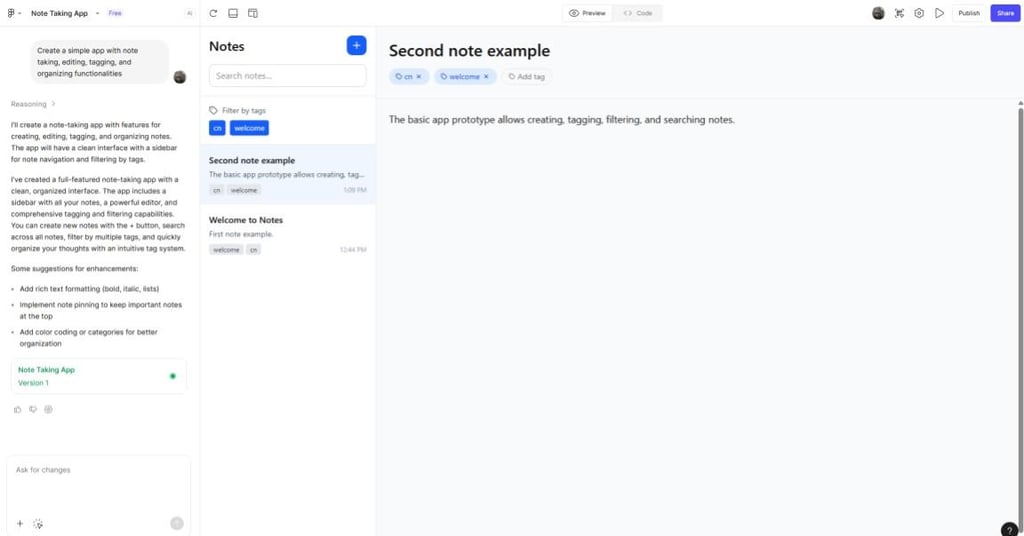
Again, Figma Make took only a few minutes. Alongside all required functionalities, it also implemented a filtering by tag function, so this tool shows good intuitiveness. Overall, it handled our tests, however straightforward they are, very efficiently.
Code generation and preview
At the top, you can switch between Preview and Code windows. The Code window opens a lightweight built-in Figma Make editor, so it's not only a static export view. You can actually edit the code yourself, and it will implement the changes in the prototype.

It reminds me of a few months I spent experimenting with the ReactJS library. The ability to review code changes in the website or app layout without reloading it is popular among developers. Figma Make also uses React as a primary language that transforms visual design into functional prototypes, predictably fully-deployable apps as the end goal.
This softens the distance between designers and developers, as designers now have more capabilities of seeing the result and modifying before handoff. Simultaneously, developers can import it straight to Figma's Dev Mode for as frictionless a handoff as possible.
Collaboration and iteration tools
Figma Make improves the outdated 'comment and wait' model into a real-time cooperative collaboration. Firstly, participants with sufficient permissions can see the full chat history, including prompts and the prototype. It lets developers and product owners review and improve the prompts.
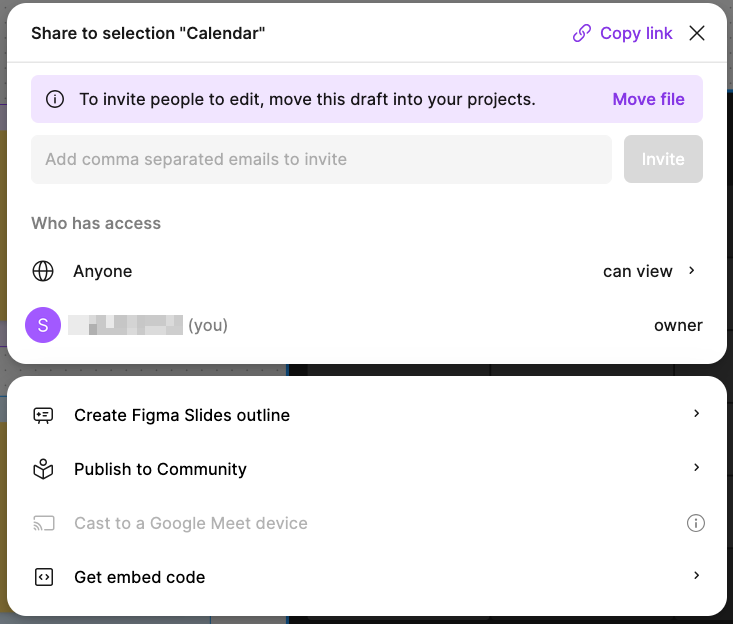
Also, multiple users can issue prompts, once again, with sufficient permissions. Instead of sending design files back and forth, all involved parties can make changes in a single window at the same time.
Integration with Figma Slides lets designers pitch their ideas without leaving Figma's ecosystem. What's more, Figma Slides don't present your prototypes as static screenshots. It embeds them directly within the slides, including all functionalities like clicking buttons or leaving notes, as in our example.
Data and backend integrations
Upon release, no backend integrations were the most significant Figma Make lacks. Without a backend, prototypes are just exactly that, mockup applications, unable to perform most features required for an application with real-world users. This has now been fixed.
Sigma solved the issue by integrating Supabase BaaS (Backend-as-a-Service) in the second half of 2025. With it, application prototypes can now save data, such as user credential information, pictures, and profiles. If you are presenting a specific prototype via Figma Slides and it has a registration form, you can demonstrate how it is saved in the Supabase backend.
Around the same time, Figma Make integrated GitHub. While not a backend for data in its traditional sense, it's a backend for code. Developers can push the Figma Make-generated code into GitHub and launch it from there in their chosen code editors, a must-have feature for a fully-developed generation engine.
What works well in Figma Make AI
At the current Beta stage, Figma Make receives meaningful criticism, but with clear future improvement guidelines. Here's what it currently does well.
- Fast concept proofs and prototype creation. Prototype generation via prompts is fast. It took Figma AI only a few minutes to generate our examples. It's a safe guess that more complex queries will take significantly longer, but it's a speedy start.
- Excellent integration with the Figma ecosystem. The Figma ecosystem has a wide selection of tools. Being able to pass Figma Design files to Figma Make and export its code to Dev Mode is invaluable for this platform's users.
- Intuitive prompt-to-design UX. Figma Make actually reads and analyzes designs. It generates code not by replicating a static image, but by understanding its hierarchical structure and UX design.
- Helpful live previews and editable code. You can preview and make changes to your prototype in real-time by using its built-in lightweight code editor.
- Useful for stakeholder buy-in and early demos. Designers can now pitch their ideas faster and make them interactive. Stakeholders get a glimpse of the early stages of a working future app, which helps make buy-in decisions.
Drawbacks and limitations
As promising as the tool is, it has plenty of room for improvement, which is typical for a beta-stage application. Our tests and multiple first-hand user reviews confirm the following setbacks.
- Beta instability. You can expect Figma Make to crash occasionally. It got stuck on generating my note-taking app two times, and I had to reload the tool and start again.
- Unexpected changes. Users online have reported that Figma Make made unexpected and unasked-for changes. One user stated that it changed a flawed button to a dropdown list instead of fixing it. Others outline too generic design choices instead of unique prompt instructions.
- Not production-ready code. I found reviews outlining messy Figma Make's code, such as overloading it with unnecessary div elements. While I cannot comment on code confidently, it is a common issue for most AI-powered code generators – they all demand human revision.
- Pricing and access hurdles. Figma Make requires a Figma subscription, and its free version is significantly limited. Also, the company moves to a credit-per-prompt payment model, leaving some users worried about paying for faulty or unfinished output.
Figma Make AI vs competitors
Figma Make enters the cutting-edge technology market that's already competitive. The competition includes brands like Lovable, Builder.io, and v0.dev, to name a few, so let's briefly see how Figma Make performs.
- Output quality. Figma Make benefits from high visual design within the Figma ecosystem. However, its builds are more primitive compared to Lovable's, and v0.dev produces outstanding modern UI results.
- Ease of use. This vibe-coding tool is very simple to use. It is even better for Figma users who can benefit from its other services, while other generation engines often require looking for third-party solutions.
- Code readiness. Developers online do not recommend deploying Figma Make's code to production without optimizing it. In comparison, Builder.io supports numerous frameworks and generates production-level code.
- Price. Because Figma announced it will move to a credit-per-prompt payment type in the near future, it is currently too early to tell how well it compares to other similar tools. Right now, it requires a paid seat on Figma's platform.
- Integration with design tools. Figma is the leading design platform, so its AI-powered generation engine fits perfectly within its platform. For Figma users, this will likely be an essential AI app generator, considering it will leave its Beta stage successfully.
Final word
There are many reasons to hype about the Figma Make AI tool. Figma already proved it offers the best services, and app and code generation engines will likely change how we approach software development.
As of now, the tool has significant setbacks that buyers should be aware of. It is still in development, sometimes makes unexpected changes, and the future credit-per-prompt payment policy is viable only if the result is satisfactory.
However, Figma users should definitely try it out, at least the limited free version. I have no doubts that Figma will keep improving this tool with planned integrations with Jira, Notion, and Asana. During our straightforward tests, it accomplished both tasks successfully, and multiple online reviews agree it's something to keep an eye on.
FAQ
Is Figma Make AI free to use?
You can use the Figma Starter free plan to familiarize yourself with Figma Make. Free accounts get 500 AI credits per month, and you cannot exceed 150 daily credits, which is sufficient for up to 10 simple prompts.
Can Figma Make AI create live web apps?
Yes, after integrating the Subabase backend, Figma Make is now capable of creating live web apps.
Is Figma Make AI good for non-designers?
That depends. The no-code app generators are for everyone by design, so everyone can use Figma Make. However, its main focus is on visual design, so non-designers may find the tool incompatible with their requirements.