Best AI art generator in 2026
Being behind major reports like The Mother of All Breaches and RockYou2024, our in-house cybersecurity experts and journalists provide unbiased, real-world testing and in-depth analysis.
We maintain complete transparency by openly sharing our testing methodologies with our audience.
Learn more

A few years ago, when I was working at an advertising agency, creating an eye-catching visual meant hiring an experienced graphic designer. Creatives would sketch their ideas on paper and explain every detail so the designer could bring them to life as accurately as possible. Today, you don’t even need to be a creative professional – a simple prompt can generate a stunning image or illustration with the help of an AI art generator.
In this guide, I tested and compared the best AI image generators to narrow down the options to the top five. I evaluated each tool based on image quality, ease of use, speed, and affordability. Let’s take a closer look at how they compare.
My top 5 AI art generators – shortlist
- OpenArt – best overall AI art generator
- Stable Diffusion – most flexible AI art generator
- DALL-E 3 – stunningly realistic and imaginative AI images
- Krea – ultra-high resolution AI-generated visuals
- Leonardo AI – fast AI image generation
What is an AI art generator
AI art generators are tools that turn written text prompts into visual images using artificial intelligence. In simple terms, you describe what you want to see – for example, “a cyberpunk city at night” – and the AI generates an image that matches your description. These tools rely on machine learning models like Stable Diffusion, DALL-E, and FLUX, which are trained on massive datasets of images and their descriptions to understand how words translate into visuals.
Once trained, the AI can generate completely new and unique images in seconds – from photorealistic portraits and landscapes to abstract art or fantasy concepts. They’re widely used by designers, marketers, content creators, and everyday users to brainstorm ideas, create illustrations, game assets, or social media visuals without needing traditional design skills. All in all, AI art generators make image creation possible for anyone, even those who don’t have any graphic design skills.
Best AI art generators of 2026 – detailed list
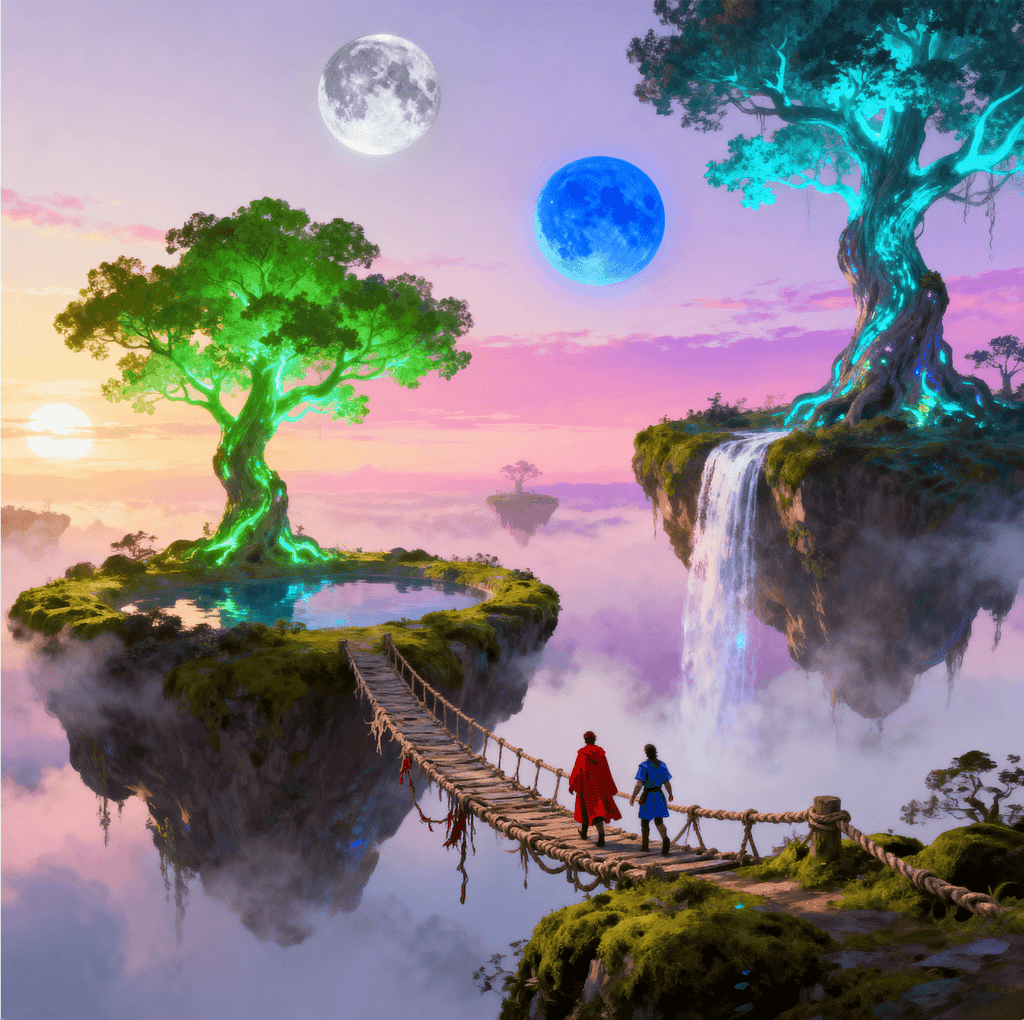
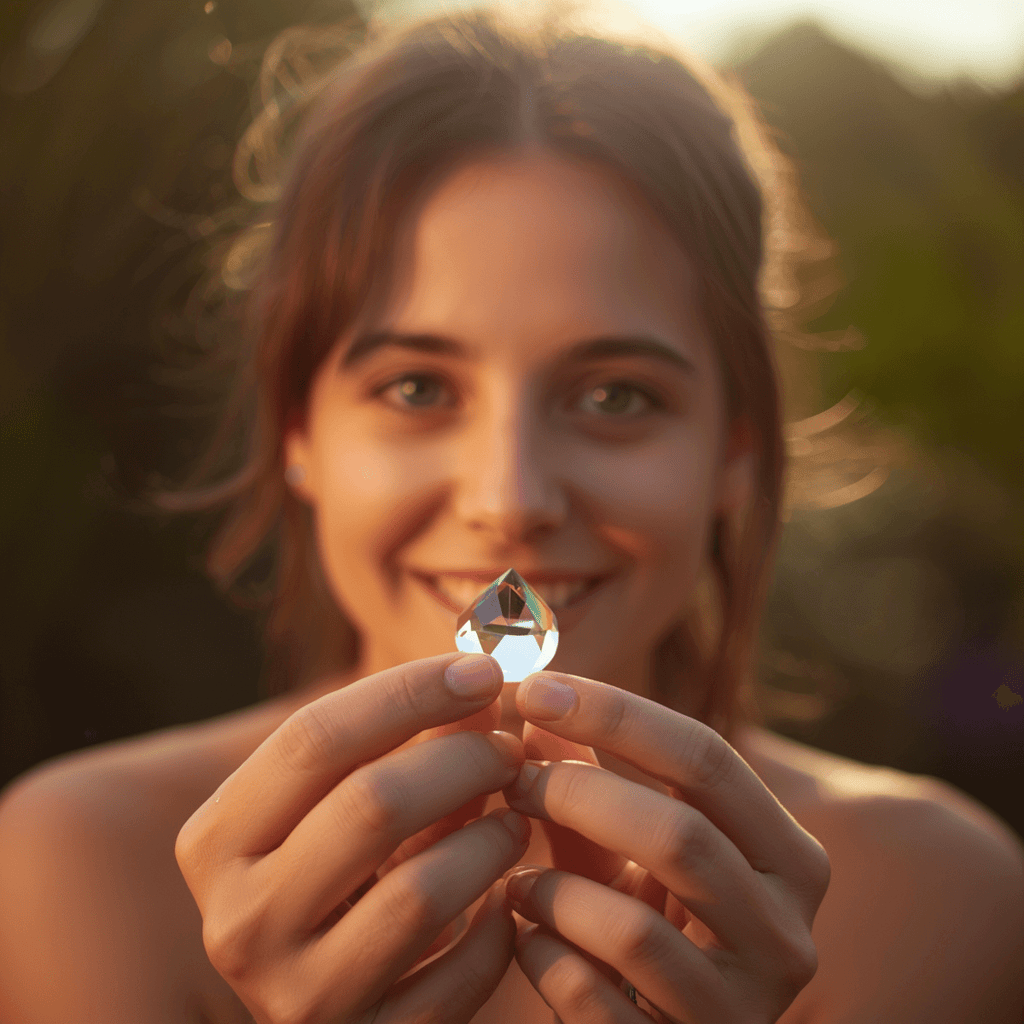
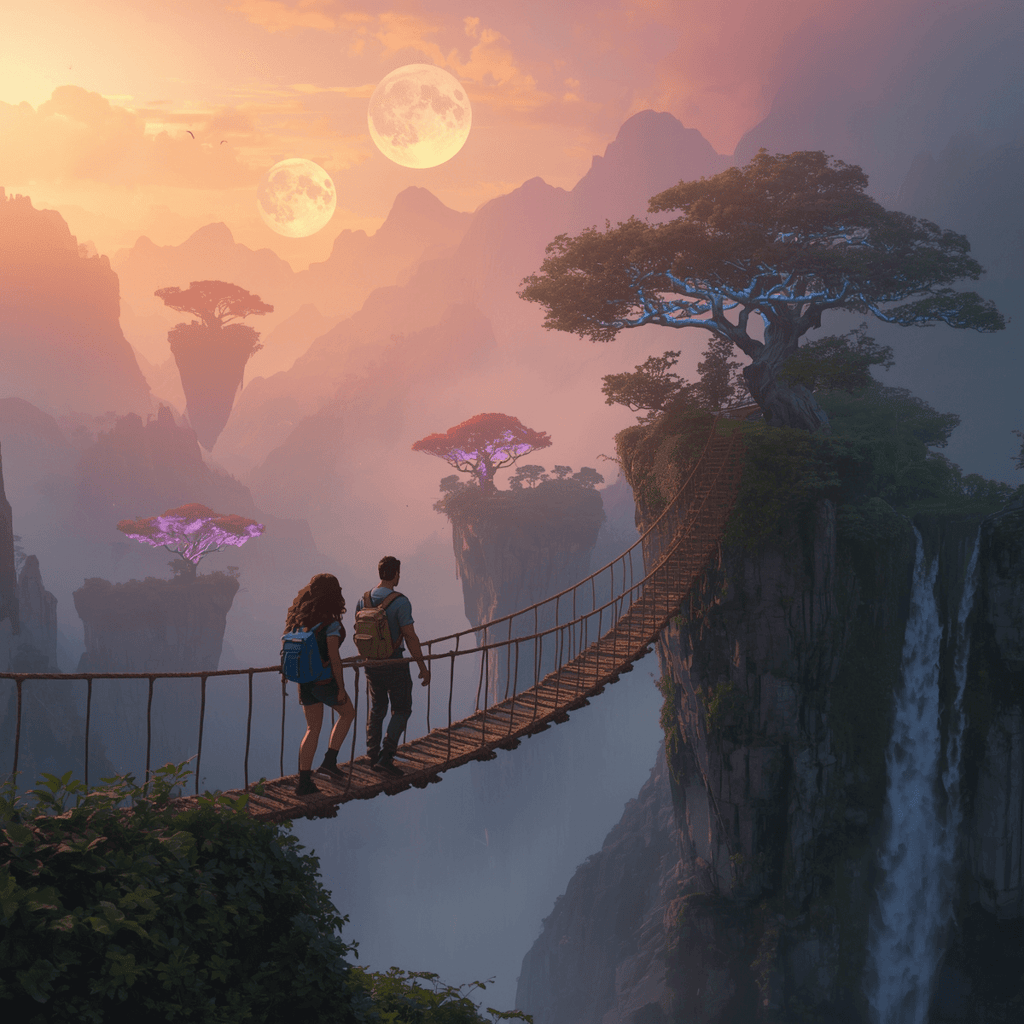
To compile this list, I tested and evaluated the best AI art generators. As most of these tools rely on a text-to-image process, I used the same prompts – one asking to create a candid golden hour portrait and the other – an illustration of a sunrise fantasy valley. Now, let’s see how these tools compare in terms of performance, ease of use, and features.
1. OpenArt – overall best AI art generator
| Starting price: | $7.00/month |
| Best for: | Most accurate prompt-based image generation |
| Free version: | ✅ Yes |
| Key features: | Conversational AI art generator, advanced editing canvas, character creation, multi-model video generation, custom LoRA creation |
From all the AI art generators I’ve tested, OpenArt stood out as the most well-rounded and reliable option. It’s a fast, intuitive platform that makes it easy to turn text prompts into either hyper-realistic photos or detailed illustrations in seconds. Getting started is effortless – just sign up on their website (no download required), and you’ll be guided through a quick, visual onboarding that explains all the key features. I found it well-suited for both beginners and advanced users alike.

During testing, OpenArt impressed me with eye-catching and accurate images. It offers tons of style presets, the ability to upload reference images, and fine-tuned control over aspect ratio, resolution, and output quantity. I also liked the chat-to-edit feature, which lets you adjust backgrounds, colors, or poses after generation without rewriting the entire prompt.
In my experience, once you click Create, images are generated within seconds and match the prompts with impressive accuracy. For instance, the tool realistically depicted a girl holding a glass prism at golden hour. Though if I had to use it for commercial purposes, I’d need to edit the glass prism to make it more natural. All in all, OpenArt perfectly balances between speed, quality, and creative freedom.
In terms of plans and pricing, OpenArt lets you choose from 5 plans. The starting Essential plan costs $7.00/month, giving you 4000 credits. You have access to both image and video creation, as well as all premium features. This plan is sufficient for non-commercial needs, but if you have larger goals, you can opt for its Infinite plan for $28.00/month with 24,000 credits. Also, there’s a free plan of 40 one-time trial credits to test premium features. Overall, I found OpenArt to be an affordable and capable AI art generator.
2. Stable Diffusion – AI art generator for full creative control

| Starting price: | $10.00/month |
| Best for: | Control over every artistic detail |
| Free version: | ✅ Yes |
| Key features: | Text-to-image AI generator, advanced editing canvas, AI 3D model generator, face swap, advanced video creation |
Stable Diffusion is an open-source AI art generator that gives creators full control over their visuals, so you can dig deeper into customization. I mostly recommend it for more advanced users, but once you master it, you can produce highly detailed and realistic images. Its standout feature is a robust editing toolkit that lets you refine, recolor, and upscale your creations quickly while maintaining full creative freedom.
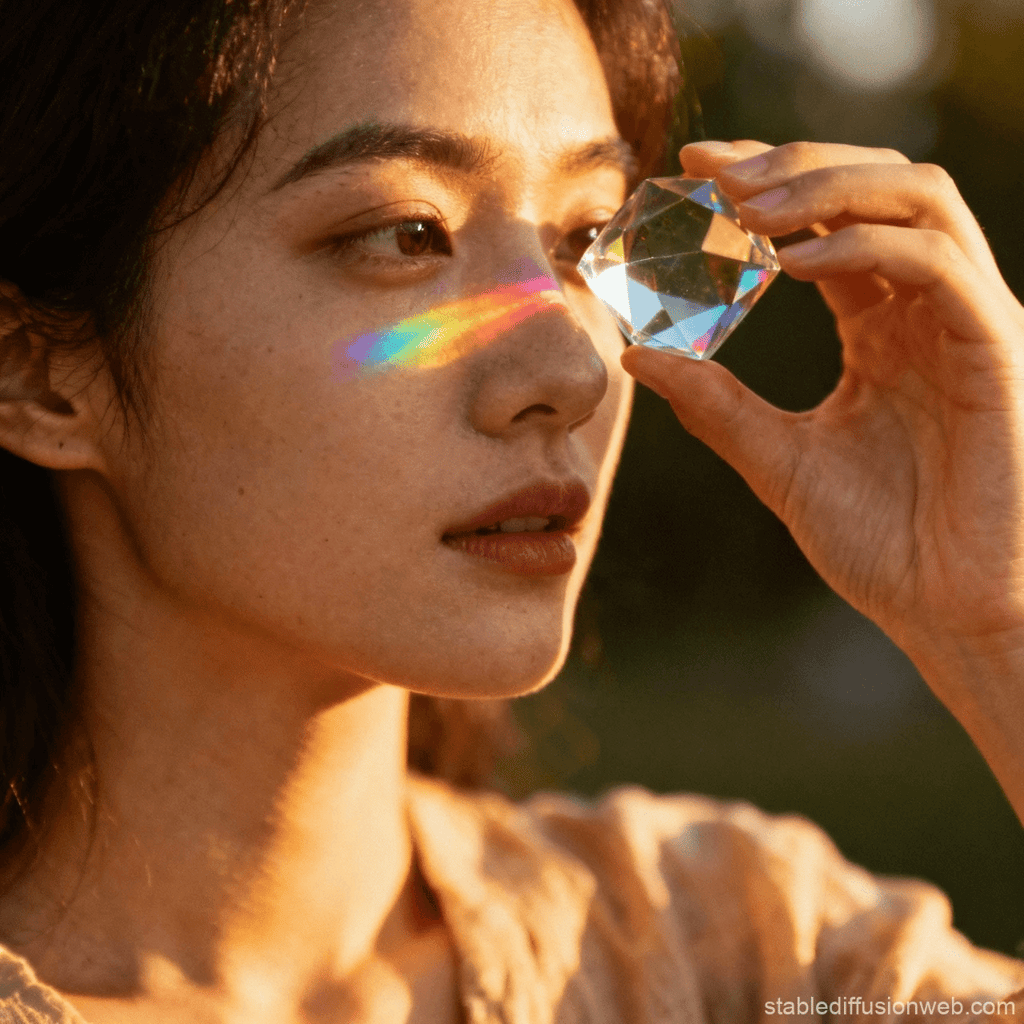
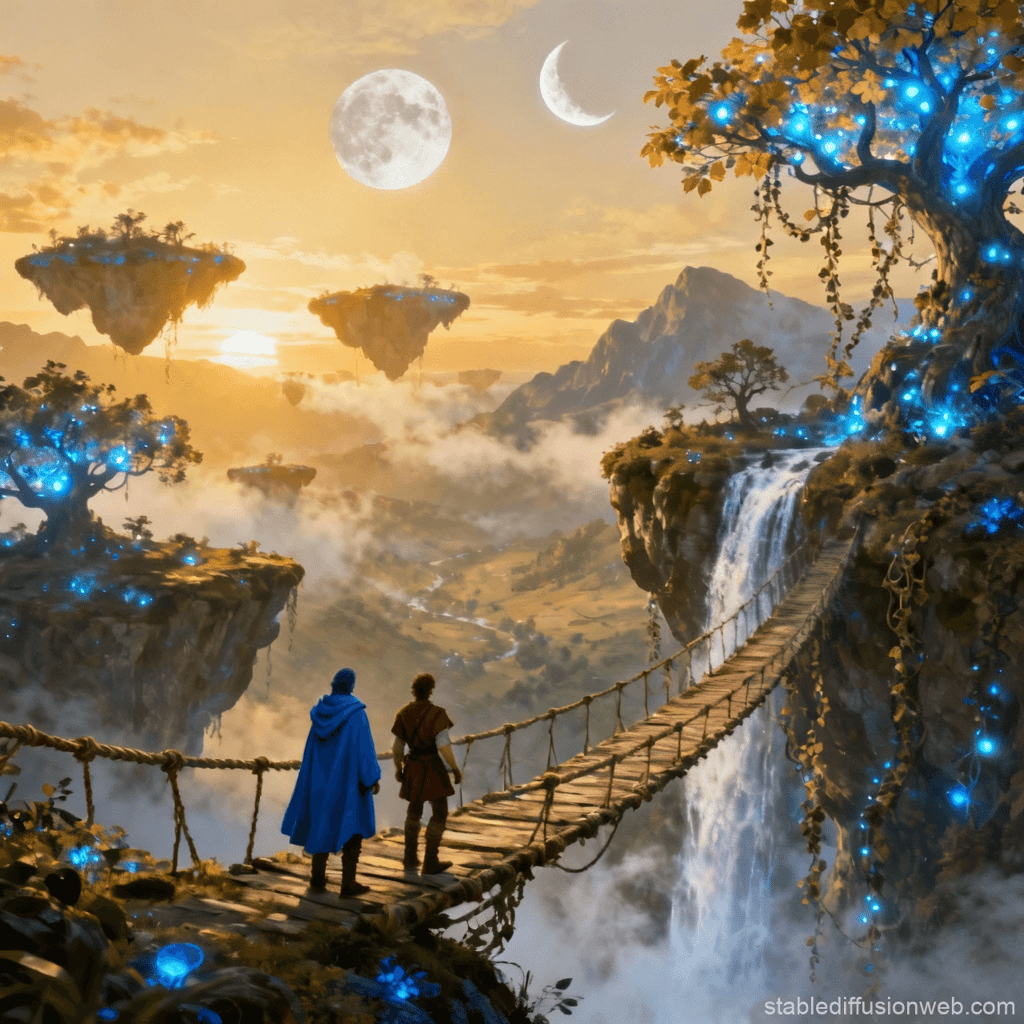
Testing Stable Diffusion was smooth from start to finish. After creating an account, I logged in and jumped into the clean, intuitive interface, where I entered my prompt (the same one I used for testing OpenArt). Image generation was fast, delivering a result in under a minute that closely matched my description. From all the tools I’ve tested, it gave me the most stunning results.
The platform offers extensive customization, including style selection, aspect ratio, output quantity, and advanced options like Guidance Scale for precise control. After generation, the built-in editor lets you adjust perspective, transfer styles, modify specific elements, or upscale for higher resolution. In my experience, the final image was sharp and detailed, with realistic lighting, dynamic composition, and impressive artistic depth.
Stable Diffusion offers 3 plans, including a free tier with 10 image generations per day. If that’s not enough for you, the Pro plan provides 2000 fast image generations per day, plus removes ads and watermarks for $10.00/month. You can also upscale images and use them for commercial purposes. Finally, the Max plan gives you twice as many resources and makes your images private for $20.00/month. Overall, Stable Diffusion is a premium AI art generator, but I appreciate its generous free tier.
3. DALL-E 3 – lifelike and fantastic AI-generated images
| Starting price: | $20.00/month (web-based and app-based, via ChatGPT Plus) |
| Best for: | Realistic image generation |
| Free version: | ✅ Yes, available via Bing Image Creator (with watermarks) |
| Key features: | Advanced prompt-following, realistic object positioning, full stylistic control |
DALL-E 3, considered an advanced image generator tool, is best for realistic images. You can get it bundled with ChatGPT and enjoy the platform’s premium features at the same time. The tool itself includes advanced text-to-image generation capabilities, which means high prompt adherence when creating images. What I appreciate most about this tool is that, despite being an advanced tool, it remains very beginner-friendly.

Using DALL-E 3 was incredibly smooth. I accessed it directly through ChatGPT, entered the same prompt I had tested with OpenArt and Stable Diffusion, and specified a cinematic style with a 16:9 aspect ratio. The generation was fast, producing a detailed image in under a minute, and the AI captured the prompt accurately, especially the woman holding a glass prism. AI art generators often struggle with anatomical features like hands, so I have to give DALL-E 3 extra points for creating hands that look natural. However, the glass prism could be more realistic.
Customization options were simple to apply, letting me tweak style, aspect ratio, and even incorporate reference images. When I noticed a small inaccuracy in the prism details, I was able to follow up in the chat interface, and the AI quickly adjusted the image. The entire creative process feels like a natural, conversational workflow.
As an advanced AI art generator, it’s no surprise that DALL-E 3 comes with a premium price. Costs vary depending on how you use it – API access typically ranges from $0.04 to $0.12 per image for standard to HD resolution. The tool is also available via the ChatGPT Plus subscription at $20.00/month, which includes image generation and access to the full ChatGPT experience. With the API, you pay per image and select the resolution, while ChatGPT Plus offers approximately 50 image generations within a 3-hour window. Free-tier access is limited, so you can’t fully explore the tool’s potential without a paid subscription.
4. Krea – ultra-sharp, high-resolution AI images
| Starting price: | $8.00/month |
| Best for: | Highly realistic images with vivid colors, natural-looking skin, and dynamic angles |
| Free version: | ✅ Yes |
| Key features: | Real-time image and video generation on canvas, AI-powered editing tools, AI patterns, and animations |
Krea definitely pleases the eyes of aesthetic lovers, with its ultra-sharp and highly realistic images. You’ll definitely notice vivid colors, people with natural-looking skin, and dynamic angles that make images look real. It also pays close attention to details. Personally, I found this tool to be best suited for content creators and marketers who want to craft eye-catching AI-generated images.
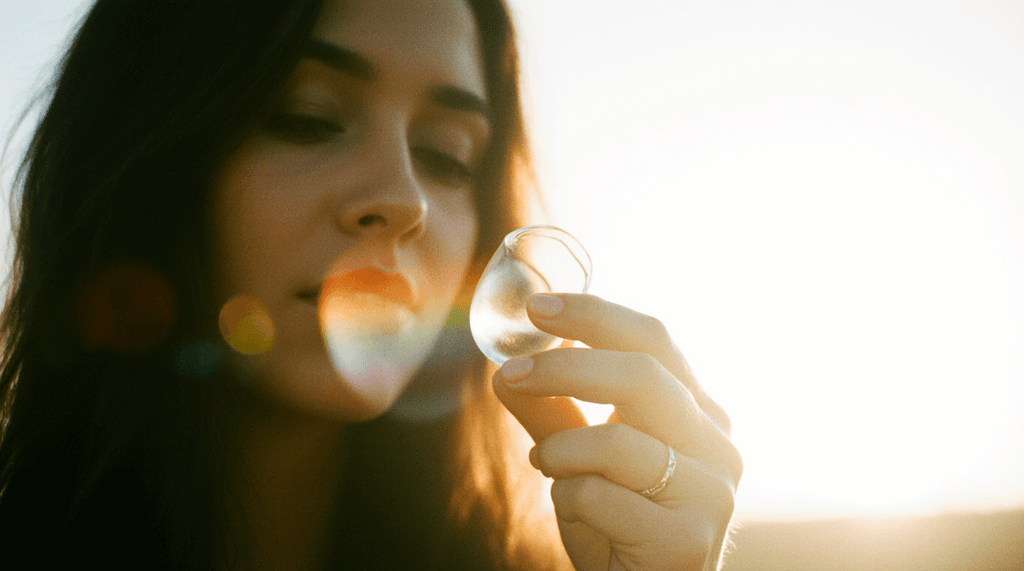
Krea’s clean, intuitive interface made testing easy. I entered my prompt and selected a photorealistic style with a 16:9 aspect ratio. I also uploaded a reference image to guide the AI’s color palette and composition. The platform quickly generated a detailed image that relatively matched my prompt. While the woman in the photo looked realistic, the AI didn’t quite capture the glass prism, instead generating something similar to an ice cube.
On a brighter note, customization options were easy to apply, including image dimensions, style selection, and the ability to transfer elements from other assets. Overall, the generation process was fast and the resulting image was sharp, with realistic lighting, fine details, and dynamic composition. But the AI didn’t completely follow my prompt, which is definitely a minus.
With its $8.00/month starting plan, Krea is one of the more affordable AI art generators. This plan provides a substantial number of images – 1010 Flux images and 36,000 real-time images – along with access to other Krea tools, including video generation and a commercial license. The Pro plan, at $28.00/month, offers 5 times more resources, while the Max plan, at $48.00/month, maximizes resources by 15 times. If you'd like to try this tool, you can use its free plan, which includes free daily generations, but without access to other Krea tools.
5. Leonardo AI – instant AI-generated images
| Starting price: | $10.00/month |
| Best for: | Game art, character modeling |
| Free version: | ✅ Yes |
| Key features: | AI-powered image and video creation, custom model training, versatile AI Canvas |
Leonardo is an advanced art AI generator, which showed one of the best speeds for generating AI images. What I liked about it was the adaptable interface, specialized tools like Realtime Canvas, and diverse model selection. It’s also capable of generating gaming assets, characters, and concept art, making it useful for graphic designers and illustrators.
Leonardo AI was pretty easy to use. First, I logged in and set up an account. The interface is fairly self-explanatory, although it can be a bit crowded, with all options clearly labeled. Generating an image is straightforward: after selecting your settings, you simply enter a prompt and let the AI work.
In my experience, the AI accurately followed instructions, generating images quickly while maintaining excellent clarity, realism, and artistic detail. However, while the AI followed my prompt, this was the weakest final result I’ve received using this prompt. It would need some tweaking before I decide to use it as a final result. I’d say that Leonardo AI combines strong customization options with an intuitive interface, but it still needs to improve the quality of the images.
Leonardo AI is flexible with its plans, offering 5 options to choose from. Its cheapest plan, Apprentice, costs $10.00/month and includes 8,500 fast tokens monthly, private creations, and premium features like image upscaling. The second plan, Artisan Unlimited, increases your tokens by 25,000 and lets you queue your generations, while Maestro Unlimited maximises your capabilities. Its Leonardo for Teams is designed for design teams and features a shared fast tokens pool and unlimited generations. If you’d like to give Leonardo AI a try, you can also use its free plan with 150 tokens.
AI art generators compared
Choosing the right AI art generator can be challenging, as all of them promise high-quality images and unique features to take your image creation into new heights. For this reason, I put together all of the providers that I’ve talked about into one comparison table. This way, you can compare them side by side:
| AI art generator | Starting price | Free version | Output quality | Style range | Ease of use | Best for |
| OpenArt | $7.00/month | ✅ Yes | High with detailed outputs, but the results can be inconsistent | Wide, but the exact number is undisclosed | Beginner friendly | Most accurate prompt-based image generation |
| Stable Diffusion | $10.00/month | ✅ Yes | Generally high, but might struggle with anatomical details like hands and faces | Wide, but the exact number is undisclosed | Best for advanced users | Control over every artistic detail |
| DALL-E 3 | $20.00/month (web-based and app-based, via ChatGPT Plus) | ✅ Yes, available via Bing Image Creator (with watermarks) | Generally high, but might produce artifacts in complex scenes | Wide, but the exact number is undisclosed | Beginner friendly | Stunningly realistic image generation |
| Krea | $8.00/month | ✅ Yes | High, especially for its real-time image and video generation | Wide, but the exact number is undisclosed | Beginner friendly | Highly realistic images with vivid colors, natural-looking skin, and dynamic angles |
| Leonardo AI | $10.00/month | ✅ Yes | Inconsistent, as it sometimes produces distorted anatomy | Wide, but the exact number is undisclosed | Beginner friendly | Game art, character modeling |
How I tested AI art generators
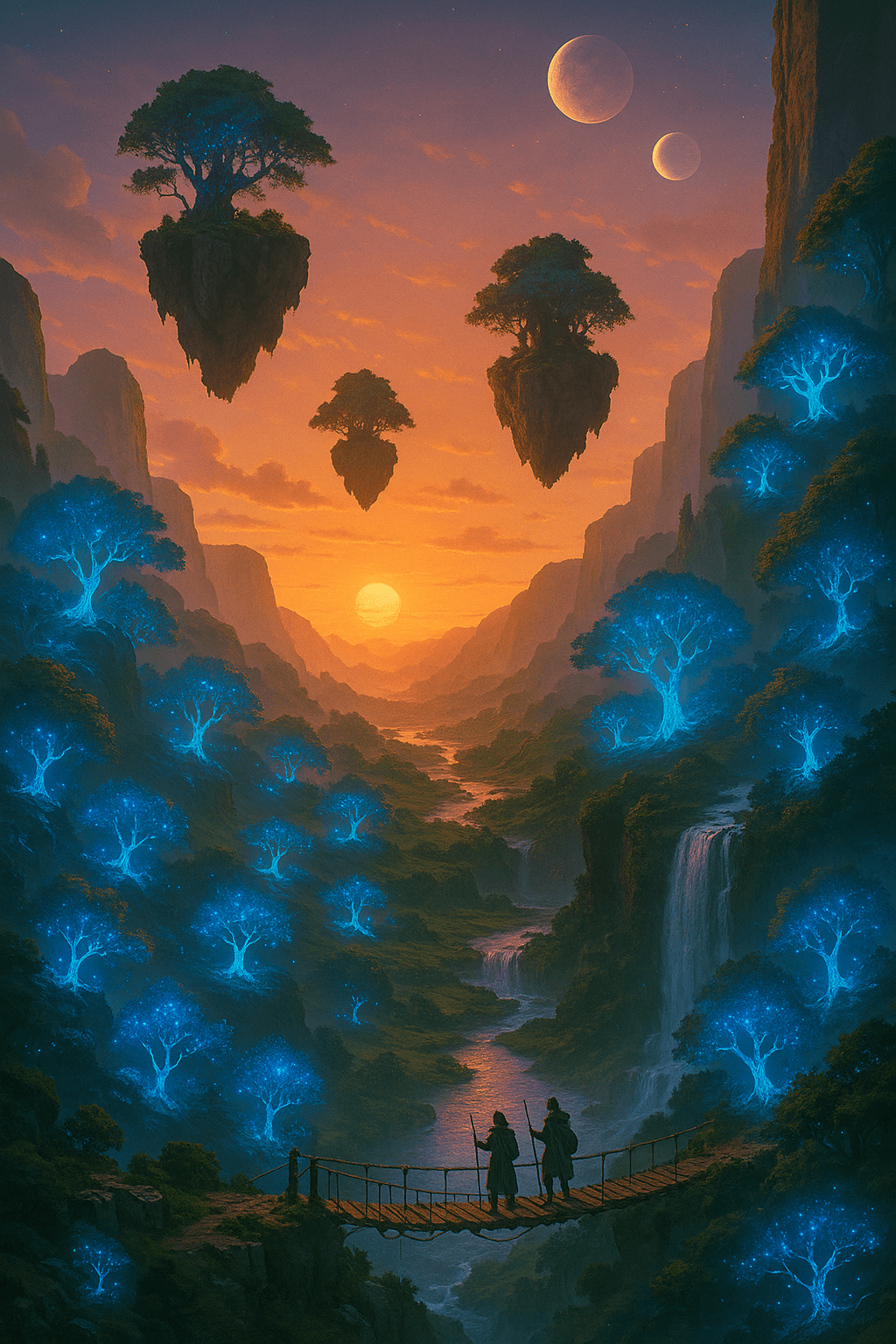
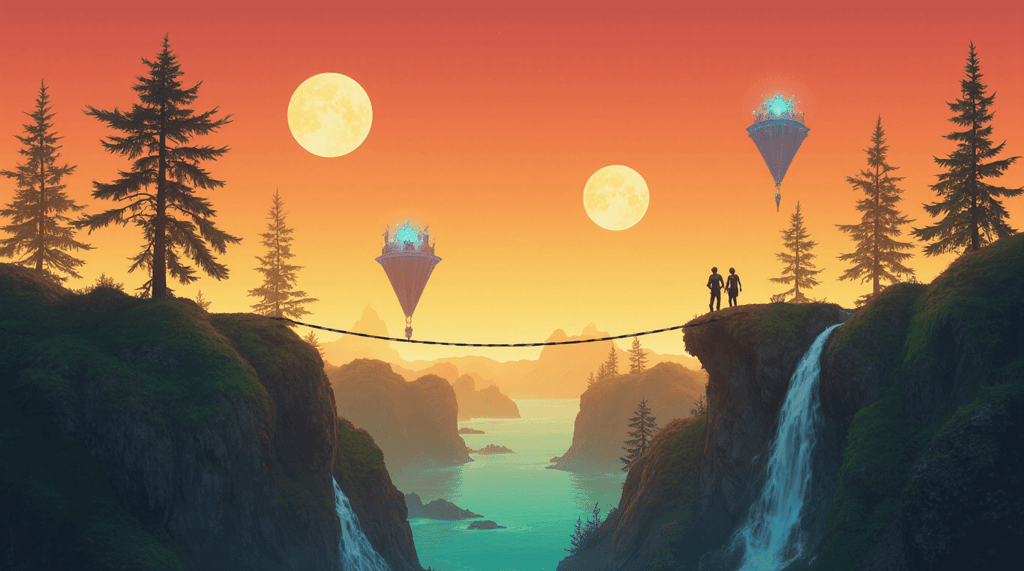
While testing AI art generators, I evaluated each platform using the same creative prompts to ensure a fair comparison. The first prompt was “candid portrait at golden hour, shallow depth of field, a person holds a glass prism that makes a small rainbow,” and the second was “sunrise fantasy valley with floating islands, two moons, bioluminescent trees, a waterfall, and a rope bridge with two travelers”. I measured how accurately each tool interpreted these prompts, the realism of the outputs, and the level of creativity in the results. Here’s the testing criteria I focused on:
- Output quality (40%). I mainly focused on the quality of AI-generated images. I evaluated their resolution, realism, and abstract quality. Depending on prompts, I also paid attention to whether the generator fulfilled my vision in full or if I needed to edit to improve the quality.
- Ease of use (25%). Another crucial factor for me was a user-friendly interface and overall experience using the tool. I only chose tools that are easy to navigate, from setting prompts to tweaking images.
- Speed (20%). I also monitored how long it took for each generator to produce an image on my prompt, including any delays in high-resolution outputs. I then compared their speeds with competitors.
- Pricing/value (15%). Free tiers of AI image generators are typically less powerful than their paid counterparts, often limiting access to key features or faster processing speeds. Because of this, I evaluated these platforms based on their pricing and whether users perceive the cost as justified by the creative tools, image quality, and extra features they receive.
How to use AI art generators
Using an AI art generator, anyone can craft a stunning visual in minutes – even without being a creative professional. What I like about them is that they’re extremely easy to use – you only need to type your vision, tweak a few settings, and that’s it. Here’s the typical AI art generation process:
- Choose a tool that fits your design needs – popular options include DALL·E, MidJourney, and Stable Diffusion
- Enter your text prompt, describing what you want to see in detail
- Select art style or resolution
- Click on Create, and the AI will generate an image instantly
- Refine details, adjust composition, or increase resolution to get a polished final image
Future of AI art generation
The AI art generation is rapidly evolving, transforming how creators bring ideas to life. As technology advances, it’s not just about images anymore – AI is moving into animation, video, and interactive storytelling, reshaping the boundaries of creativity. Here’s what you can expect in the following decade:
- More creative control. AI tools will give artists precise control over style, composition, and emotion, turning machines into collaborative co-creators.
- Video and animation integration. Expect AI to generate dynamic, multi-frame content, making immersive storytelling and interactive media more accessible than ever.
- Ethics and copyright. Legal frameworks will continue to struggle to keep up, raising questions about the ownership of AI-generated works and commercial usage rights.
- Data sourcing transparency. The use of unlicensed datasets could spark legal and moral battles, pushing the industry toward consent-driven, ethically sourced content.
- Balancing innovation and responsibility. As AI art evolves, creators will need to navigate freedom, accountability, and new norms for authorship and authenticity.
Final thoughts
After testing dozens of AI art generators, OpenArt stood out as the most balanced and capable overall. Its precision with prompts, variety of style palettes, and customization options make it ideal for both casual users and professionals who want full creative control. That said, every tool on this list brings something unique to the table – from DALL-E 3’s photorealism and Krea’s ultra-high-resolution output to Leonardo AI’s speed and flexibility.
The beauty of AI art is that there’s no single best generator – it depends on your creative goals. Whether you’re designing concept art, marketing visuals, or experimenting with fantasy worlds, these platforms can turn your ideas into striking visuals in seconds. If you haven’t tried one yet, now’s the time – open an app like OpenArt, type your first prompt, and see how effortlessly your imagination can come to life.
FAQ
What is the best AI art generator?
OpenArt is the best AI art generator that I’ve tried so far. It nails prompt-base image creation with high accuracy, offering tons of style palettes and fast, reliable output for both beginners and creative professionals.
Is there a free AI art generator?
Yes, there are free AI art generators on the market, but I wouldn’t recommend them for commercial use due to limits on resolution, styles, and licensing. Fortunately, all the generators in my review, like OpenArt and DALL-E 3, offer free versions while still supporting commercial projects.
Which AI art generators are best for commercial use?
For commercial use, I recommend reliable options like OpenArt, DALL‑E 3, and Krea, which provide clear licensing and high-quality outputs. All of the AI generators in this review also offer free versions, so you can test them before committing.
Can I legally use AI-generated art?
Yes, you can usually use AI-generated art, but legal ownership depends on the platform’s licensing rules and copyright laws in your region. I recommend checking the terms of service, as some AI tools restrict commercial use or claim partial rights over creations.
Are AI art generators safe to use?
Yes, AI art generators are generally safe to use. However, you should be cautious about copyright issues and the potential for data misuse. Always review the terms of service and avoid uploading sensitive or personal images to protect your privacy.