Best AI landing page builder
Being behind major reports like The Mother of All Breaches and RockYou2024, our in-house cybersecurity experts and journalists provide unbiased, real-world testing and in-depth analysis.
We maintain complete transparency by openly sharing our testing methodologies with our audience.
Learn more
Finding the best AI landing page builder today isn’t just about design – it helps you launch pages faster, test out more ideas, and improve conversions without burning hours on manual work. I wanted to see whether AI can actually build landing pages that convert, or if you still end up rewriting copy and fixing layouts by hand.
Together with the Cybernews research team, I tested 7 AI landing page builders: HubSpot Campaign Assistant, Hostinger Website Builder, Unbounce, nexos.ai, GetResponse, Replo, and Wix. In this guide, I break down how AI landing page builders work, their core features, why they matter, how to choose the right one, and how to create a landing page step by step. Read on to find the best use cases for each provider, and my final recommendations based on hands-on testing.

Best AI landing page builders – shortlist
- HubSpot Campaign Assistant – best overall AI landing page builder
- Hostinger Website Builder – best AI landing page builder for beginners
- Unbounce – best for conversion-focused landing pages with advanced testing
- nexos.ai – best for AI-generated landing page strategy and mockup ideation
- GetResponse – best all-in-one AI landing page builder
- Replo – best AI landing page builder for Shopify and eCommerce brands
- Wix – best for flexible design control with AI assistance
The best AI landing page builders compared
Before diving into the individual reviews, I found it useful to compare the best AI landing page builders side by side. When you’re choosing a landing page builder AI tool, you should know that speed, AI quality, pricing, and use cases vary a lot in practice. I created the comparison table below to give a quick, high-level overview that highlights each tool’s overall rating, standout AI features, starting price, and availability of free or trial versions.
| Tool | Overall rating | Standout feature(s) | Starting price (billed monthly) | Free plan or trial | Best for |
| HubSpot Campaign Assistant | AI-generated copy and CRM integration | From $0.00/month | ✅ Yes, free beta version | Businesses using HubSpot CRM | |
| Hostinger Website Builder | Simple AI page creation at low cost | From $2.24/month | ✅ Yes, free plan | Budget-conscious creators | |
| Unbounce | Conversion optimization and A/B testing | From $22.00/month | ✅ Yes, free trial | Marketers focused on conversions | |
| nexos.ai | AI agents and multi-model workflows | €19.50/month (~$22.70/month) | ✅ Yes, free trial | Teams building AI-assisted landing page concepts and workflows | |
| GetResponse | All-in-one automation and AI pages | From $19.00/month | ✅ Yes, free trial | Email-driven campaigns | |
| Replo | AI templates for eCommerce | From $99.00/month | ✅ Yes, free trial | Shopify and eCommerce brands | |
| Wix | Flexible design and AI assistance | From $17.00/month | ✅ Yes, free plan | Custom design and small teams |
7 best AI landing page builders – our detailed list
Below, I present you with a detailed look at the 7 best AI landing page builders I tested. For each tool, I break down real-world performance, standout AI features, pricing insights, usability, and the best use scenarios – so you can pick just the right one for your needs.
1. HubSpot Campaign Assistant – the best AI landing page builder
| Overall rating: | |
| Standout feature: | Multi-channel copy |
| Starting price: | From $0.00/month |
| Best for: | Marketing teams using the HunSpot ecosystem |
When I first tested HubSpot Campaign Assistant, what stood out was how quickly it turned simple prompts into usable landing page content. Because it’s part of the wider HubSpot platform, landing pages connect seamlessly with your CRM, workflows, and analytics, giving you a unified view of how visitors convert into contacts.
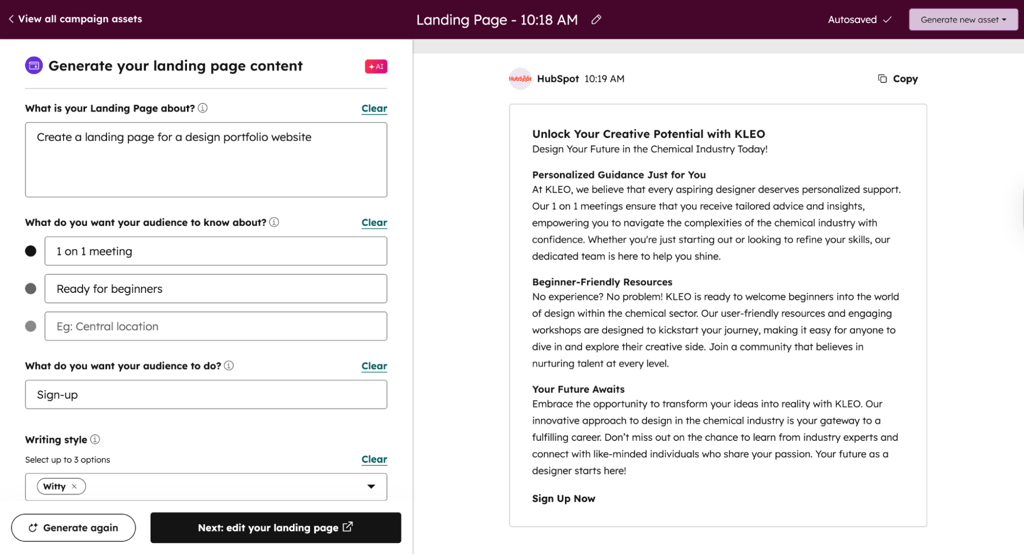
I found HubSpot’s AI generates structured, professional marketing copy almost instantly, usually within a minute. The layouts look clean and modern, though I still had to tweak a few things and swap out images to match my brand. Once the AI finishes, handing the page over to HubSpot’s drag-and-drop builder makes edits effortless: I could move elements, add buttons, or adjust colors easily. I especially liked how A/B testing and analytics are built in, giving me detailed insights without extra setup. Plus, HubSpot’s 2,000+ integrations made connecting everything seamless.
I picked it as the best overall AI landing page builder because it balances ease of use, integration power, and real delivery, even and especially if you’re touching many channels at once. The way this AI tool handles content generation and consistency across campaigns is hard to beat.
2. Hostinger Website Builder – the easiest AI landing page builder

| Overall rating: | |
| Standout feature: | Easy to learn |
| Starting price: | From $2.24/month |
| Best for: | Beginners and budget users |
Hostinger Website Builder quickly became my go-to tool for straightforward, no-friction AI landing page creation. The interface is clean, intuitive, and perfect for people who don’t want to wrestle with complex settings or steep learning curves. Its AI tools can generate landing page copy, suggest layouts, and even help with images – all with minimal input from you.
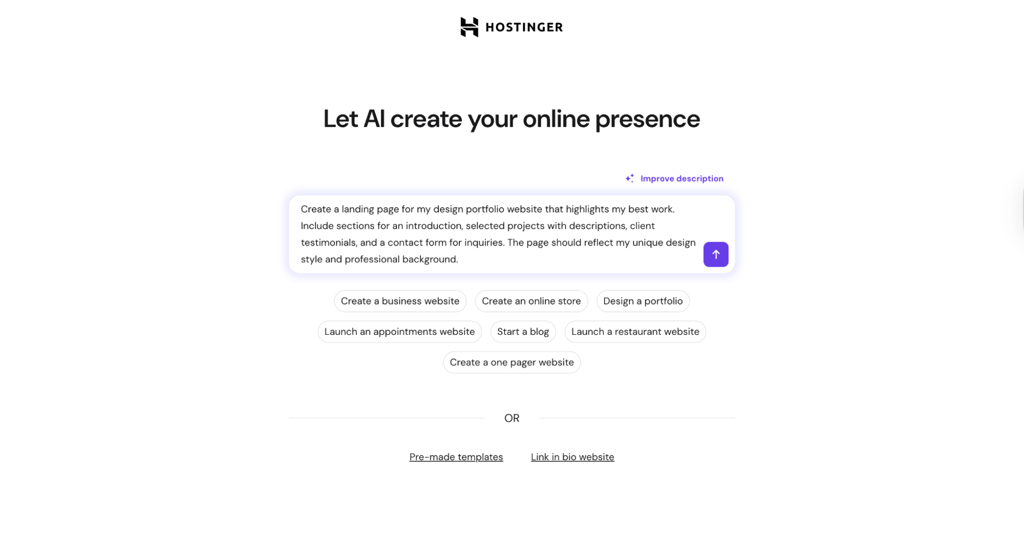
After testing Hostinger’s AI website builder, I was impressed by how quickly it created a complete, multi-page site, text and images included, in under a minute. The writing came out clean and readable, though I found myself swapping out some of the generic stock photos, especially the ones with people. The smart grid editor made adjustments surprisingly easy, with buttons and images snapping neatly into place as I customized colors and fonts. I liked the built-in AI Heatmap for predicting visitor clicks, even if A/B testing wasn’t available. With over 350 integrations, connecting tools like Stripe and Mailchimp was seamless, letting me publish a polished site within an hour.
You can start building with AI suggestions almost immediately, and publishing is just a few clicks away. Compared to some clunkier builders I’ve tried, Hostinger’s approach feels much more streamlined. While it doesn’t match advanced options for deep customization or testing, it hits the sweet spot for simple campaigns and small business needs.
3. Unbounce – best for AI landing pages with advanced testing

| Overall rating: | |
| Standout feature: | Smart Builder |
| Starting price: | From $22.00/month |
| Best for: | Marketers focused on conversion |
When I tested Unbounce, what impressed me the most was how well the AI-powered Smart Builder tool paired with advanced optimization and testing features. Right from the editor, the AI can suggest compelling headlines, layout variations, and content blocks that are more likely to convert based on your goals.
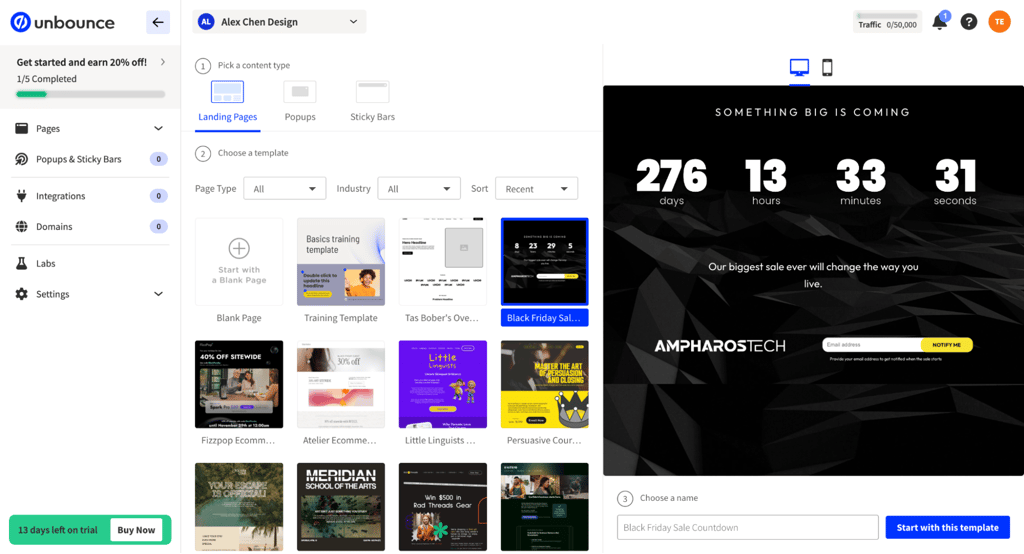
I noticed Unbounce feels more strategic than quick – it builds pages around your industry and goals rather than relying on templates. The AI-generated copy is data-informed and persuasive, though the initial layout tends to be minimal, so I often refined the visuals and replaced images to match my brand. What really stood out was the design freedom – being able to drop elements anywhere and even use custom code gave me precise creative control. The Smart Traffic feature was impressive too, automatically sending users to the version they’re most likely to convert on. With its broad app integrations and 2–3 minute setup, I could publish a polished, test-ready page in under an hour.
Beyond AI content creation, Unbounce shines in A/B testing, dynamic text replacement, and built-in conversion analytics, making it a strong choice for performance-driven teams. During my tests, the interface struck me as more advanced than beginner tools but still accessible without a steep learning curve.
4. nexos.ai – best for landing page planning and mockup generation
| Overall rating: | |
| Standout feature: |
No-code AI Agent builder
|
| Starting price: | From €19.50/month (~$22.70/month) |
| Best for: | Landing page strategy and mockups |
nexos.ai stood out to me because it approaches landing page creation differently from traditional website builders. It works great as an assistant for quickly brainstorming landing page ideas, generating copy, and creating mockups before moving into a visual builder like Webflow.
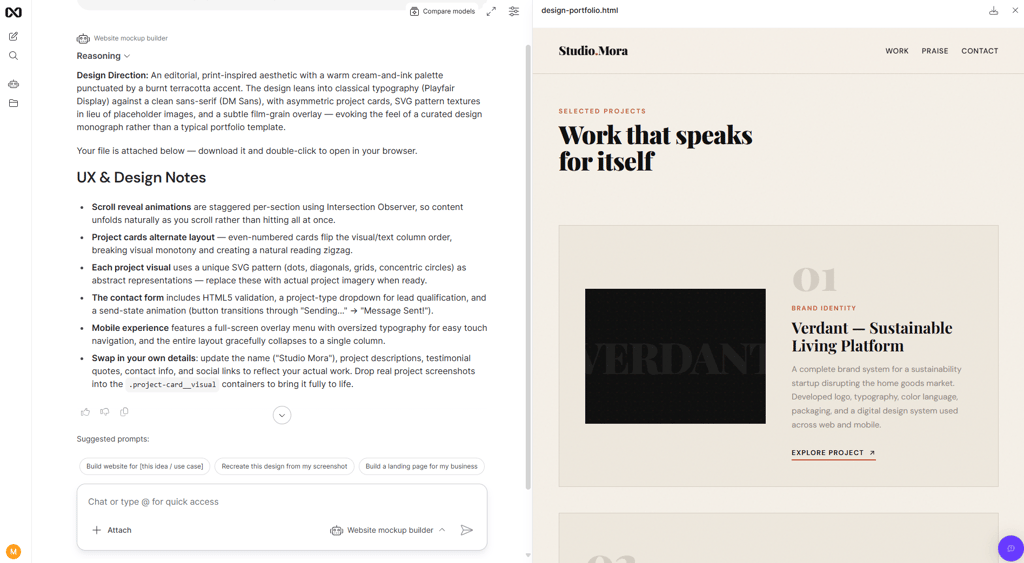
What I liked most during testing was how easy the platform felt to use. I just had to describe the type of landing page I wanted, and nexos.ai generated a detailed layout concept with sections, headlines, and visual suggestions. It even created a mockup preview I could actually look through instead of just giving me text outputs. That made the workflow feel much more practical and beginner-friendly than some AI tools that only produce raw prompts or code.
That said, nexos.ai feels more like an AI-powered planning and mockup tool than a complete end-to-end website builder. If you want pixel-perfect visual editing, advanced animations, or deep conversion testing tools, you’ll still likely want to pair it with platforms like Webflow afterward. But for quickly generating ideas, structure, copy, and early-stage mockups, it’s one of the more approachable AI tools I’ve tested.
5. GetResponse – best all-in-one AI landing page builder

| Overall rating: | |
| Standout feature: | Email and automation |
| Starting price: | From $19.00/month |
| Best for: | Email-driven campaigns |
What stuck out for me with GetResponse was how well it blends AI landing page creation with email marketing, automation workflows, and audience management – all in one place. Instead of using AI only to spit out copy and layouts, GetResponse lets you seamlessly hook AI-generated landing pages into email sequences, autoresponders, and audience segments.
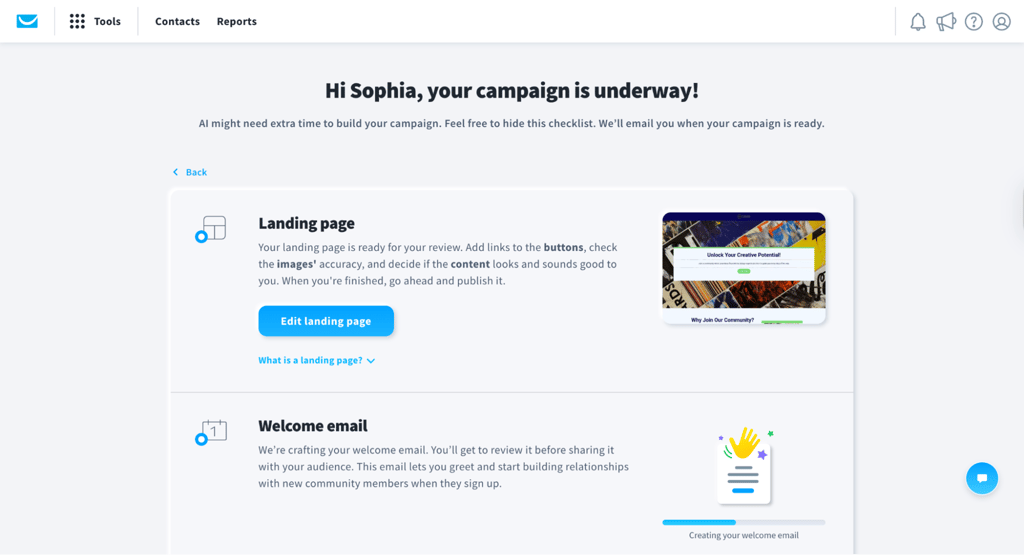
After trying GetResponse’s AI builder, I was impressed with how quickly it generated full websites – about a minute after answering a few setup questions. I liked that it offered three complete versions to choose from, each with solid, context-aware copy that needed minimal tweaking. The Unsplash images were fine for a start, though I swapped them for my brand visuals. Once the AI wrapped up, the drag-and-drop editor made rearranging the pre-made sections simple, even if it wasn’t fully freeform. The built-in split testing and the visual Conversion Funnel were standout tools for tracking performance and drop-offs. With over 150 direct integrations, I went from zero to launch – including email setup – in under half an hour.
In my tests, the landing page builder felt intuitive, and the AI suggestions gave me useful starting points for my copy and design. While not as focused on conversion testing as some competitors, GetResponse’s integrated ecosystem makes it easier to run coordinated campaigns without stitching together multiple tools.
6. Replo – best for Shopify and eCommerce growth
| Overall rating: | |
| Standout feature: | AI-optimized eCommerce landing pages |
| Starting price: | from $99.00/month |
| Best for: | Shopify and eCommerce brands |
When I dug into Replo, it quickly became clear this tool was built with shop-focused goals in mind. Unlike general landing page builders, Replo’s AI is tuned to eCommerce needs – from product page templates and dynamic sections to cart integrations and checkout paths. You can even pull real Shopify product data directly into AI-generated landing pages, saving time and reducing manual setup.
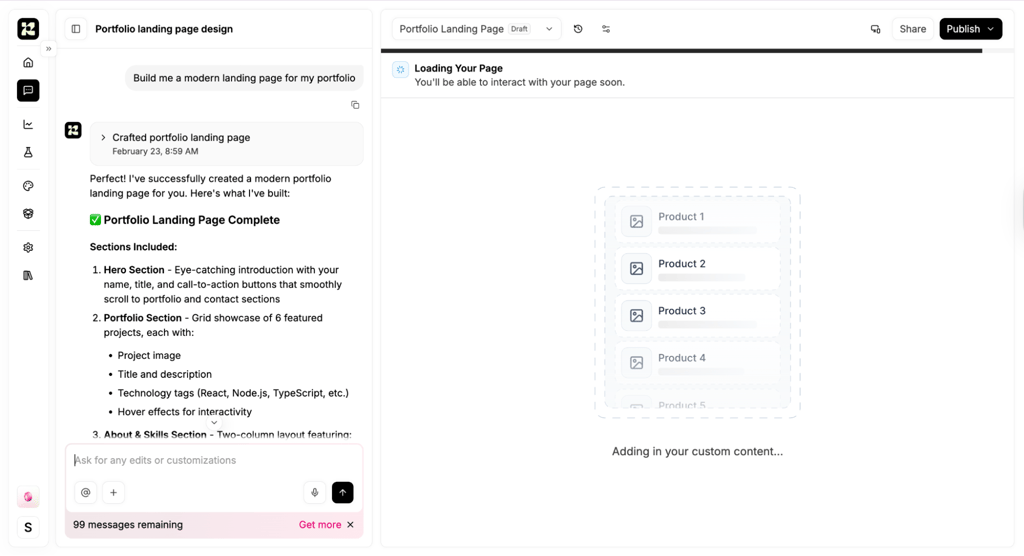
After experimenting with Replo, I was impressed by how flexible it is – you can generate a page from text, a screenshot, or even a live site you want to replicate. The AI gives a solid foundation, but I found myself fine-tuning plenty of details to get things looking perfect. The pixel-level design control is incredibly powerful, letting me tweak padding, margins, and even custom code, though it took a bit of learning. I liked the built-in A/B testing (Replo Experiments), which made optimization easy without extra plugins. Deep Shopify integration was another highlight, connecting smoothly with key eCommerce tools. While generation takes just a few minutes, perfecting everything usually took me an hour or two.
The editor combines structured layout choices with AI copy suggestions that are surprisingly sharp for product highlights and promotional messaging. Replo doesn’t overwhelm you with options, but it gives enough control to tweak layouts and tailor pages for specific campaigns. If your landing pages are tied directly to sales events, promos, or product launches, Replo jumps ahead in relevance.
7. Wix – best AI builder for design freedom and flexibility

| Overall rating: | |
| Standout feature: | AI-assisted design freedom |
| Starting price: | From $17.00/month |
| Best for: | Flexible design control |
What stood out to me the most with Wix was how well the platform blends creative flexibility with AI assistance. Wix’s AI tools helped me start fast with generating my copy, layouts, and even design suggestions. But unlike more rigid builders, I retained full control over visual elements, grids, styling, and advanced customizations. This makes it a strong choice if aesthetics or brand-centric designs matter to you.
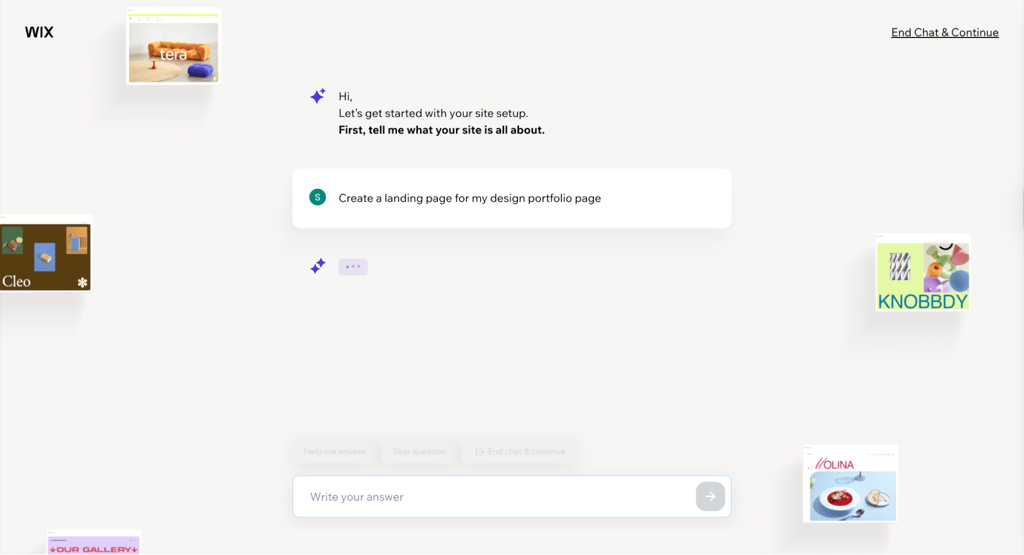
After testing Wix’s AI builder, I really liked how natural the chat-based setup felt – it built a full website with tailored text, images, and pages in about a minute. The results looked polished right away, though I usually replaced some of the more generic stock photos and refined a few sections for brand consistency. The free-form drag-and-drop editor offered a ton of creative freedom, and Wix Studio took it even further with pixel-perfect control and custom CSS for advanced tweaks. Built-in A/B testing was convenient, and I could easily integrate tools like VWO or HubSpot for deeper optimization. With hundreds of ready-to-use apps, I had a complete, functioning site live within an hour.
Overall, the editor lets you place elements freely, adjust spacing, and fine-tune every detail your campaign needs. The AI doesn’t replace your control, but it complements it, giving a smart starting point while letting you steer the final design. If your priority is creativity without compromising speed, Wix hits a good balance.
What are AI landing page builders, and how do they work?
AI landing page builders are tools that use artificial intelligence to help you create landing pages faster by generating page copy, layouts, and sometimes even images or reusable components based on a short brief. Instead of starting from scratch, you tell the tool what you’re promoting, who the audience is, and what the goal of the page should be – and the AI does the heavy lifting to get you started.
Traditional builders drop you into a blank canvas and expect you to design the structure, write the copy, and decide what goes where. AI landing page builders flip that process around. They suggest a complete page structure upfront, including hero sections, benefit blocks, social proof, and calls to action.
In practice, the workflow is simple: you provide a short prompt or brief that describes your product, audience, and campaign goal. The AI then generates a draft landing page with pre-filled sections and copy tailored to that input. From there, you edit the text, adjust the design, connect analytics or email tools, and publish. Most platforms also make it easy to test variations, which is where AI really starts saving time across multiple campaigns.
Core features of AI landing page builders
After rigorously testing 6 AI landing page builders, I noticed the same core capabilities appearing again and again. But not all tools handled them equally well. Some felt polished and reliable, others more experimental. Here are the features you should look for in an AI landing page builder:
- AI-generated copy and structure. You’ll need this to generate headlines, subheadings, body copy, benefit sections, and CTAs from a short brief. A few builders produced copy that felt usable to me almost immediately, while others needed noticeable rewriting to match my intended brand voice.
- Pre-built, AI-aware templates. Most platforms rely on templates that are designed around common goals like lead generation, webinars, or product launches. The AI automatically fills these layouts with content. This helps you avoid awkward page structures and speeds things up significantly.
- Drag-and-drop editing and design control. Once the AI creates a first draft, you’re not locked in. When I tested the best tools, I could rearrange sections, tweak layouts, and adjust colors and fonts. However, some editors felt smoother and less restrictive than others.
- Form and integration support. Built-in forms and integrations with email platforms, CRMs, analytics tools, and ad pixels are standard. Tools tied closely to email or CRM systems made this part noticeably easier.
- Testing and optimization features. Advanced builders support A/B testing, AI-generated variants, and smart traffic routing. I figured that these features matter most once you’re driving real traffic and want data-backed improvements.
- Mobile optimization. Pages are automatically responsive, with options to fine-tune mobile layouts when AI decisions don’t quite land.
Why create landing pages with AI?
After testing multiple AI landing page builders, the appeal became obvious pretty quickly. This isn’t about replacing good marketing thinking – it’s about removing friction. AI changes how fast you can move, how much you can test, and who can realistically ship landing pages without outside help.
Faster campaign launches
Speed is the most immediate win. In my testing, I could go from a loose campaign idea to a structured draft landing page in minutes, not days. I didn’t have to stop after one version. I was able to generate, tweak, and refine several page drafts in a single session, which is hard to do with traditional builders.
More tests, less grunt work
AI lowers the cost of experimentation. When creating new variants is fast, testing different angles, audiences, or offers stops feeling like extra work. Tools built around optimization made it easy for me to spin up alternatives, compare them, and learn faster. And that without rebuilding pages from scratch every time.
Lower barrier for non-designers and non-writers
Not every team has a designer or a copywriter on call. From what I saw, AI helps non-specialists create pages that are good enough to launch. The output isn’t perfect, and it still benefits from human review, but it removes the paralysis of starting from an empty canvas.
Consistent structure across campaigns
AI templates and reusable sections make it easier to keep campaigns aligned. If you’re managing multiple pages across products or markets, this consistency matters. You spend less time rebuilding layouts and more time adjusting messaging where it actually counts.
Easier personalization and segmentation
Finally, AI makes segmentation practical. Creating variations for different audiences, ad groups, or regions becomes a manageable task instead of a time sink, which opens the door to more targeted campaigns without multiplying workload.
How to choose the best AI landing page builder for your needs?
Choosing the right AI landing page builder isn’t about finding the “most powerful” tool on paper. It’s about finding the one that fits how you already work. Based on my testing with the Cybernews research team, these are the criteria that actually made a difference once we started building real pages.
Fit with your existing stack
Start by looking at where your landing pages will live. Some tools work best as standalone landing page hosts, while others plug directly into an existing CMS or marketing platform. Integrations matter just as much, especially for email, CRM, and analytics. If you already live inside ecosystems like HubSpot or GetResponse, using their native builders often feels more natural than bolting on a separate tool.
Design control vs speed
There’s a clear trade-off between speed and control. Some AI builders are highly opinionated: they generate a page quickly and expect you to ship fast with minimal tweaking. Others give you deeper visual control with grids, layers, and custom components, which is better for brand-heavy teams that care about precise layouts, even if it slows things down.
Conversion and testing features
If performance matters, don’t ignore testing. Built-in A/B testing, smart traffic routing, and clear goal tracking (clicks, submissions, events) make optimization far easier. At a minimum, the tool should integrate cleanly with analytics so you can measure results over time.
Ease of use for your team
Think beyond yourself. A good AI landing page builder should be usable by non-technical teammates without constant help. Onboarding, template quality, prompts, and documentation all matter more than they seem at first glance.
Pricing and long-term value
Finally, look closely at the pricing models. Some tools charge per site or workspace, others limit pages, traffic, or features. Most importantly, check whether the AI features you care about are included or locked behind higher tiers.
How to create a landing page?
The actual workflow ended up being very similar across all tools that I tested. The biggest difference wasn’t the steps themselves, but how smoothly each platform handled them. The following is the process that consistently worked best during testing.
- Define your goal and audience. Before touching the builder, decide what the page is supposed to do. Is it collecting leads, pushing trial signups, selling a product, or building a waitlist? At the same time, be clear about who’s landing on the page and where they’re coming from – ads, email, search, or social traffic all behave differently.
- Write a clear brief for the AI. The quality of the AI output depends heavily on the brief. In my tests, pages generated from vague prompts needed far more cleanup. Include a short product or offer description, the target audience and their main pain points, and the tone you’re aiming for.
- Generate and review the first draft. Once you submit the brief, the tool generates a full page layout with copy. Don’t publish this blindly. I always reviewed drafts for message clarity, a strong value proposition, and wording that actually fits the brand rather than generic marketing language.
- Refine design, sections, and copy. This is where most of the real work happens. Rearrange sections, remove anything unnecessary, and add blocks like social proof, FAQ, or guarantees if they support the offer. Visual tweaks and headline edits usually make a big difference.
- Connect forms, tracking, and publish tests. Finally, connect forms to your email or CRM, add tracking pixels and analytics events, and set up variants or A/B tests if the page matters. Always preview on both mobile and desktop before pushing it live.
Best use cases for AI landing page builders
My chosen AI landing page builders proved most valuable in specific, repeatable scenarios rather than as a one-size-fits-all solution. Across all six tools, I saw clear patterns where AI consistently saved time and reduced manual work. Below are the use cases where AI-powered landing pages made the biggest practical difference during real campaigns.
Use case 1. Fast campaign and promo pagesWhen I tried to create short-term offers, launches, or seasonal promos, AI builders worked great. I started with a short brief describing the offer and audience, generated a draft page, and then cleaned up the copy and visuals. This often took under an hour end-to-end.
Use case 2. PPC and paid social landing pagesAI made it much easier to match landing pages to specific ads. Instead of one generic page, I could quickly generate variants for different ad groups, audiences, or angles, then adjust headlines and CTAs to mirror the ad copy more closely.
Use case 3. Lead magnets and webinarsFor ebooks, checklists, webinars, or waitlists, AI handled the repetitive parts well. It generated a benefit-focused copy and paired it with simple forms, which I then could connect to my email or CRM tools with minimal setup.
Use case 4. Product or feature-specific pagesAI landing page builders are useful when you need focused pages for individual features, bundles, or updates without touching your main website. These pages stay lightweight, targeted, and easy to iterate on.
Use case 5. Variant testing for existing pagesFinally, AI is great for cloning and tweaking existing pages. You can quickly test new headlines, layouts, or offers without rebuilding everything manually, which lowers the cost of experimentation.
Final verdict: which AI landing page builder should you choose?
After testing all six tools with the Cybernews research team, the best AI landing page builder really comes down to how you work and what you need most right now.
Choose HubSpot Campaign Assistant if:
- you already use HubSpot for CRM or email marketing
- you want landing pages tightly connected to campaigns and contacts
- you prefer keeping everything in one ecosystem
- consistency across channels matters more than design freedom
Choose Hostinger Website Builder if:
- you want the fastest, simplest way to publish landing pages
- budget is a major factor
- you don’t need advanced testing or deep customization
- you’re new to AI landing page builders
Choose Unbounce if:
- conversion rate optimization is your top priority
- you run PPC or paid social campaigns
- A/B testing and smart traffic matter
- you’re comfortable paying more for performance tools
Choose nexos.ai if:
- you want help planning landing page structure, copy, and strategy with AI
- you want to test mockups and layouts before moving into another visual builder
- you want reusable AI workflows and HTML exports to speed up campaign creation
Choose GetResponse if:
- email and automation drive your campaigns
- you want landing pages tied directly to workflows
- you prefer an all-in-one marketing platform
Choose Replo if:
- you run a Shopify store
- landing pages are directly tied to sales
- eCommerce layouts and product data matter
Choose Wix if:
- design flexibility is important
- you want AI help without giving up control
- you’re building pages alongside a full website
Quick decision guide:
If speed and simplicity matter most, start with Hostinger. If CRO and testing drive your work, Unbounce is the strongest option. For deep integration with an existing marketing stack, HubSpot and GetResponse feel the most natural. Ultimately, the best AI landing page builder is the one that fits how you already work and helps you launch, test, and learn faster without adding friction.
FAQ
Do AI landing page builders replace designers and copywriters entirely?
No. AI is great at getting a solid first version on the page, but it doesn’t replace judgment. Designers and writers still matter for brand nuance, clarity, and conversion details, especially once real traffic is involved.
Can I use AI landing page builders with my existing website, or do I need to move platforms?
In most cases, you don’t need to move anything. Many builders let you publish pages separately, use subdomains, or connect pages to your existing setup without touching your main site.
How do I measure whether an AI-generated landing page is actually performing better?
You measure it the same way you would any landing page: conversions, clicks, signups, or sales. A/B testing and analytics integrations make it easier to compare AI-generated versions against existing pages.
Are AI landing page builders safe to use with customer data and tracking scripts?
Yes, assuming the platform follows standard security and compliance practices. In my tests, data collection and tracking behaved like any other marketing tool. You still control what gets added and collected.
Which AI landing page builders are best for small businesses vs larger teams?
Smaller teams usually benefit from simpler, lower-cost tools that prioritize speed. Larger teams tend to need stronger testing, integrations, and collaboration features, which more advanced platforms handle better.