Best enterprise AI monitoring tools
Being behind major reports like The Mother of All Breaches and RockYou2024, our in-house cybersecurity experts and journalists provide unbiased, real-world testing and in-depth analysis.
We maintain complete transparency by openly sharing our testing methodologies with our audience.
Learn more
Employees adopt new AI tools every week, and most companies can’t keep up. Chatbots, coding agents, and AI features inside everyday apps spread faster than IT can approve them. The outcome is that you can’t secure, govern, or measure AI use you can’t actually see.
That’s why AI governance matters. Traditional security tools watch networks, devices, and files, but they rarely show what employees type into a chatbot or which coding agents touch company code. The best enterprise AI monitoring platforms fill that gap by revealing which AI tools are in use, flagging sensitive data in prompts, and giving leadership proof of oversight.
In this article, I compare the top 5 AI monitoring platforms and shadow AI detection tools built to support oversight across workplaces. To pick them, I teamed up with the in-house Cybernews research team. Our findings are based on hands-on testing where possible and extensive analysis of each platform’s documentation.
My recommended enterprise AI monitoring platforms
Here’s how the top 5 enterprise AI monitoring platforms compare on coverage, shadow AI detection, data controls, and deployment.
| Platform | Best for | Web AI monitoring | Desktop AI monitoring | Coding agent visibility | Shadow AI discovery | MCP visibility | Sensitive data controls | Deployment | Compliance and audit trail | Adoption and ROI |
| NordLayer AI Scout | Visibility-first AI governance across web and desktop | ✅ 20+ web AI tools | ✅ Desktop sensor | ✅ Claude Code, Cursor, Codex, Cline, and more | ✅ Yes | ✅ Inventory and blocking | Warn, redact, or block on 11 web chats | Browser extension + desktop sensor via MDM or manually | ✅ Time-stamped audit trail, monthly reports, EU AI Act evidence pack, CSV export | ✅ Usage by person, team, and department. Plus, estimated token cost per tool and unused subscriptions |
| Prompt Security (SentinelOne) | SentinelOne customers adding AI security | ✅ 15,000+ AI services | ✅ Yes | ✅ GitHub Copilot, Cursor, Claude Code | ✅ Yes | ✅ Shadow MCP discovery | Redact or block | Part of the SentinelOne platform | ⚠️ Audit log for agent actions, compliance reports not specified | ⚠️ GenAI usage dashboard, no ROI metrics |
| Harmonic Security | Catching AI built into everyday SaaS tools | ✅ 1,000+ apps, including embedded SaaS AI | ✅ Endpoint Agent (Claude Desktop, ChatGPT Desktop, Ollama, and more) | ✅ Cursor, Claude Code, GitHub Copilot | ✅ Yes | ✅ MCP gateway with discovery and blocking | Block, warn, or log | Browser extension, EndPoint Agent + MCP gateway via MDM | ✅ Logging and audit trail, regulatory control mapping on request | ✅ Usage grouped by business use case, flags unused tools |
| Nightfall AI | Stopping sensitive data from leaking into AI tools | ✅ Prompts and file uploads across browser AI apps | ✅ Desktop AI clients via endpoint agent | ✅ Claude Code, local IDEs | ⚠️ Limited, prevention-focused | ✅ MCP gateway, blocks unapproved servers by default | Blocks prompts, uploads, clipboard, USB, and email transfers | Endpoint agent, browser plugin, and API connectors | ✅ Full data lineage from origin to destination | ⚠️ Not specified |
| Akamai Workforce Protector | Granular browser-level control over AI interactions | ✅ AI tools, embedded SaaS AI, and AI browsers (Atlas, Comet, Dia) | ✅ Optional desktop agent | ⚠️ IDE and IDEs extensions via desktop agent | ✅ Yes | ⚠️ Not specified | Warn, redact, block, or guide | Browser extension (Chrome, Edge, Safari, Firefox) + optional desktop agent | ⚠️ Not specified | ⚠️ Usage tracking, no ROI metrics |
What is an enterprise AI monitoring platform?
An enterprise AI monitoring platform shows a company how its employees actually use AI. It tracks which AI tools people open, what kind of data goes into them, and how usage changes over time. In simple terms, it turns AI use from a blind spot into something IT, security, and leadership can see and manage.
Most of these platforms collect data through a browser extension, a desktop agent, network monitoring, or a mix of these. Some focus on web chatbots, while others also cover desktop apps, coding agents, and AI features built into SaaS tools.
Here’s what companies should expect an enterprise AI governance platform to do:
- AI tool discovery. Builds an inventory of every AI tool in use, including the ones IT never approved.
- Visibility into prompts and activity. Shows who uses which tools, how often, and whether sensitive data shows up in prompts. Some platforms capture full prompts, while others report only activity signals.
- Policy controls. Lets admins warn, redact, or block risky prompts or restrict specific tools, accounts, and agent connections.
- Usage analytics. Tracks active users, adoption trends, and usage by team, department, or tool.
- Governance support. Provides reports, alerts, and audit logs that prove AI use is monitored when auditors, customers, or regulators ask.
Why AI monitoring matters
AI tools have spread across workplaces faster than most companies could write rules for them. Employees sign up for chatbots on their own, developers install coding agents, and SaaS vendors keep adding AI features to tools teams already use. Without visibility, companies can’t tell what’s happening or decide what to allow.
Blocking AI outright rarely solves the problem. It actually slows teams down and pushes usage onto personal devices and accounts. AI monitoring gives companies a better starting point instead. By employing enterprise AI governance tools, you can see how AI is used first and only then decide where controls belong.
Here are the main business drivers behind AI monitoring and governance tools:
- Shadow AI. Employees adopt AI tools faster than IT can approve them. Every shadow AI tool is a potential data leak and a gap in the company’s security policy.
- Sensitive data exposure. Source code, API keys, customer records, and internal documents often end up in AI prompts. Once that data leaves the company, it’s hard to take back.
- Coding agent use. AI coding agents can read files, run commands, and connect to external services through MCP servers. They often have access to a company’s most valuable code, mostly out of IT’s sight.
- Proving AI governance. Auditors, customers, and regulators now expect proof that AI use is governed, not just as a written policy. AI governance tools keep the records that serve that as proof.
- Real adoption and budget control. Companies spend more on AI licenses every year, but few can tell whether employees actually use them. Visibility shows where AI delivers value and where spend goes to waste.
The top 5 AI monitoring platforms
Below, I break down the 5 best AI monitoring tools for enterprises. For each one, I cover its key features, strengths, and limitations so you can pick the right fit for your organization.
Most platforms on this list are B2B tools without public pricing. To find out what they’d cost for your company, contact each provider to book a demo and request a quote.
1. NordLayer AI Scout – best overall enterprise AI monitoring platform
| Top features: | Shadow AI discovery, AI DLP controls, web, desktop, and coding agent visibility, MCP inventory, adoption analytics |
| Choose if: | You need visibility across both web AI tools and desktop coding agents in one console |
| Pricing: | $4.00/user/month (Standard plan, up to 500 users) or custom pricing (Enterprise plan, 500+ users) |
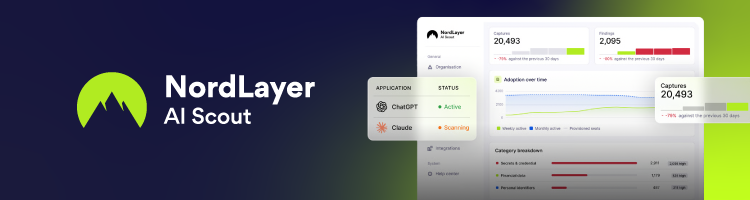
Based on my testing, NordLayer AI Scout is the best overall enterprise AI monitoring and governance platform. It covers all places where AI work happens: the browser, the desktop, and the coding agents developers run locally, which most competitors and web-only tools miss.
NordLayer AI Scout’s browser extension monitors popular web AI tools, including ChatGPT, Claude, Gemini, and Microsoft 365 Copilot. On the desktop, a sensor tracks coding agents like Claude Code, Cursor, and Codex. It captures full sessions, including the commands agents run, and keeps an inventory of the MCP servers and agent skills they use.
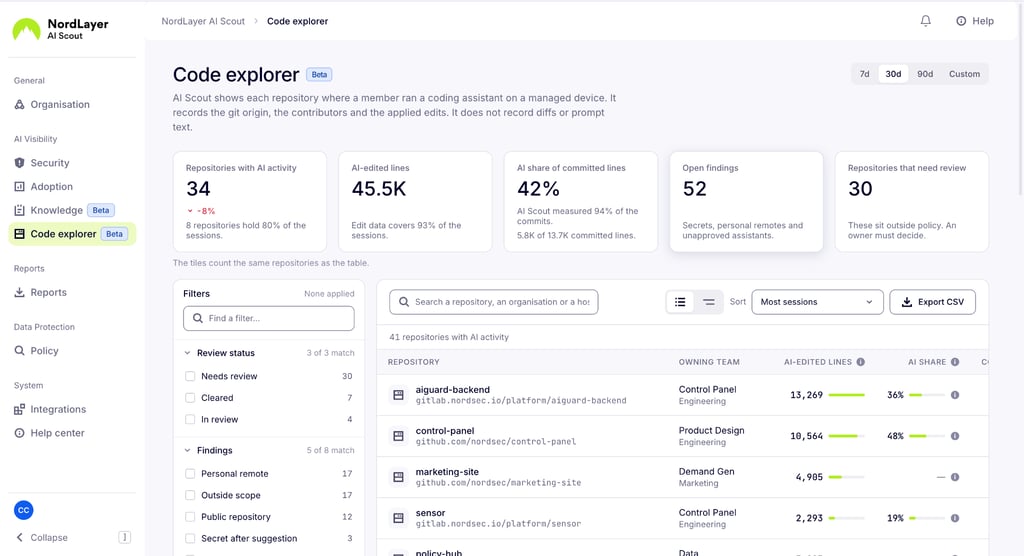
Instead of blocking AI blindly, NordLayer AI Scout takes a visibility-first route: see it, then decide what happens next. Shadow AI discovery brings unapproved tools into view across the browser and the desktop.
On the main web chats, AI DLP controls warn, redact, or block API keys, payment data, personal identifiers, and custom patterns such as your customer ID format before a prompt is sent. Prompts are scanned on the device itself, so nothing goes to an outside server for inspection, and checks don’t slow employees down.
Plus, employees don’t need a new app, login, or workflow. NordLayer AI Scout deploys silently through Intune, Jamf, JumpCloud, or any other MDM. Activity, detections, users, and analytics sit in one console, with separate Security, Adoption, Knowledge, and Code Explorer dashboard.
On top of security, it tracks active users and usage by team, along with estimated token costs. So, you can see which AI licenses pay off and which go unused.
Overall, NordLayer AI Scout helps organizations move from blind trust to informed AI governance decisions without forcing people into a new app or workflow.
2. Prompt Security – best enterprise AI governance platform for SentinelOne users
| Top features: | Shadow AI detection across 15,000+ AI services, code assistant visibility, shadow MCP discovery, AI firewall |
| Choose if: | You already run SentinelOne and want AI security inside the same platform |
Prompt Security is an enterprise AI security, visibility, and governance platform, now part of SentinelOne. Thus, it’s a natural pick for companies already using SentinelOne for endpoint protection.
Prompt Security discovers AI tools used by employees and developers, which includes unsanctioned shadow AI, and shows who uses them and with what data. Its coverage list is the largest in this ranking, with 15,000+ AI services.
On the developer side, Prompt Security tracks code assistants like GitHub Copilot, Cursor, and Claude Code, and detects shadow MCP servers and unsanctioned agent deployments. Every agent action, decision, and system interaction lands in a searchable audit log. So, security teams can trace what an agent did and when.
On top of this, a real-time AI firewall redacts sensitive data, blocks adversarial prompts, and scrubs sensitive outputs. Prompt Security can also protect AI apps companies build themselves.
All in all, Prompt Security is a strong fit for larger organizations running many AI tools across teams, which need centralized visibility and control in one place instead of separate policies for each tool.
3. Harmonic Security – best enterprise AI monitoring platform for embedded SaaS AI
| Top features: | Browser-based AI discovery, Endpoint Agent, MCP gateway, real-time guardrails |
| Choose if: | Your biggest blind spot is AI built into the SaaS tools your teams already use |
Harmonic Security is an AI governance and control platform focused on discovering, understanding, and managing enterprise AI use.
It stands out for covering AI that doesn’t look like a standalone chatbot. Its browser extension provides prompt-level insights across 1,000+ applications, including AI features built into everyday SaaS tools. As SaaS vendors keep adding AI to their products, this is a growing gap that most AI governance tools miss.
Harmonic monitors prompts at the individual level and classifies the data employees share. The Usage Intelligence engine then groups interactions by business purpose, with insights into which use cases drive real productivity and which create risk.
Harmonic also extends beyond the browser. Its Endpoint Agent covers desktop apps like Claude Desktop, ChatGPT Desktop, and Ollama, as well as coding agents like Cursor, Claude Code, and GitHub Copilot.
Harmonic Security’s MCP gateway also intercepts MCP traffic, discovers clients and servers, and lets admins block entire servers or restrict high-risk capabilities, such as tools that can write to production databases.
4. Nightfall AI – best enterprise AI monitoring platform for AI data loss prevention
| Top features: | AI DLP for prompts and file uploads, clipboard and endpoint monitoring, MCP gateway, data lineage |
| Choose if: | Your main concern is sensitive data leaking into AI tools, not mapping every AI app employees use |
Nightfall AI is an AI data security and DLP platform, used to monitor and protect sensitive data used across AI applications. It scans prompts and file uploads across AI apps, whether employees use them in the browser or as desktop clients.
Nightfall AI also monitors the channels traditional DLP often misses – clipboard copy-paste, USB, and email. Pre-trained detectors catch secrets, source code, and customer PII without manual rule-writing.
On the agent side, Nightfall’s MCP gateway applies policies to each tool call and blocks unapproved MCP servers by default. For Claude, inference hooks inspect and block prompts, tool calls, and responses across the web, desktop, and Claude Code.
Every blocked transfer keeps its full data lineage, from origin to destination. So, security teams can trace where a file came from and where it was headed.
5. Akamai Workforce Protector – best enterprise AI governance platform for browser-level control
| Top features: | Shadow AI discovery, AI browser and extension monitoring, IDE and plugin coverage, real-time policy enforcement |
| Choose if: | You want granular control over how employees and AI agents interact with AI tools inside the browser |
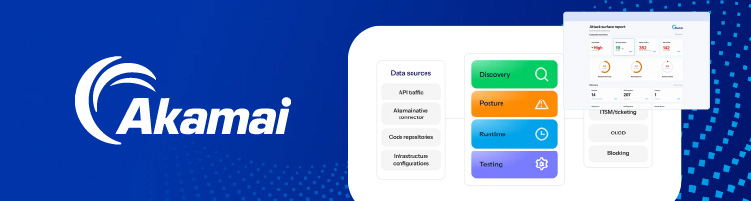
Akamai Workforce Protector (formerly LayerX Security) is an enterprise browser and AI interaction security platform focused on visibility and control across web, desktop, and agentic AI interactions.
Akamai Workforce Protector discovers shadow AI across AI tools, AI features built into SaaS apps, and agents. Plus, it tracks how employees use them. It also covers AI browsers like ChatGPT, Atlas, Perplexity Comet, and Dia. Risky and overprivileged browser extensions can be blocked instantly.
On the whole, Akamai Workforce Protector suits organizations that want granular control over each interaction, such as stopping a paste into a personal ChatGPT account or limiting what an AI browser agent can do on a company site.
The trade-off is that Akamai Workforce Protector sees AI mainly through the browser. Coverage of desktop tools depends on rolling out the separate agent, and it offers fewer of the adoption and ROI insights that visibility-first platforms provide.
Common mistakes when choosing an AI monitoring tool
Picking the right AI monitoring tool is harder than it looks, especially in a young cybersecurity category where every vendor promises full coverage.
Here are the most common mistakes to avoid:
- Mistaking AI governance for security. Seeing that sensitive data went into ChatGPT doesn’t stop it from leaving. Visibility shows you where the risks are, but you still need controls like redaction or blocking to act on them. Pick a platform that offers both, like NordLayer AI Scout, or plan how you’ll enforce policies once you know what’s happening.
- Focusing only on blocking. Blocking AI tools outright is often the first instinct. However, it slows teams down and pushes usage onto personal devices. A good platform shows you how AI is used first, so you can add controls where they matter.
- Ignoring desktop and coding agent activity. Web-only visibility misses coding agents like Claude Code and Cursor, which often have access to your most valuable code. If your developers use AI, desktop coverage isn’t optional.
- Assuming every tool gets the same protection. Many platforms can block data on some AI tools but only log activity on others. Check exactly where pre-submit controls apply.
- Overlooking deployment friction. A tool that needs a long rollout, a new app, or extra logins for employees will struggle to reach full coverage. Look for silent deployment through your existing MDM tools.
- Not checking how reporting supports governance. Dashboards are only useful if they turn into evidence. Make sure the platform offers reports, audit logs, and exports that will satisfy auditors, customers, and regulators.
- Forgetting about employee privacy. Monitoring prompts can damage trust if it’s handled poorly. Check what data is captured, where it’s processed, and who can see it.
Final verdict: which enterprise AI monitoring platform is best?
To conclude, out of the best AI security tools on this list, NordLayer AI Scout is the top pick for most organizations. It brings web AI tools and desktop coding agents into one console, adds MCP and Code Explorer visibility, and tracks real adoption alongside security findings.
It also deploys silently through your existing MDM tools and scans prompts on-device. So, your employees can keep working the way they always have without the feeling of being watched or surveilled.
That said, the other AI governance tools on this list are also strong picks in specific scenarios. For instance, Harmonic Security makes the most sense if embedded SaaS AI is your biggest worry, while Prompt Security fits naturally into a SentinelOne setup.
Still, if you’re looking for a balanced, visibility-first platform that takes you from blind trust to informed AI governance, NordLayer AI Scout is the one to start with.
FAQ
Why do companies need AI monitoring tools?
Companies need AI monitoring tools because employees adopt AI faster than IT can approve it. Without visibility, sensitive data can leak through prompts, coding agents can access critical code unnoticed, and leadership can’t prove AI use is governed or measure whether AI spend pays off.
How is AI visibility different from AI governance?
AI visibility shows how AI is actually used across a company, while AI governance sets the rules for how it should be used. Visibility comes first because you can’t write effective policies or enforce them for AI usage you can’t actually see.
Can AI monitoring platforms detect shadow AI usage?
Yes, AI monitoring platforms work as shadow AI detection tools. They build an inventory of every AI tool employees use, including ones IT never approved, through browser extensions, desktop agents, or network monitoring.
Do these platforms monitor both browser-based AI tools and desktop AI applications?
Some AI governance tools monitor both browser-based tools and desktop AI applications, but not all. NordLayer AI Scout, Harmonic Security, and Prompt Security cover both web and desktop AI tools, including coding agents.
What features should enterprises prioritize when evaluating AI monitoring software?
Enterprises should prioritize broad coverage across web and desktop AI tools, sensitive data controls, low-friction deployment, and usage analytics. Integrations with SIEM, alerting, and directory tools, plus audit logs and privacy controls, also matter for enterprise use.
How do AI governance tools help with compliance and audit readiness?
AI governance tools help with compliance by recording how AI is used and what actions were taken on risky activity. Reports, security findings, and audit logs give companies evidence of AI oversight when auditors, customers, or regulators ask for it.
Can AI monitoring platforms help measure AI adoption and tool usage by team?
Yes, many AI monitoring platforms offer AI adoption analytics by team. NordLayer AI Scout, for example, tracks active users, usage by department, team, role, and tool, and estimated token costs, so companies can see whether AI licenses are actually being used.