Claude vs ChatGPT comparison (GPT-5 vs Claude 4.1)
Being behind major reports like The Mother of All Breaches and RockYou2024, our in-house cybersecurity experts and journalists provide unbiased, real-world testing and in-depth analysis.
We maintain complete transparency by openly sharing our testing methodologies with our audience.
Learn more

Claude and ChatGPT are products that actually have a common backstory. Anthropic, the company responsible for Claude, was launched by a group of former OpenAI employees who had previously worked on ChatGPT. This naturally makes the two products quite similar to each other.
However, they are not by any means identical. To see how they perform during various tasks, I tested them with the help of the Cybernews research team using the same prompts and real-world scenarios. This helped me note the similarities and differences, and pinpoint what each product is good at.
GTP 5 vs Claude 4.1 quick overview
To help you decide between the two models, I created a table comparing the basic information about both models.
| Claude | ChatGPT | |
| Free version available | Yes | Yes |
| Paid tier | Starting from $17.00/month | Starting from $20.00/month |
| Supported platforms | PC, macOS, Linux, Android, iOS | PC, macOS, Linux, Android, iOS |
| Multimodal support | Text and image inputs | Text, image, and audio inputs |
| Image generation | No | Yes, ChatGPT offers image generation both through its normal prompting engine, and through its Sora engine. |
| Video generation | No | Yes, through its Sora engine. |
| Voice generation | No | No |
| Coding | Yes, with preview support. | Yes, with preview support. |
| Real-time search | Yes | Yes |
| File analysis | Yes | Yes |
| Context window size | Up to 1 million tokens | Up to 400,000 tokens (around 300,000 English words) |
| Custom agents | Yes | Yes |
| Plugin support | Yes | Yes |
| Integration support | Yes | Yes |
GPT-5 vs Claude 4.1: key similarities and differences
With Claude and ChatGPT doing a lot of the same work, they have a few key differences that differentiate them from each other. To help you decide which product is better for you, I decided to create a list of similarities and differences, outlining the features that can
Similarities:
- Multimodal support for text and images. Both Claude and ChatGPT take text and image-based inputs.
- Conversational AI. Both models are built as conversational LLMs, making them easy to use and understand for even non-technical users.
- Coding abilities. Both AIs are capable of coding and previewing the resulting applications.
- Real-time search. Claude and ChatGPT are both capable of accessing the internet to find information in real-time.
Differences:
- Context window size. ChatGPT’s context window size is 400,000 tokens, which is equivalent to around 300,000 English words. In comparison, Claude (on it simpler, Sonnet 4 model) offers 1 million tokens, equivalent to around 750,000 English words.
- Image and video generation. Unlike ChatGPT, Claude isn’t capable of generating images or videos.
- Coding network access. ChatGPT can access network files while coding, which Claude isn’t capable of.
- Voice support. ChatGPT can be controlled by voice, while Claude’s voice support is currently rolling out in beta.
GPT-5 vs Claude 4.1: testing main features
To test each model, I decided to test their real-time web search, deep research, image analysis, and coding capabilities. To ensure my test was fair, I used identical prompts for each product, using their paid tiers and newest available models
Real-time web search
To test each model’s real-time capabilities, I decided to ask it a very general question, with the following prompt:
You are a news analyst. Provide a summary of the latest developments in cryptocurrencies as of today, September 16th, 2025. Your response should be a concise and factual summary of the key events, including any official statements or figures released in the last 24 hours. Please cite your sources with URLs.
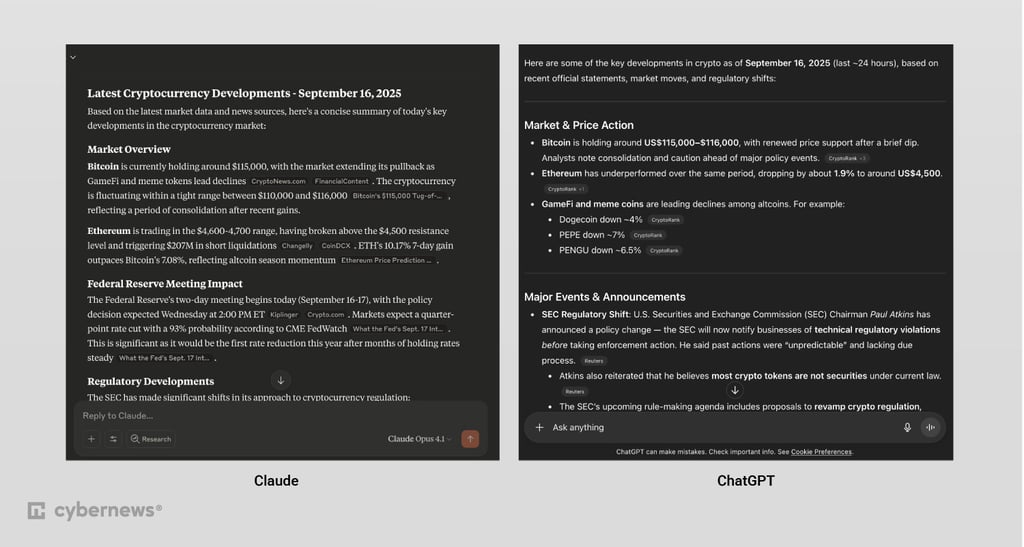
While it took a few seconds, Claude 4.1 offered a very focused analysis mostly around the crypto market. To create it, Claude used 50 sources and cited 13, making it very in-depth. However, it was formatted in a less intuitive way than ChatGPT’s output, and it didn’t feature many of the crypto-related news ChatGPT presented. This included major developments like PayPal Link, which allows easier peer-to-peer crypto trading, which I think should be a part of the prompt digest.
GPT-5 provided a broad and well-formatted digest of crypto information. It included market news and major events. It used 20 sources for its response, and cited 12 of them in the summary. The whole process took only a few seconds.
| Claude | ChatGPT | |
| Speed | Under 5s | Under 5s |
| Freshness of info | Fresh | Fresh |
| Accuracy | Accurate | Accurate |
| Citations | 50 sources used, 13 cited | 20 sources used, 12 cited |
| Relevance | Less relevant to the prompt | More relevant to the prompt |
| Depth of answer | In-depth, strictly market-related news about crypto | In-depth, broad news about crypto |
| Limitations | Very limited search scope | Smaller number of sources used |

Deep research
To request deep research, I created a complex prompt that asked for an academic report structure, including XML tags to make it easier for the models to understand the format I wanted. To avoid giving you a wall of text, I’m not going to quote the whole prompt, instead focusing on the non-structural aspects:
Persona & Task: You are a highly-skilled academic researcher and professional writer. Your task is to generate a comprehensive, evidence-based report on the current research regarding the impact of remote work on employee productivity and well-being.
1. Think Step-by-Step: Before writing, create a detailed plan for your research and report structure based on the report_structure section below. Consider the most efficient way to gather, analyze, and synthesize the required information.
2. Structured Output: Use the XML tags provided to strictly format each section of your final response, ensuring a clear and organized report.
3. Synthesize Diverse Sources: The final output must not only summarize the findings but also highlight the nuances, contradictions, and areas of debate within the academic literature, as requested in the report structure.
Cite at least five distinct peer-reviewed studies published in the last three years (2022-2025).For each citation, provide the author(s), publication year, and journal/source name.Integrate the citations naturally into the text (e.g., "A study by Smith et al. (2023) found...").
Claude took 1 minute to formulate a research plan. The plan didn’t require confirmation, and after formulating it, the LLM took 6 minutes to create a complete research document that viewed 286 sources and cited 11 in the output. It was very thorough, including meta-analyses, context, and methodology critiques. This was far closer to a true academic document than ChatGPT’s report.
ChatGPT first responded with a clarifying prompt that took a few seconds. Then it took 32 minutes to produce a fully researched document. It completed 96 searches and used 26 sources in the final document. What I got was a document containing the information I was looking for, although without many of the useful insights presented by Claude.
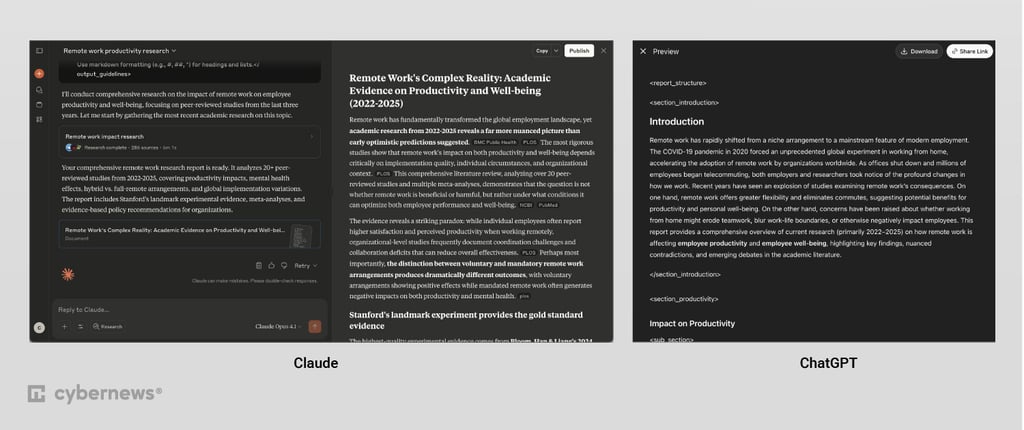

Image analysis
To check how both models deal with analyzing images, I set up a simple test where I asked them to analyze an image with the following prompt:
Analyze the attached image, which is a stacked bar chart titled 'Influenza Positive Tests Reported to CDC by U.S. Public Health Laboratories, National Summary, 2023-2024 Season'. Your analysis should include:
1. Overall trend 2. Peak Analysis.
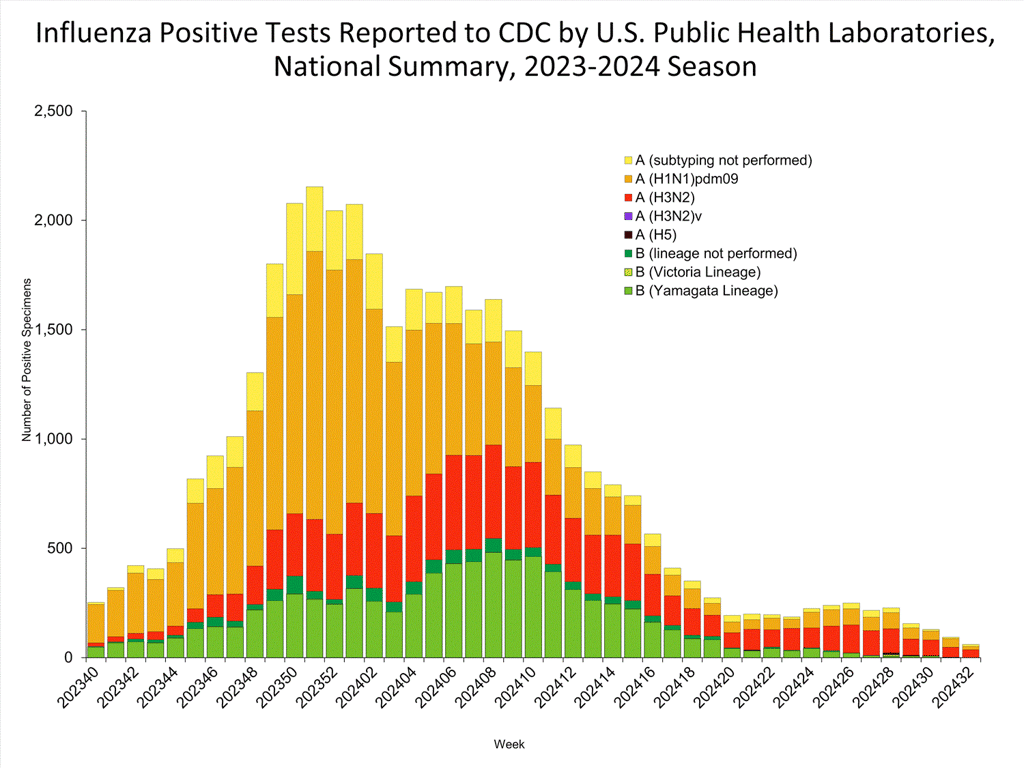
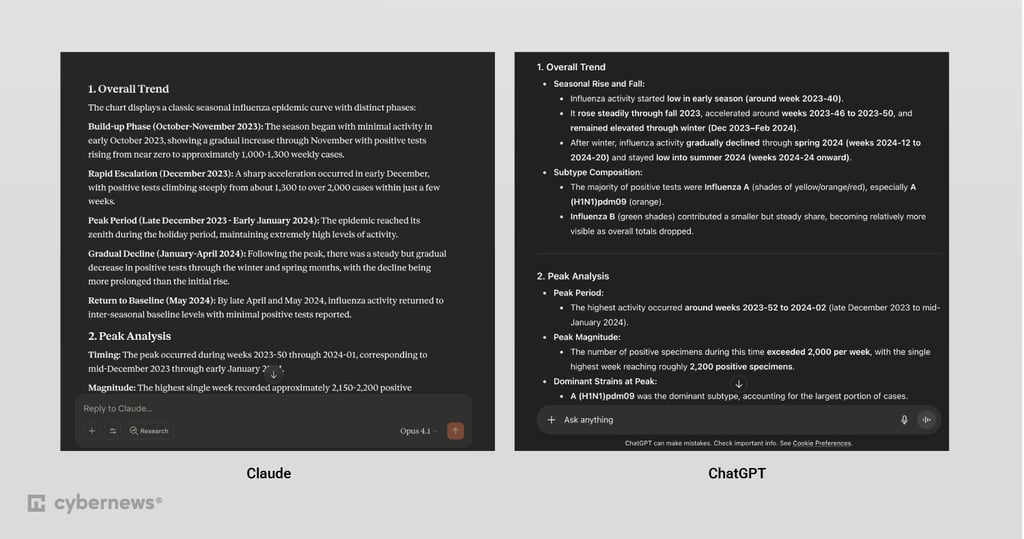
Claude focused on providing exact percentages and a broad analysis of Influenza A vs Influenza B trends. It didn’t commit any serious errors. However, I feel that it didn’t provide the detailed insights ChatGPT offered.
ChatGPT only took a few seconds to analyze the image and drew the correct conclusions, giving a very concrete, in-depth analysis. It correctly noted A (H1N1)pdm09 as the most dominant subtype, also noting the relationship between the prevalence of Influenza B and the total infections, noting that it reduced at a relatively smaller rate than other strains, making it a more stable variant.
I also tested both models with some real-life images to see if they can recognize their contents. I picked images that were dark and provided subtle silhouettes that models in the past have struggled with, in my experience. After testing a few trick images, both models managed to handle them without issue.
Coding
ChatGPT and Claude both offer robust coding interfaces that allow you to prompt them for code, preview it, and improve specific code sections. The differences are subtle, but also important. For this comparison, I used the solution in each product's web app, rather than dedicated coding tools Claude Code and ChatGPT’s Codex.The biggest difference is the robustness of the preview. ChatGPT’s Canvas is able to set up persistent storage for your project, with optional network access, allowing you to execute code and write to storage directly from the preview window.
Claude, on the other hand, is offline-only, meaning that the preview won’t be a fully functional product, and to truly test it, you’ll have to set up your own environment. This isn’t a problem if you already have one, but if you’re looking to create a singular product from scratch, this can be frustrating.
To test both products’ coding abilities, I gave them a simple prompt.
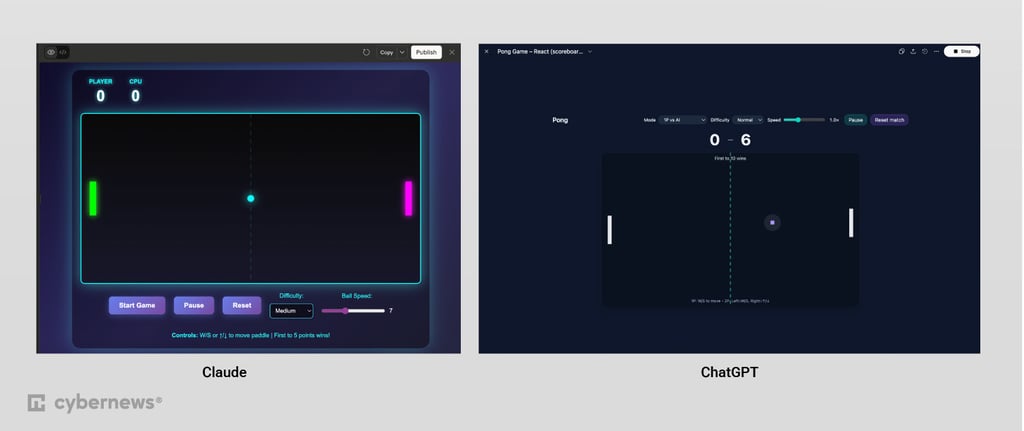
Build a functioning pong game, with a scoreboard, keyboard controls, and a customizable speed and difficulty level.
The results were pretty similar overall. Claude created a very visually appealing and vibrant version of Pong in around a minute. It did not include a multiplayer mode, but its difficulty settings did work without any issues. Scoring in Easy mode was easy, and in Impossible, impossible.
ChatGPT took 3 minutes to generate the game. The basic functionalities were working as intended, although the difficulty level only changed the size of the paddle for both players. I didn’t notice a difference in terms of how easy it was to score. ChatGPT automatically created a two-player option, allowing me to choose between playing against a computer-controlled paddle and a friend. The graphics were competent, if a bit basic. Both games shared a similar bug when it came to restarting games: even if the game reached the set score, clicking Start game wouldn’t automatically reset it. This could probably be fixed with a single prompt.
Another key aspect is their context window size. Claude’s simplified Sonnet 4 model is far better at processing massive amounts of data compared to ChatGPT. While this may not matter for most use cases, the difference is pretty massive. For example, ChatGPT’s max of around 300,000 words wouldn’t even allow it to fully summarize The Lord of the Rings trilogy based on text alone. At the same time, Claude should easily handle almost the entire Harry Potter series in one prompt, or basically the entire Bible. If you’re working on large texts, books, or big data, Claude might be a better choice.
In summary, you should:
- Choose Claude if you’re operating on big text or data sets, or require deeper and more academic-style outputs
- Choose ChatGPT if you’re looking for an AI for day-to-day use, video and image generation, and basic research
FAQ
Claude AI vs ChatGPT, which is better?
ChatGPT is better for overall use, including basic real-time search, as well as image and video generation. However, Claude handles bigger text inputs and deep research better.
When to use Claude vs ChatGPT?
I recommend using Claude for longer text analysis and academic research, and ChatGPT for day-to-day use, including real-time search, as well as image and video generation.