Nano Banana Pro Review – Cybernews investigation and insights
Being behind major reports like The Mother of All Breaches and RockYou2024, our in-house cybersecurity experts and journalists provide unbiased, real-world testing and in-depth analysis.
We maintain complete transparency by openly sharing our testing methodologies with our audience.
Learn more
As people got better at spotting AI-generated images, the technology moved on to its next stage. Nano Banana Pro is the AI tool for reasoning-based image generation launched by Google in November 2025. Even though it was released just a few months after the first Nano Banana model, the difference in quality is immense.
I tested Nano Banana Pro with the Cybernews research team to find out if it actually delivers on its marketing promises. So, in this Nano Banana Pro review, I reveal the test results, explain how to access the tool, and review its features, pricing, and real-world use cases to help you understand whether it’s actually worth using.
Quick overview of Nano Banana Pro
Here’s a quick overview of the new AI image generator:
| Best for | Image generation and editing with text prompts |
| Price | Included in Pro and Ultra subscriptions to Gemini, starting from $19.99/month |
| Free version | ✅ Yes |
| Best features | Combining up to 14 images and 5 characters into one output, up to 4K resolution, camera angle and focus controls, and legible in-image text |
Nano Banana Pro pros and cons
What is Nano Banana Pro?
Nano Banana Pro is an image generator that runs on Gemini 3 Pro. This quirky name was originally used as a placeholder for an anonymous LM Arena's public tool testing. As the tool gained massive popularity, this joke codename became the official one.
Nano Banana Pro’s hallmark is a reasoning-based model that understands and analyzes image background, instead of blindly assembling pixels like diffusion models do. This real-world knowledge and logic make it one of the first models that can actually produce legible, correctly spelled text in images – one of the main giveaways of AI-generated content.
What’s great is that the tool isn’t bound to any specific style – you’re free to generate anything from business infographics to a visual novella with consistent characters. The consistency comes from the tool’s logical definition of each character, rather than just random guessing of each pixel pattern anew.
My testing of Nano Banana Pro
The previous Nano Banana model showed excellent results in our hands-on testing. Now, I decided to check if Nano Banana Pro actually delivers on its promises and tested it across three different tasks. Here are the test results with screenshots.
Testing image generation
I tested how Nano Banana Pro generates realistic, high-quality images and gave it the following prompt:
Generate a hyper-realistic close-up portrait of an elderly watchmaker working at a table, magnifying loupe over one eye, intricate gears and tools in the foreground, cinematic warm lighting, dust particles in the air, highly detailed skin texture.
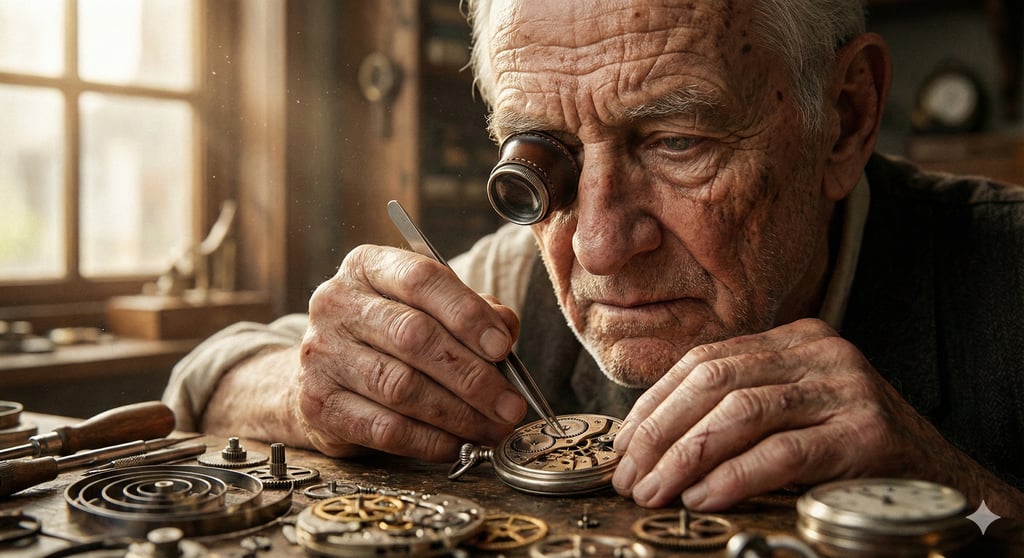
The result came in just 10 seconds. The quality of the picture turned out great: the tool complied with all the requirements, and the small details were handled well. The photo was definitely more realistic compared to other image generators, but it still has something unnatural about it.
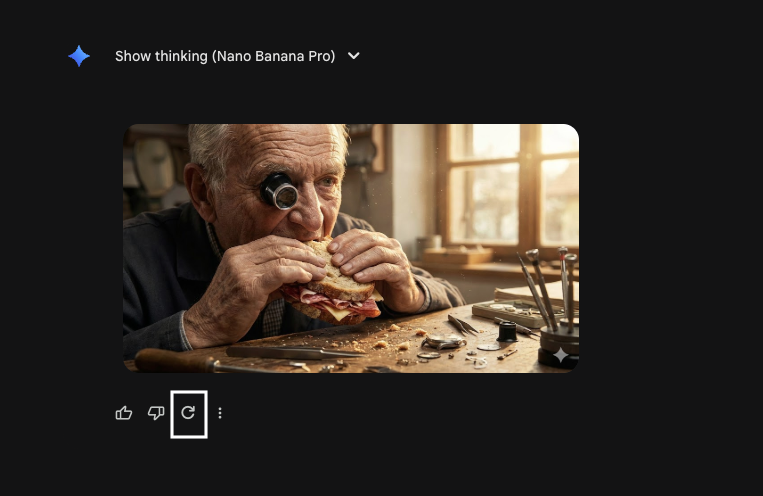
I also liked how easy it was to make changes – you can simply hit the Redo button (the circular arrow) to get a new image without rewriting the prompt.
Testing consistency
Then, I checked if the tool can maintain consistency over a few iterations. First, I edited the original prompt and added new requirements in asterisks:
Generate a hyper-realistic close-up portrait of an elderly watchmaker working at a table, **eating a large sandwich**, magnifying loupe over one eye, **crumbs on the table**, cinematic warm lighting, dust particles in the air, highly detailed skin texture.
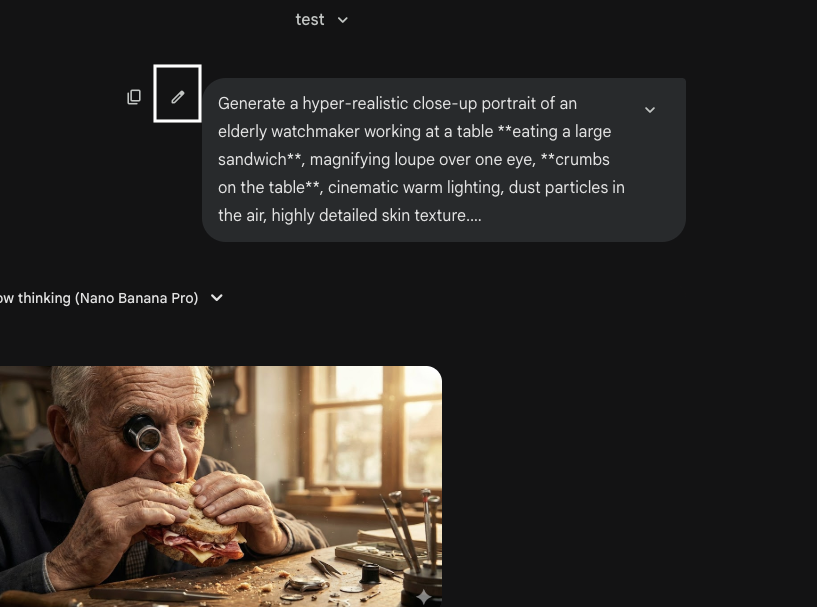
It only took 7–10 seconds to regenerate the image. The tool kept all the details exactly the same and introduced only the changes I asked for. The new elements themselves naturally fit into the image.
Then, I sent a follow-up prompt to edit the image, asking the tool to change the character’s hair color to brown.
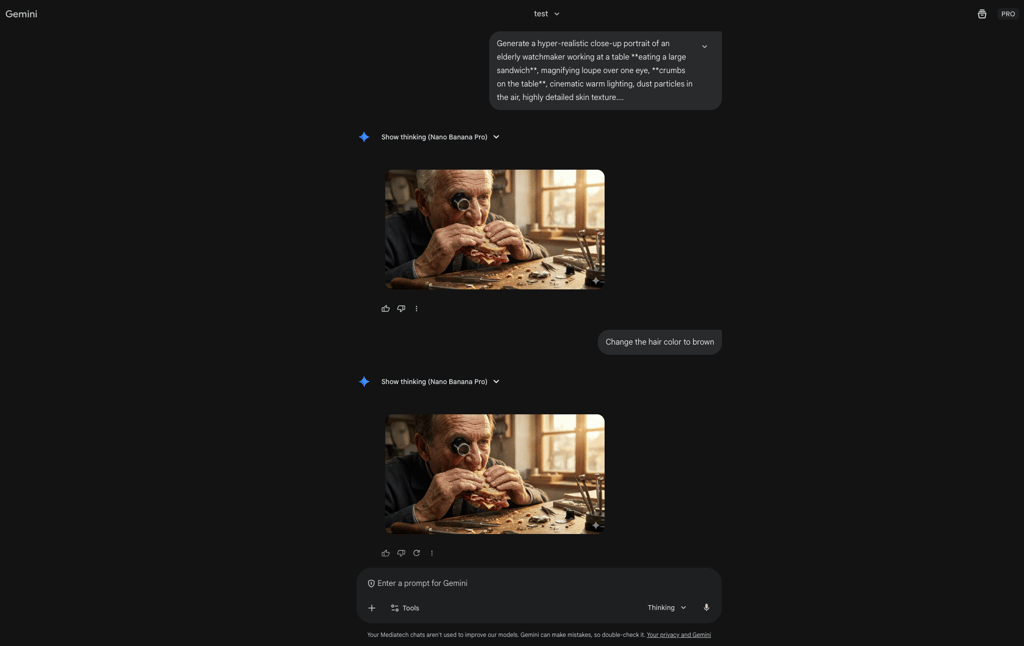
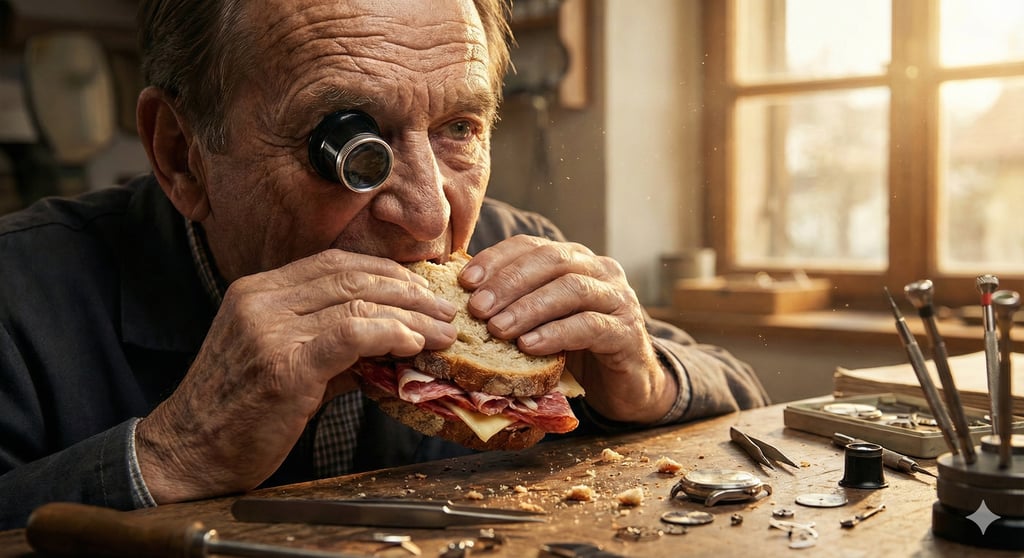
Once again, Nano Banana Pro did a great job of keeping consistency – nothing has changed apart from the hair color. The hair looked very authentic, as well as the whole image composition. I find it to be a reliable tool for generating consistent, natural-looking characters over multiple iterations.
Testing in-image text clarity
I tested text rendering, the star of the latest update, and gave Nano Banana Pro this prompt:
A futuristic neon billboard in a rainy cyberpunk city street. The billboard clearly displays the text "NANO BANANA" in bright yellow glowing letters. Reflections on the wet pavement, blue and purple ambient light.
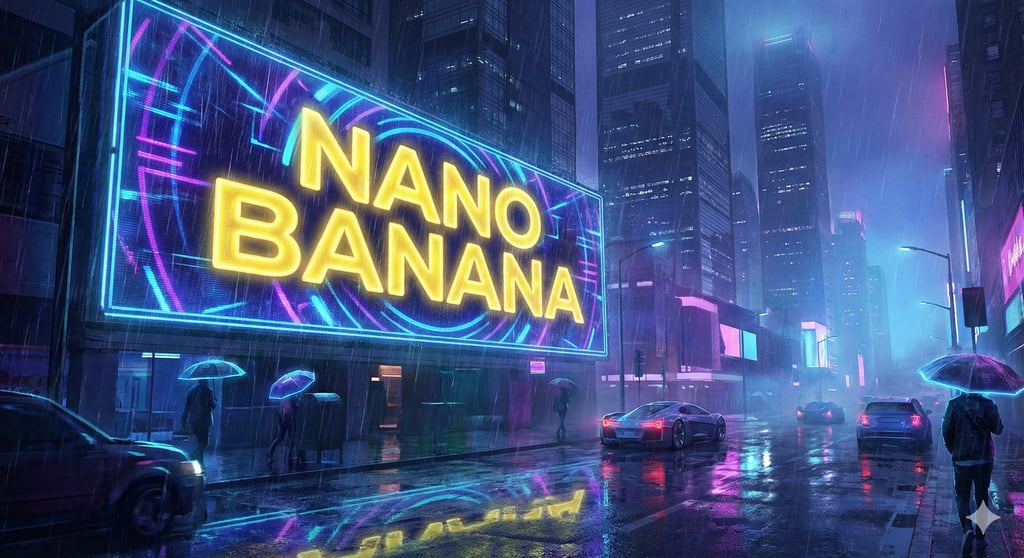
This time, the image also came fast and took around 15–20 seconds, which is a bit longer than simple image generation. Nano Banana Pro delivered exactly what it said it would – letters were legible and correct not only on the billboard, but also in the pavement’s reflection. The font was consistent for each letter as well, while the whole image composition didn’t have any weird elements.
Testing blending a few images
Finally, I wanted to see how Nano Banana Pro blends three images into one. So, I uploaded three images and gave it this prompt:
Use my uploaded images and make me a photo for social media. First image is the product, it is a water bottle, make sure to use it and add the logo on it (from the second photo), the background should include sand from the 3rd photo and a sky.
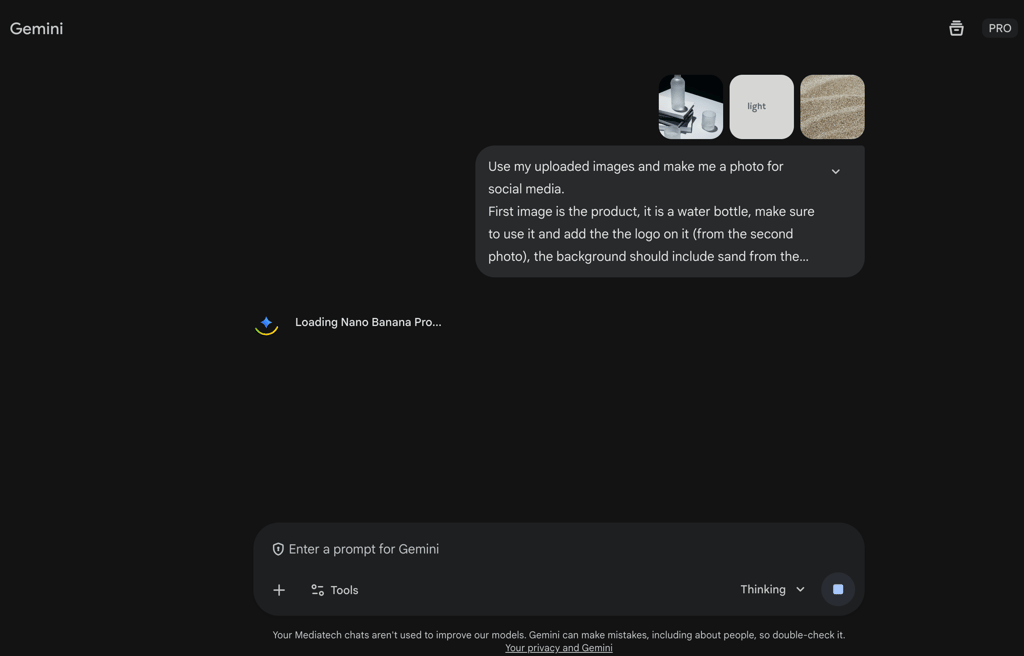
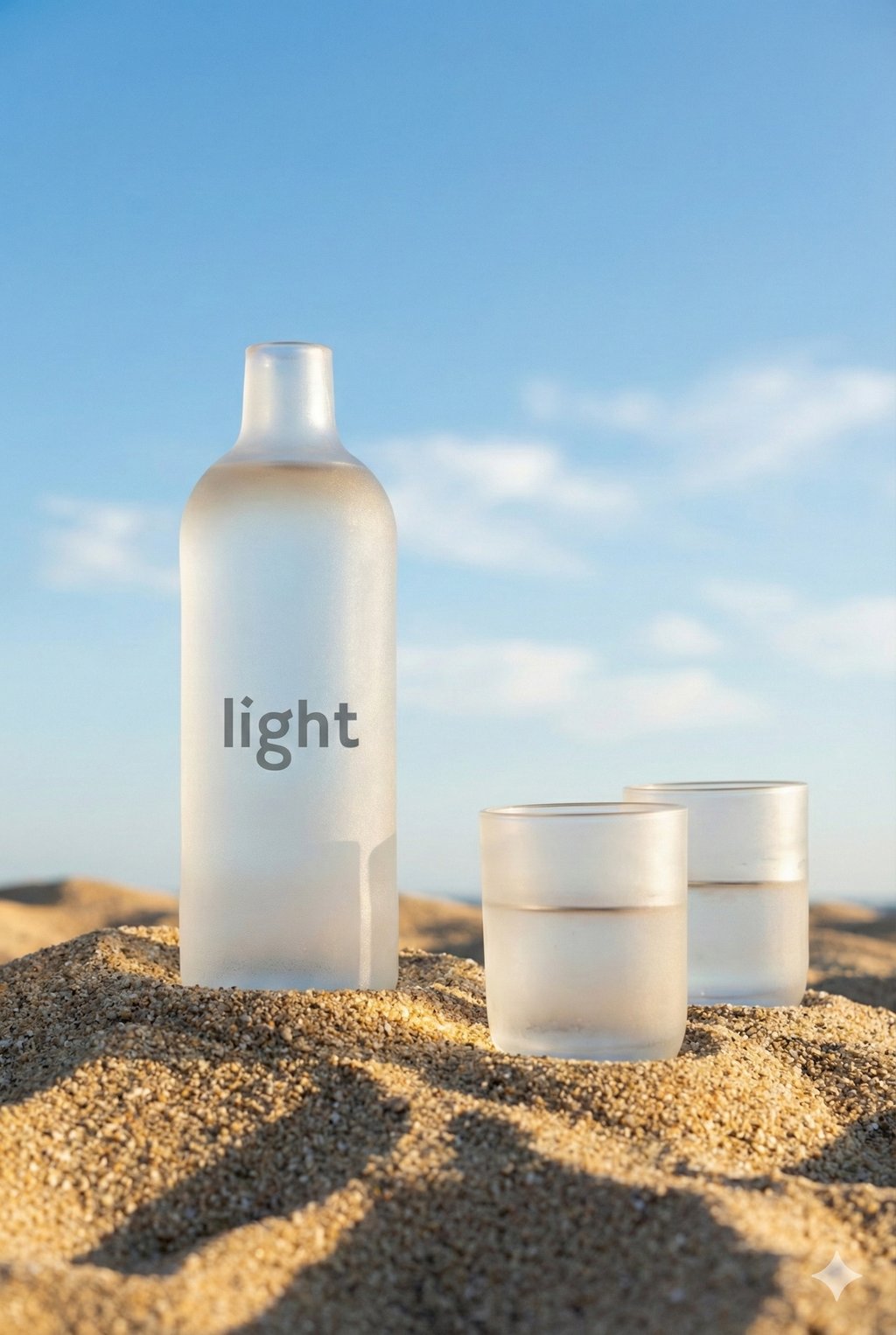
The result fully aligned with my prompt, keeping all the elements intact. It correctly applied the background and added the brand name just as I asked. I loved that the tool didn’t introduce any artifacts or make the image look cartoonish, as image generators often do.
Where can you access Nano Banana Pro?
As I noted earlier, Nano Banana was first anonymously published in LM Arena for the public to assess the tool. After topping the rankings, Google revealed the AI-generator’s name and, in November 2025, released Nano Banana Pro on the same platform. So, it’s still available on LM Arena for free blind testing and ranking.
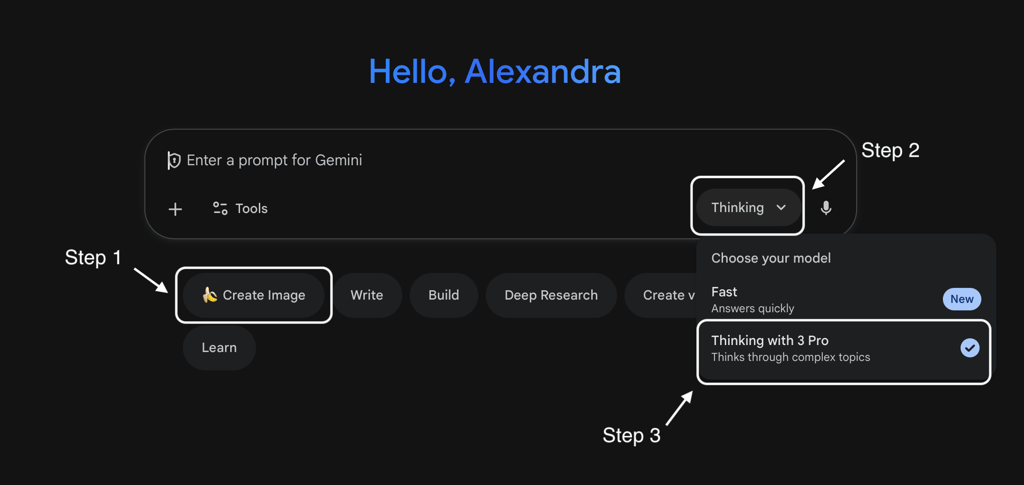
Now, Nano Banana Pro is built into the Gemini app as one of the chat features. You just click Create Image and choose Thinking with 3 Pro in the bottom right corner of the chat input box.
Also, Nano Banana Pro can be accessed via certified third-party providers like ImagineArt and Adobe Creative Cloud. Alternatively, you can use it as an API through Vertex AI and Google AI Studio. It allows developers to integrate Nano Banana Pro capabilities directly into their apps and workflows.
Key features and benefits of Nano Banana Pro
All the Nano Banana Pro’s features are controlled through text prompts. You describe all the image characteristics in simple language, and if something needs refinement, you tweak the results with additional text prompts. Here are the most prominent features of the tool:
- Advanced editing controls. You can adjust every parameter of an image, including aspect ratio, lighting, camera angle, focus, and style. The tool changes only what you ask, leaving the rest untouched.
- High-resolution outputs. You can choose the output quality from 1K to 4K, which is perfect for print and digital graphics. Also, you can upload and upscale any image to 4K.
- Support for context-rich visuals. Gemini’s deep thinking and real-time data allow it to create informative infographics, diagrams, and complex images. Even if it makes mistakes in the first output, it can improve them in the next iterations.
- Better text rendering. Unlike many image generators, Nano Banana Pro can place legible, multi-language text inside images. So, you can finally use AI for posters, mockups, and social media graphics without the need to jump to another tool for adding text.
- Blending multiple images. You can upload up to 14 images and up to five characters to merge into one output. For example, you can input a background photo, a few models, and a product to create a comprehensive, photoshoot-like image ready for production. It works the same for other styles, like illustrations and concept art.
Pricing of Nano Banana Pro
Through Gemini, Nano Banana Pro charges $0.24 for a 4K resolution image, and a 2K image costs $0.134. The subscription here is slightly higher than other AI image generators, because you pay for the full suite of Gemini’s features. Here’s the pricing for the Gemini chatbot with Nano Banana Pro access:
| Plan | Free | Google AI Pro | Google AI Ultra |
| Price | $0.00 | $19.99/month | $249.00/month |
| Number of images with Nano Banana Pro | 3 images/day with a visible watermark | Up to 100 images /day with a visible watermark | Up to 1000 images/day with an invisible SynthID watermark |
Keep in mind that Google leaves an invisible SynthID watermark in every image generated or edited with Nano Banana Pro. It’s integrated into the pixels and frequency of an image, so any person can upload it to Gemini and check whether it was AI-generated or altered. The visible watermark is placed on every image in the Free and Pro plans in Gemini.
Google warns that usage limits may change without notice due to high demand, and the daily image count can vary based on the complexity of your prompts. That’s why the image allowance per day is marked as “up to”, since the actual number of output images can be lower.
Gemini subscriptions aren’t refundable, unless your country’s law has different rules for online purchases. However, Nano Banana Pro is also available on platforms other than Gemini, where the refund policy and cost per image may be different based on their own subscription models. So, be sure to review the terms and pricing details on each platform before subscribing.
Nano Banana Pro application scenarios
Nano Banana Pro is a truly versatile image-generation tool that doesn’t specialize in any specific use case but covers most of them. Its new ability to place clear, correct text into images expanded its audience to professional designers and content creators, while casual users can use it for simple, quick edits.
Nano Banana Pro opens up space for users to edit images without the need to learn complicated tools like Photoshop. Although it can be slow in processing high-resolution images, the final result comes quicker compared to all the manual work with professional photo editing software.
Here are a few of the most common use cases for Nano Banana Pro:
- Experimenting with product shots, placing the same objects under multiple angles, lighting, and backgrounds
- Reusing one model photo for various backgrounds and outfits
- Creating visual novellas and comics with the same characters
- Building business infographics and diagrams by feeding the tool with raw data
- Enhancing educational materials or creating them from scratch for various student groups
- Generating high-resolution posters ready for printing
- Merging separate product and model photos into a cohesive image
- Adjusting the same image for various social media platforms
How to create your first image with Nano Banana Pro
Working with Nano Banana Pro is straightforward. I give you an example of the steps to take in the Gemini app to create your first image:
- Open the Gemini app, click Create image, and switch to Thinking with 3 Pro
- Enter a prompt or upload up to 14 reference images, containing up to 5 characters, depending on your goal
- Set the image parameters, such as resolution, style presets, lighting, focus, composition, and other available creative controls, in the first or consecutive prompt
- Review the output, and if needed, refine the image with additional prompts
Keep in mind that the final output hinges mainly on the correctness of your prompt. Following Google’s instructions, I advise you to include the details of each of the following prompt elements:
- A specific subject – who and what is in the image
- Composition – how the shot is framed
- Action – what is happening in the image, and what each subject is doing
- Location – what the background of the image is
- Style – the overall aesthetics, e.g., product photography, oil painting, or retro photo
Nano Banana Pro: user reviews
Although it was released on November 17th, 2025, there are already plenty of reviews of Nano Banana Pro. Just as its predecessor Nano Banana, it remains at the top of the LM Arena rankings for both AI image generation and editing according to anonymous, blind testing.
On platforms like Reddit, users praise the high output quality and advanced camera controls. Many highlight a huge improvement in realism achieved through unblurred backgrounds and correctly written texts. Signs and labels come out clean and comprehensible, too.
However, many complain about the inconsistent usage limits. Some Pro plan users with a daily image generation limit of up to 100 claim that their generation quota was capped after only 20–30 images. Sometimes, it automatically resets after a few hours. But, as I noted in the pricing section, Google itself highlights that it can indeed change the limits without notice.
Some users also report that repeated edits or iterative generations may degrade image quality. Backgrounds or facial details become distorted, and after multiple tweaks, the whole image may start to look more like a painting.
Final verdict: should you use Nano Banana Pro?
Nano Banana Pro left many wondering whether it has become the new standard for digital art creation. In my investigation, I realized that while the tool achieved a remarkable breakthrough in realistic generations and clear text rendering, it’s still not the ultimate form of AI evolution. The tool can be inconsistent, while the usage limits remain confusing.
That said, its realism, clean text output, multi-image blending, and high-resolution generation make it excellent for professional content creators, marketers, and hobbyists, as all is done only with text prompts. Nano Banana Pro has a free version, so feel free to experiment with it before committing to a paid subscription.
FAQ
How can I access Nano Banana Pro – do I need a subscription?
Yes, you need a subscription to Gemini, Google AI Studio, or another platform that integrates Nano Banana Pro. For example, Gemini offers free yet limited image generation with Nano Banana Pro, but it still requires an active Google account.
What kind of images can Nano Banana Pro create (art, infographics, mockups)?
Nano Banana Pro produces images in various styles, including art, infographics, mockups, and photorealistic images.
Does Nano Banana Pro support non-English text and multilingual image output?
Yes, Nano Banana Pro can generate in-image texts for over 100 languages.
Can I customize lighting, camera angle, and other image parameters with Nano Banana Pro?
Yes, you can customize lighting, camera angle, and other image parameters – it’s one of the main advantages of Nano Banana Pro. In the prompt, you can point out the shot parameters, including camera angle, lighting, focus, and composition.
Are there any limitations I should be aware of (resolution, usage quota, licensing)?
Yes, usage limits fluctuate and depend on the complexity and resource intensity of your prompts. Nano Banana Pro also adds an invisible SynthID watermark to all generated images, allowing anyone to upload a suspicious photo to Gemini and see, as a percentage, whether it was created or edited with AI.