I tried Gemini 2.5 Flash Image (Nano Banana): my experience
Being behind major reports like The Mother of All Breaches and RockYou2024, our in-house cybersecurity experts and journalists provide unbiased, real-world testing and in-depth analysis.
We maintain complete transparency by openly sharing our testing methodologies with our audience.
Learn more
Gemini 2.5 Flash Image, commonly known as Nano Banana, is a cutting-edge image generation and editing model. Launched in late August 2025, Gemini Nano Banana has already attracted over 10 million users and generated around 200 million AI images.
So far, it seems like a truly capable model. It can add to and blend elements in the already existing images with surprising accuracy.
To see if all the claims about this tool are true, I conducted hands-on tests for this Gemini 2.5 Flash Image Nano Banana review to evaluate the capability of its features, user experience, pricing, and other relevant pros and cons.
Gemini 2.5 Nano Banana: quick overview
Gemini Nano Banana received a lot of attention because of its ability to preserve character and detail consistency. With simple prompts, it can retouch images, change backgrounds, and add or remove elements. During my tests, it proved its worth by staying consistent with characters and prompts. However, there were occasional slips, which are common among AI tools.
In the table below, I summarize the main Gemini 2.5 Nano Banana information and characteristics:
| Release date | August 26th, 2025 |
| Core features | Multi-modal capabilities, prompt-based editing, image fusion, native world knowledge, high-fidelity text rendering, and consistent character and subject entity |
| Accessibility | Gemini app, desktop, and mobile |
| Pricing | $0.039 per image |
| Best for | Rapid, large-scale image generation and editing |
Gemini 2.5 Nano Banana pros and cons
Key features of Nano Banana
Gemini Nano Banana surprises with the accuracy and quality of the outputs. In my opinion, that’s a result of its key features, such as native world knowledge and multi-image fusion. I review them in more detail in the following sections.
Maintaining character consistency
The Gemini 2.5 Flash Image is able to maintain the image of the character, its identity, or an object across multiple generations. It’s a great feature that allows the user to maintain visual coherence and consistent storytelling. It’s particularly useful for generating a series of cohesive images.
Prompt-based image editing
Thanks to this feature, users can make various changes to their images by simply typing in a prompt. Localized edits, such as removing an object or changing the character’s pose, can be done by writing up a simple line. Such advanced editing is made simple, as no tech knowledge is needed.
Native world knowledge
This feature lets the AI model understand real-world issues. As a result, it can apply real-world context and factual information when generating and editing images. To the user, this means that the generated images are accurate, without any illogical discrepancies, such as missing or additional limbs.
Multi-image fusion
Nano Banana is capable of transferring objects from one image to another or merging two different ones to form a completely new image. This allows users to layer, blend, or fuse objects. This feature gives flexibility to create complex visuals with a single prompt.
Testing Gemini 2.5 Flash Image (Nano Banana): my experience
I personally tested Gemini 2.5 Flash Image Nano Banana to find out how well it does compared to other AI tools for image editing and creation. I tried several different scenarios, such as adding elements, changing backgrounds, and combining images. Continue reading to learn more about Nano Banana’s performance.
Adding elements
To start with, I wanted to see how good Gemini 2.5 Flash Image was at adding elements to existing pictures. For this, I wrote a prompt asking to add a chair with a cat sitting in it, in the middle of the Windows XP wallpaper.
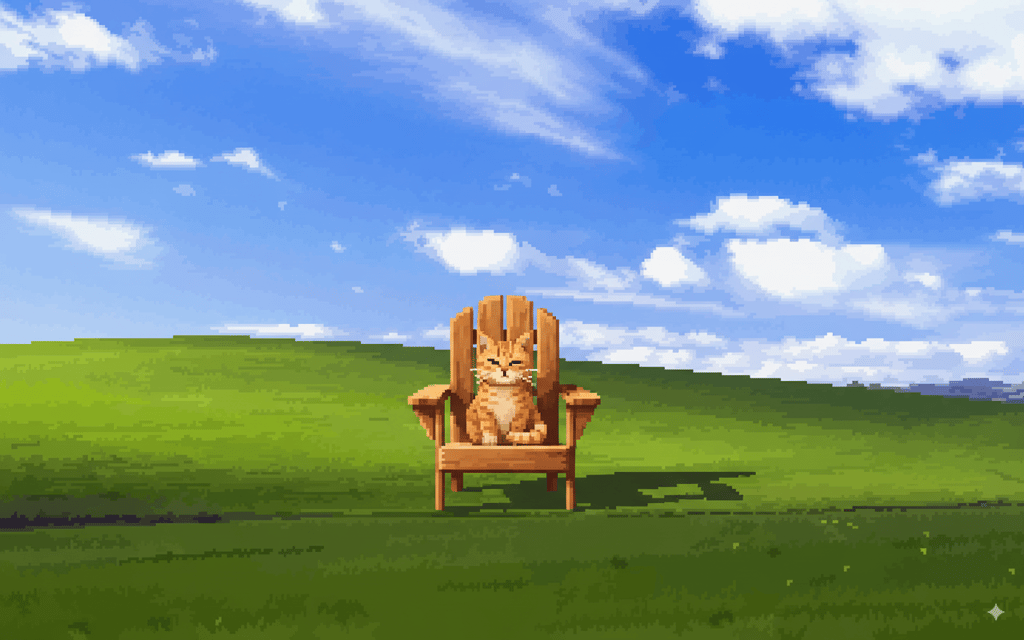
The result was pretty good. The added element was consistent with the pixel art style. Further, I decided to experiment with adding more details. So, next, I prompted the model to give the cat a cowboy hat.
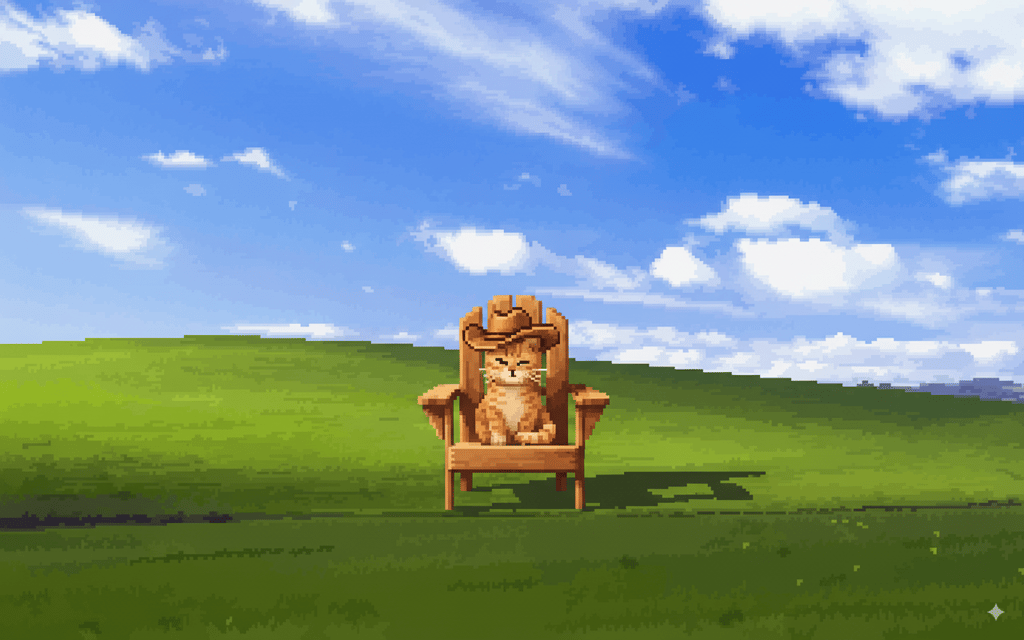
In my opinion, Gemini Nano Banana did a great job adding elements to an existing image. The process was easy and quick, since describing what you want in simple language is all that’s needed to add elements to the image.
Adding elements is a useful feature that enables users to modify, enrich, and blend the images with new objects. All without disrupting consistency and main features of original objects.
Native world knowledge
Next, I chose to test Nano Banana’s ability to generate real-life objects. For this, in the prompt, I asked to generate the Great Sphinx of Giza. I was happy with the result. The image looked good and was pretty accurate.
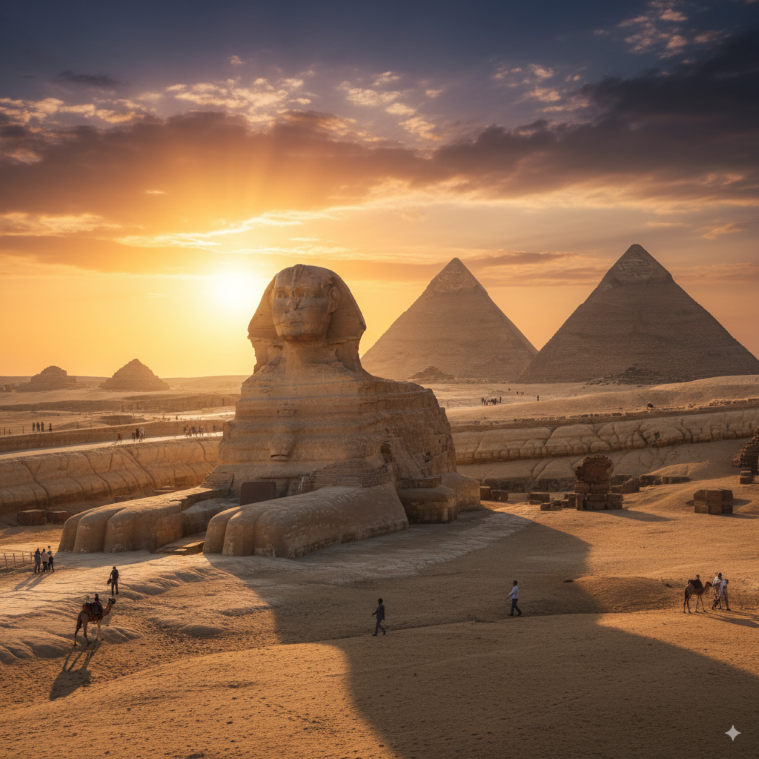
However, I have to note that the output was clearly a more polished version of the Great Sphinx. But there were no additional parts that don’t exist in real life, making the image realistic.
Next, I tried to test a more day-to-day scenario, and the results were disappointing. I asked the model to generate a new image, where a barista is working in a cafe, making coffee and smiling, while a cat is playing with syrup dispensers behind her. Not only did the image look like an animation, but my requests for the barista to be making coffee and the cat to be behind her were ignored.

Also, the image wasn’t as real-life as I wanted. However, people and animals didn’t have any extra limbs or other abnormalities, making it quite realistic. I wanted to see if I could fix the image by adding another prompt. Sadly, it only changed the orientation and the look of the cat. On the bright side, the barista was actually making the coffee this time.

While Gemini 2.5 Flash Image did well in generating some real-life objects, it didn’t do so well with others. Also, when repeatedly prompted to make the image of the barista look more like a photo, Nano Banana returned a pretty cheeky answer, saying that the image is already made in a photorealistic style.
Yet, I do believe that if prompted right, the tool is able to generate a realistic image. This makes it useful for those who need to make creative images that look real and obey logic.
Background changes
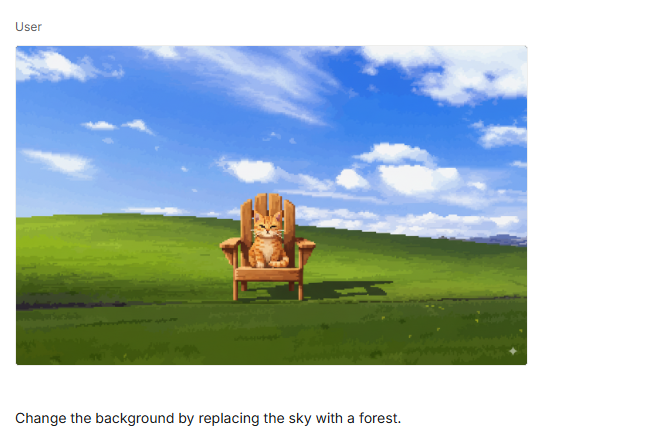
To experiment with background changes, I came back to my first image that used Windows XP wallpaper. I asked Gemini Nano Banana to replace the sky with a forest and keep the cat in the chair that was in the middle of the image. It generated the output in seconds. Since I didn’t provide any additional details, the result was accurate and only had what I asked for.
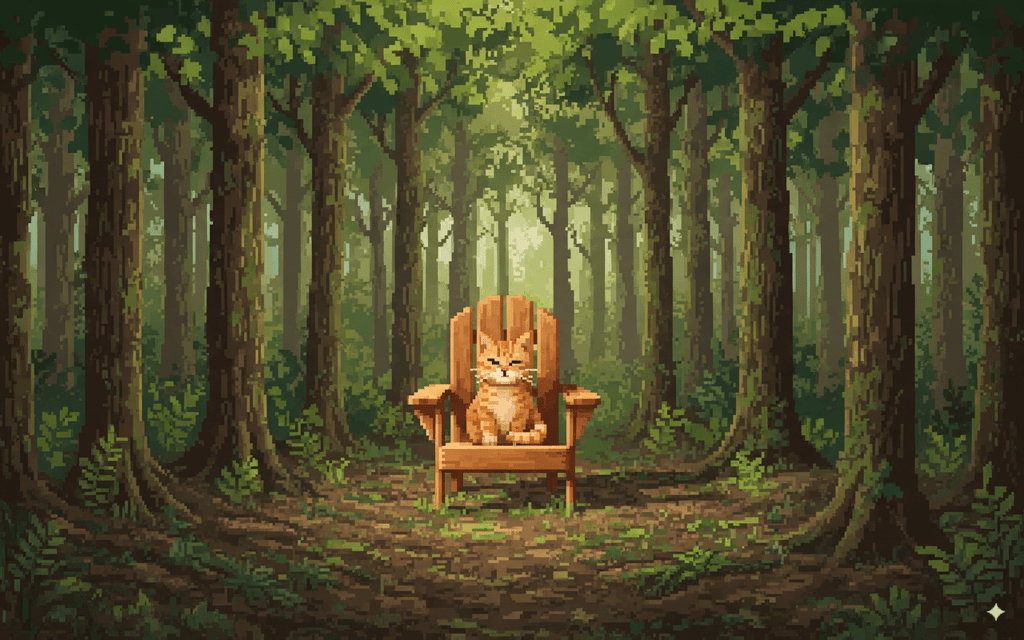
This feature is pretty neat. It can be great for marketing visuals as it can change backgrounds to showcase the product better or enhance the overall look of the scene.
Face retouching
During my testing, Gemini 2.5 Flash Image also proved that it can easily handle everyday photo editing. For this, I used an image of a girl, and prompted the model to make her eyes more open and add freckles to her face.

In a few seconds, Nano Banana returned the result. It did what I asked – now the girl was slightly looking up, having her eyes more open. Also, it added visible freckles to her face.

With this feature, I could easily enhance facial details and experiment with different looks. Therefore, I think it’s a good option for those who want to have their photos polished but don’t have any photo-editing skills.
Scene adaptations
For scene adaptation testing, I asked to change the setting from daylight to evening lighting. The tool did exactly what it was asked to do, leaving me happy with the result.

It’s a very useful feature that allows for the transformation of the mood, background, and style of the image. It makes it easy to repurpose the image and can be particularly useful for social media or marketing visuals.
Remove unwanted elements
For unwanted elements removal, I went with the previously used image of a girl holding a cat. This time, I asked to remove the girl entirely and keep the cat only. Yet again, I had the output generated in several seconds. But this time it did what we usually expect from AI tools – it maintained illogical details.

As you can see, it edited out the girl, but it left her legs, where the cat is sitting. It’s definitely not the result I wanted, and it turned the whole scene pretty gruesome. Also, it added a pillow, which was not in my prompt. What else left me disappointed was that after specifically asking to edit out the legs and remove the pillow, Nano Banana returned completely unchanged output.
However, when it works correctly, this feature could be helpful for removing imperfections from images or erasing objects. So, if you’re working with product photos or social media, you might find it useful.
Multi-image fusion
For the final test, I tried Nano Banana’s capability of multi-image fusion. Much like the removal of elements, it was rather disappointing. I asked to integrate an image of a cow into my previously generated image of a cat sitting on a chair.
It did great cropping out the object of a white background, but in doing so, it also reshaped the project to align with the new image’s dimensions. I asked twice to go back to the old dimensions but it failed to do this.
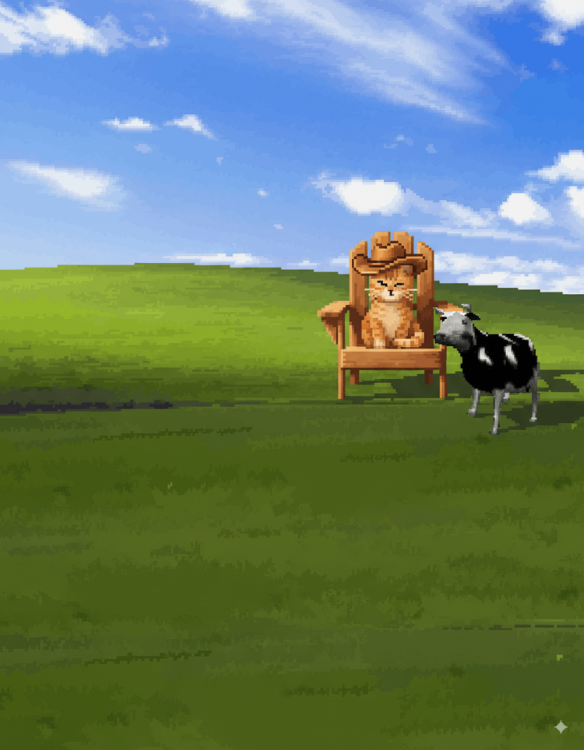
I decided to give this task one more try. So, I asked yet again to go back to the old dimensions of an image. Additionally, I asked to place the cow in the chair next to the cat. It still failed with the dimensions, but it did the rest. However, the cow now seemed newly generated, and not sourced from the initial .jpg.
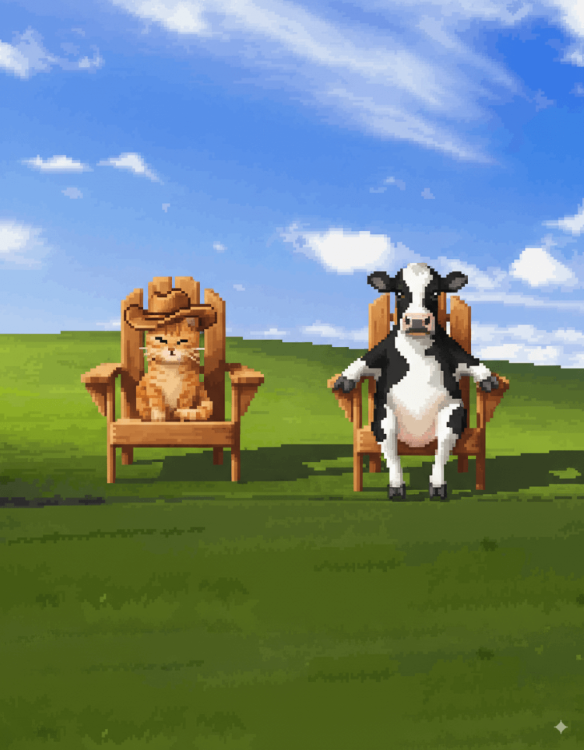
This feature could serve those users who want to combine multiple photos into one. It can help create complex compositions with consistent character composition across images.
Gemini 2.5 Nano Banana pricing
Gemini 2.5 Nano Banana can be used for free, but it has some limitations. While both paid and free users can access advanced image editing features, free-tier users receive a limited number of requests, lower output quality, and lower processing speed.
If you want to avoid the mentioned limitations, you can use a paid plan. Through a Google AI Premium subscription, with the Google AI Pro plan, you can use Nano Banana free of charge for the first year, but later it costs $19.99/month. However, if you use the Gemini API, you’re charged for the number of requests and the complexity of the generation, with a starting price of $0.039 per image.
If you’re a casual user and intend to experiment and learn, a free plan is sufficient for you. For content creators and other professionals who require consistent high-quality outputs and faster processing, it’s better to choose the Google AI Pro subscription. On the other hand, API access is best suited for developers and business users.
How to use Gemini 2.5 Flash Image
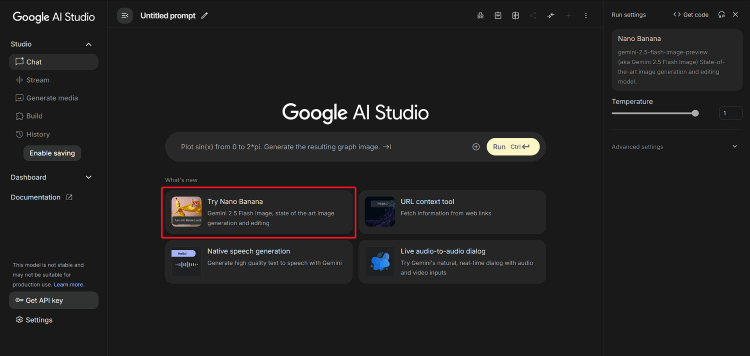
Using Gemini 2.5 Flash Image is a simple process. Follow this step-by-step guide to get started:
-
Open the platform by visiting Google AI Studio or the Gemini app
- Upload an image
- Describe the changes in your prompt
- Review and refine after checking the results; provide additional prompts if further changes are needed
- Download the edited image
Final thoughts
Gemini 2.5 Flash Image Nano Banana is a robust and capable tool that impressed me with its speed and output quality. It generates images quickly and requires almost no time to begin editing or creating new visuals, making it remarkably easy to use.
That said, it does have some drawbacks. Sometimes, it doesn’t follow instructions and can introduce illogical details into an image. Despite that, it stands out for its superior character consistency and remains an excellent option for editing and generating images. Compared to many other AI image creation tools, which still struggle to produce realistic and high-quality outputs, Nano Banana performs noticeably better.
Overall, Nano Banana is an ideal choice for casual creators and social media users who value speed and creativity over absolute precision in their image editing and generation.
FAQ
How much does Gemini 2.5 Nano Banana cost?
For business users, Gemini 2.5 Nano Banana is billed based on tokens, and its price starts from approximately $0.039 per image. While for regular users, it’s available for free as part of Google AI Studio.
Why is it called Nano Banana?
Nano Banana is an unofficial Gemini 2.5 Flash Image name. It was used when developers at Google DeepMind needed a temporary and anonymous name to test the model. This name went viral on forums and social media. As a result, even after the official launch of Gemini 2.5 Flash Image, many platforms continue calling it Nano Banana.
Is Gemini 2.5 Flash Image better than Photoshop or Canva for editing?
Gemini 2.5 Flash Image is considered better than Photoshop or Canva for certain types of editing. Nano Banana surpasses other editing platforms in speed, ease of use, and AI-powered, efficient edits. However, compared to Photoshop, it still lacks pixel-perfect control and precision when editing details.
Can Gemini Nano Banana edit multiple images at once?
Yes, Gemini Nano Banana can edit multiple images at once. It allows uploading and blending, transformation, and style transfer of multiple images at the same time. All of it can be achieved and controlled by prompts.