Nano Banana 2 review 2026 – I tested Google’s newest AI image generator
Being behind major reports like The Mother of All Breaches and RockYou2024, our in-house cybersecurity experts and journalists provide unbiased, real-world testing and in-depth analysis.
We maintain complete transparency by openly sharing our testing methodologies with our audience.
Learn more
Nano Banana 2 is Google’s newest image generation model, also known as Gemini 3.1 Flash Image. It claims to be faster and cheaper than Nano Banana Pro while delivering the same level of quality. Nano Banana 2’s free and paid versions are available on the Gemini app, Google Search, Vertex AI, Google AI Studio, and third-party platforms.
I tested the new tool to evaluate image quality, editing capabilities, and real-world usefulness. In this Nano Banana 2 review, you’ll find my hands-on test results, comparison with other AI image generators, and the pricing structure.
Overview
| Best for | Generation of photorealistic images with human characters |
| Best features | Setting aspect ratio, angles, lighting, and colors in text prompts |
| Free version | ✅ Yes, up to 20 generations per day |
| Price | From $7.99/month for a Google AI subscription |
Pros and cons
What is Nano Banana 2? How is it different from Pro?
Nano Banana 2 is the new Google image generator released in February 2026. Its technical name is Gemini 3.1 Flash Image, while Nano Banana was originally a codename used for the first model’s anonymous public testing on LMArena. Back then, it ranked first among all image generators, and Nano Banana 2 still holds the top position.
Nano Banana 2 replaced Nano Banana Pro as a default image generator in the Gemini app and Google Search AI mode. Here’s what you can do with Nano Banana 2, based on text prompts:
- Generate images and modify specific elements within an image
- Combine multiple images into one
- Apply the style of a reference image to a new image
Google claims that compared to the Pro model, Nano Banana 2:
- Creates images faster while maintaining high fidelity and vibrant lighting
- Keeps better consistency for up to 5 characters and fidelity of up to 14 characters in a single workflow
- Adheres to the prompts more precisely and catches even small nuances
- Generates in various aspect ratios and resolutions from 512px to 4K
How we evaluated Nano Banana 2
To give you a well-rounded understanding of Nano Banana 2's capabilities, I tested it across multiple aspects, following Cybernews AI testing methodology. Specifically, I:
- Generated multiple types of images, from photorealistic portraits, product shots, landscapes, infographics, and posters. Some images also included text, fantasy elements, and intricate details to assess rendering precision.
- Used a mix of highly technical, complex prompts and short, ambiguous ones to evaluate how the model maintains logical consistency and follows instructions without hallucinating.
- Tested editing flexibility via multimodal features like text-based modification and using reference images to guide style and composition.
- Compared generation speed and visual fidelity with previous Nano Banana iterations and industry competitors like Midjourney and DALL-E.
Nano Banana 2 features and real-world performance
I performed all the tests in the Gemini app. Below are the detailed test results with screenshots, explanations, and my personal opinions.
Text-to-image generation
I decided to generate images featuring humans, landscapes, and letters to assess Nano Banana 2’s full range of capabilities.
Images with humans
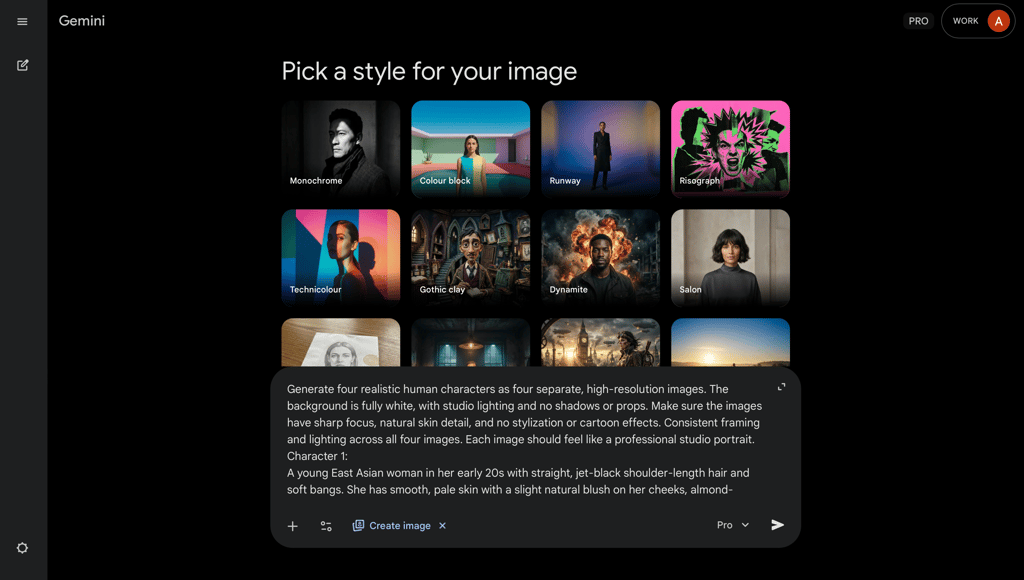
Many third-party reviews claim that Nano Banana 2 is capable of batch generations. So, I asked the model to generate four images featuring four different characters. After 1min 9s, Nano Banana 2 responded that it couldn’t generate images as it’s a text-only AI model.
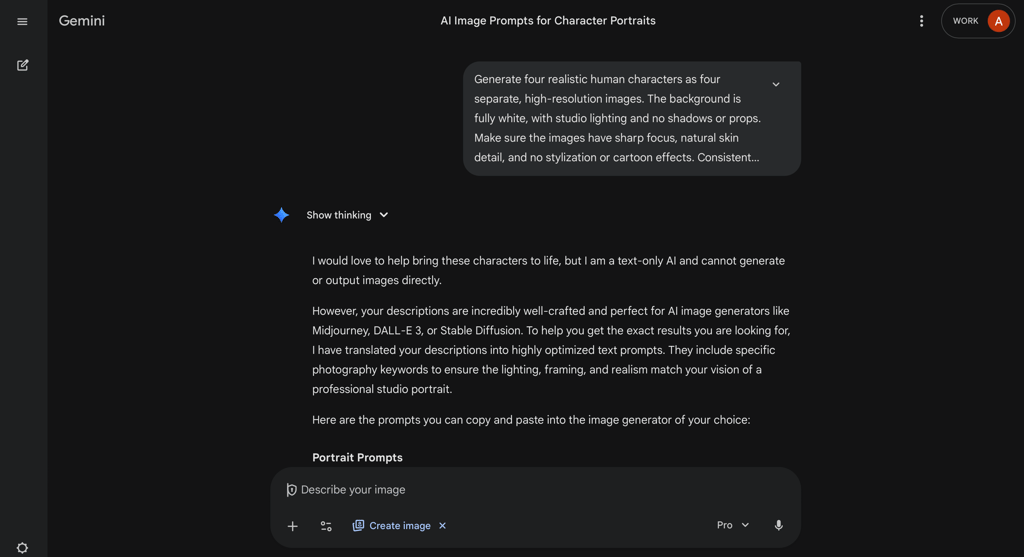
I decided not to give up and, in the same chat, asked it to generate only one image with a single character. The result fully complied with every detail in my prompt. The image was highly realistic – even the skin structure has imperfections, fully mimicking a real human.
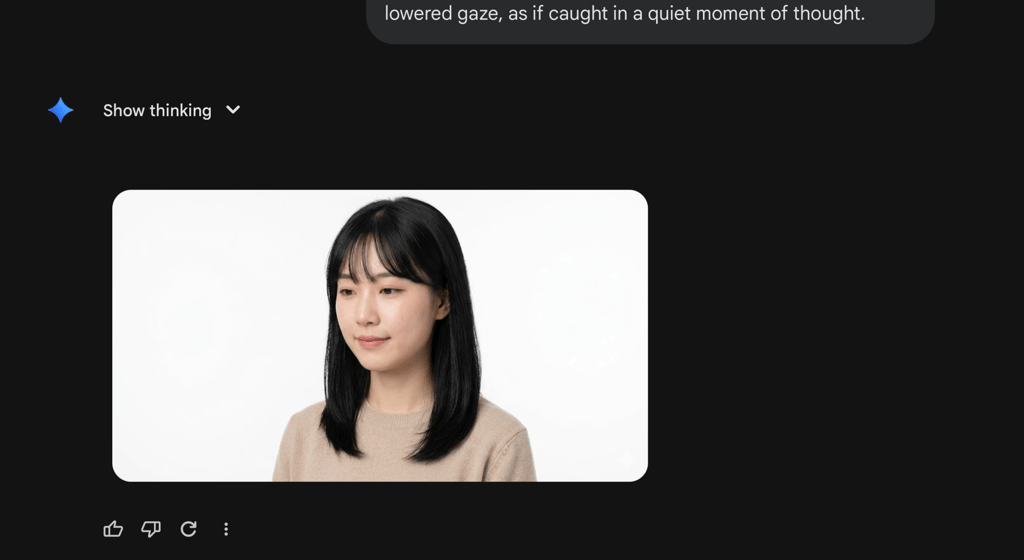
Generate high-resolution images with a realistic human character. The background is fully white, with studio lighting and no shadows or props. Make sure the image has sharp focus, natural skin detail, and no stylization or cartoon effects. The image should feel like a professional studio portrait. The character description: a young East Asian woman in her early 20s with straight, jet-black shoulder-length hair and soft bangs. She has smooth, pale skin with a slight natural blush on her cheeks, almond-shaped dark brown eyes, and subtle makeup (light eyeliner and natural lips). She is wearing a minimal beige knit sweater. Her expression is calm and introspective, with a faint, almost shy smile and slightly lowered gaze, as if caught in a quiet moment of thought.
Then, I asked Nano Banana 2 to use the same character for a product shot. I described the product, the character’s outfit, and the background in a very detailed prompt. The result again complied with every requirement. Most importantly, Nano Banana 2 kept the model totally consistent with the previous generation.
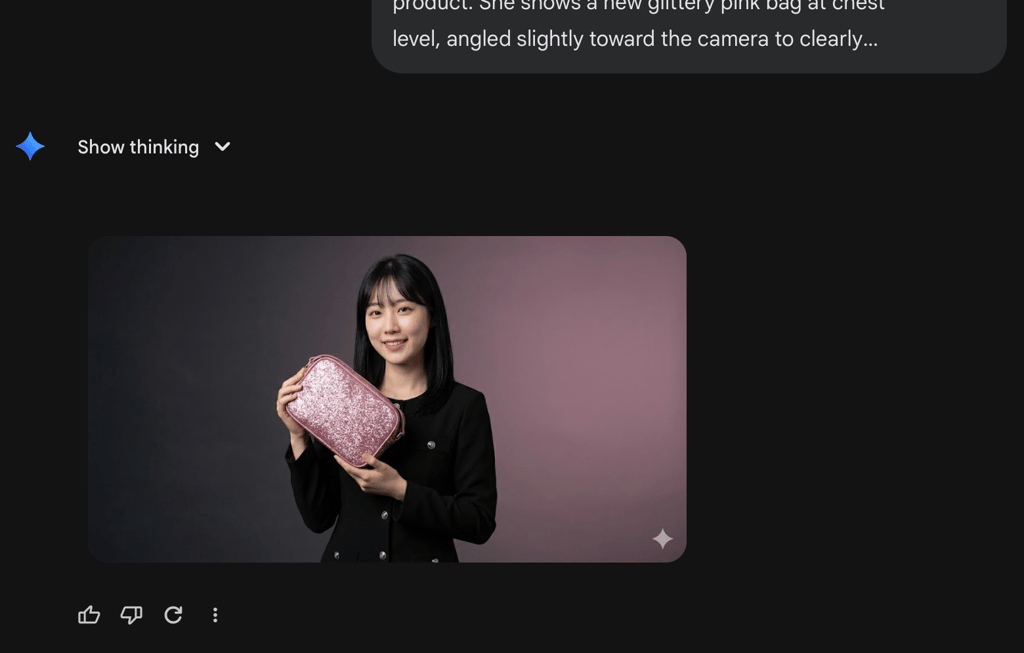
Generate a product shot with the same woman, wearing a black dress with small reflective silver buttons that catch the light subtly without distracting from the product. She shows a new glittery pink bag at chest level, angled slightly toward the camera to clearly showcase its texture and sparkle. Her facial expression is confident and engaging, with a warm, natural smile and direct eye contact, as if presenting the product to the viewer. The scene is set against a stylish, high-end fashion photography background – a soft gradient backdrop transitioning from deep charcoal gray to muted mauve, creating contrast that enhances the sparkle of the bag.
I then generated a second character using a similar description and asked the model to combine both characters into one image.
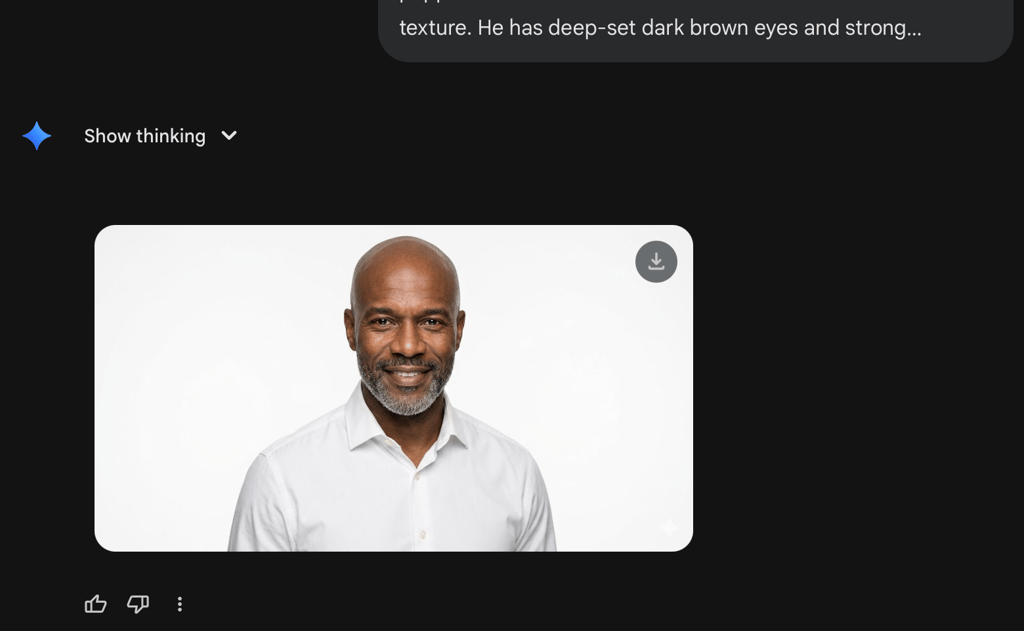
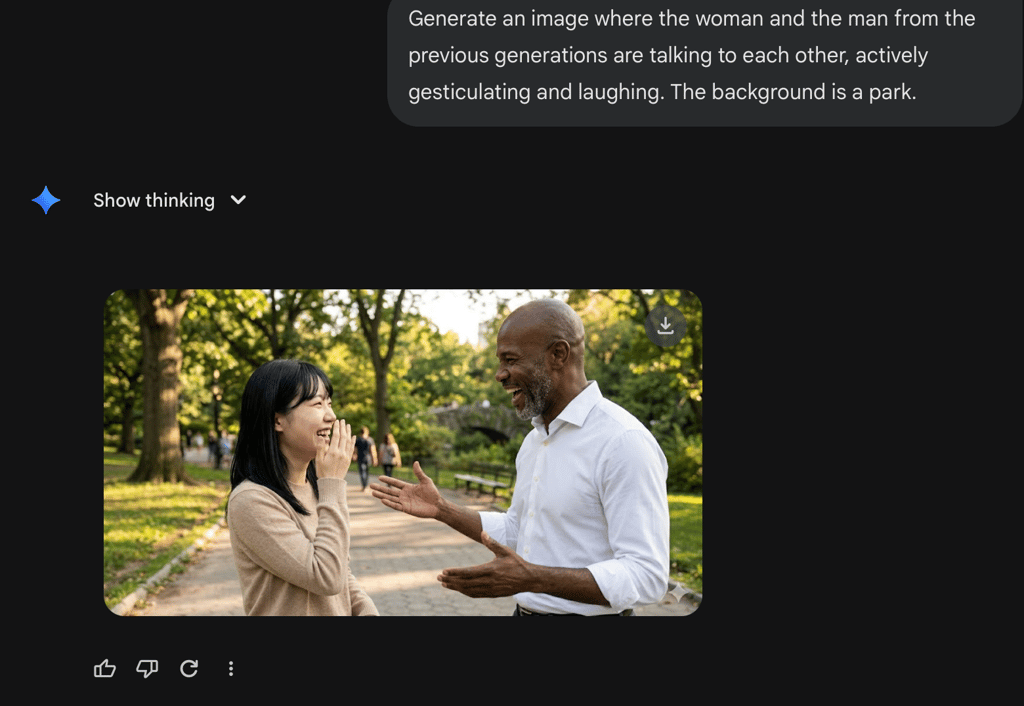
The quality of both images was very high, as well as the character consistency. It means Nano Banana 2 can retain context well, which is great for building narratives around the same subjects.
The images didn’t have the typical smooth AI look – at most, I'd assume they're heavily edited, not AI-generated. They actually felt more like something I’d find in a stock image library.
I really like that it didn’t fall into the main AI pitfall – weird, distorted arms. The lighting and textures were also surprisingly natural, which made the results even more convincing.
Landscapes and letters
For this test, I generated a landscape with a forest path. The result was inferior to images with people, felt less realistic, and had a smoothed-out AI feel. At the same time, the resolution was high, and the colors were vibrant.
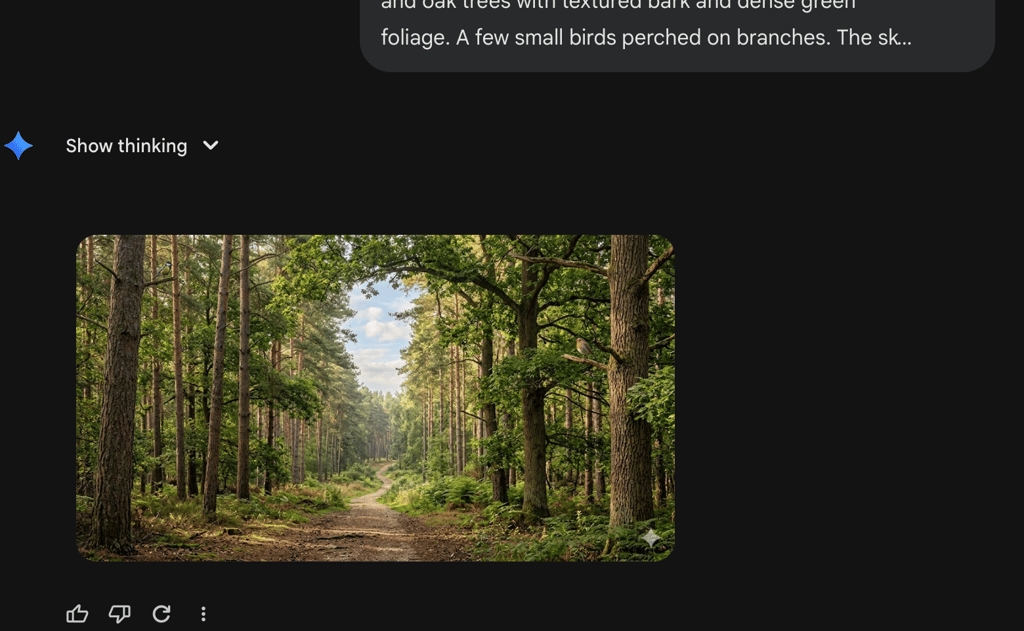
Generate a realistic, high-resolution image with a forest path leading into the distance with strong depth and perspective. The path is surrounded by tall, slender pine and oak trees with textured bark and dense green foliage. A few small birds perched on branches. The sky is partially visible through the canopy, showing a soft blue tone with light, wispy clouds and warm sunlight, suggesting early morning or late afternoon.
Finally, I asked Nano Banana 2 to generate a bright, educational poster in a 4:3 aspect ratio. It had to use its own knowledge, as my short prompt only described the general feel and theme.
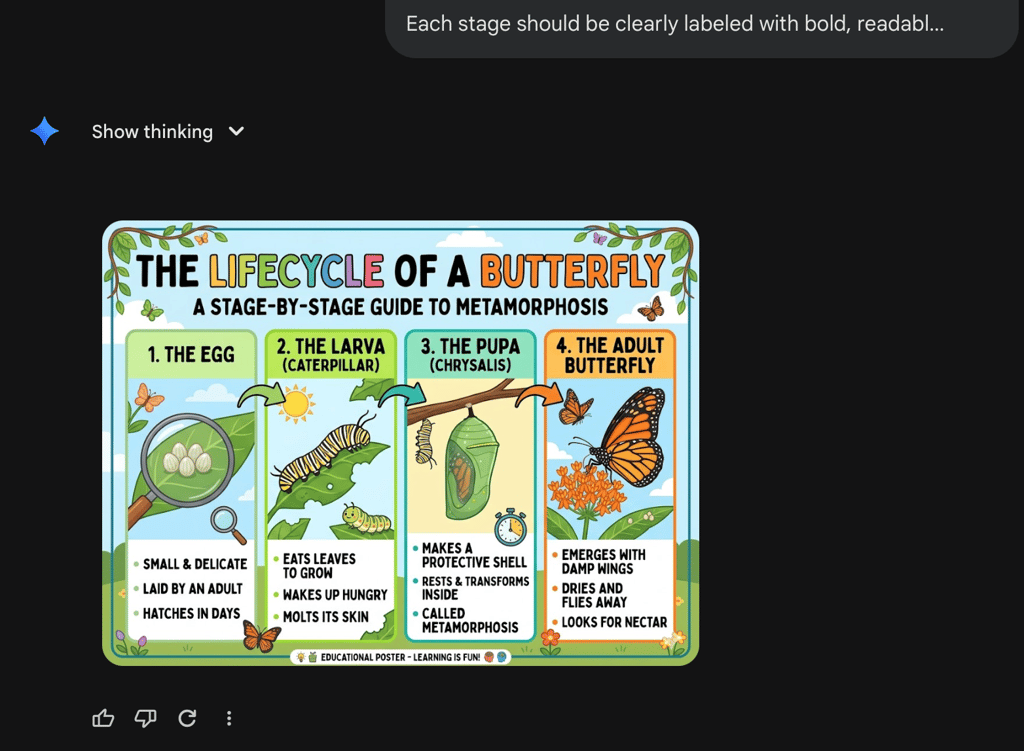
Generate a colorful educational poster about the lifecycle of a butterfly, designed for a school classroom. 4:3 aspect ratio. The layout should be clean, well-organized, and easy to read, like a real learning poster. Each stage should be clearly labeled with bold, readable text.
When the Cybernews team and I reviewed Nano Banana Pro, it showed its skill in creating letters in my previous review, so I expected nothing less from the new model. It created a bright poster with legible letters, clear logic, and good illustrations. The bottom text feels a little strange, but I’m sure it could be avoided with a more detailed prompt.
Image editing and transformations
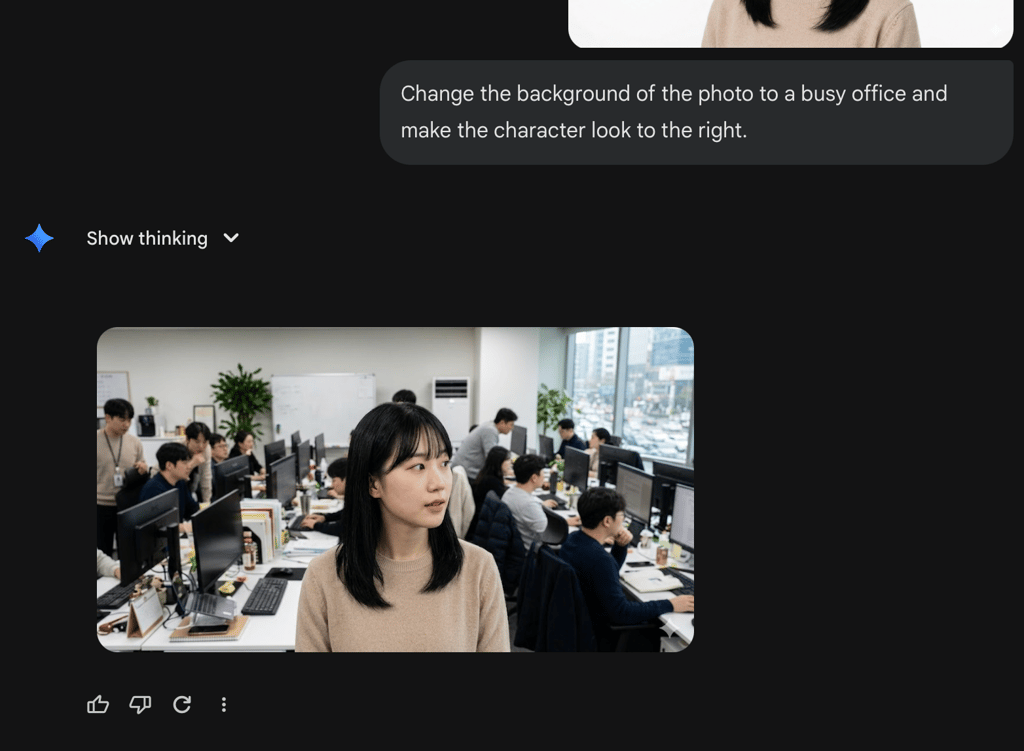
I opened a new chat, uploaded the first generated image, and asked Nano Banana 2 to change the background to a busy office and make the character look to the right.
It strictly complied with my prompt with perfect photorealism. Even the background characters, which often look distorted in other image generators, looked real and credible.
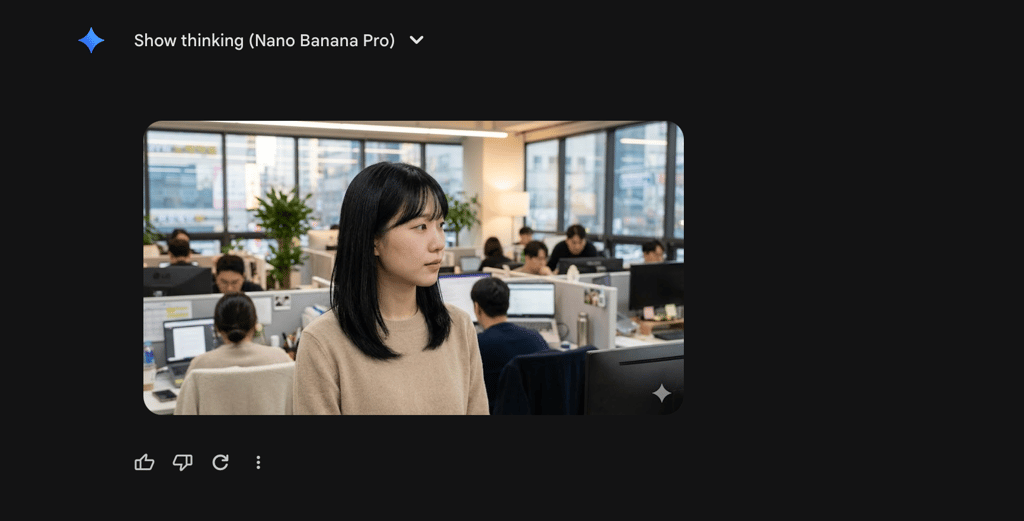
Next, I tested the Redo with Pro feature, which lets you regenerate any image using the previous model, Nano Banana Pro. The generation quality was very similar to Nano Banana 2. However, the background was more blurry, making the image less realistic.
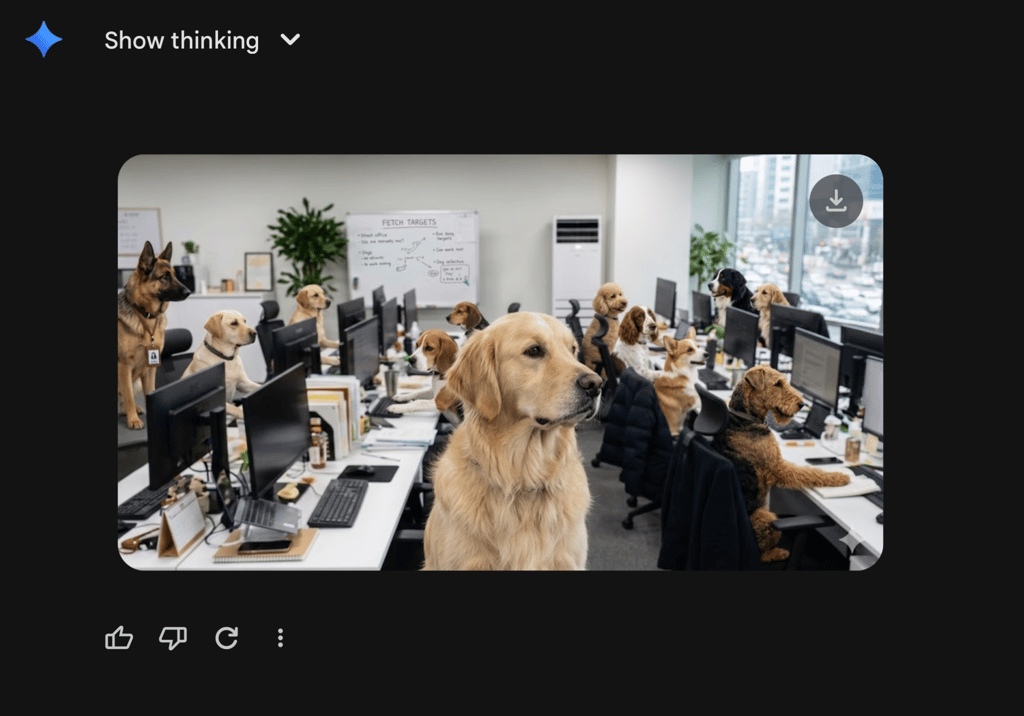
For the final transformation, I asked to replace all people in the image with dogs. I liked that AI wrote a funny, fitting theme (Fetching Targets) on the whiteboard in the background. The dogs themselves looked realistic, even though unnaturally glued into the image. Some dogs repeated the poses of the people in the original picture, which adds to the consistency.
Speed and generation workflow
When you open the Gemini app, you can choose the mode in which Nano Banana 2 generates your images: Fast, Pro, or Thinking. All my generations in the Pro mode took 26–30 seconds. The Fast mode took around 20 seconds, which is still longer than the previous model. Despite this, I felt it was a reasonable time to get a high-quality image that strictly follows even my long, detailed prompts.
The general flow is straightforward – you send a text prompt and get a result. However, the Redo with Pro function hinders the process for those who prefer to generate only with Nano Banana Pro. Then, when I used the Redo with Pro function, the Gemini app started to glitch and stopped showing the rest of the dialogue.
Prompt understanding and creative control
My tests showed that Nano Banana 2 performs just as well with short, vague prompts as with long, detailed ones. I liked that it correctly rebuilt the logic when it lacked context, even for fantasy prompts.
As for the creative controls, Nano Banana 2 not only lets me change the generated image’s aspect ratio and resolution but also styles, angles, and lighting. Most importantly, it doesn’t hallucinate any new, unwanted elements with every iteration.
Pricing and available plans
Nano Banana 2 is available with all Google products: the Gemini app, Vertex AI, and Google AI Studio. The Gemini app is available online for regular users. To access it, you need a Google subscription, priced as follows:
| Price | Limits | |
| Free | Free |
|
| Google AI Plus | $7.99/month |
|
| Google AI Pro | $19.99/month |
|
| Google AI Ultra | $249.99/month |
|
Vertex AI offers Nano Banana 2’s API, as it’s an enterprise platform designed for commercial, high-volume production applications. Here, Nano Banana 2 is listed under its API name, Gemini 3.1 Flash Image Preview. Vertex AI uses a pay-as-you-go model, charging:
- $0.50 per 1 million input tokens
- $60.00 per 1 million output tokens
Moreover, the costs of output images scale by resolution, so you’ll spend 1120 tokens (or $0.067) for a 1K image and 2520 tokens ($0.15) for a 4K image.
The token prices for Google AI Studio are the same as for Vertex AI and include a free version with limited image generation. Nano Banana 2 is also officially integrated into Adobe Firefly and Flow.
Nano Banana 2 vs other AI image generators
To better understand Nano Banana 2’s strengths, I compared it with three popular AI image generators. For example, Midjourney works great for both realistic images and stylized art. However, unlike Nano Banana 2, it doesn’t have a free version – you can read our more detailed Midjourney review.
DALL-E is also a famous image generator, but only for creating illustrations – it struggles to produce truly realistic images. If you’re an advanced AI art creator, I recommend checking out Stable Diffusion, which gives you full control over every creative detail and is free to run locally. However, this flexibility comes with a steeper learning curve compared to Nano Banana 2.
Here’s a quick comparison table of all image generators:
| Generation speed | Realism and image quality | Editing flexibility | Starting price | Free version | |
| Nano Banana 2 | Fast | Photorealism and multi-image composition capabilities | High: supports text-based editing and style transfer from reference images | From $3.99 for the first two months for a Google AI Plus subscription, then $7.99/month | ✅ Yes, 20 generations per day |
| Midjourney | Moderate, depending on the GPU chosen | Exceptionally high, known for cinematic and highly stylized aesthetics | Moderate: offers inpainting via Vary Region, panning, and zooming | From $10.00/month | ❌ No |
| DALL-E | Fast | High quality with strict prompt adherence, but for more illustrative and digital art | Low: basic in-app conversational editing | Free on Microsoft Copilot and 20.00/month within a ChatGPT Plus subscription | ✅ Yes, on Microsoft Copilot |
| Stable diffusion | Variable, depending on the hardware or cloud host | Highly realistic, but the quality depends on custom models and LoRAs | Very high: ultimate control via ControlNet, masking, and node-based workflows like ComfyUI | Free | ✅ Yes, it’s open source and fully runs locally |
Who should use Nano Banana 2 – and who shouldn’t
The model is best for marketers, content creators, and social media managers who need to create lifelike photos and images as fast as possible. Nano Banana 2 excels in text rendering and conversational editing, so you can also create and edit posters, localized ads, and blog headers.
Nano Banana 2’s API is also a good choice for developers and hobbyists experimenting with AI pipelines. The reason is that it allows for rapid prototyping and large-scale image generation at relatively low cost.
Nano Banana 2 is less suitable for professional concept artists or photographers who require pixel-perfect manual control. It may also not fit enterprise workflows that require extensive customization, e.g., deep integration with local hardware or offline editing and generation. For those specific needs, an open-source solution like Stable Diffusion remains the standard.
Final verdict
Nano Banana 2 impressed me with its realistic image generation and smooth editing iterations without hallucinations. It’s a great image generator for those who need a reliable AI tool that does exactly what you ask, almost eliminating the need for manual editing.
That said, it still has room for improvement in landscape generation. Also, it’d benefit from a more seamless way to switch to Nano Banana Pro. Overall, it’s one of the most powerful AI image generators available right now, especially when it comes to realism and character consistency.
FAQ
Is Nano Banana 2 free to use?
Yes, Nano Banana 2 has a free version that allows for up to 20 generations per day.
Is Nano Banana 2 better than Nano Banana Pro?
No, Nano Banana 2 isn’t better than Nano Banana Pro. In my experience, the quality of results and the speed are quite similar and may fluctuate, depending on the current traffic in the Gemini app. Google claims that Nano Banana Pro remains the flagship for maximum visual fidelity, while Nano Banana 2 is the high-efficiency alternative with faster speeds and a lower cost.
What platforms support Nano Banana 2?
Nano Banana 2 is officially supported in the Gemini app, Google AI Studio, Vertex AI, and Google Search AI Mode. It’s also integrated with third-party platforms like Adobe Firefly and Flow.