Best AI note takers (2026)
Being behind major reports like The Mother of All Breaches and RockYou2024, our in-house cybersecurity experts and journalists provide unbiased, real-world testing and in-depth analysis.
We maintain complete transparency by openly sharing our testing methodologies with our audience.
Learn more

An AI note taker is a revolutionary tool that generates summaries, transcribes meetings, and even facilitates follow-ups. This can significantly transform your daily activities, as it helps you save time and be more productive by focusing on more essential tasks.
But as there are many AI note taking apps, I decided to work with the Cybernews research team and review several tools. Thus, I came up with a list of the eight best AI note takers in 2026. So, keep reading to find out more about what they are, how they work, and how to use them.
Disclaimer: A discount code is valid from November 17th to December 1st, 2025
Best AI note takers – shortlist
- Fieldy – overall best AI note taking app in 2026
- PLAUD NotePin – best note taking AI with advanced speech recognition
- ABVPO – best AI note taker for professionals
- RECOLX – best AI note taking app with industry-specific note formats
- IUNSONE – best AI meeting note taker with robust security
- Rpbznr – best note taker AI with offline translation
- jojobnj – best AI note taker with free AI summaries and transcriptions
- E EAZEYAI – best AI meeting note taker with noise cancellation
The best AI note takers compared
Before I delve into my detailed reviews, let’s briefly compare the best AI note takers side-by-side:
| Model | Connection | Microphone | Memory storage | Audio format | Weight | Dimensions | Recording time |
| Fieldy | Bluetooth | Built-in | Unlimited | Not specified | Not specified | Not specified | Up to 72 hours |
| PLAUD NotePin | Bluetooth | Built-in | 64GB | Not specified | 16.7g | 6.30 x 5.51 x 0.75in | Up to 20 hours |
| ABVPO | Bluetooth | Built-in | 64GB | MP3 | 29g | 5.94 x 3.98 x 0.75in | Up to 35 hours |
| RECOLX | Bluetooth | Built-in | 64GB | MP3, WAV | 27.22g | 3.35 x 2.13 x 0.13in | Up to 30 hours |
| IUNSONE | Bluetooth | Built-in | 64GB | MP3, WAV | 30g | 3.14 x 2.17 x 0.14in | Up to 540 hours |
| Rpbznr | USB | Built-in | 80GB | WAV | 249.5g | 0.43 x 2.4 x 4.84in | Up to 8 hours |
| jojobnj | USB | Built-in | 64GB | WAV | 108.86g | 0.27 x 2.2 x 0.27in | Up to 480 hours |
| E EAZEYAI | Bluetooth | Built-in | 64GB | WAV | 49.90g | 0.3 x 2.5 x 3.8in | Up to 50 hours |
The best AI note takers – our detailed list
Now, it’s time to go through my in-depth reviews of the best AI note taker. Let’s see what each of them offers and which is best for your needs:
1. Fieldy – best AI note taker
| Connection: | Bluetooth |
| Microphone: | Built-in |
| Memory storage: | Unlimited |
| Audio format: | Not specified |
Fieldy is my #1 pick. This AI note taker has a bunch of features that make transcribing meetings and generating summaries a breeze. You’ll no longer need to do these tasks manually. But there’s a lot more that makes this software the best in 2026.
The first thing that got my attention was the speaker identification. Due to this, Fieldy can identify up to six different speakers and accurately take notes of the key points of your meeting. Also, unlike other AI note takers, Fieldy has unlimited storage. Thus, you can store all of your transcriptions without worrying about losing some of them due to a lack of storage.
2. PLAUD NotePin – best advanced AI note taker
| Connection: | Bluetooth |
| Microphone: | Built-in |
| Memory storage: | 64GB |
| Audio format: | Not specified |
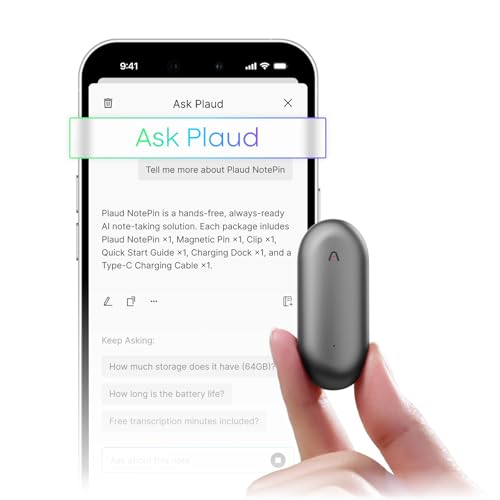
In second place comes the PLAUD NotePin. This AI note taking device offers quick and accurate transcription in 112 languages, generates summaries, mind maps, and to-do lists. Thus, it’s the perfect choice if you want to enhance your productivity.
Although this device utilizes advanced speech recognition, I really liked its ease of use. You’ll only need to click one button to start or stop recording. On top of this, you can enjoy noise cancellation and AI enhancement while recording.
3. ABVPO – best note taking AI for professional documentation
| Connection: | Bluetooth |
| Microphone: | Built-in |
| Memory storage: | 64GB |
| Audio format: | MP3 |
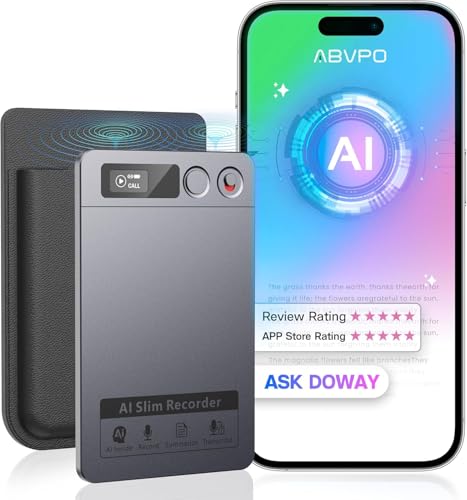
If you’re looking for another great AI note taking app, then you should definitely check out the ABVPO. This device saves all of the audio in an MP3 format, and you can enjoy one year of free premium features.
That said, ABVPO will seamlessly transcribe and summarize content in 152 languages. By utilizing GPT-4, you’ll enjoy natural language processing and get polished transcripts that don’t require any manual editing.
4. RECOLX – best AI note taker with 70+ templates

| Connection: | Bluetooth |
| Microphone: | Built-in |
| Memory storage: | 64GB |
| Audio format: | MP3, WAV |
RECOLX is another of my top picks, which lets you transcribe and summarize your meetings from anywhere. With end-to-end encryption, you can be sure that your files will stay out of access for any third parties.
One of the things I liked the most was the availability of 71 productivity templates. This means that RECOLX has industry-specific note formats and automatically applies them to any type of meeting, from interviews to daily briefings. Plus, you’ll get three months of free usage of the AI pro features.
5. IUNSONE – best AI note taking app with top-notch protection

| Connection: | Bluetooth |
| Microphone: | Built-in |
| Memory storage: | 64GB |
| Audio format: | MP3, WAV |
The IUNSONE AI note taker is my fifth top pick. This voice recording has advanced transcription, which helps it deliver accurate results due to its AI-powered speech recognition.
The voice recorder has a unique power-off automatic file saving function. Plus, it shines with its top-notch privacy features, like recording data encryption, 0.5 seconds to complete cloud backup, and processing data only with your authorization. You can even use the AI translator to communicate with your business partners in another language.
6. Rpbznr – best note taker AI for offline translating
| Connection: | USB |
| Microphone: | Built-in |
| Memory storage: | 80GB |
| Audio format: | WAV |
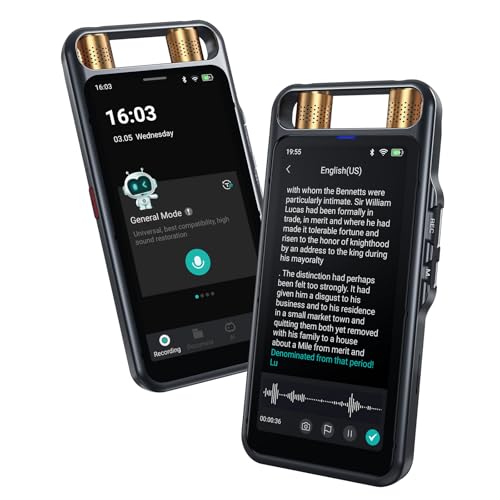
The Rpbznr is a sleek AI note taking device that you can take with you anywhere, even if you’re on a business trip. One of its greatest perks is that it’s compatible with all types of devices, like smartphones, laptops, tablets, and PCs, allowing you to generate notes and summarize meetings with ease.
This AI voice recorder definitely stands out due to its advanced transcription capabilities in 134 languages, both online and offline. Additionally, the device has two directional mics and six omnidirectional ones. So, you can benefit even from its intelligent noise reduction and get clear recordings.
7. jojobnj – best AI note taking software with free AI transcriptions
| Connection: | USB |
| Microphone: | Built-in |
| Memory storage: | 64GB |
| Audio format: | WAV |
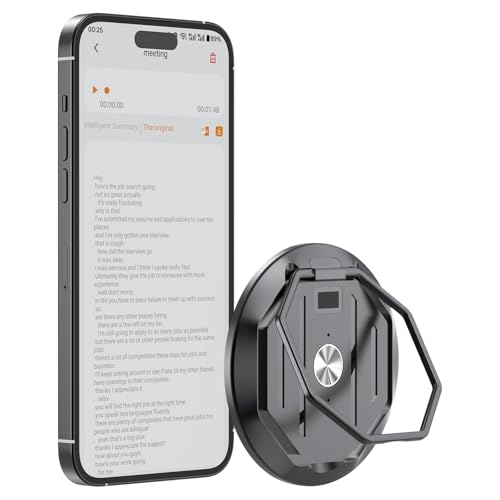
If you want to enjoy real-time voice-to-text transcription with great accuracy and context-aware summarization, then you shouldn’t miss out on jojobnj. What’s more, this device stands out from its competitors because it provides you with free transcriptions and AI summaries.
With support for 152 languages and multiple translation models, you can even benefit from real-time, face-to-face, and photo translation. As a result, this device is perfect for meetings, interviews, business calls, and many more scenarios.
8. E EAZEYAI – best noise-cancellation AI note taker
| Connection: | Bluetooth |
| Microphone: | Built-in |
| Memory storage: | 64GB |
| Audio format: | WAV |
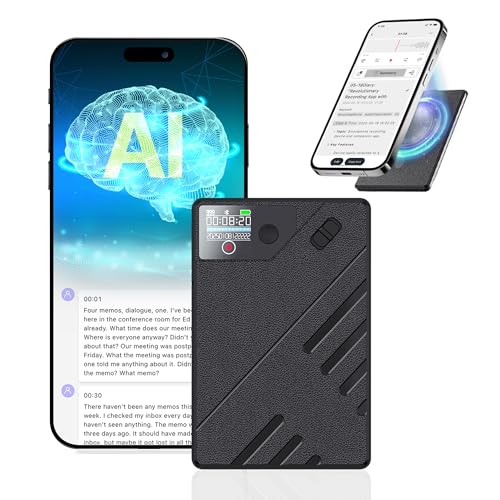
Last but not least on my list is the E EAZEYAI AI tool for taking notes. You can start or stop recording by clicking a simple button or by using the dedicated app. However, there are additional things that make it worth considering.
The E EAZEYAI device has a dual-mode engine and AI noise cancellation technology. Due to this, it delivers clear recordings and captures every word with high precision, regardless of how noisy your environment is. Plus, its 540-hour recording time is definitely not something you get with any AI note taker.
Our methodology for evaluating these AI note takers
In order to pick the best AI note takers, I worked with the Cybernews research team and thoroughly analyzed a lot of tools. That’s why I used various research sources, like user reviews, expert comments, and vendor documentation.
However, before I dive into the evaluation parameters, keep in mind that these findings are based on research, not firsthand usage. Here’s what I focused on:
- Transcription accuracy (40%). First and foremost, I carefully evaluated the transcription accuracy of all the AI note taker models. I made sure each of them supports over 100 languages and provides accurate results.
- Feature depth (30%). Of course, I checked the features as well, but I didn’t stop at only reading what’s listed. I delved deeper into their performance and the benefits they deliver. Also, I made sure the tools have more advanced functionalities, not just basic ones.
- Security practices (20%). I looked for robust security features, like end-to-end encryption and top-notch data privacy. But as you may use the devices for your meeting, I also made sure they’re GDPR/HIPAA compliant.
- Pricing transparency (10%). Lastly, I reviewed prices, mainly looking for hidden fees and any additional charges. Thus, all the models on my list have fair and transparent pricing.
What are AI note takers and do they work?
AI note takers are digital tools that capture, transcribe, and summarize any spoken information.
These tools utilize speech-to-text technology, so they can convert the audio into accurate transcripts. Also, they rely on natural language processing (NLP) that improves the text by summarizing all the key points, highlighting any needed action, and tagging topics. Due to this, AI note takers turn raw conversations into structured notes.
As I mentioned, the core technologies behind the AI note taking tools are speech recognition and NLP. Basically, they work together so they can understand our language. More precisely, the speech recognition identifies any words and phrases, while the NLP analyzes the meaning and context.
Nowadays, you can use AI note takers in different scenarios, from meetings to interviews, lectures, and even brainstorming sessions. Regardless of the usage, these tools save time and enhance your productivity.
Pros and cons of AI note takers
What features should I look for in an AI note taker?
Before you make the final decision, you definitely need to look for a few essentials in an AI note taker. But that’s why I’m here. Let’s go through the key features together:
- Transcription accuracy. You should always check the accuracy of the transcribed speech. To ensure high accuracy, look for a wide language support and multiple accents.
- Platform integration. Make sure you can use the AI note taker with different platforms, including Zoom, Teams, and Google Meet.
- Summaries and action items. The note taker should also be able to make summaries of the meetings. However, also explore whether there are additional features like speaker identification and collaboration tools.
- Privacy and bot‑free operation. Always look for an AI note taker that prioritizes safety. Bot-free options also enhance your privacy, as there’s no third party included in the process.
- Pricing/free plans. Lastly, consider the pricing. This doesn’t mean going for the cheapest device, but the one that offers the best value for your money. Free plans can also come in handy if you like to test the device first.
How to use an AI note taker: step-by-step
Using an AI note taker is pretty simple. You don’t need any significant technical experience. Let’s go through the process and check it out step-by-step:
- Choose the right tool based on your workflow.
- Sign up and set preferences. This refers to selecting your language, speaker detection, or any other settings you’d like to activate, depending on the device you use.
- Start transcription. To do this, you need to upload audio, connect to meeting platforms, or paste audio. Again, this depends on the AI note taker you select.
- Review the notes. Some of the notes may require some additional editing, tagging, or highlighting for future use.
- Export, share, or integrate elsewhere.
Final word on best AI note takers
After thorough researching and reviewing, I picked Fieldy as the best note taker. This tool stands out from other devices due to its various features, multiple language support, and advanced AI speech recognition.
However, selecting the right tool depends on your needs and priorities. These include accuracy, features, price, or flexibility. There are ideal tools for different user needs – you just need to know what you’re focusing on.
FAQ
What’s the most accurate AI note taker?
Based on my research, the most accurate AI note taker is Fieldy. This device utilizes advanced AI models, providing you with great transcribing accuracy in different scenarios. However, you can always check the other tools on my list, as they all have accuracy over 90%.
Can AI note takers handle poor audio quality?
Yes, AI note takers can handle poor audio quality. However, this doesn’t refer to all of them. You need to find a device with noise cancellation functionality, so you can get clear results even in noisier environments.
Do note takers support multiple languages?
Yes, note takers support multiple languages. While the number of languages varies from model to model, they usually understand and work in 100+ languages and accents.
Is my data safe with AI note taker apps?
Data safety is one of the biggest concerns when it comes to AI note taker apps. To ensure your information will stay safe, you need to find a tool that has robust encryption and complies with GDPR and HIPAA laws and regulations.
Are there free note taking tools that work well enough?
Yes, there are free note taking tools that work well enough. However, they may be limited to only transcribing. Also, free apps can endanger your data privacy. Thus, my recommendation is to select a paid AI note taker with a free plan, so you can first test it and see whether it fits your needs.