Higgsfield AI review (2026): testing this cinematic AI video generator
Being behind major reports like The Mother of All Breaches and RockYou2024, our in-house cybersecurity experts and journalists provide unbiased, real-world testing and in-depth analysis.
We maintain complete transparency by openly sharing our testing methodologies with our audience.
Learn more

I recently explored Higgsfield AI, a new player in AI video generation that really emphasizes cinematic realism and fine-tuned camera control.
What stood out to me is how it gives creators more professional-level influence over movement, composition, and storytelling. It goes well beyond the usual prompt-based tools.
In this Higgsfield AI review, I share my hands-on impressions of how well the provider delivers on its promises of video realism. I also discuss Higgsfield’s creative flexibility, shot-to-shot consistency, and overall usability in real production workflows.
Quick overview: Higgsfield AI pros and cons
Higgsfield AI video generator is best for creators, filmmakers, and brands aiming for cinematic videos with realistic motion and strong camera control.
It works great for short-form storytelling, concept visuals, and ad projects, but it’s less suited to users who just need quick social clips or simple text-to-video tools.
What is Higgsfield AI, and what makes it different?
To me, Higgsfield AI feels like a next-gen video generation platform built with filmmakers and visual storytellers in mind. Instead of chasing visual novelty like many text-to-video tools, it focuses on cinematic realism. This means you can expect natural motion, expressive camera movements, and cohesive scene flow.
What really sets Higgsfield apart is the creative control it gives you. Adjusting over camera paths and depth results in videos that feel more like actual movie shots rather than AI experiments.
By merging generative imagery with real-world cinematography, Higgsfield opens up exciting possibilities for storytelling, concept visualization, and branded content creation.
Getting started with Higgsfield AI
If you are new to Higgsfield AI, the first experience can look slightly technical. The platform is built for users who want more control over video output, not just quick text-to-video clips.
Account and setup process. I found setting up Higgsfield AI simple and fast. You can register with your email or log in through a connected account. The onboarding process took me only a few minutes. After logging in, I was asked to choose a plan. There is a free version available, but it is very limited – you can generate one video and one image. This is enough to explore the interface, but serious testing requires a paid plan and credits.
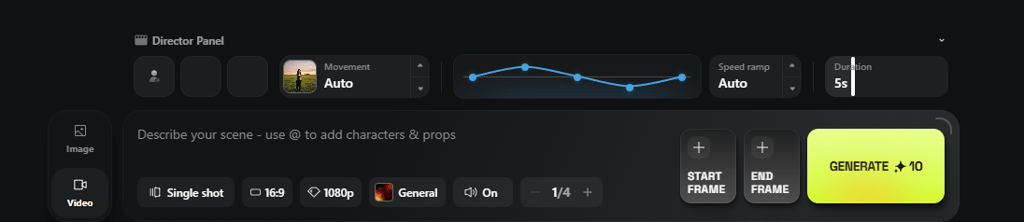
Prompt structure and controls. Higgsfield uses a structured prompt system combined with technical controls. You are not just describing a scene – you are defining how it behaves. You can select a model such as Sora, Veo, Kling, or Cinema Studio, adjust camera movement, set realism and style, and control duration. This approach offers strong creative control, but weak prompts can waste credits quickly.
Time to first usable video. The process is quick. I created my account in a few minutes, wrote a simple prompt in around 5 minutes, and rendering, in my experience, took 2–4 minutes. In many cases, you can get a usable result within 15 minutes.
Learning curve for new users. There is a short adjustment period. The interface is clean, but understanding camera language, prompt precision, and credit management is key. After several generations, the workflow becomes more intuitive.
Core video generation capabilities
Higgsfield AI stands out because it focuses on control, realism, and camera logic rather than just fast text-to-video output. To test these claims, I tried Higgsfield with several prompts – one single-shot video and two multi-shot sequences.
The first was a simple cinematic test: a lone woman on a rooftop at sunset with a slow push-in camera movement and detailed lens and lighting instructions inspired by Denis Villeneuve’s style.
The second focused on human motion and multi-shot consistency: a rain-soaked neon alley combat scene with physical interaction, impact, and handheld camera movement.
The third tested whether Higgsfield could handle grounded fantasy in a realistic way: a hooded mage in rain-slick elven ruins, with environmental effects, shifting light, and magical elements interacting with the scene.
Here are my prompts, if you’re curious:
“A lone woman standing on a rooftop at sunset, wind moving through her hair, city skyline glowing behind her. Slow cinematic push-in camera movement, 85mm lens, shallow depth of field, soft golden hour lighting, subtle lens flare. Moody atmosphere, dramatic tension, high dynamic range, realistic skin texture, film grain, inspired by Denis Villeneuve' style cinematography.”
“Night, rain-soaked neon alley. Medium-close shot at chest height. A lone woman in a soaked black leather jacket stands tense as a man rushes toward her from the mist.
As he grabs her wrist, she pivots sharply, redirects his arm with controlled force, and drives her elbow into his ribs. The impact looks grounded and weighty. He stumbles backward into stacked crates, which collapse realistically.
Tight handheld camera orbit with subtle, natural shake matching body movement. Rain falling steadily, water splashing underfoot, neon reflecting across wet pavement. Realistic human biomechanics, accurate contact physics, no exaggerated motion. Cinematic thriller tone, 35mm lens, medium depth of field, film grain.”
“A wide establishing shot at blue hour in an ancient elven ruin carved into a cliffside above a black pine forest, wet stone glistening after rain.
A lone hooded mage (mid-20s, pale skin, dark braided hair peeking from the hood) in a charcoal cloak with silver thread stands at the edge of a broken archway, holding a faintly glowing crystal orb at waist height.
Camera at chest height, 35mm lens feel, slow dolly forward on a stabilized rig as wind moves the cloak hem and drifting mist curls through the columns; fireflies and tiny ember-like motes float past the lens, and moonlight beams shift as clouds slide overhead. The mage steps down a cracked stair, careful and quiet, raising the orb slightly; its cold cyan light pulses and throws moving reflections across rune-etched stone.
Camera transitions into a gentle lateral track left, maintaining a medium-wide profile angle, slight handheld weight but controlled, as the orb’s light reveals suspended dust and thin ribbons of fog flowing through the corridor. In the background, hanging vines sway and distant trees ripple with wind; the ruin’s shadows deepen and stretch as the moon emerges from behind a cloud.
A closer shot from behind the mage’s shoulder at eye level, 50mm lens feel, as the orb flares brighter and runes ignite along the wall in sequence, like a fuse traveling through carved lines.
The mage’s breathing becomes visible in the cold air; their fingers tighten around the orb and tremble slightly. Camera performs a slow orbit clockwise, tightening into an intimate three-quarter close-up as the rune-light crawls across the stone and reflects in the mage’s eyes; fog thickens, swirling faster as if pulled by the magic, and loose ash-like particles lift from the floor and spiral upward. The magic settles into a steady glow and a hidden stone door grinds open a few inches, spilling warm amber light that contrasts the orb’s cyan. The mage lowers the orb, shoulders relaxing a fraction, and takes one cautious step.”
Cinematic camera movement and scene control
I tested Higgsfield mostly in Cinema Studio mode. For the single-shot rooftop prompt, I asked for a slow dolly in with an 85mm lens and shallow depth of field. The result was surprisingly good. The push-in felt natural, not like a zoom. The scene had depth. The skyline glowed softly behind the subject, and the camera movement looked smooth, not random.
With the multi-shot alley fight, I let the model design most of the camera work, but I also experimented with tracking, orbit, and push-in variations. Transitions between shots were smooth. The handheld feel matched the body movement quite well. There was a subtle shake, but it did not feel artificial.
The fantasy ruins prompt was more complex. The dolly and tracking moves were there, but two shots ended up with very similar camera movement. It is hard to say if that was a limitation of the model or the way I structured the prompt. Still, the overall motion felt cinematic.
Compared to other tools I tested – including Kling AI, Grok, and Veo – Higgsfield delivered the most balanced result in terms of realism and camera control. All of them understood the dolly in instruction, but Higgsfield handled depth and movement more naturally.
Visual quality and realism
In the rooftop test, facial detail stood out immediately. I always check the eyes first when testing an AI video. Here, the subtle sun reflections looked like something a real camera would capture. The skin texture was not overly polished. There was a light imperfection, which helped the realism.
By contrast, Veo’s output looked too perfect. The reflections in the eyes felt artificial, almost mirrored. Kling did not really attempt nuanced eye reflections. Grok also leaned toward an overly clean look. Higgsfield felt closer to real cinematography.
The alley fight with Higgsfield revealed some limits. At normal speed, the scene looked solid. When paused frame by frame, issues became clear.
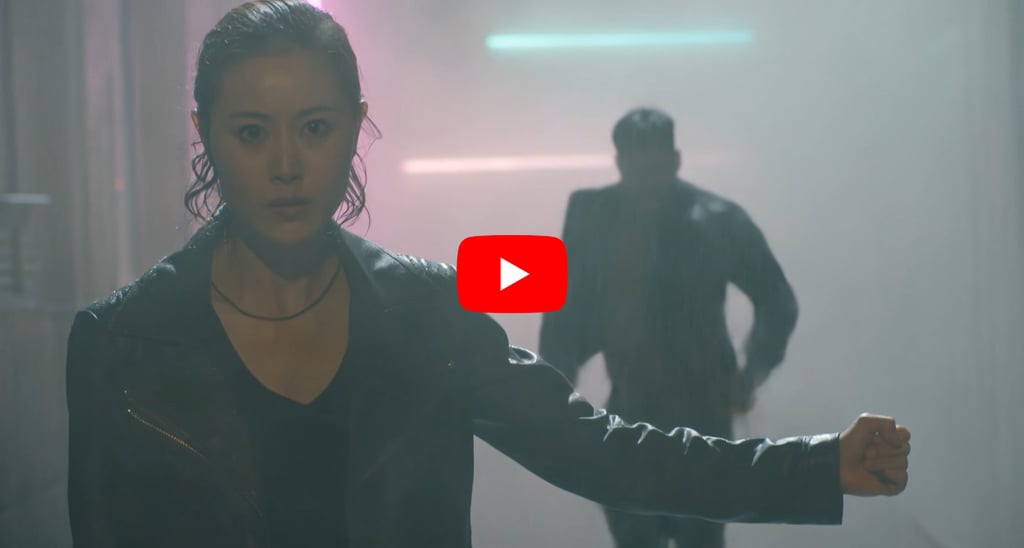
At first, the woman's position felt off. Then, the collapsing crates broke in unrealistic ways. Some pieces disappeared, others changed proportions. There were also continuity problems. In one moment, the attacker grabbed her wrist. In the next shot, the strike came from a different angle with inconsistent arm positioning. The final fall into the crates lacked a clear force transition.
The fantasy scene looked visually decent. The lighting contrast between the cyan orb and warm door glow worked well. But character movement felt off. The mage’s walk cycle looked unnatural, which made the whole scene feel slightly strange.
Overall, it did feel cinematic. Only when analyzing closely did the AI artifacts become obvious.
Prompt control and customization
My prompts ranged from 55 to 332 words. The shorter rooftop prompt worked extremely well. The longer, structured combat and fantasy prompts showed that complexity may increase the risk of inconsistency.
Small wording changes made a difference when recreating videos. In the fight scene, I clarified hand position and strike direction. After adjusting the phrasing, Higgsfield generated more varied camera movement and a more logical transition from impact to falling crates. The flow improved. However, the final frame still broke immersion with a distorted leg on the attacker.
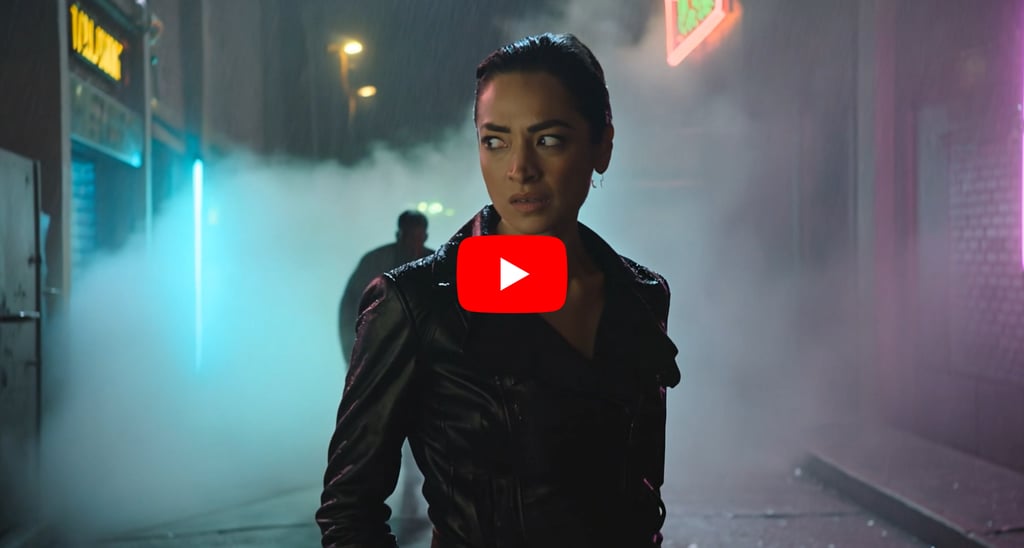
Camera instructions and motion cues had the biggest impact. Realism cues helped, but they did not fully prevent biomechanical errors. Duration also mattered. Shorter sequences were easier for the model to keep coherent.
At times, I found myself guessing what I would get next, rather than controlling the scene. To reduce that, I split the fight into separate shots and used character images from Pexels to maintain consistency. I generated the first scene successfully, but after that, the system didn’t allow further generations even though I still had credits. That limited deeper structured testing.
Image-to-video and scene consistency
I tested image-to-video in my later experiments using reference images for character consistency. The model did replicate the characters quite well in the initial result. Unfortunately, I could not fully stress-test the workflow due to generation limits.
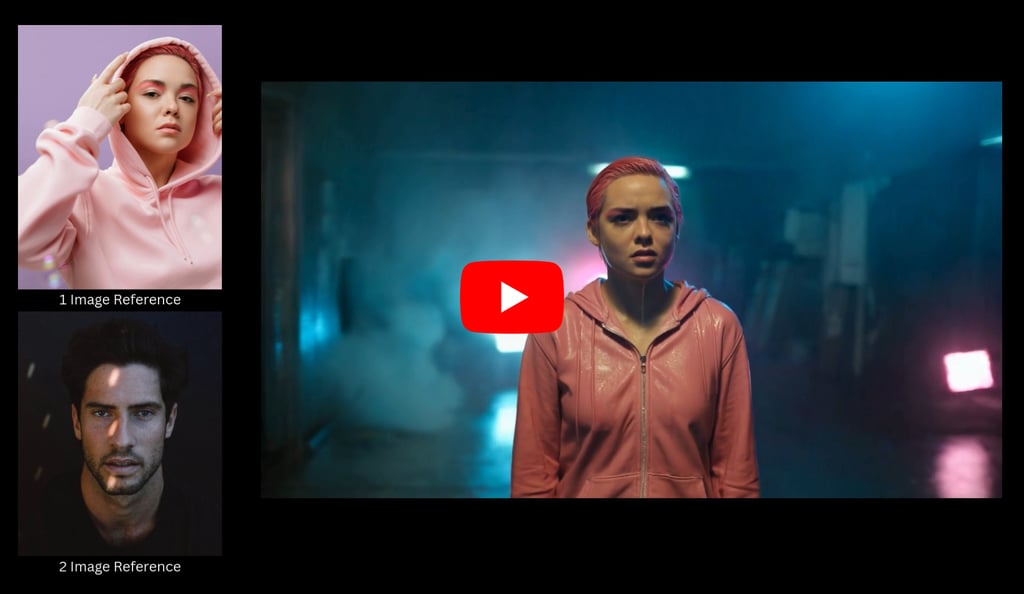
As an alternative, I explored the AI influencer creation mode. Instead of fully prompting, I designed a character using predefined features. I then applied one of the built-in motion templates – a viral TikTok-style dance.
What stood out was the imperfection. The model showed slightly uneven teeth and small skin blemishes. Those details made the character feel more human. In many AI systems, faces look overly polished and synthetic. Here, the subtle flaws added credibility.
In terms of core video generation capabilities, Higgsfield performs strongly in cinematic framing and atmosphere. However, it still struggles with complex physical interactions and long multi-shot continuity. But for short, stylized sequences with controlled motion, it delivers visually convincing results that stand out in today’s AI video landscape.
Video quality testing: strengths and weak spots
After testing several different scenarios, I started thinking more strategically about where Higgsfield actually performs best and what should be avoided when writing prompts.
Best-performing scenarios
From my testing, Higgsfield performs strongest in short, cinematic shots with controlled movement. The single-shot rooftop scene is a good example. A slow dolly in, shallow depth of field, golden hour lighting – all of it came together naturally. The camera movement felt intentional, not mechanical. Depth looked real. The subject separation from the background was convincing.
I also noticed that Higgsfield’s Cinema Studio mode handles emotional close-ups particularly well. Subtle facial expressions, especially sadness and crying, are rendered more convincingly than high-action sequences. Tear buildup, soft eye reflections, and restrained micro-expressions feel more natural when the scene is intimate and tightly framed. Emotional stillness appears to be one of the model’s stronger areas.
Another clear use case is short-form advertising content. Higgsfield feels particularly well-suited for short ads, especially in fashion, beauty, or lifestyle categories. When the focus is on atmosphere, product presence, and controlled motion rather than complex action, the results look premium. Lighting, depth of field, and subtle camera movement create a polished commercial feel without requiring heavy physical interaction.
In short, focused sequences with clear visual priorities deliver the most consistent results. When the scene is built around mood, framing, and light rather than heavy interaction, the output looks polished and social-media ready.
Common limitations
The weaknesses become visible once motion complexity increases. For example, in the alley fight sequence, the scene looked solid at first glance. But frame-by-frame review exposed broken physics. The crates collapsed in unrealistic ways. Some elements disappeared or changed proportions mid-motion.
So, when working with Higgsfield, I would recommend having these in mind when creating:
- Avoid complex multi-character scenes in a single shot. Fast physical interactions increase the risk of broken continuity and unrealistic impact transitions.
- Avoid scenes that depend heavily on realistic physics. Collisions, falls, or destruction moments can break continuity and reduce realism.
- Avoid relying on precise biomechanics. Arm positioning, strike direction, or leg placement can shift between shots. Limb distortion becomes more noticeable in action-heavy scenes.
- Avoid long, uninterrupted action sequences. The longer the clip and the more sustained the movement, the higher the chance of instability.
- Avoid stacking too many simultaneous actions in one prompt. When multiple movements and physical reactions happen at once, coherence can degrade.
- Avoid assuming identical results across multiple runs. More complex prompts can produce noticeably different interpretations of character behavior or camera movement.
- Avoid building entire sequences in one generation. Breaking scenes into controlled shots improves consistency and reduces variability.
In short, Higgsfield handles mood, framing, and controlled motion better than high-precision physics or sustained action choreography.
Pricing, credits, and usage limits
Higgsfield offers four main plans: Basic, Pro, Ultimate, and Creator. The Basic plan starts at $9.00 per month and includes 150 monthly credits, which equals around 75 Nano Banana Pro generations, roughly 15 Kling 3.0 videos, or about 10 Cinema Studio videos, in my case.
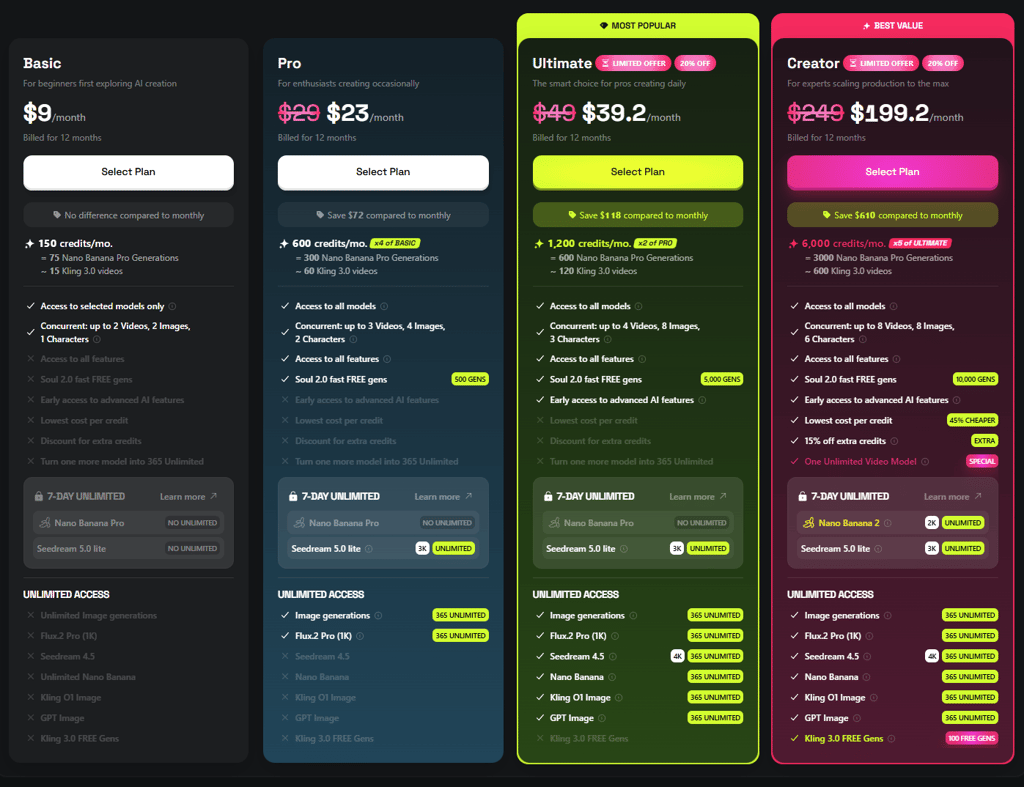
I tested the platform using the Basic plan. In my experience, 150 credits are enough for basic experimentation and short tests. However, when aiming for a polished result, you often need to regenerate scenes multiple times to fix motion issues, improve continuity, or adjust prompts. Credits can run out quickly in that process.
If you plan to refine shots, test variations, and iterate toward a more cinematic outcome, the Basic plan feels limiting. It works for exploration, but serious creation requires a higher tier.
What users are saying about Higgsfield AI
User sentiment around Higgsfield AI is clearly divided. On one side, many users describe it as a convenient all-in-one creative platform for AI image and video generation. Reviewers on platforms like Trustpilot and G2 appreciate the intuitive interface and the ability to access multiple models in one place.
Creative hobbyists, storytellers, and social media creators often highlight how quickly they can produce cinematic visuals without switching between different tools. Some users also mention responsive customer support and a broad feature set that encourages experimentation.
However, criticism is just as visible. The most common complaint centers around marketing and subscription terms, particularly plans advertised as “unlimited” that later turn out to be restricted. Several users report confusion around feature caps, subscription changes, or cancellation processes.
Technical concerns are also frequently mentioned. These include slower generation times, inconsistent model performance, occasional bugs, and outputs that don’t always meet quality expectations. Some reviewers describe the platform as feeling slightly fragmented rather than fully seamless.
Overall, Higgsfield appears to appeal strongly to creators who value convenience and experimentation, but expectations around transparency, performance stability, and subscription clarity play a major role in user satisfaction.
Higgsfield AI vs other AI video generators
Higgsfield positions itself as a cinematic-first AI video tool, and that’s where it performs best. Compared to Kling, Veo, Runway, Pika Labs, Luma AI, and OpenAI’s Sora, it sits somewhere in the middle – visually strong, accessible, but not yet dominant in complex motion.
In terms of cinematic quality, Higgsfield excels in short, controlled shots with strong depth of field and emotional close-ups. Kling delivers sharp realism but can vary across runs. Veo and Sora demonstrate extremely polished, high-end visuals in demos, especially for longer sequences, though access is limited. Runway produces commercial-ready results with solid consistency, while Luma AI stands out in realistic motion and spatial coherence. Pika Labs focuses more on fast, creative, social-style outputs.
For control vs automation, Higgsfield offers a balanced approach. It responds well to camera instructions like dolly or orbit, while still automating scene composition. Runway provides more timeline-style creative control. Pika and Veo lean more toward automation. Sora appears highly automated but narratively advanced in demos.
Regarding accessibility and pricing, Higgsfield is publicly available with subscription tiers, though lower plans can feel restrictive when iterating. Runway, Luma, and Pika are also widely accessible. Kling can be region-restricted. Veo and Sora remain limited.
| Platform | Cinematic quality | Control level | Motion consistency | Accessibility | Premium pricing |
| Higgsfield AI | Strong in short cinematic shots | Balanced | Stable in simple scenes | Public | From $9.00/month |
| Kling AI | High realism | Moderate | Variable | Limited regions | From $6.99/month |
| Google Veo | Very polished (demo level) | Highly automated | Strong in demos | Limited | Not widely available |
| Runway (Gen-3) | Commercial-ready | Strong control tools | Good overall | Public | From $12.00/month per user |
| Pika Labs | Creative, social-focused | More automated | Good for short clips | Public | From $8.00/month |
| Luma AI (Dream Machine) | Realistic motion | Moderate | Strong spatial logic | Public | From $23.99/month |
| OpenAI Sora | Advanced cinematic storytelling (demo) | Highly automated | Very strong (demo) | Limited | From $8.00/month |
Who should use Higgsfield AI
Not every AI video tool fits every workflow – and Higgsfield is no exception. After testing it across different prompt styles and scene complexities, it became clear that this platform shines in very specific situations.
Higsfield is best for:
- Creators who want cinematic visuals without a full film crew – think eye-catching clips that look professionally produced.
- Marketing and branding teams aiming to level up their visual content for campaigns, ads, and social channels.
- Teams or individuals focused on short-form video projects – TikToks, Reels, YouTube Shorts, promos, trailers, and highlight reels.
Higgsfield is not ideal for:
- Long-form videos – if you’re planning full episodes, tutorials, or feature-length content, Higgsfield isn’t built for that.
- Casual users who just want a simple, quick tool with no learning curve – this one requires creativity and some investment of time.
- Budget-only workflows – it’s powerful, but that comes with a price tag that might not make sense for purely cost-driven projects.
Final verdict
Higgsfield is worth the money, but only if you know what you’re signing up for. Higgsfield isn’t a one-size-fits-all video generator. It’s a creative tool that shines when you want cinematic, stylized visuals without hiring a full production crew. But it’s not perfect – and in some cases, it might not be the right choice at all.
If your goals are about high-impact short clips, polished branding content, and pushing visual boundaries with AI, Higgsfield delivers something few competitors do right now. But if you’re after long-form storytelling, ultra-simple tools, or strict budget efficiency, you’ll hit limitations.
FAQ
What is Higgsfield AI used for?
Higgsfield AI is used to generate cinematic-style videos from text or image prompts. It’s mainly designed for short-form creative content such as social media videos, ads, branded visuals, and visually stylized storytelling projects.
Is Higgsfield AI free?
Higgsfield offers a limited free tier with a set number of credits, which is enough for testing. However, if you want higher output quality, more generations, or commercial-ready usage, you’ll need a paid plan.
How long can Higgsfield AI videos be?
Higgsfield is optimized for short clips rather than long-form content. Individual videos are typically only a few seconds long, and longer sequences need to be created by stitching multiple clips together.
Can Higgsfield AI be used commercially?
Yes, Higgsfield AI can be used for commercial projects under paid plans. This means you can use generated videos for ads, marketing campaigns, and branded content.