Google Veo 3 Review: What We Think of This AI Video Generator?
Being behind major reports like The Mother of All Breaches and RockYou2024, our in-house cybersecurity experts and journalists provide unbiased, real-world testing and in-depth analysis.
We maintain complete transparency by openly sharing our testing methodologies with our audience.
Learn more-

-
Contribution by
Šarūnas Karbauskas



Google Veo 3 is one of the most advanced AI video generation models to date. While previously its availability was rather limited, now Google Veo 3 is accessible globally on Google Cloud’s Vertex AI platform.
Since its launch on May 20th, 2025, we’ve had enough time to test it and compare it with the previous models, Veo 1 and 2. And the difference is really noticeable. Unlike earlier models, Veo 3 stands out with its exceptional dubbing, lip syncing, and realistic conversations.
However, it doesn’t come without flaws. In this Google Veo 3 AI video generator review, we tested the model and compared it to alternatives currently available on the market.
Quick overview of Google Veo 3
Google Veo 3 is an advanced AI video generator that can quickly create a video from a text-based prompt or an image. The generated videos closely match the prompt, and it makes adding music or sound effects surprisingly simple. It can be a useful tool for streamlining the creative process of clip-making for newcomers and professionals alike.
During our testing, Google Veo 3 stood out in how well it handled prompts that had more space for interpretation. The tool was able to create videos with natural movement in realistic-looking environments.
Our experience using Google Veo 3 was generally positive. The results felt artistic and creative. That said, Veo 3 is not a perfect tool. When tasked with the video creation requiring precision and controlled shots, it struggled with consistency and details. Another of its drawbacks is the pricing. Its entry price is generally higher than that of the competitors.
Nonetheless, if your goal is to create visually rich and prompt-accurate videos with minimal manual input, Google Veo 3 is a capable tool.
| Release date: | May 20th, 2025 |
| Core features: | Lip syncing, realistic speeches, music integration, and fast processing |
| Clip length: | 8 seconds |
| Accessibility: | Can be accessed with Google AI Pro or the Ultra plan |
| Pricing: | From $37.50 to $199.90 a month |
| Best for: | Generating short, realistic videos |
| Main drawbacks: | Prompt adherence and physics (depicting a person falling down or playing sports) |
Google Veo 3: pros and cons
It’s essential to understand the strengths and weaknesses of Veo 3 before deciding if it’s the right tool for you. Also, it allows for easier comparison with other AI video generators. For this reason, we’ve listed the pros and cons of using Veo 3 below.
What is Veo 3?
Veo 3 is a generative AI video tool developed by the leading AI lab, Google DeepMind. Veo 3 was released on May 20th, 2025 – a year after launching the first model, Veo 1. It’s the most capable and developed AI video generator out of 3, offering high-quality sound effects, synchronized audio, and dialogue. These features make Veo 3 stand out from the previous models due to increased realism and quality of the videos.
Veo 3 is a part of the Gemini ecosystem, which allows for smooth integration across other Google platforms like Workspace, YouTube, and Cloud. This collaboration makes Veo 3 accessible globally and enhances its functionality through continuous updates released across various Gemini tools.
Google Veo 3 key features and capabilities
Google Veo 3 is similar to other AI video generation tools, meaning it enables you to create elaborate videos out of simple prompts. However, since this is the third iteration of this service, it is much more refined than the previous versions and comes with some exciting new features.
Here’s a rundown of everything that Google Veo 3 is capable of:
- High-quality video generation. The service can create videos of up to 8 seconds in 1080p full HD quality, which is a significant improvement over previous versions.
- Flexible video formats. You can adjust the aspect ratio and other technical details of the service’s output, allowing you to create clips that are immediately suitable for your use case.
- Synchronized video and audio generation. Google Veo 3 natively creates videos with audio that’s in perfect sync with the visuals, thus eliminating the need for additional audio editing and post-production. This includes music, dialogue, and background noises.
- Text to video generation. The service can create top-quality videos out of simple text prompts. You can describe every little detail yourself, or let the system fill in the gaps automatically.
- Image to video generation. You can bring any picture or image to life using Google Veo 3. The service will automatically create motion and sound to create a high-quality video out of an image.
- Intuitive user interface. Google Veo 3 is easy to use for casual users who are new to AI video creation. Meanwhile, experienced professionals will appreciate the platform’s extensive customization capabilities and developer integrations.
Trying out the Google Veo 3: How to use it?
We teamed up with the Cybernews research team to test Google Veo 3’s capabilities for ourselves. Our goal was to evaluate the service’s overall ease of use, creative potential, and the quality of its outputs.
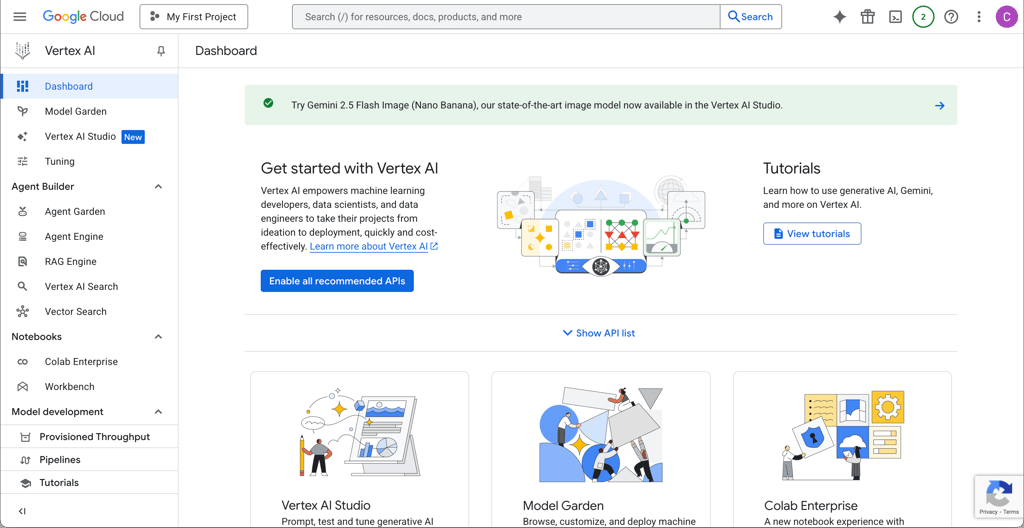
The first step of our AI testing process was getting familiar with the service’s interface. We used Google’s Vertex AI Studio and, right off the bat, we had a little trouble finding the Veo 3 model. This is because the enterprise version is more detailed and complicated than the consumer version, making it less suited for inexperienced users. Eventually, we got the hang of it and had no other issues moving forward.
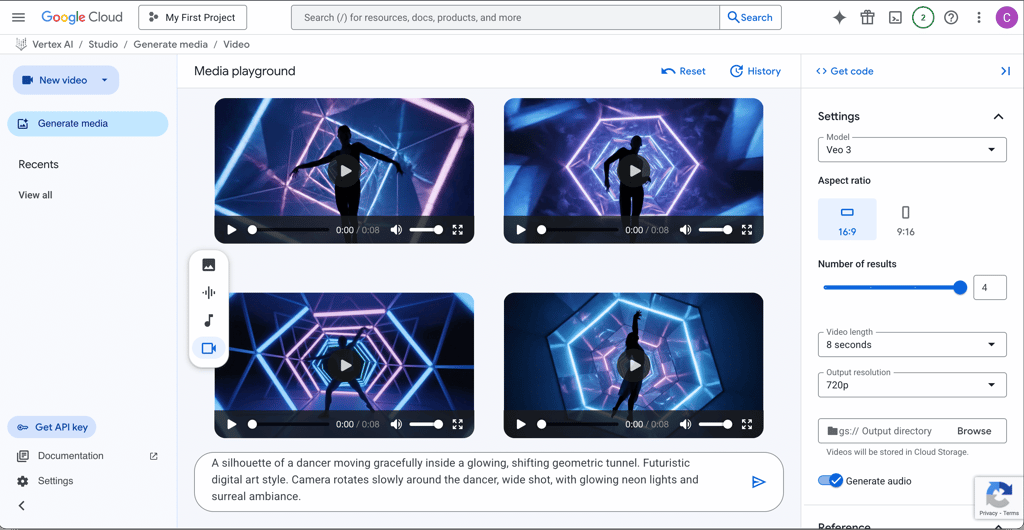
Next, we moved on to the service’s main attraction – text-to-video generation. We used two different prompts to generate four clips each to see how varied the outputs could be. For these evaluations, we used the veo-3.0-generate-001 model.
For the first prompt, we set the settings to 16:9 aspect ratio, 8-second clips, 720p resolution, and to generate audio. The four clips were generated in less than one minute, which is pretty quick. As expected, the clips had some similarities, but they also had some unique attributes that made them distinct. There weren’t any immediately noticeable artifacts or issues with the clips, so overall we were happy with the results.
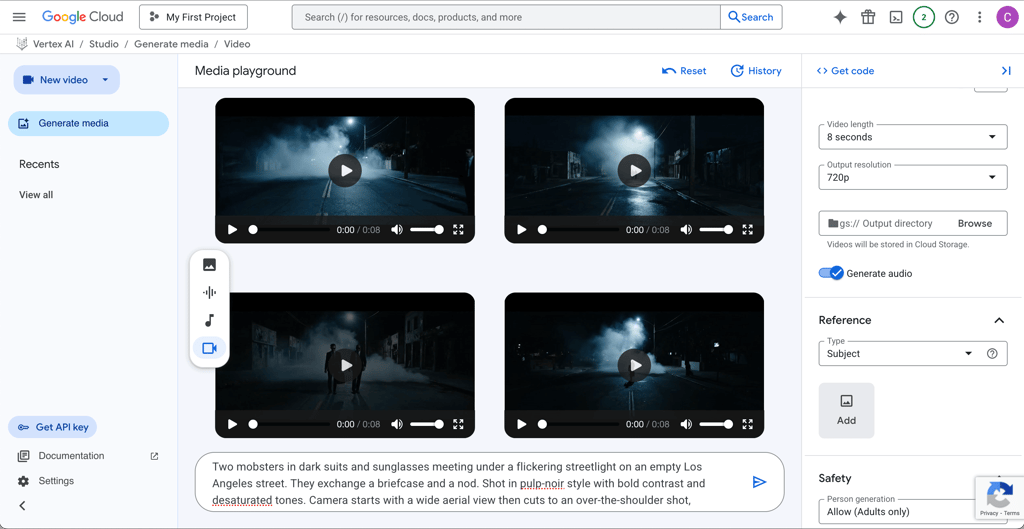
The second test had similar technical parameters, but the results weren’t as good as we expected. The overall visuals were excellent, but there were more minor issues in each clip that left us a bit disappointed. For example, one clip had a third person that we didn’t ask for, while another had a cut in the middle that made the whole video not as smooth. We concluded that these subpar results were because our prompt wasn’t precise enough. After all, the first test was good because we appreciated the room for interpretation, while in the second test, we were expecting a particular output.
We also tested Google Veo 3’s image-to-video creation capabilities. This time, we used the veo-3.0-generate-preview model since the previous one doesn’t support image-to-video conversion yet. We used a screenshot of two South Park characters as the foundation and added additional instructions on how to animate the scene. We didn’t write any dialogue between the characters and instead allowed the system to fill in the blanks.
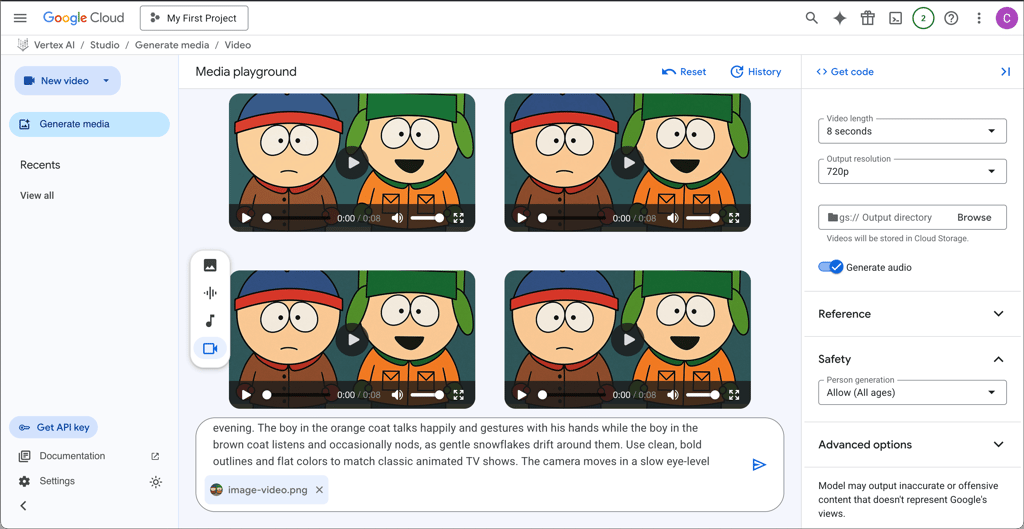
Once again, the results could have been refined by writing a more precise prompt. Additionally, some parts of the videos had some awkward moments, but the overall results were very good. The audio quality and lip sync were mostly accurate, and the dialogue that Google Veo 3 generated was appropriate for the situation. So, after some time with the system, you’ll be able to write prompts that return excellent outputs.
Comparing Veo models
Since the first Veo version, which was released in May 2024, to the launch of the newest model, Veo 3, it has been only a year. However, the improvement is really noticeable.
To start with, the first two models were more experimental. The videos Veo 1 was able to generate were short and glitchy. Veo 2 was a step forward, and it was able to handle the transitions and camera moves better.
Veo 3 is the most developed and capable version of the three, with improvements in camera movement and facial realism. It also added new features, such as audio integration and lip synchronization, to make the videos even more realistic.
In the table below, you can see a side-by-side comparison of all three Veo models:
| Veo 1 | Veo 2 | Veo 3 | |
| Understanding prompts | Often misses details | Able to understand scenes and transitions | Understands tone and pacing; can handle multi-shot |
| Facial realism | Unrealistic and glitchy | Inconsistent | Expressive and realistic |
| Audio integration | ❌ No | ❌ No | ✅ Yes |
| Lip synchronization | ❌ No | ❌ No | ✅ Yes |
| Camera movement | Static pans | Basic pans and zooms | Cinematic and smooth |
How much is Google Veo 3? Pricing and plans
Google Veo has 3 subscription tiers with prices ranging from $37.50 to $199.90 a month. Its entry plan is a good option for beginners, but it offers limited features. Also, if purchased as a month-long subscription, it doesn’t include commercial usage rights. Thus, if you are planning to use generated videos for business purposes, we recommend an annual subscription for the entry or high-tier plans.
All subscriptions include 8-second videos, 1080p video resolution, sound effects, and lip sync support. Pro and Enterprise plans additionally come with faster processing, priority support, and commercial usage rights.
You can also use Veo 3 for free by signing up for Vertex AI. The free trial is valid for 30 days and includes $300 credit.
Here’s a side-by-side comparison of Google Veo plans and pricing:
| Plan | Month’s subscription | Annual subscription |
| Plus | $49.90/month | $37.50/month |
| Pro | $99.90/month | $70.00/month |
| Enterprise | $199.90/month | $130.00/month |
Google Veo 3 alternatives
While Google Veo is an advanced and good AI video generator, it might not be for everyone. If you’re looking for rapid video creation for the creative industry or experimental media, it’s worth exploring alternative video creation tools.
| Video creation tool | Max video length | Text-to-video accuracy | Output quality | Editing capabilities | Starting price | Best for |
| Google Veo 3 | 8s | Good motion coherence | Up to 1080p video resolution | Basic in-platform editing | From $37.50/month | Marketing, education, and creative projects |
| OpenAI Sora | 20s | High-quality storytelling and physics | Up to 1080p video resolution | Limited post-generation editing | From $20.00/month | Marketing, entertainment, and experimental media |
| Adobe Firefly Video | 5s | Follows prompt instructions well | Up to 1080p video resolution | Full Adobe Creative Cloud integration | From $9.99/month | Creative industry and advertising |
| Runway Gen-3 Alpha | 20s | Moderate accuracy | 720p | Motion brush, camera path tools | From $12.00/month | Social media and rapid video creation |
| Runway Gen-4 | 10s | High photorealism | 720p | Advanced editing suite | From $12.00/month | Film, media, and visual effects |
Who should use Google Veo 3?
On the one hand, Google Veo 3 is a powerful tool that any AI enthusiast can use to create funny clips from text prompts or random images. It has excellent potential, and the tool’s ability to generate audio means you don’t have to put in any extra effort to add music or sound effects to your clips. Plus, if you have experience writing prompts, you should be able to create professional-looking videos that are suitable for serious applications, such as advertising or film.
However, in our opinion, the price of the Google Veo 3 is its main drawback. You have to pay a hefty subscription fee to access the service, and you’ll have to pay even more if you exceed your allotted credit limit. That means it can be expensive to iterate on clip ideas with the service since each clip costs credits. Instead, you have to immediately know what you’re after if you want the most bang for your buck. That means that expert users will get more effective use from Google Veo 3, while casual users might have a harder time.
Our final thoughts about Google Veo 3
Google Veo 3 is definitely an impressive AI video creation tool that’s suitable for casual and experienced users alike. After all, the quality of its output will mostly depend on your prompts, meaning it’s up to you to make the most of it.
Our tests showed that the service is excellent if you have a vague idea of what you want. However, if you want something more specific, you have to write your prompt accordingly, as the service may interpret the gaps in unexpected ways. Moreover, the system isn’t perfect, meaning you’ll still encounter occasional artifacts, weirdness, and unpredictable outcomes.
However, one of our main concerns is Google Veo’s pricing model. The starting prices are pretty steep, and you only get limited credits to create clips. That means you could potentially run out of credits if you get carried away with iterating clip ideas. Luckily, the service has a free trial, meaning you can test its capabilities and see for yourself whether Google Veo 3 meets your expectations.
FAQ
How much does Google Veo 3 cost?
The price of Google Veo 3 ranges from $37.50 to $199.90 a month. Its monthly price is cheapest when subscribed to an annual plan, and highest on a month-to-month basis.
How to access Google Veo 3?
Google Veo 3 can be accessed through various Google platforms, including Google AI Studio, the Google Gemini app, Google Flow, or Google Vids.
Is Google Veo 3 worth it?
Whether Google Veo 3 is worth it depends on individual needs for an AI video generator. It’s worth it if you need fast video creation with decent quality and requires minimal manual editing. However, it’s pricey compared to competitors.