OpenAI Sora 2 review: what has improved?
Being behind major reports like The Mother of All Breaches and RockYou2024, our in-house cybersecurity experts and journalists provide unbiased, real-world testing and in-depth analysis.
We maintain complete transparency by openly sharing our testing methodologies with our audience.
Learn more

Everywhere you look, there’s a new AI tool popping up. Hardly a week goes by without a new launch or a major update to an existing platform. Following ChatGPT’s rise, new advancements in artificial intelligence have quickly emerged.
Let me introduce you to OpenAI's Sora 2, the latest text-to-video AI model and companion social app. You might’ve heard about this video-and-audio generator launched in 2025. With a single prompt, the tool can generate realistic, cinematic clips with synchronized sound to suit all kinds of creative projects.
Unlike other image and video generators, Sora 2’s main strength lies in creating photorealistic videos that maintain continuity, simulate realistic failures, and can switch between cinematic and animated styles.
If you’re interested in how Sora 2 works, then you’re in the right place. In this OpenAI Sora 2 review, I explain how it works, where it lies among competitors, and break down its pricing, so you can determine whether it’s what you need.
Quick overview of Sora 2
Here's everything you need to know about OpenAI Sora at a glance. This table covers all the essentials without going into a deep dive.
| Release date | September 2025 |
| Core features | Text-to-video and audio generation with synchronized dialogue and sound effects, realistic physics modeling, cinematic continuity, style flexibility, enhanced steerability, expanded stylistic range |
| Clip length | Up to 20 seconds |
| Accessibility | Invite-only rollout to ChatGPT Plus and Pro subscribers |
| Pricing | $20.00/month (ChatGPT Plus), $200.00/month (ChatGPT Pro) |
| Best for | Content creators, marketers, and filmmakers who need high-fidelity video generation |
| Main drawbacks | Limited availability, generation time, occasional glitches, spatial and montage inconsistencies |
Pros and cons
Here’s a quick look at the strengths and weaknesses of Sora 2, OpenAI’s text-to-video AI model.
Pros
- High-quality video output: generates photorealistic, cinematic clips with strong visual continuity
- Integrated audio: automatically generates matching sound effects and dialogue
- Text-to-video simplicity: create videos directly from natural language prompts without technical skills
- Flexible style options: switch between realistic, cinematic, and animated styles
- ChatGPT integration: seamless workflow within the existing OpenAI ecosystem
Cons
- Restricted access: invite-only rollout, only for paid ChatGPT subscribers
- Slow generation times: complex videos can take several minutes to process
- Inconsistent results: quality varies significantly between prompts
- Limited post-generation editing: no advanced fine-tuning after the video is created
What is Sora 2?
Sora 2 is OpenAI's latest venture into multimodal AI, developed by the same team behind GPT-4 and DALL-E. It generates video clips directly from text prompts, with consistent visuals, realistic motion, and audio that stays in sync with the scene. Unlike older models that often dropped objects, stretched characters, or lost track of continuity, Sora 2 maintains coherence across the entire clip.
It also comes with the Sora social app, an invite-only iOS platform where you can remix videos, drop yourself or friends into scenes using cameos, and explore AI-generated content from other users. The app and the video model work together, letting you create, share, and discover clips without leaving the OpenAI ecosystem.
What sets Sora 2 apart from competitors is its attention to detail. Objects behave naturally, characters can stumble or fail in realistic ways, and the audio flows with the action. It’s a noticeable step forward for anyone looking to experiment with cinematic-quality AI video.
Overall, Sora 2 represents a fundamental shift in AI-assisted content creation. It brings high-level production capabilities to anyone with a creative idea and a monthly subscription.
Diving into OpenAI Sora 2 features and capabilities
Sora 2 introduces innovations that set it apart from other AI video generators. Its strengths lie not only in raw output but also in how naturally it interprets prompts and translates them into film-like results. Here are some of its standout features:
- Natural language video prompts. Describe complex scenes using everyday language, and the AI translates your words into cinematic reality. Want a golden retriever running through a field at sunset with dramatic slow-motion effects? It’s possible. Sora 2 understands not just the visual elements but also the emotional tone and technical requirements.
- Cinematic coherence. Sora 2 can maintain character, lighting, and object continuity across multiple shots, creating videos with establishing shots, close-ups, and dramatic angles that flow naturally. It applies rules of composition and pacing that usually take human editors years to master.
- Photorealism and stylization. Beyond impressive photorealism, Sora 2 offers broad stylization options, including realistic, cinematic, animated, and anime-inspired outputs. The detail in textures, lighting, and atmospheric effects rivals professional CGI studios.
- Seamless ChatGPT integration. No separate accounts or extra subscriptions are required beyond your existing ChatGPT plan. As it’s within a familiar environment, Sora 2 eliminates the friction of learning new software, making it accessible to casual users while still being powerful enough for professionals.
Sora 2 video generator
I haven’t had the opportunity to test the Sora 2 video generator yet, but through official demos, Reddit threads, and community insights, I've learned a lot about its capabilities and the aspects it still struggles with.
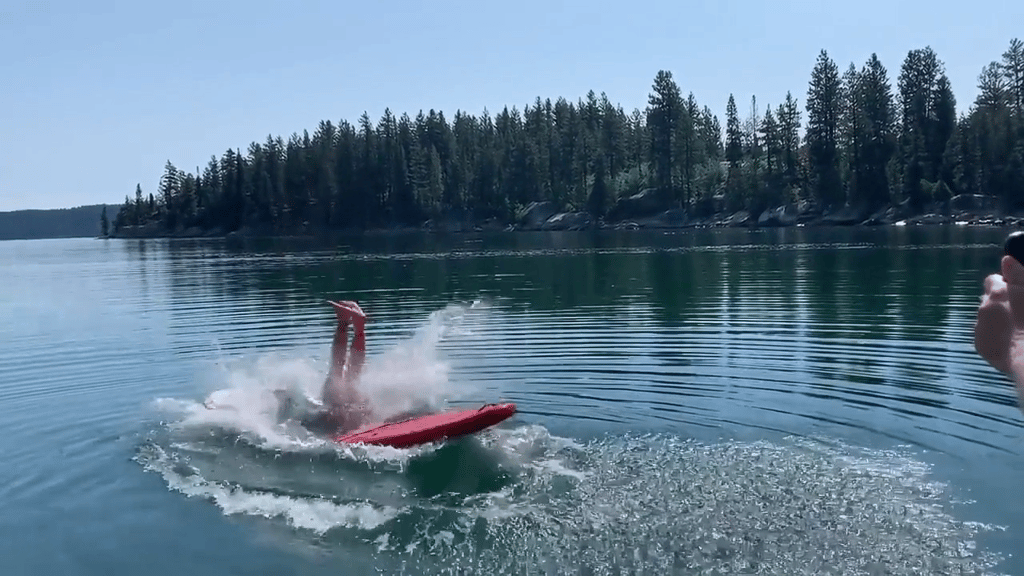
In one example, the model generates a backflip on a paddleboard. What’s most striking is how the board, water, and character all interact realistically – the splash, the tilt of the board, and the timing of the jump feel natural, and the audio is perfectly synced with the motion. Many other AI video models still struggle with this level of physics accuracy and multi-step action, so seeing it handled so smoothly is impressive.
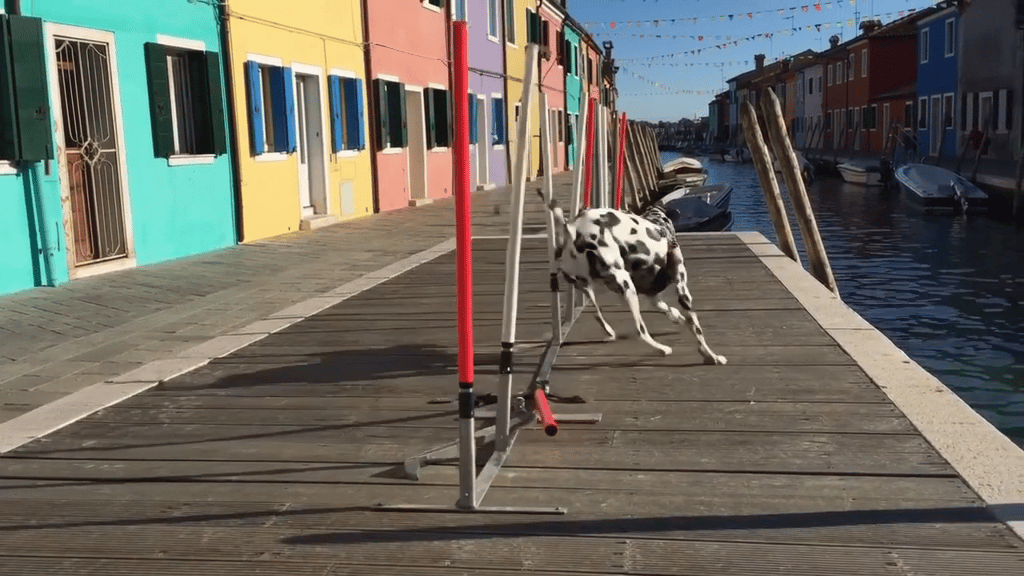
Another example shows a Dalmatian running through a complex obstacle course in Burano, Italy. The lighting shifts as the camera moves, reflections and shadows remain consistent, and the dog’s movement stays coherent across multiple shots. To an untrained eye, the video looks like a genuine professional shoot. The surprising part here is how well Sora 2 maintains continuity and depth across multiple camera angles, something most AI video generators still can’t manage.
That same mix of realism and unpredictability is visible in user-made videos. Reddit users have been testing Sora 2 nonstop since launch, and the feedback is split between amazement and frustration. Many users have noticed a “generation lottery,” where the same prompt can produce a perfect cinematic shot one time and something uncanny the next.
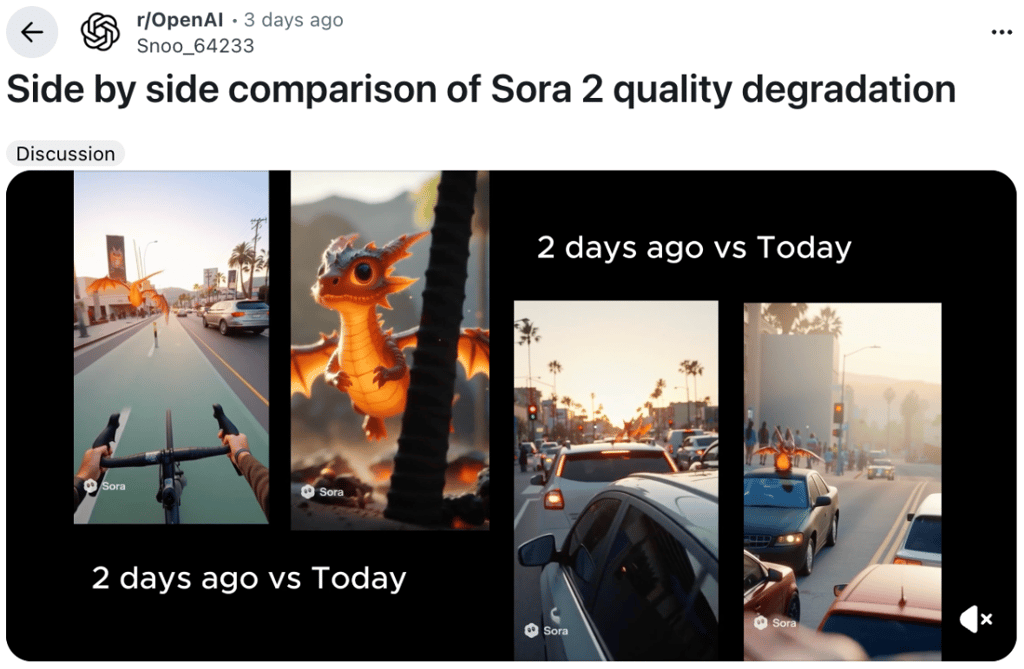
Many Reddit users say that characters in videos generated with Sora 2 walk or turn almost naturally, but their weight or rhythm feels off. In their shared videos, I also noticed inconsistent pacing, with dialogue or gestures occurring too quickly. However, the visual realism is far ahead of earlier models, especially in how it tracks perspective and maintains texture detail across shots.
Pricing and plans
Sora 2 isn't available as a standalone product. Access comes bundled with existing ChatGPT subscriptions, which simplifies billing but limits flexibility.
Official OpenAI sources currently do not state exact generation limits or fixed quotas for Sora 2 in their public documentation. Instead, they describe access as invite-only with generous limits tied to available computing resources during rollout. The limits below are based on user reports.
| Plan | Monthly cost | Sora 2 access | Generation limits |
| ChatGPT Plus | $20.00 | ✅ Yes | Approximately 30-50, max. clip length 10 seconds, with watermark and 720p resolution |
| ChatGPT Pro | $200.00 | ✅ Yes | 500+ videos, up to 20s clips, watermark-free, up to 1080p resolution, faster priority |
| Free ChatGPT | $0.00 | ❌ No | Not available |
Sora 2 alternatives
The AI video generation space is rapidly evolving, with several strong competitors offering different approaches to text-to-video creation. In the table below, I compare some of the most popular video creation tools to Sora 2.
| Platform | Max. video length | Key strengths | Pricing | Availability |
| OpenAI Sora | 60 seconds | Cinematic quality, audio integration | From $20.00/month | ChatGPT subscribers |
| Google Veo 3 | 8 seconds | Exceptional visual realism, Google ecosystem | From $19.99/month | Google AI Pro and Ultra subscribers, Google Cloud customers, and some third-party platforms |
| Adobe Firefly Video | 5 seconds | Creative Cloud integration | From $9.99/month | Adobe subscribers |
| Runway Gen-3 Alpha | 10 seconds (40 seconds with the Extend feature) | Professional editing tools | Free or from $12.00/month | Public access |
The main advantage of Google Veo 3 is that it’s part of the Google ecosystem. This is especially convenient for users already using Google’s products. Also, Google Veo 3 video quality matches Sora in many scenarios, but access remains restricted to select creators and developers.
Adobe Firefly Video integrates seamlessly with Creative Cloud applications, making it attractive for existing Adobe users. However, the 5-second limit severely restricts creative possibilities compared to Sora 2's longer capabilities.
Runway has established itself as the professional standard for AI video editing. While the Gen-3 Alpha model produces shorter clips, the platform offers extensive post-generation editing tools that Sora currently lacks.
Who is OpenAI Sora 2 for?
Sora 2 serves three primary user groups, each with distinct needs and expectations. Content creators and social media managers can use Sora 2 to produce engaging short-form content. The quality level also helps smaller creators compete with larger production budgets.
Filmmakers and creative professionals can use Sora 2 for pre-production work. Directors can visualize scenes before expensive shoots, test different visual approaches, and present concepts to clients or investors. Sora 2 improves on continuity, multi-shot coherence, and realistic physics, making it even more helpful for complex scene visualization. While not yet suitable for final production work, it excels at rapid prototyping and creative exploration.
Marketing teams and small businesses can quickly generate multiple variations of ads or visual campaigns. Sora 2’s improved controllability and realism offer an opportunity for higher-quality A/B testing without a production crew, although careful prompting is often necessary to avoid unnatural motion or pacing issues.
General consumers represent the largest potential market, though their needs vary widely. Casual users might create personalized content for special occasions, while hobbyists can explore creative storytelling without technical barriers.
Final thoughts
Sora 2 represents a genuine breakthrough in AI video generation, delivering cinema-quality results that were unimaginable just over a year ago. The seamless ChatGPT integration and sophisticated understanding of cinematic language create a compelling package for creative professionals.
However, significant limitations remain. Generation times can be frustratingly slow during peak usage periods. The lack of fine-tuning controls also frustrates users who need precise adjustments.
Nevertheless, Sora 2 offers exceptional value for content creators, marketing professionals, and filmmakers willing to invest in monthly subscriptions. The Plus tier provides sufficient videos for most users, while the Pro level suits commercial applications. Casual users might find the pricing steep for occasional experimentation, but serious creatives will appreciate the professional-grade results.
All in all, Sora 2 works best for users who understand its strengths and limitations, approach it as a creative partner rather than a replacement for human creativity, and have realistic expectations about AI-generated content.
FAQ
How can I use OpenAI Sora 2?
Sora 2 is currently invite-only through the Sora iOS app and requires a ChatGPT Plus or Pro subscription. Once you have access, open the app, type your video prompt, and Sora 2 will generate your clip within a few minutes. Currently, it’s only available in the US and Canada, but you can still access Sora 2 from other regions by using a VPN.
Is Sora 2 different from ChatGPT?
Yes, Sora 2 is a specialized video generation model, while ChatGPT focuses on text conversations. However, they're integrated within the same interface for seamless workflow. ChatGPT handles the conversation and prompt understanding, then hands off video creation tasks to Sora 2. Think of them as complementary tools working together rather than separate applications.
Does OpenAI Sora 2 have a free trial?
No, Sora 2 doesn't offer a dedicated free trial, but new ChatGPT Plus subscribers get access during their subscription trial period. This gives you about a week to test Sora 2's capabilities before committing to the monthly fee. Free ChatGPT users do not have access to Sora 2, making the Plus subscription the minimum entry point for video generation features. Access is also invite-only through the Sora iOS app.