Pipedream vs n8n
Being behind major reports like The Mother of All Breaches and RockYou2024, our in-house cybersecurity experts and journalists provide unbiased, real-world testing and in-depth analysis.
We maintain complete transparency by openly sharing our testing methodologies with our audience.
Learn more
If you’re comparing Pipedream vs n8n, you’re likely looking for more than just a few features – you want to know which platform can make your workflows simpler. Pipedream is a cloud-native automation platform that’s developed around code, APIs, and event-driven workflows. Whereas n8n is a more flexible workflow automation tool that features visual flows, self-hosting, and customization. By now, you’re probably asking:
- Which platform is easier to build and maintain real-world workflows in?
- Which one fits my stack better – SaaS tools only or APIs, microservices, and internal systems?
- Which scales more affordably once workflows run in the thousands?
- Where does my data live, and how much control do I actually have?
To find out which is the better solution, our research team and AI tested both Pipedream and n8n, building similar workflows in each to see how they really behave. From our testing, Pipedream feels stronger for developer-led teams that want speed, native scaling, and code-level control. n8n is better for visual workflows, self-hosting, and full data ownership. The core trade-off is clear: developer-centric convenience versus visual flexibility and control over infrastructure.
In our n8n review, we highlight its strengths in customization and self-hosting. In our Pipedream review, we examine its developer-centric design and event-driven architecture. In this comparison, I wanted to see how those strengths compare when the two platforms are tested side by side.
Pipedream vs n8n overview
| Pipedream | n8n | |
| Rating | ||
| Key features | Event-based automation, broad integrations, complete code-level control, and support for multiple programming languages | Workflow builder, debugging, secure deployment, webhooks, data transformation, cloud or self-hosted, open source |
| Pros | Code-level flexibility Broad API and app integrations Event-driven, auto-scaling architecture Detailed logs and debugging tools Usage-based pricing | Visual workflow builder Open-source and self-hosted 8000+ integrations Reduced manual work Built-in AI agents |
| Cons | Steep learning curve Limited direct support UI and documentation gaps | Fewer pre-built templates Self-hosting requires setup Less beginner-friendly |
| Who’s it for | Developers and teams who want code-first, event-driven automation with cloud scalability | Users who prefer visual workflows, self-hosting, and full control over data and infrastructure |
| Free version/trial | Free plan with up to 100 credits/month (no credit card required) | 14-day free trial on Starter or Pro plan (no credit card required) |
| Price | From $29.00/month | From $20.00/month |


Side-by-side overview: what each tool is really good at
| Feature | Pipedream | n8n |
| Workflow style | Code-first with optional visual assistance | Visual, drag-and-drop with code nodes |
| Integrations approach | 3000+ APIs, easily extendable through Pipedream Connect | Prebuilt and custom nodes, self-host API freedom |
| Customization | Complete code-level control with API-driven custom automation logic | Custom nodes, code, SDKs |
| AI capabilities | Built-in AI workflows and assistants | Limited, some automation nodes |
| Security and data control | Managed cloud, less user control | Full control when self-hosted |
| Extensibility | Custom code (Node.js, Python, Go, Bash) | Custom nodes, APIs, scripts |
| Hosting model | Cloud only | Self-host or cloud |
| Triggers and webhooks | Webhooks, API, event-driven triggers | Webhooks, scheduling, events |
| Open source | ❌ No | ✅ Yes |
| Visual editor | ✅ Yes | ✅ Yes |
| Learning curve | Medium | Medium-high |
| Pricing model | Usage-based | Execution/workflow-based |
| Target audience | Developers and technical teams looking for code-level control and API flexibility | Users and teams who want visual workflows and full data control |
While Pipedream and n8n are both workflow automation tools, they aim to solve different user needs. Therefore, your choice should be based on your team’s workflow complexity and automation goals.
Choose Pipedream if you’re a developer or technical team that needs code-level control and deep API flexibility. If you rely on event-driven, serverless workflows that scale automatically without managing infrastructure. Or if you’re building complex automations, custom logic, or AI-powered workflows that go beyond typical no-code limits.
Choose n8n if you prefer visual workflow building with the option to self-host and retain full control over your data. If your team includes both technical and non-technical users who need flexibility without being locked into a proprietary cloud. Or if long-term ownership, customization, and open-source transparency matter to you.
Visual editor and workflow design (how it feels to build flows)
Having tested both Pipedream and n8n, I can honestly say they’re fundamentally different. And this shows from the moment you start building your first workflow.
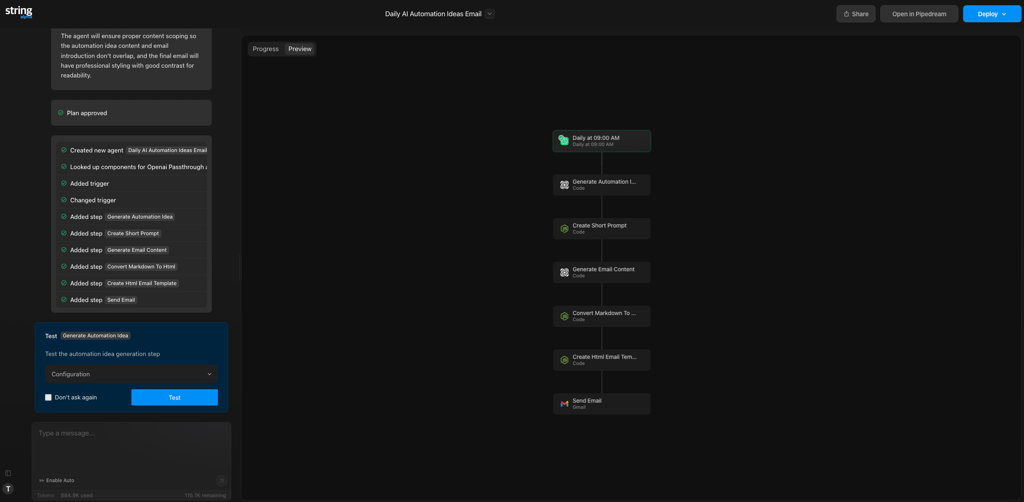
Pipedream uses a linear, vertical canvas where steps stack top to bottom. There’s no drag-and-drop builder, so you add new steps with a + button. Most configuration happens inside each step, and a robust setup often requires working with IDs, parameters, or JavaScript. That said, it feels efficient, but clearly focused on developers.
All workflow configuration and inputs are accessible directly within each step, while secrets and authentication are managed separately in the Accounts section. If you need help building or refining workflows, Pipedream’s AI assistant can assist you at any step.
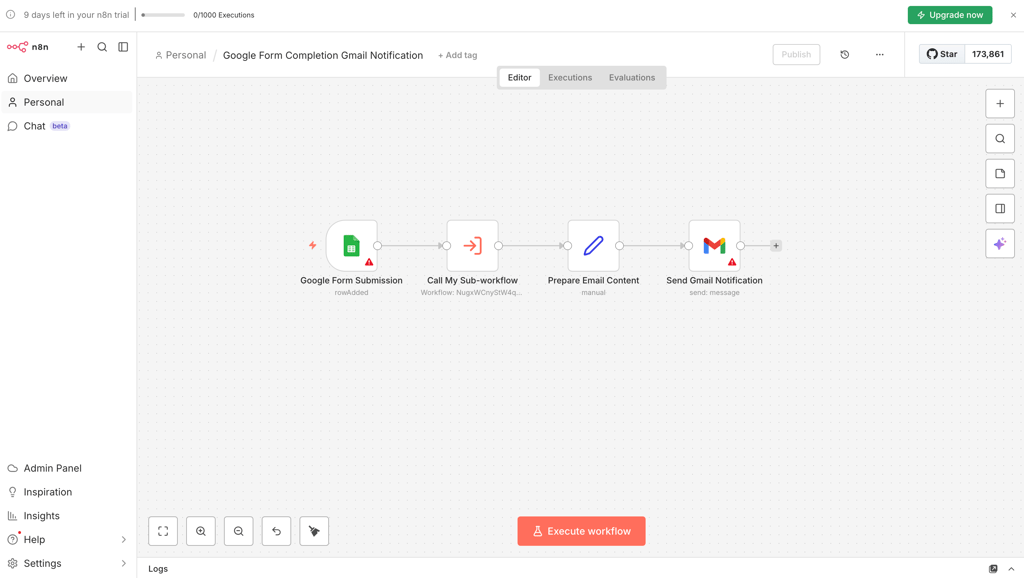
In contrast, n8n is fully visual. Workflows are built from nodes (such as triggers, actions, and conditions) connected by lines, with branching logic immediately visible. You can zoom out to see complex flows, add sticky notes for documentation, and create reusable sub-workflows that can be referenced by ID or JSON. Compared to Pipedream, it’s much easier to understand the big picture, even if you’re a less technical user.
So, if you’re a developer comfortable with JavaScript, Pipedream might be faster for you. However, if you’re not a programmer or a part of a collaborative team, you might find n8n easier to design and maintain.
Signup and onboarding (your first 30 minutes)
When evaluating automation tools, one of the first things I pay attention to is their signup and onboarding process. No matter how powerful a tool is, if the first steps feel confusing or overwhelming, a user won’t stick around to explore its full capabilities.
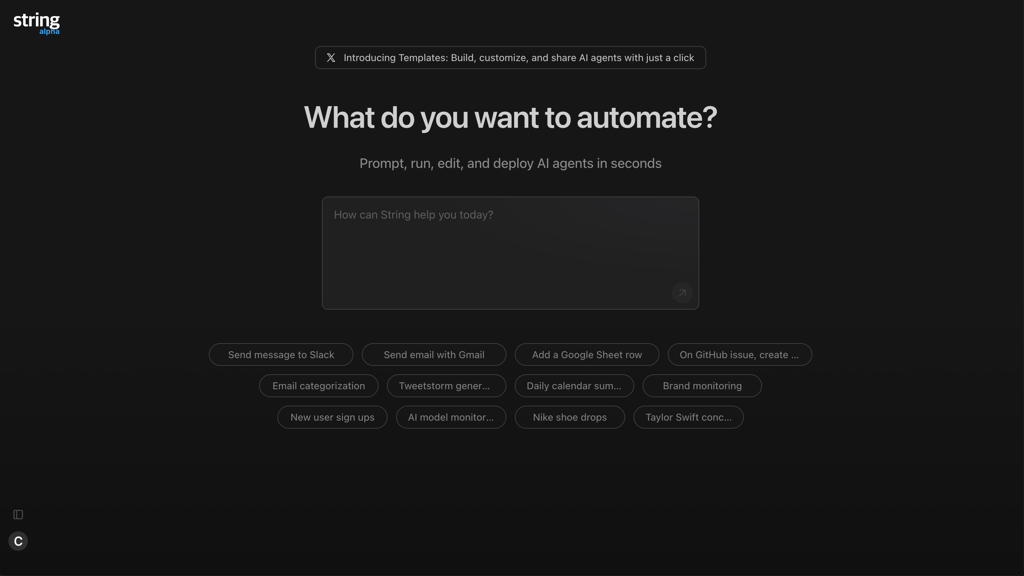
With Pipedream, signing up is straightforward – you can use SSO or verify your email, and you’re all set. Once you register, the platform launches you into the AI builder, where you can generate your first workflow with all code in line. However, I wasn’t a fan of the fact that accessing the main workflow builder isn’t that easy – it requires scrolling and clicking the Pipedream logo.
Manual workflow creation takes longer, as there are no suggested templates. Besides, triggers and actions require coding knowledge to configure IDs or parameters. While help center documentation and tutorial videos are available, if you’re not a technical user, you might find the process intimidating.
In contrast, n8n keeps the account creation minimal: just email verification and an account name for login. When starting your first workflow, you can create it manually, use the AI builder, or explore templates and tutorials. Manual workflows are parameter-heavy but require no coding, and the visual node-based canvas makes it easier to see the workflow structure. The AI builder works reliably, with credits managed more predictably than Pipedream.
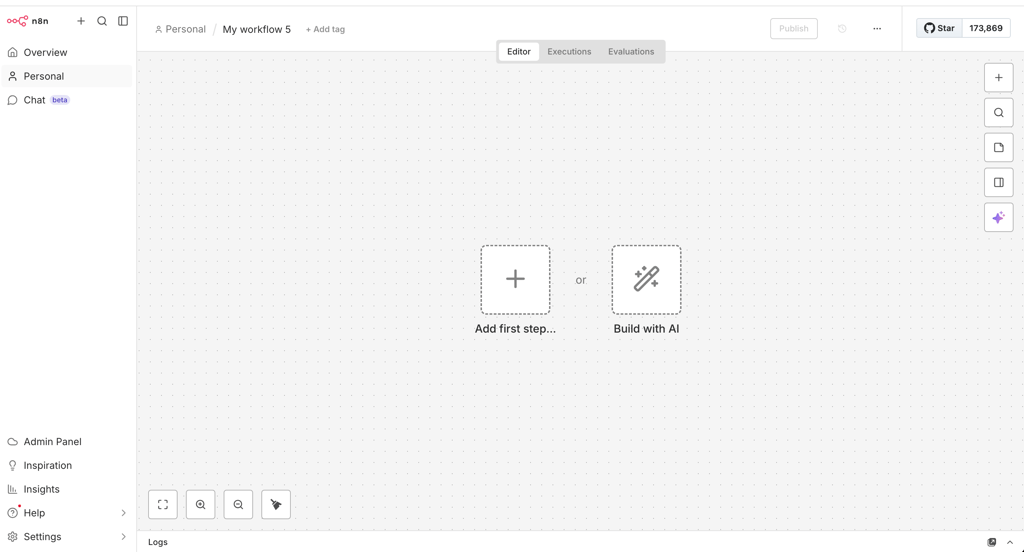
Overall, n8n provides a more approachable, guided experience for beginners, while Pipedream is faster and more intuitive for developers comfortable with code.
Debugging and testing (finding out why things broke)
Automation rarely works perfectly on the first try. A lot of things can go wrong – APIs fail, tokens expire, and payloads don’t match expectations – so debugging is where tools really prove their value. It can save you tons of time, which you would otherwise spend retracing steps to fix the issue.
Pipedream can quickly help you identify if something goes wrong. The platform gives detailed live events and deployment history for every workflow you run. Each trigger and action is logged step by step, with payload data clearly visible, which makes tracing issues quite easy. You can re-run triggers, edit steps, and redeploy without friction.
However, while errors are flagged under workflow issues, the explanations sometimes felt vague to me. API token errors appeared without clear guidance and occasionally disappeared after a retry, without explanation. There’s an AI debugging assistant available, but it doesn’t always pinpoint the root cause.
Meanwhile, n8n offers execution history with timestamps and error indications. It’s not as detailed as Pipedream because it doesn’t always display transparent step-by-step payloads. Instead, you can test individual steps and adjust parameters before publishing changes.
When errors occur, an AI chat assistant helps interpret them. It can’t see the entire workflow context, but explanations tend to feel cleaner and more stable. I should note that I didn’t encounter unexplained or ghost errors during our testing.
If you’re pushing frequent changes, Pipedream feels faster and more granular. For complex, error-prone external APIs, n8n is more predictable and stable.

AI capabilities and integrations (where the smart stuff comes in)
A workflow is only valuable if it connects to the tools and systems you actually use. If your platform doesn’t support your key apps, database, or AI models, you’ll certainly run into limitations. Both n8n and Pipedream integrate AI in practical ways, but their approaches are slightly different.
Pipedream fully relies on ChatGPT and currently doesn’t allow switching models. Its AI Workflow Builder generates full workflows and shows the exact Node.js code it uses, which is good for transparency and technical control. In our testing, it performed well for summarizing text, extracting structured fields from emails, and building ticket-routing logic.
However, it’s better at building workflows than fixing problems. AI features use credits fast, and because Pipedream runs on AWS, data goes through the cloud (though it says it doesn’t store request or response data). There’s also no option to use a local AI model.
Compared, n8n offers more flexibility. It includes both a personal AI agent and a workflow-building agent, and supports multiple models (ChatGPT, DeepSeek, and Ollama). With self-hosting and local LLMs like Ollama, data can remain entirely within your network. From my experience, the platform was especially helpful when debugging setup errors, offering clear explanations and alternative fixes.
Still, it’s worth keeping in mind that, in both tools, AI sometimes adds unnecessary steps or imperfect logic, so you can’t fully rely on it.
Customer support and community (who helps you when you’re stuck)
If you’re creating complex workflow automations, at some point you might get stuck – no matter how technically skilled you are. In these situations, reliable support – whether customer support or community forum – is crucial to help you move forward with your project and handle any roadblocks.
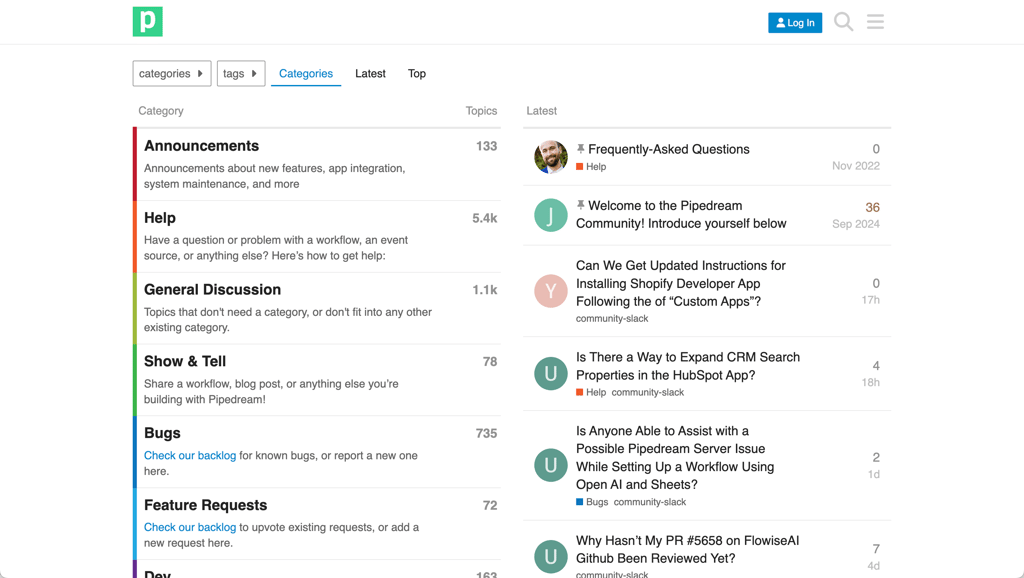
Pipedream centers its support around a detailed documentation hub, GitHub activity, and community discussions. The docs are technical, structured, and especially strong around APIs, authentication, and debugging, including AI-assisted troubleshooting. Paid plans include ticket-based support, but there’s no live chat. The GitHub repository is active, and many integrations are community-driven, which is valuable for developers. However, most examples assume you’re comfortable reading code and adjusting scripts yourself.
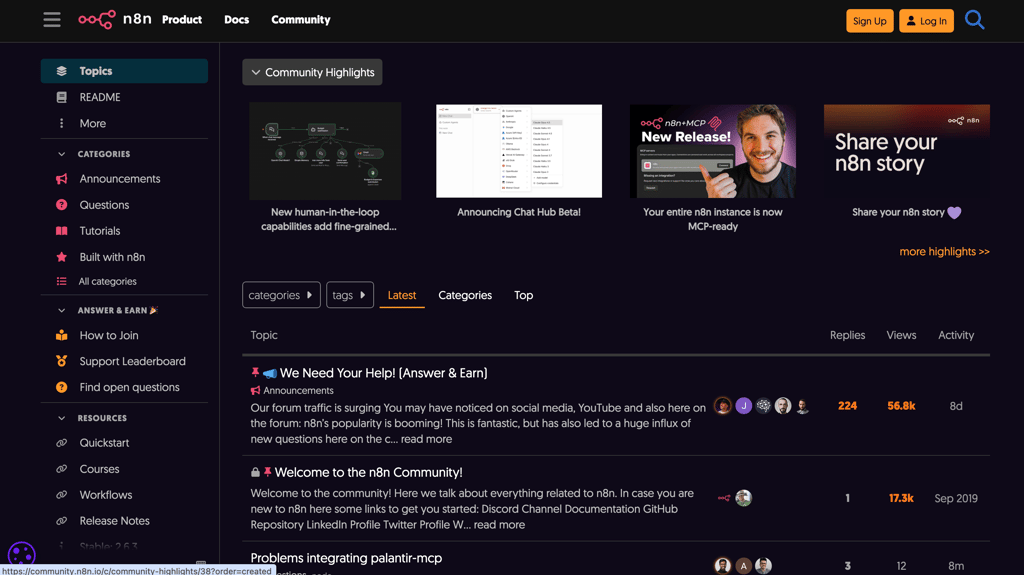
n8n offers equally extensive documentation, with clear guides on nodes, credentials, self-hosting, and error handling. Its community forum is particularly active and accessible, with contributors ranging from hobbyists to enterprise users. Templates, tutorials, and example workflows are easy to find, which lowers the barrier for troubleshooting. Paid tiers provide ticket-based support, but much of the day-to-day help happens in the community.
What this means in real life:
- Developers comfortable with GitHub threads and code snippets will be fine relying on Pipedream’s ecosystem
- Mixed-skill teams or semi-technical users will likely feel more supported in n8n’s community-driven environment
- Neither tool offers true white-glove support by default
Pricing, licensing, and scalability (what happens when you grow)
Whether you’re an everyday user or a business, pricing is always a deciding factor when choosing a solution. Here’s what you can expect:
| Pipedream | n8n | |
| Starting price | From $29.00/month | From $20.00/month |
| Usage metric | Active workflows, building workflows, event sources | Executions (a single run of your entire workflow) |
| Key limitations | Free tier has limited invocations and support; paid plans add more runs and enterprise features | Lower-tier cloud limits executions; fewer managed features |
| Hosting options | Cloud-only (no self-hosting) | Self-hosted or cloud |
| Licensing | Proprietary, managed cloud | Open-source, fair-code license |
Based on our testing and current pricing, each tool can offer better value depending on your situation. Here are a few real-world examples where one tool is likely to be cheaper – and why:
- Small side project/indie builder: n8n self-hosted is cheapest (since it’s free) and flexible
- Small team with dozens of workflows: Pipedream’s cloud plans are simpler to manage; costs are predictable
- High-volume event flows/enterprise: Pipedream scales serverlessly without infrastructure overhead, usually cheaper than cloud-hosted n8n at very high volumes
In terms of licensing and ownership, n8n’s open-source model means full control over workflows, data, and long-term sustainability. Pipedream is proprietary, so you rely on their cloud infrastructure for uptime and features.
Real-world use cases (where each tool shines)
After testing both platforms hands-on, I was convinced that Pipedream and n8n are best suited for different working environments. The differences align closely with how their editors, debugging, and hosting models behave in practice. Let’s debunk where each platform outperforms the other.
Event-driven, code-heavy workflows. I would pick Pipedream first for backend-style automations triggered by webhooks or external events. Its linear, code-first structure, detailed logs, and fast re-deployments make it ideal for handling API logic, custom scripts, and scalable event processing.
Internal tools and ops automation. For operations workflows involving multiple branches or team collaboration, n8n might be more practical. The visual, node-based editor helps you understand the big picture, especially as workflows grow complex.
API-heavy integrations and microservices. Again, Pipedream stands out. During our testing, embedding custom logic directly into steps was intuitive, especially when working with non-standard APIs or token-based authentication quirks.
Data pipelines and enrichment flows. For multi-step data transformations, n8n has the advantage. Its branching, parameter control, and reusable sub-workflows make structured pipelines easier to manage visually.
Startups vs established teams. Fast-changing startups might prefer Pipedream’s speed and serverless scaling. More established teams – especially those prioritizing infrastructure control – will likely lean toward n8n and its self-hosting flexibility.
Pipedream vs n8n: user reviews
To understand how well both tools perform in real-world situations, I collaborated with our research team to dig into public feedback across Reddit and community forums. Instead of focusing on isolated opinions, we looked for consistent patterns in what users praise and what they criticize.
I found that users describe Pipedream as powerful and developer-friendly. It's often praised for its API flexibility, ability to embed custom code, and event-driven architecture. Moreover, many appreciate how quickly workflows can be deployed, especially for complex, backend-style automations. However, there are some recurring complaints like a steeper learning curve for non-technical users, occasional UX friction, and pricing that can become harder to predict as usage scales. Some users also noted that documentation assumes a certain level of coding knowledge.
On the other hand, n8n is complimented for its visual workflow builder, flexibility, and self-hosting capability. Users value the control over data and infrastructure, as well as the balance between no-code and advanced customization. The most common drawbacks include initial complexity, a parameter-heavy setup, and the maintenance responsibilities that come with self-hosting.
All in all, I noticed that Pipedream resonates most with developers, while n8n appeals to teams seeking visual control and infrastructure ownership.
n8n vs Pipedream: how to decide between them?
n8n and Pipedream are two strong automation tools in 2026. Whether you’re an indie creator or an expanding business, these platforms can save you hours of work on repetitive tasks and even help you scale without burning out.
Choose Pipedream if you prefer code-first workflows and feel at home with JavaScript. This tool is ideal if you primarily run in the cloud and are comfortable with a managed environment. It’s especially well-suited for event-driven integrations that connect tightly to your existing stack.
Choose n8n if you’re looking for a visual builder that both technical and semi-technical users can work with. It gives you the option to self-host and maintain greater control over your data. It’s also a strong choice for building complex workflows with branching, retries, and long-term maintainability in mind.
With everything considered, this is a choice between a developer-centric, cloud-native automation platform (Pipedream) and a flexible, visual, and self-host-friendly workflow engine (n8n). If you work in code and events, Pipedream might be natural for you. However, if you think more in processes and diagrams and care about infrastructure control like me, n8n is likely the better long-term fit.
Best alternative: Nexos.ai
Pipedream and n8n are most useful when automation ownership sits close to technical teams. However, some teams may be looking for a tool that brings AI workflows closer to day-to-day business operations instead of treating automation as a mainly technical project.
In situations like this, Nexos.ai makes sense as a third option. I tested Nexos.ai with the Cybernews research team as part of the broader automation tools landscape, and what stood out to me was its focus on turning AI into a shared operational layer. It combines workflows, no-code AI agents, integrations, and multi-model orchestration, so teams can organize AI-assisted tasks across business tools from one workspace.
I can’t say Nexos.ai is an absolute substitute for engineering-heavy workflows. However, if your priority is making AI automation easier to use across business teams, it’s worth considering.
FAQ
Is Pipedream easier to use than n8n for developers?
Yes, Pipedream is generally easier to use than n8n for developers, thanks to its cleaner UI, quick setup, and code-first approach that speeds up workflow building and debugging, especially for those comfortable with JavaScript.
Can I self-host n8n, and what does it take in practice?
Yes, you can self-host n8n, but it requires a hands-on setup and ongoing maintenance. In practice, you need to manage your own server, handle updates and security patches, and configure databases and environment variables. So, it’s better suited for technical teams.
Which is better for high-volume, event-driven workflows?
For high-volume, event-driven workflows, Pipedream generally outperforms n8n due to its scalable cloud infrastructure and pay-as-you-go execution model. n8n can handle heavy workloads when self-hosted with proper resources, but Pipedream’s built-in scaling and reliability give it the edge for demanding production environments.
How do Pipedream and n8n handle sensitive data and secrets?
Both Pipedream and n8n support secrets management, but they take different approaches. Pipedream handles encryption and secret storage automatically in the cloud, while n8n puts you in charge – especially when self-hosted – making security more dependent on your setup.
Which platform is more cost-effective for a growing startup?
Pipedream is more affordable for a growing startup because its usage-based pricing scales with your needs. n8n can be cheaper if self-hosted, but you need to account for infrastructure and maintenance costs, which can add up as you grow.