Pipedream review 2026
Being behind major reports like The Mother of All Breaches and RockYou2024, our in-house cybersecurity experts and journalists provide unbiased, real-world testing and in-depth analysis.
We maintain complete transparency by openly sharing our testing methodologies with our audience.
Learn more

Pipedream is a developer-centric automation platform built for API-heavy workflows with custom code and serverless execution. As it’s a relatively newer-generation platform, I was curious to see whether it works for real workflows and whether it’s better than no-code tools like Zapier.
For this Pipedream AI review, I collaborated with our research team to evaluate how it performs in real automation scenarios, from simple triggers to complex workflows. My verdict is that Pipedream is best for developers and tech-savvy teams. It works well for real workflows, especially those needing real-time event handling, API orchestration, and bespoke logic.
Compared to no-code tools like Zapier, it offers greater flexibility and developer control, but it isn’t as easy to pick up for non-technical users. The learning curve is real, but worth it if you need custom code and serverless scalability rather than popular integrations. Keep on reading for an in-depth analysis of this automation platform.
Quick overview of Pipedream
| Rating | |
| Best for | Developers who want to automate workflows, integrate APIs, and run code server-free |
| Key features | Event-driven workflows, integrations, full code control, and multi-language support |
| Free version | ✅ Yes |
| Starting price | From $29.00/month |
Pipedream at a glance: strengths and tradeoffs

What Pipedream does and where it fits in automation
Pipedream is one of the fastest ways to connect APIs, AI services, and databases through event-driven workflows. What I like about this tool is its great flexibility for more tech-savvy users. Unlike no-code automation tools, it has fewer built-in limitations, allowing you to tweak settings and logic to fit your needs.
Essentially, Pipedream solves a common problem with traditional no-code platforms: they work well for simple, linear automations but quickly become restrictive once workflows require custom logic, complex branching, or direct API control. When predefined actions aren’t enough, users are often forced into awkward workarounds or external scripts.
When it comes to automation, Pipedream puts code and events at the center. You can run custom code like JavaScript or Python, respond to real-time events, and control how data flows between services. This makes it well-suited for API orchestration, webhook handling, scheduled jobs, and internal tooling – situations where simpler tools struggle or break down entirely.
How workflows are built
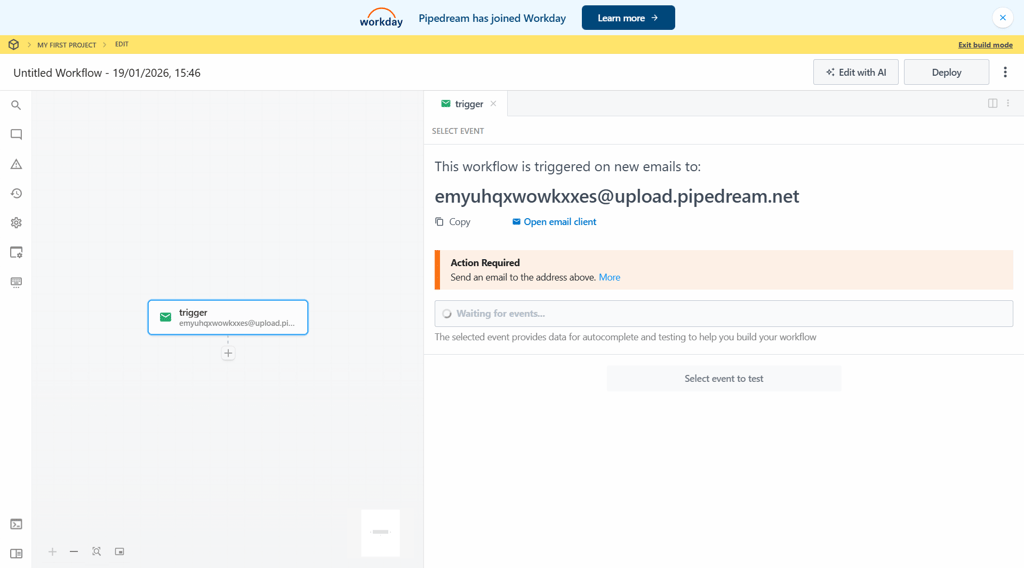
To build workflows, Pipedream uses a trigger-based execution model. Here’s how it works: first, you define a trigger (like an HTTP request, schedule, or app event), then chain together steps (actions or custom code) in a visual builder to control how data flows through the workflow.
Each workflow consists of steps, which can be prebuilt actions or custom code blocks. Prebuilt steps handle common tasks like sending messages, writing to databases, or calling APIs, while code steps let you run custom logic in languages like JavaScript or Python. You can also reuse components across workflows, which helps reduce duplication and makes maintenance easier as automations grow more complex.
Logic and decision-making are handled through conditions and branching. You can define rules that determine which steps run based on data values, API responses, or execution results. This allows workflows to split into different paths, retry failed actions, or stop execution entirely when conditions aren’t met.
In short, the model is linear when you want it to be simple, but powerful enough to support complex, multi-path workflows. That balance makes Pipedream suitable for everything from basic automations to production-grade, event-driven processes.
Who Pipedream is (and isn't) for
From seasoned developers to full engineering teams, Pipedream appeals to a wide range of users. Its low-code approach opens the door even for less technical users who want to automate workflows and build custom integrations without deep coding experience. Here are the best-fit users:
- Seasoned developers, looking for a quick way to wire APIs together without building a full infrastructure
- Technical teams that need automation beyond prebuilt connectors
- Startups that want fewer tools by combining automation, integration, and light backend logic
On the other hand, there are some users who might find better values in alternatives:
- Non-technical users who want purely drag-and-drop workflows
- Teams that only need simple “if X then Y” automations
- Users who don’t want to maintain or own logic over time
Core Pipedream capabilities and what stands out
Compared to alternatives like Zapier, I found Pipedream ideal for more technical use cases. These include code-level control, built-in integrations and APIs, and debugging and observability. Let’s look at each of them separately.
Code-level control
I like that Pipedream offers a developer-friendly environment where you can write and edit custom code, like JavaScript, directly. Unlike other automation tools that are limited to a set of actions and triggers, Pipedream allows you to create your custom logic and automate virtually any process. That flexibility is especially useful for complex integrations that require tailored processing, such as pulling data from multiple APIs, transforming it, and sending it to the final destination.
You can also use external libraries and make direct API calls, which removes many of the constraints found in no-code platforms. There’s no need to wait for a specific connector or workaround when an integration doesn’t exist – you can build it yourself.
It’s worth keeping in mind that this freedom comes with added responsibility. Because workflows rely on custom code, you’re responsible for handling errors, maintaining logic, and updating integrations as APIs change. In return, you get far more control, transparency, and long-term flexibility than predefined automation tools typically offer.
Built-in integrations and APIs
Another notable thing about Pipedream is its vast library of built-in integrations. With over 3000 integrations available, it’s easy to connect popular apps like Slack, Google Sheets, Stripe, and GitHub. If you’re working with multiple platforms, it can help you manage data across different tools without a heavy setup.
Moreover, Pipedream doesn’t restrict you to pre-built integrations. If an integration doesn’t exist or needs more control, you can make custom API calls directly within your workflows. These calls are fully customizable, so you can define endpoints, payloads, headers, and response handling however you like.
Lastly, the tool also takes care of authentication. It manages credentials securely, supporting common authorization methods like API keys, OAuth, and bearer tokens, so you don’t have to reimplement authorization logic every time you connect a service.
Debugging and observability
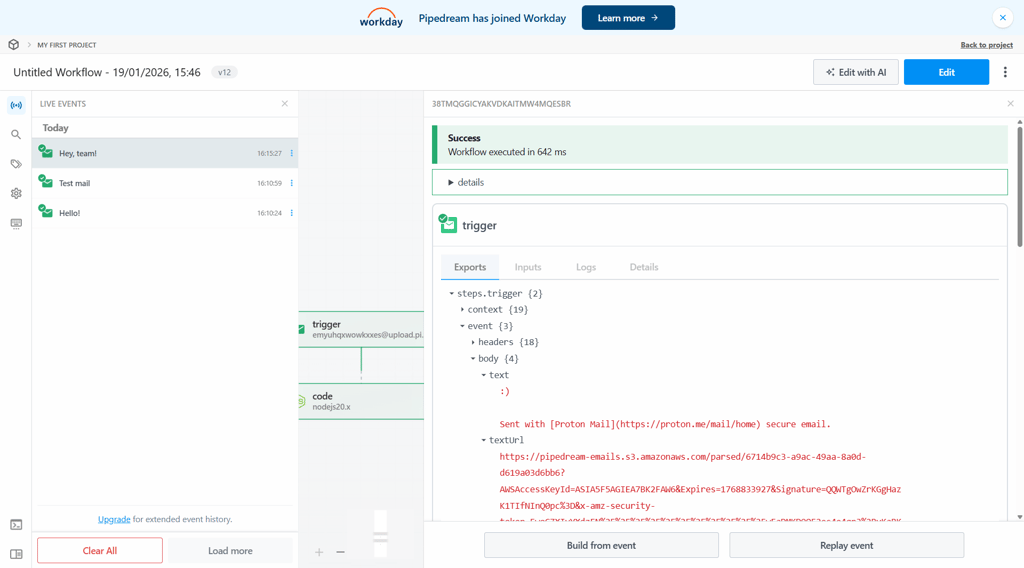
If you create new workflows, naturally, you want to see how they’re performing over time. Pipedream provides robust debugging and observability tools to give you full visibility into your automations. Each workflow execution generates detailed logs that show inputs, outputs, and any errors at every stage. You can also access a complete execution history, making it easy to trace problems, review past runs, and analyze performance patterns.
Error handling is also straightforward: failed steps are clearly flagged, and you can configure retry behavior for recoverable errors or add custom logic to handle exceptions. With this level of control, you can ensure workflows run smoothly and issues are resolved before they impact downstream processes.
Overall, compared to most no-code platforms, Pipedream offers far deeper insights. While no-code tools often show only high-level status or task counts, Pipedream exposes the actual data flowing through each step, the code executed, and any API responses. This makes troubleshooting more precise, and you can build reliable automations with confidence.

Inside a Pipedream workflow
Workflows enable you to connect apps, data, and APIs without worrying about servers or infrastructure. In essence, they are chains of steps that run automatically when triggered by an event, such as an HTTP request or a new entry in a Google Sheet.
In Pipedream, a workflow is more than just a simple automation – it’s a fully programmable sequence where each step can run custom code, call APIs, or manipulate data. Unlike linear automations, workflows can branch based on conditions, handle errors, and process data dynamically, giving developers far more control.
Components and steps are reusable, so you can build modular logic once and use it across multiple workflows. This not only saves time but also ensures consistency, reduces errors, and simplifies maintenance, especially for complex or production-level automations.
Pricing breakdown: how usage grows your bill
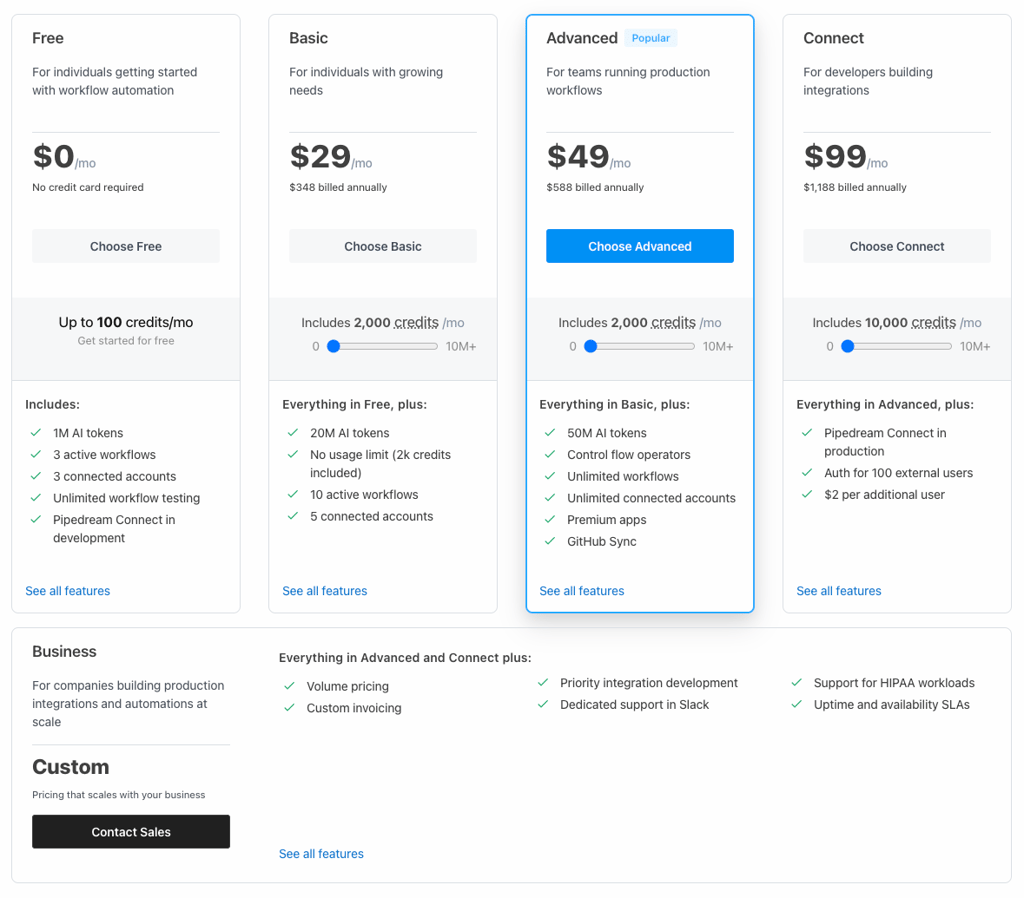
At the time of writing, Pipedream offers 5 plans, depending on your needs. If you’re a new user, there’s a free plan, with 3 active workflows, unlimited users, 3 connected accounts, and up to 100 credits/month. For me, that wasn’t enough to build a complex workflow, but it was enough to experiment and feel comfortable with the system, which I’d say is normal for a free tier.
Paid plans start at $29.00/month and go up to $99.00/month, with custom pricing available. They give you more credits (which are essentially compute time used by workflow executions), plus higher workflow and account limits, premium apps, team members, and enterprise features. As you add more executions, higher-volume workflows, parallel tasks, or more team users, your bill climbs up because you consume more credits or need a higher tier.
Therefore, it’s good to keep in mind cost surprises, which are common in automation platforms, including Pipedream. It happens when a project goes from occasional runs to frequent or heavy workflows. Let’s say, small test usage might stay cheap, but production traffic, long-running tasks, or bursts of executions can rapidly consume credits and push you into extra usage charges.
My advice is to evaluate risk by estimating your typical execution frequency and memory usage per run, then comparing those to the included credits and average costs. What works for small tests might cost significantly more at scale if not planned.
Where Pipedream shines in real scenarios
While testing the tool, I saw that Pipedream is best for advanced automations that move into real workflow logic, rather than just one-click tasks. So, I concluded some of the real use cases where the tool might save you time and effort the most:
Simple automations. One of Pipedream’s quick wins is how well it bridges events to actions. Common examples include sending Slack or email notifications when a form is submitted, repo changes, or payment event fires. It’s also useful for basic data enrichment, such as calling an external API to look up additional fields, then appending and forwarding that data to a spreadsheet, database, or messaging tool.
Developer-grade workflows. Developer-grade workflows. Pipedream easily handles API orchestration across multiple services, so you can do chain requests, manage auth, and apply custom logic in code. This is where Pipedream AI orchestration capabilities become especially useful, enabling more intelligent coordination between services and workflows. Some of the typical workflows include ingesting webhooks, transforming payloads, routing data based on conditions, and persisting results to databases. Scheduled is another job it’s good at – from generating recurring reports to running cleanup or sync tasks via cron.
Team and operations workflows. Pipedream also works well as a lightweight backend glue. Your team can use it to sync CRM and sales data, route alerts or incidents to the right channels, and build internal tooling without spinning up or maintaining a full backend service.
What users say: patterns from reviews
Apart from testing Pipedream myself, I wanted to know what real users say about this tool, so I did some research by reading reviews on Trustpilot and Product Hunt. I saw that users consistently praise Pipedream for its flexibility, which lets them build complex workflows that meet unique needs. Developer control is another standout, with full access to code, branching logic, and debugging tools.
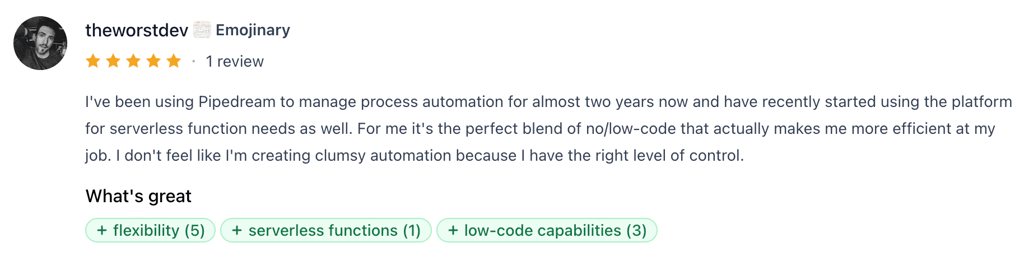
Many reviewers appreciated the time saved, thanks to fast automation and pre-built integrations. Other positives include scalability, ease of handling growing workloads, and an active community that provides support and shares solutions.
On the other hand, common complaints center on the learning curve, especially for new users unfamiliar with APIs or serverless workflows. Some users report UX friction, such as confusing navigation or setup steps, and pricing uncertainty as usage grows. A few mention that documentation gaps can slow down onboarding.
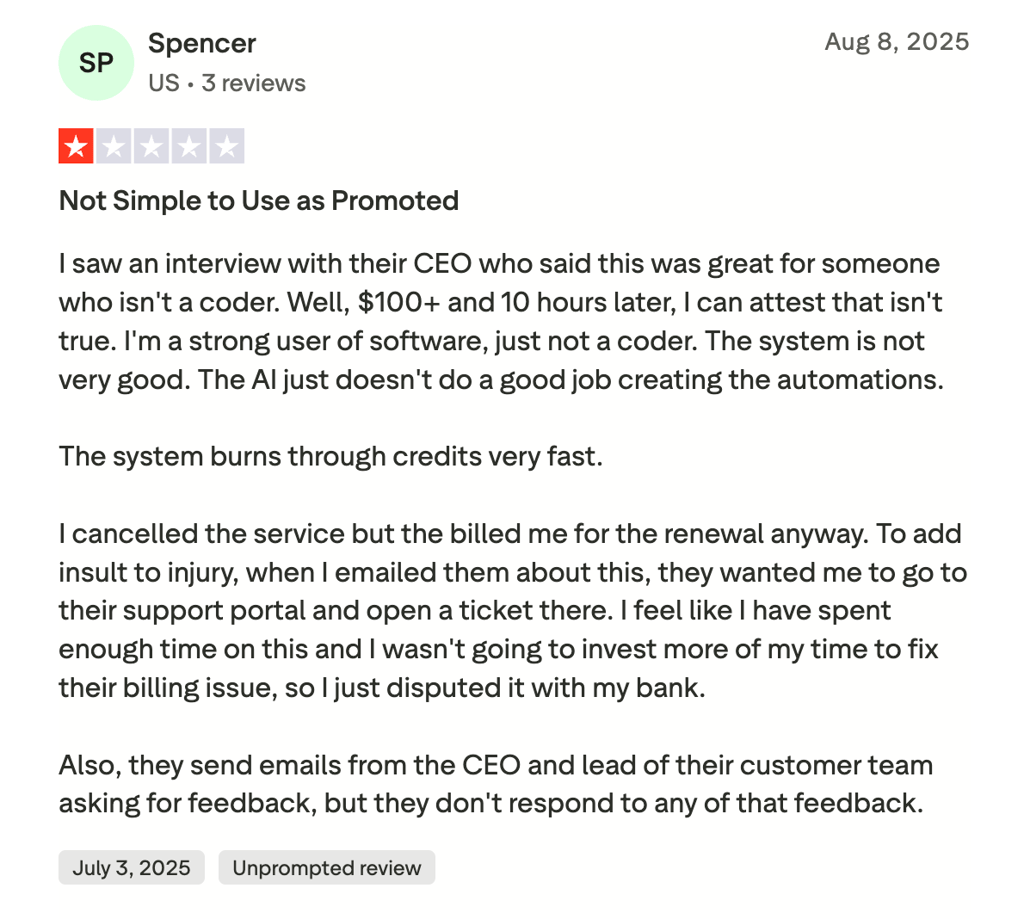
Differences are clear: developers value the coding flexibility and deep integrations, while beginners often rely on templates but can feel overwhelmed by complexity. Across platforms, patterns hold: Product Hunt users emphasize speed and innovation, while Trustpilot reviewers focus on reliability and support. Overall, Pipedream earns strong praise, though it has minor usability and pricing caveats.
First steps: setup and learning curve
If you’re a first-time user, you might need some time to get comfortable and learn your way around the platform. To make the process easier, I’ll walk you through creating your first workflow step by step:
- Create an account (or sign up with Google or GitHub) and choose a plan – you can start with the free tier before upgrading to a paid plan
-
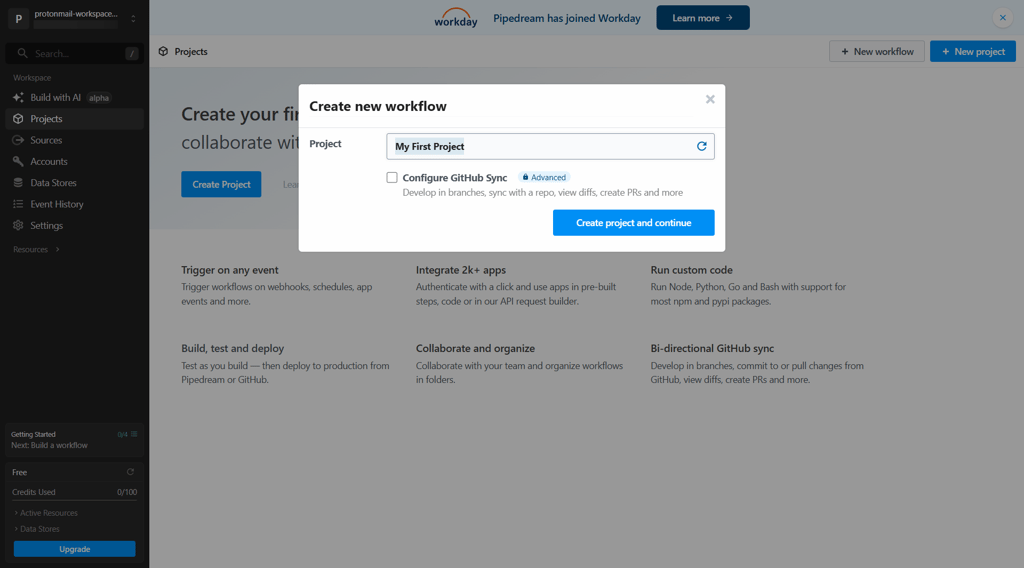
From the dashboard, select New workflow, specify the name and execution controls, and click Create Workflow
-
Select Add Trigger and search by app name to find triggers associated with your app

-
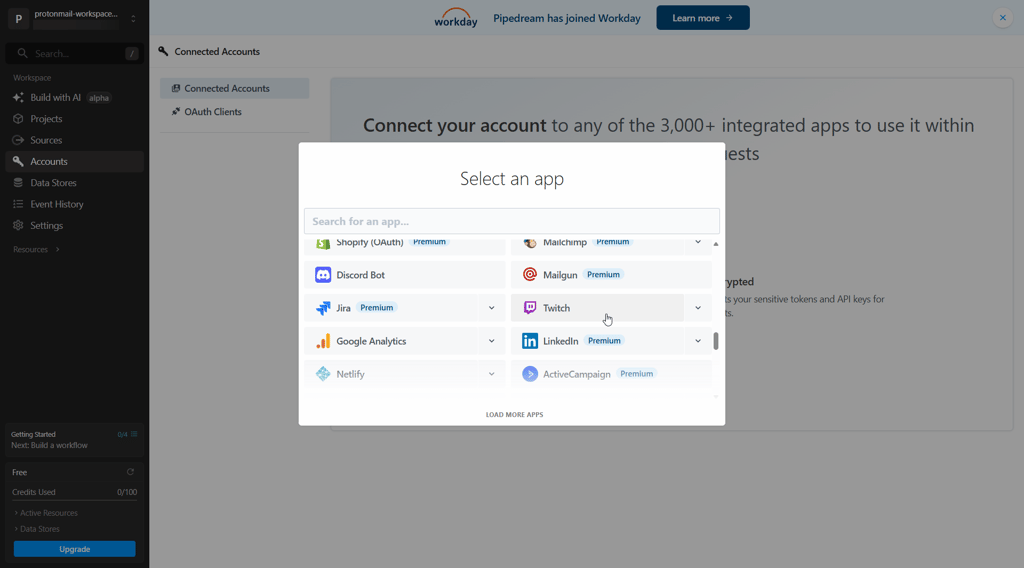
Connect your accounts and enter the values for configuration settings, keeping the first workflow minimal (one trigger + one action)
-
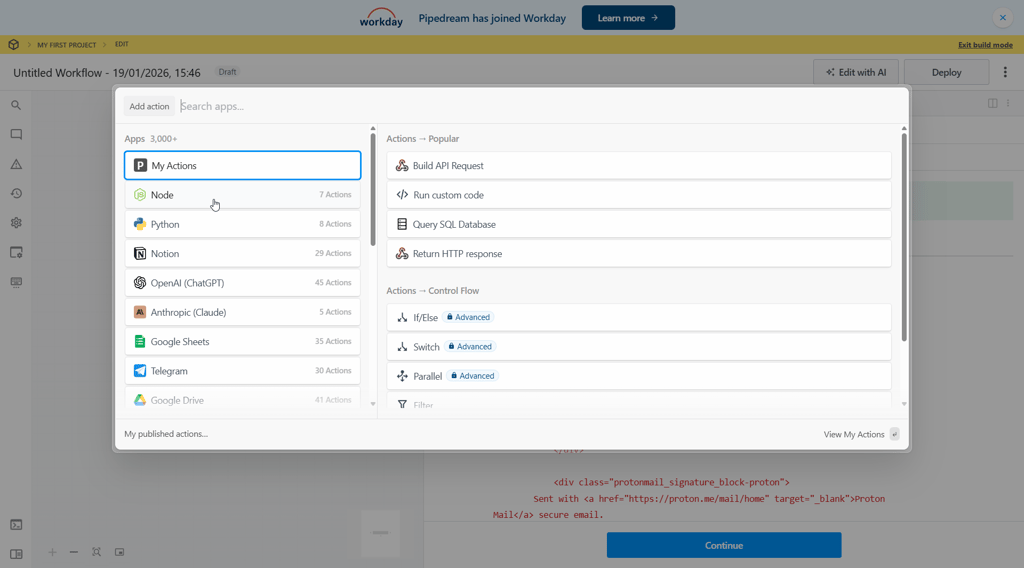
Add action steps – if needed, add a code step for small transforms or custom logic
-
Run a test execution to verify the inputs and outputs, then enable the workflow once everything works as expected
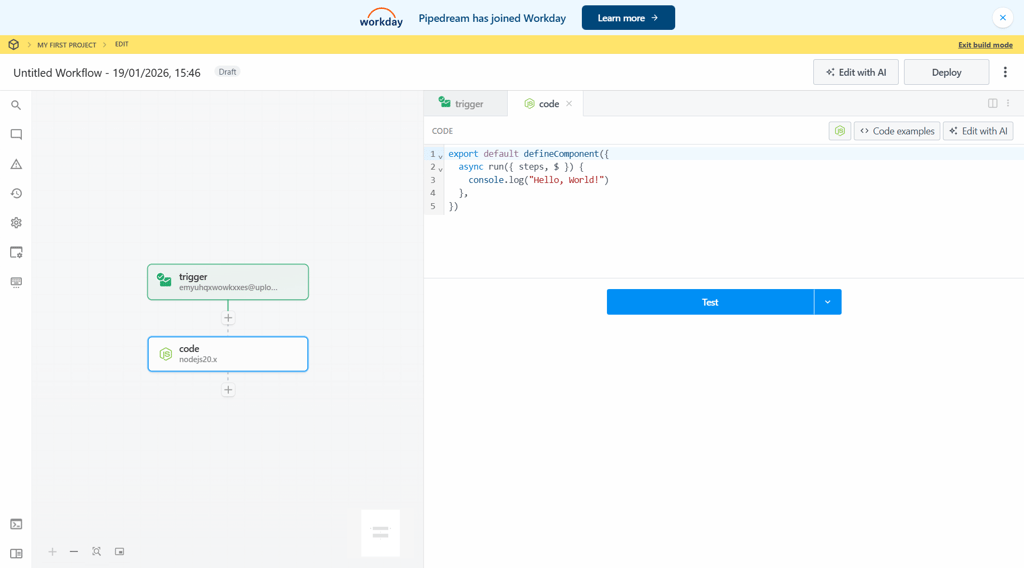
-
Check execution logs to quickly spot and debug failed steps
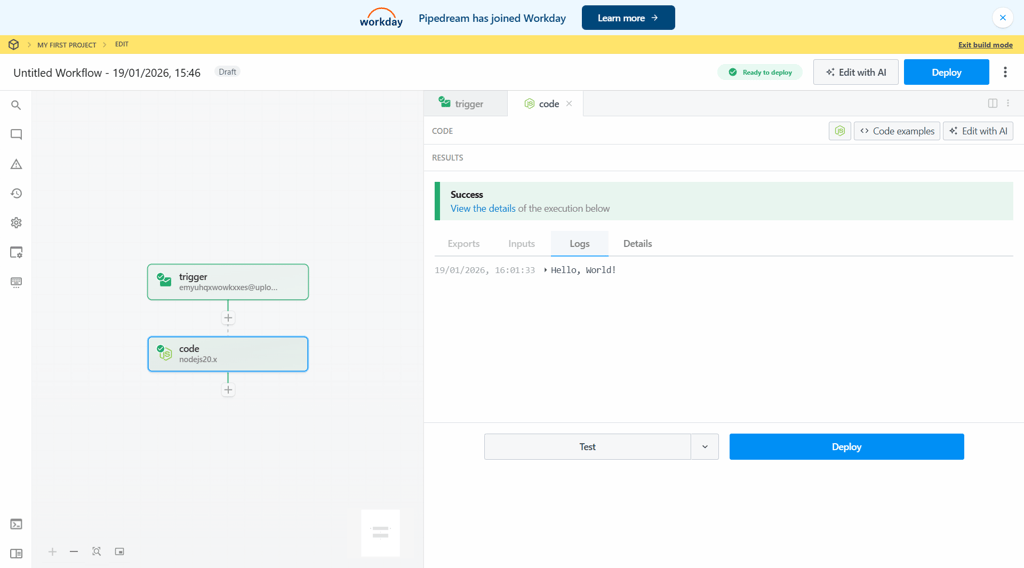
Overall, I found the platform highly developer-oriented, which may make it challenging for users without technical experience. On day one, you should be able to create simple triggers and use prebuilt actions, but more advanced features like webhooks, API calls, data transformations, and branching typically take longer to master.
How Pipedream compares to alternatives
Pipedream stands out from its competitors by focusing on developers who want full control over APIs, custom logic, and serverless execution without managing infrastructure. However, if you need no-code simplicity, self-hosting and cost control, or a more visual, low-code builder, Pipedream alternatives might provide a better value. Here’s how the platform stacks up when compared to its competitors:
| Tool | Best for | Flexibility | Ease of use | Code support | Cost at scale | Ideal user |
| Pipedream | Developer-centric workflows | Very high, code-level control | Moderate, developer-oriented | Full native code support | Moderate, usage-based | Developers and tech-savvy teams |
| nexos.ai | Intuitive, no-code workflows | Limited by lack of coding capabilities | Very simple to use | Only prompting | Moderate, usage-based | Non-technical teams that need simple-to-create workflows |
| Zapier | No-code automation | Limited to predefined actions | Simple and easy to use | Basic scripting only | High for large volumes | Business users and non-technical teams |
| n8n | Open-source, self-hosted logic | Very high, fully customizable | Moderate to difficult | Full code support | Low if self-hosted | Technical teams and privacy-focused organizations |
| Make | Visual, complex logic | High, strong routing and logic | Moderate | Limited code blocks | Moderate, operation-based | Power users and mid-level teams |

Best alternative: nexos.ai
If you're looking for a simple, no-code alternative to Pipedream, I recommend nexos.ai. While nexos doesn't have Pipedream's in-depth code customization, it's an excellent choice for teams that feel that Pipedream is too robust for their needs.
Nexos builds AI-native workflows that can be controlled by prompting multiple models, optimized to deliver the best results. In case you find it hard to build your first automation, nexos offers over 100 templates, which I found to be extremely useful when building my flows. Additionally, nexos gives your team access to multiple AI models within a certain interface – with no additional plans needed.
That's why, if you feel like Pipedream's functionality is a fit but don't have the experience to make the most of its code editing, nexos.ai provides a useful alternative. However, if you require deep, code-level edits, I would stick to Pipedream or a tool like n8n.
Takeaway: is Pipedream the right choice?
For developers and technical teams, Pipedream might be the right choice. It offers flexible, API-driven automation with full control over logic and execution. In our testing, it consistently outperformed simpler tools when workflows became complex, event-driven, or code-heavy.
That said, it’s not ideal for non-technical users who want quick, no-code automation with minimal setup. Tools like Zapier might be a better choice for that. Switching to Pipedream is worth it once you outgrow basic triggers and integrations. The learning curve is real, but it pays off when automation becomes core infrastructure rather than a convenience feature.
FAQ
Is Pipedream better than Zapier for developers?
Yes, Pipedream is generally better than Zapier for developers because it offers more flexibility, direct API access, and support for custom code, making it ideal for advanced workflows. On the other hand, Zapier is better suited for non-technical users who want quick and no-code automation without deep customization.
Does Pipedream require coding knowledge?
Yes, Pipedream requires some coding knowledge for building advanced workflows and custom integrations. However, it also offers templates and visual tools that can help users with limited coding experience get started, especially when using features like the Pipedream AI agent builder, which simplifies creating event-driven, AI-powered workflows.
How secure are Pipedream workflows?
Pipedream workflows are secure for both individual users and businesses, as they include SOC 2 Type II compliance, HIPAA and GDPR support, encryption of data in transit and at rest, and isolated execution environments to help protect sensitive data. Just keep in mind that the security of a workflow also depends on how you configure authentication, environment variables, and access controls in your project.
Can Pipedream replace backend services?
Yes, Pipedream can replace backend services by handling server-side logic, integrations, and event-driven workflows without managing your own servers. In many cases, teams also use Pipedream AI agents to process events, apply logic, and trigger actions dynamically. However, for full-scale backend needs like complex databases, heavy compute, or persistent state, a traditional backend platform is still usually required.
Is Pipedream worth the cost at scale?
Yes, Pipedream can be worth the cost at scale if you rely on complex API workflows and event‑driven automation that would otherwise require heavy engineering resources. However, costs can rise quickly with high volumes or long‑running tasks, so you’ll need to evaluate pricing against your specific usage and alternatives.