I reviewed Gemini 2.5 Computer Use – is it ready for real UI automation?
Being behind major reports like The Mother of All Breaches and RockYou2024, our in-house cybersecurity experts and journalists provide unbiased, real-world testing and in-depth analysis.
We maintain complete transparency by openly sharing our testing methodologies with our audience.
Learn more

AI has passed beyond the simple question-answer model and is evolving into something more advanced. On October 7th, 2025, Google released the preview of the Gemini 2.5 Computer Use – a system that understands user interfaces and can interact directly with web pages.
It’s like giving someone remote control over your laptop while you only observe and confirm actions from time to time. To see how it works in practice, I’ve tested how Gemini 2.5 Computer Use works, and below you’ll find my in-depth review of its advantages and limitations.
What is Gemini 2.5 Computer Use?
Gemini 2.5 Computer Use is a new AI system built on top of Gemini 2.5 Pro. It can directly interact with web pages, i.e., click buttons, fill out forms, and crawl through websites just like a human would. Unlike traditional chatbots that give us summaries, outlines, and new content, Computer Use is all about real action in real time.
It knows how to execute tasks because it can interpret interface elements. When you give Gemini 2.5 Computer Use a request like “Gather data from four different sources and organize it into a table,” it repeats the following loop:
- The tool takes a screenshot of the interface and sends it to the model for analysis
- The model analyzes the interface (buttons, menus, text boxes), decides what to do next, and sends it back to the tool in your device
- The tool executes the required action, i.e., clicking, typing, scrolling
- The loop repeats until the task is complete
For now, Gemini 2.5 Computer Use works in web browsers, but “demonstrates a strong promise for mobile UI,” as claimed by Google. Actually, Google isn’t the first company to launch the computer use feature. As we reported in one of our articles, Anthropic released the same update in October 2024.
What are the limitations?
Gemini 2.5 Computer Use still works in the preview mode, so some lag and difficulties are to be expected. Below are a few limitations that you may face when using the model.
Can get pricey
Gemini’s pricing can be confusing, but the general rule is that more complex tasks use more tokens, and more tokens cost more. It charges more for larger inputs and outputs, as they require more computing power.
Here’s the current pricing for the Gemini 2.5 Computer Use model:
- Input tokens: $1.25 per million tokens when your prompt has fewer than 200K tokens, or $2.50 per million when it exceeds 200K tokens
- Output tokens: $10.00 per million tokens when the output consists of less than 200K tokens, or $15.00 per million when it’s above 200K tokens
Considering that 100 tokens is about 60-80 English words, the cost can add up quickly.
Safety restrictions
Gemini 2.5 Computer Use still can’t access the websites that require human verification or independently accept the privacy policy. Also, it can’t access your personal data or perform irreversible actions such as hitting Send or making payments. In these cases, manual human confirmation is necessary.
Moreover, Google itself warns users that some actions and advice from the model may be harmful, as it can click on unsafe links and buttons to achieve the result more efficiently. That’s why it advises users to supervise the model during tasks involving sensitive data or critical decisions.
Only for web browsers
The current version is optimized for web browsers only and aims to mimic a human navigating the internet. It can’t yet handle full desktop or mobile devices. However, Google is testing the model for mobile UI as well.
Strengths of Gemini 2.5 Computer Use
Gemini 2.5 Computer Use isn’t the first to offer computer use capabilities, but Google reports that its benchmark performance is far better than that of competitors. Here are the advantages I’ve noticed myself:
- Processes complex requests. Gemini 2.5 Computer Use is excellent for processing complex requests that require multiple steps. It can jump from website to website without interruption while providing you with an explanation of what it’s doing.
- Accurately identifies UI elements. The model clearly sees and interprets UI elements and interacts with them. It understands the context and the hierarchy of the interface elements and so can assess its usability.
- Uses a real browser. All the actions are performed within real browsers, not simulated environments. This means that the model can interact not only with static elements but also with pop-ups and dynamically loaded content. This allows you to check the real-life flows on your websites and see how users actually experience them, instead of using scripted simulations.
Testing Gemini 2.5 Computer Use with real-life tasks
I’ve conducted two tests to check how Gemini 2.5 actually handles tasks through the Browserbase demo environment.
Test 1 – searching for an article
I gave the model a command, “Find the most recent Cybernews.com article,” and it performed every browser action from searching via Google to clicking on links and reading the web pages.
Once Gemini reached Cybernews.com, it got stuck as the website started with the Cloudflare “Verify you are a human” page. However, it found a way out and searched the latest article in Google News.
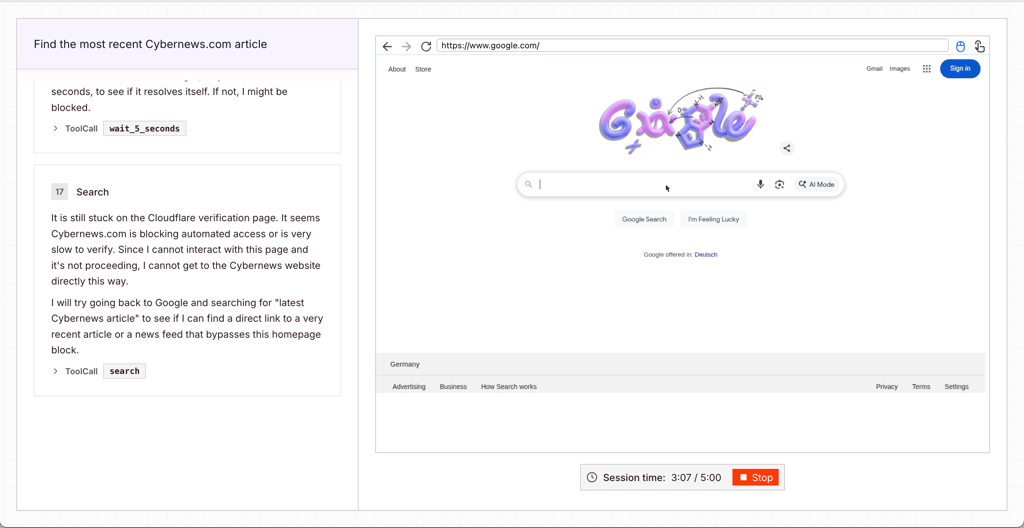
Overall, it took four minutes to find the right article. It’s pretty slow, considering that the request was simple.
Test 2 – assessing UI
Next, I gave Gemini the command “Evaluate Cybernews.com UI.” In this case, it didn’t meet the human verification page, so it could freely access the website. The model clicked on the menu bar, scrolled down the home page, and produced the assessment – all within 2.5 minutes.
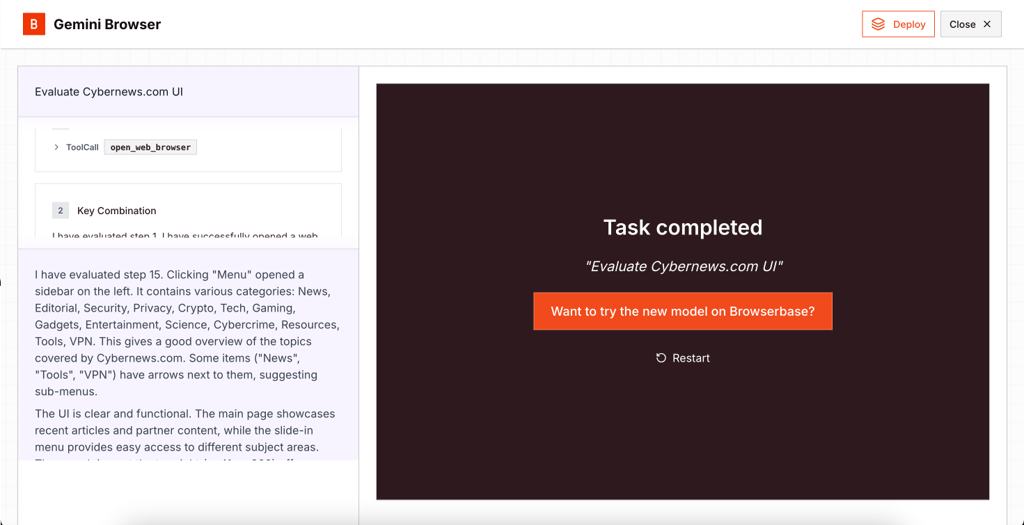
The analysis was clear and comprehensive. Gemini has described every block and interactive element it saw on the screen. This means that Gemini clearly understood the interface and can assess its user-friendliness.
How to get access to the Gemini 2.5 Computer Use?
The easiest way to access the full version of Gemini 2.5 Computer Use is through Google AI Studio. You can follow these steps:
- Sign in with your Google account
- Create or select a project
- Set up the billing information
- Choose Gemini 2.5 Computer Use (Preview) from the available models
- Interact with the model via the built-in environment
You can also try Gemini 2.5 Computer Use for free in a virtual browser environment through Browserbase. This demo setup provides a realistic experience but doesn’t allow you to directly interact with the web browser and manually confirm the model’s actions.
Who is Gemini 2.5 Computer Use for?
Gemini 2.5 Computer Use looks like another step toward autonomous AI agents that independently perform tasks and let us hand off even more routine, monotonous work to them.
With Gemini 2.5 Computer Use, businesses can automate digital workflows, such as filling out forms and generating reports, without custom integrations. Developers can build intelligent agents that perform complex online tasks and UI-driven prototypes. QA engineers can perform usability tests and visual regression tests that closely simulate user interaction with the interface.
Overall, the Gemini 2.5 Computer Use model is still in its early stages and works in the preview mode. It requires your supervision and action confirmation, as some of its independent choices may potentially be harmful to your system.
It works great for the safe requests that don’t involve any critical data or extensive internet browsing. So, I’d wait for the next updates before trusting it with sensitive workflows or giving it truly autonomous, unsupervised browsing.
FAQ
What is Gemini 2.5 Computer Use?
It’s the same Gemini 2.5 Pro but with an extension that allows AI to perform real actions (clicking, typing, scrolling, or navigating through websites) in the user’s browser.
How is it different from Gemini 2.5 Pro or Flash?
Computer Use is a capability built on top of the Gemini 2.5 Pro model, known for its deep reasoning and accuracy. Flash is a different Gemini family model whose main benefits are speed and a cheaper price per token.
Can it control a web browser safely?
Yes, if you don’t give it requests involving browsing potentially malicious websites or leave it unsupervised. Generally, every critical action requires human verification, and you can set custom guardrails to protect yourself even further. At the same time, Google warns users not to trust Gemini 2.5 Computer Use completely, as it may click phishing buttons and websites to execute the user’s request as fast as possible.
Is it available for public use?
Yes, any user can try out Gemini 2.5 Computer Use through Browserbase and experiment with the feature in a virtual browser. You can also get a full-fledged experience in your own browser through Google AI Studio.