Bubble vs Base44: which one should you choose?
Being behind major reports like The Mother of All Breaches and RockYou2024, our in-house cybersecurity experts and journalists provide unbiased, real-world testing and in-depth analysis.
We maintain complete transparency by openly sharing our testing methodologies with our audience.
Learn more

Building apps without code used to be a pipe dream. Now, on any random Tuesday afternoon, you can choose between platforms that turn your napkin sketch into a fully working app.
I spent two weeks testing both Bubble and Base44 with identical project ideas. I built the same apps, pushed the same buttons, and cursed at the same loading screens. In the end, one platform left me feeling like a coding wizard, while the other required a lot more effort.
We’ll break down everything you need to know, including pricing, ease of use, actual app-building experiences, and the real truth about which one deserves your time and money. Because, as much as we deny it, there are plenty of apps out there that promise to deliver something that they can’t.
Straight from someone who’s been knee-deep in both platforms, here’s what works, what doesn’t, and what’s worth your time.
Base44 vs Bubble: quick overview
Choose Base44 if: You want to describe your app idea in plain English and watch AI build it in minutes. The learning curve is practically flat, and the AI handles the heavy lifting while you focus on the big picture.
Choose Bubble if: You need granular control over every database field, workflow, and pixel. It's powerful but demands time investment to master its visual programming approach.
| Feature | Base44 | Bubble |
| Learning curve | Beginner-friendly | Steep |
| AI integration | Advanced (Claude Sonnet 4, Gemini 2.5 Pro, GPT-5, with option to override) | Limited |
| Free plan | Generous with core features | Basic with Bubble branding |
| Starting price | From $16/month | From $29.00/month |
| Best for | Rapid prototyping, non-developers | Complex apps, power users |
| Code export | Frontend only (Builder plan+) | No code export |
| Mobile apps | Web-based responsive | Native mobile apps |
| Stack | Full-stack (frontend, backend, database, hosting, authentication) | Full control |
Base44 wins for most people because it removes a big barrier to no-code app builders in the market: the learning curve. While Bubble offers more control, Base44's AI-first approach gets you from idea to working app faster than any other platform I've tested.
Pricing & plans
Money talks, but both platforms have different conversations with your wallet.
| Plan | Base44 | Bubble |
| Free | Core features, 25 message credits + 100 integration credits/month | 50K workload units/month, API connector, Bubble branding |
| Starter | $20/month – 100 message credits + 2,000 integration credits | $29.00/month (billed annually) – 175K workload units, custom domain, live app |
| Builder | $50/month – 250 message credits + 10,000 integration credits | $119/month (Growth plan) – 250K workload units, premium version control |
| Pro | $100/month – 500 message credits + 20,000 integration credits | $349/month (Team plan) – 500K workload units, sub apps, 25 branches |
| Elite/Enterprise | $200/month – 1,200 message credits + 50,000 integration credits; custom pricing for enterprise | Custom pricing, dedicated server, SLA, priority support, custom workload |
Base44 starts cheaper at $20/month for its Starter plan, while Bubble’s entry-level Starter plan costs $29.00/month billed annually. The gap gets wider as you move into mid-tier and professional pricing. Base44’s free plan is genuinely usable for experimenting, though credits are limited. Bubble’s free plan gives you 50K workload units but keeps branding and doesn’t allow full launch features like custom domains.
Here’s where the difference really shows. Base44 uses a hybrid model, a fixed monthly subscription plus two types of credits: message credits for app building and integration credits for external services. Bubble, by contrast, uses workload units. Both models can feel like a meter running, but Base44’s separation between build-time and run-time credits gives more clarity when estimating costs.
For developers considering scaling, this clarity is important.
Base44’s Pro and Elite tiers scale smoothly without forcing you to constantly track usage spikes, while Bubble demands workload monitoring or add-on purchases once usage climbs. That hidden complexity can add to your costs if you’re not careful.

Apps and ease-of-use
When you're building apps, friction is the enemy. Every extra click, every confusing menu, every "wait, where was that button?" moment kills momentum.
The difference between these AI tools isn't just features. It's how they make you feel when you're using them.
Bubble apps and ease-of-use
I started with Bubble because everyone talks about it. The interface looks professional, almost intimidating. Lots of panels, dropdown menus, and options everywhere.
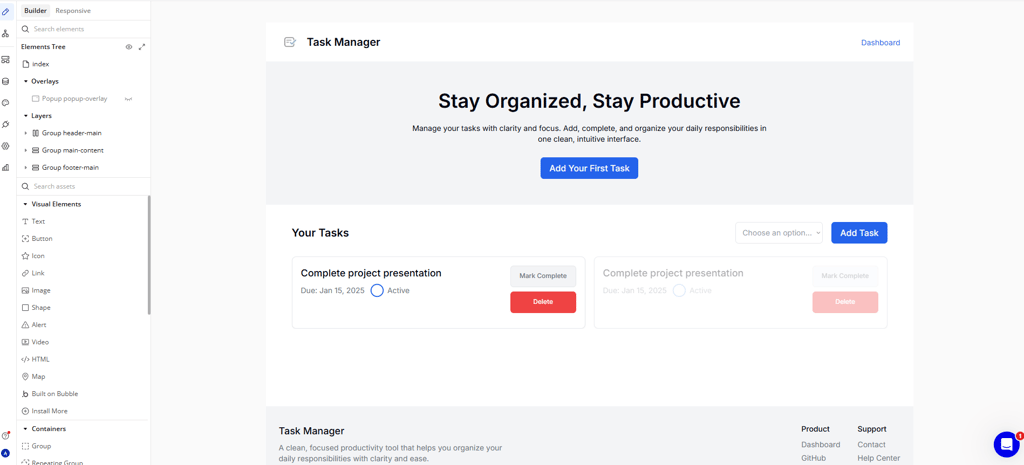
When building my first app (a simple task manager), it took hours just to understand the workflow system. The visual programming approach is clever, but it assumes you think like a developer. You're creating database fields, setting up triggers, and connecting workflows all manually.
The learning resources are extensive. Bubble Academy exists for a reason—because you need it. The community is helpful, but asking "how do I make a button work?" on day one feels a bit embarrassing.
What I liked: The control is incredible once you get a handle on it. You can build complex apps with custom logic, integrations, and sophisticated user management.
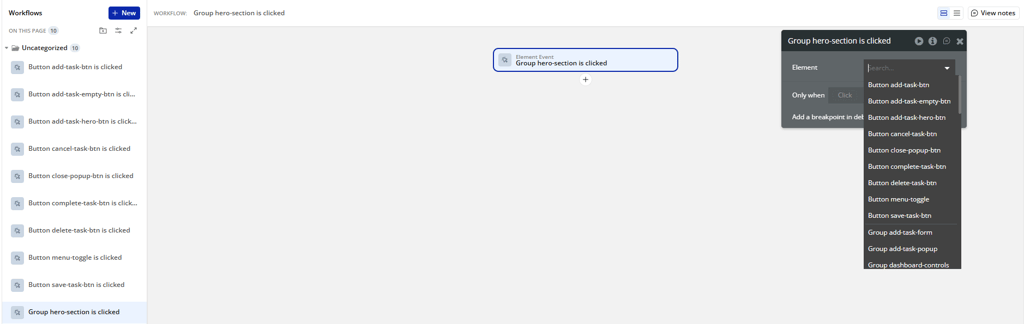
What frustrated me: Everything takes longer than it should. Simple tasks require multiple steps across different interface panels.
Base44 apps and ease-of-use
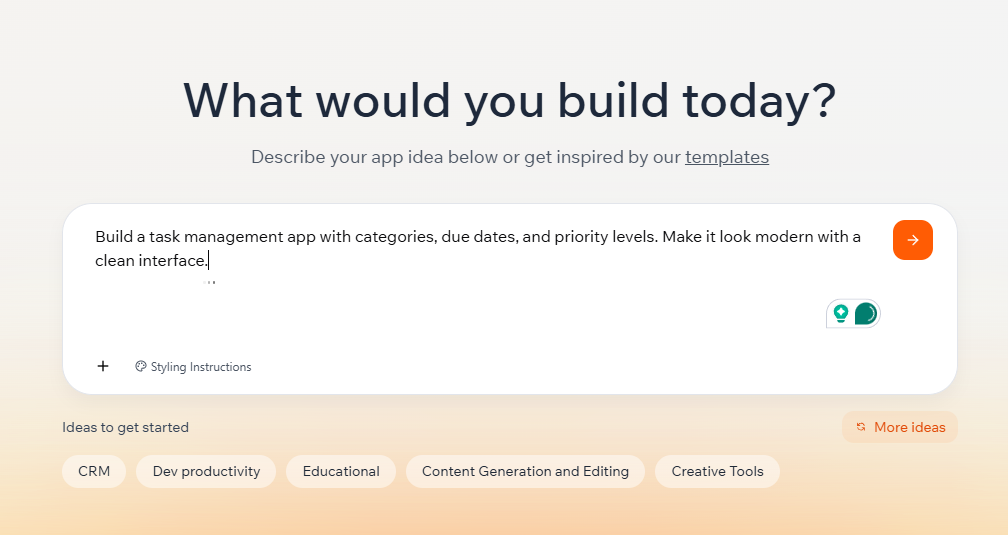
Base44 felt like cheating in the best way possible. I described my task manager in one paragraph in the text box: "Build a task management app with categories, due dates, and priority levels. Make it look modern with a clean interface."
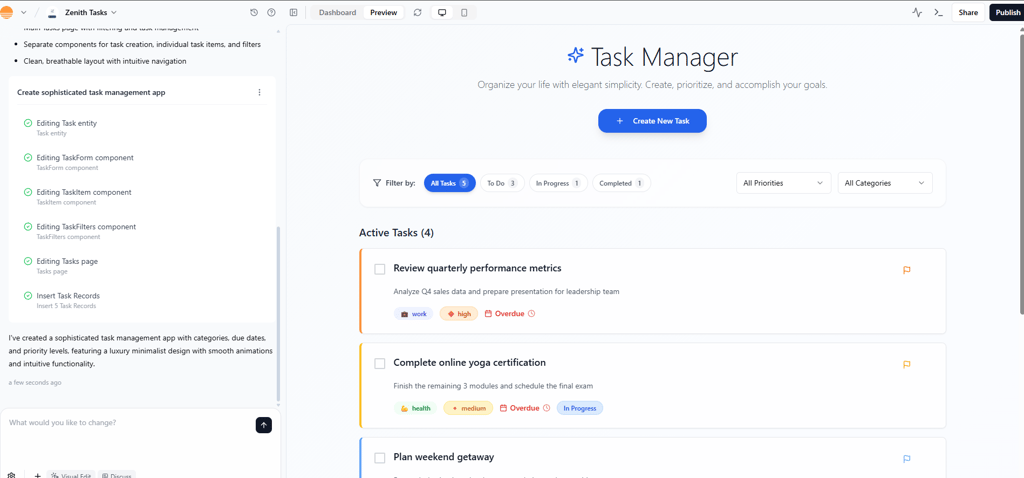
Two minutes later, I had a working app. Not a template, a functional app with my exact requirements. The AI generated a complete app, not just UI. It provisioned a database schema, backend logic, authentication flows, and hosting, alongside the user interface.
The platform uses a prompt-first workflow where you describe your idea in plain English, add design preferences, and let AI handle the construction. Built-in templates and design tokens guide non-developers through the process.
What I loved: The speed is unmatched. Ideas become apps extremely fast. The AI makes smart decisions about database relationships and user flow.
What could be better: You give up some control for that speed. Fine-tuning specific elements requires additional prompts rather than direct manipulation.
App building experience with both tools
I tested both platforms with three different projects: a task manager, an expense tracker, and a simple social media feed. Same ideas, different approaches, very different experiences.
Building an app with Base44
Starting a new project in Base44 feels like having a conversation with a really smart developer friend. The interface opens with a simple prompt box and some example ideas.
For consistency, I used the same description from the earlier section: “Build a task management app with categories, due dates, and priority levels. Make it look modern with a clean interface.”
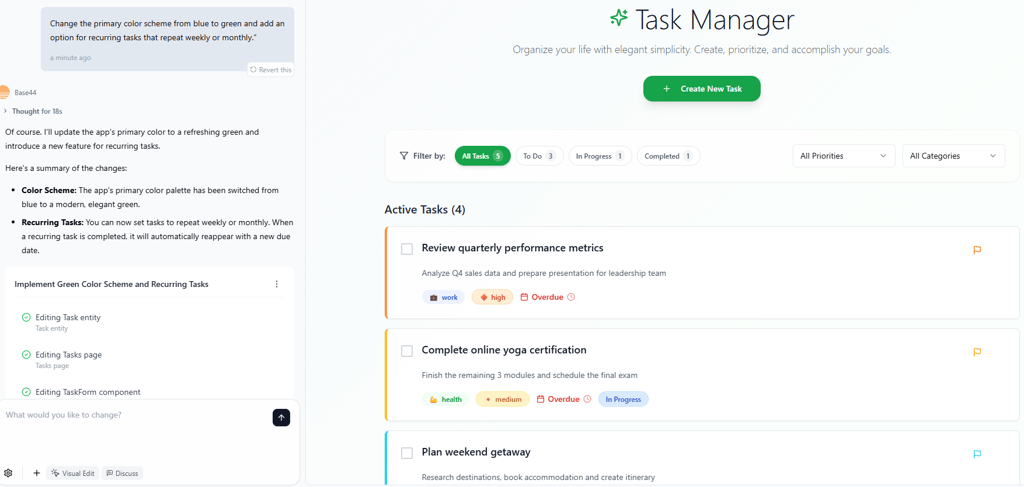
Two minutes later, I had a working preview. From there, I could immediately make edits such as changing the color scheme, adding recurring tasks, or adjusting the layout with a simple prompt. The platform doesn’t overwhelm you with settings. You just tell it what you want, and it applies the changes.
The building process took around 4–5 minutes:
- AI generated the app structure and initial design
- I previewed the result and requested adjustments
- Base44 refined the interface based on prompts
- The final app was ready for testing and publishing
What I also liked was the dashboard view. Once the app was generated, the dashboard gave me clear visibility over user access, security scans, and publishing options. It felt polished and professional, especially compared to other builders where deployment is a separate headache.
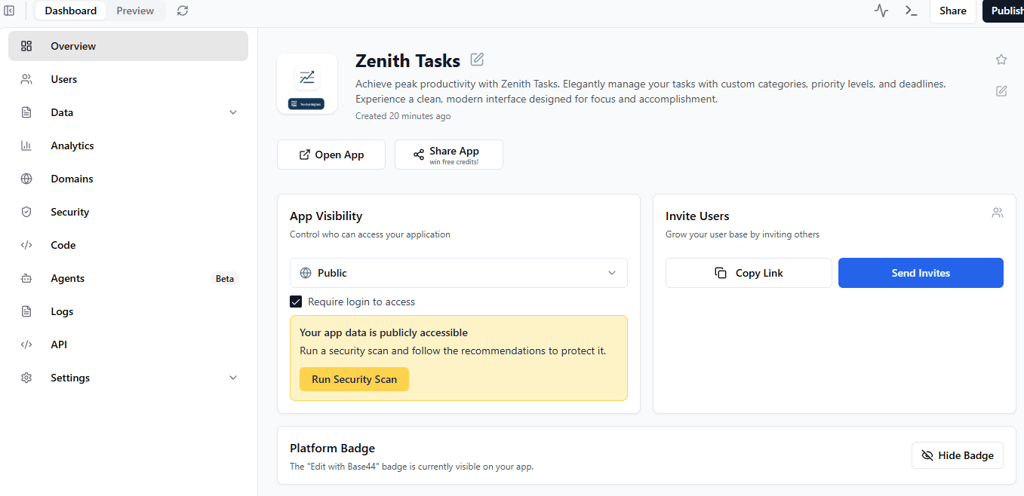
The result was surprisingly polished. Categories and due dates worked smoothly, the interface looked clean, and the app was automatically responsive for mobile. Iteration was fast.
I could prompt changes instead of digging through multiple settings. For most builders, that trade-off between speed and fine-grained control is exactly what makes Base44 stand out.
Building an app with Bubble
For consistency, I used the same Task Manager app I tested earlier. In Bubble, though, this meant dropping straight into the editor and handling everything manually.
The first step was building out the database. I had to define data types for Tasks, Categories, and Users, then create fields like Title, Due Date, and Status. Without this groundwork, nothing else would function.
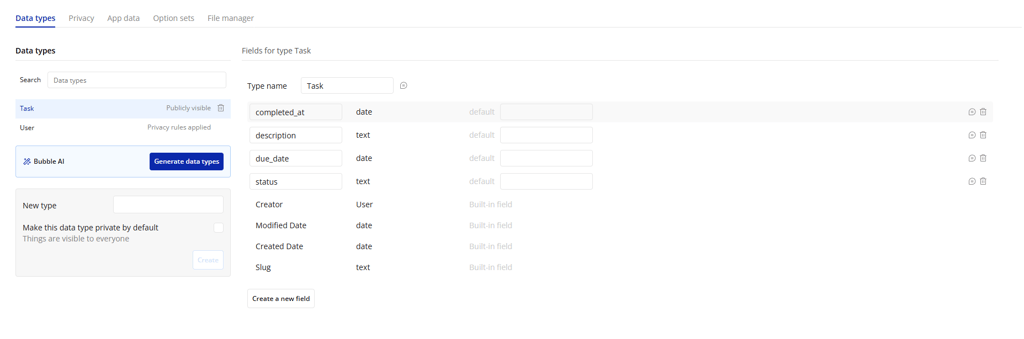
Once the data model was in place, I moved to the Workflow tab to wire up interactions. For something as basic as adding a task, I needed to create a workflow: “When Add Task is clicked → Create a new Task in the database.” Each small feature, like marking a task complete or deleting it, required a new workflow chain.

The building process stretched across hours:
- Defining data types and relationships
- Designing page layouts and forms
- Building workflows for adding, completing, and deleting tasks
- Testing and fixing edge cases
The control is impressive, as you can dictate exactly how data flows, add conditional logic, and set user permissions. But the trade-off is time. Even minor adjustments meant switching between tabs, updating workflows, and checking database fields.
Compared to Base44, where a single chat prompt handled recurring tasks or design tweaks, Bubble required multiple manual edits across different panels. The final app worked well, but the process highlighted just how much effort Bubble demands from its builders.
Base44 vs Bubble: final verdict
After weeks of testing, the choice is clearer than I expected.
Base44 is the future of app building for most people. The AI integration isn't just a gimmick, but fundamentally changes how fast you can go from idea to working app. While you sacrifice some control, you gain speed, simplicity, and surprisingly good results.
Bubble remains the power user’s choice. If you need complex business logic, extensive customization, or enterprise features, it's still the better option. But you'll pay for that power with time and a steep learning curve.
For startups, solopreneurs, and anyone who wants to test ideas quickly, Base44 wins decisively. The pricing is better, the learning curve is flatter, and you'll ship faster.
For established businesses with complex requirements and technical teams, Bubble's control and maturity make more sense.
My recommendation? Start with Base44. Build your MVP fast, validate your idea, then decide if you need Bubble's additional complexity. Most people will find Base44 handles their needs just fine.
The no-code future isn't about replacing developers with visual programming but about replacing programming altogether with AI that understands what you want to build.
FAQ
Do Bubble or Base44 require coding knowledge?
Neither platform requires traditional coding, but they take different routes. Base44 uses AI to remove most technical work. You describe your idea in plain English, and the system builds the database, UI, and workflows automatically. Bubble uses visual programming, so you’re not writing code but still need to think like a developer, setting up databases, workflows, and logic through drag-and-drop interfaces. In practice, Base44 is closer to true no-code, while Bubble leans toward low-code.
Can I monetize apps built with Bubble or Base44?
Yes. Both platforms allow commercial projects. Base44 supports payment features out of the box and even suggests monetization strategies depending on your app. Higher plans let you export frontend code for more ownership. Bubble hosts everything on its platform but offers strong scaling and integrations, including payment gateways, subscription management, and user billing.
Which platform is better for startups vs enterprises?
Base44 is ideal for startups and early-stage builders who need to test MVPs quickly without technical staff. Bubble is better for enterprises or teams with developers, since its complexity pays off in detailed customization and advanced permissions.
How do Bubble and Base44 handle third-party integrations?
Bubble excels at complex integrations with its API connector and plugins. Base44 handles common integrations automatically, covering payments, email, and analytics without extra setup.