Z-Image – AI image generator review
Being behind major reports like The Mother of All Breaches and RockYou2024, our in-house cybersecurity experts and journalists provide unbiased, real-world testing and in-depth analysis.
We maintain complete transparency by openly sharing our testing methodologies with our audience.
Learn more

Z‑Image is a new open-source AI image generator designed to create high-quality visuals from simple text prompts. It runs on a 6B parameter model and focuses on speed, making it ideal for quick, realistic outputs.
In this hands-on Z-Image AI review, I’ll walk through its features and test what this model can (and can’t) do.
Z-Image at a glance
Below you’ll see a quick look at Z‑Image’s core features. This open-source model is designed for fast, local image generation, with developer-friendly tools and flexible setup options.
| Quick Facts | Details |
| Platform type | Local (Windows/macOS/Linux); ComfyUI, Forge Neo; CUDA support; web demos available |
| Model / foundation | 6B S3-DiT; 12.3GB BF16 / 6GB FP8 / 5GB GGUF; downloadable via Hugging Face, ModelScope, GitHub |
| License | Apache 2.0 (code + weights); full commercial use allowed |
| Inputs | Text prompts (English/Chinese) |
| Guidance tools | Standard CFG guidance applies; 8–9 steps ideal; seed control; negative prompts optional |
| Style presets / LoRA | No built-in styles; LoRA support is community‑driven via ComfyUI; some Turbo variants need adapters, but this varies by workflow |
| Batch generation / speed | Example: sub-second (H800), 2–5s (RTX 4090), ~34s (RTX 2060); VRAM limits apply. Performance depends on VRAM, resolution, quantization, and settings |
| Inpainting / outpainting | Achieved through ComfyUI graphs or img2img pipelines; no dedicated native tool |
| Upscaler and max resolution | 1024×1024 native, up to 2048×2048 on high-VRAM setups; real‑ESRGAN and similar models integrate through ComfyUI but are not part of Z‑Image itself |
| Output formats | PNG, JPEG, WebP (via plug-ins); RGB only; metadata embedding depends on the UI; by default RGB output has no embedded provenance |
| Watermark / C2PA | None; no visible or hidden marks, no provenance tracking |
| Commercial rights | Commercial use allowed per Apache‑2.0 and Alibaba terms; must retain license and notice files |
| Cost to run | ~4GB RAM minimum (GGUF), 16GB recommended (BF16); cloud GPU time typically ranges roughly $0.40–$6/h depending on GPU type and region |
| API / CLI / Docker | Python pipelines, CLI tools, and Docker images exist in the community ecosystem – availability varies over time |
| Ecosystem | Integrates with ComfyUI, ControlNet Union, FlashAttention, Cache-DiT, stable-diffusion.cpp. These are integrations, not built‑in model components |
| Target audience | Developers, hobbyists, small studios, bilingual creators, privacy-conscious users |
Z‑Image core features breakdown
This section breaks down Z‑Image’s core features based on my hands-on testing using the Huggingface.co demo, where I focused on image quality. I also reviewed documentation and user feedback to better understand how the model works under the hood.
Performance and speed
One of Z‑Image’s standout features is speed. Most AI image models go through many steps (called inference steps) to build an image from a prompt. The Turbo variant needs only 8 steps, which is very low. This helps it generate photorealistic images much faster than other models. On high-end GPUs like the H800, it can deliver results in under a second.
On high-end GPUs like the H800 or 5090, users report generation times as low as 2–7 seconds for 1024×1024 images. On mid-range GPUs like the RTX 3060 or 4070 Ti, speeds range from 9 to 30 seconds, depending on settings and drivers.
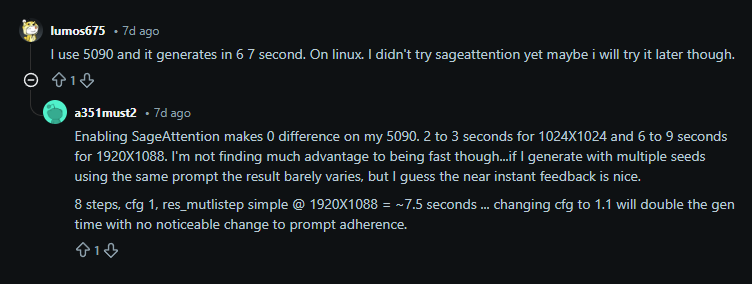
What makes Z‑Image easy to use is that it doesn’t need a powerful computer. It can run on devices with just 4 to 16GB of memory, so even hobbyists or small teams can use it. And even though it’s lightweight, the image quality is still very good – often matching much larger, heavier models.
In short, Z‑Image balances between speed, efficiency, and visual quality – making it one of the more user-friendly open-source models available right now.
Hardware requirements
Z‑Image is designed to be fast and lightweight, so you don’t need a powerful machine to use it – but the hardware you have will affect how quickly it runs and what quality you can expect.
If you’re using a mid-range GPU with around 12–16GB of memory, you’ll be able to generate high-quality images (up to 1024×1024) quickly and without issues. For example, a card like the RTX 3060 or 4070 will work well.
It can also run on lower-end GPUs (like 6–8GB cards), especially if you use the smaller, compressed model versions (called FP8 or GGUF). These are a bit slower and may limit image size or detail, but they still work.
If your device doesn’t have a compatible GPU, you can also try Z‑Image using cloud services or web demos. Just keep in mind that those may have generation limits or wait times.
In short, Z‑Image is flexible. It works great on newer GPUs, but it can also run on more modest setups – making it accessible to hobbyists, developers, and small teams without expensive gear.
Bilingual text rendering
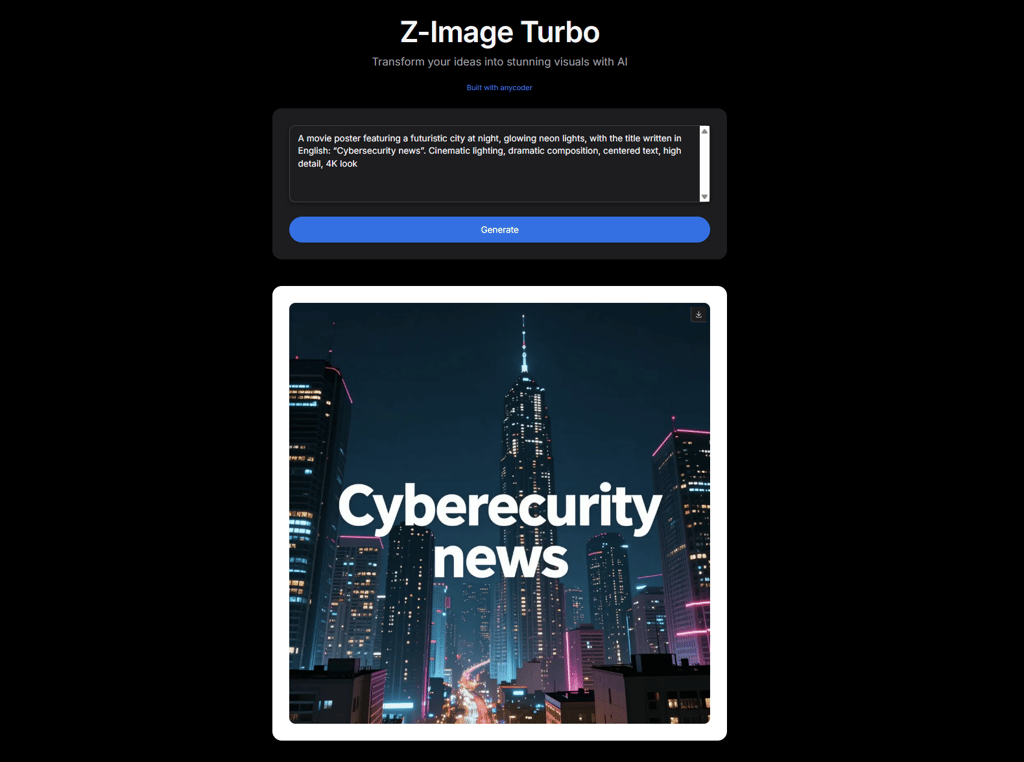
Z‑Image claims to support English and Chinese text rendering, especially for poster-style outputs. In testing, the results were mixed. When I prompted the model to create a poster titled “Cybersecurity news”, it misspelled it as “Cyberecurity”. This kind of result is common in AI image generators. The layout and style look good, but the text is often inconsistent or inaccurate.
On the other hand, when I tested a more natural scene – a man reading a newspaper – the Z-Image handled it much better. The headline “Global AI Trends” appeared clearly on the paper, with correct spelling and a realistic design. It suggests that Z‑Image handles text more accurately when it’s part of something in the scene – like a book, or a newspaper.
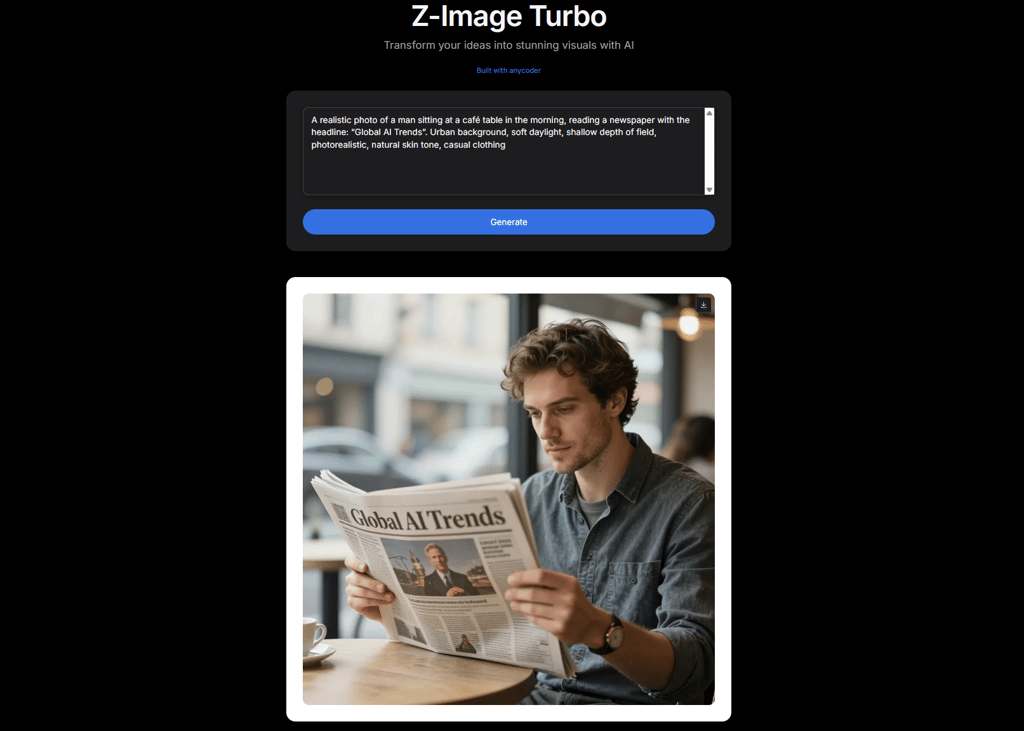
To conclude, Z‑Image can handle basic text rendering in realistic contexts, making it useful for mock-ups or concept scenes. But when accuracy matters – especially in titles, logos, or design-heavy prompts – it’s still not reliable enough for production use.
Image quality and photorealism
Z‑Image Turbo is said to stand out for its ability to generate clean, photorealistic images with impressively natural lighting and skin texture – especially in portraits.
In my own test, I used a detailed outdoor scene prompt: “a young woman sitting on a park bench at golden hour.” The result I got was visually strong – warm tones, soft depth of field, and accurate color balance.
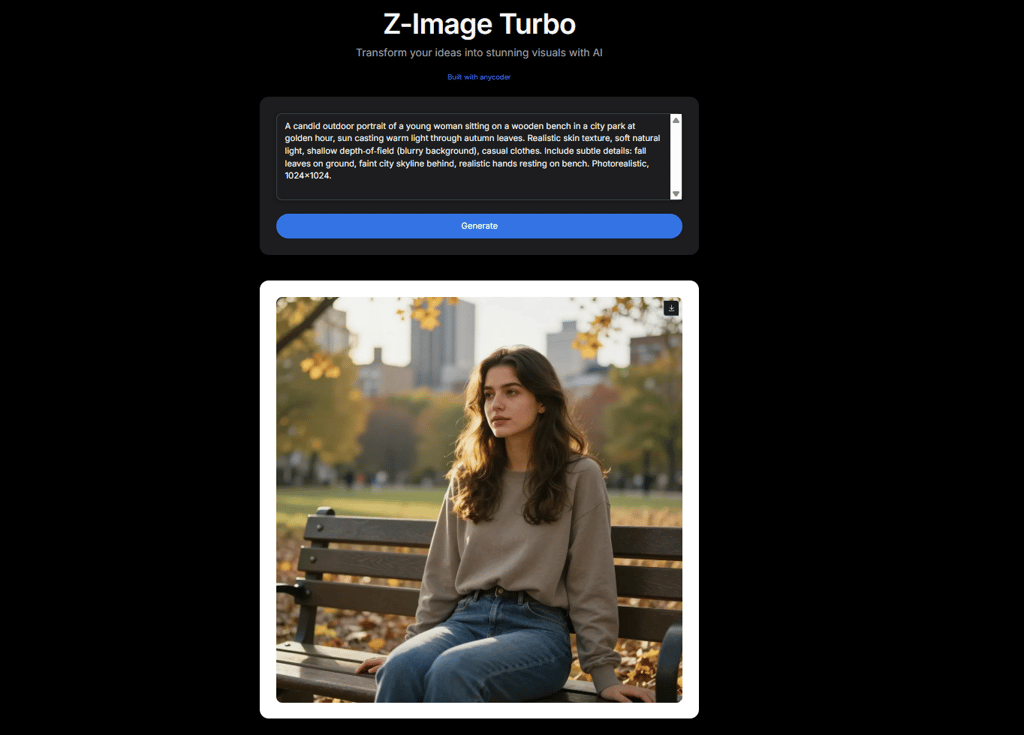
However, like many AI images, it looked a bit too perfect – smooth skin, perfect lightning, and everything arranged neatly.
Reddit users seems to have similar impressions. Many highlight how Z‑Image delivers high-quality results in just seconds, calling it “the best open-source image model right now”. Additionally, Z‑Image follows prompts well, and many users say its skin detail and lighting are better than some bigger, more demanding models.

Still, the model has its limitations. People have noticed small visual flaws in more artistic images, and it can run slower on computers with less than 8GB of graphics memory. Details like hands, text, or busy backgrounds can also vary in quality depending on how precise the prompt is.
Z‑Image shines at quick, high-quality portrait generation, especially when realism and natural light are key. The outputs are often clean and attractive – sometimes to the point of looking a bit too idealized. While not perfect for every use case, it’s a strong option for fast, realistic image generation with minimal setup.
Open source and commercial freedom
Z‑Image is released under the Apache License 2.0, a permissive open-source license that gives users a lot of flexibility. You can download, use, modify, and even redistribute both the model and its code. It’s also allowed for commercial use, meaning you can build products, services, or tools with Z‑Image without needing special permission or paying licensing fees.
This makes it especially appealing for developers, small teams, and businesses looking to integrate AI image generation into their own workflows. The open license also encourages experimentation and community contributions, allowing anyone to customize or extend the model as needed.
Z‑Image is not just free to use – it’s also safe to use commercially, making it a strong choice for both personal and professional projects.
Summary – fast, but not perfect
Z‑Image is a fast, lightweight, open-source AI image generator that turns text prompts into high-quality visuals. It runs locally, works well even on mid-range GPUs, and delivers impressive results – especially in photorealistic portraits.
While it handles realistic scenes and simple prompts well, it lacks advanced features like inpainting, upscaling, and batch generation. Text rendering is hit or miss – accurate in natural scenes, but unreliable in poster-style layouts.
Despite these limits, Z‑Image is free to use and fully open for commercial projects. It’s a solid choice for developers, hobbyists, or small teams who want quick, realistic image generation without the need for expensive tools or cloud access.