I tested Grok AI vs ChatGPT – here are my findings
Being behind major reports like The Mother of All Breaches and RockYou2024, our in-house cybersecurity experts and journalists provide unbiased, real-world testing and in-depth analysis.
We maintain complete transparency by openly sharing our testing methodologies with our audience.
Learn more

The world seems divided again, and this time over AI chatbots. Some root for Grok AI, the product of Elon Musk’s xAI, with its extravagant updates and cheeky voice. Others remain loyal to ChatGPT – OpenAI’s chatbot, the most popular AI tool in the US in November 2023. Both chatbots have free plans, but advanced features require a subscription – I’m ready to pay, but only for one chatbot to use daily.
The Cybernews research team and I decided to run a Grok AI vs ChatGPT comparison, giving them identical prompts to compare their performance in deep research, image analysis, content creation, and coding. Below you’ll find precise test results, pricing comparisons, and the best use cases for each tool.
Grok vs ChatGPT: quick overview
Grok and ChatGPT don’t only belong to different companies and run on different AI engines. There are other must-know characteristics that I summarized in one clear table.
| Platforms | Grok AI | ChatGPT |
| Pricing | $30.00/month, free plan available | $20.00/month, free plan available |
| Platforms | Web, mobile, API | Web, mobile, API |
| Multimodal | Text, images, voice | Text, images, voice, video |
| Image generation | Yes | Yes |
| Voice input or output | Yes | Yes |
| Web search | Yes | Yes |
| Agents | Customizable | Customizable |
| Context window | Up to 2M in Grok 4 Fast | Up to 1M in GPT-4.1 |
| Custom chatbots | Yes, in Grok Builder | Yes, on the OpenAI app or website |
| File analysis | PDF, docs, JSON, spreadsheets, images, code files | PDF, docs, JSON, spreadsheets, images, code files |
| Integrations | Built-in and third-party integrations | Built-in and third-party integrations |
| Security | Retains chat data, has business, edu, and enterprise controls | Retains chat data, has business, edu, and enterprise controls |
Key similarities and differences
Grok and ChatGPT are both chatbots that look identical, but only on the surface. Here you can find their main similarities and differences.
Similarities
Grok and ChatGPT share a few core features that make them versatile platforms:
- AI assistants. Both are multipurpose AI assistants for various use cases, from content creation to data analysis and coding.
- Access to the internet. Grok uses Grok Search, while ChatGPT primarily uses Bing to find information online.
- File support. Both process various file formats, including PDFs, spreadsheets, images, and docs.
- Voice input and output. Grok and ChatGPT allow for audio inputs and outputs.
- Business use. Both tools can be used by business, education, and enterprise teams.
- Image generation. Grok generates images with Flux.1, while ChatGPT generates images with DALL·E 3.
Differences
The difference between the tools is related mainly to their personalities and overall positioning:
- Tone. Grok has a more casual and even ironic tone by default. ChatGPT communicates in a professional, cheerful manner. It’s not a problem because both tools’ tones can be customized.
- Positioning. ChatGPT is focused on professional and academic use cases and serious contexts. Grok centers around cultural trends and controversial updates, such as new AI companions with provocative aesthetics.
- Access to social media. Grok has direct access to X (formerly Twitter), which allows it to listen to breaking news and public reactions to it. ChatGPT doesn’t directly access any social media API.
- Censorship. Grok has weaker ethical policies, so it may generate politically incorrect and inappropriate answers and images, as described in the Cybernews Grok 4 review. All potentially sensitive, controversial topics are heavily censored in ChatGPT.
- Pricing. ChatGPT offers more affordable pricing for individual use ($20.00/month) and for businesses (From $30.00/month/month/user). Grok costs $30.00/month for individuals and for a seat in a business plan.
Testing Grok and ChatGPT side-by-side
I tested how Grok and ChatGPT work across nine different tasks. To make the evaluation fair, I gave both tools exactly the same prompt for each task and compared the outputs. Below are the test results with screenshots and winners.
Research and fact-checking
First, I checked how the tools handle research – one of their primary and most common use cases. Here’s the prompt I gave to both of them:
What were the key findings and major criticisms of the EU's AI Act, which was finalized in 2024? Please provide a summary of the main points, cite at least three credible, specific sources (e.g., major news outlets, official EU publications, or academic analyses), and explain the reasoning behind one major criticism regarding its impact on open-source development.
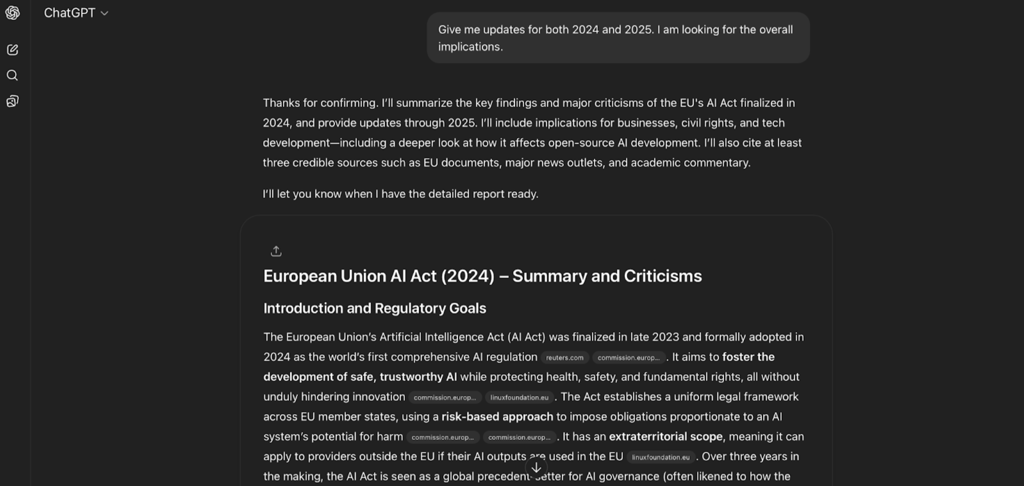
ChatGPT research was comprehensive and, most importantly, up-to-date. It correctly described the latest developments in the problem as of July 2025.
The output took 11min 15s and used nine reliable sources appropriate for official and academic citation. However, there wasn’t a formatted list of references, as the sources were cited in-line as clickable buttons after each paragraph.
I really liked how specifically the answer was structured into subheadings and that some important points were bolded. It made scanning and reading much easier.
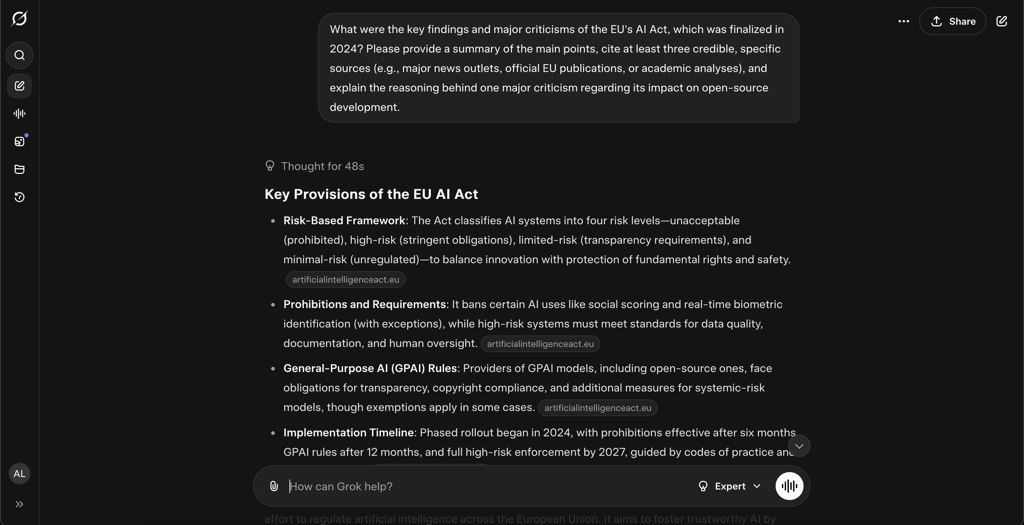
Grok’s research was more high-level, explaining the technical details of the EU AI Act and the nature of criticism. Unlike ChatGPT, it didn’t provide any recent data from 2025, but used outdated sources that didn’t reflect the entire picture.
The clear advantage was the speed – Grok took only 1min 40s to generate the answer. What’s more, it used 20 credible sources and included a separate reference list at the end of the answer. A ChatGPT review by my colleagues confirmed similar results regarding the tool’s high accuracy and speed.
The answer itself was plain text with seven subsections and no proper formatting. This organization made some sections too large to skim or pick a specific point at a glance.

Image analysis
I wanted to test how accurately the tools interpret charts and graphs in images and make logical conclusions. So, I uploaded a complex graph and gave the tools the following prompt: “Summarize and analyze the data provided in the image.”
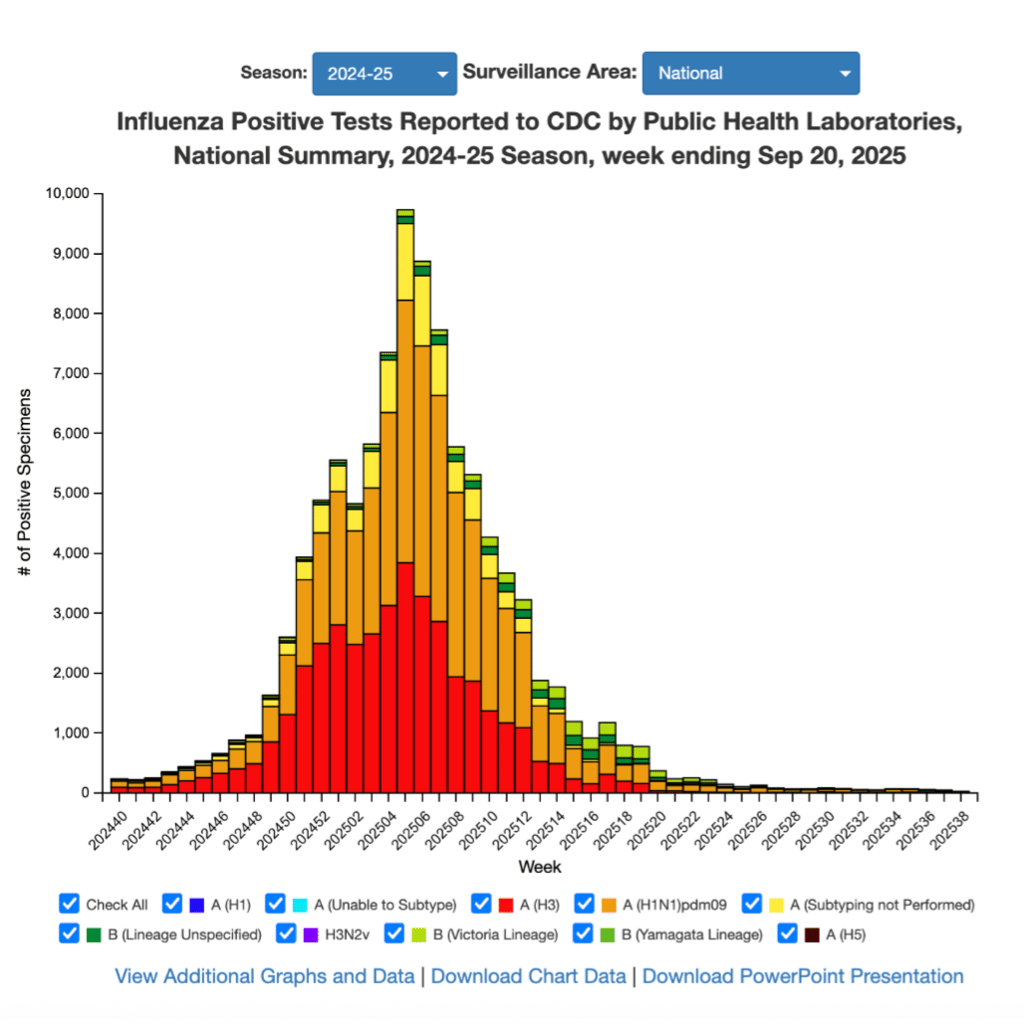

ChatGPT accurately described the graph with its seasonal trends and peak activity. However, it provided just a high-level observation instead of a comprehensive trend analysis.
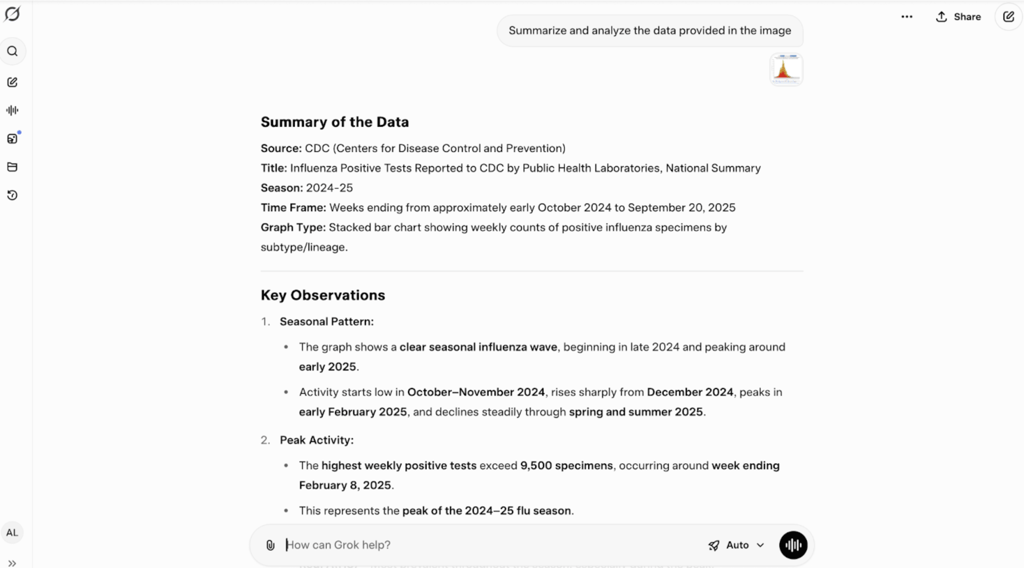
Grok analysis was far deeper. It took the graph description as a starting point for further study. The tool concluded how these trends are connected to public health and potential implications for vaccine matches.
What I appreciated the most was that Grok pointed out the limitation of the graph, which represents only public health labs and not all clinical cases. ChatGPT omitted this point altogether.
Summarization
Summarization may seem like an easy task for a chatbot, but this is where they often omit facts and even hallucinate. To check this aspect, I provided both tools with the identical texts and gave the following prompt:
Summarize the provided article into exactly five bullet points. The total summary must not exceed 80 words. The tone should be formal and neutral.
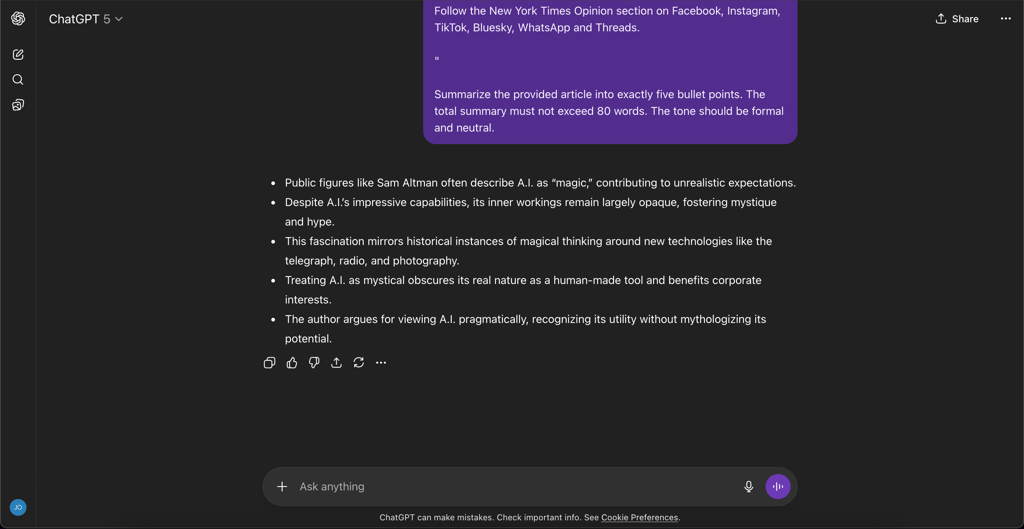
ChatGPT summarized the text correctly and again offered a clear structure. It used the one idea per bullet approach, which made reading easy.
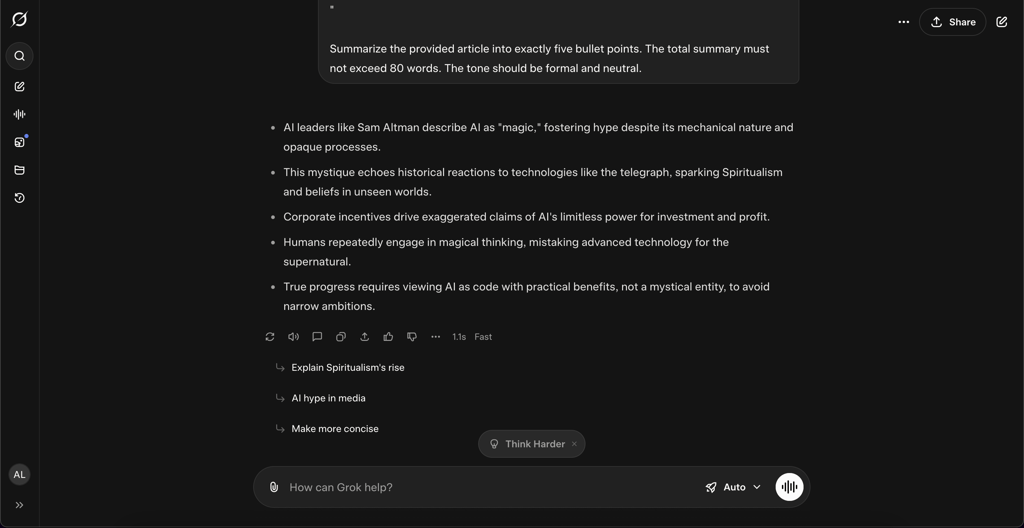
Grok also clearly conveyed the main points, too, and didn’t make up any facts. However, some ideas were blended into a single bullet, which makes it slightly less reader-friendly than ChatGPT’s summary.
Content creation
The internet is full of AI-generated content with similar phrasing but for different products. I decided to check if something had changed and whether AI-generated texts now come ready to publish without any editing needed. I gave both tools the following prompt:
Create a short brand kit for a new company called 'Aura,' which sells eco-friendly, minimalist yoga mats. Provide the following:
1. One compelling tagline (under 10 words).
2. A 50-word ad copy for a social media post, targeting environmentally conscious millennials.
3. Three brand keywords that capture the company's tone.

ChatGPT met all the prompt’s requirements, but the generated text sounded generic, and some phrases like “Meet Aura” felt too AI. The text clearly needs a human touch for a livelier, catchier tone suitable for marketing purposes.
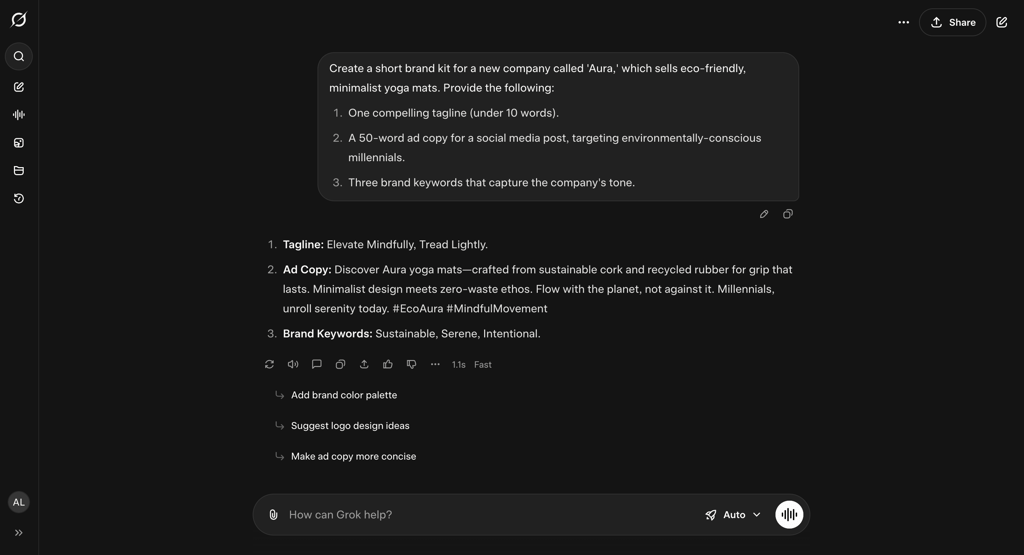
Grok met all the formal requirements, but its copy also sounded too artificial. I liked that it offered hashtags, as the tool recognized that it was a social media post. The catchy, lighthearted tone made it a great starting point for a solid marketing copy.
Creative writing
Human creativity is difficult for AI to replicate, or at least that’s what people hope for. I decided to challenge the tools and give them a creative writing task with this prompt:
Write a short story (around 200 words) that begins with this line: 'The old librarian locked the door, but the single glowing book on the shelf refused to be ignored.' The story must include at least one line of dialogue and have a surprising twist at the end.
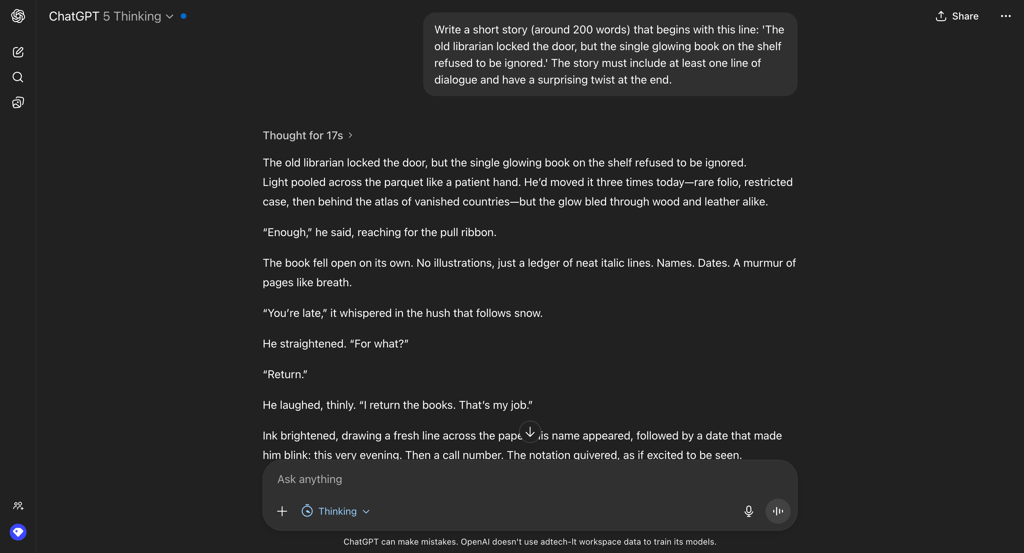
ChatGPT strictly followed the prompt, but the story was hard to follow because of its sophisticated language. The ending was actually original, but it requires some mental effort to grasp it. Overall, the originality loses its impact due to the overly complicated wording and sentence structures.
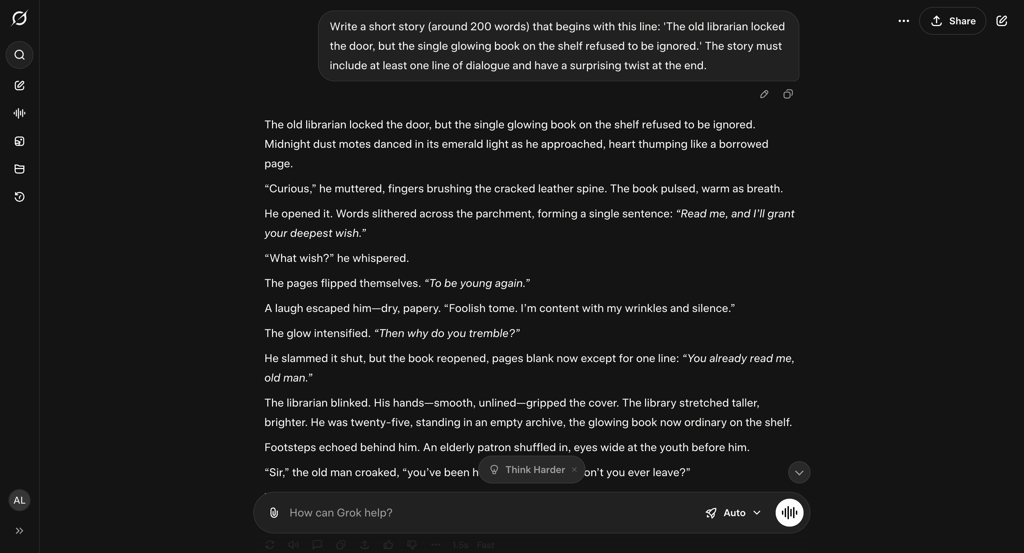
Grok’s story complied with all the requirements and was much easier to follow. However, the plot twist itself felt familiar and wasn’t as original as ChatGPT’s.
Image generation
Adobe Firefly reports that it was used to generate 18 billion assets (images, videos, vectors, etc.) in less than two years. This made me test another aspect – image generation. I gave the two tools the following prompt:
Generate a photorealistic image of a golden retriever wearing a tiny, hand-knitted blue sweater, sitting on a rustic wooden park bench. The lighting should be soft morning light, and the dog's face should be in sharp focus, looking directly at the camera with a happy expression. The paws should be resting naturally on the bench.
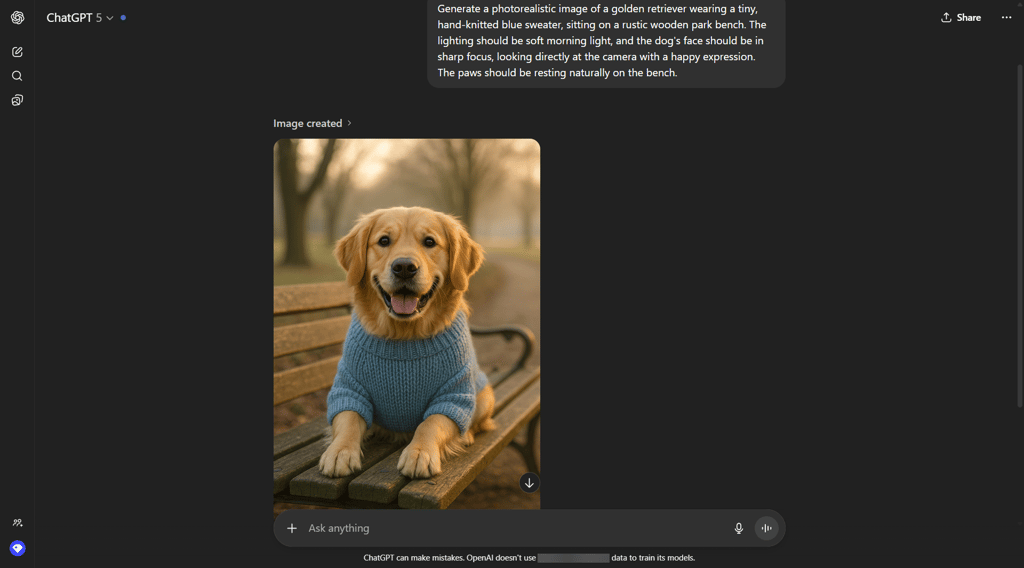
ChatGPT generated a realistic image according to the prompt in 2min 30s. The picture still had that distinctive AI-smoothed-out effect, but the tool definitely knew the breed well enough not to produce any nonsense.
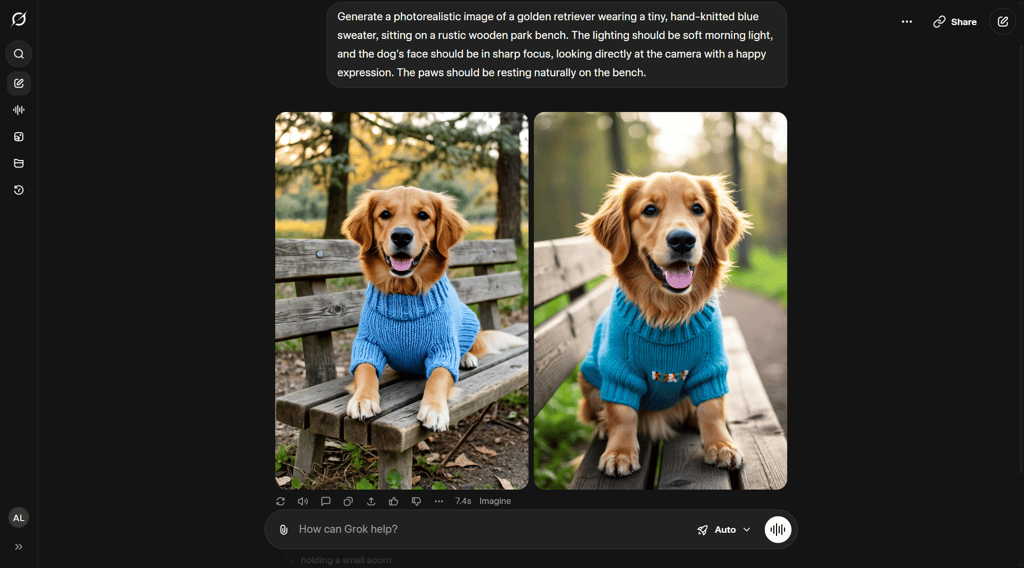
Grok has generated two images in just 10 seconds. However, neither met all the requirements of the prompt. Most importantly, the generated dog was unrealistic and resembled a mix of a golden retriever and a dachshund, with a weirdly short body.
Coding
I didn’t bog down the tools with complex algorithms, but a simple CRUD app. The CRUD operations sit behind almost all the apps, so the aim was to show how AI performed the essential coding tasks. I gave both tools this prompt:
Write the code for a simple notebook web page using HTML, CSS, and JavaScript. Requirements:
1. Use localStorage to save and retrieve notes, so they persist on browser refresh.
2. HTML: Needs a textarea for editing, a 'Save Note' button, and a div to list all saved notes.
3. JavaScript Logic (CRUD):
Create: The 'Save Note' button should create a new note and add it to the list.
Read: The list should display all saved notes when the page loads.
Update: Clicking on a note in the list should load its text into the text area for editing. Saving it should update the original note.
Delete: Each note in the list should have a 'Delete' button.
4. Please provide all the code in a single HTML file.”

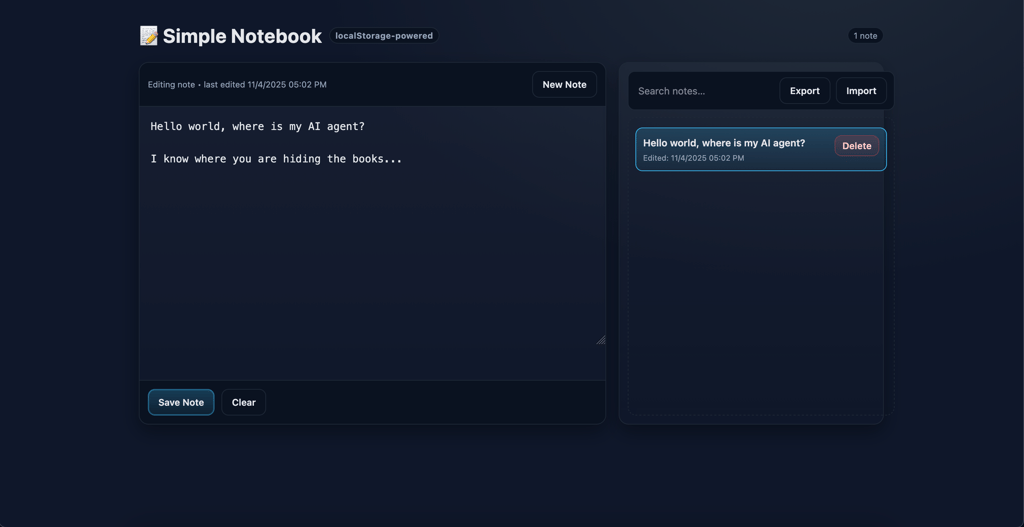
ChatGPT built clean code without any visible bugs. The interface felt modern, and all the CRUD operations worked properly. ChatGPT even went a step further and added the extra feature of importing and exporting notes in JSON format.
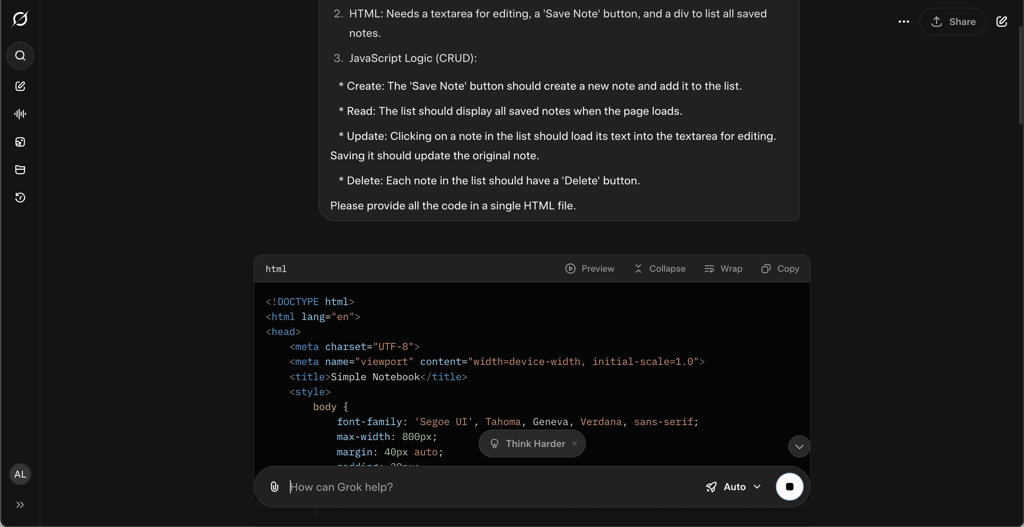
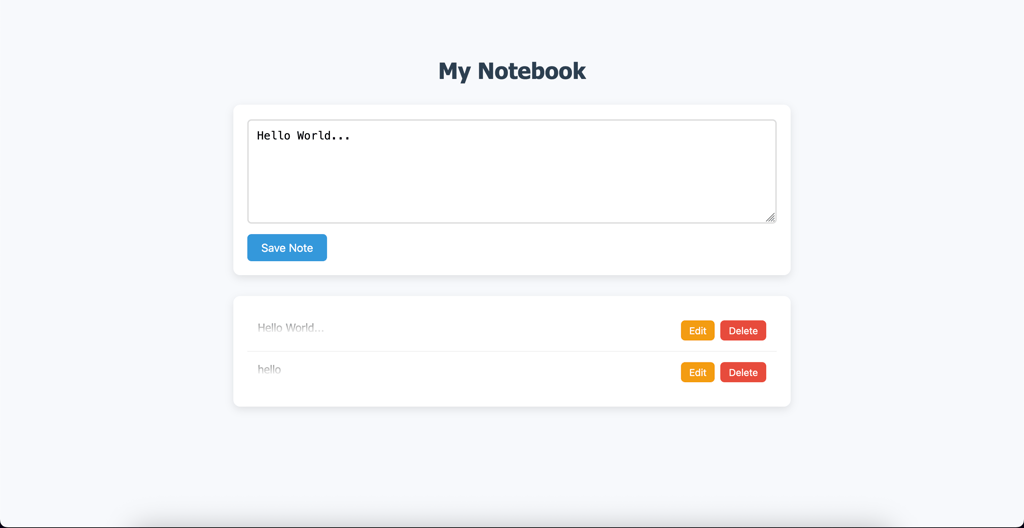
Grok’s code was buggy. First, the interface felt more outdated compared to ChatGPT, and the Delete feature didn’t work properly. After clicking Delete, the tool erased all the notes and restored them only after refreshing the page. Also, there was no Read function – I could only view them by clicking Edit. On the good side, the Create and Edit features worked well.
Data analysis
Finally, I wanted to check how the tools handle huge datasets. I attached a CSV file about UFO sightings with more than 80,000 records and wrote this prompt:
Analyze the attached CSV file (ufo_sightings_scrubbed.csv), which shows UFO sightings from 1949 until 2013.
1. Which shapes of UFOs tend to be seen most often?
2. Which states report the most UFO sightings?
3. Create a histogram to understand the distribution of the duration of UFO sightings.
4. Take a look at the data since the year 2000. How have annual sightings trended?
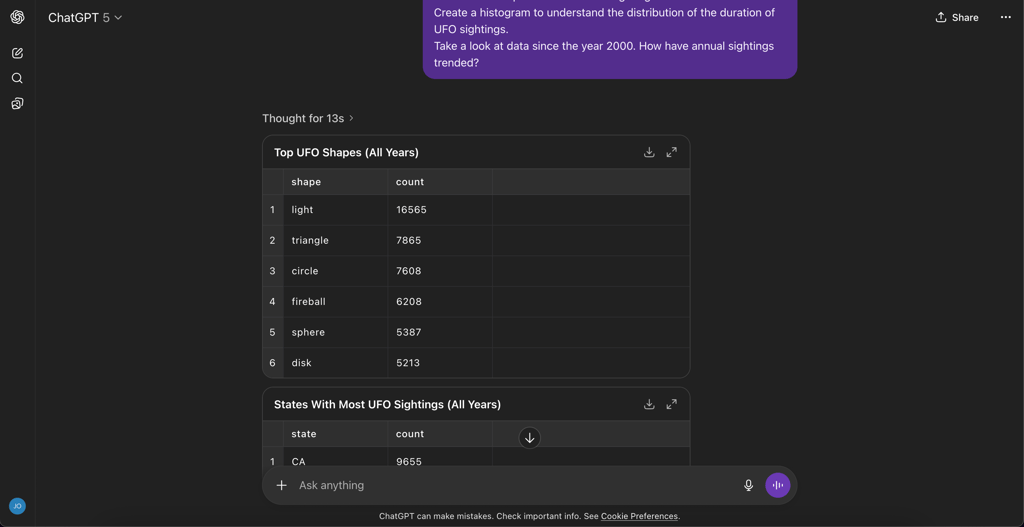
ChatGPT analyzed the file perfectly in 1min 15s. It answered all of the questions correctly and included downloadable visualizations and tables. All the facts and numbers matched with the provided document exactly.
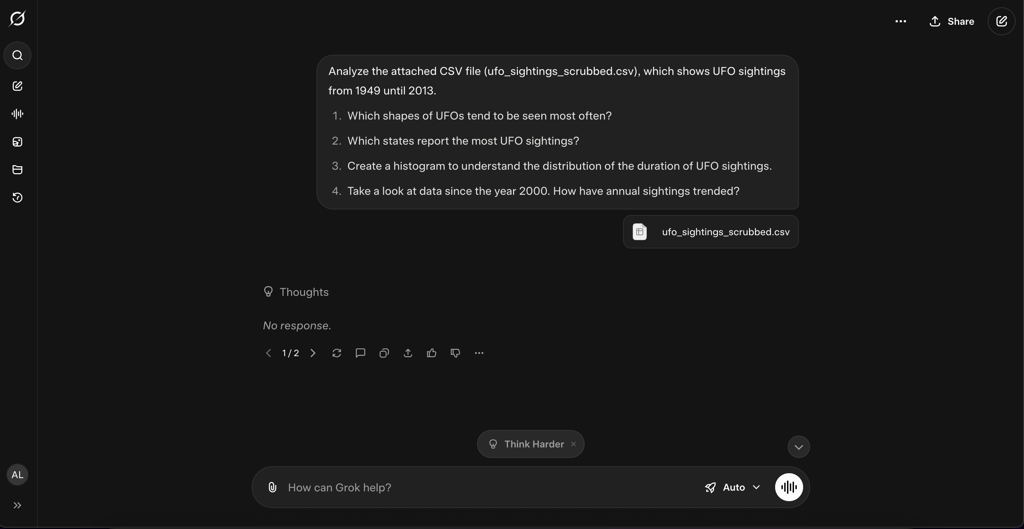
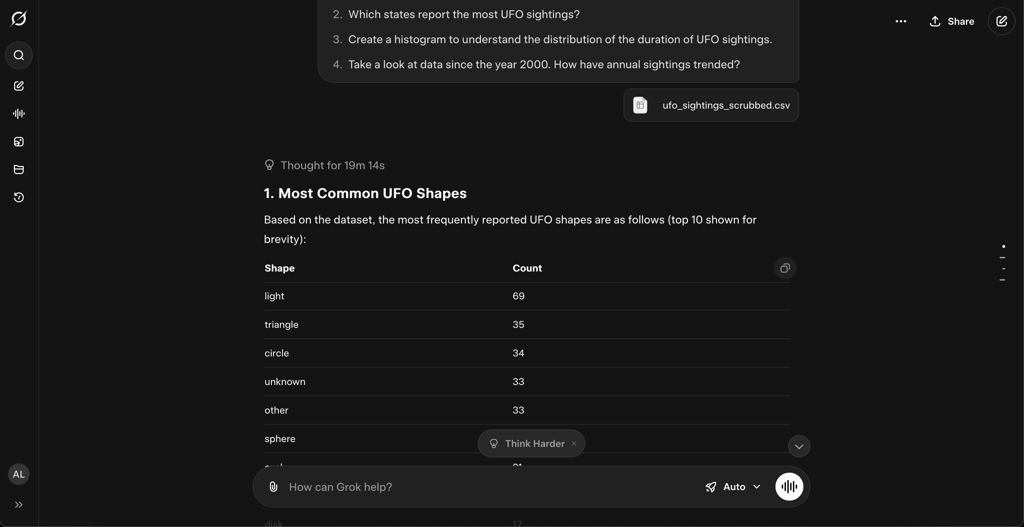
I waited for the Grok’s response for an hour, but it failed to produce one. The second attempt took 19 minutes. This time, the analyzed dataset was there, but incomplete. Instead of 16,565 reports of the light-shaped UFOs, Grok only counted 69.
It only described a histogram, so I followed up with the request to visualize it. However, the tool still returned a plain-text histogram instead of an image.
User experience and output style
These two AI tools are among the top when it comes to a seamless user experience. Their interfaces are highly intuitive, buttons are placed logically, and functions are easy to find – even first-time users can figure out what to do without any instructions.
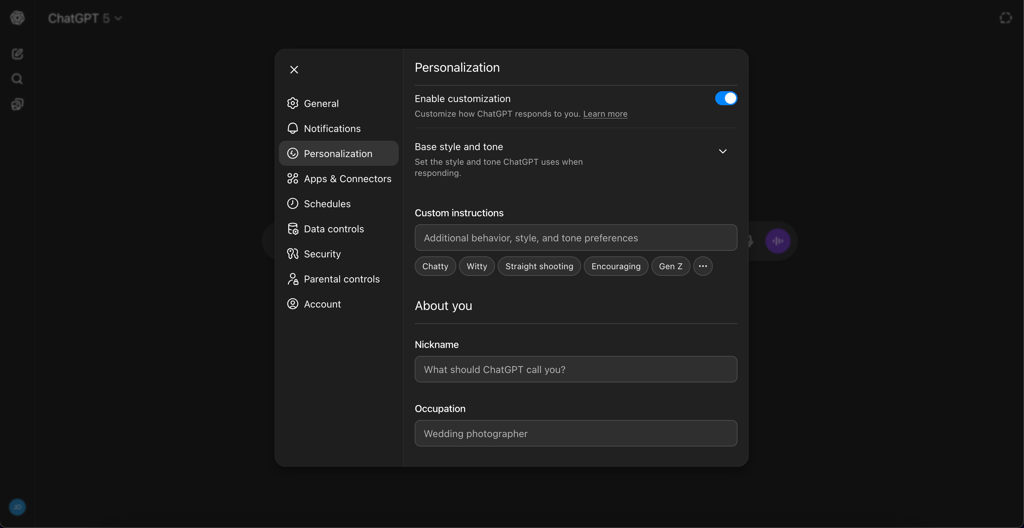
ChatGPT offers a wider range of customization features. Here, you can not only create your own GPTs but also adjust the chat’s response style and tone to sound chatty, witty, straightforward, encouraging, or Gen Z.
You can also set a nickname for ChatGPT to use, personalize the information it provides, and choose whether to enable web search, code execution, canvas, and voice. You can even change the color of chat bubbles – just for fun's sake.
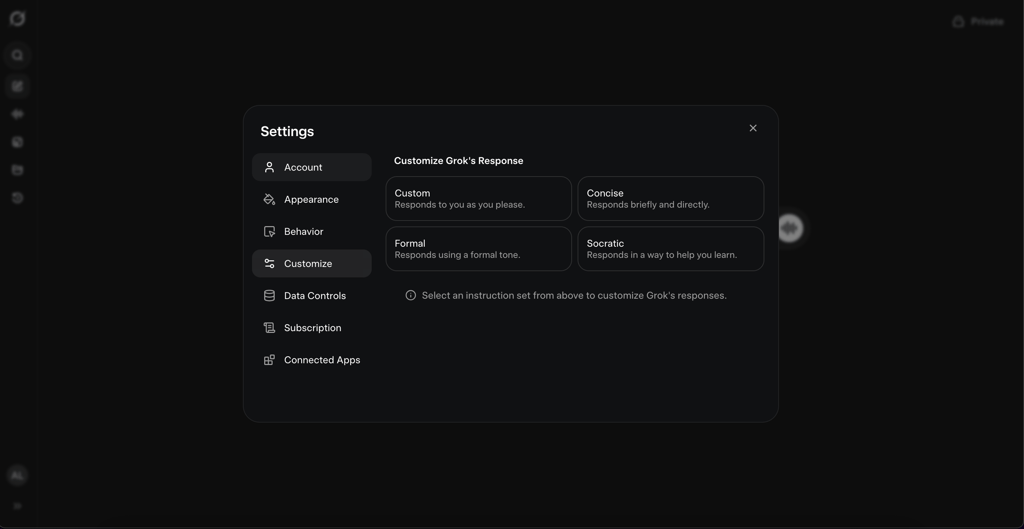
In Grok, you can give custom instructions for tone or choose it to be concise, formal, or Socratic. You can also enable auto-scroll, follow-up suggestions, a sidebar editor for code and documents, typeahead suggestions, rich text in the query bar, and a starry background. Also, you can turn on notifications when processing or automatic video generation finishes.
Grok vs ChatGPT: plans and pricing
I compared the pricing of both AI chatbots, together with the features they offer and the level of detail provided.
| ChatGPT plan | What you get | Price |
| Free |
| Free |
| Plus |
| $20.00/month |
| Pro |
| $200/month |
| Business |
| $25.00/month/user |
| Enterprise |
| Custom |
ChatGPT and Grok offer similar pricing plans, with ChatGPT being more affordable and specific about the features included.
| Grok plan | What you get | Price |
| Free |
| Free |
| SuperGrok |
| $30.00/month |
| SuperGrok Heavy |
| $300.00/month |
| Grok Business |
| $30.00/month/user |
| Enterprise |
| Custom |
Grok provides fewer details about what each plan includes, probably because the usage hinges heavily on token calculations. One striking distinction from ChatGPT is that Grok has recently introduced the SuperHeavy plan, which is significantly more expensive than the other models.
Grok vs ChatGPT: my final verdict
If I were to choose only one tool, I’d go for ChatGPT. I love its versatility and precision – in the end, ChatGPT won in the majority of my tests. It’s especially useful in deep research and analysis in professional and academic contexts. Thanks to internet access, it can find the latest credible sources, clearly break down large datasets, and generate realistic images – to the extent AI can today.
Grok can be applied in casual, everyday research and insights into cultural trends, but it remains a relatively young tool that requires more training. What’s good is Grok’s direct access to X, so it understands public opinions and feelings about the latest news. Grok coped the best with the creative writing tests thanks to its understanding of clear, engaging content.
All in all, chatbots are learning every second. Perhaps tomorrow, you’ll have a new outstanding tool that’ll make everything you do even easier.
FAQ
Is Grok better than ChatGPT?
No, Grok isn’t better than ChatGPT. In fact, ChatGPT performed better in the majority of my tests compared to Grok. The tools have different use cases: Grok is better for casual research on trending topics and the latest news, thanks to its direct connection to X. ChatGPT is more versatile and can be used in academic, professional, and everyday contexts.
Grok vs ChatGPT, which is more accurate?
Both tools can produce mistakes, so you should double-check the outputs of both. In my tests, ChatGPT worked more accurately with large data files, while Grok was more accurate at analyzing images.
Can I use both ChatGPT and Grok?
Yes, you can. If you’re using the free versions of both, you can use another app when you run out of free credits. Obviously, it’s more convenient to choose one tool and pay a subscription for all its advanced features rather than jumping between different apps.
Is Grok better at creative writing than ChatGPT?
Yes, it is, but both tools stand out in different aspects. In my test, Grok delivered a better result in terms of easy-to-follow vocabulary and language. However, ChatGPT won in creativity. When it comes to marketing content, the outputs of both tools require manual refinement.