Quillbot vs Grammarly: which one should you use in 2026?
Being behind major reports like The Mother of All Breaches and RockYou2024, our in-house cybersecurity experts and journalists provide unbiased, real-world testing and in-depth analysis.
We maintain complete transparency by openly sharing our testing methodologies with our audience.
Learn more

As a writer, I know how tough it can be to choose between Grammarly and Quillbot. Both are popular tools that promise to improve your writing, but they focus on different things. Grammarly is great at catching grammar and spelling mistakes, while Quillbot shines when it comes to rephrasing and changing sentence structure.
In this article, I share an honest, fact-based comparison of Grammarly vs Quillbot. I explain how each works, their strengths, and when one might be better than the other. So keep reading, and by the end, you’ll know which fits your needs the best.
Quillbot vs Grammarly: quick overview
Quillbot and Grammarly both can help you improve your writing. They have some features in common, but each one is good at different things. To make it easier to understand, I put together a table with the main similarities and differences between these two writing companions.
| Feature | Grammarly | Quillbot |
| Grammar checking | ✅ Yes | ✅ Yes |
| AI | Grammarly AI can generate ideas, outlines, and full text based on prompts while also improving grammar, clarity, and tone to keep writing polished and professional | Quillbot AI Chat focuses on conversation-style help, letting you rewrite, summarize, brainstorm, and organize ideas all in one workspace |
| Vocabulary suggestions | ✅ Yes | ✅ Yes |
| Explanations for edits | ✅ Yes | ✅ Yes |
| Paraphrasing | ✅ Yes | ✅ Yes |
| Paraphrasing history | ❌ No | ✅ Yes |
| Summarizing | ❌ No | ✅ Yes |
| Plagiarism checking | ✅ Yes | ✅ Yes |
| Tone detection | ✅ Yes | ✅ Yes |
| Accuracy | Suggestions are reliable on most occasions | Less reliable than Grammarly |
| Integration | Works across 500,000+ apps and programs | Offers limited integration with other platforms |
Grammarly overview
I first tried Grammarly when I wanted help fixing simple grammar and spelling mistakes. Since then, it has become a handy tool I use to write more clearly and confidently. It doesn’t just point out errors – it also suggests ways to make my writing easier to read.

I know plenty of people, from students to professionals, who use Grammarly regularly. It also has features for businesses, like keeping writing consistent across teams. However, what I find especially useful is how easily Grammarly fits into whatever I’m working on. Whether on my computer, browser, or phone, it works with apps like Gmail, Slack, and Microsoft Word, so I can get help wherever I’m writing.
Quillbot overview
Quilbot is known for its paraphrasing tool, and that's the exact reason why it drew my attention. This feature helps me rewrite sentences in different ways without changing the meaning, which is especially useful when working as a writer. Over time, Quillbot added more tools, making it even more useful for many parts of the writing process.

Now, Quillbot is popular among students, especially for essays and research work, thanks to its easy-to-use design and affordable pricing. It also supports many languages, which is helpful if you write in more than just English. Additionally, you can use Quillbot on the web, as a browser extension, or on your phone. It also works with apps like Microsoft Word and Slack, so it’s easy to get help no matter where you're writing.
Quillbot vs Grammarly: key features
In this section, I compare the key features of Quillbot and Grammarly side by side, so you can see how each tool works and which one might fit your needs better.
Grammar checker
To see how well both tools check grammar, I tested them with a short story about walking to the store and seeing a friendly dog. The original text had some mistakes like “seen” instead of “saw” and “runned” instead of “ran.” This helped me see how each tool fixes errors and improves the writing.
Grammarly fixed all the grammar mistakes and made the sentences sound natural. It changed things like “seen” to “saw” and “runned” to “ran” and gave clear suggestions without changing the meaning.
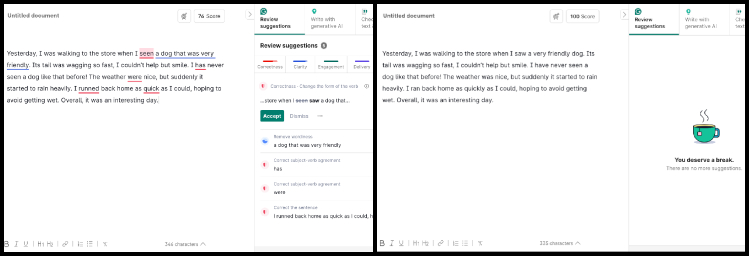
Quillbot found most mistakes but missed some, like not fixing “as quick as I could.” It also changed “interesting” to “intriguing,” which made the writing sound a bit more formal. Quillbot focused more on changing the words than fixing grammar.

Overall, Grammarly did a better job of fixing grammar and making the writing clearer.
Paraphrasing
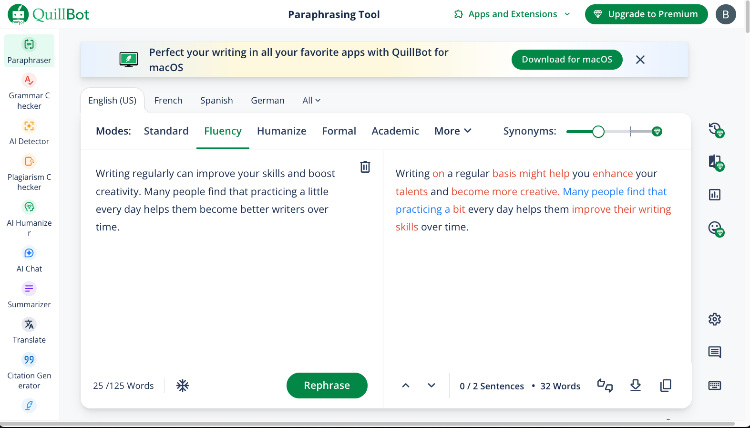
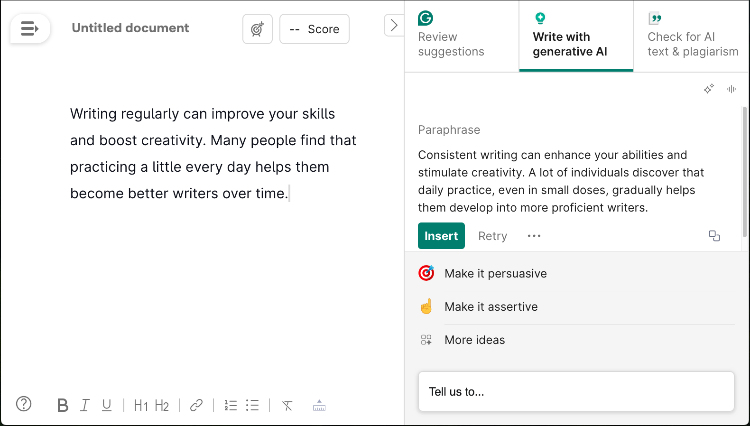
To test the paraphrasing abilities of both assistants, I generated a small random text and inserted it into both tools. This helped me compare how well they rewrite content.
Quillbot truly stood out during this test. Its paraphrasing feature allowed me to rewrite text in various styles, including Standard, Fluency, Academic, and Creative. The unique synonym slider gave me control over how much the new text differed from the original. I really enjoyed using it and found the rewritten text to be clear and well crafted.
Grammarly, on the other hand, offers a "Write with generative AI" feature that can paraphrase text. However, it didn't perform as well. The rewritten content felt less natural and less human-like compared to Quillbot.
Plagiarism detector
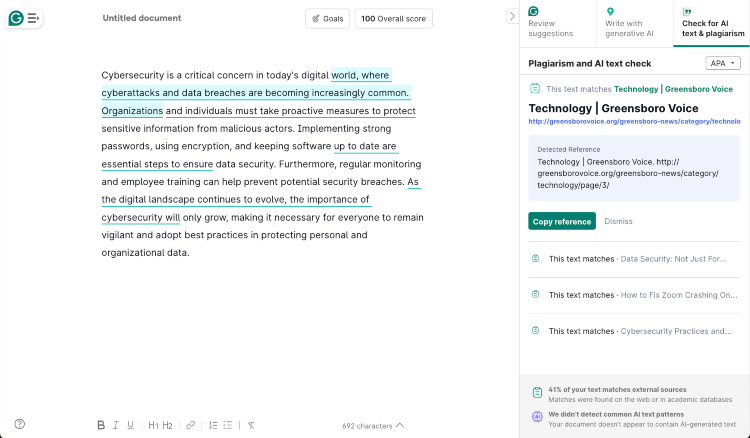
To test the plagiarism checkers, I collected some text fragments from different random sources and put the same text into both tools. This way, I could see how well each one detects copied content.
During tests, both Quillbot and Grammarly did a solid job. Quillbot marked about 45.7% of the text as plagiarized and provided the exact sources where the content originated. Grammarly marked roughly 41% of the text as plagiarized and also gave the sources. Interestingly, both tools flagged the same sections of the text as plagiarized, showing that their detection abilities are similar.
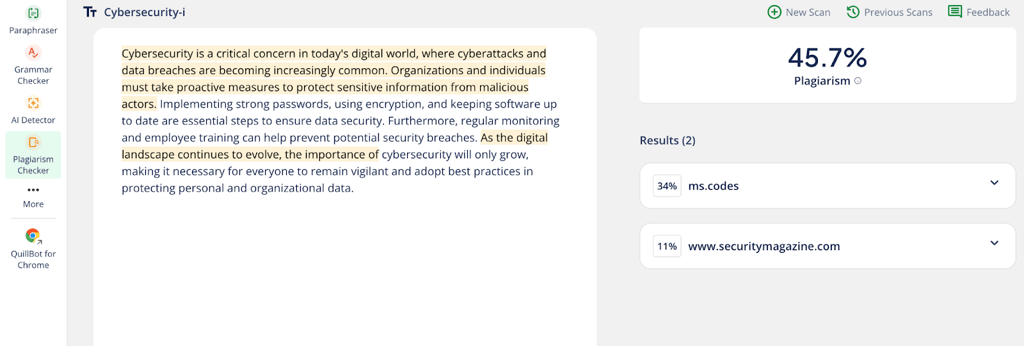
In terms of pricing and limits, Quillbot’s plagiarism checker is a feature, available with the premium plan. It has a monthly limit of 25,000 words, which makes it a good option for students or users on a budget. Grammarly’s checker is also premium but offers unlimited scans, making it better suited for professional writers or organizations that need to check large amounts of content regularly.
AI content generation
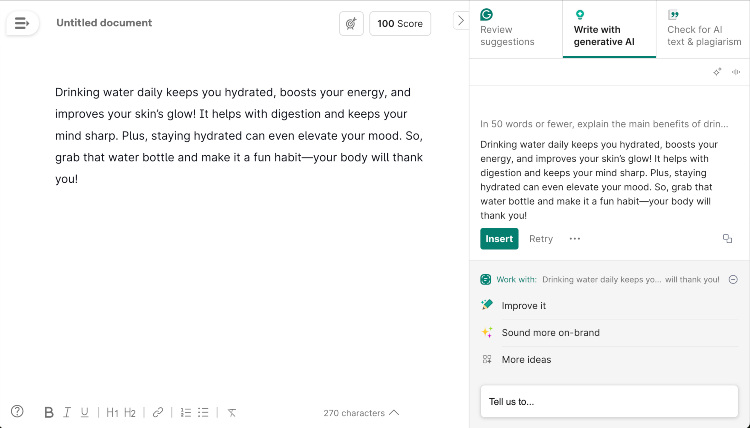
To compare the AI generators, I gave both Quillbot and Grammarly the same short prompt with clear instructions about tone, style, and word count. This helped me see how well each tool followed directions and how natural their writing sounded.
Quillbot’s response was clear, informative, and included the exact keyword “hydration.” It gave useful information and was easy to read, but the tone felt a bit more formal than friendly.

Grammarly’s response sounded more natural and conversational, like talking to a friend, which I asked for in my prompt. It used the word “hydrated” instead of the exact keyword, but the meaning was the same. Additionally, the tone was positive, engaging, and easy to connect with. Overall, I liked Grammarly’s AI output better than Quillbot’s.
Extensions and applications
When it comes to platform support, both Grammarly and Quillbot work on many devices and apps, but they do it a bit differently.
From my testing, Grammarly felt more seamless. Its desktop apps for Windows and macOS are well designed and work smoothly with Microsoft Word, Google Docs, Outlook, and even Slack. I liked how it ran quietly in the background across so many websites and apps without any extra steps and hassle. The browser extension also caught mistakes instantly, even in places I didn’t expect.
Quillbot also has good support. I tried its Chrome extension and the desktop app, which works as a small widget you can open in supported apps. It’s not as deeply built-in as Grammarly, but it’s still useful once you get used to it. I especially liked the mobile keyboard app for iOS and Android, which is great for quick edits and paraphrasing on the go.
Grammarly additional features
Grammarly includes several features that set it apart from Quillbot, especially for professional and team use. Here are some of its features that I found most useful:
- Advanced tone and style suggestions. Grammarly goes beyond simply identifying tone. It provides specific suggestions to help you adjust your wording so you sound confident, polite, formal, or whatever best suits your audience. This is particularly useful for professional communication where tone matters as much as accuracy.
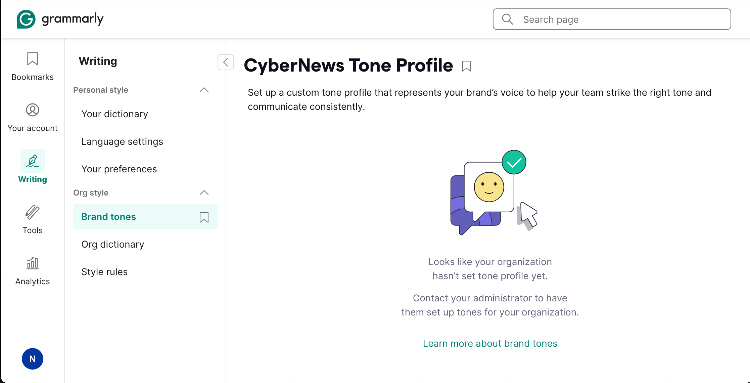
- Style guides and brand tone. For businesses and teams, Grammarly Business offers the ability to upload a company style guide and define a brand tone. This ensures that all communication, whether an internal memo or a client email, stays consistent and on-brand. This is a key feature for organizations with strict branding requirements.
Quillbot additional features
Quillbot takes a different path than Grammarly by providing its tools mainly for students, researchers, and individuals. Here are some of its more unique features that I found most useful:
- Summarizer condenses long articles, papers, or emails into key points. This is especially useful for quickly understanding the main ideas without reading the entire text.
- Translator supports over 45 languages, including French, Spanish, Russian, and Chinese. This makes Quillbot a strong choice for multilingual users and those working in international contexts.
- Quillbot Flow brings all Quillbot’s tools into one seamless workspace. You can paraphrase, summarize, generate citations, research sources, take notes, autocomplete text, and even dictate – all without leaving the page. It’s like having Google Docs inside Quillbot but with instant access to every writing tool it offers.

Quillbot vs Grammarly: ease of use
I also looked closely at how easy and beginner-friendly both Grammarly and Quillbot are. After all, a tool is only helpful if it’s simple to use and doesn’t slow you down.
Grammarly ease of use
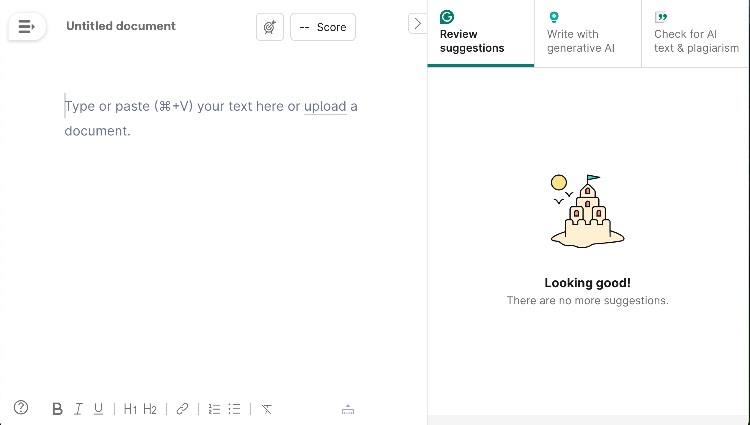
Grammarly feels really easy to use right from the start. When you open it, the tool quickly shows you how to get started without any hassle. Mistakes pop up in different colors on the side, so you can easily see what needs fixing, like grammar errors, unclear sentences, or tone issues. Also, each suggestion comes with a short explanation, which helps you understand how to improve your writing.
Additionally, I liked the fact that Grammarly works well with popular apps like Google Docs and Microsoft Word, or right in your browser. That means you can get help wherever you write.
Quillbot ease of use
When I first tried Quillbot, I really liked how simple and easy it was to use. The layout is clear, with tools like the paraphraser, grammar checker, and summarizer all neatly listed on the left side. Switching between them felt quick and natural, which helped keep me focused while writing. I also appreciated that I could try the free paraphraser without even signing up – great for jumping right in.
However, there is one small thing that I didn't like – Quillbot uses the same red underline for all errors, so it isn't always clear what kind of mistake I made.

Quillbot vs Grammarly: plans and pricing
When it comes to pricing, Grammarly is more expensive because it offers features aimed at professionals and businesses. On the other hand, Quillbot is more affordable and straightforward. This makes it an excellent option for students and casual users who want to improve their writing without paying too much. Take a look at the table below to see the main differences yourself.
| Quillbot | Grammarly | |
| Free plan | Limited access to paraphraser, grammar checker, AI tools, summarizer, citation generator, and translator. | Basic grammar, spelling, punctuation, tone detection, and 100 AI prompts/month. Limits on documents (300/30 days) and words (150,000/30 days). |
| Monthly premium | $19.95/month | $30.00/month |
| Quarterly premium | $13.31/month | $20.00/month |
| Annual premium | $8.33/month | $12.00/month |
Quillbot vs Grammarly: user reviews
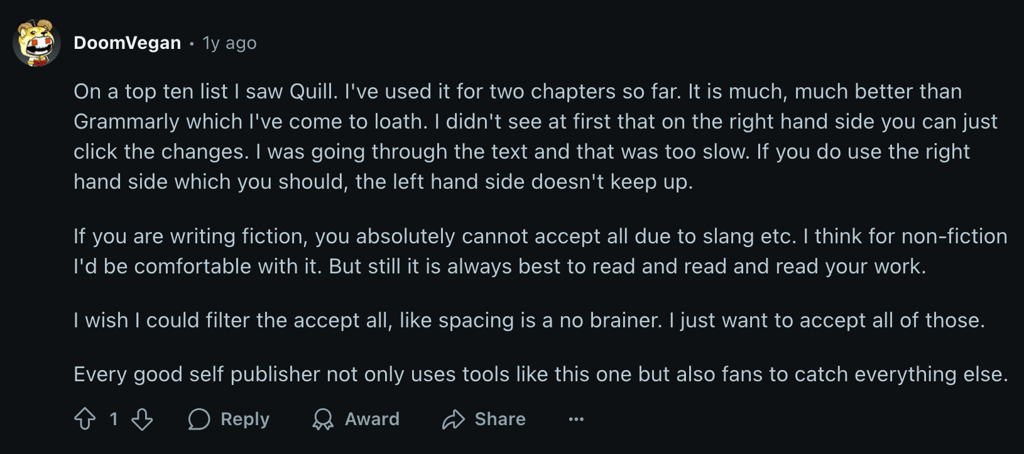
Looking at features and prices is helpful, but hearing from real users shows how these tools perform in everyday writing. So, I checked out what people on Reddit are saying about Grammarly and Quillbot and found mixed opinions on both.
For Grammarly, many appreciate its thorough grammar, spelling, and style checks, plus its helpful tone suggestions and strong plagiarism checker. People like that it works across lots of platforms. However, some users find it annoying because it gives too many tips, sometimes changing the original meaning or making writing sound robotic. Others complain it uses too much computer memory and that its AI features can cause their work to be flagged as AI-generated, which is a problem for academic honesty.
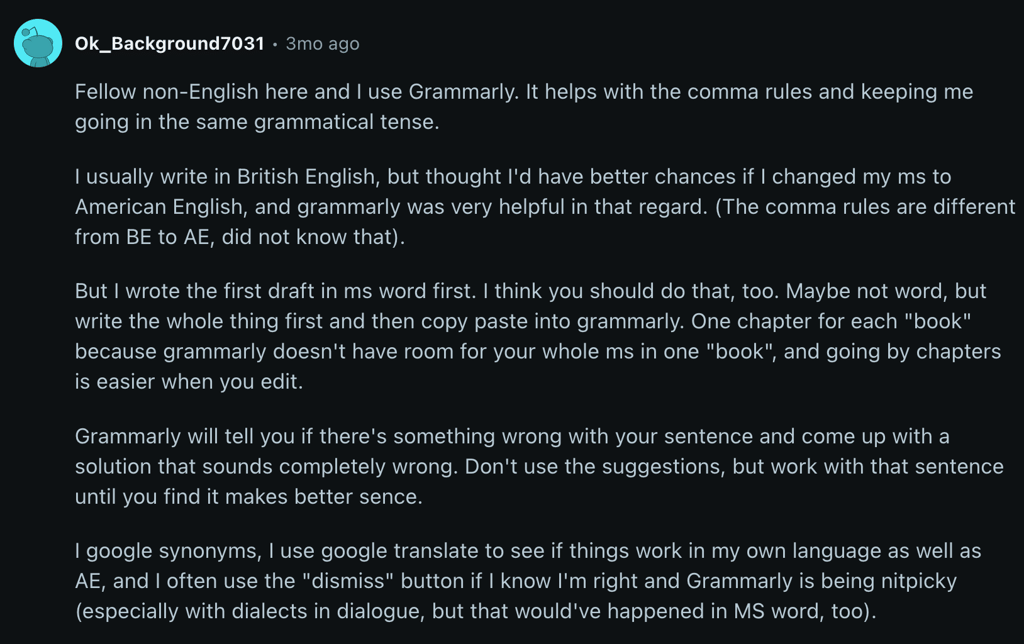
Quillbot is praised mainly for its excellent paraphrasing abilities, with various modes that help users rephrase sentences easily, which is especially helpful for students. It's also known for being more affordable, making it a popular choice for budget-conscious users. On the downside, its grammar checking isn't as good as Grammarly's. Some users say the paraphrased text can feel a bit unnatural or robotic, requiring extra editing to sound smooth. Additionally, Quillbot doesn't connect with as many other apps and platforms, which can limit its convenience for users who work across different tools.
Quillbot vs Grammarly: final verdict
After testing and comparing both tools, I found that Grammarly and Quillbot are both excellent in their own ways. Each one brings unique strengths to the table, making them valuable depending on what you’re looking for.
Grammarly shines for professionals, marketers, and content creators who want to improve grammar, clarity, and tone. Its seamless integrations, style guides, and unlimited plagiarism checks make it ideal for high-stakes communication and team collaboration.
Quillbot is best for students, researchers, and multilingual writers. Its paraphrasing, summarizing, translation, and citation tools are perfect for academic work and rephrasing text on a budget.
In the end, the choice comes down to your needs. However, using both at the same time gave me the best results. Quillbot worked perfectly for quickly rephrasing, summarizing, and gathering research, while Grammarly was great for polishing and refining the final draft. Together, they covered every step of the writing process from first draft to final copy.
FAQ
Which is more accurate, Grammarly or Quillbot?
Grammarly is more accurate. In my testing, it provided detailed error detection and style suggestions, while Quillbot was better for rewording and condensing text.
Which is better for students, Grammarly or Quillbot?
Grammarly is better for students. It corrects mistakes, helps improve writing, and also checks for plagiarism and AI-generated content.
Do professionals use Quillbot?
Yes, many professionals use Quillbot. Its paraphrasing, grammar checking, and summarizing tools help with emails, reports, and other business documents.
Do professionals use Grammarly?
Yes, professionals do use Grammarly. It helps make their writing clear, correct, and professional in jobs like journalism, teaching, business, and creative work.
Is Grammarly better than Quillbot?
Neither is strictly better – they serve different purposes. Grammarly focuses on detailed proofreading, while Quillbot specializes in rephrasing and summarizing content.