GPT Image 1.5 vs Nano Banana Pro: which AI image model is better?
Being behind major reports like The Mother of All Breaches and RockYou2024, our in-house cybersecurity experts and journalists provide unbiased, real-world testing and in-depth analysis.
We maintain complete transparency by openly sharing our testing methodologies with our audience.
Learn more
AI image generation is moving fast – almost too fast to keep up. In late 2025, OpenAI and Google released new image models just weeks apart. OpenAI launched GPT Image 1.5, and Google followed with Nano Banana Pro. Same moment, same goal, but very different feel.
I tested both tools the way you can actually use them – real prompts, practical visuals, and everyday creative tasks. For example, I tried creating blog visuals, social graphics, concept images, and quick iterations where speed and consistency matter more than academic perfection.
This GPT Image 1.5 vs Nano Banana Pro comparison shows where each model performs well, where it falls short, and which one saves you time for different types of tasks. By the end, you’ll know which tool fits your workflow right now.
Quick Comparison
Below is a side-by-side comparison table listing the key aspects of GPT Image 1.5 and Nano Banana Pro. I’ve included technical aspects, pricing, and best use cases for both tools:
| GPT Image 1.5 | Nano Banana Pro | |
| Company | OpenAI | |
| Released | Dec. 16th, 2025 | Nov. 20th, 2025 |
| Max resolution | 1536x1024 | 4K |
| Speed (1K) | 30-45 sec | 10-15 sec |
| Pricing (API) | $0.009-$0.20/image | $0.134-$0.24/image |
| Aspect ratios | 3 | 10 |
| Best for | Prompt adherence, text, iteration, text rendering | Studio-quality visuals, high-res output, natural lighting |
| Key strength | 4x faster than predecessor, precise edits, curated styles | 4K output, studio-quality, high-level material rendering |
| Review | GPT Image 1.5 review | Nano Banana Pro review |
The differences of GPT Image 1.5 vs Nano Banana Pro
For this section, I tested both tools with the same practical prompts and compared speed, image quality, and realism. The goal was to see how they perform in real workflows – from quick drafts to more polished outputs – and how much follow-up work each one requires.
Speed and generation time
Resolution and server load affect speed most for both models. From what I’ve found, Nano Banana Pro delivers 1K images in about 10-15 seconds, while GPT Image 1.5 is usually closer to 30-45 seconds at 1K. For GPT Image 1.5, OpenAI states that it’s a major speed improvement – up to four times faster than earlier versions.
Nano Banana Pro is better for quick drafts, while GPT Image 1.5 is better for image iterations. At higher sizes, neither is exactly quick, but Nano Banana Pro takes the lead here.
Resolution and output quality
There’s a clear difference in this category. GPT Image 1.5 supports 1024x1024 – plus portrait and landscape results at 1024x1536 or 1536x1024. Large-format prints may not look very sharp without upscaling.
Nano Banana Pro has higher-resolution options – with 1K, 2K, and 4K available as outputs, plus 4096x4096 for 4K (varies by aspect ratio). Google’s enterprise documentation confirms 4K support at multiple aspect ratios – great for specific crops.
In most cases, GPT Image 1.5 is sharp for poster-size work but Nano Banana Pro has a lot more headroom – reducing the need for upscalers and retouch work down the line.
Photorealism vs polished aesthetic
In my view, both models can make photorealistic images, but the final looks are different. I’d say that Nano Banana Pro is more camera-like – with natural lighting and a less synthetic or glossy finish.
GPT Image 1.5 produces a more ad-ready, refined look – with sharp edges and balanced contrast. If you’re after pure realism, Nano Banana Pro wins. If you’re after visuals for socials or marketing, GPT Image 1.5 is more geared towards that.
Instruction following and prompt adherence
OpenAI markets its AI products as having a strong ability to follow instructions. I see that GPT Image 1.5 handles composition, object counts, and specific edits. You can also edit existing images with the API.
On the other hand, Google markets Nano Banana Pro as a tool that reasons and has world knowledge, with an option to ground outputs with Google Search (on supported surfaces). In my view, Nano Banana Pro is great at scene logic, while GPT Image 1.5 is known for unraveling detailed, picky formatting requests. Neither tool disappoints in this category.
Editing and iteration
Again, both tools perform impressively here – albeit within vastly different ecosystems. OpenAI’s Image API supports generations and edits for GPT Image 1.5 – plus mask-based inpainting and high input fidelity for preserving faces or logos. OpenAI also talks about multi-turn editing in the Responses API – though this currently only supports older versions of Image, not 1.5.
Google describes its model as one with studio controls, localized edits, and deep control over lighting, camera angle, focus, and color grading. If you’re inside one chat flow, I felt GPT Image 1.5 was smoother. If you need cinematography-like controls, Nano Banana Pro wins. Both respond best to clear, step-by-step edit instructions.
Real-world testing results
While testing GPT Image 1.5 vs Nano Banana Pro, I noticed a consistent theme for both models: both can produce impressive visuals, but fail in different ways.
For instance, GPT Image 1.5 likes a clear concept and detailed prompt, whereas Nano Banana Pro prioritizes studio-style production control. For me, it was difficult to state a winner, since that depends on whether your task revolves around design, editing, or photorealistic output.
I’ve included some scenarios that I’ve seen most often in real usage discussions, and ones that I thought were a good test for these tools’ capabilities. Here’s my interpretation, and what users’ discussions imply for your everyday workflow.
Photorealism test
Multiple commenters described both models as photorealistic, but noted that Nano Banana Pro was more realistically tuned. Regarding GPT Image 1.5, commenters said it produces a more curated look that’s better-framed and tuned to be more pleasing. When I tried Nano Banana, I asked for a photo of two friends laughing and hugging in Budapest. The results were pretty nice and looked realistic. Model even added a date to make the shot look like taken with a phone or a camera.
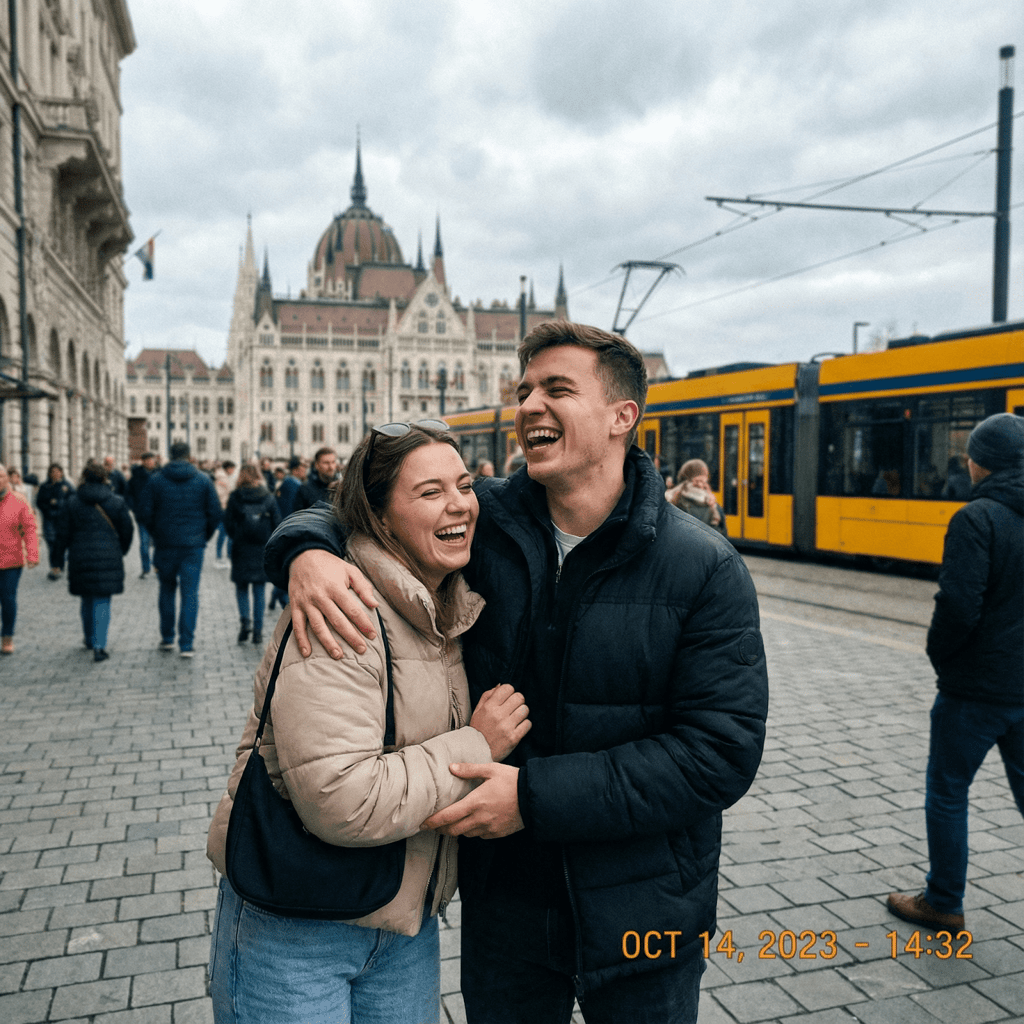
Other commenters offered helpful insights – like how Nano Banana Pro is better at adding photographic imperfections that create a sense of realism – like grain, blur, harsh flash, and imperfect focus. On the other hand, commenters said GPT Image 1.5 wasn’t as good at these realism nuances. During my test, GPT Image 1.5 generated pretty realistic photo, but somehow it felt too polished for me.
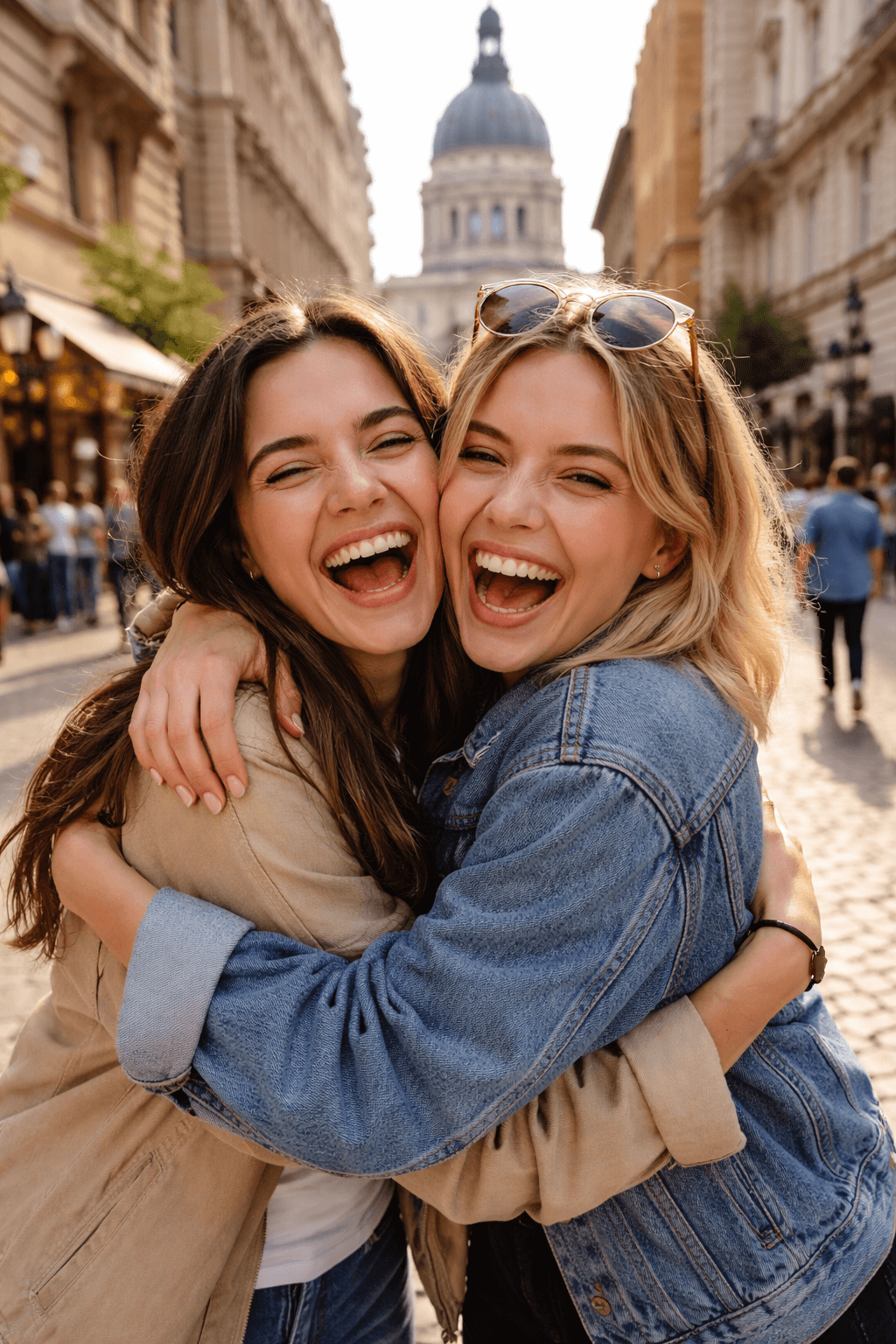
If you have experience in photography, you’ll most likely prefer Nano Banana Pro’s candid imperfections – such as smartphone-like shots. The examples I’ve reviewed confirm that Nano Banana Pro excels at realistic lighting and a gritty aesthetic when prompted with detailed, technical instructions.
Complex prompt test
Complex prompts quickly revealed that you can’t fully trust either model to reliably change backgrounds, alter existing objects, or switch up the time of day. However, the multi-element change success rate is still about 70-80% for both – depending on the number of constraints you add. I’ve read that both models fail when there are five or more constraints, but are more stable when it’s fewer than that.
Firstly, I tried GPT 1.5 with a simple prompt, “A woman sitting indoors at a wooden café table with a laptop”. Then I asked for it to alter the image I got: “Change the background from an indoor cafe to an outdoor street café in Paris. Switch the lighting from daytime to early evening, with warm street lights. Keep the woman’s pose, clothing, and facial features exactly the same”.
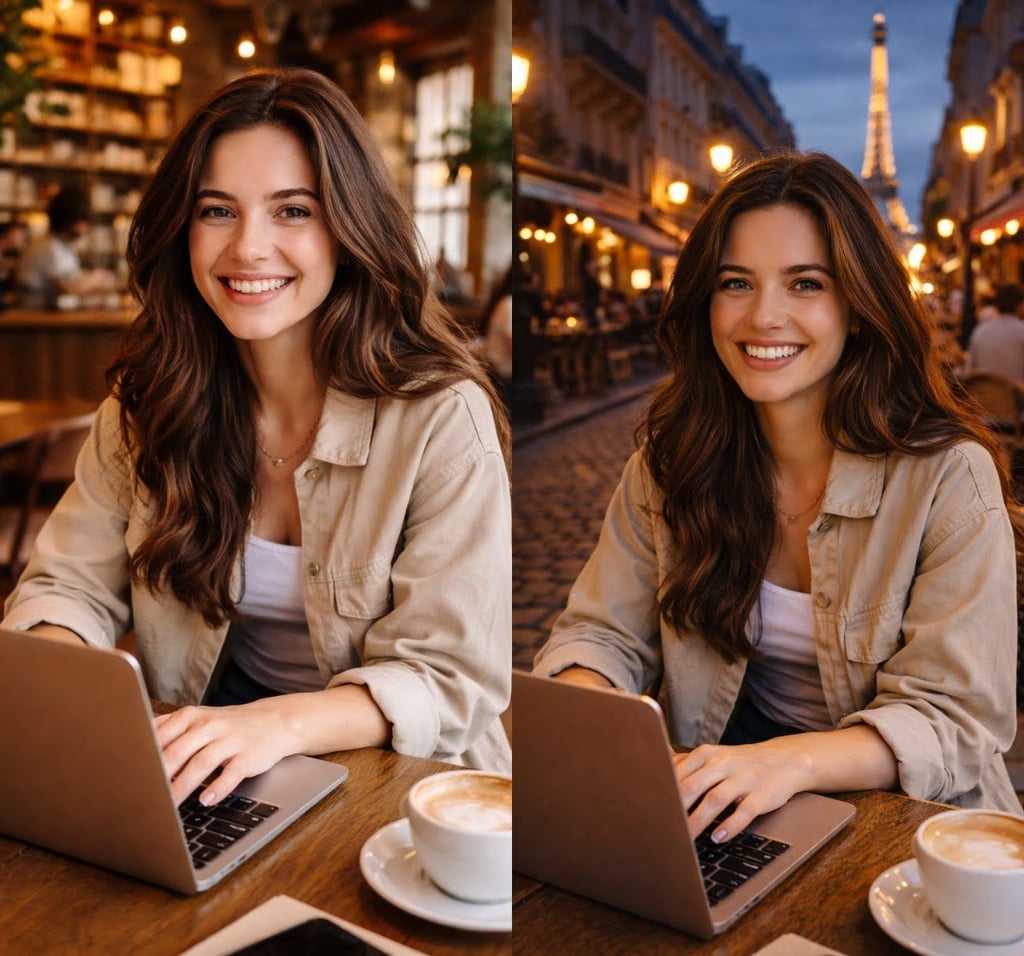
I was quite impressed with the result – the model fulfilled my instructions, I could see the same woman with a laptop, smiling in an outdoor cafe in the evening. However, you can notice that the shadowing for the girl is not perfect.

With the Nano Banana Pro model, there were some inconsistencies. When I asked it to edit the image, it moved the character outdoors as requested, but it didn’t clearly look like evening, and it was hard to tell whether the setting was actually Paris. To make the scene more obvious, the ChatGPT model placed the character next to the Eiffel Tower.
The key issue here is consistency. With both models, unrelated elements were sometimes changed, and complex prompts were hard to follow reliably. In real creative workflows, this leads to extra rework and can reduce trust during later edits – something many users have pointed out. In my testing, ChatGPT handled complex prompts more predictably overall, while Nano Banana Pro showed occasional alignment but tended to shift the scene when even a single variable was changed.
Infographic and text-heavy design
For infographics and text design work, the online community favored Nano Banana Pro. The examples I reviewed also confirmed that it produces cleaner, more impactful infographics and text. This is where you don’t want issues with character fidelity, the look of small text, and overall layout clarity.
Namely – in one example – Nano Banana Pro pushed out a minimal, easily legible poster, while GPT Image 1.5 produced a richer, more “visually appealing” poster – with noticeable synthetic “sheen” and extra effects. It’s worth noting here that Google explicitly markets Nano Banana Pro’s strengths in creating legible text in images and structured infographics. GPT Image 1.5’s result looked a little flatter and cartoon-like to me.
I’d recommend Nano Banana Pro for producing pure infographics and text that looks minimal and professional. For a more cinematic style and extra flair, I’d recommend GPT Image 1.5 – but keep in mind that commenters noted GPT Image 1.5’s outputs sometimes need a little cleanup. It’s difficult to say which model is the best AI image generator here – as that depends on your style and precision/realism needs.
Product packaging mockup
I believe packaging design is a solid test for an AI image generator because it’s unforgiving – you need realistic-looking materials and lighting, plus crisp text mapped onto a 3D surface. Both models can do this, but when I analyzed a few sample outputs and user comments, Nano Banana Pro was more impressive.
According to some users, Nano Banana Pro is the clear winner for complex labels on items like bottles or sprays. It also has superior material textures – like with frosted glass and metal reflections – and is consistent in full packaging concepts. Then again, users praised GPT Image 1.5 for legible small fonts and professional layouts – great for ecommerce shots and quick prototyping (coffee bags, UI-integrated products).
In this area, Nano Banana Pro shone for its high-end retail presentation and headline impact, while GPT Image 1.5 led for ideation and iteration. However, the samples I’ve seen show that GPT Image 1.5 produced a synthetic sheen on materials – unlike Nano Banana Pro.
Precise editing test
Editing consistency is essential when you’re designing. You want to be able to move a logo without affecting layout, change lighting without destroying the scene, or isolate and resize a subject successfully. Scenarios like these are common in design production, which is why I thought this was a critical area to test and research.
OpenAI’s documentation states that Image API supports mask-based inpainting, but that the tool may not follow a mask shape with perfect precision. Google makes no such claim, but simply describes Nano Banana Pro as a tool that specializes in changing lighting, focus, and camera feel.
Commenters have reported that both tools handle common edits just fine, but they perceive Nano Banana Pro as more “surgical” on the visual controls front. Overall, my takeaway is that GPT Image 1.5 is better for the concept and composition stage, while Nano Banana Pro is for when you need proper visual controls that work as intended – most of the time.
Which image generator should you choose?
It’s helpful to consider which use cases work best for each tool. I’ve noted important aspects you should consider for each tool below.
Why choose GPT Image 1.5
GPT Image 1.5 excels at prompt adherence, iterations, and a “pleasing” or “styled” look for work that doesn’t require 4K output. Here’s why you should choose GPT Image 1.5:
- Follow precise instructions. Choose GPT Image 1.5 if you like to write general ideas in your prompts, and when you want the tool to process these thoughts.
- Fast iteration and API workflow. You get intuitive generation and straightforward edit endpoints.
- Standard-size cost-controlled production. With GPT Image 1.5, you can choose from standard sizes – 1024x1024, 1024x1536, and 1536x1024 at low, medium or high quality settings.
- Preserve details from input images. You can preserve faces or logos for brand-sensitive edits. Here, it’s important to use high input fidelity for the best results.
- Cinema feel and special effects. GPT Image 1.5 excels at the “cinematic” look, and grasps a wide variety of styles and colors. Great for visual-heavy work such as in marketing or social media.
Why choose Nano Banana Pro
Google’s Nano Banana Pro is geared towards high-resolution, controlled studio-style edits, and text-heavy designs. Here’s why you should choose Nano Banana Pro:
- High resolution output. Nano Banana Pro allows 2K and 4K output which means less upscaling and retouching down the line.
- Realistic lighting control. You can adjust lighting, focus shifts, camera angles, and even color refinements (color-grading style).
- Text and infographics. Nano Banana Pro excels at legible, structured infographics and text designs.
- Retail-quality visuals. You get high-end, crisp visuals that look very realistic and less “generated” or “flat.”
GPT Image 1.5 could output an eCommerce-style concept of a cereal box front that you’d like to put through iterative edits. Nano Banana Pro could produce a 4K product packaging mockup of a box on a kitchen counter with crisp text, and highly realistic materials/lighting.
Comparing the drawbacks
Below are the drawbacks I’ve noted for each tool. I’ve based these on my own opinion, the official limitations, and feedback from online commenters.
GPT Image 1.5
GPT Image 1.5 lacks high-resolution output, while its outputs lack hyper-realistic lighting. Here are GPT Image 1.5’s drawbacks:
- Lacks high-resolution output. GPT Image 1.5 tops out at 1536x1024. If you need large-scale prints, you will need to upscale the output.
- Layouts may be altered. Even with detailed prompts, element placement isn’t always perfect. Complex prompts can overload this even more, leading to random results.
- Complex prompts take time. OpenAI says that complex generations can significantly raise latency. Commenters explain that adding and adjusting variables adds a lot of latency.
- Interpretive blending. GPT Image 1.5’s mask-based inpainting can spill over the mask edge. This may shift colors or regenerate nearby elements.
Nano Banana Pro
Nano Banana Pro’s drawbacks include pricing inconsistency, and a learning curve. Here are Nano Banana Pro’s drawbacks:
- Pricing/quota inconsistency. Access and limits vary a lot based on platform (Google Gemini, Vertex AI, Workspace, etc). This makes planning an issue when switching.
- Outdated hallucinations with grounding. Nano Banana Pro’s real-time search grounding only activates in supported interfaces. It may “hallucinate” in Gemini app/mobile versions.
- Advanced prompting learning curve. Fine-tuning lighting means technical knowledge is favorable (stops, depth of field, angles). Unintended changes can take place with less technical prompts.
Both tools are capable, but won’t satisfy the needs of every user – it depends on the use case. Also, remember that none of these drawbacks are deal-breakers. I recommend you use GPT Image 1.5 for faster iterations, and Nano Banana Pro for professional image nuances.
Which AI image generator won the battle?
In this GPT Image 1.5 vs Nano Banana Pro comparison, I’ve understood that both tools have a place in my AI image editing stack. However, if I must declare a winner – Nano Banana Pro wins overall due to its professional-grade outputs, lighting control, and text/infographics impact.
At the moment, Nano Banana Pro is among the top-performing AI image generation tools in terms of photorealistic output and material rendering – vastly improving on the “flat” AI image quality outputs seen in some models.
Meanwhile, GPT Image 1.5 is close behind for its fast iteration at 1K sizes, intuitive generation and editing, and predictable per-image pricing. Ultimately, I would use GPT Image 1.5 for the concept/ideation draft stage, and Nano Banana Pro for the final.
FAQ
Does GPT Image 1.5 generate better images than Nano Banana Pro?
No, neither model is really “better” than the other. Both AI image generators create impressive outputs in their own right. GPT Image 1.5 is more efficient at iteration at standard sizes and is more adept at understanding complex prompts, while Nano Banana Pro wins for higher-resolution, studio-like workflows and rendering realistic materials/lighting.
Which image generation model is cheaper?
GPT Image 1.5 is cheaper based on the official per-image pricing. GPT Image 1.5 starts at $0.009 per image for low quality 1024x1024 images and goes up to $0.133 for high-quality 1024x1024 images. Portrait and landscape sizes cost more.
Is Nano Banana Pro faster than GPT Image 1.5?
Yes, in most side-by-side tests the Nano Banana Pro is significantly faster than GPT Image 1.5. Nano Banana Pro takes around 10-15 seconds per image, while GPT Image 1.5 takes around 30-45 seconds. However, these results vary for both with prompt complexity, queueing, and platform used.