GPT Image 1.5 review: is OpenAI's latest image model worth it?
Being behind major reports like The Mother of All Breaches and RockYou2024, our in-house cybersecurity experts and journalists provide unbiased, real-world testing and in-depth analysis.
We maintain complete transparency by openly sharing our testing methodologies with our audience.
Learn more
OpenAI released its newest image generation model, GPT Image 1.5, in December 2025. The successor to GPT Image 1 is reportedly faster and more effective than its predecessor. But are the claims true?
With the help of the Cybernews research team, I tested GPT Image 1.5 and checked whether it lives up to the hype. I evaluated its speed, image editing capabilities, text rendering, and complex prompt features, comparing them to those of other top models.
Through my testing, I found that GPT Image 1.5 is one of the best image generation models on the market, comparing favorably to Nano Banana Pro and Stable Diffusion in multiple categories. Continue reading this GPT Image 1.5 review to find out exactly where it excelled.
What is GPT Image 1.5?
GPT Image 1.5 is OpenAI’s newest AI image generation tool. It’s an iteration of ChatGPT’s previous 1.0 model, introducing multiple improvements. Here’s a breakdown of this image generation model:
| Model name | GPT Image 1.5 |
| Release date | December 16th, 2025 |
| Availability | ChatGPT (all users), API |
| Pricing | $0.009-$0.133 per image (API), starting from $20.00/month (web version) |
| Key strengths | Precise editing, text rendering, instruction following |
| Best for | Professional workflows, iterative design, marketing materials |
| Limitations | Not suitable for all workflows, struggles with non-English text, has trouble working with multiple faces |
How we reviewed and tested GPT Image 1.5
To determine whether GPT Image 1.5 is worth it, the Cybernews research team and I applied our AI testing criteria to the image generation model. I focused on the following aspects:
- User experience (30%). I conducted hands-on testing and analyzed feedback from users across Reddit and tech forums to assess the ease of use in real-world conditions.
- Performance metrics (20%). I examined the model’s speed in both hands-on testing and lab testing, using Artificial Analysis, to determine whether it actually meets the claimed speed.
- Feature analysis (20%). I tested the product’s features by observing its performance, evaluating its editing precision, text generation capabilities, and the ability to parse complex prompts.
- Competitive context (15%). I compared GPT Image 1.5 with other top image generators, including Nano Banana Pro and Stable Diffusion, to determine whether it offers value compared to the competition.
- Pricing and value (15%). I analyzed the product’s plans and pricing to determine its cost-effectiveness, looking at both its web interface and API pricing.
GPT Image 1.5 features and capabilities
GPT Image 1.5 builds upon GPT Image 1.0, enhancing image generation capabilities. Notably, its capabilities include text generation, precise image editing, and image-to-image transformation.
When testing the product, I found that it provides reliable image generation with excellent prompt understanding and good speeds. I took a deep dive into its features, looking at how the model responds to various prompts and requests. In this section, I’ll break down the top 4 features I found when testing the product.
Precise image editing
GPT Image 1.5 enables you to generate and edit images quickly, retaining previous features while only modifying what is requested. I tested this feature extensively and found that it worked well when prompted appropriately. For example, I asked GPT Image 1.5 to generate an image of a baseball player hitting a home run.
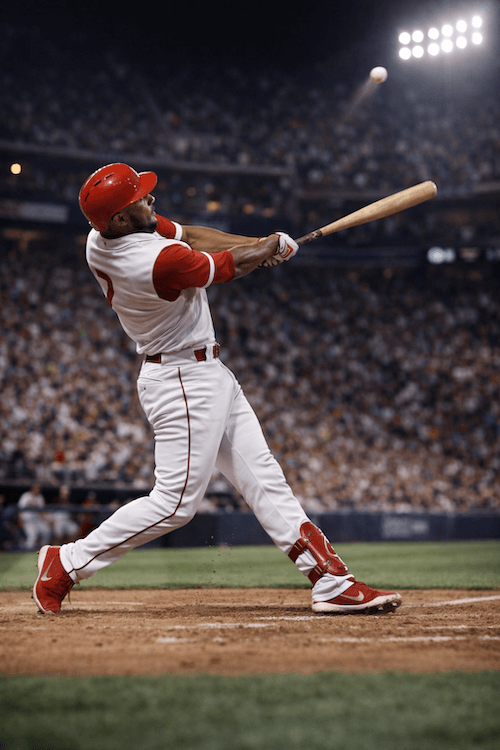
I wanted to change the jersey color, so I asked the model to change it to a purple and navy jersey, while retaining all the other features. In the past, many models would still change features like the background, face, or jersey design. In this case, GPT Image 1.5 simply changed the jersey color as prompted. However, in a previous test, I did not ask it to retain the rest of the composition, and GPT Image did slightly alter other details of the image.
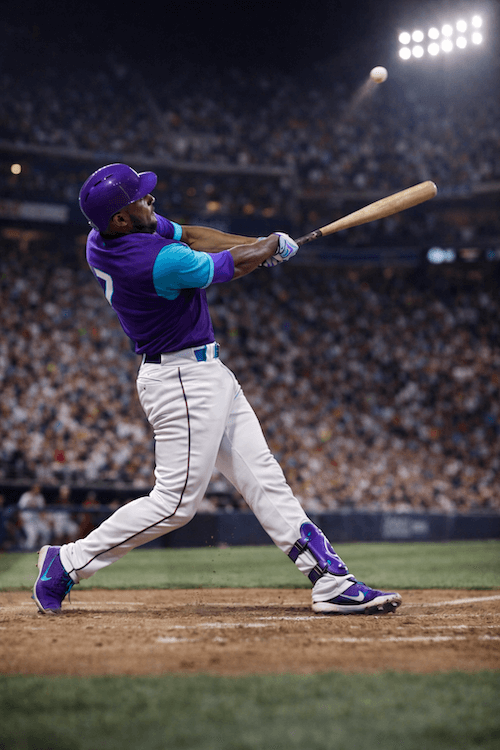
As a sidenote, as you can see, GPT does add logos to its images. I did not prompt for the Nike shoes to be present. Despite that, GPT decided to add the logo automatically. Since the “swoosh” is a trademarked logo, using an image like this in a commercial capacity may bring about a cease and desist letter. Luckily, GPT Image 1.5 also gives you the ability to mark the elements you want to edit and then further edit just them.
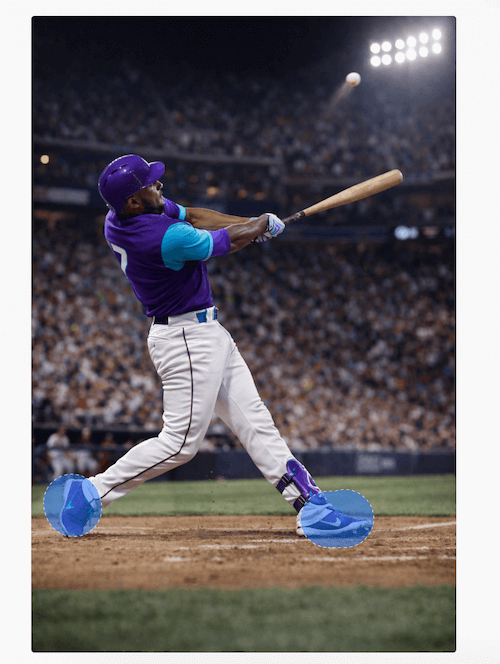
This allows you to specify exactly which element you want to change, leaving the other elements unchanged, which can be helpful if the interface is having trouble with your text prompts.
Text rendering improvements
One of the most significant challenges for AI generators in the past has been creating consistent and legible text. Luckily, GPT Image 1.5 has addressed some of these issues, generating text far better. I tested this by prompting an image of a basketball player in a Cybernews jersey. GPT Image 1.5 handled this well, inserting the text in the right context and with a consistent font.
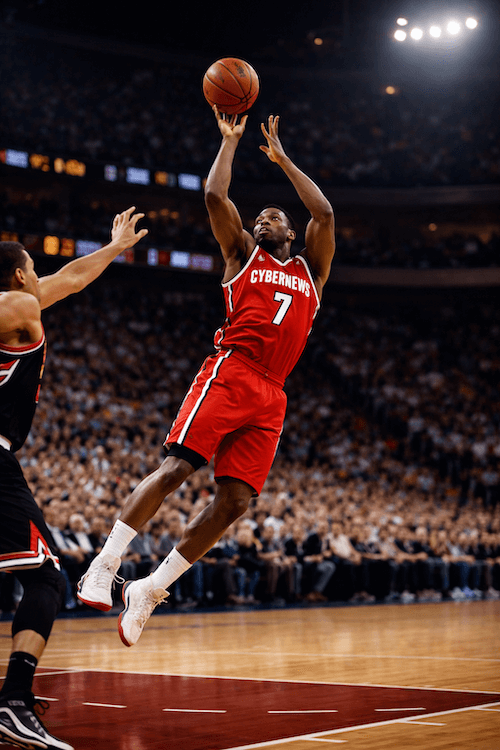
Overall, GPT Image 1.5 performs well with English text, although it may struggle with alphabets beyond the English alphabet. This is probably going to be improved as the model gets more testing material. However, the first test was pretty basic, so I decided to test it by giving it a more complex prompt.
To test how it deals with smaller letters, I asked it to generate a newspaper. I used the following prompt:
A 1950s newspaper lying on a café table, front page visible, with large headline 'HISTORIC SUMMIT ENDS', subheadline 'Leaders Reach Agreement', multiple columns of smaller article text visible but readable, a small weather box in the corner showing 'London: 18°C Cloudy', and at the very bottom the text 'Daily Chronicle - Page 1 of 24 - Price: 6d'. Vintage photography style
The model did a good job with the larger letters, but it clearly struggled generating smaller print, with the text being completely illegible. This isn’t a big deal, but it would’ve been impressive if the model generated it.

4x faster generation speed
GPT Image 1.5 is claimed to have a 4x faster generation speed than GPT Image 1. In my tests, it was slightly quicker than the older model but not as fast as other models, such as Nano Banana Pro and Stable Diffusion. This may be due to server load resulting from the high demand for GPT Image 1.5.
That said, the model is still fast, especially given that it can generate multiple images side-by-side. This is where a speed increase can really be noticeable, saving time on image iterations. Lab tests also point to it being the fastest model on the market for API use, with GPT Image 1.5 topping the Artificial Analysis text-to-image leaderboard.
Given these details, my experience is likely an outlier, possibly due to the tests being performed in a high-usage plan or with unoptimized prompts. I’m not sure whether the 4x claim is entirely valid for end users, but I’m certain the waiting times are acceptable, especially given the output quality.
Better instruction following
To test how GPT Image 1.5 handles complex instructions, I created a lengthy and intricate prompt to assess its ability to parse a dense piece of text. Here’s the prompt I used:
A surreal landscape at sunset featuring a massive ancient library built into a cliff face, with floating books creating a spiral staircase leading to the clouds, bioluminescent plants growing between the shelves, a wise old owl perched on a crystal podium, waterfalls of liquid light cascading down the sides, and two adventurers in steampunk attire discovering the entrance, all rendered in a fantasy art style with dramatic lighting and rich purples, golds, and teals
The result impressed me. While it did take a minute to generate the image, the whole image included all the prompted elements and matched what I had in mind. That’s a big step up from previous models that would often fail when faced with more complex prompts.
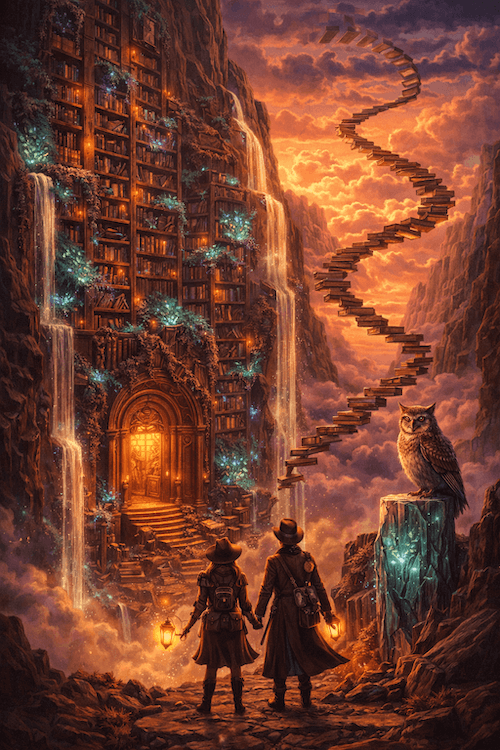
Image-to-image transformation
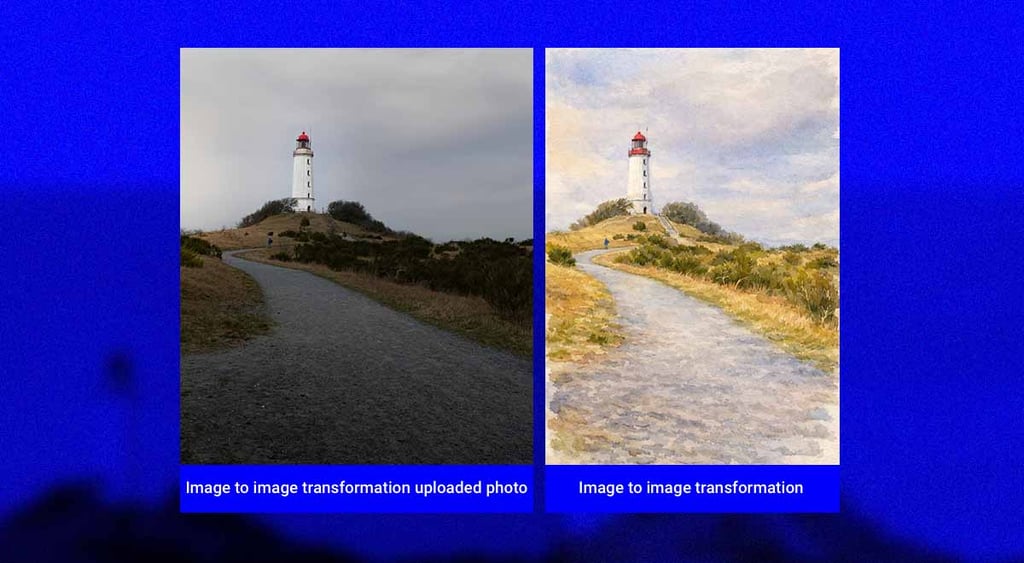
To test out GPT Image 1.5’s image transformation capabilities, I found a royalty-free photo of a lighthouse on Pexels. I then prompted GPT Image 1.5 to:
Transform this image into a watercolor painting style with soft edges, pastel colors, and visible brush strokes, as if painted by a traditional artist
The prompt took 47 seconds to execute, and the result was quite impressive. The image quality was excellent, and the details in the watercolor painting were captured as requested. Overall, GPT Image handled the prompt extremely well, providing everything I had prompted for.
Drawbacks of GPT Image 1.5
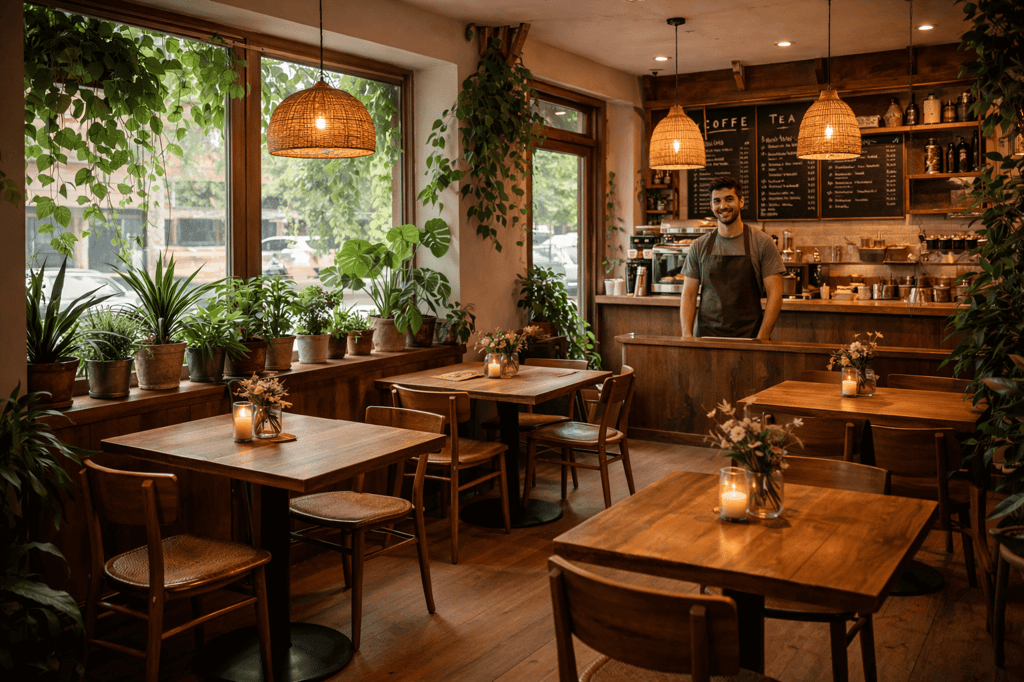
GPT Image 1.5 has a few limitations. Users often point out that the image has a characteristic yellow tint, which is also visible in some of the examples in this article. It can also struggle with small details in realistic images, which may lead users to recognize it as AI.
For instance, in this image of a coffee shop, the barista is standing in front of a tiny and oddly shaped counter that could draw users' attention to the fact that it’s an AI-generated image.
Other than that, a significant drawback is related to copyright issues. Since I included a few sports-related images when generating test images for this article, I noticed that GPT Image 1.5 adds copyrighted logos (such as the Nike or Adidas logo) to generated content. This may lead to less experienced users opening themselves up to litigation should they accidentally use an image containing a logo for commercial purposes.
Comparing GPT Image 1.5 with other image generators
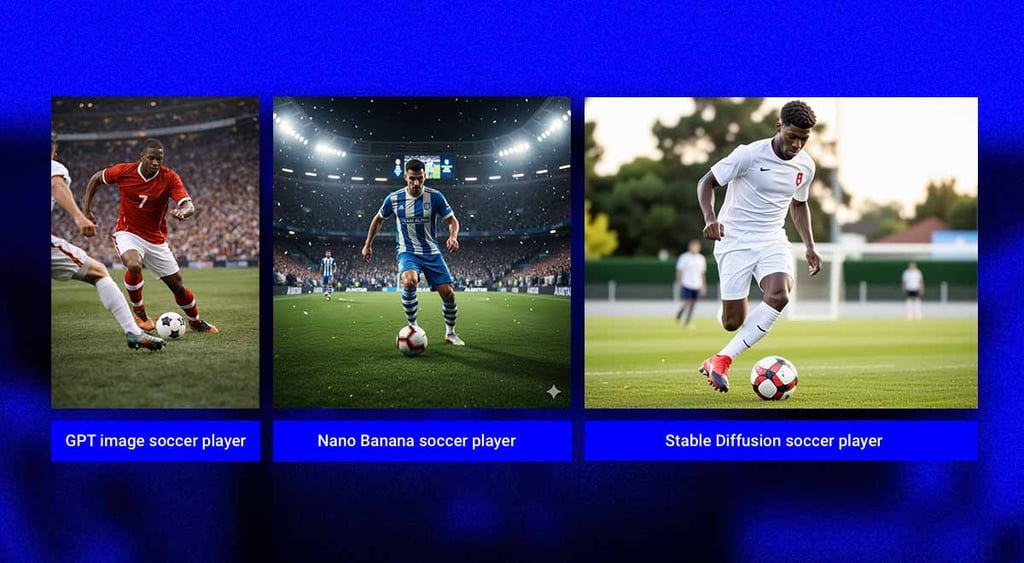
I used two different image prompts to compare how each model deals with generating varied images, comparing GPT Image 1.5 with Nano Banana Pro and Stable Diffusion.I started with a simple prompt, asking each model to generate a soccer player dribbling. GPT Image took around 35 seconds, while Nano Banana Pro and Stable Diffusion took around 15 seconds. However, the longer generation time did bring the best result. Nano Banana’s image is very cartoony and AI-ish, while Stable Diffusion was more realistic but still had that AI gloss. GPT Image 1.5’s result was actually quite photorealistic and the best of the bunch.
My second prompt was much more complex:
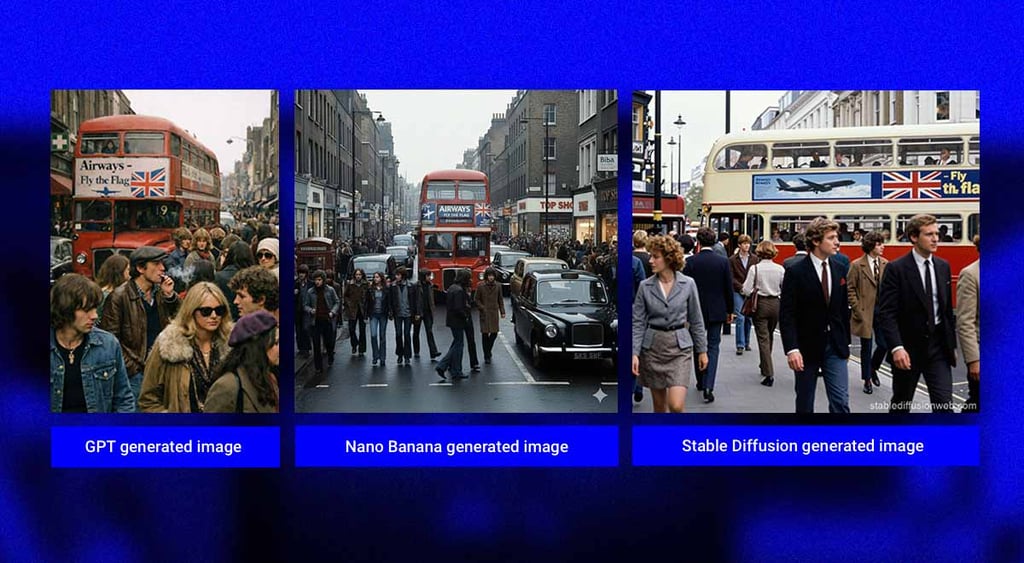
Crowded Chelsea street in 1970s London, hyper-realistic, complete scene in focus, packed with era-appropriate people, London bus featuring a large ad for 'Airways - Fly the Flag' with the Union Jack and an airplane silhouette. Raw photography style, everyday camera quality, candid street photo
In this case, both Nano Banana Pro and Stable Diffusion took around 15 seconds, while GPT Image took 40 seconds. All three images were well generated and matched the prompts. The only real differentiator was the airplane silhouette on the bus ad, which was by far the most detailed on GPT Image.
Cost-wise, GPT Image 1.5 is slightly more cost-effective than Nano Banana Pro, both for web users and API users. You can get around 200 images per day with the $20.00/month ChatGPT Plus plan. Gemini, meanwhile, allows you around 100 prompts per day with the $19.99/month Google AI Pro subscription. Stable Diffusion offers 66 images per day with its $10.00/month plan, making it a good option for low-volume users on a budget.
API-wise, GPT Image 1.5 costs around $133.00 per 1000 images, while Nano Bana Pro costs a slightly higher $134.00 per 100 images. Stable Diffusion has a very low API cost of $40.00 per 1000 images.
| Web interface price | Image limit | API price | Artificial Analysis ELO rating (higher is better) | |
| GPT Image 1.5 | $20.00/month | 200 images per day | $133.00 per 1000 images | 1258 (#1) |
| Nano Banana Pro | $19.99/month | 100 images per day | $134.00 per 1000 images | 1221 (#2) |
| Stable Diffusion | $10.00/month | 66 images per day | $40.00 per 1000 images | 1033 (#46) |
Final thoughts
GPT Image 1.5 is a big step up in OpenAI’s race with Google for the best generative AI model. It offers photorealistic images, excellent prompt parsing, and better speeds than its predecessor. With my tests showing that it compares favorably against both Nano Banana Pro and Stable Diffusion, GPT Image 1.5 is an excellent choice.
That said, it still has its cons. A subtle yellow filter is present in a lot of its outputs, and the product still has trouble avoiding putting copyrighted content into the images it generates. So, while this is a strong product, you still have to be careful while using it and provide it proper oversight when doing so.
FAQ
Is GPT Image 1.5 better than GPT Image 1?
Yes, GPT Image 1.5 is better than GPT Image 1. Its generation capabilities and speed are far superior to those of the previous model.
Is GPT Image 1.5 available for free?
Yes, you can get a limited amount of GPT Image 1.5 prompts by using the free version of ChatGPT.
Which is better: GPT Image 1.5 or Nano Banana Pro?
Both products are pretty similar and excel in various areas. I would say that GPT Image 1.5 is slightly better than Nano Banana Pro because of its slightly lower pricing and more diverse usability.