Relevance AI review 2026 – can its AI agents really do the work for you?
Being behind major reports like The Mother of All Breaches and RockYou2024, our in-house cybersecurity experts and journalists provide unbiased, real-world testing and in-depth analysis.
We maintain complete transparency by openly sharing our testing methodologies with our audience.
Learn more

Relevance AI is a no-code platform for building custom AI agents and multi-agent workflows to automate repeatable business tasks across sales, marketing, ops, and support. According to my research, Relevance AI:
- Is best for go-to-market (GTM) operators and technically capable teams who want to build custom agents, not buy pre-built ones.
- Falls short for teams looking for a cheap, simple platform for linear workflows and with native LinkedIn automation.
I reviewed the platform and tested its AI-based agent builder, Inventor, and the workflow canvas, Workforce. In this Relevance AI review, you can find the test results, how to get started with it, an explanation of its pricing model, and when it’s better to use Relevance AI or its alternatives.
Quick overview of Relevance AI
| Best for: | Creating workflows with autonomous AI agents that communicate with each other and process complex, unstructured data |
| Key features: | AI-based agent builder, visual workflow canvas, 400+ ready-made templates on the marketplace, and 2000+ integrations |
| Free version: | ✅ Yes |
| Starting price: | $19.00/month |

Pros and cons of Relevance AI
What Relevance AI actually is (and the right mental model)
Relevance AI is a low-code platform that lets you build AI agents and connect them into a single workflow. Agents act as independent workers assigned to a narrow role, e.g., a lead scorer, an enrichment agent, or an email copywriter. They can trigger each other, pass data back and forth, and autonomously execute complex, multistep workflows.
The process of building Relevance AI agents is simple:
- You define the agent’s behavior and the LLM to power it, as well as its triggers and tasks, e.g., researching data once a new inbound lead is added to a CRM and sending it to Slack
- Connect it with your business tools – Relevance AI has 2000+ integrations
- Provide it with context and knowledge, e.g., SOPs, documentation, PDFs, etc.
- Connect it to other agents in the Workforce canvas and publish it
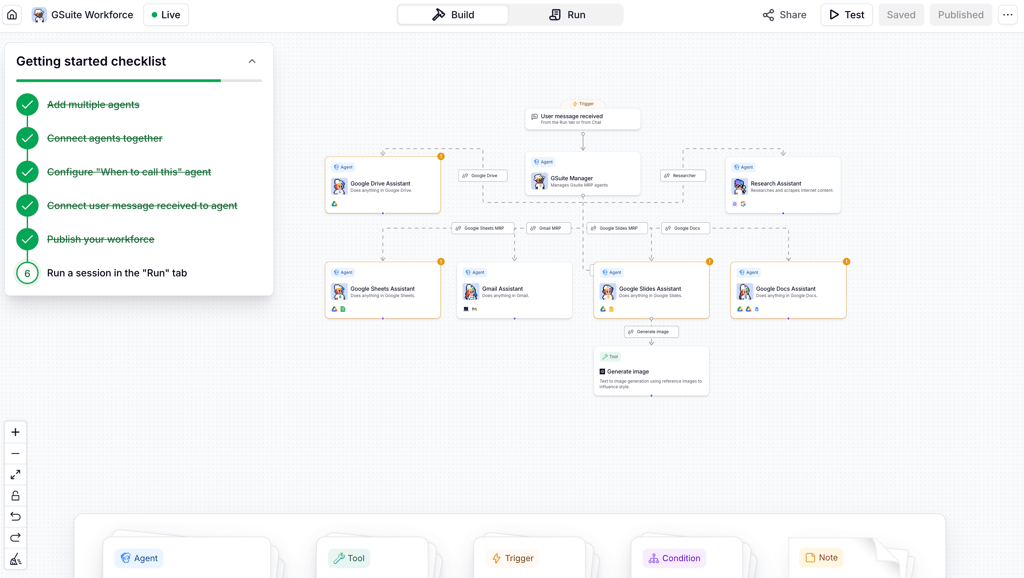
Overall, Relevance AI helps you automate manual research and enrichment pipelines, preparation work for BDRs and SDRs, data triage, and repetitive reporting, analysis, and categorization of unstructured data.
Who gets real value from Relevance AI?
Relevance AI doesn’t fit every team. My research shows that it’d be the best choice for:
- GTM operators and RevOps teams who want to automate research, lead qualification, and data enrichment without hiring more human workers.
- Technical-leaning sales and marketing teams that are comfortable with mapping out logical, multistep workflows.
- Teams with multi-department workflows, when, for example, marketing’s AI research agent needs to hand off structured, enriched data to sales’ AI outreach agent.
- Startups and SMEs who want to pilot one specific workflow, like automating BDR preparation, prove the ROI, and then scale that logic across the rest of the business.
It’s not the right fit if you’re looking for:
- Automating LinkedIn connection requests, profile scraping, and messaging – Relevance AI doesn’t have a native LinkedIn integration.
- Finished, out-of-the-box AI agent or a workflow – Relevance AI is an agent and workflow builder, so you have to construct, test, and tweak the processes yourself (even the ready-made workflows from the marketplace).
- High-volume, always-on workflows – Relevance AI offers a usage-based pricing model, so it’ll get expensive fast if you have massive datasets running in continuous loops.
Relevance AI feature highlights
I tested Relevance AI's core features, focusing on what actually matters for daily agent building, operation, and maintenance. Here’s my detailed overview.
Inventor: describe-to-build agent creation
To build an agent, you simply need to describe what the agent has to do in Inventor. I loved the pixel-art buttons and animated picture that appear when Inventor thinks – among so many black-and-white canvases, it really adds to the overall experience.

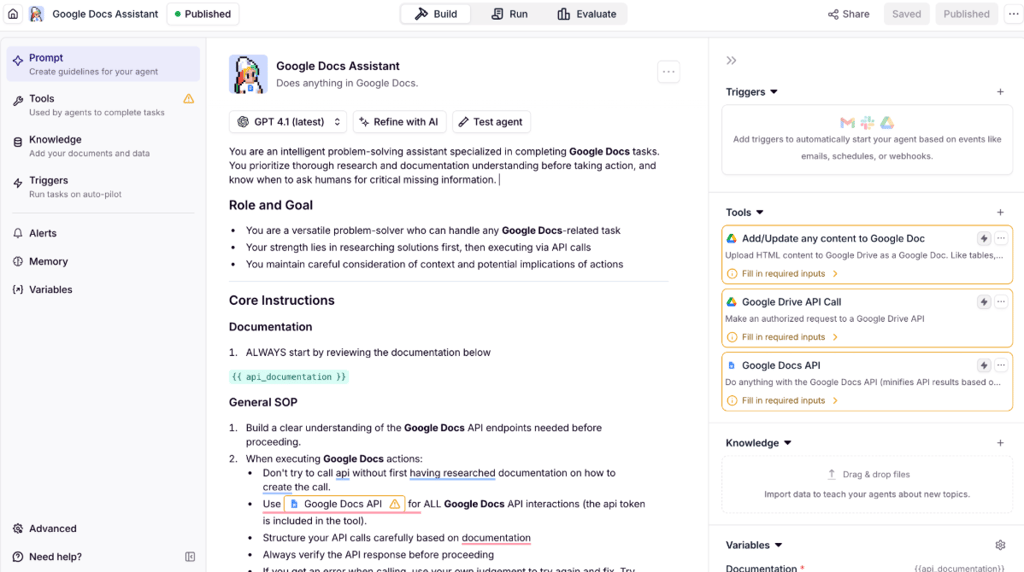
Simply by chatting with Inventor, I could build the agent’s workflow, set triggers, and connect it to the Tools. In Relevance AI, Tools are separate actions the agent can execute via one of the integrations, e.g., sending a Slack message or adding an FAQ entry in WordPress. You can choose the ready-made Tools or create your own, also in Inventor.
Next, I added documents to the agent's Knowledge. It can include internal SOPs, PDFs, and websites – any context you’d like the agent to be guided by. There is also an option to connect it to Notion, SharePoint, and Google Drive.
I liked that all the configurations can be handled both by Inventor and manually. Overall, I think the process was easy, and you don’t need any prior experience to build simple agents.
The AI-generated draft is a starting point, not a finished agent, especially for complex tasks. So, manual review and refinement are still needed for reliable use.
Workforce canvas: multi-agent orchestration
Relevance AI’s Workforce canvas is a workflow builder. From my experience, it works similarly to Gumloop’s workflows – you drag and drop individual AI agents, connect them, and push Publish to make it live. I liked the Test feature, which lets you check that all tools and connections work properly before publishing.
I was a bit confused by Relevance AI’s feature naming. For example, it refers to the connections between agents as Edges, which define what an agent does next: lets AI make a decision or simply forces the next step. Together with agents, you can add and connect conditions, triggers, and separate Tools, like sending an email or generating an image.
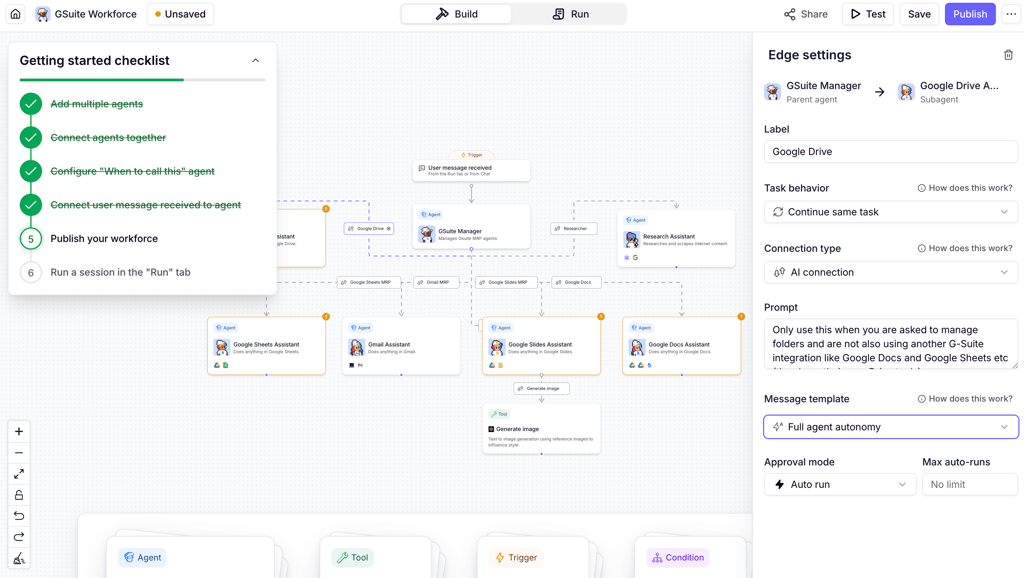
Building workflow logic requires more knowledge than AI agents, and you also need to sort out platform-specific feature names. Still, it’s manageable, as all the settings have clear explanations, while the checklist literally tells you what to do step by step.
The naming of some features can be confusing, but, actually, they represent standard workflow functions. Use visual elements to navigate across all Relevance AI functions.
Agent and Workforce marketplace
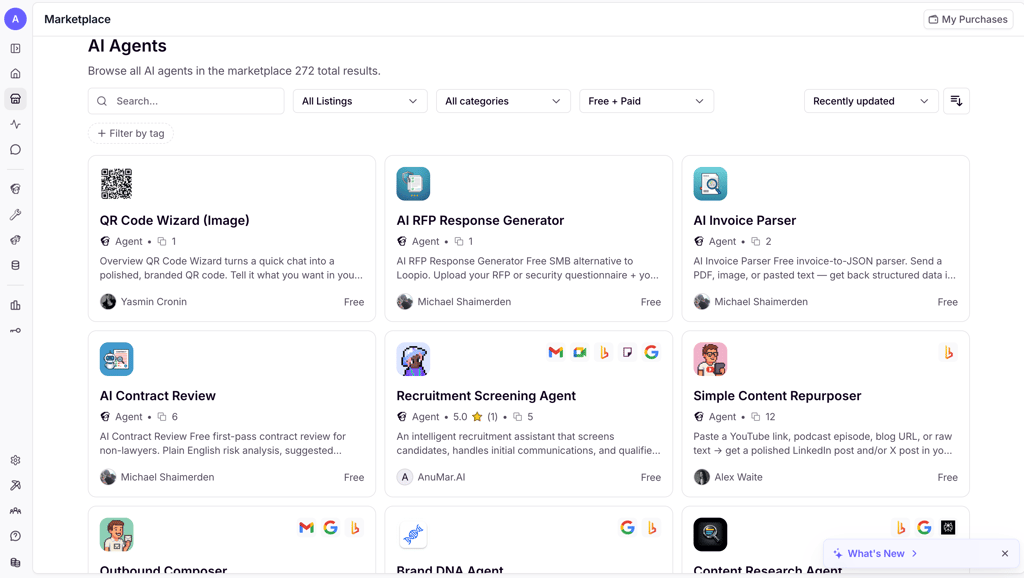
I absolutely loved the variety of agents, Workforces, and Tools available in Relevance AI’s marketplace. The most advanced ones are paid, but many are free, so you can start using them immediately. Moreover, you can monetize your own creations on the marketplace once they’re approved by the platform.
Integrations and agent run modes
Relevance AI offers 2000+ integrations across marketing, IT operations, and sales. You can connect to them by adding them to a Tool or by setting up webhook triggers to push and pull data from your proprietary or niche software.
Also, once your agents are built, you can deploy them as:
- Conversational chat agents that you directly interact with via the Relevance AI interface or through connected apps like Slack and Microsoft Teams
- Autonomous agents that are triggered by a pre-set time or action and execute tasks in the background
- Voice and meeting agents that can make and receive actual phone calls while you predefine the script, tone, and routing
Getting started: your first Agent in Relevance AI
I found 3 ways to get started with your first agent:
- Use the Inventor AI: chat with the AI describing what you want, manually refine the configurations, if needed, and deploy the Agent
- Use a marketplace: choose and buy a pre-built AI agent, customize it according to your needs, and deploy the Agent
- Build from scratch: open the blank canvas, define its workflow, and add the Tools and Knowledge step by step manually
For your first experimental Agent, don’t build it from scratch – clone a free one from the marketplace, connect it to your data sources, run it on 5 leads, and review the output. This flow will give the feel for how agents work and how to manipulate them.
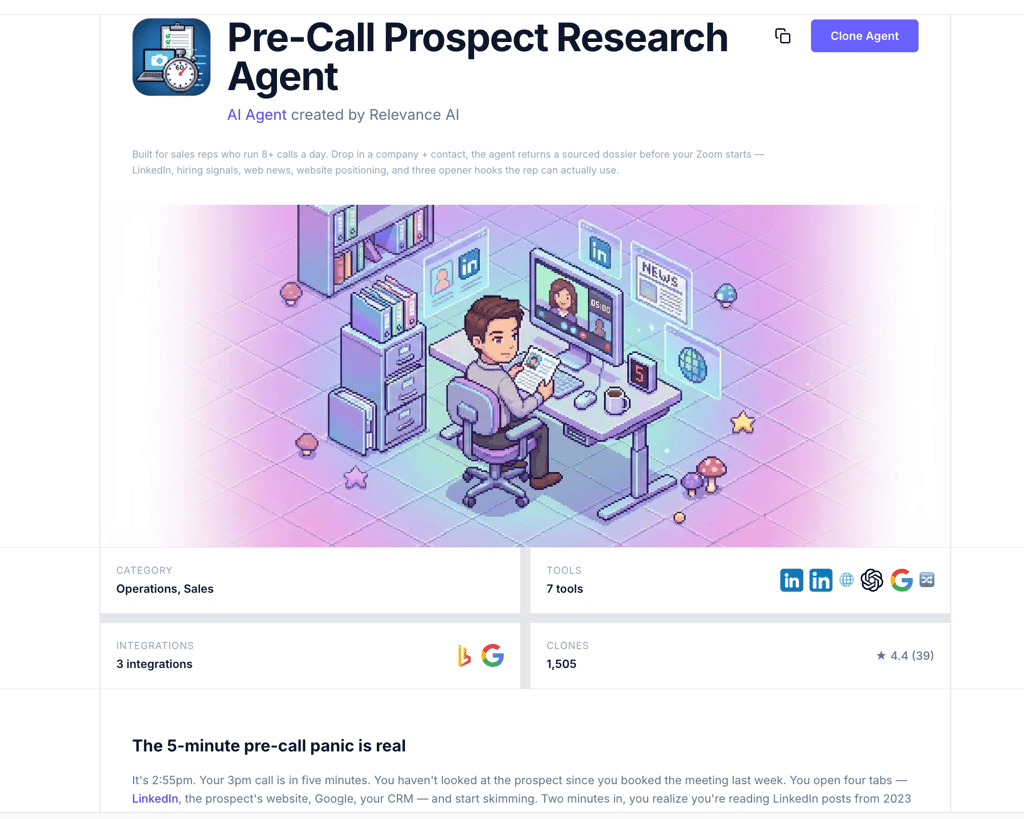
Throughout my research, I noted a few problems new users of Relevance AI may run into:
- Expecting a production-ready agent generated by AI on the first try – Inventor builds a solid draft and even an almost finished product, especially for simple use cases, but it still requires manual refinement.
- Not setting a BYO API key for LLM models – a BYO API key lets you pay the provider directly at lower wholesale costs and use Relevance AI credits only for running agents.
- Deploying a looping agent without a run limit – it can easily burn all your credits in minutes.
- Underestimating Knowledge storage needs – the Pro plan’s limits fill up quickly with document-heavy agents.
Documentation, support, and community
From my experience, Relevance AI’s documentation is one of the most straightforward among automation tools, clearly explaining every feature and how to work with it efficiently. If you have any questions, you can chat with the AI, which will escalate the issue to a human support agent if it can’t help. Enterprise plan users also have access to a dedicated Slack channel and phone support.
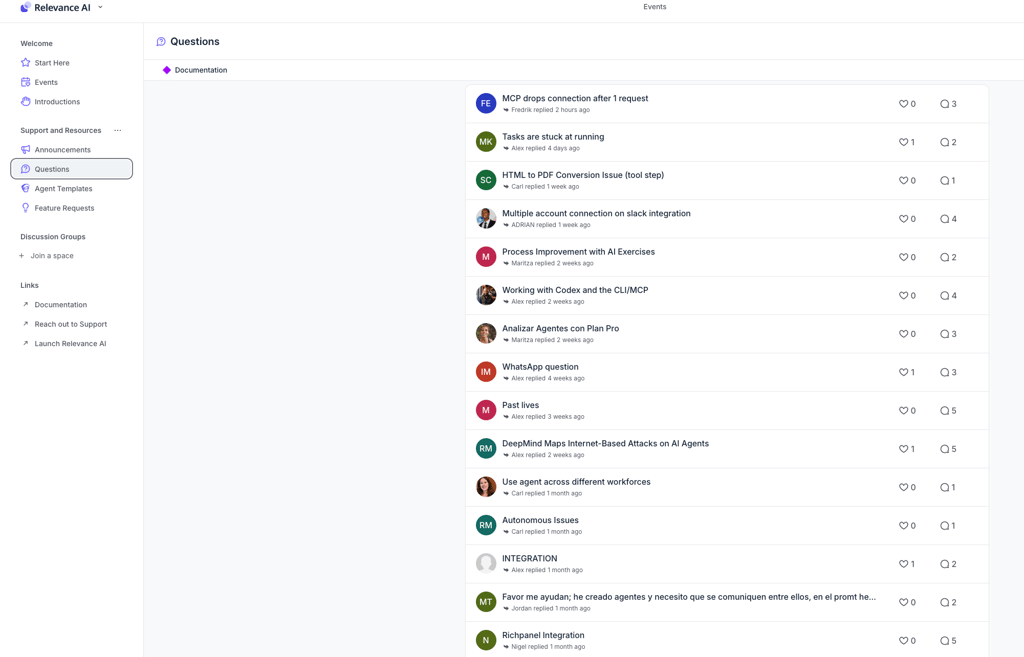
I found answers to some of my questions thanks to the Relevance AI community. It’s very active on the official website and on Reddit, as any question gets answered within a few hours. There are also plenty of YouTube videos from Relevance AI itself and third-party tech experts that show how to create advanced workflows and improve your agents.
Security, data control, and reliability
Relevance AI is SOC 2 Type II and GDPR-certified and supports data storage in the US (Northern Virginia), the UK (London), or Australia (Sydney). This allows you to comply with international data residency requirements and ensures that your business information doesn’t cross borders into unauthorized jurisdictions.
The best thing about Relevance AI is that it explicitly states that your data isn’t used for model training, while everything you upload and create remains your property. Moreover, on paid plans, data is stored until you delete it, whereas on free plans, it’s kept for only 30 days. It’s a huge advantage, since all major LLMs may keep your data indefinitely and train on it.
The Enterprise plan includes an even broader security organization. For example, it supports single sign-on (SSO), role-based access control, and audit logs. It also offers custom virtual private clouds and private subnets to isolate your data at the network level.
Relevance AI pricing: the two-part model explained
Relevance AI has two types of credits:
- Actions – the cost of one Tool run (failed runs are also paid)
- Vendor Credits – the compute cost of the AI model run
You aren’t forced to use the Vendor Credits at all, as you can plug in your own API keys for your preferred models and pay the provider directly. However, since Relevance AI has a zero-markup policy for all LLMs, paying for Vendor Credits can be the most cost-efficient solution if you want to juggle a few LLMs or have one invoice for all agentic operations.
Here’s the breakdown of Relevance AI pricing plans:
| Price | Best for | Key limits | Notable features | |
| Free | $0.00 | Testing and exploring the agents |
| Access to all agents and Tools |
| Pro | $19.00 | Personal workflows and simple automations for everyday tasks |
| Unlimited multi-agent Workforces and BYK for LLMs |
| Team | $234.00 | Teams collaborating on AI agents across departments |
| Calling and meeting agents and A/B testing mode for agents |
| Enterprise | Custom | Large organizations with advanced security |
| A dedicated account manager and a custom set of features and triggers |
I like that you can set usage caps for each agent to prevent unexpected overages. However, if you do need a top-up, you can buy an additional 1000 Actions for $80.00 and 10,000 Vendor Credits for $20.00. The unused credits roll over to the next billing cycle, so you don’t lose them.
What teams actually use Relevance AI for
Businesses use Relevance AI to build highly specific, multistep workflows. Here are the 5 most common scenarios I found:
- BDR and prospect research. Agents can autonomously scrape company websites, enrich the data through web searches, score prospects against ideal customer profile criteria, and draft personalized outreach.
- Competitive and market intelligence. Scheduled agents can act as an always-on research team that monitors competitor blogs, news sources, and review websites, synthesizes the updates, and adds summaries directly into Slack or Google Sheets.
In Relevance AI, Verisoul built an internal agent, Morning News Mo, that automatically finds 30 industry articles, cross-references them with Verisoul’s internal knowledge base to identify the 5 most relevant pieces of news, and sends a brief directly into its Slack channel every morning.
- High-volume operations. Agents can replace manual, low-value data tasks, e.g., auditing unstructured documents or triaging big datasets. A well-optimized Relevance AI agent can deliver an ROI of around 3000% by completely eliminating manual processing hours, according to the founder of Relevance AI, Jacky Koh.
- Lead qualification and CRM enrichment. Incoming leads can trigger a background agent instantly. The agent, in turn, researches the inbound domain, qualifies the lead based on revenue signals or tech stack, and automatically writes those structured data points directly into HubSpot or Salesforce before a human worker even opens the record.
- Content production pipelines. Marketing teams can utilize multi-agent workflows to scale content creation. The process may look like this: a Research Agent pulls SEO data and competitor outlines, passes the data to a Writer Agent to draft the copy, which is then handed off to a Brand Voice Review Agent who ensures the tone matches company guidelines before publishing it in a CMS.
What users say: consistent patterns in reviews
I’ve noticed that users generally agree that Relevance AI is incredibly powerful. For example, across Reddit and Gartner reviews, many users say the marketing claims are surprisingly accurate, and non-technical teams have successfully built multi-agent workflows for semantic search, CRM enrichment, and lead qualification.
Of course, users love the transparency of not paying a markup on AI, noting that it’s much fairer than competitors. The BYOK policy adds another level of trust and helps users save money.
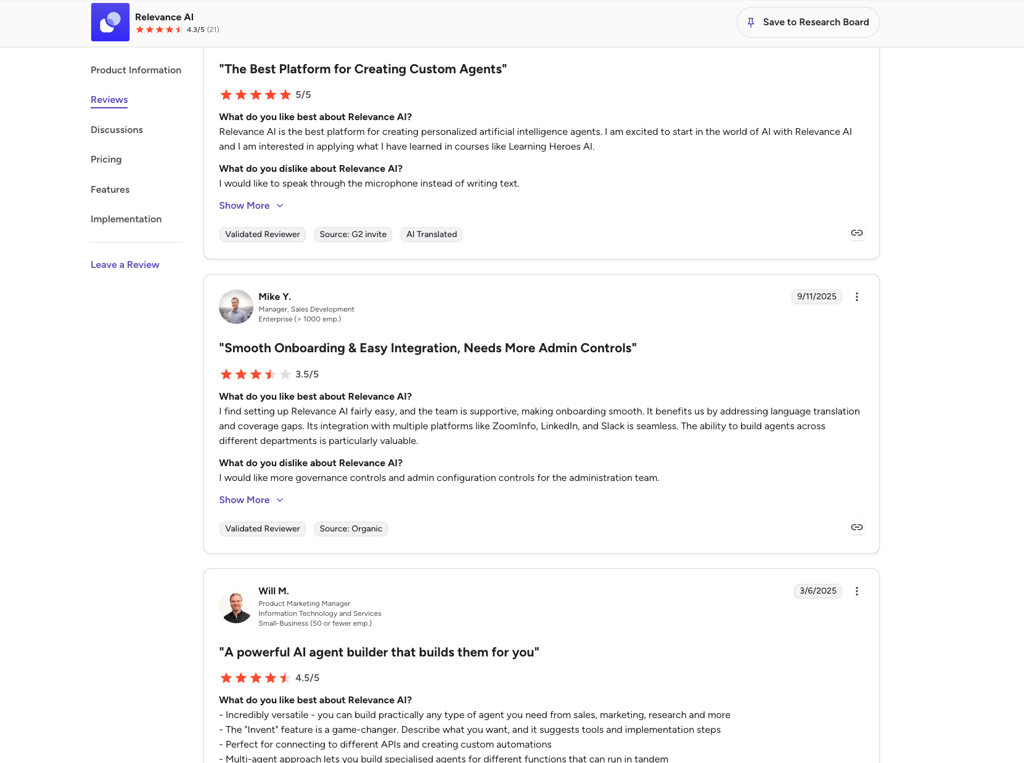
The main complaint comes from agency owners. On Reddit, they say that the pricing model doesn’t allow for handling multiple client environments cost-effectively because of the shared workspace, which makes credential isolation difficult. Finally, Capterra reviews often note that while the basic setup is easy, custom API handling, complex conditionals, and other advanced features require a significant learning curve.
Relevance vs competitors
Relevance AI’s workflow builder looks similar to other automation tools, especially Gumloop. However, in Gumloop, you build data-heavy pipelines and connect separate tasks on a giant canvas. Relevance AI feels more like building and connecting separate software apps – each capable of performing a few tasks.
Some users may prefer traditional tools like Zapier for building only linear workflows and n8n for complex branching logic, custom code, and self-hosting. You can read more in our Zapier vs n8n review or, if you’re choosing between visual AI canvases and code-heavy infrastructure, check out our Gumloop vs n8n comparison. Lindy is also a good alternative, but its agents focus more on tasks that involve high volumes of communication, like calling, scheduling, or sending emails.
| Best for | Ease of use | Flexibility | Pricing feel | Biggest drawback | |
| Relevance AI | Multi-agent GTM workflows and research | High – a low-code builder | High – multi-agent orchestration | Usage-based | High usage can get expensive |
| Gumloop | Complex data pipelines | High – visual drag-and-drop tool | High – visual node-based logic | Credit-based tiers | Can be visually overwhelming when workflows get massive |
| n8n | Technical users wanting self-hosting and complex workflow logic | Low – steep learning curve | Very high – full code and API access | Free if self-hosted | Requires coding and JSON knowledge |
| Lindy | Autonomous personal assistants for emails and scheduling | High – natural language setup | Medium – best for admin and communication work | Flat subscription plus usage | Struggles with complex automations |
| Zapier | Simple, structured A-to-B workflows | High – extremely intuitive | Low – mostly linear paths | Per-task billing | No complex branching and loops on basic plans |
As you can see, Relevance AI sits between developer frameworks like n8n and no-code automation tools like Zapier and Lindy. This makes it a perfect option for RevOps and GTM teams who want to build custom, multi-agent workflows without involving a full engineering department.
Verdict: is Relevance AI worth building on?
Yes, Relevance AI is the most capable low-code platform for building custom multi-agent workflows. However, as one of the best AI tools, it requires real commitment – you need to be financially prepared if your team is large and give your employees adequate time to learn the platform.
Here are the main reasons to use Relevance AI:
- The combination of the AI agent builder, Inventor, and the visual workflow builder, Workforce, is the fastest route to building a multi-agent pipeline without writing code
- The BYOK policy on paid plans gives technically capable teams full LLM cost control
- 400+ marketplace templates for agents and workflows mean you don’t start from zero
And here are the reasons to look for other best no-code AI agent builders:
- Lack of native LinkedIn integration makes it incomplete for outreach-first GTM teams
- Credit-based pricing can escalate quickly on heavy workflows without proper usage monitoring
- Complex agents require a bigger financial investment and even coding
FAQ
Is Relevance AI actually no-code?
Yes, Relevance AI doesn’t require coding. However, if needed, you can easily add your own JavaScript code.
How does the Actions + Vendor Credits pricing model work?
An Action is the cost for what your agent does (sending an email or creating a Google Doc), while a Vendor Credit is the cost of a single run of an AI model (Gemini writing an email). That’s why one agent run can consume both types of credits. Also, you don’t have to purchase the Vendor Credits and use your own API key for the chosen LLM.
Can I use my own OpenAI or Anthropic API key?
Yes, you can use your own OpenAI, Anthropic, and Google AI API keys in Relevance AI.
Is Relevance AI secure enough for enterprise data?
Yes, Relevance AI is highly secure for enterprise data. It’s SOC 2 Type II and GDPR-certified, explicitly states that it doesn’t train on your data, and allows for data storage in the US, the UK, and Australia.