GPTZero review (2026)
Being behind major reports like The Mother of All Breaches and RockYou2024, our in-house cybersecurity experts and journalists provide unbiased, real-world testing and in-depth analysis.
We maintain complete transparency by openly sharing our testing methodologies with our audience.
Learn more

Like it or not, AI-generated content is everywhere as AI tools become more common. You see it in student essays, resumes, emails, dating app bios, and even casual texts. In some cases, it might not matter much. However, in others, distinguishing between human-written and AI-generated content can be crucial.
That’s where GPTZero steps in. This AI-powered tool analyzes text to determine whether it was likely generated by AI models like ChatGPT, Claude, and LLaMA. Originally built due to concerns about AI-generated work in academia, it has since gained popularity among educators, businesses, and even everyday internet users.
Universities use it to separate original, insightful student work from AI-generated submissions. Discerning news readers rely on it to spot clickbait and fake news. Hiring managers use it to verify cover letters and resumes. Savvy shoppers turn to it to weed out fake reviews from genuine ones.
But in a sea of seemingly similar AI detectors, how is GPTZero any different from the other names on the market? And, as someone who’s been working with words long before AI-generated content entered the scene, I’m curious to see how GPTZero holds up. Can it reliably tell AI-generated text from human work?
To find out, I teamed up with the Cybernews research team to examine the AI tool’s accuracy, key features, pricing, user-friendliness, and more. Find out how it fares in this GPTZero review.
Quick overview of GPTZero
| Overall rating: | |
| Brief description: | GPTZero is designed to detect AI-generated text. In addition to its core AI detection, it offers grammar, AI vocabulary, and plagiarism checks, plus extra features like writing feedback and a source finder. |
| Pricing: | From $8.33/month |
| Free version: | Yes |
What is GPTZero and how does it work?
GPTZero is an AI tool that detects AI-generated text from models like ChatGPT, Claude, and LLaMA. Simply put, it’s AI built to identify AI-generated content.
Originally created to flag AI-generated text in academic work, it focused on two key measures: perplexity and burstiness. Perplexity checks how predictable a sentence is – human writing is usually less predictable. Meanwhile, burstiness is all about how the text flows. People naturally mix short and long phrases, as well as simple and complex sentences.
Over time, GPTZero expanded beyond just these 2 factors. To analyze text, it now relies on 7 components: perplexity, burstiness, GPTZeroX, education module, internet text search, GPTZero Shield, and deep learning.
Today, it’s used in various fields, including journalism, content creation, and HR and recruitment. On top of its AI scans, GPTZero also offers grammar, AI vocabulary, and plagiarism checks, along with writing feedback and source identification.
Is GPTZero reliable?
GPTZero claims to be 99% accurate in detecting AI-generated writing. In other words, it correctly classifies AI writing 99 out of 100 times. For mixed AI-human content, its accuracy drops to 96.5, which I’d say is still pretty solid.
However, when you check GPTZero reviews on platforms like Trustpilot and Reddit, opinions are all over the place. Some praised its AI detection, comparing it to the likes of Turnitin, while others called out its high false positive rate.
I can see where both sides are coming from. From my experience, GPTZero is quick to spot straight-up AI text. So, if you copy-paste from ChatGPT, it’ll probably catch it.
At the same time, I find its false positives alarming. It even flagged articles I wrote years ago – way before AI tools hit the mainstream. After testing it a few times, I’ve noticed that anything that’s been edited tends to get flagged. Yet, ironically, you can fool the software by tweaking a few words or peppering in some intentional mistakes.
Pros and cons of GPTZero
No AI tool is perfect, and GPTZero is no exception. Here are some of its strengths and drawbacks you should consider:
Key features of GPTZero
GPTZero keeps things very simple – just the essential features and a handful of extras if you opt for a premium plan. Below, I’ll walk you through its key features and what each brings to the table.
Advanced detection algorithms
GPTZero started out using just perplexity (how unpredictable a sentence is) and burstiness (variation in structure and flow) to detect AI-generated text. Higher levels of both would point to human writing.
It has since expanded to 7 components, including:
- GPTZeroX. Analyzes sentences in the context of the full text
- Education module. An education model option trained on student work
- Internet text search. Checks archives for existing content
- GPTZero Shield. Detects common methods to bypass AI detection
- Deep learning. End-to-end deep learning approach with large datasets for improved detection
Document compatibility
Like any AI detector worth its salt, GPTZero can scan a mix of common formats. In addition to the usual suspects like TXT, DOC, and DOCX, it also works with PDF, JPG, JPEG, PNG, GIF, and WEBP.
That said, compared to some competitors, its supported formats feel a bit restrictive for my taste. I’d have liked to see a wider range that includes PPT and XLS. For instance, Copyleaks also lets you upload various URL formats and code files like HTML, Java, Python, and Ruby.
From this, I’d say GPTZero is better suited for academic and traditional professional settings. If you’re working with spreadsheets, presentations, and codes, it’s not the most convenient option.
User dashboard
I find GPTZero’s user dashboard clean, minimalistic, and easy to get around. There’s a menu to the left that houses a handful of features like new scans and documents. This keeps the interface clutter-free, with everything easily accessible.
Past scans are under the Documents tab. One thing I really like here is that you can filter them by type, date, and results. Alternatively, you can simply use the search bar to quickly locate a specific one.
Multi-language support
GPTZero focuses mainly on scanning English text but expanded to include French and Spanish in late 2024. It’s nice to see some progress, but I must note that it’s still playing catch-up.
Take Winston AI, for example – it supports 7 languages. Meanwhile, Copyleaks’ AI detector impressively covers 30+, including Russian, Korean, Japanese, and Turkish.
Reporting tools
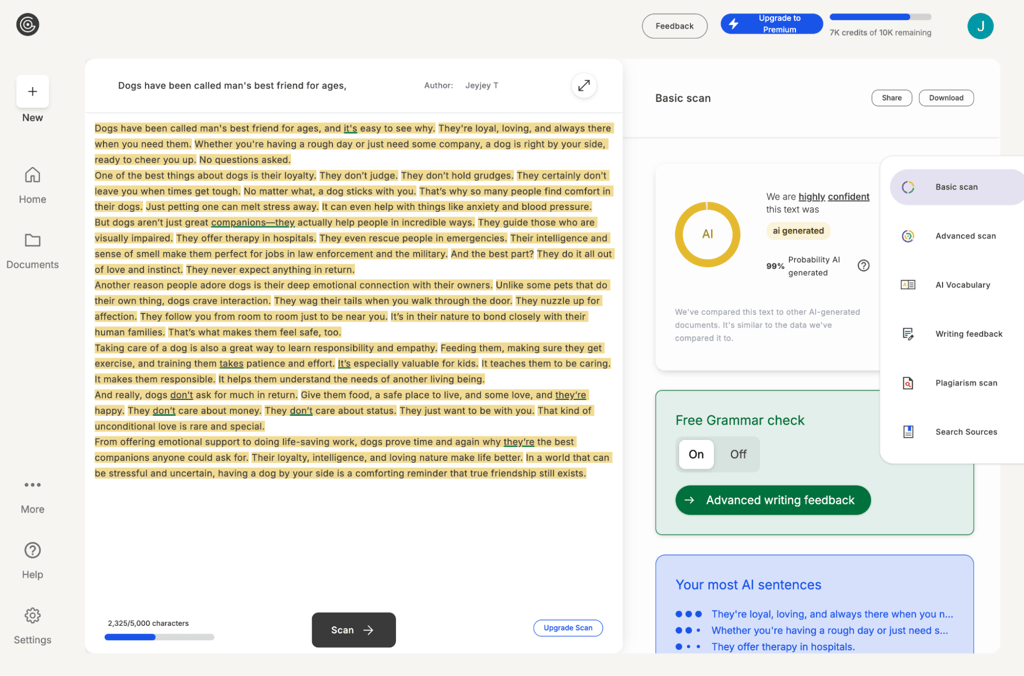
GPTZero instantly detects AI-generated text and provides a probability score as a percentage. I appreciate that it also rates its confidence: highly confident (error rate <2%), moderately confident (~10%), or uncertain (>14%).
On the content itself, AI-generated sentences are highlighted in orange for better visibility. You can share your results or download the report as a PDF.
GPTZero pricing and plans
GPTZero offers a free plan and 3 paid options. The free version is pretty limited – you only get basic AI scans (capped at 10,000 words per month) and 5 free advanced scans. For anyone beyond the most casual users, I’d say a paid plan is the more practical choice. Here’s a comparison of its paid options:
| Plan | Pricing per month | Words per month | Features |
| Essential | $8.33 | 150,000 | Basic AI scan, grammar and AI vocabulary checks |
| Premium | $12.99 | 300,000 | Everything in Essential, advanced scan, writing feedback, plagiarism check, source identification |
| Professional | $24.99 | 500,000 | Everything in Premium, up to 10 million words in overage, bulk file scanning (up to 250 files at once), team collaboration, enterprise-grade security |
These rates are only for annual billing, which knocks 45% off the normal price tag. If you opt for monthly billing instead, you’ll see a price hike – pretty common for services like this. Besides its free and paid plans, GPTZero also offers Teams and Enterprise API plans.
GPTZero: user experience
While I’ve extensively researched and tested GPTZero with the Cybernews research team, my opinion is just one perspective. To get a clearer picture of the overall user experience, I scoured platforms like Reddit and Trustpilot for reviews from everyday users.
Generally, users found GPTZero easy to use thanks to its clean interface and the simple text scanning process. Many also appreciated the sentence-by-sentence highlighting and straightforward reports. Others liked the integration of the Chrome extension for quick access.
However, that is not to say that GPTZero is without its share of criticisms. From what I’ve seen, the biggest complaint was about its apparent lack of accuracy. Many users reported false positives where human-written content gets flagged as AI-generated.
For example, one user said their essay was flagged until they simplified the structure and wording. Another noted that changing a single word in a 400-word essay led to entirely different results. Some found that simply accepting Grammarly’s suggestions triggered GPTZero’s false positives. Even decades-old work wasn’t spared and flagged as AI-generated.
In addition to accuracy issues, I noticed some users were frustrated by the software’s limited number of daily checks and low word limit. A few also reported problems with the Chrome extension not displaying reports. Finally, some questioned whether the subscription price was worth it for a tool that’s not always reliable.
From the user reviews, I gathered that GPTZero has a mix of positive and negative feedback. On the plus side, its ease of use – from its interface to detection process – was a hit with users. However, its accuracy – or, rather, inaccuracy – and usage limits remained a source of frustration.
How to use GPTZero
In my experience, GPTZero is straightforward and easy to use. If there’s a learning curve at all, it’s barely noticeable. Here’s a step-by-step guide to using the software:
-
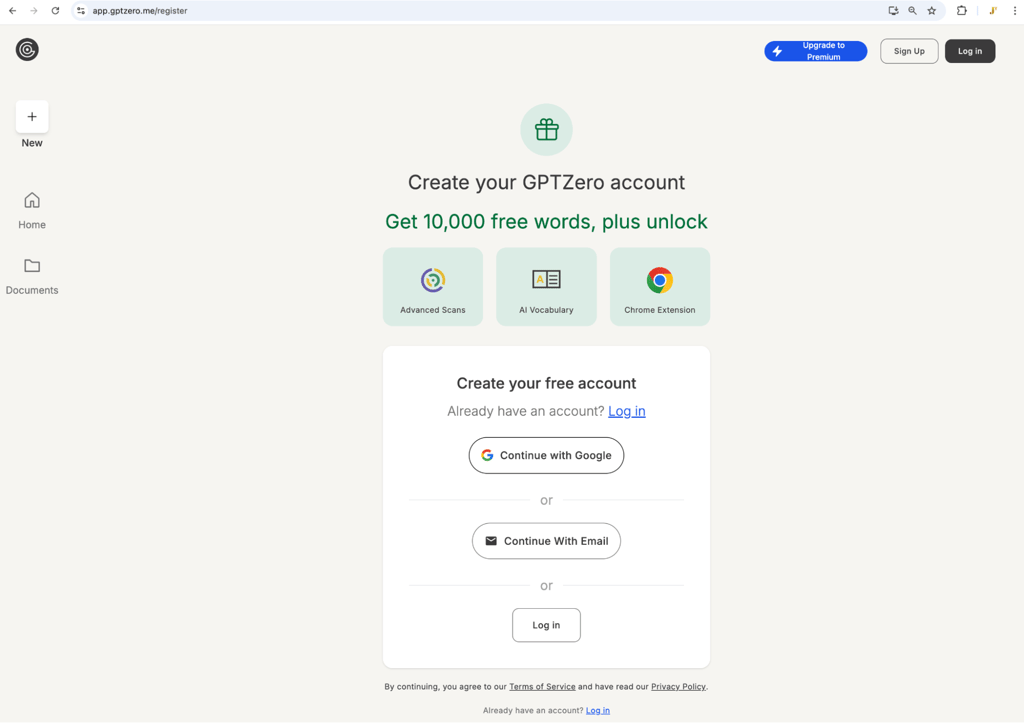
Sign up. Head over to the GPTZero website and create an account with your email address
-
Click the Upload file button and pick the file you want to scan. Alternatively, you can just paste the text directly into the input box
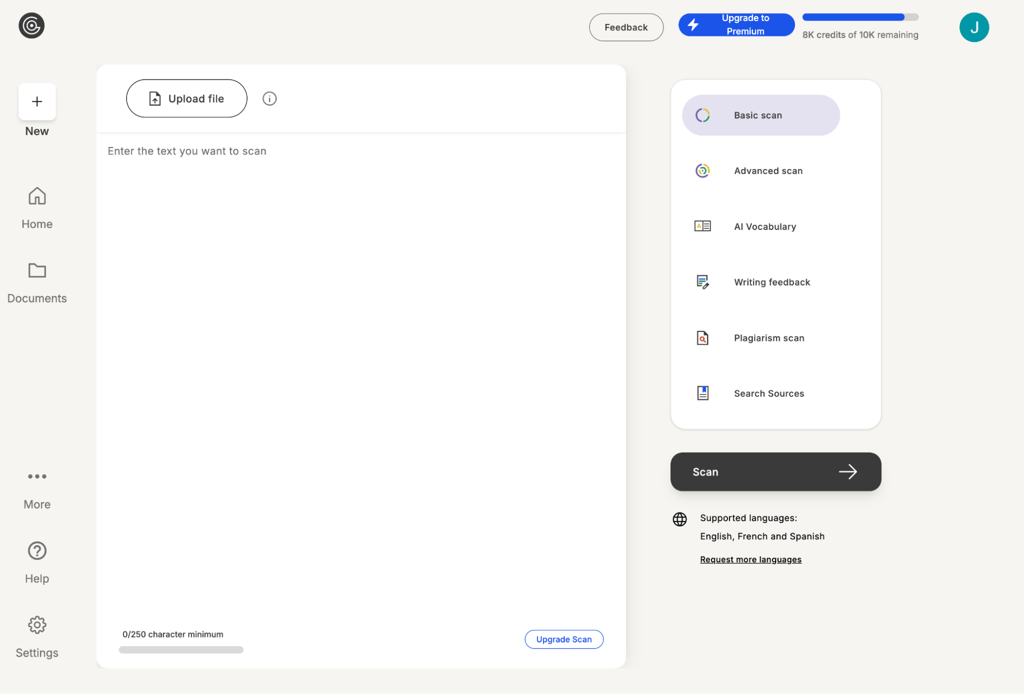
- Hit the Scan button to kick the AI content detection process into gear
-
Review the results. You’ll see a colored ring – either orange or green – along with a percentage indicating the probability that your text is AI-generated. Scroll down for a detailed probability breakdown of whether it was written by a human, AI, or a mix of the two
-
Download the report. Share or download the full report as a PDF for your records

GPTZero alternatives
While GPTZero has its fans, it might not be the right fit for everyone. If it’s not quite hitting the mark or driving you a tad mad with false positives/negatives, you should check out some alternatives. Below, I’ve picked 3 other AI detection tools – let’s see how they compare to GPTZero:
- Turnitin. A familiar name to students and academicians everywhere, Turnitin has long been a trusted tool for plagiarism detection. Since 2023, it has added AI detection to identify content generated by models like ChatGPT. Turnitin is a popular choice for academic writing and student paper analysis because of its massive academic database. However, its accuracy can drop outside of academic contexts.
- Copyleaks. A versatile AI detection tool, Copyleaks is used for everything from academic integrity and compliance to intellectual property protection. Compared to GPTZero, it supports more file types, including URLs and code files. Plus, it lets you scan content in 30+ languages. Its AI suite includes an AI detector, a plagiarism checker, and a writing assistant.
- Writer.com. Writer.com offers AI content detection and plagiarism checking. Like GPTZero, it keeps things stripped down – showing just the percentage of human-generated content. A free version that scans up to 5,000 words is available. However, users report that Writer.com is generally less accurate at detecting AI-generated content. While GPTZero tends to flag false positives, Writer.com is more likely to overlook them. It’s best for content teams, marketers, and businesses.
Final word on GPTZero review
Overall, I’d say GPTZero is a decent tool for detecting AI-generated content. Its completely free plan makes it accessible to all. It’s also incredibly user-friendly, with a simple process and intuitive interface. I like that it highlights text sentence by sentence, making it easier to analyze and edit where necessary.
However, GPTZero isn’t without faults. My biggest concern is that I don’t see it providing the level of accuracy needed for confident decisions. It tends to flag human-written text as AI-generated, especially when the writing is procedural, well-structured, or significantly polished.
My recommendation is to use GPTZero, if you must, only as a quick check or an initial screening tool to flag potential AI-written text. It might also be helpful when paired with human analysis. However, I wouldn’t risk using it as a definitive measure for determining whether something is AI-generated.
FAQ
Is GPTZero used by universities?
Yes, some universities use GPTZero, but usually in a limited capacity. For instance, the University of Louisiana has integrated its AI content detection into its school system. However, most institutions tend to stick with more specialized tools like Turnitin.
Is GPTZero free to use?
Yes, GPTZero is free to use if you opt for its free plan. However, it comes with some limitations like a 10,000-word cap per month. To scan more words or access extra perks like a plagiarism checker, you’ll need a paid plan. Prices start from $8.33/month.
Is GPTZero better than Turnitin?
No, GPTZero isn’t necessarily better than Turnitin. While both are used for academic integrity and have some overlapping features, users typically turn to GPTZero for AI detection and Turnitin for plagiarism checks.
Does GPTZero save your work?
Yes, GPTZero saves your work. It retains a copy of your submitted text, which you can find in your dashboard under the Documents tab.
Does GPTZero collect data?
Yes, GPTZero collects certain data. According to its privacy policy, it may collect personal information based on your interactions, choices, and the products and features you use. It also stores personal details you provide – including your name, email address, job title, and payment info.