Best AI web scraper tools
Being behind major reports like The Mother of All Breaches and RockYou2024, our in-house cybersecurity experts and journalists provide unbiased, real-world testing and in-depth analysis.
We maintain complete transparency by openly sharing our testing methodologies with our audience.
Learn more

If you’re trying to turn messy websites into clean datasets, scraping can feel fragile. One layout tweak, a new JS widget, or a “friendly” anti-bot wall can break a setup that worked yesterday. That’s why I put together this guide on the best AI web scraper tools built to extract structured data without nonstop selector babysitting.
Together with the Cybernews research team, I put 6 scrapers through the same jobs that usually break workflows: Gumloop, Browse AI, Octoparse, Firecrawl, AIScraper, and Web Scraper.
I wanted straight answers: Can AI read complex layouts better than traditional scrapers? Which tools suit non-developers vs engineers? How do these platforms handle blocks, frequent layout changes, and legal or ethical limits?
Keep reading to learn:
- What AI scraping is and how it pulls fields
- AI vs traditional scraping in real use
- API-first vs no-code, and who each fits
- How to choose based on sites, scale, and outputs
- Trends ahead and the best pick per team
Best AI web scraper tools – shortlist
- Gumloop – best for building scraping flows that plug into automations and other apps
- Browse AI – best for training “robots” that keep pulling fresh data on a schedule
- Octoparse – best for template-heavy scraping when you need lots of knobs and controls
- Firecrawl – best for turning sites into LLM-ready content and structured outputs via API
- AIScraper – best for quick, prompt-based extraction right inside the browser
- Web Scraper – best for sitemap-style scraping with control over dynamic sites
Best AI web scraper tools compared
Before going tool by tool, it’s worth stepping back. These scrapers take different routes to the same end goal: structured data. Some feel like automation builders, some are “train a robot” no-code tools, and some are basically web data APIs for dev teams. Pricing also scales in different ways (monthly plans vs credits), so it’s easier to compare them once upfront.
Here’s a quick comparison:
| Tool | Overall rating | Standout features | Starting price | Free/trial version | Best for |
| Gumloop | 4.9 | Visual workflow canvas for scraping and automations, run logs for debugging | $30.00/month | Free plan (5k credits/month) | Scraping workflows that connect to broader automations |
| Browse AI | 4.7 | “Train a robot” flow, monitoring runs, exports, and integrations | $19.00/month | Free plan (50 credits/month) | Set-and-forget scraping and monitoring for non-technical teams |
| Octoparse | 4.6 | Templates and workflow editor, more controls for pagination and job logic | $69.00/month | Free plan and free trial | Higher-volume scraping with more control (still no-code) |
| Firecrawl | 4.4 | Dev-first endpoints (scrape, crawl, map, search, extract) built for LLM-ready outputs | $16.00/month | Free plan (500 credits one-time, no card) | AI products, agents, RAG ingestion, programmatic pipelines |
| AIScraper | 4.2 | Browser extension, prompt-based extraction, quick column building | Credit packs from $6.00 (pay-as-you-go) | Starts with free credits | Quick, lightweight page-level extraction for ops and research |
| Web Scraper | 4.2 | Sitemap/selector model, cloud scheduling, built for repeatable jobs | $40.00/month | Browser extension is free; 7-day trial on subscription plans | Repeatable scheduled scraping with more setup control |
6 best AI web scraper tools – our detailed list
For each tool below, I focused on one thing: how quickly it can get from a URL to a usable dataset. I tested the setup flow, how clean the extracted fields looked, how much manual cleanup it needed, and how well the tool holds up once a site changes or starts pushing back. You’ll see the best use case for each scraper, the main strengths, and the trade-offs that showed up during my testing.
1. Gumloop – visual scraping workflows with clear run-by-run debugging

| Overall rating: | 4.9 |
| Standout features: | Drag-and-drop workflow builder with a detailed Run Log |
| Starting price: | $30.00/month (Pro) |
| Best for: | Building multi-step scraping workflows with monitoring and triggers |
Gumloop is a workflow builder where scraping is one step inside a bigger automation. In my testing, that mattered because a lot of scraping jobs weren't just extract rows. They usually need cleanup, parsing, deduping, and an export step, sometimes on a schedule.
The way Gumloop structures work is easy to grasp as a beginner. You start with a trigger, then connect nodes into a flow (scrape, transform, send to a destination). Triggers can be scheduled or event-based, so you can run the same scrape daily or kick it off via a webhook.
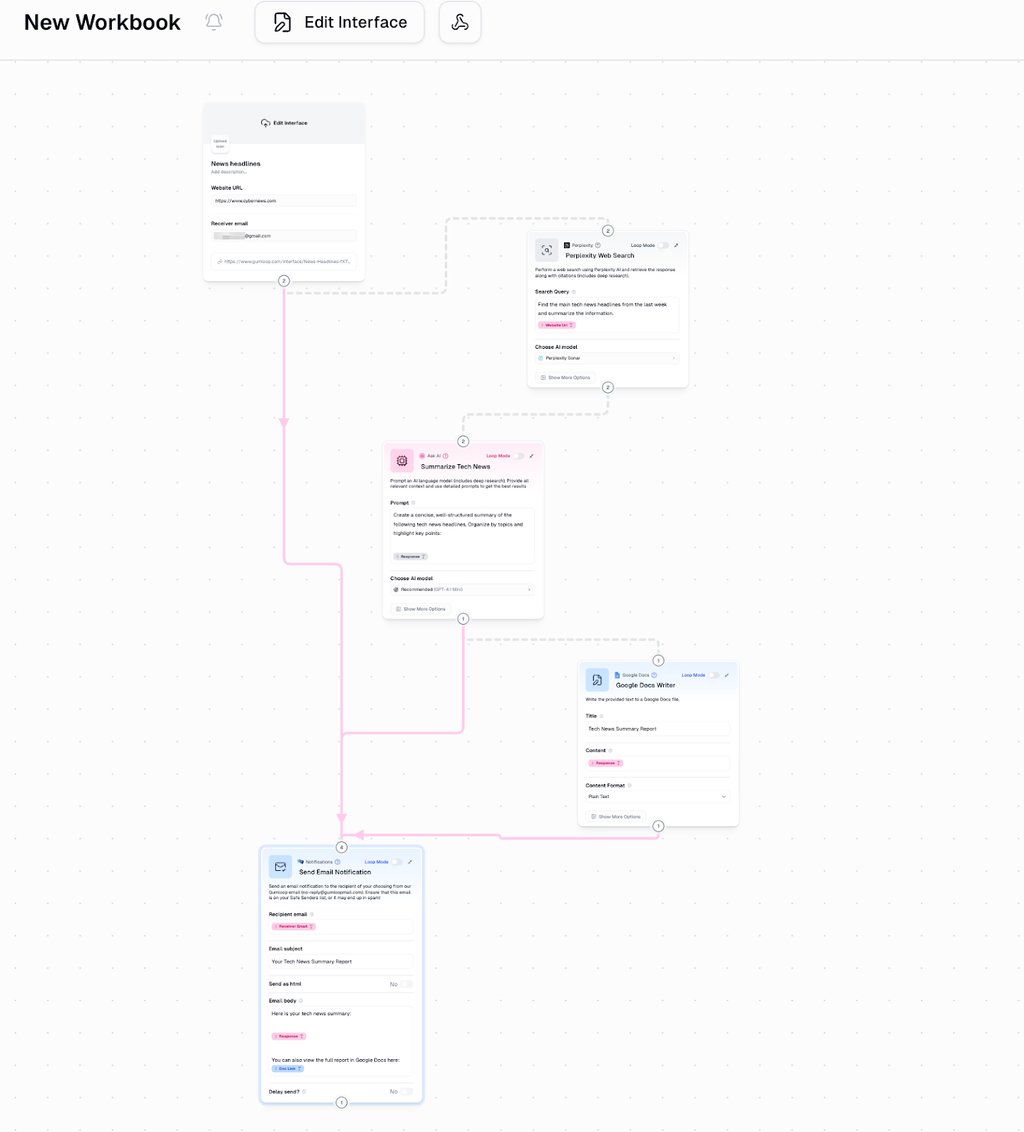
What I liked most during testing was the Run Log. It shows each step as it executes, with input and output details, so when something fails, you can spot the broken step fast without guessing. That made the whole setup feel less fragile, especially for multi-step jobs.
Pricing starts at $30.00/month on the Pro tier, and there’s a free plan listed on Gumloop’s pricing page. Credit-based pricing means heavy scraping or model calls can ramp costs quickly, so it’s worth watching usage when runs become recurring.
2. Browse AI – “train a robot” scraping with built-in monitoring
| Overall rating: | 4.7 |
| Standout features: | Robot training flow and monitoring runs |
| Starting price: | $19.00/month (Personal) |
| Best for: | No-code scraping you can schedule and keep an eye on |
Browse AI is the most approachable “set it up once, then let it run” option I tested. Instead of thinking in selectors or scraping logic, you train a robot by opening the target site and clicking the bits you want. In practice, that made the first setup feel far less intimidating, especially for people who just need reliable exports and don’t want to live inside a dev workflow.
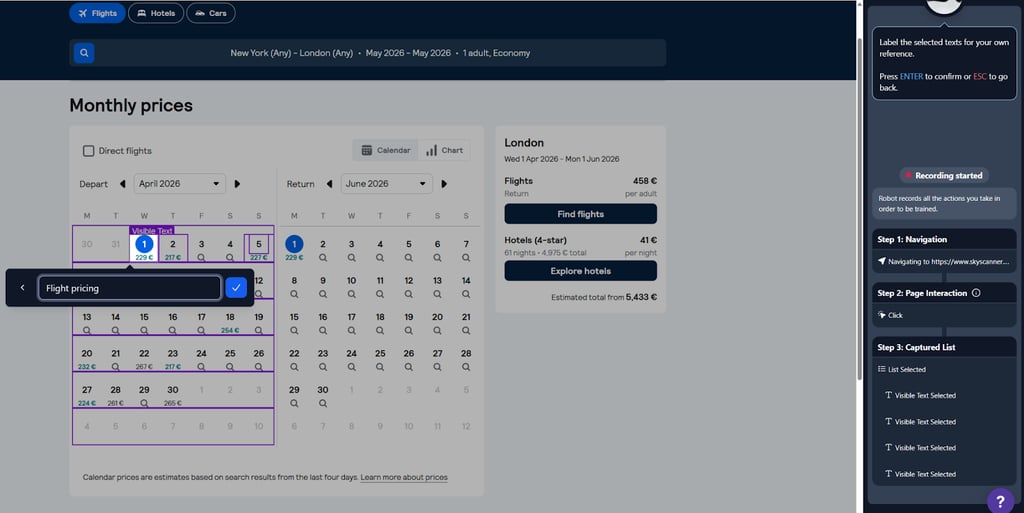
I really liked Browse AI’s two-step approach during testing. One robot handled my page interaction and collection, and another was in charge of parsing. So, the final output looks like a real dataset instead of a messy dump. You can run robots on a schedule and treat the result like a live feed.
Pricing is simple: the Free plan gives you 50 credits per month, and it includes 2 websites, 3 users, unlimited robots, and full platform access. Paid plans start at $19.00/month. On the trust side, there's a Trust Center and compliance with SOC 2 Type II and GDPR/CCPA.
Browse AI also leans into “data goes somewhere useful.” You can integrate it with Google Sheets, Airtable, Make, Zapier, webhooks, and a REST API, which fits the way most non-technical teams work day to day.
3. Octoparse – template-heavy scraping with more control when jobs get bigger
| Overall rating: | 4.6 |
| Standout features: | Huge template library and granular no-code workflows |
| Starting price: | $69.00/month (Standard) |
| Best for: | High-volume scraping that needs more control than prompt-only tools |
Octoparse is the power user pick in this list. In my testing, it gave me the most control without forcing a coding workflow, and it’s clearly built for repeatable jobs with pagination, column logic, and edge cases.
The template library saved me time. I’d rather tweak a working task than babysit setup from scratch. And when I went URL-first, Octoparse still did the basics for me: scanned the page, spotted the data, and then let me tighten up the fields and navigation.
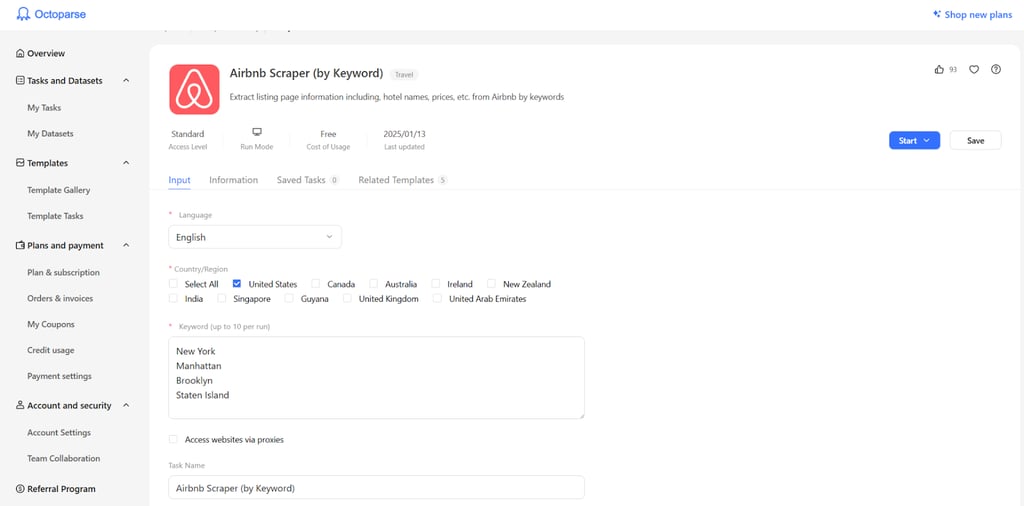
It also leans into “keep it running” features. Octoparse supports cloud-style extraction (so jobs can keep running without your machine), which is useful when scraping becomes scheduled and recurring. And if blocking becomes a problem, Octoparse documents proxy setup as a standard part of keeping jobs stable.
The trade-off is complexity. You get more knobs, but setup takes longer than the browser-first, prompt-only tools. I’d use Octoparse when the job needs structure and repeatability, not when I just want a quick one-page export.
4. Firecrawl – API-first scraping for LLM-ready outputs
| Overall rating: | 4.4 |
| Standout features: | Scrape/crawl/extract endpoints that return clean markdown or structured data |
| Starting price: | $16.00/month (Hobby) |
| Best for: | Developers building agents, RAG ingestion, and web data pipelines |
Firecrawl is the most “developer tool” on this list. It’s not trying to be a point-and-click row exporter. In my testing, it worked more like web data infrastructure: give it a URL (or a site), pick an endpoint, and get back content that’s already shaped for downstream AI use.
The big win is the output. Firecrawl is designed to turn pages into clean formats like markdown or structured JSON. It also supports things you usually end up stitching together yourself, like JS rendering, screenshots, and basic browser actions for dynamic pages. If you need to go beyond single pages, it has dedicated endpoints for crawl, map, search, and extract.
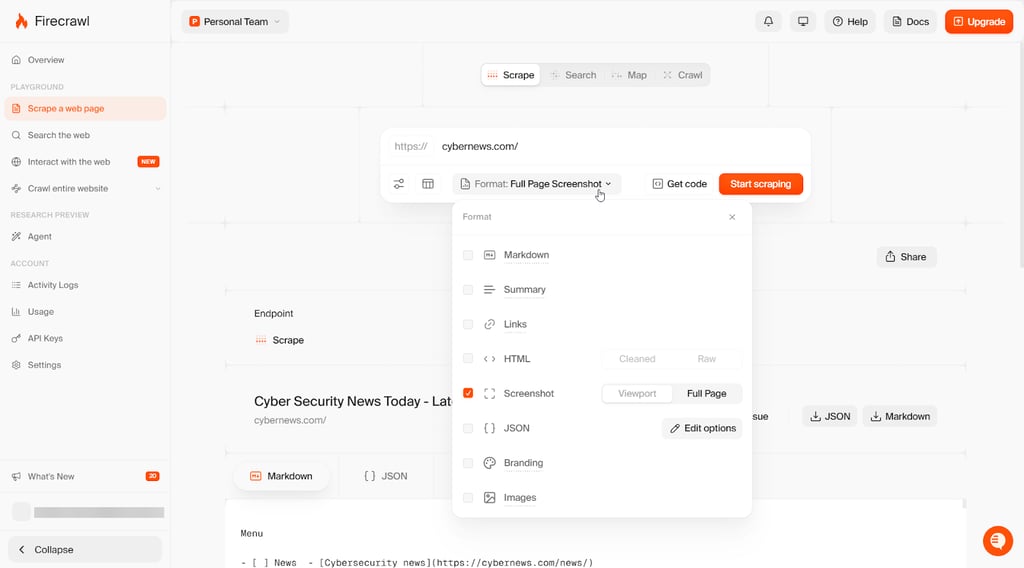
Pricing is credit-based. The Free plan gives a one-time 500 credit allowance with no card, and it doesn’t renew. Paid plans start at $16.00/month (Hobby), but you'll probably have to go with Standard for scaling.
The trade-off is obvious: Firecrawl is great when you already think in APIs and pipelines. If the goal is to turn a table into a spreadsheet in two minutes, it can feel like extra work compared to browser-first tools.
5. AIScraper – prompt-first scraping right in the browser
| Overall rating: | 4.2 |
| Standout features: | Chrome extension with prompt-based extraction and quick column edits |
| Starting price: | Credit packs from $6.00 (pay-as-you-go) |
| Best for: | Fast, one-page extraction for non-technical work |
AIScraper is the most “just get the data” tool I tested. It’s a browser extension. You open a page, describe what you want, and it builds the columns for you. That’s the whole vibe. In practice, it’s great for quick lists, basic research pulls, and lead-style tasks where speed matters more than perfect control.
The flow couldn't be simpler. Install the extension, open the page, type in what to collect, and you get the columns. A couple of edits later (rename, reorder, drop the junk), you’re ready to export. In my tests, exports worked well for the usual handoff formats like CSV and Sheets, so it didn’t feel like a dead-end tool.
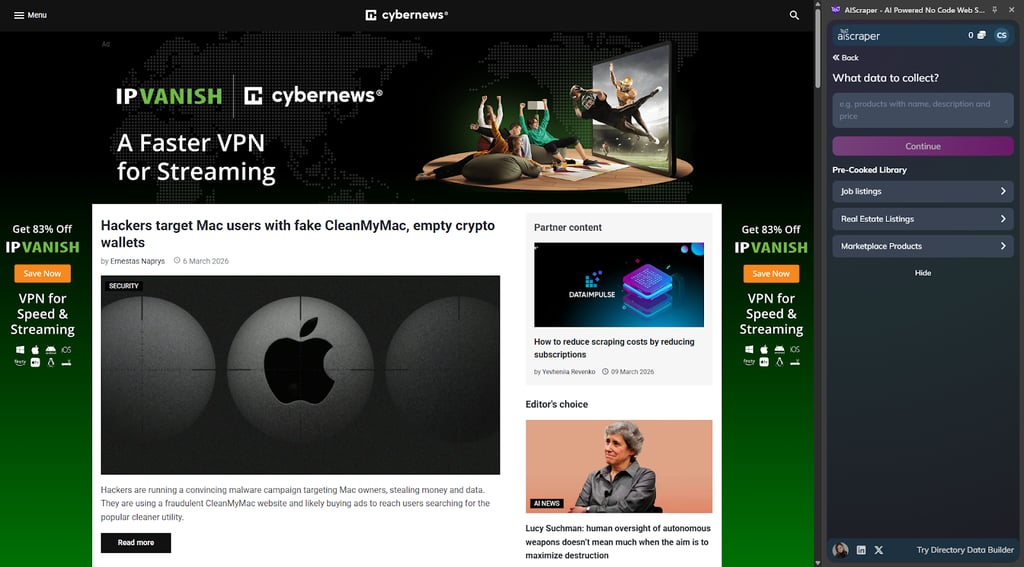
Pricing is credits, not a monthly plan. The homepage shows packs in the $6.00–25.00 range for 200–3000 credits, and you can top up as you go. Most pages cost 1–3 credits, and subpages cost extra. That’s helpful because this kind of tool can look cheap until you need to scrape 500 pages.
Where it falls short is anything complex. AIScraper is page-first. It can follow subpages via a branching flow, but it’s not built for deep crawling, multi-step pipelines, or heavy engineering integrations.
6. Web Scraper – sitemap-based scraping with more control for repeatable jobs
| Overall rating: | 4.2 |
| Standout features: | Sitemap and selector model with Cloud runs and scheduling |
| Starting price: | $40.00/month (Project) |
| Best for: | Repeatable, scheduled scraping with more control than prompt-only tools |
Web Scraper is the most classic scraper in this lineup, with AI help layered on top. I reach for it when I need repeatability. Multi-page lists, pagination, deeper navigation, JS-heavy pages – this is the kind of work it handles well. The setup is a sitemap and selectors. Once that’s done, reruns are painless.
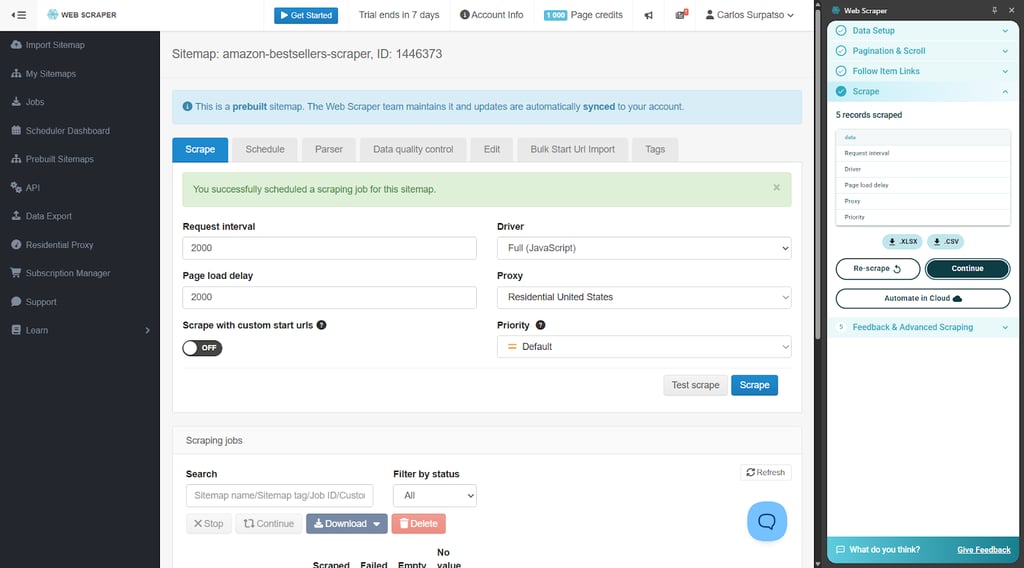
The Cloud side is where it becomes practical for ongoing work. You can run sitemaps in the cloud, schedule jobs, and monitor runs instead of keeping a browser session open. What I liked here is that the Cloud product is built around “keep it stable” features: proxy support, retries, and IP rotation to reduce random failures. There’s also an HTTPS JSON API for managing jobs and pulling results into other systems.
Pricing is straightforward. The browser extension is free, and Cloud plans start at $40.00/month (Project). Every paid plan also comes with a free 7-day trial.
The trade-off is time. You’re doing more upfront work than with prompt-first tools, and it’s still possible to build a sitemap that works, but that’s only until the target site changes. Cloud runs help a lot if this is a recurring job, but cloud usage is metered by URL credits (each page load counts), so bigger crawls cost more than you’d expect if you only think in rows exported.
What is AI scraping and how does it work?
AI scraping is web scraping with an extra layer of “understanding.” Instead of relying on fragile CSS/XPath selectors for every field, the tool tries to figure out what’s what on the page (title, price, description) and turn it into structured output.
Here’s the basic flow:
- Load the page content (HTML and rendering when the page relies on JS)
- Identify the parts that match the fields you want (title, price, description, etc.)
- Output the result in a structured format (columns or JSON)
The nice part is resilience. When a site nudges the layout around, AI-based extraction can often keep working without a full rebuild. It’s not magic, but it’s less brittle than hard-coded selectors in a lot of everyday scraping jobs.
In my testing, AI scraping helped most on:
- Busy pages with nested sections and repeatable blocks
- Sites that change layouts often
- Jobs where meaning matters more than DOM position (like separating price vs discount vs shipping)
API-first vs no-code AI scraping tools: what's the difference?
API-first scrapers are built for developers. You trigger jobs in code, pass parameters, pull results as JSON, and plug everything into a pipeline (ETL, RAG ingestion, internal tooling). They handle pipelines, but you need to be okay with code, auth, and keeping jobs stable.
No-code scrapers aim at non-technical workflows. Instead of code, you get a UI: click elements, train a robot, set up a sitemap, or prompt the fields you want. Exports are the point (CSV, Sheets, Airtable-style handoffs), so it’s fast to start and easy to share with a team. The downside is scale and customization. Once jobs get complex or massive, no-code tools can hit limits faster.
| Type | Best for | Strengths | Trade-offs | Examples from my list |
| API-first | Dev teams, pipelines | Flexible, automatable, production-friendly | Steeper learning curve | Firecrawl |
| No-code | Ops, analysts, SMBs | Fast setup, simple exports | Can cap out on scale/custom logic | Browse AI, Octoparse, Web Scraper, AIScraper |
| Hybrid | Mixed teams | UI speed and workflow control | More moving parts | Gumloop |
Traditional vs AI web scraping: how AI helps?
Web scraping used to be mostly rules: selectors, scripts, and lots of duct tape. AI-assisted scraping shifts some of that work from “tell the scraper exactly where the data lives” to “tell it what the data means.”
Setup and configuration
Traditional scraping usually starts with CSS/XPath selectors and custom logic. It works, but the setup gets slow the moment a page isn’t clean and predictable.
With AI scraping, setup is often faster on non-trivial pages. In testing, the biggest time saver was skipping the “hunt for the right selector” phase and getting to a usable table sooner, even if some cleanup was still needed.
Handling layout changes and edge cases
Rule-based scrapers break on small DOM changes. A button moves, a wrapper div changes, a list turns into cards, and the extractor starts missing fields or pulling the wrong ones.
AI scrapers can often recover by re-reading the layout and matching the same meaning (name, price, rating) in a new structure. It’s not autopilot. Monitoring still matters, but minor redesigns don’t force full rebuilds as often.
Extracting structured, contextual data
Traditional scrapers are great at “grab what’s at this selector.” They’re weaker at “understand what this number represents.”
AI extraction is better at separating similar-looking fields (price vs discount vs shipping) and ignoring nearby noise (ads, related items, recommended products). Some tools also normalize outputs as they extract (cleaning text, consistent formatting, fewer weird column values).
Scale, maintenance, and monitoring
AI doesn’t remove scraping basics. Large jobs still need sane rate limits, retries, and a plan for blocking. The difference is maintenance: managed tooling and AI extraction often reduce how often a workflow needs hands-on fixes.
This is also where logs and dashboards matter. Tools that show run history, errors, and step-by-step output make it easier to catch drift early.
Legal and ethical considerations
AI scraping doesn’t change the rules. Robots.txt, site terms, and privacy regulations still apply, and some use cases get sensitive fast.
For anything high-risk (personal data, regulated industries, aggressive crawling), I’d pull in legal or compliance early, before scaling a workflow.
How to choose the right AI web scraping tool
I don’t start with features. I start with the job. Who’s running it, what kind of pages it has to survive, and what “done” looks like (a quick CSV or something that runs every day without any issues). Here's my checklist:
- Target users and skill level. I start with who’s going to use it. Dev teams usually move faster with an API. For ops, SEO, or sales, a UI tool is easier to launch and easier to share internally.
- Data types and sites to scrape. I check what the sites look like in real life. Static pages are easy. JS-heavy pages, pagination, and “click to load more” flows are where weaker tools fall over. Authenticated areas are another layer (and need to stay within legal limits).
- Scalability and performance. I don’t trust a tool until it’s under load. Scheduling and concurrency matter, and so does consistency when runs get bigger. If it gets flaky as volume grows, it’s not a long-term pick.
- Data quality and extraction flexibility. Clean output matters more than raw speed. I look at how well the tool maps fields into a schema, how easy it is to define custom columns, and how consistent results stay across similar pages.
- Integrations and output formats. Decide where the data needs to land. Some teams just want CSV or Sheets. Others need webhooks, APIs, databases, or a warehouse-friendly flow.
- Anti-bot and reliability features. Blocking is normal. I check proxy support, retry behavior, and how the tool reacts when a run hits CAPTCHAs or rate limits. No tool “solves” this, but some handle it with fewer problems.
- Security, compliance, and hosting. If scraping touches sensitive data, I care about access controls, logs, and where data is processed and stored. Some teams also need private hosting or self-hosting options.
- Pricing and limits. I look past the headline price. Credits, pages, rows, or job limits can make a cheap plan expensive fast, especially when crawls get deeper or runs become frequent.
AI-driven web scraping tendencies and the future
AI is pushing scraping away from constant selector maintenance and toward semantic extraction. Instead of rebuilding logic every time a site shifts, more tools are trying to read pages the way a human would and output fields that match a schema.
The other big shift is workflow thinking. Scraping is getting bundled with everything that happens right after: cleanup, parsing, enrichment, and routing results into the next system.
A few trends I keep seeing:
- Scrape, extract, and enrich in one run (tagging, summaries, normalization, deduping)
- Tighter ties to analytics stacks (warehouses, BI tools, scheduled feeds, webhooks)
- More compliance knobs (consent, access controls, audit trails, safer defaults)
My take: in 2–3 years, web scraping won’t feel like a separate craft for most teams. It’ll look more like data ingestion infrastructure, and in AI-heavy orgs, it’ll sit right inside agent workflows that collect, clean, and use web data automatically.
Bottom line: which AI web scraper tool should you choose?
If you just want the fastest pick based on how the work gets done, here’s how I’d choose.
Choose Gumloop if:
- A scrape is just one step in a bigger workflow (parse, enrich, route, notify, automate)
- Run logs and step-by-step visibility matter for keeping jobs stable
- Automation-first setup fits the way the team already works
Choose Browse AI if:
- A no-code setup matters more than deep customization
- The goal is monitoring (scheduled runs) and clean exports, not building pipelines
- The workflow needs to be usable by non-technical teammates
Choose Octoparse if:
- Scraping jobs are bigger and repeatable and need more control (pagination, columns, logic)
- Templates and a richer visual workflow save time vs building from scratch
- You want a no-code tool that still feels suitable for power users
Choose Firecrawl if:
- Scraping needs to live inside code (agents, RAG ingestion, products, data pipelines)
- You want crawl-and-extract-style endpoints and structured outputs
- Dev-friendly workflows matter more than a UI
Choose AIScraper if:
- The goal is quick page-level extraction, straight from the browser
- Prompt-based columns are enough, and speed matters
- Work is small-batch (research, leads, ops tasks), not deep crawling
Choose Web Scraper if:
- You want sitemap-style control for repeatable jobs
- Pagination and multi-level navigation are part of the job
- Cloud runs and scheduling matter for ongoing scraping
Narrow it down like this:
- Non-technical, quick scrapes > no-code setup, fast exports (CSV/Sheets), saved jobs, basic scheduling
- Developer use, product/pipeline integration > solid API/SDK, structured outputs (JSON), crawl + extract support, good logs and retries
- Large-scale, recurring runs > scheduling and concurrency controls, monitoring/run history, proxy support, retry logic, clear usage limits and costs
After testing, my takeaway is simple: AI helps, but it’s not hands-off. Stuff breaks, sites shift, and guardrails still matter. I plan for monitoring and compliance from day one.
FAQ
What is AI web scraping, and how is it different from traditional web scraping?
AI web scraping uses models to recognize what’s on a page and turn it into fields (title, price, rating, etc.). Traditional scraping is rule-based: selectors, scripts, and very specific page structure assumptions. AI is quicker to set up and usually survives small layout changes, but the traditional approach gives tighter control when pages are stable.
Do I need coding skills to use AI web scraper tools effectively?
Not always. If the goal is just to get data from a page into a spreadsheet, plenty of tools work with clicks, training, or prompts. Coding is useful when scraping is part of a bigger system (API calls, scheduled runs, error handling, storage, and integrations).
Is AI web scraping legal, and what should I watch out for?
It depends. Start with the site’s terms, robots.txt, and what data you’re collecting. Personal or sensitive data is where risk spikes. If you’re scraping at scale or for anything regulated, get legal/compliance involved early.
How do AI web scrapers handle anti-bot measures like CAPTCHAs or IP blocking?
Some jobs will run clean, but sometimes, you'll get blocked. Tools try to reduce friction with browser rendering, rate limiting, retries, and proxy support. CAPTCHAs and aggressive bot protection can still stop a run, so don’t treat an anti-bot as a solved problem.
Which AI web scraper tools are best for small, one-off projects vs large, ongoing data pipelines?
For one-offs, go for fast setup and easy exports (CSV/Sheets), so you’re not spending an hour on plumbing. For ongoing pipelines, look for API access, structured output (JSON), crawling support, monitoring/logs, and clear usage limits so costs don’t surprise you later.