Best AI tools for conversion rate optimization
Being behind major reports like The Mother of All Breaches and RockYou2024, our in-house cybersecurity experts and journalists provide unbiased, real-world testing and in-depth analysis.
We maintain complete transparency by openly sharing our testing methodologies with our audience.
Learn more

If you’re trying to get more revenue out of the traffic you already have, this guide will help you choose the best AI tools for conversion rate optimization. Plenty of platforms claim to be AI-powered, but not all of them move the needle. Some just add another dashboard.
I tested 7 AI-powered CRO tools together with the Cybernews research team: Trendos, nexos.ai, Intellimize, VWO, Unbounce Smart Traffic, Attention Insight, and Optimizely. We focused on how quickly you can launch experiments, how well AI routing works, and how pricing scales as traffic grows.
You’re probably asking: will this actually increase signups or sales? How much effort does my team need to invest? Is this better for experimentation, personalization, or UX insights? I'll help you answer all those questions.
Keep reading to learn what AI CRO tools actually do, which features matter most, the ROI you can realistically expect, how to integrate AI into your CRO workflow, and which tool best fits your team and traffic level.

Best AI tools for conversion rate optimization – shortlist
- Trendos – best for tracking AI visibility and GEO insights
- nexos.ai – best for AI-driven conversion intelligence and predictive optimization
- Intellimize (Webflow Optimize) – best for AI-driven personalization and automated traffic routing at scale
- VWO – best for experimentation-heavy teams that want testing, insights, and AI assistance in one platform
- Unbounce Smart Traffic – best for marketers optimizing landing pages without complex setup
- Attention Insight – best for AI-powered visual attention and pre-launch UX validation
- Optimizely – best for enterprise-grade experimentation with advanced statistical control
Best AI tools for conversion rate optimization compared
Before diving into each platform, it helps to see them side by side. These tools solve different CRO problems – some focus on AI-driven personalization, others on classic experimentation, and some on visual UX prediction. Pricing models and free access vary widely, especially as your traffic grows. Here’s the quick comparison:
| Tool | Overall rating | Standout features | Starting price | Free/trial version | Best for |
| Trendos | AI visibility tracking and GEO insights | $169.00/month | ✅ Yes, free plan available | AI visibility tracking and GEO insights (supporting CRO workflows) | |
| nexos.ai | AI-driven conversion intelligence and predictive optimization | €19.50/month (~$22.70/month) | ✅ Yes, 14-day full-feature trial | Predictive CRO optimization and conversion intelligence | |
| Intellimize (Webflow Optimize) | AI-driven personalization and automated traffic routing | $14.00/month (but add-on costs additionally) | ❌ No, sold as a paid add-on | AI personalization and automated optimization | |
| VWO | All-in-one testing, behavioral analytics | Custom pricing | ✅ Yes, 30-day full-feature trial | Experimentation, insights | |
| Unbounce Smart Traffic | AI landing page optimization and Smart Traffic | $22.00/month | ✅ Yes, 14-day full-feature trial | Marketers needing no-code landing tests | |
| Attention Insight | AI attention prediction and heatmaps | $24.00/month | ✅ Yes, 14-day full-feature trial | Pre-launch UX validation | |
| Optimizely | Enterprise experimentation and advanced stats | Custom pricing | ✅ Yes, free rollouts tier (feature flags, basic experimentation) | Enterprise and advanced experimentation |

7 best AI tools for conversion rate optimization – detailed list
Here’s how each of these AI CRO tools performs once you start setting up real experiments. I looked at traffic allocation, personalization, reporting clarity, and day-to-day usability. Below, you’ll see what working with each platform actually feels like.
1. Trendos – AI tool for PPC visibility tracking and GEO insights
| Overall rating: | |
| Standout feature: | AI visibility tracking, GEO performance insights |
| Starting price: | $169.00/month |
| Best for: | Teams tracking brand visibility in AI-generated answers |
Trendos focuses on a layer most CRO tools don’t cover yet, which is how your brand appears inside AI-generated answers. As AI-generated answers increasingly shape user expectations and trust, this kind of visibility influences conversions before users even reach your site.
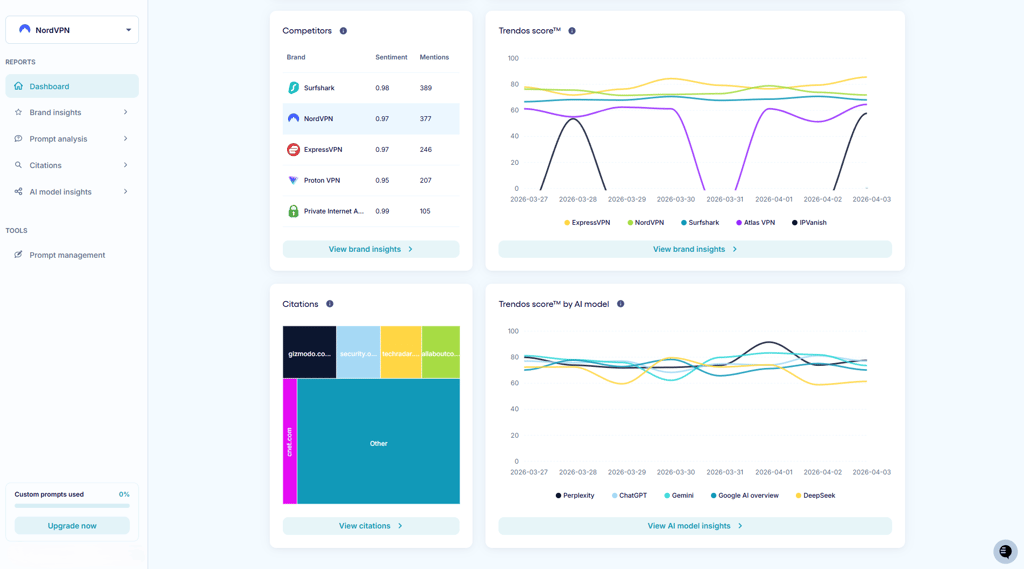
Instead of running experiments or optimizing layouts, Trendos tracks how your brand is mentioned across AI platforms and connects that visibility to your overall marketing strategy. You can see whether your content is being surfaced, how often it appears, and how it is positioned compared to competitors.
From my testing, the interface is very intuitive. The dashboards make it really simple to spot patterns and trends without digging through complicated reports. Having the whole timeline of how AI tools describe a brand is neat, something traditional analytics platforms don’t show.
However, it's important to note that this isn’t a replacement for CRO platforms like Intellimize or VWO. It works better as a supporting layer alongside them. If your team already runs experiments and optimizes funnels, Trendos helps you understand how those efforts translate into AI visibility tracking and GEO (Generative Engine Optimization) performance.
2. nexos.ai – best for operational AI automation supporting conversion growth
| Overall rating: | |
| Standout features: |
AI workflow automation, unified AI workspace, predictive optimization
|
| Starting price: |
€19.50/month (~$22.70/month)
|
| Best for: | Automating repetitive work and scaling operations without extra headcount
|
nexos.ai approaches conversion optimization from the operational side, with less reliance on experiments and landing page testing. It functions as a backend infrastructure layer that enables businesses to build custom AI agents, automate workflows, and connect multiple AI models (including OpenAI and Anthropic) from a single workspace.
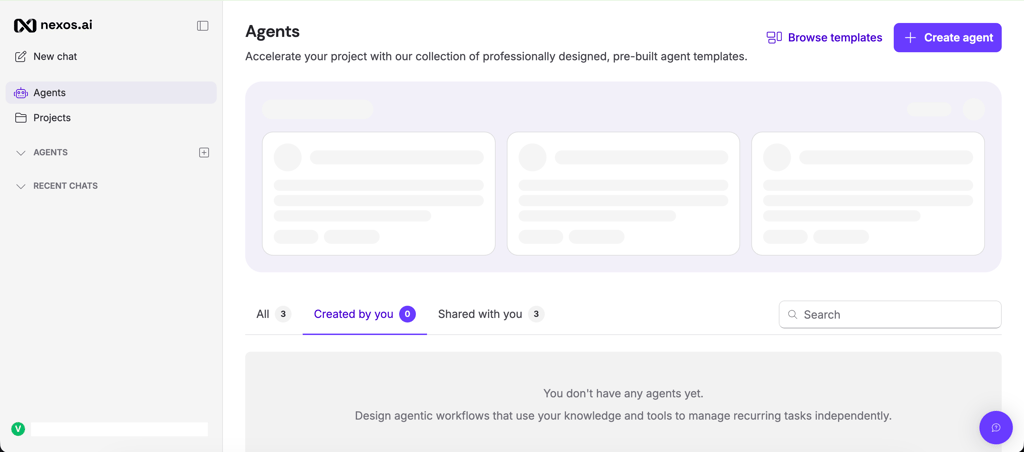
Where nexos.ai stands out is its broad workflow coverage across business functions. It can help you automate content creation and campaign optimization, personalize outreach and prepare faster using AI-generated research. It can greatly assist small and growing teams without having to rely on bringing in additional specialists.
When I was testing nexos.ai, I was pleased with how easy to use the tools is. It offers a broad variety of agents, across 9 categories, including marketing, sales, and product, while the tool can used with simple prompts.
Unlike traditional CRO tools focused on A/B testing, nexos.ai improves the systems behind conversion generation. By reducing operational bottlenecks and accelerating execution, it indirectly supports higher conversion performance across the funnel.
3. Intellimize (Webflow Optimize) – best for AI-driven personalization inside Webflow

| Overall rating: | |
| Standout features: | Automated traffic routing, personalization |
| Starting price: | $14.00/month (add-on costs additionally) |
| Best for: | Webflow teams that want built-in testing and personalization |
Intellimize is integrated into Webflow as Webflow Optimize. It runs directly inside the Webflow dashboard and pairs naturally with Webflow Analyze, which handles click data, scroll behavior, and conversion tracking.
The core feature is automated traffic routing. Instead of locking traffic into fixed splits, the system adjusts distribution as performance data accumulates. If one variation begins outperforming, it gradually receives more exposure. You can test different headlines or hero sections and control who sees each version based on device or past behavior.
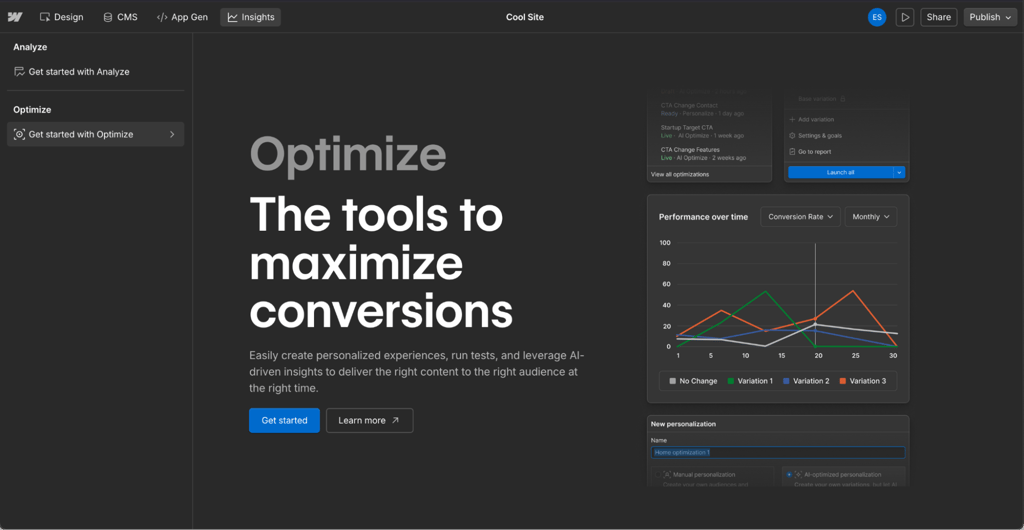
Compared to traditional A/B testing, the difference is in how traffic shifts over time. You’re not waiting for a fixed test to finish before acting. Allocation adapts as signals come in, which is useful on higher-traffic pages where small lifts compound quickly.
You’re also not locked into full automation. You can manually define a version for pricing-page return visitors, then let the system handle performance-based routing inside that segment. That mix of structure and automation works well for teams that want control without constant manual tuning.
In my testing, the setup was straightforward inside Webflow’s interface. Variants are created visually, and traffic allocation runs in the background. This isn’t built for low-traffic sites experimenting casually. It’s better suited to teams running continuous optimization programs inside Webflow.
4. VWO – best for experimentation-heavy teams

| Overall rating: | |
| Standout features: | Full experimentation suite and built-in behavioral insights |
| Starting price: | Custom pricing (based on traffic and modules) |
| Best for: | Teams running continuous A/B and multivariate testing programs |
VWO is ideal if you experiment regularly. Testing, heatmaps, session recordings, funnels, and form analytics live in the same dashboard. You don’t have to connect three different tools just to figure out why a variation dropped conversions.
A/B tests are standard, and multivariate tests are also available. You can split URLs or experiment on the server side if needed. If you’re testing across web and backend flows, everything runs from the same interface. Results are calculated using VWO’s SmartStats engine, which presents performance as a probability of beating control rather than a simple yes/no significance label. In practice, that makes it easier to judge momentum while a test is still running.
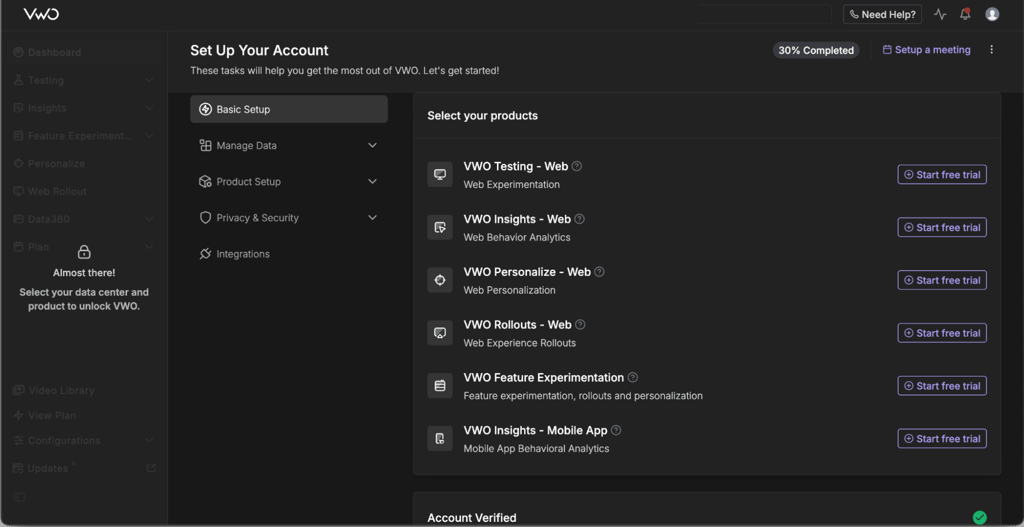
Where it becomes especially useful is the Insights layer. If a variation underperforms, you can jump straight into session recordings or scroll maps to see where users hesitate or drop off. That shortens the gap between finding out something didn’t work and planning the next step.
VWO Copilot adds AI assistance on top of that. It can suggest test ideas based on behavioral data and help generate draft variations. It doesn’t replace strategy, but it speeds up the ideation phase.
Setup took more time compared to lighter tools, mostly because event tracking and goals need to be carefully mapped. Once configured, it’s flexible and well-suited to teams that test regularly.
5. Unbounce Smart Traffic – best for fast AI routing on landing pages

| Overall rating: | |
| Standout features: | AI-based traffic routing for landing page variants |
| Starting price: | $22.00/month |
| Best for: | Marketers optimizing landing pages without engineering support |
Smart Traffic lives inside the landing page builder. You create a few versions, turn it on, and it starts adjusting where traffic flows based on past behavior. It’s focused on campaign pages, not full-site experimentation.
Instead of running a classic 50/50 A/B test, Smart Traffic analyzes incoming visitors and starts adjusting distribution after roughly 50 visits. Over time, it routes new visitors toward the variation that has performed better for similar profiles – device type, location, browser, and other attributes.
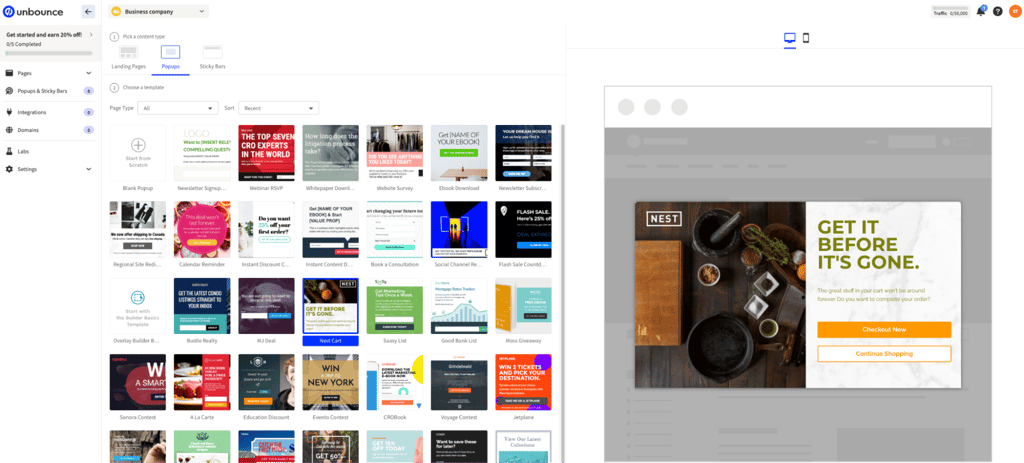
You still create the variants manually inside Unbounce’s builder. The AI doesn’t generate full pages for you, as its role is routing and optimization, not design strategy. That keeps the setup simple – you duplicate a page, tweak the headline or layout, and let Smart Traffic handle allocation.
Reporting focuses on conversion lift compared to a standard split test. It’s designed for marketers who want directional improvement without diving deep into statistical models.
In testing, the builder felt fast and easy to use, as getting variants live took minutes. The limitation I noticed is the scope. If you need deep funnel analysis, backend experiments, or complex personalization rules, this isn’t the tool for that. It works best for paid campaign landing pages.
6. Attention Insight – best for pre-launch visual attention analysis
| Overall rating: | |
| Standout features: | AI-powered attention heatmaps and clarity scoring |
| Starting price: | $24.00/month |
| Best for: | Design and marketing teams validating layouts before launch |
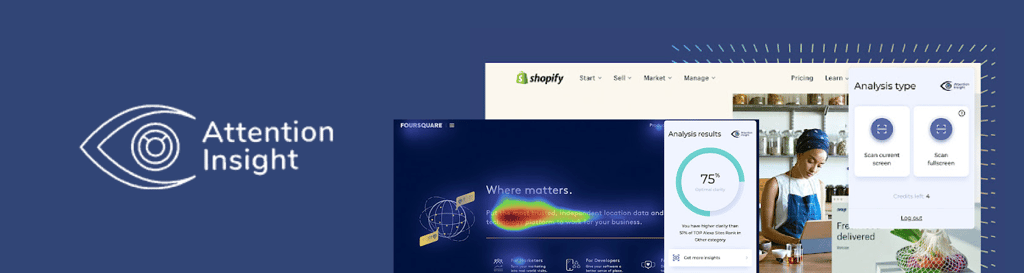
Attention Insight doesn’t run live experiments. It analyzes your page design and predicts where users are likely to focus before you publish anything.
You upload a screenshot or design file, and the system generates an attention heatmap based on eye-tracking research data. It also provides a clarity score and highlights areas that may not draw enough attention, especially around CTAs.
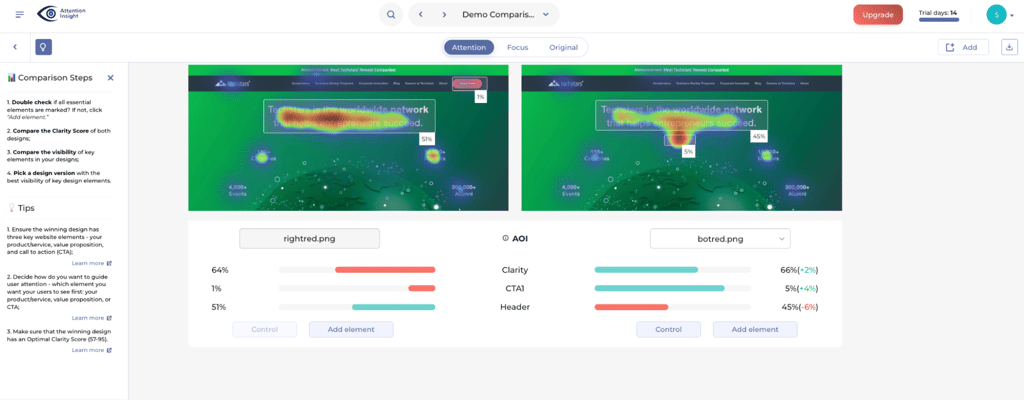
A CTA that blends into the layout stands out immediately in the heatmap. If it’s buried too low, that’s obvious, too. You can also compare two versions side by side and see where attention shifts.
The tool works well at the design stage – there’s no traffic involved and no experiment running in the background. You use it to validate layout decisions before moving into live testing.
In testing, results were instant. You upload the design and get feedback within seconds. For teams working with designers or clients, that speed helps narrow down layout decisions before running paid traffic.
7. Optimizely – best for large-scale experimentation programs

| Overall rating: | |
| Standout features: | Advanced experimentation engine with strong statistical controls |
| Starting price: | Custom pricing |
| Best for: | Organizations running complex web and product experiments |
Teams use Optimizely when experimentation connects directly to product decisions. Marketing tests and feature rollouts can live in the same environment.
It handles both marketing tests and product rollouts. A team can test page changes, then gate a new feature behind a flag and release it incrementally. Multi-page experiments are supported as well, which matters for checkout flows or onboarding sequences that span several screens.
What I really liked is that audience targeting is flexible. Experiments can be triggered based on behavior, attributes, or predefined user groups. That allows teams to control who can enter a test, rather than exposing every visitor to every variation.
The statistical layer is one of its stronger points. The Stats Engine includes safeguards like false discovery rate control and sample ratio mismatch detection. When multiple experiments run at the same time, those checks help prevent false positives and traffic imbalances from distorting results.

Optimizely also offers a permanently free tier called Rollouts. It focuses on feature flags and basic experimentation. It’s not a full CRO suite, but it gives teams a way to test feature delivery before committing to a broader rollout.
In my testing, the setup required careful configuration. Events, goals, and audience definitions need to be mapped correctly. In other words, this platform expects planning. It makes more sense when experimentation is already embedded in the workflow rather than treated as a quick landing page tweak.
What are AI CRO tools
AI CRO tools focus on improving conversions. They analyze how people interact with your pages and use that information to shape what gets tested or shown next.
At a basic level, these tools sit between your website and your analytics. They track user behavior, run A/B tests, and either suggest improvements or automatically adjust which version visitors see. That could mean routing traffic toward a higher-performing layout, personalizing messaging for repeat visitors, or highlighting friction points in a checkout flow.
The key difference from older experimentation tools is automation. You don’t have to manually manage every traffic split or write endless personalization rules. The system adapts as performance data comes in.
In our testing with the Cybernews research team, these tools typically connected to existing builders, analytics setups, or product frameworks. Once configured, they started handling allocation, surfacing patterns, or generating test ideas. The human still sets the goals, while AI helps move things forward faster.
Key features of AI CRO tools
Not all AI CRO tools work the same way. Some revolve around experimentation, others focus on automated routing, and a few lean into UX visuals or copy suggestions. Before choosing one, it helps to know which layer actually drives impact for your site.
Experimentation and personalization engine
This is the foundation of most CRO platforms. At a minimum, you’ll see A/B testing. More advanced setups allow multivariate experiments or adaptive allocation models that shift traffic as data builds. Some platforms use bandit-style models that favor stronger variations automatically instead of waiting for a fixed test window to close.
Traffic handling is where tools start to differ. Some keep splits fixed, while others reallocate visitors during the experiment, gradually favoring stronger variations.
Personalization adds another layer, as not every visitor has to see the same version. A returning user might land on a different headline than someone new. Mobile visitors can see a tighter layout. Some platforms let you define these groups manually, then adjust distribution within each segment.
Audience and behavioral insights
These platforms show how people actually move through a page. You’ll see click clusters, scroll behavior, rage clicks, and where users leave the funnel. Form friction and hesitation points usually stand out quickly.
Segmentation usually includes device type, referral source, geography, and previous activity. That context changes what you focus on. A weak traffic source or drop-off point usually becomes the next area to explore.
AI-generated copy and design suggestions
Many platforms now include an AI assistant inside the editor. It can draft alternative headlines, rewrite button copy, or suggest small layout adjustments based on performance data.
Their output is rarely final and works best as a starting point. Teams still review tone, messaging, and compliance before publishing anything live.
Visual and UX analysis
Some tools focus on layout before traffic even arrives. Heatmaps and scroll maps show where interaction concentrates. Predictive attention models estimate which areas of a design mockup draw attention.
This doesn’t replace experimentation. It narrows decisions earlier in the process, so you don’t waste traffic testing for obvious layout issues.
Reporting and decision support
Results need to be readable. Most platforms show conversion lift, probability to beat control, timelines, and segment breakdowns.
Some AI layers automatically summarize patterns or flag anomalies. Some tools also suggest follow-up tests based on observed performance trends. The stronger tools make uncertainty visible, which helps avoid premature rollouts.
What you can expect from AI CRO tools
Most AI CRO tools improve performance gradually. In my testing, none produced instant or dramatic lifts. Some variations won by small margins, while others lost. The real gains came from running multiple experiments over time and letting improvements stack.
The timeline for seeing results depends heavily on traffic and the tools used:
- With Unbounce Smart Traffic, routing began adapting after roughly 50 visits, but accuracy improved as more data came in.
- With VWO, the Duration Calculator made it clear how much traffic was needed to detect even modest uplifts. I was able to set up standard tests in about half an hour.
- On lower-volume pages, results took longer to stabilize. High-traffic pages gave me much faster signals.
Getting a test live also varies. Landing page tools allowed variants to be published within minutes. Full experimentation platforms required more setup, especially around goal mapping and event tracking. Misconfigured goals were one of the easiest ways to invalidate results.
AI routing helps most on pages with steady traffic. Automated allocation removes the need to constantly adjust splits. VWO Copilot surfaced a few test ideas I wouldn’t have prioritized on my own. Attention-based tools were useful earlier, before sending paid traffic to a layout.
The limitations are predictable: low traffic slows learning, messy tracking skews outcomes, and AI suggestions still require review. These systems reduce manual work but can’t fix bad data.
Features to consider when choosing the best AI tools for conversion rate optimization
A tool can look strong on paper, but the fit depends on traffic, stack, and how your team works. Here is what you should pay attention to:
- Traffic and stack fit. The tool must fit comfortably within your existing setup. Some plug straight into a builder, some rely on scripts and manual configuration. Traffic level also changes expectations – low volume slows everything down.
- Experimentation depth. Basic A/B testing may be enough for some teams. Others need multivariate setups, personalization rules, or bandit-style allocation. Check whether you can control traffic splits manually or if the system handles allocation automatically.
- Integration and data quality. Clean data determines whether results mean anything. Look at how events and goals are defined, how easy mapping feels, and whether the platform integrates with analytics or CRM systems without requiring heavy engineering.
- AI assistance quality. Not all AI suggestions are useful. Some tools generate quick headline drafts or layout tweaks. Others analyze behavior and suggest hypotheses. In testing, the difference came down to whether suggestions saved time or created extra cleanup work.
- Ease of use for marketers. A visual editor makes a difference. If every change requires developer input, iteration slows down. Check how quickly a marketer can launch a variant and interpret results without technical support.
- Reporting, insight, and explainability. Results should be clear, so look for transparent uplift calculations, probability indicators, and segment breakdowns. Strong tools also surface uncertainty, so you don’t roll out changes too early.
- Pricing model and scalability. Many platforms price based on traffic or modules. Costs can increase quickly as page views grow. Understand what happens when you scale experiments, add seats, or unlock advanced features.
How to integrate AI tools into your CRO workflow
This is how I’d plug AI tools into a real CRO process based on my testing:
Step 1: clarify goals and pick your first funnel
I start with a single page tied directly to revenue or signups. Product page, landing page, pricing page – one step only. Then I define 1–2 primary metrics and one guardrail metric, so a win doesn’t break something else. Without clear metrics, AI routing has nothing meaningful to optimize toward.
Step 2: set up clean tracking and integrations
Before launching anything, I verify that events and goals are mapped correctly. During testing, misconfigured goals were one of the fastest ways to ruin results. If tracking is wrong, everything that follows is noise. I also test conversions manually to confirm my values are accurate.
Step 3: start with low-risk, high-impact tests
I keep the first round of tests simple – adjust a headline, tweak a CTA, shift elements in the layout. When an AI assistant is available, I let it generate a few draft variations and then clean them up myself before anything goes live. High-traffic pages usually move first, as they produce usable data faster.
Step 4: let AI assist with traffic allocation and analysis
When routing or bandit models are available, I use them. They reduce manual split management and adapt as data builds. I still check volume and confidence before rolling out changes broadly. Segment breakdowns often reveal where performance really shifts.
Step 5: scale to personalization and more complex experiments
Once a few experiments succeed, I move into segmentation or multi-step flows, applying different messaging for different audiences and running more complex tests once the basics are stable. It’s important to document everything, so the process can be repeated across pages and teams.
Which AI CRO tool should you choose?
All of these tools can move conversion numbers, but the differences appear in traffic, team structure, and the depth of experimentation within the business. Here’s what I recommend each tool for:
- Trendos is ideal for teams tracking AI-driven brand visibility. It shows how campaigns appear in AI-generated answers, adding important insight.
- nexos.ai is great for teams that want to improve processes behind conversion generation.
- Intellimize is strong inside Webflow when routing and personalization need to run automatically. It keeps experimentation tied closely to design and segmentation without juggling separate tools.
- VWO is a practical choice when testing is ongoing across multiple pages. Testing, behavioral data, and reporting stay in one system, which simplifies iteration.
- Unbounce Smart Traffic is useful for campaign-driven landing pages. It focuses on routing visitors efficiently without requiring heavy configuration.
- Attention Insight is helpful before traffic goes live. It highlights layout and attention issues early, which reduces wasted spend later.
- Optimizely is more at home in product-focused teams. Feature flags and server-side experimentation make more sense when releases are tied to testing.
Narrow it down like this:
- If understanding AI-driven visibility is important, add a tool like Trendos to your stack
- If routing traffic automatically is the priority, lean toward platforms built around adaptive allocation
- If experimentation depth and statistical control matter more, focus on testing engines first
- If layout clarity is the weak spot, validate the design before running live experiments
- If experimentation connects to product rollouts, server-side control becomes more important
Start with the bottleneck. Then choose the tool that addresses it directly. Features matter less than fit.
FAQ
Do I need a lot of traffic to benefit from AI CRO tools?
Not necessarily. You don’t need massive volume to start testing, but traffic decides how quickly things become clear. On busy pages, patterns show up fast. On low-volume funnels, you’ll wait longer, and small swings can look bigger than they are. AI routing also improves with more data, so higher traffic gives it more room to work.
Can AI CRO tools replace traditional A/B testing platforms?
No, because underneath the AI label, most of these tools still rely on structured comparisons. They just automate parts of the process, like traffic allocation, segmentation, and idea generation. The discipline of testing doesn’t disappear. If anything, the tools make it easier to run more controlled experiments, not avoid them.
How do I measure the true ROI of an AI CRO tool?
Look beyond surface metrics. A small lift in conversion rate doesn’t mean much unless it affects revenue or qualified leads. I focus on revenue per visitor, trial starts that convert, or average order value shifts. Speed is also important – if a tool lets you run twice as many clean experiments, that operational gain shows up over time.
Are AI CRO tools safe for sites handling sensitive customer data?
They can be, but setup matters. Enterprise platforms usually offer access controls and secure integrations. The bigger risk is sloppy configuration. If events are mapped carelessly or sensitive fields are exposed to testing layers, problems follow. Treat implementation like infrastructure, not a quick marketing plugin.
Which AI CRO tools work best for small vs enterprise-level websites?
Smaller sites want focused tools that are quick to launch and don’t need heavy engineering. Larger teams need server-side testing, feature flags, and stronger statistical controls because multiple experiments run at once. The tool should match the program's complexity, not just the traffic volume.