Best AI for CRM
Being behind major reports like The Mother of All Breaches and RockYou2024, our in-house cybersecurity experts and journalists provide unbiased, real-world testing and in-depth analysis.
We maintain complete transparency by openly sharing our testing methodologies with our audience.
Learn more

The best AI for CRM in 2026 should offer more than a chatbot. It should, at its core, intuitively process customer data into practical insights that a team could use to automate workflows and ease the burden of daily tasks.
In this review, I explore 7 customer relationship management and workflow tools that use AI for sales, support, and customer-related operations. These platforms score leads, draft outreach, automate follow-ups, route tickets, and uncover great insights. Each tool shines in a distinct niche.
I tested leading AI-powered CRM tools together with the Cybernews research team, focusing on how well they convert raw records into actions, not just pretty dashboards. I combined hands-on experience together with a deeper dive into what CRM actually does. I also cover what to pay attention to when choosing the right product, go over real-world use cases, and explain which tools work best for different teams.

Best AI for CRM: shortlist
- Pipedrive – best AI CRM in 2026 overall
- HubSpot CRM – best free CRM with AI guidance for startups
- Nexos – best for flexible AI automation with multiple models
- Zapier – best for AI automations and integrations
- Zoho CRM – best AI CRM for teams needing customization
- Salesforce – best AI CRM for enterprise-level operations
- Zendesk – best AI CRM for teams handling a high ticket volume
The best AI for CRM compared
Before we dive into each review, here’s a quick side-by-side comparison of the top AI CRM tools and the main differences in features, pricing, and application.
| AI CRM | Overall rating | Standout features | Starting price (monthly price with annual subscription) | Free trial | Best for |
| Pipedrive | Visual pipeline, follow-up reminders, automation | $14.00/seat | 14-day free trial | Small sales teams that want a simple, functional CRM | |
| HubSpot CRM | AI guidance inside an all-in-one customer platform (Breeze) | Free or $9.00/seat | 14-day free trial on premium plans | Startups that want a free CRM they can grow into | |
| Nexos | Multi-model AI access, custom AI Agents, no-code workflow automation | $18.00/user | 7-day free trial | Teams looking for flexible CRM automation with access to multiple AI models and custom workflows | |
| Zapier | AI-powered automations across apps (Zaps, Tables, Forms, Copilot) | Free or $19.99/seat | 14-day free trial on premium plans | Teams that need a “glue layer” to connect CRM, email, and support tools | |
| Zoho CRM | Zia AI creates custom reports or workflows/modules inside the CRM | $14.00/user | 15-day free trial | Teams that want customization and automation without enterprise pricing | |
| Salesforce | Enterprise AI ecosystem (Agentforce, Data Cloud, deep customization) | Free or $25.00/user | 30-day free trial | Enterprises with complex sales/service processes and controls | |
| Zendesk | Support-first AI with triage, agents, generative replies, generative search | $19.00/agent | 14-day free trial | Support teams facing high ticket volume |
7 best AI tools for CRM: detailed list
Here’s a deep-dive into my top 7 AI CRM picks. I tested each one to share my personal experience and insights.
1. Pipedrive – best AI CRM for teams that want minimal onboarding

| Overall rating: | |
| Standout feature: | Visual drag-and-drop sales pipeline |
| Starting price (annual subscription): | $14.00/seat/month |
| Best for: | Sales teams wanting visual pipeline tracking |
Founded in 2010, Pipedrive has built a strong reputation as a CRM for sales and productivity. It’s my winner because it’s a lightweight, effective CRM that helps close deals. I had no problem navigating the interface, and I could start tracking deals without any configuration headaches.
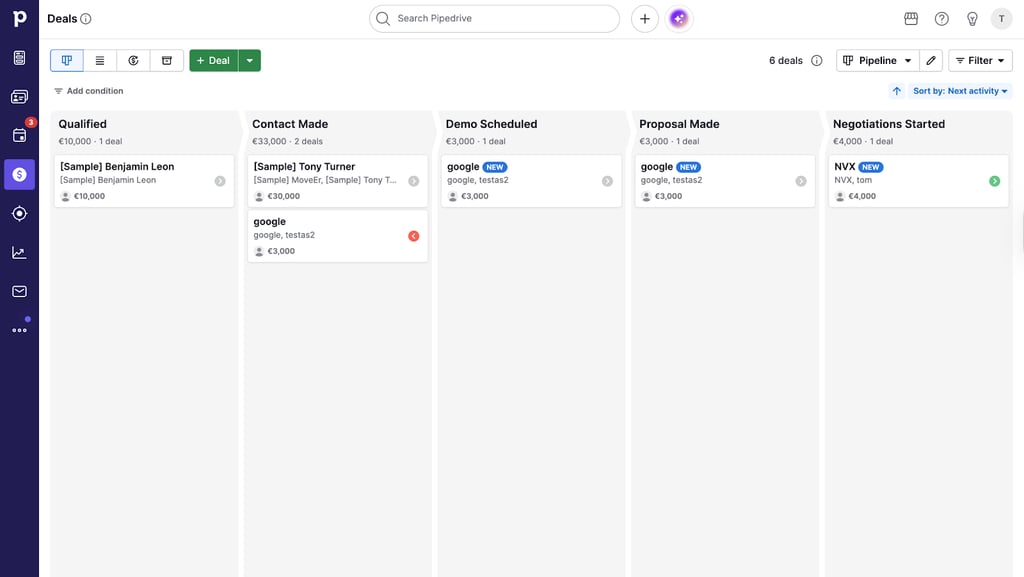
The Kanban-style pipeline is Pipedrive’s signature UI. I could easily see where every deal was right away, and dragging-and-dropping cards through different deal stages was quick and effortless too. Overall, I found that the ease of use could be very helpful for small teams, as there’s almost no training required to use the CRM.
Pipedrive also includes reminders, task tracking, and pop-up nudges. These ensure that follow-ups, calls, and tasks are brought up early. Customization is solid too – you can build multiple pipelines from templates, tweak stages, and add custom fields.
Pipedrive says its Sales Assistant “uses AI to surface insights from your data, identify patterns and strategies, and answer your questions.” The AI can effectively pinpoint conversion drops and bottlenecks. Additionally, email sync consolidates threads in one place, while higher plans add AI drafting, summaries, and replies.
I was thoroughly impressed by Pipedrive’s Pulse, a smart prospecting toolkit that shows you overlooked deals, custom scoring for ranking priorities, data enrichment for missing company details, and sequences that automate email and task follow-ups directly from one view.
Overall, Pipedrive works well for SMBs, startups, freelancers, or agencies that want lightweight sales automation and fast growth.
2. HubSpot CRM – best for startups looking for a free CRM with AI guidance
| Overall rating: | |
| Standout feature: | AI agents and AI apps |
| Starting price (annual subscription): | Free or $9.00/seat/month |
| Best for: | Startups looking for a scalable, free CRM with Copilot Breeze integration |
Founded in 2006, HubSpot is popular with startups and SMBs. It connects marketing, sales, and service tools in one place. When it comes to AI integration, it’s more like an advisor than an operator.
During internal testing, HubSpot surprised me with a great, guided setup experience – initial onboarding took just 10 minutes. While creating the account, I was asked about my goals, team size, and the tools I use. I was then guided through CRM setup, invitations, roles, and my first campaign steps.
Within the dashboard, I was met with Breeze Copilot AI. It interprets what’s going on across the platform and answers questions based on the data in your account. However, there are some limitations: it didn’t reliably add in new data to the CRM for me. So, I still had to do some of the admin work manually.
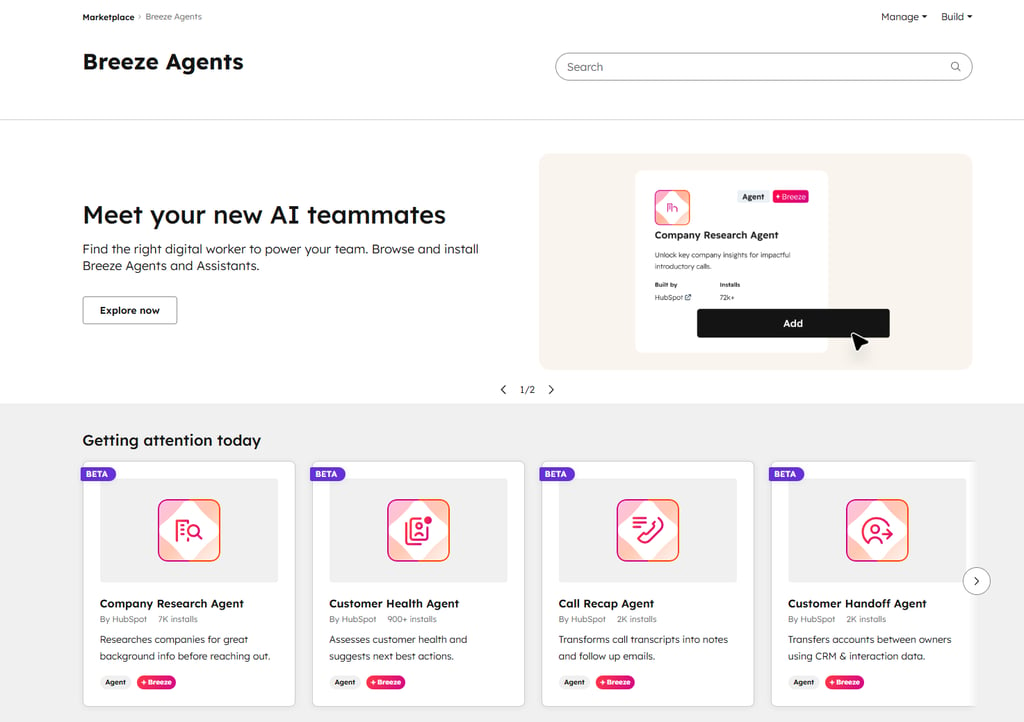
HubSpot still has a lot of AI depth thanks to the Breeze ecosystem. For example, the Breeze Marketplace has pre-built AI agents and AI apps for your CRM. Customer Agent is a support agent you can train and embed on your website to answer questions related to data available in your HubSpot account. Finally, Breeze Assistant helps you with insights and efficiency for sales and service flows.
The biggest upside is that a Free subscription tier exists. So, HubSpot is a solid choice if you want to start for free and scale as you grow.
3. Nexos – best for custom AI-powered CRM workflows without coding

| Overall rating: | |
| Standout feature: | Over 8000 app integrations |
| Starting price (annual subscription): | $18.00/user/month |
| Best for: | Flexible CRM automation with access to multiple AI models and custom workflows |
Nexos is an all-in-one AI platform that gives a unified access to the world's leading AI models (GPT-4, Claude, and Gemini) from a single interface. Unlike traditional CRMs locked into one AI provider, Nexos lets you choose the best model for each CRM task or build custom AI Agents that automate your entire customer workflow.
During my testing, I found Nexos particularly powerful for teams that want to automate CRM processes without relying on disconnected systems. The no-code AI Agent builder lets you create sophisticated workflows that handle everything from lead enrichment and qualification to automated follow-ups and ticket routing without writing a single line of code.
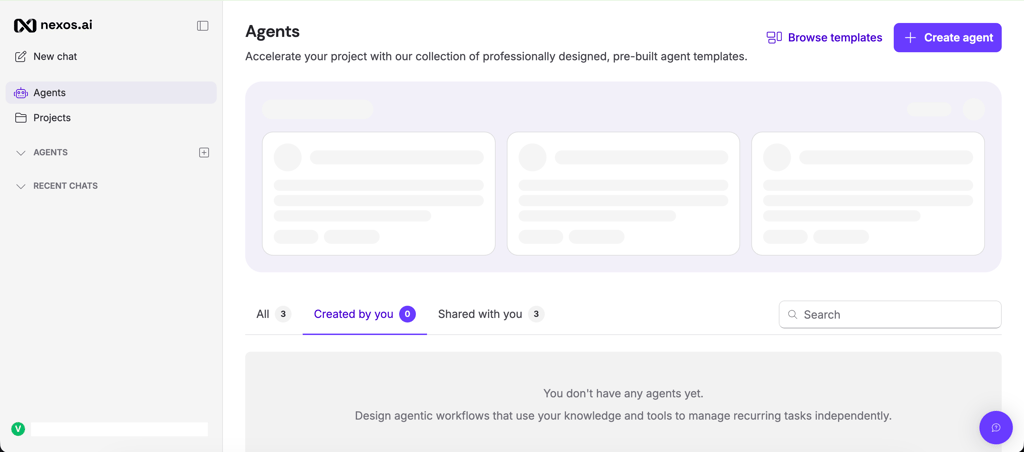
What impressed me most was the flexibility. Instead of being forced to use a single AI model for every task, I could experiment with different models to find what worked best. For example, I used Claude for drafting personalized customer emails, GPT-4 for data analysis and lead scoring, and Gemini for quick summarization tasks. This multi-model approach meant I wasn't limited by the strengths and weaknesses of just one AI system.
Nexos works as a central hub that connects your CRM data with AI-powered automation. You can build custom workflows that pull data from your existing CRM, process it through AI models, and push actions back – whether that's updating records, sending emails, creating tasks, or routing tickets. The platform maintains clear visibility into what each AI Agent is doing, so you're never losing control of your customer data.
I also appreciated the team collaboration features. You can set custom access controls, deploy AI Agents across different departments, and give team members the exact tools they need without overwhelming them with complexity. For teams managing multiple brands or handling high volumes of customer interactions, this centralized approach eliminates the chaos of juggling separate tools.
Nexos offers a free 7-day trial with no credit card required, so you can test the platform's full capabilities before committing. Plans start at $18.00/month for individuals, with team and enterprise options available for larger organizations.
4. Zapier – top AI automation tool connecting your CRM, email, and support tools

| Overall rating: | |
| Standout feature: | Over 8000 app integrations |
| Starting price (annual subscription): | Free or $19.99/seat/month |
| Best for: | Teams who want an AI layer that makes their existing CRM and tools stack work across apps |
Founded in 2011, Zapier has remained a key player in no-code SMB automation. It’s not a traditional CRM. It’s best known for connecting over 8000 apps (e.g., Salesforce, HubSpot) and turning workflows into automated Zaps.
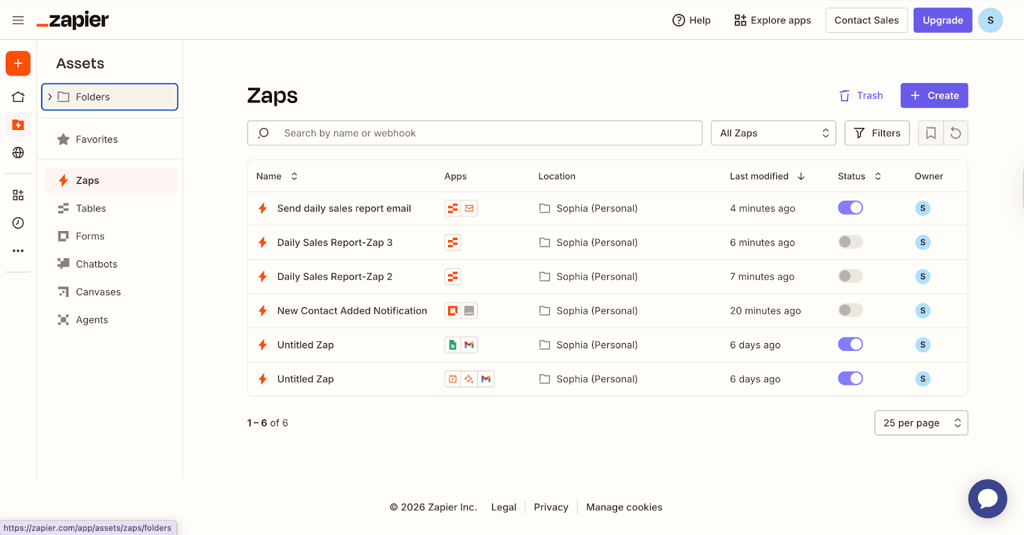
During internal tests, Zapier gave the easiest way to speed up customer work without changing my main system. Best of all, it cut down on boring, repeated admin tasks. That's why I see Zapier as the "glue" that automates a CRM. Most small teams use many tools, including email, spreadsheets, forms, Slack, and a core CRM. Zapier links these tools together and automates them all in one spot.
Think of Zapier like a helpful layer on top. For example, I grabbed leads from Forms, saved and fixed the data in Tables, and sent the clean info straight to a CRM or help desk. Once a new lead is recorded, a simple flow is initiated: Zapier adds details, makes a contact, picks an owner, sends Slack alerts, and kicks off follow-ups.
I appreciated Copilot, which helped me describe automations. Using it, I could generate steps, troubleshoot errors, and map data fields. On paid plans, multi-step flows with if-then rules make Zapier act like a CRM. You can direct tickets and leads to different flows based on rules, data quality, or how urgent they are.
On the downside, Zapier lacks a pipeline board, forecasting, and representative coaching. Instead, it sits on top of your existing CRM and provides you with automation benefits.
5. Zoho CRM – best for teams looking for a mid-market enterprise-lite CRM

| Overall rating: | |
| Standout feature: | Enterprise depth plus Zia AI at SMB prices |
| Starting price (annual subscription): | $14/user/month |
| Best for: | Teams looking for automation and customization without enterprise prices |
Zoho was founded in 1996, and Zoho CRM is its customizable sales hub that was developed in 2005. In my experience, besides Salesforce, Zoho CRM is the most customizable platform on this list. On the other hand, while pricing is fair for what you get, there’s a steep learning curve to getting used to the tool. You’re basically dropped straight into the dashboard with minimal onboarding. Overall, it’s certainly less intuitive than Pipedrive or HubSpot.
The highlight is Zoho’s highly configurable AI assistant Zia. It generates reports and builds workflows. For example, I asked it to create a report for my most successful leads. After that, it opened the reporting area, guided me through the steps it was taking as it built the report, and created a shareable result.
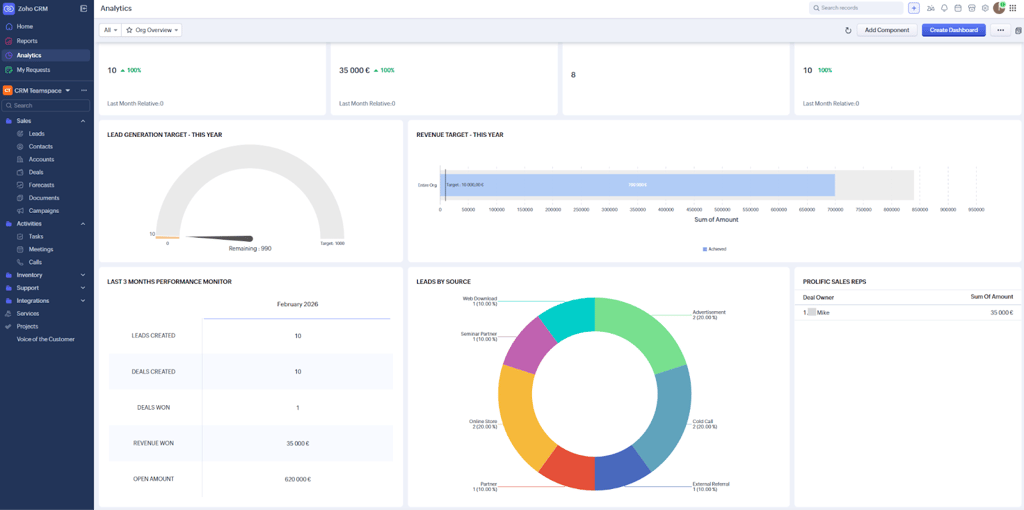
Zoho also has operational capabilities like anomaly flagging in lead creation, deal values, and task closures. You can configure what you view as unusual activity for your team. You can also interrupt Zia AI and take over if you want to tweak output.
For outreach, Zoho’s Smart Prompt plugs into external LLMs from companies like OpenAI and Anthropic for generative flows like email drafts and campaign messaging.
To sum up, while powerful in some ways, Zoho appears less intuitive than some competitors. Namely, I had to spend time tweaking prompts to avoid generic results. I also had to add conditions and clear triggers. Plus, I noticed that it struggles with output if given messy CRM fields.
6. Salesforce – enterprise AI CRM platform for large teams with complex needs

| Overall rating: | |
| Standout feature: | Enterprise AI tools (Einstein, Agentforce, Data Cloud) |
| Starting price (annual subscription): | Free or $25.00/user/month |
| Best for: | Large enterprises (1000+ employees) needing hyper-customizable CRM systems |
Salesforce was founded in 1999 and is one of the most popular full-scale CRM systems for enterprise platforms today. It’s certainly the most complex, specialized platform on my list: a full ecosystem with multiple clouds (with AI embedded), advanced customization, plus heavy administration and governance. Naturally, setup and navigation are more demanding compared to other AI CRMs. In fact, it was kind of difficult to test because of its complexity
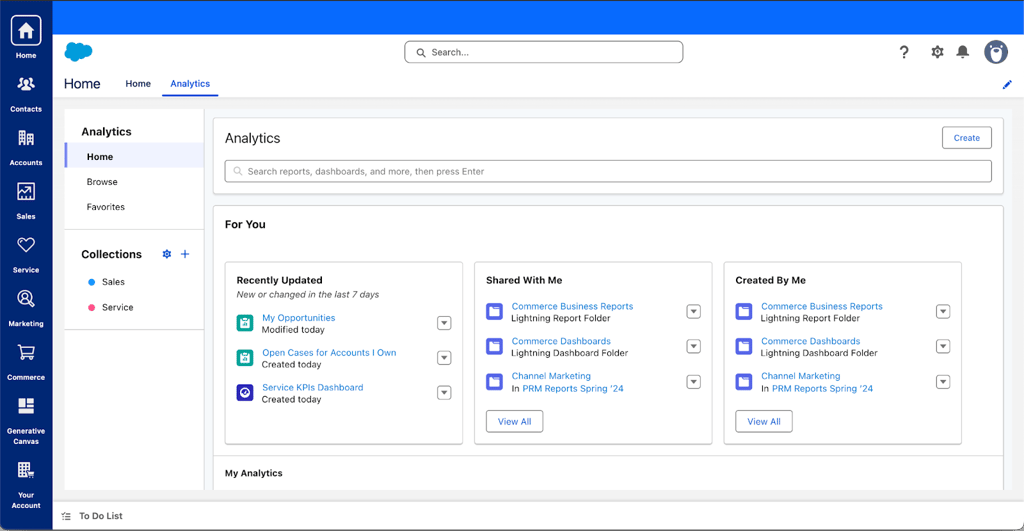
Salesforce’s Einstein and Agentforce AI systems are powerful. Beyond summarizing, the company claims it’s “AI that can act.” During testing, I found that Sales Cloud is professional but not suitable for beginners. AI features also weren’t easy to find within the UI.
Salesforce really shines for governance and data. For example, Data Cloud unifies customer data across systems, so AI outputs are more context-aware. It’s extremely capable if you need advanced roles, auditability, approvals, and customized flows across departments. All thanks to agentic AI systems with a reasoning engine that analyzes vast amounts of data and works autonomously to scale operations.
Nonetheless, despite the powerful capabilities, Salesforce setup is a major drawback. Even the trial takes a while to set up. The learning curve is steep, especially if you’re not already familiar with Salesforce’s ecosystem of add-ons, automation rules, permissions, and objects.
I recommend clearly knowing your business goals and Salesforce products before going ahead with Salesforce CRM. It’s not ideal for smaller teams.
7. Zendesk – platform built for customer experience and support

| Overall rating: | |
| Standout feature: | AI agents that handle high-volume customer tickets |
| Starting price (annual subscription): | $19.00/agent/month |
| Best for: | Teams requiring a customer experience (CX) and support platform |
Zendesk was founded in 2007 and excels in customer support software. It has a strong help desk focus, plus an optional CRM-style sales toolkit through Zendesk Sell.
During my testing, I found this out-of-the-box product to be purpose-built for customer response times and resolution speed. The flows, reporting, and UI are designed around tickets, channels, and agent productivity.
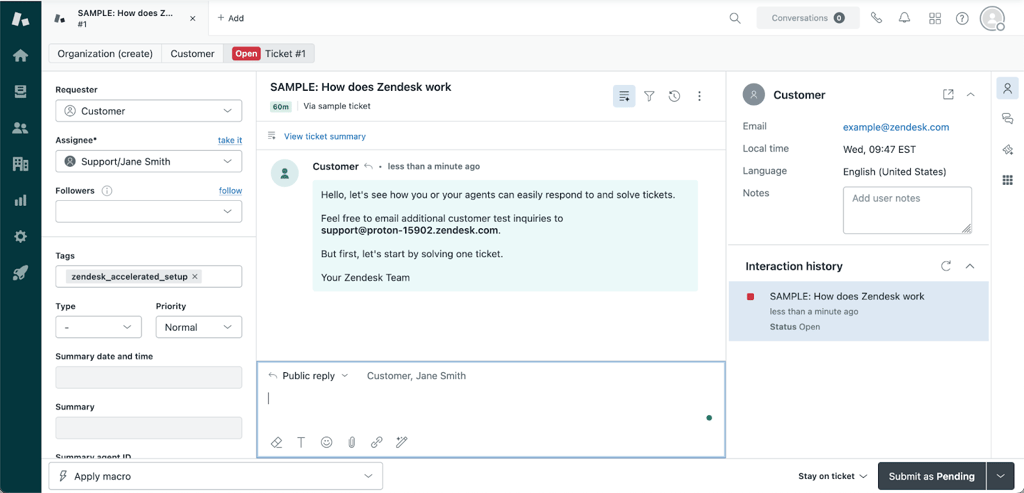
As for the AI experience, it’s configured mainly from the administrator side. I didn’t find configuration difficult, but you’re expected to read the documentation and set up essential foundations yourself.
I found Zendesk’s AI great at handling tickets: it detects intent, language, and sentiment on incoming tickets, then applies tags and populates fields for routing rules and reporting.
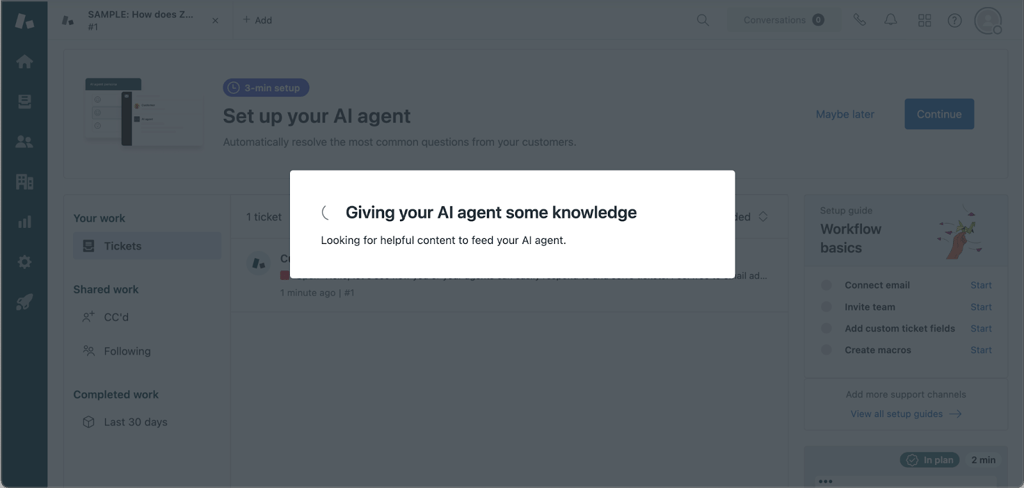
Zendesk markets its AI agents as “the next generation of AI-powered bots that automate and resolve your customers’ issues across service channels.” Given real support data, the agent’s answers improve significantly (help center articles, macros, and internal documentation). When starting from scratch, you’ll need time to build the knowledge base before the AI starts to feel worth it.
Zendesk also has a sales branch via Zendesk Sell, but I’d use Zendesk if I were a business looking for solid ROI that comes from support-related operations. That said, I prefer Pipedrive or Zoho for a sales-driven business strategy.
What is an AI-powered CRM and how does AI work in CRM?
An AI-powered CRM is essentially a traditional CRM supported by AI. In short, the AI system learns your customer data and suggests priorities, drafts communications, and automates repetitive work.
For example, an AI-powered CRM can be extremely useful for lead and opportunity scoring and identifying prospects that are most likely to convert into real sales. It can also suggest email replies and personalize outreach based on past interactions or recommend any follow-ups, meetings, or stage changes.
Support-wise, AI can organize tickets by intent, language, and sentiment. It can then route them to the correct agent or queue. With automated data entry, administrator work is significantly reduced. Cleanup is also made easier with actions like deduping records, filling missing fields, and enrichment.
When it comes to UI, AI generally appears in a few common places. Most obviously, inside contact, deal, and ticket windows (as summaries, scoring, and recommended actions). You can also note AI in pipeline boards, inboxes, and other dashboards where it marks risk, finds trends, or recommends what you should do next.
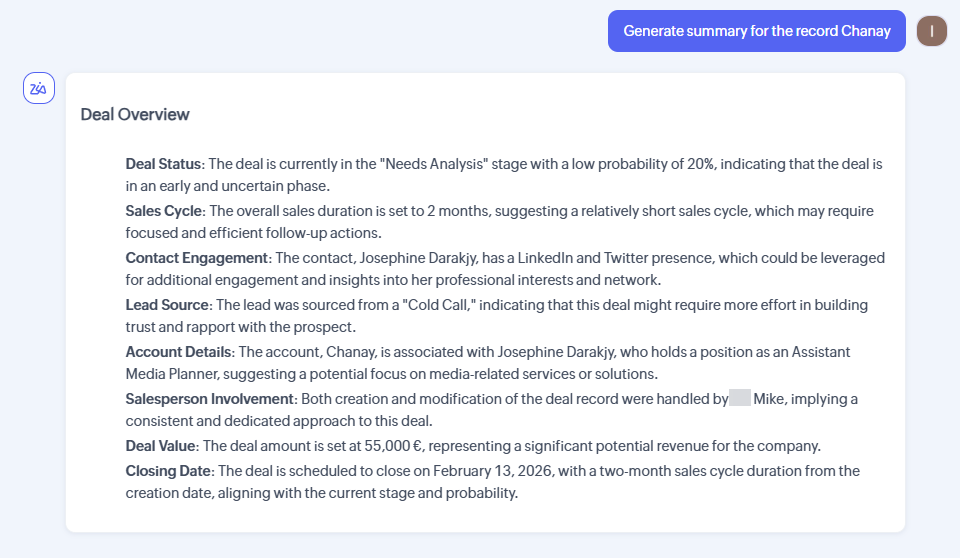
Many platforms also integrate chat assistants or copilot panels that answer questions about your CRM data. These assistants also generate notes, emails, and workflows – usually through panels on the right or top widgets within the main dashboard.
Features and benefits of integrating AI into CRM
The best CRMs with AI turn customer data into efficient actions and conversions. For me, the best AI CRMs reduce administrative work, accurately find tickets and key deals, and guide through the next logical steps. Let’s dive deeper into the most common features and benefits.
Better prioritization (lead and deal scoring)
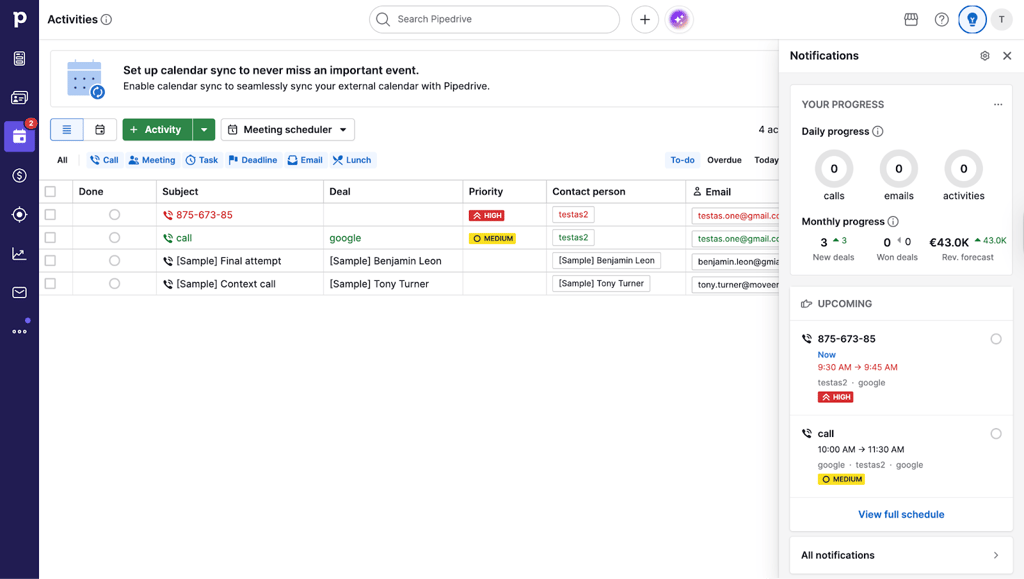
AI scoring helps identify hot priorities so teams can do more and guess less. It ranks leads or deals by conversion likelihood using behavior, health, and fit data. During my tests across HubSpot, Salesforce, and Zoho, pipeline risk signals and follow-up nudges reduced missed opportunities and improved focus.
Smarter communication (emails, messages, scripts)
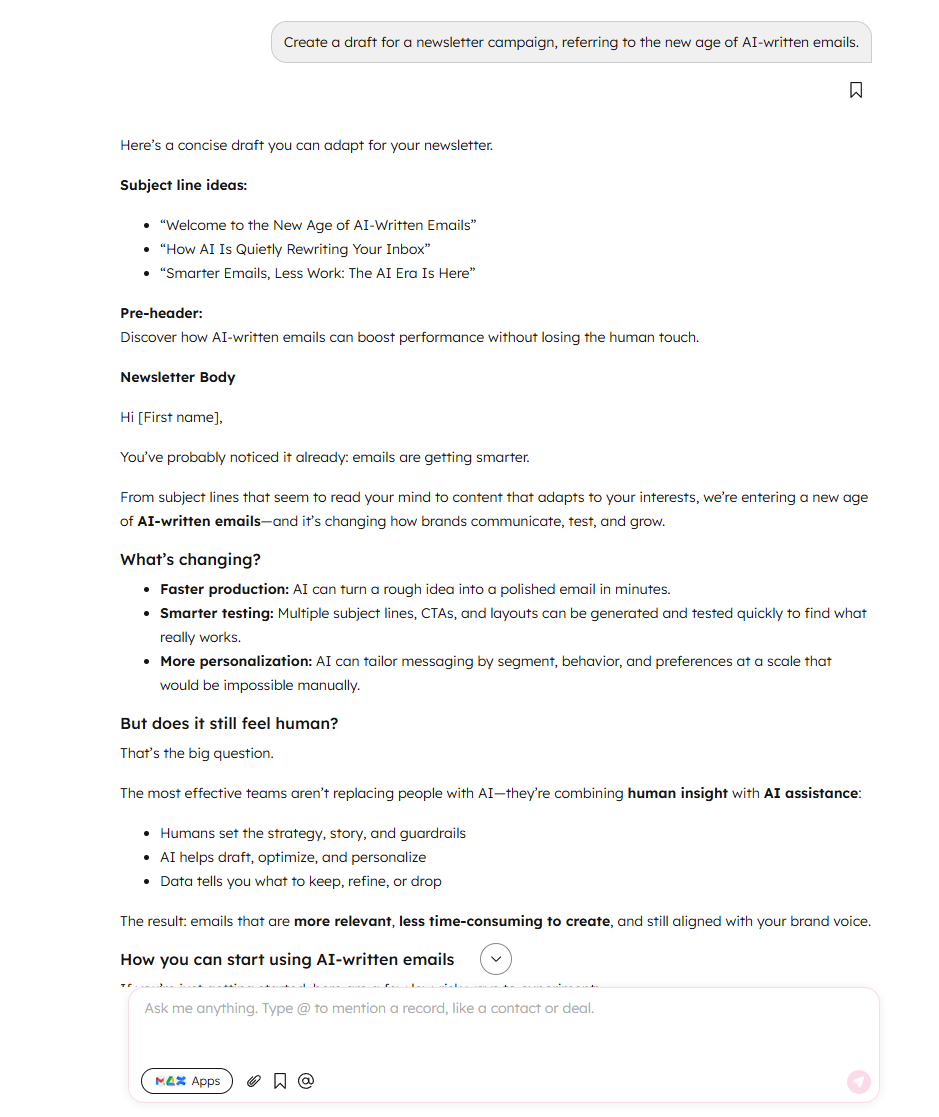
AI-powered CRMs generate drafts and reply suggestions within inboxes or chat copilots. With useful context like emails, call notes, and deal history, AI produces useful content. HubSpot’s copilot gave me usable campaign drafts quickly, while Zendesk’s one-click Tone Shift feature made agent replies more professional or empathetic. Zoho’s Zia (with LLM Smart Prompt integration) generated email outreach for me.
Cleaner data with less admin work
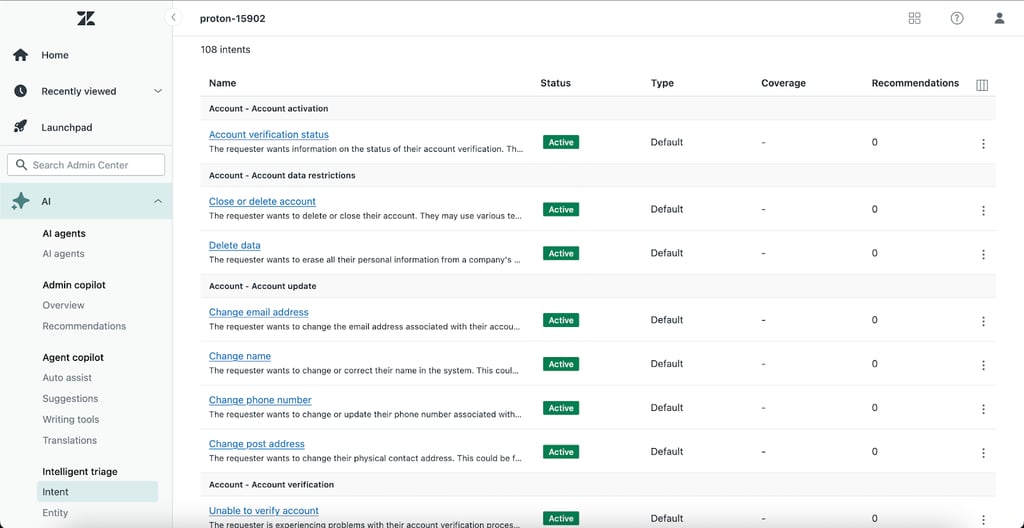
Auto-classification and anomaly flagging features clean data more effectively than deduping alone. Zoho’s Zia flags irregular patterns and suggests missing fields, while Zendesk’s Intelligent Triage cleans up reporting by detecting aspects like intent, sentiment, and language. Meanwhile, Salesforce handles this by unifying siloed records via Data Cloud (a single “source of truth”) to minimize conflicting context.
More actionable reporting and forecasting
Salesforce’s Einstein Forecasting AI system goes deepest, predicting revenue and pipeline health, though it can be hard to use. Pipedrive’s Insights clearly showed me conversion rates and bottlenecks. Zoho’s Zia found anomalies in lead creation and deal values but took time to use. None provided churn-risk indicators, but some did suggest next steps.
Support and success automation
For support teams, Zendesk leads the way with AI triage, routing, and suggested replies and knowledge articles grounded in help content. Salesforce handled this across large organizations, while Zapier watched for specific events (triggers) in one app, automatically passing data between apps.
How to choose AI for CRM
Choosing the right AI-powered CRM depends on factors like data access, scale, complexity, and efficiency. Here are a few things to consider and my top AI CRM recommendations for unique use cases:
- Assess your team. Count seats and define what your team does daily. Light CRMs like Pipedrive and HubSpot are perfect for individuals and small teams (1-10 seats). If you’re a larger operation, you may need custom processes, and Salesforce works best for that. Ask yourself if you need a platform for sales, support, or both.
- Know your customer. Consider whether your customer is focused on email, billing, help desk, calendar, products, or warehouses. Remember, AI output gets better when given wider context. My testing showed that Zapier was best for mixing workflows (for example, Forms > CRM > Slack). For Salesforce’s Data Cloud, you need to already be in that ecosystem.
- Determine the level of AI integration. Light AI application is all about drafting, summarizing, and suggesting next steps. Heavy AI application is for automating actions and, thus, requires more time and care to set up. During testing, I found that HubSpot’s Breeze answers questions but can’t add records, Zoho’s Zia builds reports and flows but needs prompt and trigger tuning, while complexity makes Salesforce challenging to adopt.
- Consider admin control, compliance, and data sensitivity. If you handle sensitive or regulated data, look for a platform that excels at roles and permissions, auditing, approvals, and administrator control over AI behavior. In this case, Salesforce and Zendesk fit better than lightweight CRMs.
- Think about budget restrictions. Factor in setup overhead along with subscription costs. During my tests, HubSpot’s guided experience and Pipedrive’s ease of use showed value instantly. With Salesforce’s native ecosystem, you’ll take longer to reach meaningful AI outcomes. Less complex tools win for speed, but enterprise solutions win when you can deal with the overhead. The smart move is to test the product before company-wide use.
Challenges and useful tips for using AI in your CRM system
Be careful when using AI. Though it can save time, it’s not perfect. One of the most common mistakes is overstrusting AI suggestions because AI can misunderstand or follow a flawed logic. It can misjudge deal context and ticket nuances (or miss them entirely). It’s best to think of AI suggestions as drafts and not a final truth. So, make sure to double-check customer-facing output first. A few simple safeguards I recommend include: setting approval steps, reviewing routines, and clearing team rules. It’s also a good idea to define when AI can act vs suggest.
AI can also provide incomplete information, which can lead to messy CRM data and terrible AI outputs. The result could be generic writing, inaccurate scoring, and problematic routing. One thing you can do is clean your key fields, such as industry data, deal information, lifecycle status, and ticket data. During the testing stage, I spent a lot of time on hygiene because the AI output quality sank when I gave it inconsistent records.
One more thing to consider is the level of experience with AI. Some team members may ignore or resist AI, especially if the setup doesn’t feel natural or slows workflow. An easy fix is to pick tools that integrate AI smoothly and avoid tools that offer no flexibility. In my opinion, it should also be mandatory to launch pilots first. That will help you ease your team into using AI-led CRMs and create clear “when to trust AI” rules.
Finally, you must not forget about privacy concerns. Your chosen AI may use and store your data, so check who can access outputs. Align your internal rules with how your vendor handles data and document them thoroughly. Also, be very careful when working with regulated data. For Salesforce and Zendesk-scale deployments, I strongly recommend involving your legal and compliance departments.
Real-world AI CRM use cases
Let’s look at realistic scenarios. Many CRMs promise revolutionary results with AI, but here’s what that looks like in reality:
| Use case | Situation | AI solution | Tools I tested that worked |
| Prioritizing leads in a crowded pipeline | Representatives are stuck in low-commitment deals and forget to follow up | AI scoring and nudges identify which deals need immediate attention | Pipedrive (visual pipeline, reminders), HubSpot, Nexos (multi-model AI for custom lead scoring), and Salesforce to pull CRM history |
| Automated follow-ups with AI copy | Prospect ghosts you because outreach isn’t consistent | AI writes follow-up emails for you, and all your team needs to do is review and send them | Pipedrive (sales assistant, email automation), Nexos (custom AI Agents with multiple models for personalized outreach), Zoho (Zia, Smart Prompt), Zapier (workflow) |
| Smarter support triage and routing | Many tickets have overwhelmed your team, and half of them aren’t even tagged correctly | AI interprets intent, tone, and language, auto-tags and routes tickets, brings you suggested replies based on your help documents | Zendesk (Intelligent Triage, AI agents), Nexos (custom workflow automation), Salesforce (for enterprise service automation) |
| Enrichment, cleanup, and health signals | Incomplete or messy records block personalization and reporting, so it’s hard to understand which accounts need immediate attention | AI marks inconsistent fields and bad patterns, helps standardize records, and pinpoints at-risk customers | Nexos (AI Agents for data enrichment and standardization), Zapier (forms and tables), Zoho (Zia anomaly detection), Salesforce (Data Cloud) |
Trends and future for AI CRMs
AI CRMs are advancing from mere assistants to embedded copilots and enterprise multi-agent systems that can execute high-priority work for you. However, not all platforms are moving at the same pace.
On the less advanced end, we have AI systems like HubSpot's Breeze that summarize threads, create replies, and suggest next steps. On the more advanced end, platforms like Nexos are democratizing multi-agent systems with no-code AI Agent builders that give teams enterprise-level automation without the complexity. Zoho's Zia builds reports and workflows from your prompts, while Salesforce uses a complex ecosystem that lives in your business processes.
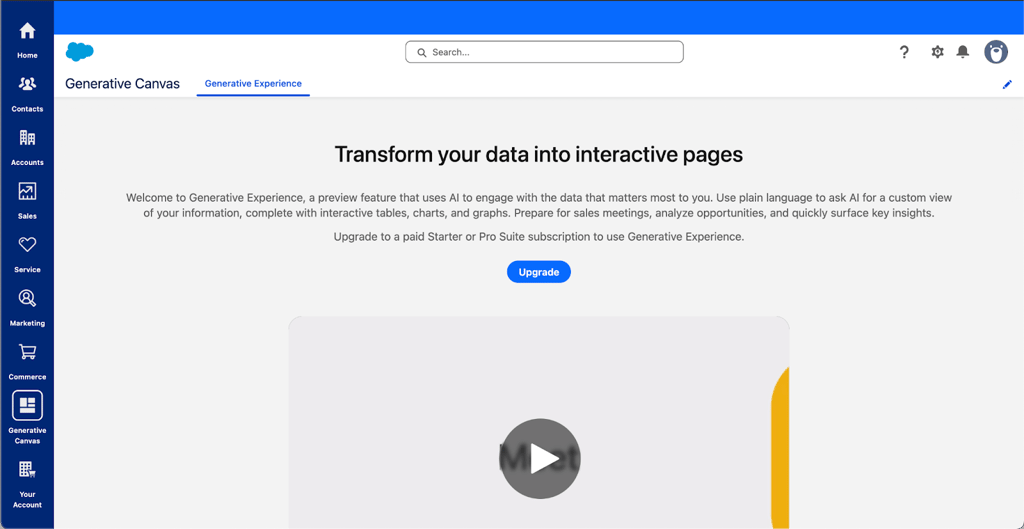
One of the most significant trends is connecting AI deeper to company data. Nexos addresses this by providing unified access to multiple AI models, allowing teams to choose the best model for each data context. Salesforce's Data Cloud and Generative Canvas features mean AI isn't just in the contact fields, but also in product analytics and billing. For example, once you connect usage data and revenue signals to your pipeline, your lead scoring is suddenly grounded in what customers actually do.
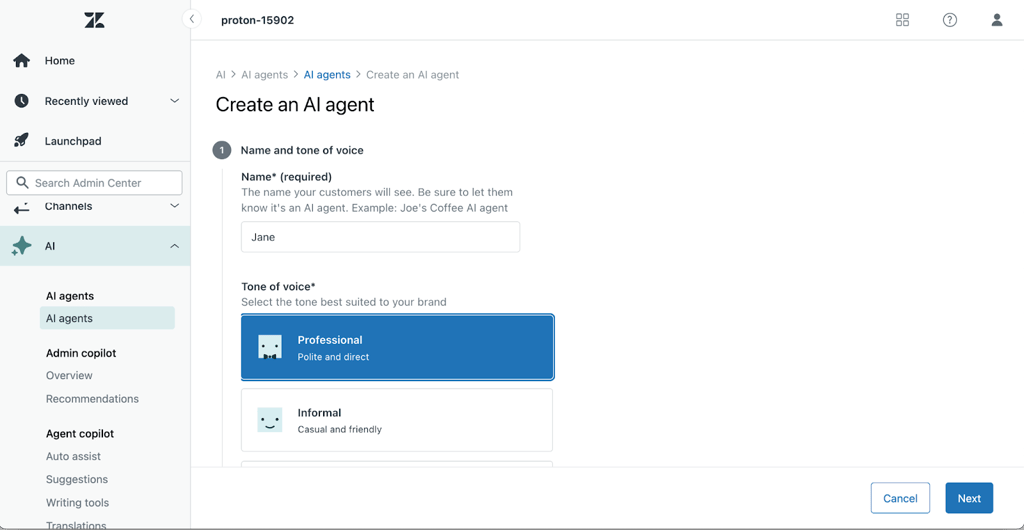
As AI becomes more autonomous, administrator controls become key. For example, Zendesk already requires administrator control over agents, tone, and the intent library. Zoho manages this transparently, showing you the process so you can step in if required. The future of the AI CRM market looks like stricter permissions, guardrails, and audited AI actions.
Final verdict: which AI for CRM should you choose?
Ultimately, choosing your best AI for CRM involves careful consideration. Based on my research and hands-on testing, Pipedrive is the best AI CRM for small sales teams. It offers excellent onboarding, visual workflow, and follow-up reminders.
For growing B2B teams, HubSpot CRM offers an all-in-one platform with Breeze copilot. If you need maximum flexibility and want to build custom CRM workflows with access to multiple AI models, Nexos is the ideal choice – its no-code AI Agent builder and unified access to GPT-4, Claude, and Gemini make it perfect for teams that want sophisticated automation without relying on disconnected systems. On the other hand, I'd choose Salesforce for complex enterprise setups. It can provide deep customization and governance controls.
If you have a specific use case, there are other AI CRMs to consider as well. For example, Zendesk is best for support-focused teams as it's built for customer-facing workflows. If your team is all about sales, check out Zoho CRM. And let's not forget about Zapier. While not a dedicated CRM, Zapier connects over 8000 apps to automate workflows.
In short, assess your team, consider what level of AI integration you require, and then make sure to test your top choices yourself to finally find the AI CRM that's best suited for your needs.
FAQ
What is the best AI-powered CRM for small businesses?
Pipedrive is the best CRM for small businesses. It’s easy to learn, has an intuitive visual pipeline, plus useful AI features like an AI sales assistant.
Which CRM has the most useful built-in AI features for sales teams?
Zoho CRM is the most sales-focused. With the integrated Zia AI, you can build reports, workflows, see anomalies, and apply prompt-based actions. Plus, even though it’s less powerful than Salesforce, it’s much easier to navigate.
Can I add AI to my existing CRM using tools like Zapier?
Yes, you can use Zapier to connect LLMs like Claude, ChatGPT, or other automation apps to trigger actions based on CRM data. This works best for specific actions like drafting emails or data enrichment.
Are AI features in CRM tools safe for sensitive customer data?
That depends on vendor data privacy practices and how you configure your CRM. Lighter tools may not have the strict data governance that enterprise platforms have. So, always check your vendor’s AI data policy.
How much more do AI-powered CRM features typically cost?
That will vary. On some platforms, AI features are included with the free CRM plans. Advanced AI features can be tied to more expensive plans, so check what each subscription tier offers.