Adobe MAX 2025: Firefly, AI assistants, and Sneaks
Being behind major reports like The Mother of All Breaches and RockYou2024, our in-house cybersecurity experts and journalists provide unbiased, real-world testing and in-depth analysis.
We maintain complete transparency by openly sharing our testing methodologies with our audience.
Learn more

At Adobe MAX 2025 in Los Angeles, the spotlight was on tools designed to help creatives cut through tedious, boring tasks, so they can focus more on what really matters: their creativity. This year’s updates bring smarter, more accessible tech to make creative work smoother for everyone.
In this article, I’ll walk you through the most important updates. I’ll explain the new tools Adobe is introducing, the experiments it’s working on, and the big ideas shaping the future of its software. You’ll learn about improvements to Adobe Firefly, new AI assistants that can help inside apps like Photoshop and Express, and even early hints that Adobe may connect with tools like ChatGPT.
Firefly evolves with custom models
Firefly is taking a big step toward true personalization. Adobe is introducing a new option that lets you create your own AI model, one that actually learns from your style. All you have to do is upload six to twelve examples of your work, and Firefly trains a mini-model that understands your look, your tone, and the kind of images you like to create.
What’s exciting is that this isn’t just a generic tool. The custom model is said to produce images that feel uniquely “you,” whether that’s a specific color palette, a particular mood, or a character style you’ve developed over time. And because it’s built on Adobe’s trusted Firefly foundation, everything stays on safe, commercially licensed data.
Unlike earlier AI business-only tools, Adobe is opening this up for individual creators, offering more control and creativity. Compared to competitors like Midjourney or Runway, Firefly offers a more personalized experience within Adobe’s trusted ecosystem.
Firefly Image Model 5 – smarter and sharper
One of the coolest new features in Firefly Image Model 5 is that it makes editing more detailed and easier. It generates sharper, more realistic pictures with better details than before, creating images at 2K resolution (2560x1440).
A big highlight is layered editing, which means the program can automatically recognize different parts of an image and treat them like separate pieces. That lets you move, resize, or swap these parts independently, but everything adjusts naturally and looks much smoother.
The model also supports making changes just by typing simple commands, so you can tweak photos quickly without complicated tools. Additionally, it is reportedly capable of improving image quality.

In a demo with a bowl of ramen and chopsticks, the edits worked smoothly and looked very natural. When parts were moved, the pieces adjusted perfectly to the angle and focus, and the lighting shifted just like it would in a real photo. It didn’t seem like anything was out of place.
New generative audio tools
Adobe also stepped into sound. Two new features, Generate Soundtrack and Generate Speech, now enable creators to create royalty-free audio directly within Adobe apps:
- Generate Soundtrack creates custom AI music that automatically fits your video
- Generate Speech turns written text into lifelike voiceovers
The speech feature supports 15 languages and even allows you to control the tone, ranging from calm and friendly to energetic and emotional. It’s powered by Firefly technology and ElevenLabs. This is huge for independent creators, small studios, and educators who want professional audio without incurring the expense of purchasing expensive licenses or hiring voice actors.
AI assistants and ChatGPT integration
Adobe is building AI assistants into apps like Photoshop and Adobe Express. These assistants act as conversational helpers, so you can request edits in plain language while they handle the technical adjustments behind the scenes using the same controls you’d normally use.
Manual editing isn’t going away. You can step in at any time, tweak the results, or undo what the assistant suggested. The goal is simply to give users another option for handling repetitive or time-consuming tasks.
Adobe is also testing a deeper connection between Adobe Express and ChatGPT. You can already use the Adobe Express GPT inside ChatGPT to start simple projects, but Adobe is exploring a more advanced setup where edits could happen directly in the chat interface.
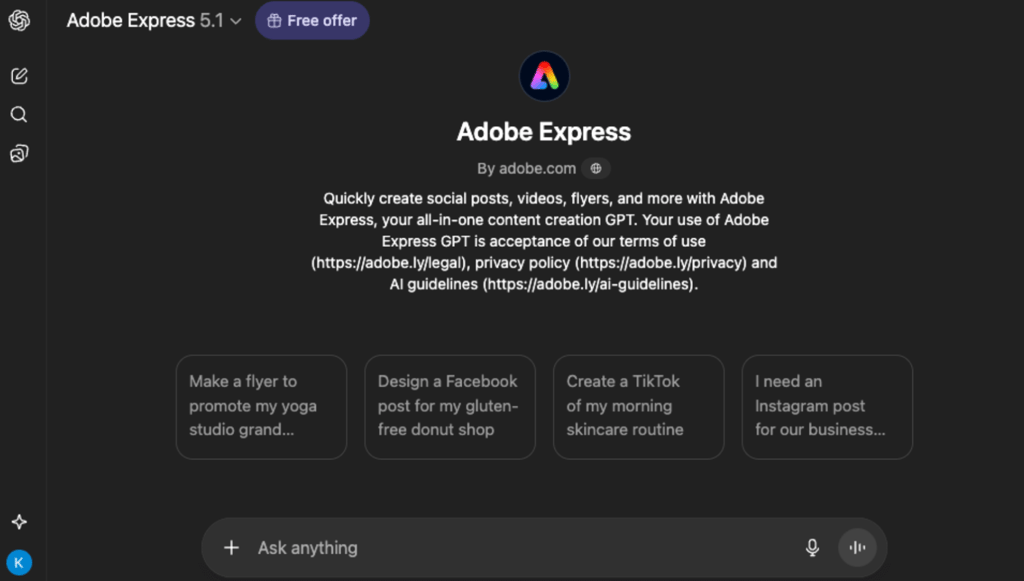
A full release timeline for the AI assistant in Adobe Express has not been announced. However, the assistant is currently available as a beta feature for Premium users.
Project Moonlight – context-aware creation
Project Moonlight is Adobe’s new attempt to tie all of its AI features together so they feel like one connected system instead of a bunch of separate tools. It’s currently in private beta, and Adobe says a wider release is coming in the next few months. There’s a waitlist for anyone who wants early access.
The system collects context from different parts of your workflow. It can pick up on your editing habits, the look you tend to aim for, and even the kind of content you post on social platforms. The idea is that this shared understanding can help generate suggestions that match your style, whether you are in Photoshop, Premiere, or any other Adobe app.
Moonlight also helps during the planning phase. It can analyze social performance data, help you organize your ideas, and offer recommendations before you even start creating. When you describe what you want to create, it coordinates the various AI helpers inside Adobe’s apps, allowing them to take care of smaller steps in the background while still letting you adjust anything manually.
For now, it is still in testing. Adobe showcased a preview of Moonlight at MAX 2025, but a firm release date has not been announced yet.
The most talked-about Sneaks
Each year at MAX, Adobe shows a batch of experimental projects called “Sneaks”. These are early ideas from the research teams that may or may not make it into real products. These tools are designed to help with everyday challenges that creators often encounter. This year, the focus was on making those difficult edits much easier and faster to do. Here are the four Sneaks that garnered most of the attention.
Project Frame Forward
Project Frame Forward is designed to simplify video editing by letting you make changes to just one frame, which the system then automatically applies to the whole clip. At Adobe MAX, the first Frame Forward demo showed a person being removed from the first frame using Photoshop tools, and the AI smoothly erased them from every following frame. It even kept the background details, like the landscape and lighting, perfectly intact.

Instead of spending hours masking each frame, the AI analyzes the video to keep lighting, motion, and structure consistent throughout. For creators working on tutorials, social videos, or quick edits, it could significantly cut down editing time while still delivering polished results.
Project Light Touch
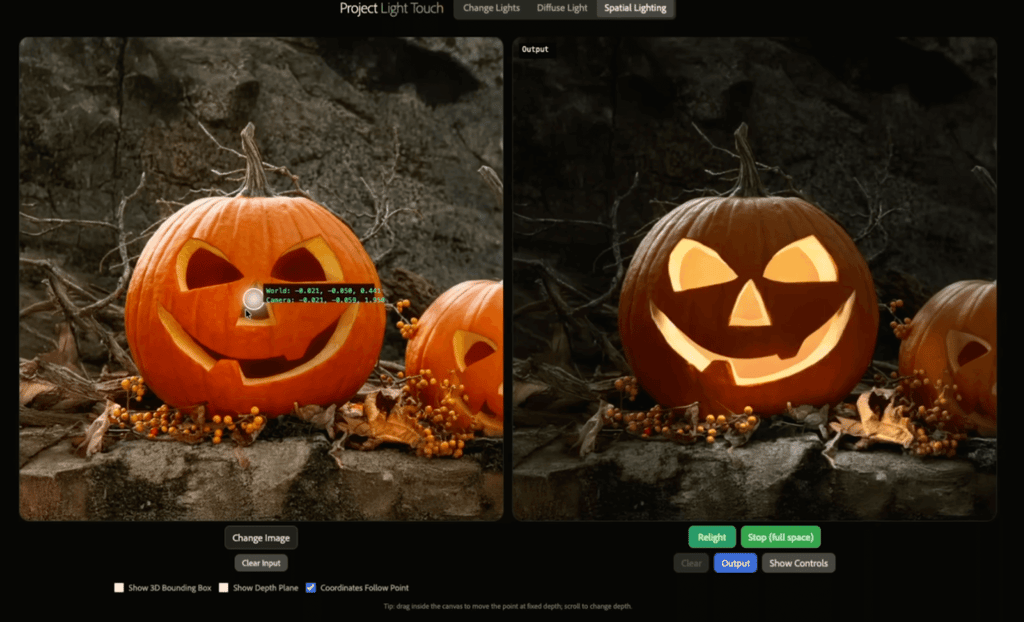
Light Touch lets you change the lighting in a photo even after it’s been taken. You can move the light’s direction, soften it, brighten it, or change midday sunlight to look like early morning. It works interactively, almost like repositioning virtual studio lights.
The tool also allows adjustments in 3D space, like in the viral pumpkin demo where they pushed the light source inside the pumpkin, changing how light and shadows behave naturally.
Project Clean Take
Clean Take focuses on spoken audio. It can fix mispronounced words, smooth out tone, and separate the speaker’s voice from background sounds. The interesting part is that it keeps the speaker’s natural identity instead of replacing the voice with something artificial. In the YouTube Clean Take demo, it corrected a mispronounced word by simply selecting the word and regenerating it with a natural tone.
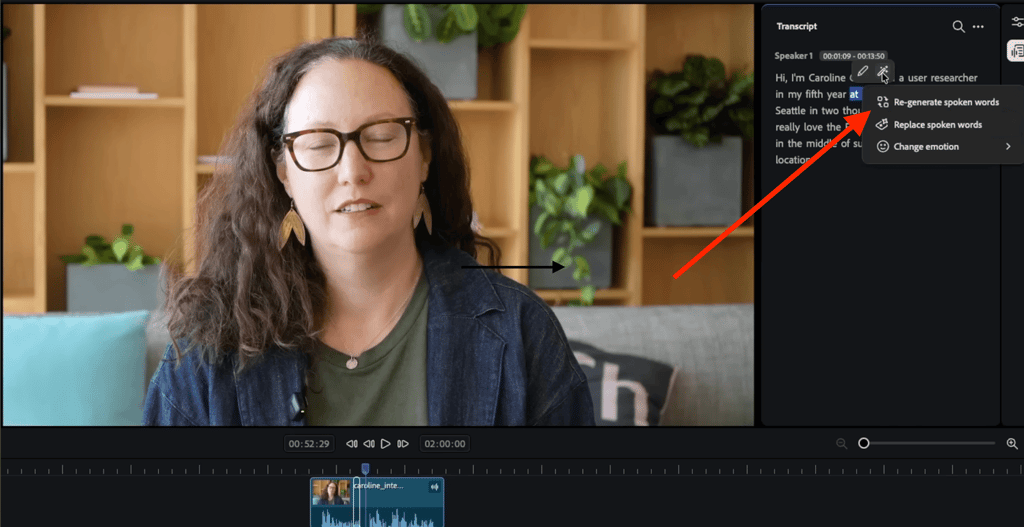
Project Clean Take is aimed at video editors, podcasters, and content creators who want to quickly fix audio problems without needing to re-record. However, anyone working with recorded audio, whether in film, podcasts, or other media, could benefit from its time-saving editing features.
Project Trace Erase
Trace Erase is a smarter way to remove objects from photos. Instead of just deleting the object itself, it also gets rid of things like shadows, reflections, and other small distortions the object creates. This means the final photo looks clean and natural, without any obvious signs that something was removed. In one of the examples during the Trace Erase demo, a car was removed with just a single quick click.
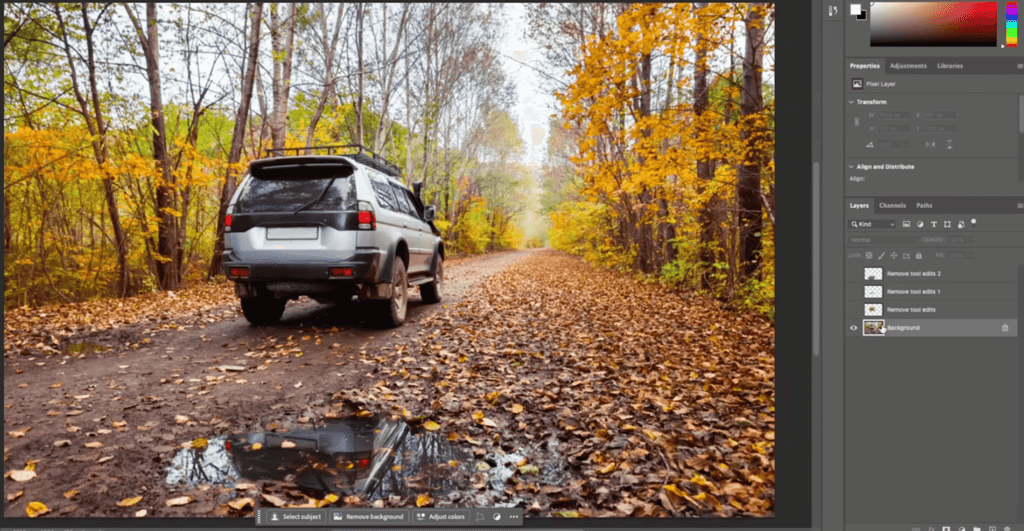
Not only did it remove the car, fill in all of the background details, but it also erased the car’s shadow on the ground. Even the reflection of the car in a nearby puddle disappeared seamlessly.
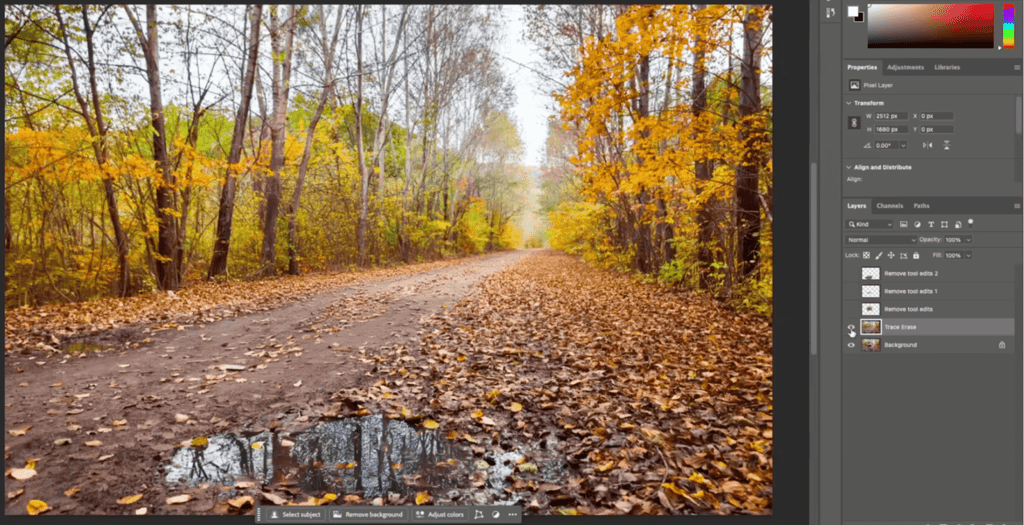
Normally, cleaning up reflections like that would take a lot more time and effort. This should save a lot of time for photographers, designers, and anyone working on detailed image edits.
The bigger picture – Adobe’s AI vision
From what I’ve seen and heard, Adobe is trying to make creative work faster and less fiddly, not to take artistry away. The tools are designed to streamline tedious, repetitive tasks, allowing you to focus on the idea itself.
They are also ensuring that creators remain in control. You can let the AI do the heavy lifting, then step in and tweak whatever you want. Thankfully, this balance of automation and manual control is apparent across the new features.
Additionally, privacy and safety come up a lot in Adobe’s messaging. Firefly and related models are trained on commercially licensed data, and the company keeps emphasizing licensed, safe outputs rather than free-for-all generation. For people who worry about reuse and ownership, that matters.
Finally, Adobe is considering the entire workflow, not just individual features. The goal is tools that work together across apps and devices, and that fit into how teams actually make things. If it delivers, creators could spend less time on mundane tasks and more time on innovative ideas.
Conclusion
Adobe MAX 2025 put AI at the center of how Adobe plans to help people make things. Many of the beta tools on display are already usable prototypes, rather than distant promises.
Firefly became sharper and more personal. Audio tools can now produce ready-to-use soundtracks and voices, and AI assistants have begun appearing inside apps you already use.
Several of the Sneaks are likely to become real features, and they already hint at significant workflow improvements aimed at removing tedious, repetitive work, so more people can bring their ideas to life and create finished pieces. That matters for solo creators and small teams alike.
I came away hopeful. If Adobe continues to iterate in this direction, the next MAX should showcase which experiments have stuck and how creators actually use them.
FAQ
When will Project Frame Forward be available?
Adobe hasn’t confirmed a release date for Project Frame Forward. Beta versions could appear in Firefly or Premiere updates in 2026.
Will Firefly’s custom models require payment?
Yes, Firefly’s custom models require payment. They’re available only with premium plans like Firefly Pro, Firefly Premium, or Creative Cloud Pro, which include generative credits needed to train and use these models. The free tier does not offer custom model access.
Is Adobe’s ChatGPT integration official yet?
No, not official yet. Adobe is testing integrations with OpenAI and Microsoft. You can use the Adobe Express GPT in the ChatGPT store to start simple projects. However, the full workflow, which lets you design and edit fully inside ChatGPT, is still experimental and has no public release date.
Can AI-generated music and voices be used commercially?
Yes, Adobe’s AI-generated music and voices from tools like Generate Soundtrack and Generate Speech are royalty-free and designed for commercial use, making them an excellent option for creators who want professional audio without worrying about licensing issues.