Humanize AI review 2026: can it really polish AI text into natural writing?
Being behind major reports like The Mother of All Breaches and RockYou2024, our in-house cybersecurity experts and journalists provide unbiased, real-world testing and in-depth analysis.
We maintain complete transparency by openly sharing our testing methodologies with our audience.
Learn more

When I first came across Humanize AI, I was curious whether it could truly make AI-generated text sound natural instead of robotic, repetitive, or overly polished. Designed to refine and rewrite AI content so it feels authentically human, the tool promises to bridge the gap between machine precision and human tone.
In this review, I put Humanize AI to the test across different content types – from blog posts and SEO articles to academic paragraphs – to see how well it performs in the real-world writing process. Here’s what I discovered after hands-on comparisons and detailed testing.
Overview
- Best for: SEO teams and content marketers producing large volumes of content who need to preserve keywords while reducing the risk of AI detection.
- Great for: non-native English writers and students looking to improve fluency, readability, and natural phrasing in their text.
- Not ideal for: legal, medical, or technical writing where every word matters, as automated rephrasing can subtly change meaning in such contexts.
Suggested rating: 3.9/5
What is Humanize AI, and why does it matter?
As AI tools now generate more drafts than ever, it’s becoming clear that raw AI text often sounds a bit too stiff: fluent yet flat. That’s where the best AI humanizer tools step in. Humanize AI is a browser-based rewriter that takes AI-generated text and refines it to read as though it came from a human writer. Instead of simply rephrasing sentences, it focuses on improving tone, flow, and readability while preserving the original meaning.
From my testing, this distinction makes a real difference. Basic paraphrasing tools tend to just swap out words or shuffle sentence structures. This, in turn, often results in distorting intent or messing with SEO keywords. Humanize AI feels more purposeful: it adjusts rhythm, nuance, and phrasing to create smoother, more human-like language. It also stands out for its tone modes, SEO awareness, and multilingual support, which make it practical for global content teams or anyone producing text at scale.
In short, Humanize AI isn’t about disguising AI content on the surface level. It’s about elevating what you’ve written with AI without losing your voice. Whether I tested it for an SEO-focused article, a polished blog draft, or content for international readers, the tool helped strike a balance between efficiency and authenticity.
How Humanize AI works (practical walkthrough)
Part of Humanize AI’s appeal is its refreshingly straightforward approach. The process starts with a simple copy‑and‑paste. For this testing, I normally took raw text outputs straight from AI writing tools and then just dropped them into Humanize AI’s input box.
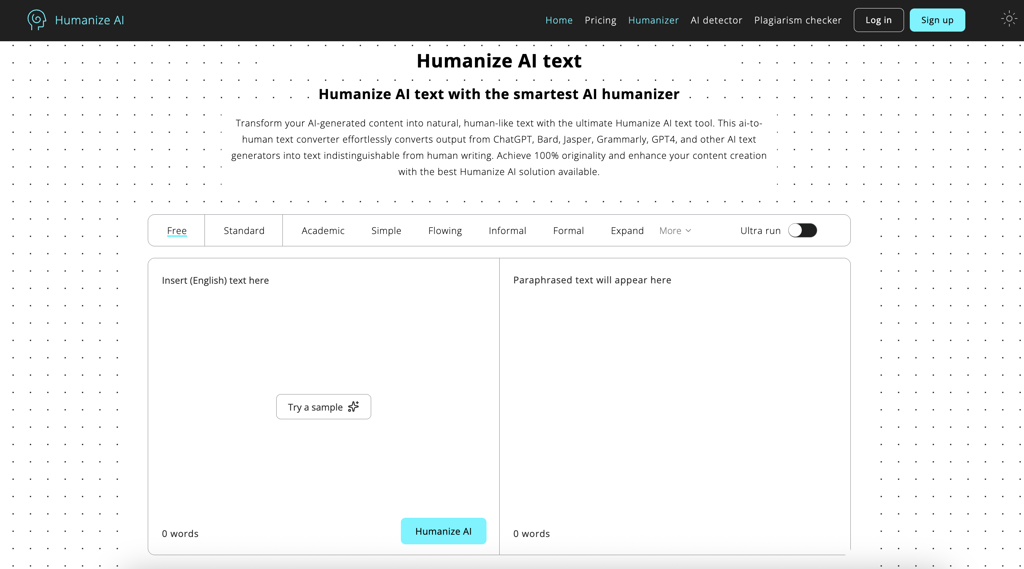
As you can see, there’s no need to register or log in, which makes it great for on‑the‑fly edits or testing different drafts side by side.
Once the text is in, the next step is choosing a rewrite mode. Humanize AI offers several – Standard, Academic, Flowing, and Formal, among others. Each mode subtly changes the rhythm and tone of the result. For example, Flowing mode smoothes transitions and softens sentence breaks, while Academic adds clarity and precision for essays or reports. I found the Flowing mode to be the most balanced for blog and SEO writing, as it maintains both fluency and keyword placement.

After selecting a tone, output generation happens almost instantly – Humanize AI even gives you an estimate of the expected waiting time. While it varies depending on the word count you want it to humanize, in my experience, it didn’t take longer than 15 seconds.
The free version produces quick rewrites, while the premium Ultra run mode takes longer but digs deeper into sentence structure. I also noticed that Ultra run tends to modify rhythm and syntax more aggressively, aiming to eliminate patterns that AI detectors often flag. These typically include repetitive phrase openings or mechanical cadence.
Humanize AI’s algorithm appears to scan for structural markers typical of machine writing: predictable punctuation, uniform sentence length, and template phrasing. It then reorganizes sentence syntax, changes transitional words, and subtly varies sentence rhythm to make it read more like a human wrote it without altering the original meaning.
All in all, it’s easy to understand how the Humanizer AI works, as the workflow is very intuitive: paste, choose your mode, and refine. In an instant, the text takes on a friendlier appearance, one that reflects how I’d write something myself after a good editing session.
Hands-on testing: readability, tone, and naturalness
To see how well Humanize AI handles different content styles, I ran several real‑world tests. Each piece was first generated with an AI model and then rewritten using Humanize AI’s Standard plan, which unlocks different paraphrasing modes, and the Ultra run mode.
What stood out most was how consistently quickly it processed text – each time under 15 seconds – and how noticeably it changed the rhythm and phrasing while keeping meaning intact.
Blog snippet
For a conversational blog introduction about studying history, the tool smoothly toned down the original's heavy phrasing. For instance, it changed complex expressions like “dusty dates and forgotten names” to more informal “series of dates and people you’ve never heard of.” While the information was clearly communicated, the imagery was slightly toned down.
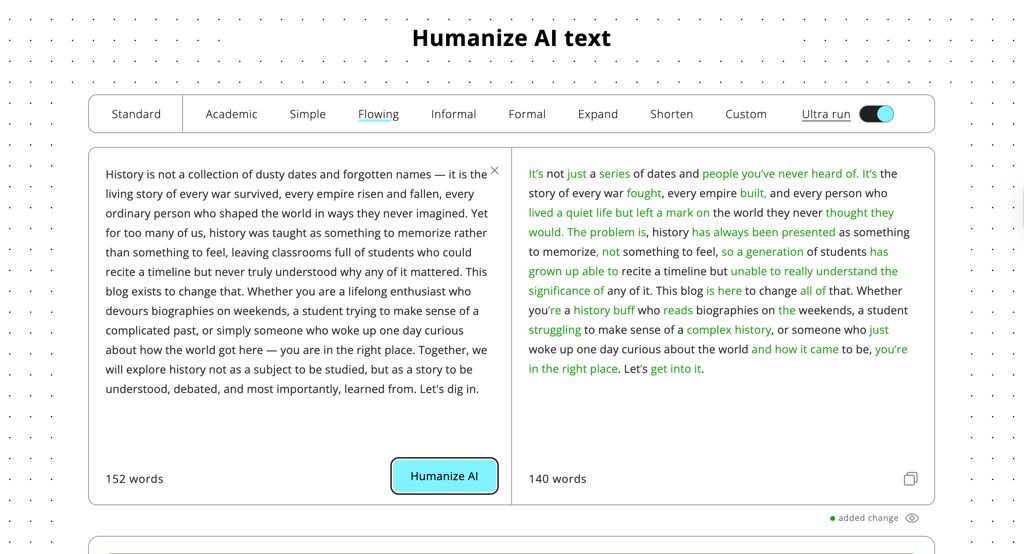
The new version reads more like a newsletter post than an essay, using shorter sentences and simpler phrasing. New transitions feel natural, and the use of “Let’s get into it” at the end of the paragraph makes it more personal. However, in my opinion, while readability and engagement were definitely improved, it lost some of the style.
Academic paragraph
Here, Humanize AI performed impressively. The Academic mode maintained formal tone and structure while varying sentence length and replacing repetitive transitions. The rewrite preserved nuances important to the text: key concepts of authorship, consent, and creative ethics remained unchanged, yet it flowed better and read less like machine output.
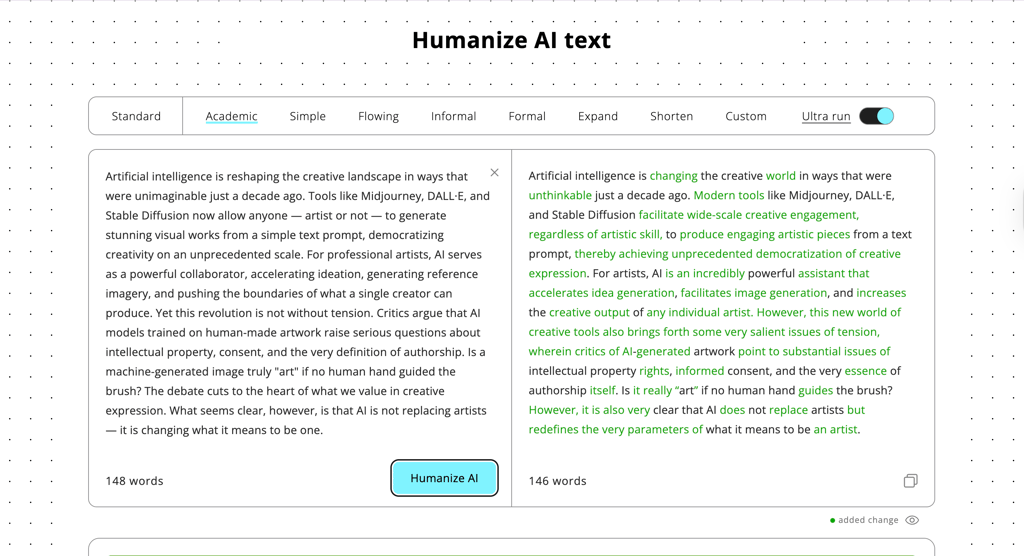
I noticed minimal awkward phrasing, meaning that Humanize AI’s algorithm balanced precision with natural rhythm well. Compared to typical paraphrasers, it didn’t distort meaning or unnecessarily inflate vocabulary, showing clear awareness of context.
Marketing copy
The marketing example was the strongest. The rewrite maintained the positive, service-oriented tone but used more brand-speak language in place of the slightly generic AI-speak – “Your dog is a hero” instead of “Your pup works hard.” The text now reads like something from a real company’s website rather than a prompt result. See for yourself:
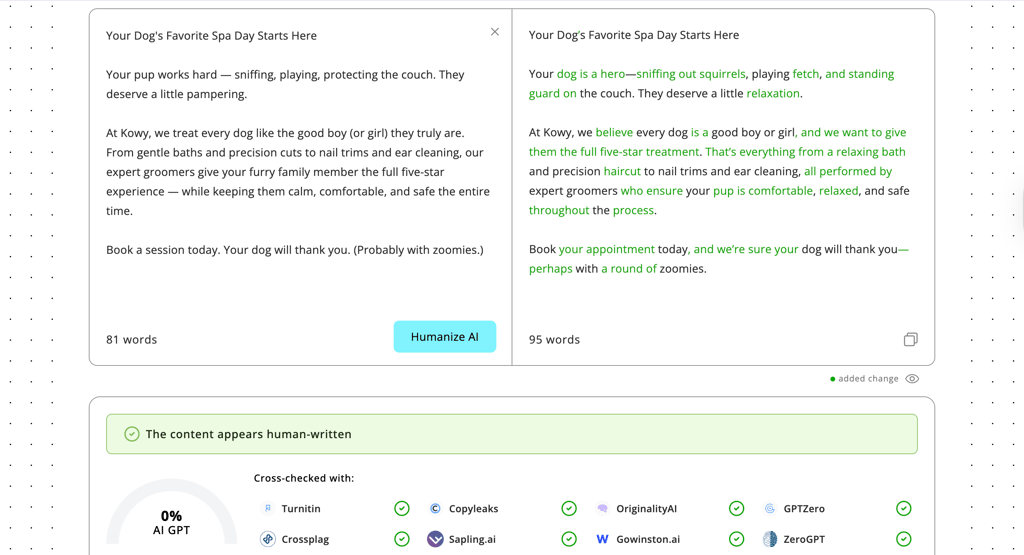
In all the tests I conducted, Humanize AI has clearly improved the readability and tone of the text without altering the original message. It is very fast, user-friendly, and produces text that reads like human writing. Still, human editing is important for accuracy.
AI detection resistance: what to realistically expect
One of the main reasons people turn to Humanize AI is its ability to make AI‑written text read more naturally – and, as a side effect, reduce AI detection scores. During testing, I found that the tool can indeed lower detection rates with the best AI detectors, such as Originality.ai, GPTZero, and Turnitin. This is especially noticeable when using the Ultra run mode, which promises 0% AI detection. The text is more readable, with varied sentence structures and less of the robotic patterns that AI detectors are likely to pick up.
However, it is essential to be realistic about the situation and understand that no software can make you completely invisible. AI detection systems use different algorithms, most of which are based on statistical patterns and rhythm patterns, not just vocabulary. A paragraph that is likely to pass one detector may still result in a false positive on another because each software has a different definition of what constitutes “human-like” text. Even genuine human writing may, at times, result in a false positive, especially on aggressive academic detectors such as Turnitin.
What Humanize AI does well is enhance plausibility. It removes structural patterns, replaces filler phrases, and adds natural pacing, making the text read more like it was written by a thoughtful human editor. For SEO, blogging, or general readability optimization, this is all you really need – not total disguise, but a more refined and natural read.
However, I would not recommend using it solely to avoid detection in academic or regulatory settings. Detection algorithms are constantly being updated, and there are also ethical questions about concealing AI authorship. The point is that Humanize AI helps reduce the robotic presence of machine-written content, but it cannot (and shouldn’t) ever claim to be 100% undetectable. It is better understood as a refinement and humanization tool, and in this regard, it is a great helper for closing the gap between AI-written and human-written content.
Pricing and available plans
Humanize AI has a simple pricing structure geared towards both casual users and content teams working at scale. There’s a free version that lets you test the tool with limited monthly usage – can be useful for small-scale rewriting and blog polishing. The free tier doesn’t require registration, which is great for quick experiments, but there’s no Ultra run and tone mode included in the free version.
For more frequent use, upgrading to a paid plan gives you access to higher word limits, additional humanizer credits, and broader language support. Paid users can also take advantage of the built‑in AI detector and writer quotas. This ultimately makes Humanize AI more of an all‑in‑one platform for rewriting, checking, and refining content.
Here’s how the core plans break down.
| Plan | Monthly price, billed annually | Monthly limit | Key features | Best for |
| Free | $0.00 | 1500 words, 200 words per | Standard rewriter mode, no login required | Light users, quick testing |
| Lite | $4.99 | 10,000 words, 500 words per process | Ultra run mode, unlimited plagiarism checks, all modes and settings, multilingual support | Freelancers and bloggers |
| Standard | $9.99 | 25,000 words, unlimited words per process | Free re-humanizing, unlimited words per process, | SEO and content teams |
| Pro | $19.99 | 150,000 words, unlimited words per process | Priority access, API integration, and team management tools | Agencies and publishers |
For occasional users, the free version is perfectly enough. However, if you work with large content volumes, the subscription is quickly justified, mostly because of speed, output depth, and the advanced rewrite options.
Humanize AI vs alternatives
When I compare Humanize AI against other options, it consistently comes out as the most balanced choice for everyday content work.
| Tool | Primary strength | Weakness | Best use case |
| Humanize AI | Balanced humanization + SEO‑friendly structure | Can oversimplify technical language | Blogs, SEO content, general web copy |
| QuillBot | Fast clarity and grammar cleanup | Doesn’t change the AI‑like structure much | Polishing messy or ESL drafts |
| WriteHuman | Strong AI‑detection reduction | Can sound awkward or off‑tone | Situations where detection scores matter most |
| Manual editing + grammar tools | Highest quality and nuance | Time‑consuming and costly at scale | Flagship pages, high‑stakes content |
As you can see from our QuillBot review, it’s excellent when you mainly need cleaner sentences, better grammar, and quick surface-level polish. However, it doesn’t really hide the underlying AI rhythm. WriteHuman pushes hard in the opposite direction, breaking patterns so aggressively that it often scores well on human/AI checks, yet sometimes sounds slightly off to real readers.
And while, in my opinion, manual editing plus a grammar checker is still the gold standard for true human voice, it is important to also recognize that it’s slow and expensive if you’re producing content at scale.
Humanize AI sits in a practical middle ground. It reworks ideas more deeply than a basic paraphraser, adjusting them to the point where the final product reads as if it might have been originally written by a human. It usually avoids the awkwardness you can get from tools overly focused on detector beating.
However, it can also make technical language more plain than a subject matter expert might use. To me, this makes Humanize AI a very useful tool, but not a substitute for human editing on important content.
Who should use Humanize AI and who shouldn’t
In my experience, Humanize AI comes in handy most when you’re already using AI writers regularly and need a fast way to make drafts feel more natural. It’s especially helpful when readability, tone, and SEO structure matter just as much as speed.
Good fit for
If your main goal is to turn solid but slightly robotic drafts into smooth, human‑sounding content, this is where the tool earns its keep:
- Content creators and bloggers who want AI‑generated posts to sound more like their own voice and less like generic template copy.
- SEO writers and marketers who need to preserve keyword placement while improving flow, rhythm, and engagement.
- Students polishing essays, reports, or personal statements so they read more fluently and naturally without rewriting everything from scratch.
- Freelancers with heavy writing workflows who rely on AI for first drafts and need a quick humanization layer before final edits.
Not ideal for
There are also clear cases where I’d reach for other tools – or a human editor – before relying on Humanize AI:
- Complex technical documentation where every term matters and oversimplification could introduce errors or ambiguity.
- Heavy academic research and specialist writing that demand expert precision, field‑specific language, and strict adherence to style guidelines.
- Users expecting fully undetectable AI output, since no humanizer can guarantee perfect results across all AI detectors or satisfy strict institutional rules around AI use.
Final verdict
Humanize AI is worth using if you regularly clean up AI drafts, and especially if you're more concerned about readability rather than perfection. It really shines if you want your content to read smoother and more human, especially if you're writing blogs or SEO content, without messing up your keywords.
On the downside, it can oversimplify technical language and cannot guarantee that AI detectors never flag your work – realistically, no tool can. Overall, I see it as a solid first humanization layer, not a complete replacement for editing
FAQ
What is Humanize AI?
Humanize AI is a browser-based tool that refines AI-generated text to sound more natural and human-like. It improves tone, flow, and readability while preserving original meaning and keywords. Unlike basic paraphrasing tools, it offers different modes for tailored rewrites across blogs, essays, and other types of content.
Can Humanize AI make AI text undetectable?
No tool can guarantee 100% undetectability, and this includes Humanize AI. It lowers detection scores on tools like Originality.ai, GPTZero, and Turnitin by varying sentence structure and rhythm. While Humanize AI promises 0% AI with its Ultra run mode, results will vary by detector algorithm – expect improved plausibility for general content, but not foolproof evasion, especially in academic settings.
How accurate is Humanize AI rewriting?
Humanize AI is highly accurate for preserving core meaning, keywords, and intent in most cases. It works well with blogs and marketing but can oversimplify technical or nuanced language. From my hands-on tests, meaning stayed intact 90%+ of the time, though I still caught awkward phrasing or minor issues during my manual review.
Can Humanize AI help academic writing?
Yes, moderately. Its Academic mode smoothes robotic phrasing and improves flow for essays and reports, and it can be useful for non-native speakers to boost fluency. However, avoid it for research-heavy work that requires precise terminology, as rephrasing risks losing nuance. Humanize AI works best as a polishing step before expert review.