Best AI meeting note taker and assistant for notes, minutes, and summaries
Being behind major reports like The Mother of All Breaches and RockYou2024, our in-house cybersecurity experts and journalists provide unbiased, real-world testing and in-depth analysis.
We maintain complete transparency by openly sharing our testing methodologies with our audience.
Learn more-

-
Contribution by
Yelyzaveta Hunchenko



Over the past few years, we’ve seen AI meeting assistants quickly evolve from basic recorders into smart tools that automate note-taking and transcription and even provide actionable insights. What once meant scrolling through hours of raw audio is now handled in seconds by platforms that can summarize discussions, highlight decisions, and track next steps. Whether you’re running a Zoom call or managing hybrid team meetings, using the best AI meeting assistant can feel like having an extra team member who never misses a detail.
To create this guide, together with the Cybernews dedicated team, we thoroughly researched and tested a variety of AI meeting assistants firsthand, focusing on accuracy, ease of use, and overall value. The result is this curated list of solutions that cater to different needs – compiled to help you stay organized, save time, and make meetings more productive.
Best AI meeting assistants
- Fireflies AI – best for analytics
- Fathom – best free option
- tl;dv – best for search and video
- Krisp – best for audio quality
- Avoma – best for workflows
- Otter – best for meeting insights
How we tested AI meeting assistants
When putting together this guide, we wanted to go beyond marketing claims and actually see how each AI meeting assistant performs in real scenarios. To make our testing consistent and fair, we used a clear framework that reflects what matters most for professionals who rely on these tools every day. Each assistant was tested across the following key criteria:
- Features, integrations, and value (30%). We tested advanced features like task tracking or multilingual support, checked how well they fit into platforms like Zoom or Slack, and weighed all that against their cost.
- Output quality and reliability (25%). We checked how accurately each tool handled real meeting transcriptions, whether summaries made sense, and how well they managed errors or messy conversations.
- Speed and efficiency (25%). We measured how quickly the tools processed recordings, delivered summaries, and automated repetitive tasks, focusing on how much time they actually saved us after a meeting.
- Ease of use and UX (20%). We looked at how smoothly we could get started, whether the interface felt intuitive, and how easily these tools could be shared with different team members.
Why consider an AI meeting assistant?
Meetings are essential, but they can easily drain time and attention if key details slip through the cracks. That’s where AI meeting assistants come in – they take on the heavy lifting of documentation, allowing teams to stay focused instead of being distracted by note-taking.
Moreover, Gartner research shows that AI adoption and investments are only increasing across industries, with organizations already moving from experimentation with AI to its expansion.
While platforms like Google Meet or Microsoft Teams offer built-in transcription or recording features, dedicated AI meeting assistants often go further by adding intelligence, context, and automation. Here are some additional benefits to implementing these:
- Time savings. By automatically handling transcription and summaries, AI tools cut down hours of manual note-taking and recap writing.
- Better focus. Participants can engage in discussions without worrying about missing details, knowing the assistant will capture everything.
- Action item tracking. Many tools extract tasks directly from conversations, making it easier to assign responsibilities and follow through.
- Advanced insights. Beyond simple transcripts, some assistants analyze patterns, highlight decisions, and even suggest next steps.
Sometimes the best way to see the real impact is through people actually using these tools. Here’s a quick user testimonial that shows just how much easier meetings can feel with an AI assistant on your side:
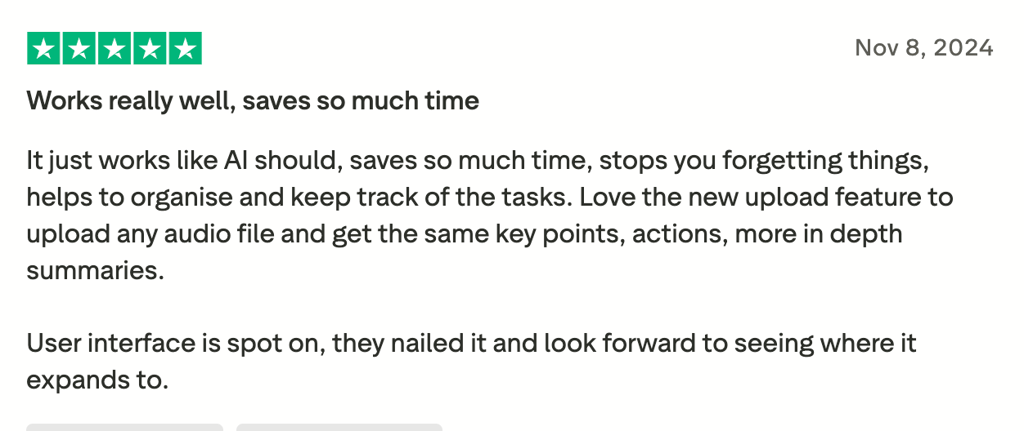
However, it’s important to keep in mind that these tools are not without drawbacks. Privacy remains a significant concern, especially when sensitive or confidential topics are discussed. Accuracy can also vary depending on accents, technical language, or background noise, which means human oversight is still necessary despite automation.
Best AI meeting assistants – detailed reviews
Below, we review the best AI meeting assistants and note takers in greater detail to help you pick the right assistant for your specific needs. Whether you’re searching for a free solution, a tool with advanced analytics, or a platform that streamlines full workflows, there is a suitable solution for you.
1. Fireflies.ai – best for analytics and everyday workflows
| Features: | Live notes and transcription, personalized feed with key topics, rules engine, advanced analytics, and admin controls |
| Description: | Rules engine lets admins create custom rules to automatically route meetings, control sharing, and enforce privacy settings without manual effort |
| Rating: |
We see Fireflies.ai as a comprehensive AI meeting assistant built for busy professionals and teams who want to automate how meeting data flows into everyday workflows. The platform uses generative AI to transcribe, summarize, and analyze conversations, turning meetings into actionable insights that integrate well with Slack, Google Sheets, Notion, and more.
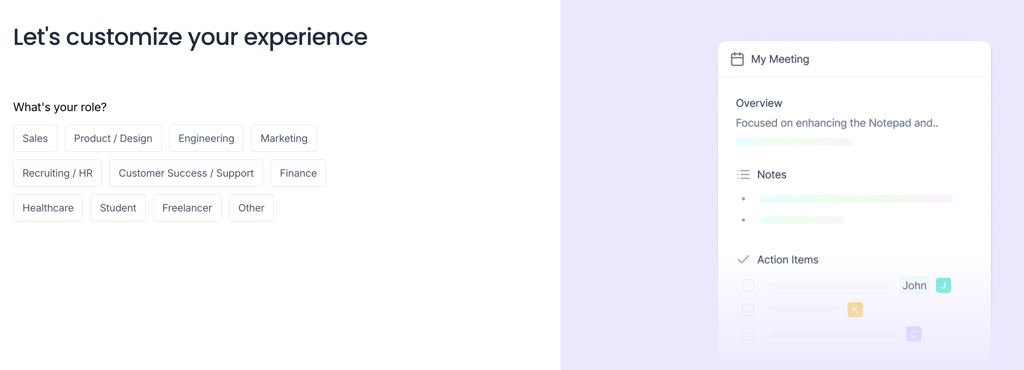
When we set up Fireflies, the onboarding was smooth, especially since we signed in through Google and Microsoft, automatically giving Fireflies access to our calendars. This also allows it to later join meetings on your behalf.
Fireflies’ generative AI features, like the MCP Server, allow external AI agents such as ChatGPT to analyze transcripts for reports, while the Talk to Fireflies feature enables live Q&A during meetings. The personalized feed keeps you up to date with the most relevant meeting insights, and the rules engine automates management of meeting data and privacy.
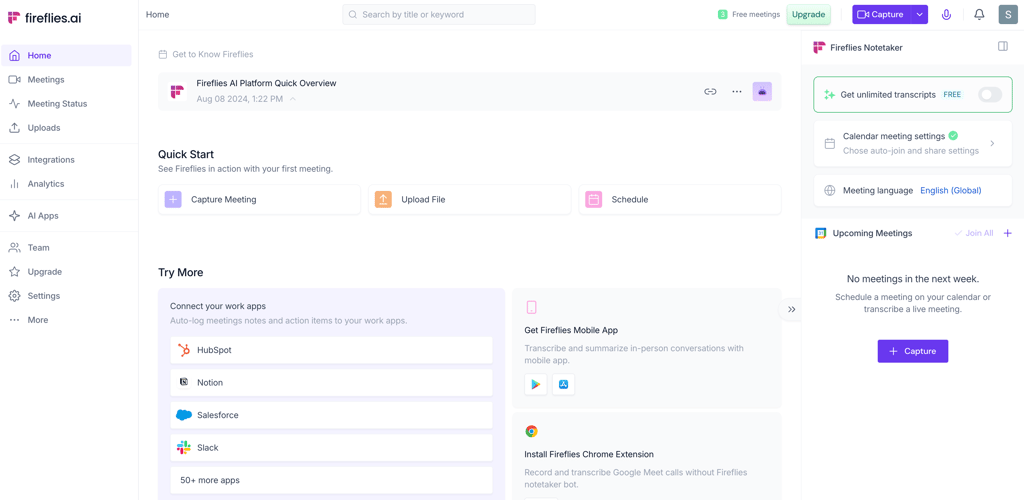
We also appreciated the wide range of AI-powered apps available for different industries – from sales to HR. Overall, Fireflies fits teams that don’t want just a note-taking tool but a meeting tool that feeds directly into project management and CRM systems.
However, from our experience, the interface can feel a bit cluttered at times, and the platform is aggressive in promoting premium upgrades.
The free plan includes unlimited transcription but gives you only 800 minutes of storage per seat and limits AI capabilities and integrations. Paid plans unlock unlimited AI summaries, collaboration features, and access to advanced integrations.
| Plans | 4 (Free, Pro, Business, and Enterprise) |
| Price | Free or from $10.00/month per seat |
| Key limits | Limited storage on the Free and Pro plans; rules engine available only with the most expensive plan |
2. Fathom – best free AI meeting note-taker assistant

| Features: | AI Scorecards for coaching and evaluating calls, customizable templates for sales-deal summaries and non-English summaries |
| Description: | AI Scorecards help scale coaching across the team, track performance, and give consistent feedback |
| Rating: |
Fathom has carved out a strong position in the market – and on my list – by making a bold promise: a high-quality AI meeting assistant that’s completely free. It has become the #1 rated AI notetaker on G2 while also being the most-installed in the Zoom and HubSpot marketplaces. For solo professionals and small to medium businesses, it’s the easiest way to get accurate transcripts, smart summaries, and actionable insights without paying a cent.
Getting started for us was straightforward. Sign in with Google or Microsoft, answer a few onboarding questions, and you’re dropped into a clean, minimal interface.
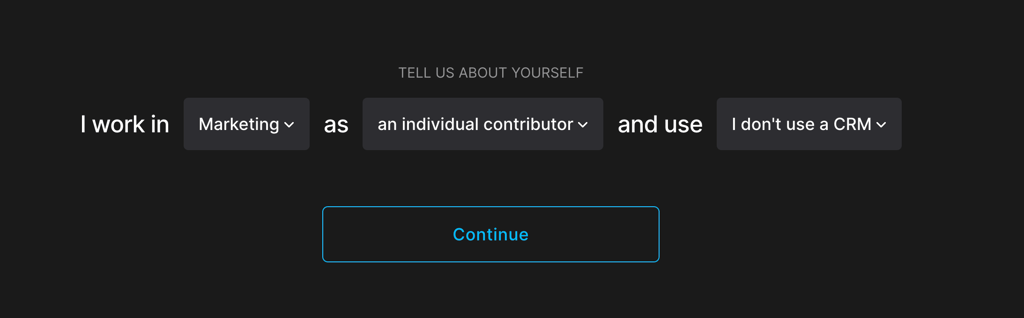
The desktop app runs alongside Zoom calls, while the rest of the experience is entirely browser-based. We liked how the platform organizes meetings automatically and offers simple video guides to help you get going. The design really keeps the focus where it matters – on your meeting recordings.
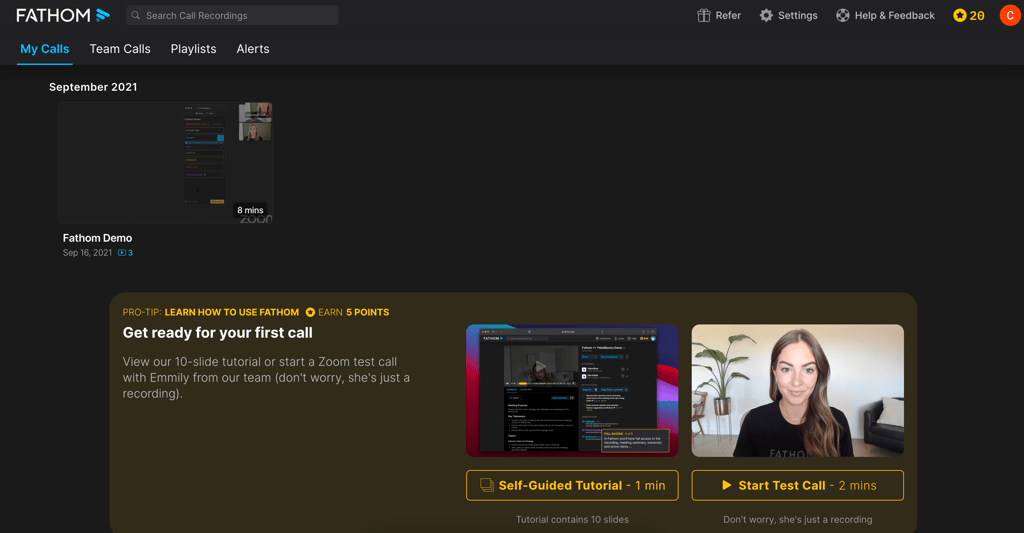
Features are where Fathom shines. Every call is recorded, transcribed, and summarized with strong accuracy. Highlights can be captured during a live call with one click, meaning they’re neatly slotted into your post-meeting summary.
Action items translate directly into follow-ups, and with the recent Asana integration, those tasks can instantly become trackable items inside ongoing projects. The Zapier integration – now part of every plan, including free – makes it easy to connect Fathom with virtually any workflow. Fathom also integrates smoothly into Zoom and CRM platforms like HubSpot, as well as other third-party tools configured from the settings menu.
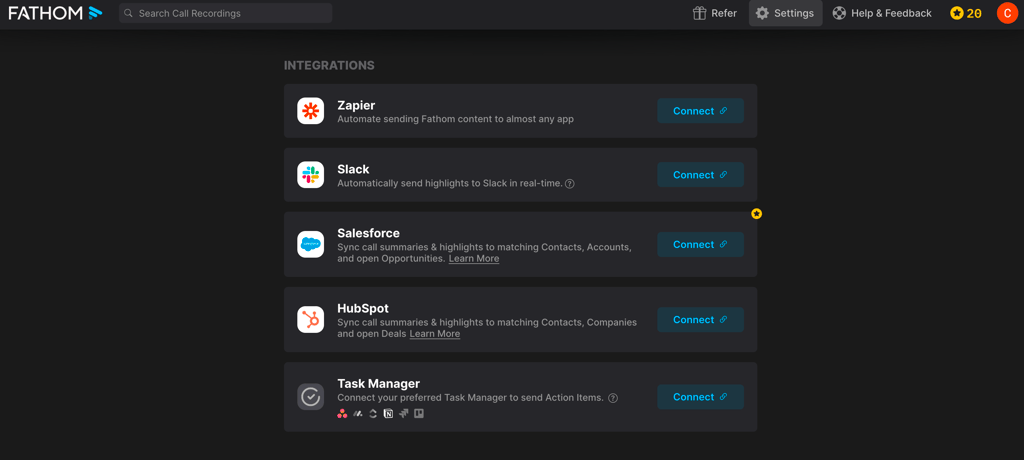
For teams, the value has grown even more with features like team-wide AI search, which transforms a company’s recordings into a searchable knowledge base, while Ask Fathom – a conversational assistant – can instantly pull insights from any call. On paid team plans, AI Scorecards and Meeting Types add an extra layer: structured templates, grading, and coachable insights for repeatable processes like sales calls or business reviews.
As such, Fathom’s use cases extend from freelancers who want quick notes to small businesses looking to share accurate meeting recaps across teams. It doesn’t overload with extras – it just nails the basics with exceptional accuracy and ease of use.
The best part? Unlimited recordings, transcripts, and summaries are all included in the forever-free plan. You get premium features for 5 calls per month and no hidden limits, which is pretty much unheard of in this space. Still, for those requiring more customization or collaboration, there are Premium and business plans available.
| Plans | 4 (Free, Premium, Team, and Business) |
| Price | Free or from $14.00/month per user |
| Key limits | Advanced sales features are paywalled at the highest price point, and public API access support is still in development, restricting custom integrations for advanced users |
3. tl;dv – best for search and video
| Features: | Sales AI Coaching & Playbooks, auto-drafted follow-ups, multilingual support, privacy-first with EU hosting and end-to-end encryption, EU AI Act compliance |
| Description: | AI Coaching & Playbooks provide personalized coaching and performance scorecards for sales teams to help refine engagement and closing techniques |
| Rating: |
We found tl;dv to be a specialized AI meeting assistant tailored for sales teams, customer success leaders, and UX researchers who need to record, analyze, timestamp, and share video clips of customer interactions for coaching and feedback. Its standout feature is AI-powered search, which lets you quickly find key moments in recordings across Zoom, Microsoft Teams, and Google Meet. The tool also supports multi-language transcription and translation, making it great for global teams.
Setting up tl;dv involves a short onboarding process where you select your preferred language, industry, and job role.
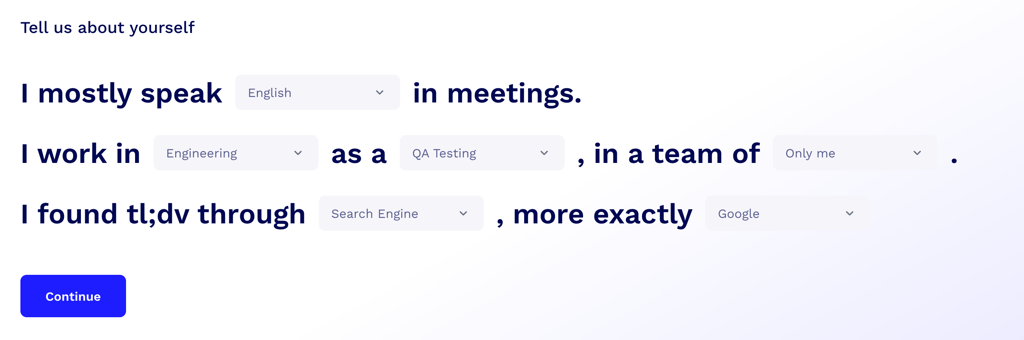
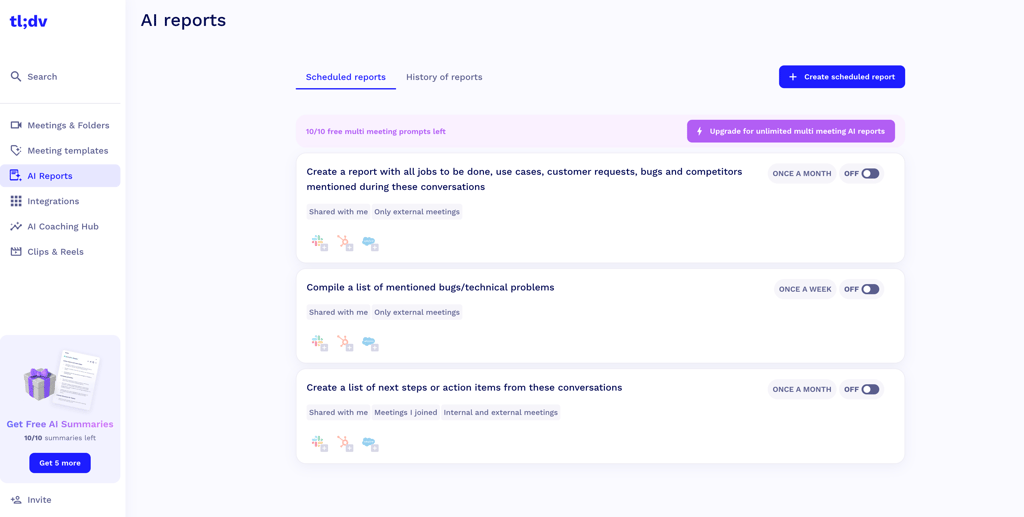
The dashboard is minimalistic and organized around managing meetings and recordings, while integration options connect seamlessly with popular productivity apps and automate workflows with custom triggers. tl;dv’s MCP server enables external AI tools to access meeting data for context-aware automation, such as CRM updates and recurring AI reports.
Unlike all other tools on our list, tl;dv does not claim HIPAA compliance. However, it is fully compliant with the EU AI Act and follows SOC 2 Type II and standard across this group GDPR requirements to ensure enterprise-grade data security and privacy. This makes it a solid choice for teams prioritizing compliance without healthcare-specific needs.
The free plan includes unlimited recording and transcription, while paid plans expand AI insights, reporting, and integrations. Subscriptions start at $18.00/month per seat, billed annually, which is expensive compared to other tools on our list. Moreover, some setup and configuration tweaks may be needed to tailor the tool perfectly to each workflow, which could affect the initial user experience.
| Plans | 4 (Free Forever, Pro, Business, and Enterprise) |
| Price | Free or from $18.00/month per seat |
| Key limits | Limited uploads on the free plan |
4. Krisp – AI meeting assistant for noise-free calls
| Features: | Noise cancellation and audio clarity, real-time accent conversion, voice translation, and SDK for voice agents |
| Description: | Removes background noises, converts regional accents into a more neutral tone in real time, and lets other apps plug in Krisp’s audio tech |
| Rating: |
One of Krisp’s main strengths is its robust noise-cancelling capabilities. It’s designed to strip away distractions – barking dogs, echoey rooms, and heavy accents – so conversations stay sharp. And in 2025, Krisp doubled down on that vision with major new releases that transform it from a background utility into a full-fledged AI meeting companion.
We found that Krisp is best suited for remote and distributed teams, ensuring clear calls and accent conversion. Contact centers can benefit from AI Agent Assist to support sales and service conversations, while the mobile app lets remote workers record and transcribe meetings, so no information is lost outside the office.
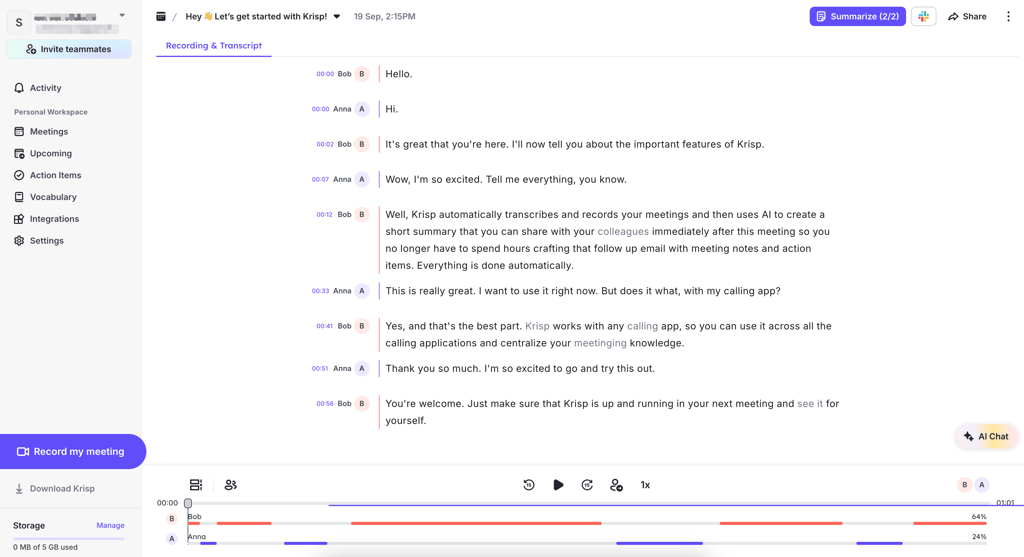
The AI assistant is easy to use, and onboarding is instant and straightforward, with no personalized tutorials. Krisp provides a sample transcribed conversation, though, to guide users through its features, including customizable action items and third-party integrations.
As for integrations, Krisp connects with productivity tools like Slack and HubSpot to sync meeting notes and action items into daily workflows. SDK partnerships also extend its noise cancellation and accent AI directly into third-party platforms.
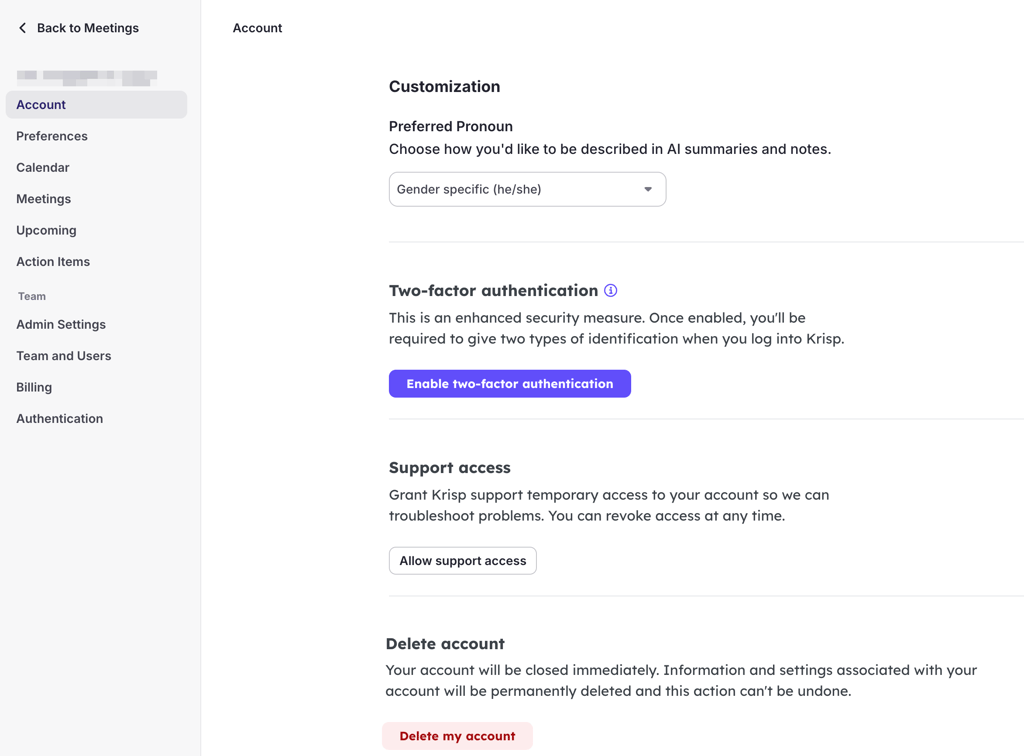
Overall, Krisp offers 3 different plans, including a free tier. The cheapest plan costs from $8.00/month, which, compared to other providers on the market, is a reasonable price. In this plan, you can find features like unlimited transcription, noise cancellation, audio and video recording, AI notes and action items, and AI accent conversion, which seem sufficient for distributed and remote teams.
| Plans | 3 (Free Trial, Pro, and Business) |
| Price | From $8.00/month per user |
| Key limits | Lacks advanced intelligence like custom vocabulary or sentiment analysis; no Salesforce, HubSpot, or Notion/Asana integration |
5. Avoma – AI tool for actionable meeting insights
| Features: | Collaboration features, revenue intelligence, strong emphasis on coaching, and conversation intelligence beyond just notes |
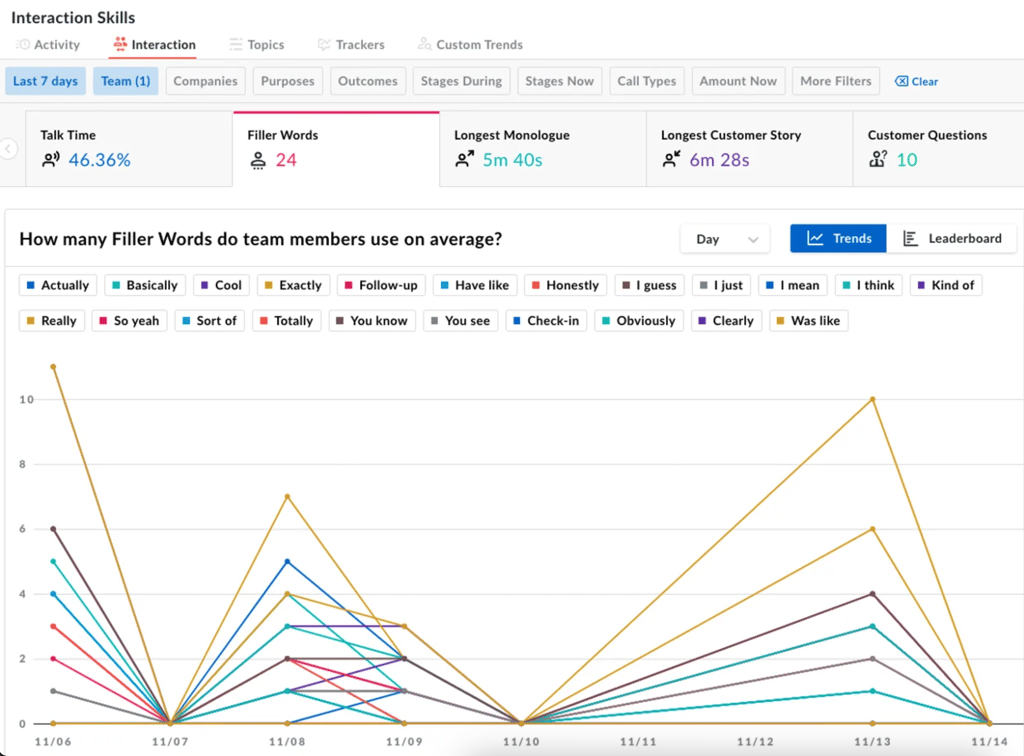
| Description: | Supports teams with scheduling, lead routing, CRM syncing, provides full meeting summaries, queries past meetings for specific AI-generated questions like action items and budgets, and evaluates calls against custom scorecards for coaching and performance review |
| Rating: |
Avoma is a premium AI platform that manages the full meeting lifecycle for corporate teams. It handles everything from pre-meeting agendas to post-meeting analysis and follow-ups. With end-to-end automation and CRM integrations, it helps teams get actionable insights, track coaching metrics, and streamline tasks.
This AI assistant is ideal for sales and customer success teams that need a complete view of their meetings. AI coaching and smart trackers help managers monitor performance and spot key conversation trends. Remote teams can make use of automated notes, live bookmarks, and AI follow-ups, while CRM syncs and revenue intelligence keep tasks and insights on track.
From our experience, Avoma is intuitive and easy to navigate, meaning that teams can get started quickly without a steep learning curve. The onboarding is straightforward, with guided tours and sample meetings that show key features.
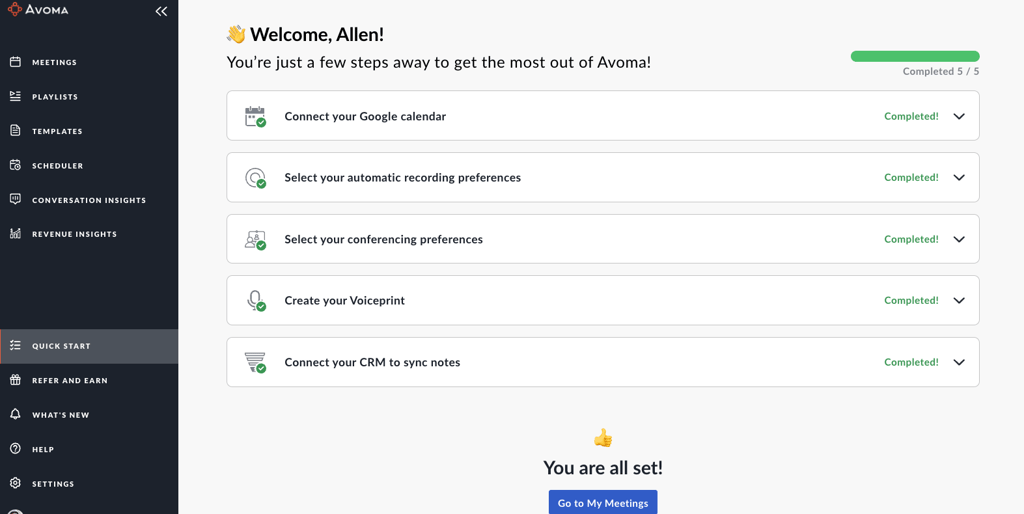
Avoma integrates with calendars, CRM platforms, and collaboration tools to ensure notes, tasks, and follow-ups flow seamlessly into existing workflows. Its automation features extend across scheduling, lead routing, and syncing insights into tools like Salesforce, HubSpot, and Slack. This way, teams can act on insights without leaving the platform.
The provider offers 3 plans and 3 revenue add-ons, including conversation intelligence, revenue intelligence, and lead routing. Even without add-ons, the plans aren’t cheap, with the base plan starting at $19.00/month. Selecting add-ons can quickly increase the cost, as each begins at $19.00/month. For smaller teams, the Startup plan is a solid option, offering up to 25 paid users, unlimited 1:1 scheduling, automatic video recording, real-time transcription, AI summary notes, and the Ask Avoma feature.
| Plans | 3 (Startup, Organization, and Enterprise) |
| Price | From $19.00/month per user |
| Key limits | Limited free tier |
6. Otter – AI assistant that highlights key insights

| Features: | Live captions during meetings, inline images, My Agenda feature, custom vocabulary, multiple platforms |
| Description: | Provides live captions for Zoom and Google Meet, inline images and My Agenda feature enhance meeting context, custom vocabulary improves technical accuracy, available on multiple platforms |
| Rating: |
Otter turns meetings into actionable insights with real-time transcription, AI-powered summaries, and multi-platform support. Its new AI Meeting Agent Suite transforms the platform from a passive recorder into an active participant, answering queries during meetings, scheduling follow-ups, and drafting emails automatically. With support for multiple languages and robust integrations, Otter helps teams capture, search, and act on information from every conversation.
Based on our testing, Otter is best for modern teams that need fast, actionable insights. Sales and customer success teams can capture key decisions, track follow-ups, and maintain accurate records across time zones. Remote and hybrid teams benefit from live captions, multi-platform support, and searchable transcripts, while executives can leverage the AI Meeting Agent Suite to automate post-meeting administrative tasks.
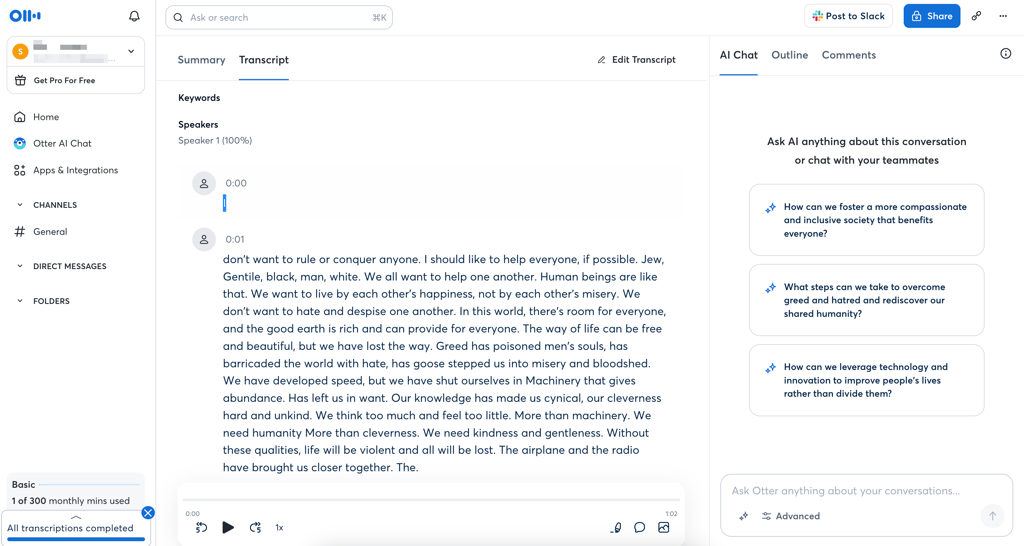
Otter keeps the onboarding process simple. After signing up with a Google or Microsoft account, users can jump straight into creating transcripts or importing audio without lengthy setup steps. The interface is clean and intuitive, making it easy to search, highlight, or edit transcripts.
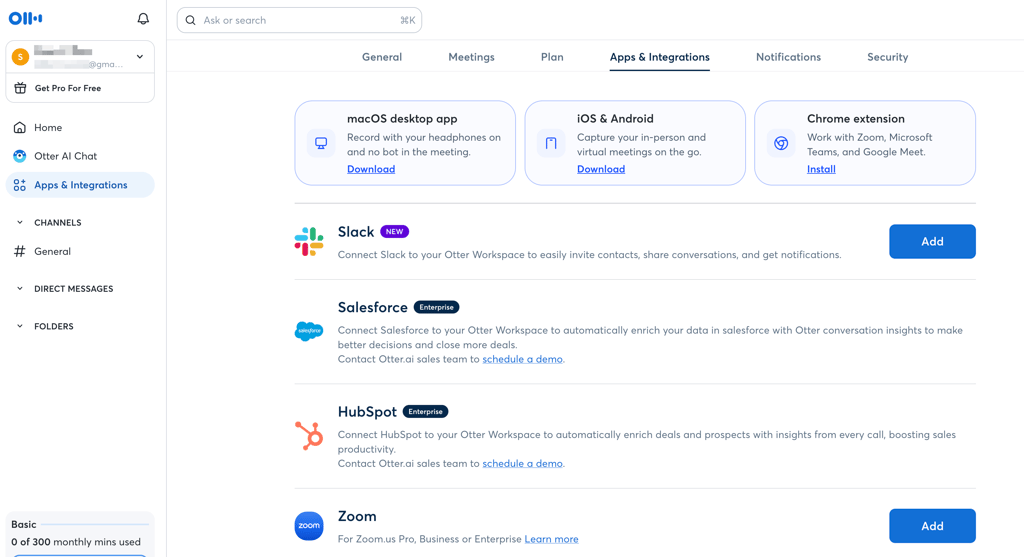
Teams can also connect calendars or Zoom accounts during onboarding to start syncing meetings automatically. Otter easily integrates with Zoom, Dropbox, Google Calendar, Outlook, and iOS calendars. Sharing is simple via folders, links, or group access, ensuring teams can collaborate seamlessly without leaving the platform. Overall, the platform feels approachable even for first-time users, with most features discoverable in just a few clicks.
Otter offers 4 plans, if you count its Basic plan, which works as a free tier. We found the pricing affordable, with its cheapest plan starting at $8.33/month. This includes live transcription, speaker identification, audio recording playback, multi-language support, and advanced AI workflows. Even if you choose to begin with the free plan, it’s also pretty capable, but without advanced AI features.
| Plans | 4 (Basic, Pro, Business, and Enterprise) |
| Price | Free or from $8.33/month |
| Key limits | Lacks video recording, sentiment analysis, talk-time analytics, cross-meeting analysis, and Notion/Asana integration |
Other notable tools
Not every AI meeting assistant makes the top tier, but a few are still worth keeping on your radar. Here are some notable AI tools with unique strengths that could be solid alternatives depending on your workflow:
- Jamie. Jamie works with both online and in-person meetings without needing a bot to join the call. It’s GDPR-compliant and hosted in Europe. I also like the fact that it supports over 100 languages and lets you set up custom templates. On the downside, its free plan is limited, and advanced tiers can get pricey as you scale.
- Sembly. Built for teams, Sembly doesn’t just transcribe meetings – it delivers highlights, next steps, and even works with pre-recorded files. Its compliance credentials (GDPR, SOC 2, HIPAA, PCI DSS) make it attractive for enterprise use, though its language support (around 45-48) lags behind Jamie.
- Grain. Aimed at sales and success teams, Grain integrates tightly with tools like Slack, HubSpot, and Salesforce. It’s excellent for pushing insights directly into workflows, but requires a bot to join calls, which some users find less seamless.
Emerging players are also worth a look. For example, Zocks is experimenting with fresh approaches to meeting insights that could push the category forward.
Best AI meeting assistants at a glance
Picking the right AI meeting assistant isn’t easy – each one packs its own features. That’s why we put together this cheat sheet of the best AI meeting assistants. Here’s how they compare in features, pricing, and key perks:
| Provider | Rating | Starting price | Free version | Key features | Best for |
| Fireflies | Free or from $10.00/month | ✅ Yes, forever free plan | Live notes and transcription, personalized feed with key topics, rules engine, advanced analytics, and admin controls | Generative AI, generous integrations | |
| Fathom | Free or from $16.00/month | ✅ Yes, forever free plan | AI Scorecards for coaching and evaluating calls, customizable templates for sales-deal summaries and non-English summaries | Easy note-sharing, keyword alerts | |
| tl;dv | Free or from $18.00/month | ✅ Yes, forever free plan | Sales coaching and playbooks, auto-drafted follow-ups, multilingual support, privacy-first with EU hosting and end-to-end encryption, EU AI Act compliance | AI-powered search, free recordings | |
| Krisp | From $8.00/month | ✅ Yes, free trial for 7 days | Noise cancellation and audio clarity, real-time accent conversion, voice translation, SDK for voice agents | Noise cancellation, detects different accents | |
| Avoma | From $19.00/month | ✅ Yes, free trial for 14 days | Collaboration features, revenue intelligence, strong emphasis on coaching and conversation intelligence beyond just notes | Cover end-to-end automation, CRM sync | |
| Otter | Free or from $8.33/month | ✅ Yes, forever free plan | Live captions during meetings, inline images, My Agenda feature, custom vocabulary, multiple platforms | Real-time transcription, AI chat |
Why is it an alternative to built-in AI?
Google Meet and Microsoft Teams now include AI features, but the native tools don’t always cover every need. If you want advanced insights, cross-platform support, or smarter meeting analytics, third-party AI assistants often do a better job.
The best AI meeting assistants work across Zoom, Google Meet, and Microsoft Teams, keep all your transcripts in one place, and let you track patterns across multiple sessions. Google Meet currently limits analysis to individual meetings, while Microsoft Teams Copilot can reason across Microsoft 365 data but lacks dedicated multi-meeting analytics. Third-party platforms bring live interactive perks, like Otter’s Hey Otter voice commands or Fireflies’ AskFred, which go further than most built-in AI options.
Core features, such as transcription, summaries, and action-item detection, are now standard everywhere. However, integration and security draw the dividing line: third-party tools plug into CRMs and project management apps and showcase compliance certifications, while Google and Microsoft keep users within their own ecosystems.
In short, third-party AI meeting assistants give you analytics, interactivity, and cross-platform smarts that built-in AI tools are only starting to catch up with.
Conclusion
AI meeting assistants are becoming irreplaceable tools for anyone buried in calls, team check-ins, or client briefings. They don’t just take notes – they transcribe, summarize, and surface action items so you can focus on the conversation instead of scrambling with a keyboard. With plenty of platforms competing for attention, the challenge is figuring out which one fits your workflow best.
If you want a single pick, Fathom is the best AI meeting assistant overall – solid transcription quality, reliable summaries, and a strong set of privacy protections. But don’t discount the others; depending on your needs (like budget, integration needs, or niche features), all tools on this list are perfectly capable alternatives.
FAQ
Which AI meeting assistant gives the most accurate transcripts and speaker names?
When it comes to accuracy, Fathom consistently delivers some of the clearest transcripts in the market. Its speaker identification is also among the best, making it perfect for teams that need reliable, organized meeting notes.
What privacy and security does the AI meeting assistant have (GDPR, SOC 2, HIPAA)?
Top AI meeting assistants don't just transcribe – they secure your data with robust privacy measures. Many platforms are certified for GDPR compliance, SOC 2 Type II, and HIPAA, offering end-to-end encryption, strict access controls, and audit logs to protect sensitive information.
Who owns my data with the AI meeting assistant, and where is it stored?
With AI meeting assistants, your data is technically yours, but the platform still stores and processes it on its servers to create transcriptions and summaries. Most use cloud storage in provider-specified regions, and some let enterprise users pick storage locations or lock things down with encryption.
How does the AI meeting assistant handle accents, background noise, and people talking at once?
Most AI meeting assistants use advanced speech recognition trained on diverse accents and dialects, though accuracy can dip with strong regional variations. They apply noise suppression and speaker separation to cut through background chatter and overlapping voices, but results vary when multiple people talk at once.
What languages can the AI meeting assistant transcribe and summarize?
An AI meeting assistant typically supports transcription and summarization in anywhere from 20 to over 100 languages, depending on the platform. For instance, Fireflies claims support for 100+ languages, while Otter currently supports just 4.