OpenAI Codex app review (2026): hands-on test
Being behind major reports like The Mother of All Breaches and RockYou2024, our in-house cybersecurity experts and journalists provide unbiased, real-world testing and in-depth analysis.
We maintain complete transparency by openly sharing our testing methodologies with our audience.
Learn more

Codex is OpenAI’s answer to software like Claude Code and Google Antigravity, a standalone AI coding app for macOS that can also be plugged into your IDE (Integrated Development Environment). Codex is capable of creating and managing large projects, generating and debugging multiple files.
To see how it stacks up against the alternatives, I put OpenAI Codex through a series of tests to determine its coding performance, strengths, and weaknesses. Keep reading to find out how Codex performed.
Overview
| Rating | |
| Pricing | From $20.00/month |
| Best for | Freelancers looking for coding assistance |
| Great for | Prototyping, learning to code |
| Not ideal for | Large, complex projects |
What problem is OpenAI Codex designed to solve?
OpenAI Codex is a coding assistant designed to help developers, students, and teams quickly build software with AI. It’s basically a more advanced version of ChatGPT’s coding mode, allowing you to build entire code repositories, as well as debug existing codebases.
Codex can be used in a variety of scenarios, from building web and desktop applications to refactoring and code analysis to code explanation. Unlike a typical chat-based coding tool, Codex can manage multiple files, building more complex web apps than a canvas-like mode in ChatGPT, Gemini, or Claude.
Getting started: setup, interface, and workflow
Using Codex was pretty simple. To start off, installation was simple, working just like installing any other piece of software on macOS. Once installed, the app presented me with a simple interface featuring a chatbot and a sidebar where I could manage my projects and explore the automations and Skills (prompt presets) offered by Codex.

The automations offered by Codex are essentially scheduled prompts that it runs at a chosen interval. Skills, meanwhile, are premade, advanced prompts that use integrations with other software to perform advanced activities, like turning a Figma design into a webpage or generating a video for your website using Sora.
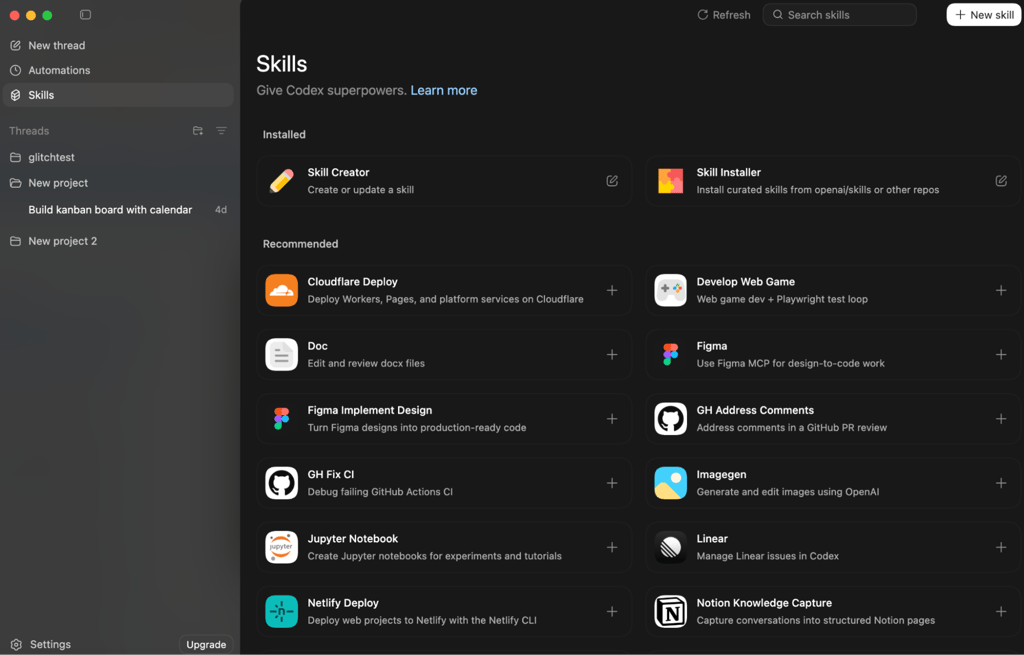
Codex can also be accessed via the Cloud, with repositories managed through a GitHub integration. Unfortunately, I found that implementation to be very unintuitive and hard to integrate into any kind of workflow.
The desktop app was very simple to use. Whether I was asking it to generate code or to answer questions, the model performed its tasks quickly and with reasonable accuracy. It is also linked to specific code lines in its explanation, making it easy to review and verify the code.
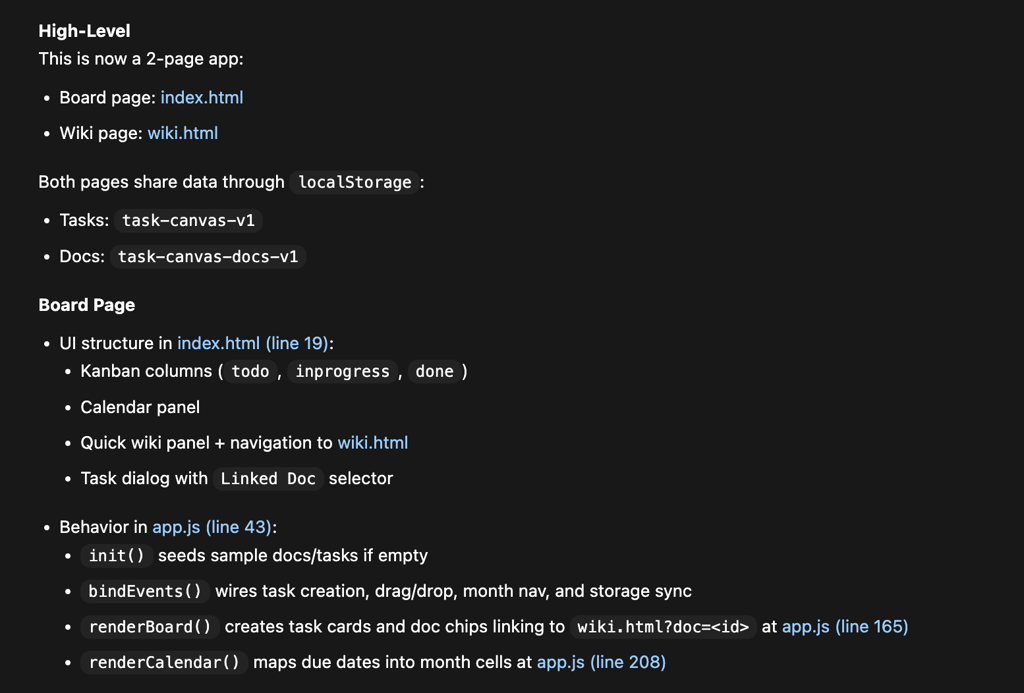
Overall, using OpenAI Codex felt very intuitive. Setting up a new project was easy thanks to the GitHub integration, but also possible locally by simply creating a new folder. Overall, I would say that Codex was the most user-friendly coding assistant I’ve used thus far.
What Codex can do well (core capabilities)
Codex is built to turn human intent into working software – fast. It bridges the gap between plain English and code, helping developers move from idea to implementation with fewer roadblocks. Whether you're prototyping, debugging, or navigating an unfamiliar codebase, Codex acts less like a static tool and more like an engineering assistant.
Code generation from natural language
Codex can use your normal, conversational prompts to create advanced web apps in multiple programming languages and frameworks, including Python, Angular, Node.js, PHP, Swift, Kotlin, and others.
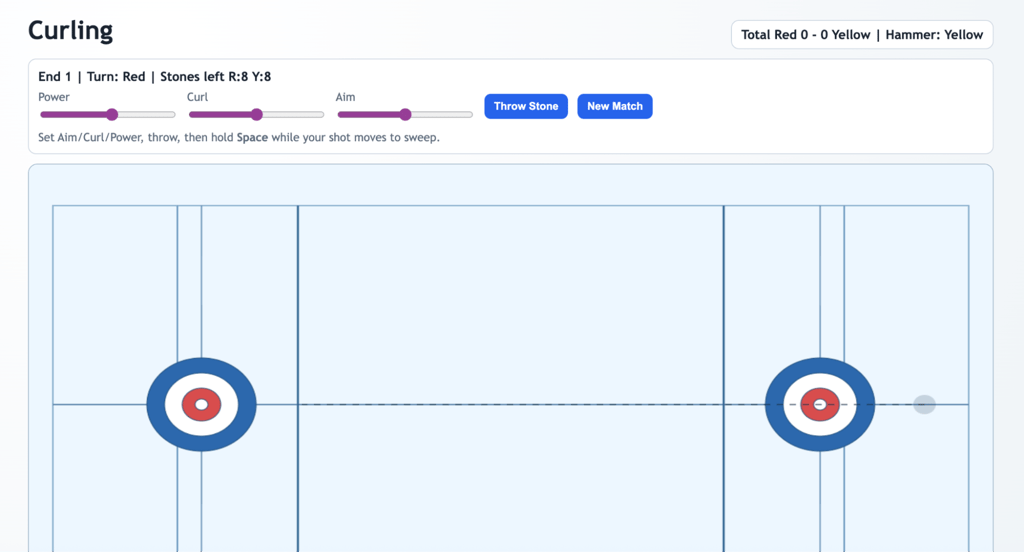
When testing Codex, I found that it understands simple prompts well. I was able to build a Kanban dashboard, with a calendar and a Wiki with a simple prompt, and it worked pretty well. To test something more complex, I asked Codex to generate a curling game. It did so, although the game had trouble with a few =rules, and even after fixes and my notes, the dimensions and gameplay were still a bit off what they should be.
Code understanding and explanation
Codex does a good job of understanding and explaining existing code. Whenever I asked for a breakdown of code, it would relate to specific lines when doing so. The breakdowns are clear and easy to understand, even if you don’t have experience with coding.
Of course, if you ask for a more technical breakdown, Codex can deliver it and adjust to your knowledge level, giving answers suitable to your abilities. All in all, Codex is definitely capable of performing code analysis at a high level.
Debugging and error handling
To test OpenAI Codex’s debugging capabilities, I asked Gemini 3 Pro to introduce some hard-to-spot glitches in a simple app. Codex didn’t have any trouble finding bugs in either of the two scenarios I presented it.
Similarly, I corrupted a file in one scenario, breaking my software. In this case, Codex also spotted the errors and rewrote the script to make it work. In more complex projects I generated, debugging was pretty successful, although sometimes it wouldn’t understand certain GUI-related prompts properly, for example, not being able to create a proper responsive layout.
Multi-language support
OpenAI claims that Codex can support over a dozen programming languages and multiple frameworks. However, I found that when writing an app without specific language requirements, it defaults to Python or JavaScript for most tasks.
When testing Codex, I asked it to rewrite several ASPs into different languages. It did so promptly, delivering functional code in languages like TypeScript and C# without issue. The software was also able to easily pick a different programming language, based on even pretty vague requirements.
My experience with the OpenAI Codex app
The first steps with OpenAI Codex may have been the hardest. Codex requires you to either sync with a GitHub project to use in cloud mode or install a standalone app. Unlike Google Antigravity, Codex doesn’t offer native Windows or Linux installations. It only provides a separate installer for macOS. It can be used with an IDE like VS Code, but it’s not quite as plug-and-play as its competition.
Of course, just like any IDE, Codex depends on the software installed on your computer to run, test, and compile scripts. This is expected, as Codex isn’t a code for casual, beginner-level coding, but rather an advanced assistant.
I tested OpenAI Codex in a few ways, asking it to write code for a variety of software in different programming languages. I wanted to give Codex a challenge, so I asked it to build two different apps.
The first app was a pretty simple time management app. It featured a calendar, a kanban board, and a wiki that let you connect tasks to the calendar. It worked well, with only very minor bugs, and each iteration brought exactly what I asked for.
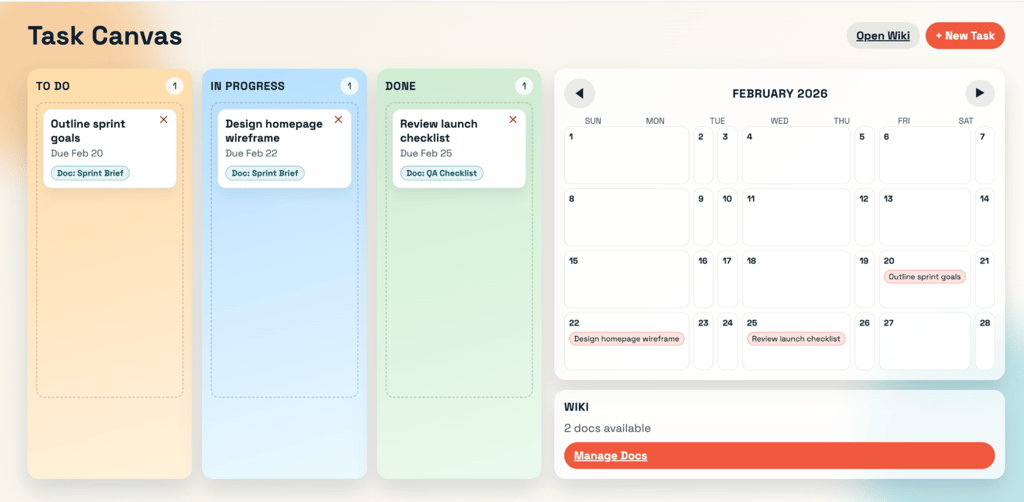
The second app was a curling game. Seeing as I was writing this around the time of the Winter Olympic Games, I decided to test Codex’s capabilities with a complex sport that didn’t require much graphics rendering.
While Codex got the gist of what I was trying to do, it still needed a lot of refinement to make the game actually playable. For example, stones would disappear when they shouldn’t, and power was hard to adjust. Even after several iterations, Codex struggled to make adjustments that would make the game a good representation.
Codex also does a relatively good job matching programming languages to my use cases. When I asked it for an app that would run in the Windows tray, it immediately chose Python. When asked for an alternative implementation, Codex chose C#. This was the right choice, as C# works well on Windows through the .NET framework.
What users are saying about the OpenAI Codex app
When looking through community forums and websites like Reddit, I found that the general consensus is positive. Users were particularly focused on the intuitiveness of its interface and the speed of the model.
Some users also appreciated how hands-off Codex was, allowing them to focus on orchestrating, rather than micromanaging and editing the code themselves. This was particularly appreciated by people with some technical experience but limited coding skills, as an opportunity to build software faster and more efficiently.
On the flip side, many Windows and Linux users found Codex's macOS-only status extremely frustrating. Other users also pointed out that the software doesn’t show its reasoning by default, making it harder to oversee what it's doing. Finally, some also pointed out that Codex is having trouble with code refactoring.
Codex vs other AI coding assistants
OpenAI Codex is based on the same model previously used to create GitHub Copilot, but that isn’t its only competitor. Other products on the market, like Google Antigravity, Claude Code, or Windsurf, all work similarly to OpenAI Codex.
At this point, all three top AI models do an excellent job in coding simple solutions. This means the biggest differentiator in terms of performance was always going to be how fast and how user-friendly each interface was.
OpenAI’s implementation is definitely one of the better ones in terms of usability. Installing it and connecting it to GitHub was simple, and adding a new project was very intuitive. This is something that I have struggled with when testing Google Antigravity, which had trouble setting up all its dependencies in the installation process. It’s also far simpler to set up than Claude Code and GitHub CoPilot, offering a separate app, alongside plugins for popular IDEs.
I also noticed that Codex is on the faster side when it comes to generating code. Most simple tasks I requested took under a minute, while Antigravity, for example, would often take over a minute, even for a simple code fix in a rather small app. Take a look at the detailed comparison table below.
| Tool | Price (starting tier) | What it is | Best feature | How it learns your code | Where you use it | Supported platforms |
| OpenAI Codex | $20.00/month* | A desktop app to manage AI workers | Runs multiple AI tasks at the exact same time | Looks at specific project folders | macOS app, IDE extension, and terminal | macOS (Apple Silicon only) |
| Google Antigravity | $0.00/month** | A custom code editor built around AI | Shows you pictures and plans of what it will build before it codes | Uses a control dashboard | A custom version of VS Code, and an IDE extension | macOS, Windows, and Linux |
| Claude Code | $20.00/month | An AI assistant that lives in your command line | Easily connects to your computer's command line and other tools | Reads the text directly from your terminal | Terminal and editor plugins | macOS, Windows, and Linux |
| Windsurf | $15.00/month | A fast code editor that works alongside you | Edits many different files at once without getting confused | Deeply scans and memorizes your entire project | A custom version of VS Code | macOS, Windows, and Linux |
| GitHub Copilot | $10.00/month | An AI add-on for enterprise teams | Searches across all your company's private code | Searches your company's GitHub account | Any standard editor and GitHub.com | macOS, Windows, and Linux (via your editor) |
Pricing, access, and value for developers
OpenAI Codex is bundled with ChatGPT, starting at $20.00/month. While it does offer a free version with increased usage limits for a limited time, these are likely to be really restrictive when OpenAI ends its launch phase.
Here’s a breakdown of the plans you can pick with OpenAI Codex:
| ChatGPT tier | Price | Codex app access | Rate limits |
| Free / Go | $0.00/month | Limited-time trial access | Low usage limits |
| Plus | $20.00/month | Included | Medium usage limits |
| Pro | $200.00/month | Included | High usage limits |
| Team / Business | Custom | Included | Custom usage limits |
Who should use the OpenAI Codex app?
OpenAI Codex is an app that will work for different use cases. To help you decide whether you should get it, I gave a breakdown of the work OpenAI Codex excels at, and when you should avoid using it.
OpenAI Codex is an excellent fit for:
- Individual developers looking to improve their workflow. Codex can really speed up development time, especially for smaller-scale tasks that don’t require a team.
- Students learning to code. Codex can be a very helpful teaching tool, helping students understand various languages and perform code reviews for learners who are just starting out.
- Teams performing rapid prototyping and scripting. If your team needs several versions of software in quick succession, Codex is an excellent assistant.
OpenAI Codex isn’t ideal for:
- Fully autonomous coding. Codex isn’t software capable of fully autonomous coding. It requires human-driven prompts to create specific features.
- Complex production systems without review. The more complex a task, the more likely Codex is to make mistakes, potentially affecting production code.
- Windows and Linux users. Until OpenAI releases a desktop app for the two systems, its biggest advantages are limited to macOS.
Final verdict
OpenAI Codex is an interesting product. By focusing on bringing a usable, intuitive AI coding interface to users, OpenAI challenged competitors like Google Antigravity and Windsurf. Codex is easy to use and delivers fast and effective code, particularly for simpler projects.
However, it’s not perfect by any means. It can struggle with more advanced code and concepts, and doesn’t offer a functioning app for Windows and Linux. This makes it of limited use for larger teams and non-macOS users.
FAQ
What is the OpenAI Codex app?
OpenAI Codex is a desktop coding assistant for macOS that allows you to build entire repositories with natural language-based prompts.
Is Codex better than ChatGPT for coding?
Yes, Codex is better than ChatGPT for coding. Codex uses a purpose-trained GPT model, making it slightly more efficient for coding. However, the biggest advantage is that, being a desktop app, it can manage more complex projects comprising multiple files.
Can Codex replace GitHub Copilot?
This depends on your use case. Codex can be integrated with your IDE just like Copilot, but rather than providing autocomplete and assistance, Codex will generate entire projects.
Is the Codex app free?
Codex is free for a limited time. OpenAI announced that Codex access will be available in its launch stage. Afterwards, it’s likely that Codex’s free version will be very limited.