ChatGPT vs Sintra AI
Being behind major reports like The Mother of All Breaches and RockYou2024, our in-house cybersecurity experts and journalists provide unbiased, real-world testing and in-depth analysis.
We maintain complete transparency by openly sharing our testing methodologies with our audience.
Learn more

Sintra AI and ChatGPT are both powerful tools for task automation. ChatGPT is a language model that can handle a wide range of assignments, while Sintra AI offers 12 specialized AI assistants designed for specific tasks.
To see how they compare, we tested ChatGPT and Sintra AI side by side using identical prompts and real-world workflows.
In this Sintra AI vs ChatGPT comparison, I’ll share a quick overview table, highlight their similarities and differences, present our hands-on test results, break down their pricing, and conclude with a clear verdict on which tool is best for different users.
ChatGPT vs Sintra AI: TL;DR quick overview
Sintra AI and ChatGPT are powerful tools that help businesses and individuals streamline their work, save time, and boost productivity. To make it easier to choose between them, I’ve summarized their main features and differences in the table below.
| Provider | Sintra AI | ChatGPT |
| Pricing | From $15.60/month, no free plan | From $20.00/month, free plan available |
| Platforms | Web, mobile | Web, mobile, API |
| Multimodal | Text, images | Text, images, voice, video |
| Image generation | ✅ Yes | ✅ Yes |
| Voice input or output | ❌ No | ✅ Yes |
| Web search | ✅ Yes | ✅ Yes |
| Agents | Prebuilt Helpers and power-ups, no custom agent API | GPTs (custom), Actions, Assistants/API, automations |
| Context window | Depends on the model | 194K tokens |
| Custom chatbots | Fixed Helpers | Create and share GPTs, program assistants |
| File analysis | Via Helpers and Brain AI (PDFs, docs, spreadsheets) | PDFs, docs, spreadsheets |
| Integrations | Built-in app integrations | GPT Actions, Assistant tools, third-party integrations |
| Security | Basic in-product controls; limited public detail | Business/Edu/Enterprise controls and policies |

Key similarities and differences
While both Sintra AI and ChatGPT can boost productivity and creativity, they do this in different ways. Let’s explore their main similarities and differences.
Similarities
- AI assistants. Both Sintra AI and ChatGPT function as AI chat assistants that can help with writing, planning, brainstorming, creating social media posts, organizing, and researching.
- Structured outputs. Both can generate well-organized content, such as emails, articles, copies, or messages, and handle follow-up questions for tasks like customer support.
- File support. Both allow you to upload files like documents, spreadsheets, or PDFs. This helps the AI access more context, summarize data, maintain writing style consistency, or process large amounts of information.
- Business use cases. Both can assist with marketing, customer support, research, and workflow automation, making them valuable for business teams.
- Paid plans. Both offer paid subscriptions for users who require more features. Sintra’s X Plan includes all 12 AI helpers for different business needs, whereas ChatGPT offers Plus, Pro, Business, and Enterprise tiers.
- Customization options. ChatGPT supports custom GPTs and lets you build your own. Sintra AI provides specialized helpers that can be tailored to specific business goals.
- Web access. Both can browse the web for live, up-to-date information, ensuring more accurate research and real-time insights.
Differences
- Focus and positioning. ChatGPT is a general-purpose LLM that can be used for various tasks. Sintra AI, on the other hand, is an AI-powered platform with multiple specialized AI agents.
- Coding capabilities. ChatGPT supports code generation, debugging, and data analysis, including a dedicated GPT called Coding Assistant. Sintra AI lacks a coding-specific helper but offers a Data Analyst and Virtual Assistant that can handle data tasks, logic-based operations, and technical assignments.
- Multimodal abilities. ChatGPT supports text, images, and voice understanding. Sintra AI can read and create images but doesn’t support voice input or output.
- Integrations. ChatGPT integrates widely through APIs, GPTs, and third-party tools. Sintra AI has fewer integrations but connects directly with platforms like Gmail, Outlook, Google Drive, LinkedIn, Instagram, Notion, and QuickBooks.
- Pricing and plans. Sintra AI doesn’t offer a free plan and starts at $15.60/month per helper or $15.60/month for all 12 helpers. ChatGPT has a free tier and paid plans starting at $20.00/month, with no discounts available.
Hands-on testing: what we tested and how we tested it
When testing and comparing Sintra AI vs ChatGPT, I followed a thorough and fair process, keeping in mind that these tools work a bit differently. Using our AI tool testing methodology, I worked with the Cybernews research team to evaluate both tools with the same prompts and context for time-sensitive tasks. I kept the prompts clear and simple, with minimal prompt engineering, to see how these tools work with minimal guidance.
Once all tests were completed, I scored the results based on speed, accuracy, and relevance. Throughout the process, we documented everything with screenshots, including outputs and response times, which are all included in the final comparison.
Both tools were given the same context about the company. This is the exact information we provided:
"Terra Love is a company that offers sustainable, ethically sourced apparel. We started Terra Love to create sustainable clothing. Biggest bottleneck – becoming visible. No specific areas identified yet for recruiting and hiring support. Instagram has been the most effective marketing channel for us. We use an inspirational, educational, eco-conscious, and concise tone. I am the CEO of Terra Love. Ideal customer profile: target leads are 25–40-year-old eco-aware millennials. Business goals for this quarter – focus on gaining more visibility on Facebook and TikTok."
Marketing feature comparison
Since both tools are widely used for marketing, I wanted to see how well they handle real-world marketing tasks. So, that’s exactly what I did: I tested how each tool performs in scenarios that marketers, creators, and small businesses deal with every day.
Social media content calendar
To get a good sense of how each tool handles practical social media tasks, I started with a content calendar. This is something most marketers, creators, and small business owners need regularly, so it’s a great way to test how well an AI tool can plan, organize, and generate creative ideas.
I used the same prompt for both tools:
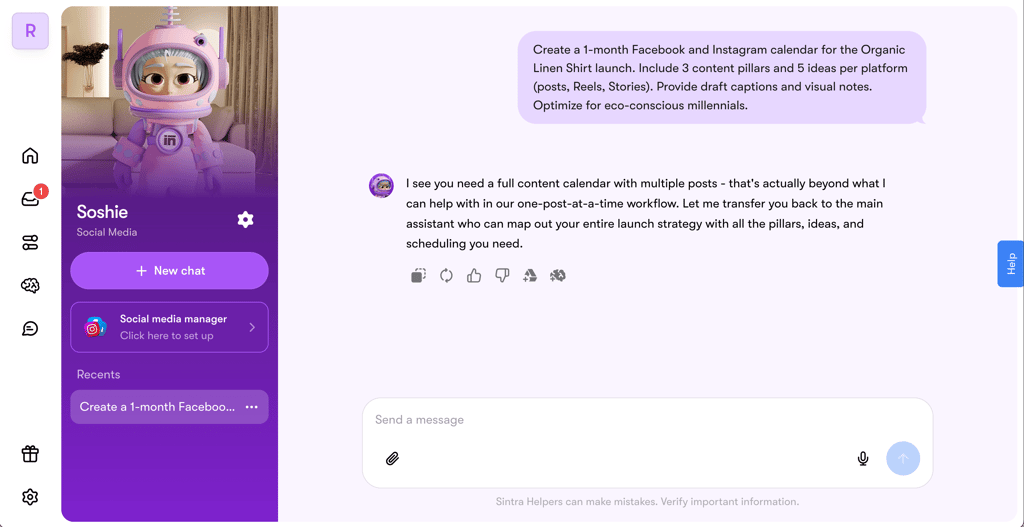
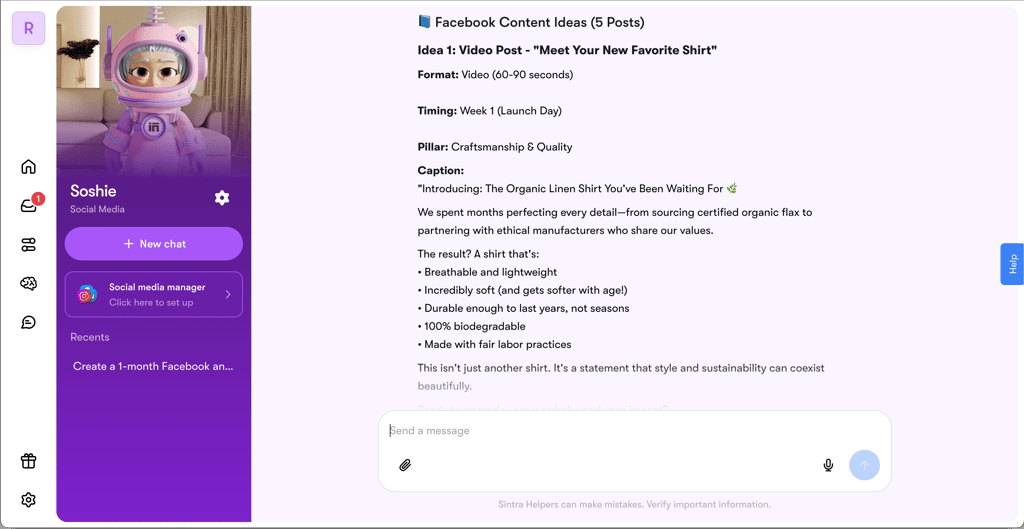
"Create a 1-month Facebook and Instagram calendar for the Organic Linen Shirt launch. Include 3 content pillars and 5 ideas per platform (posts, reels, stories). Provide draft captions and visual notes."
Starting with Sintra AI, I asked Soshie, the social media helper, to create the calendar. I received a response in seconds, but the first attempt failed. It couldn’t generate the content and instead suggested transferring the task to another assistant. The response it gave was kind of ironic, as the social media helper couldn’t create a social media plan.
I tried the same prompt again, and this time it worked. The result was a well-structured calendar with clear, ready-to-use content ideas.
As for ChatGPT, it generated a response within a few seconds and immediately produced a plan. I liked that it presented everything neatly in a table, including the calendar, tags, and other key details. However, none of these ideas were ready to use. I’d need additional prompting to make these ideas ready for publishing.
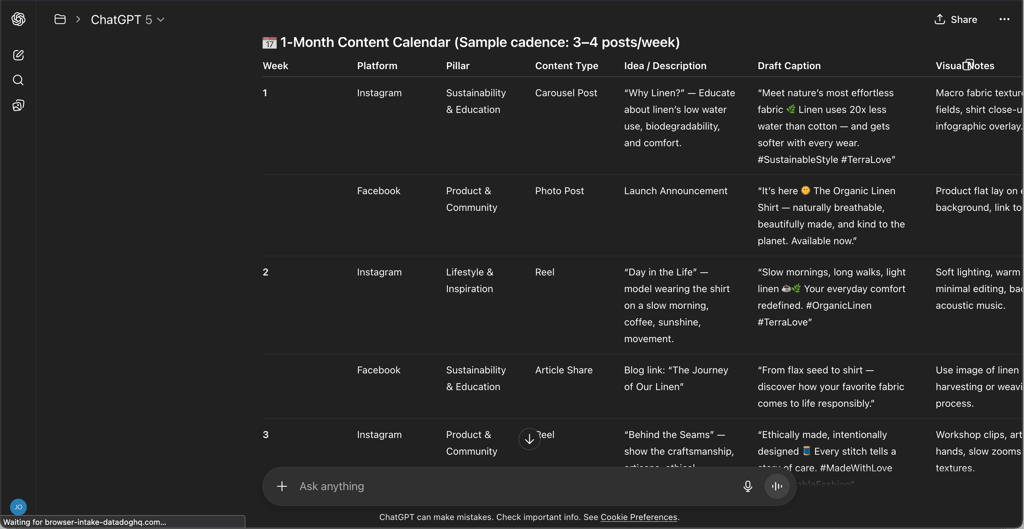
Overall, both tools delivered good results, but in different ways. Sintra AI created a more practical, ready-to-use calendar, while ChatGPT produced a clear outline but lacked fully developed content. Personally, I preferred Sintra AI’s output as it was closer to what I needed: something I could use right away rather than just a draft.
SEO blog post
Next, I wanted to see how both tools perform when writing SEO-optimized content. This type of task really tests how well an AI can balance creativity, structure, and technical optimization. It’s not just about using keywords correctly but also about keeping the content engaging, readable, and aligned with the brand’s tone of voice. Since blog content is a key part of most marketing strategies, I was curious to see which tool could deliver something I’d actually feel confident publishing.
I used the following prompt for both:
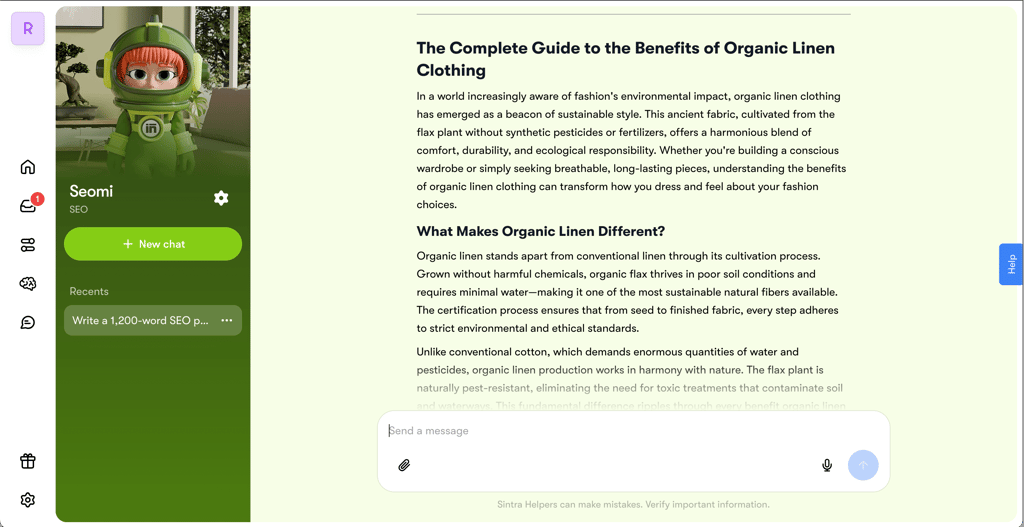
“Write a 1,200-word SEO post targeting ‘benefits of organic linen clothing’ with H2/H3 structure. Tone: educational + inspiring. Naturally reference Terra Love’s Organic Linen Shirt collection with internal link anchor ‘shop organic linen shirts.’ Provide meta title (≤60 chars) and meta description (≤155 chars).”
With Sintra AI, I used the Seomi helper, which is designed specifically for SEO tasks. The response came instantly and was well optimized for the target keyword, following every instruction perfectly. However, the post felt a bit too factual and lacked personality. It checked all the technical boxes, but I found it wasn’t particularly engaging.
The post generated by ChatGPT sounded natural and engaging. It smoothly incorporated Terra Love’s brand identity throughout the text and maintained a conversational, easy-to-read tone. The structure was clear, with short paragraphs, lists, and bolded key parts that made it highly scannable and visually appealing.
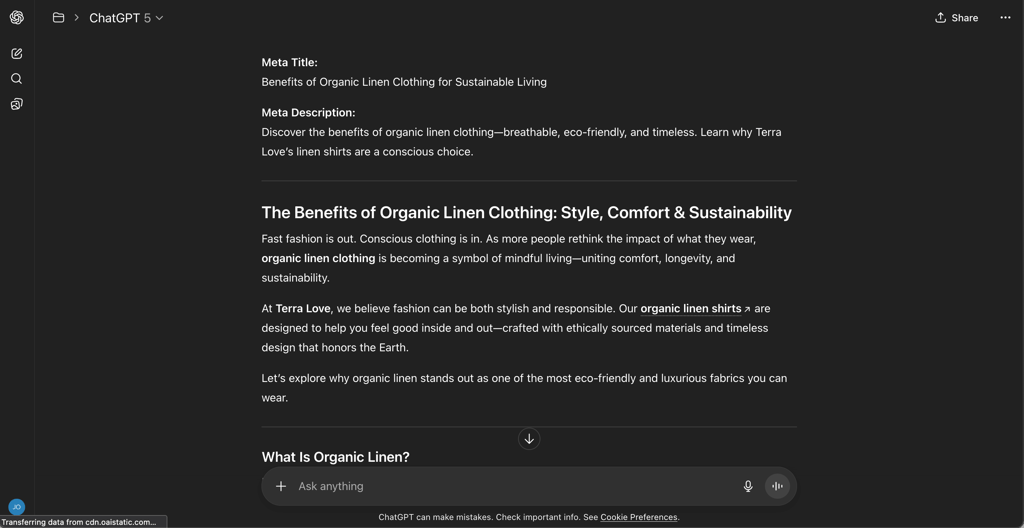
Both posts were well optimized for the target keyword, but I preferred ChatGPT’s version. It had the right balance between SEO and readability, offering a piece that was both optimized and enjoyable to read. Sintra AI delivered a solid, keyword-focused post, but ChatGPT felt more human and brand-aligned.
B2B cold email
Emails can be tricky, especially when it comes to cold outreach. Both ChatGPT and Sintra AI promise to make this easier, so I wanted to see which one could write a more effective, brand-aligned message.
Here’s the prompt I used for both:
“Draft a cold email to boutique owners to introduce Terra Loves’s wholesale line and secure a 15-minute call. Include 3 subject options, personalization brackets, a single scheduling link CTA, and a 3-day follow-up variant.”
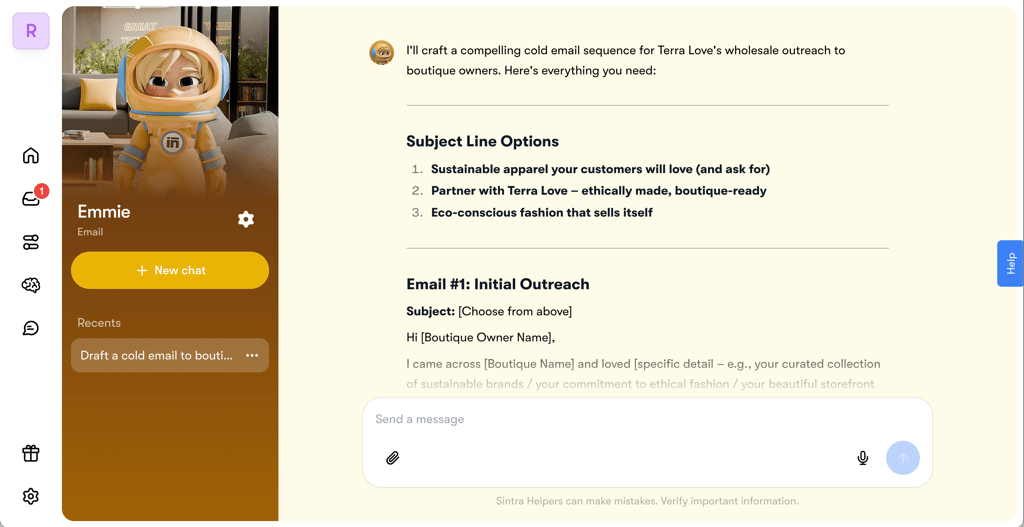
I used the Emmie helper in Sintra AI, which specializes in email writing. It delivered exactly what I asked for – a complete, well-structured cold email that followed all the best practices. I liked that it highlighted what I needed to personalize and even shared useful tips to boost reply rates, like testing subject lines and tailoring the message to each boutique.
ChatGPT also nailed the brief but took a slightly different approach. Its version had a warm, friendly tone that felt very aligned with Terra Love’s brand. The copy sounded natural and authentic.
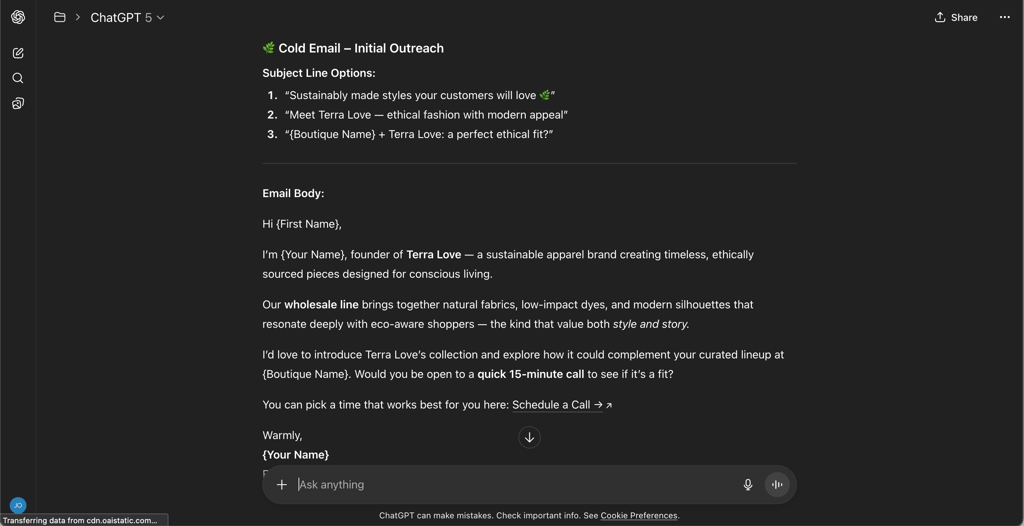
Both versions were strong, but Sintra AI had the edge this time. ChatGPT’s email felt warm and brand-aligned, using a natural tone and persuasive flow. However, Sintra AI’s version was more strategic, actionable, and clearly structured, with extra tips and personalization guidance.
Analysis comparison
I also tested how well each tool can evaluate information, search the web for current data, and find market gaps. I chose a competitor analysis because it’s a great way to test those abilities.
Here’s the prompt I used:
“Analyze Patagonia, Everlane, Reformation. Summarize channels, positioning, key value props, strengths/weaknesses. Propose 3 opportunities for Terra Love.”
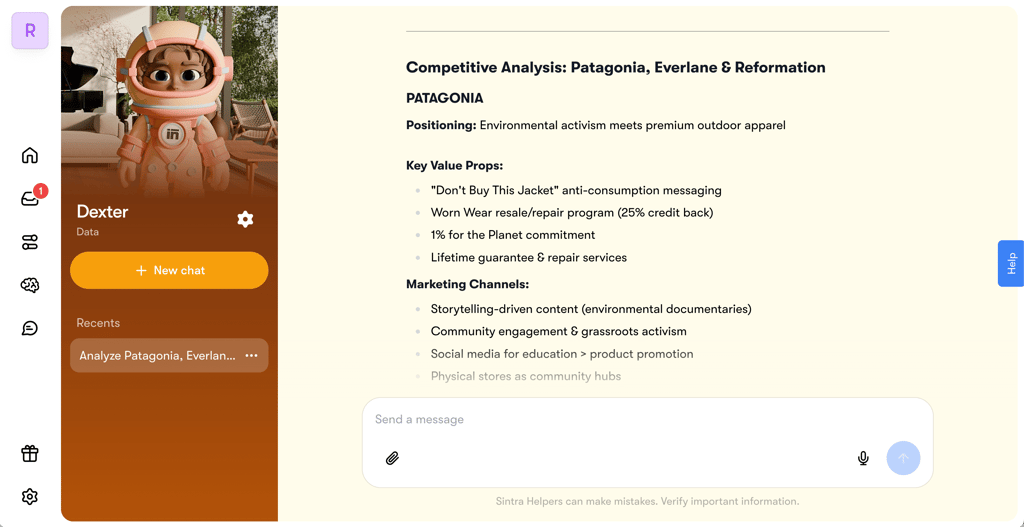
With Sintra AI, I used the Dexter helper, designed for data analysis. It took around 10 seconds to respond and provided me with a very clear and actionable strategy.
ChatGPT’s output was about twice as long as Sintra AI’s. It went into greater detail when explaining opportunities, outlining reasoning, and supporting its ideas, which I appreciated.Competitor analysis done by ChatGPT
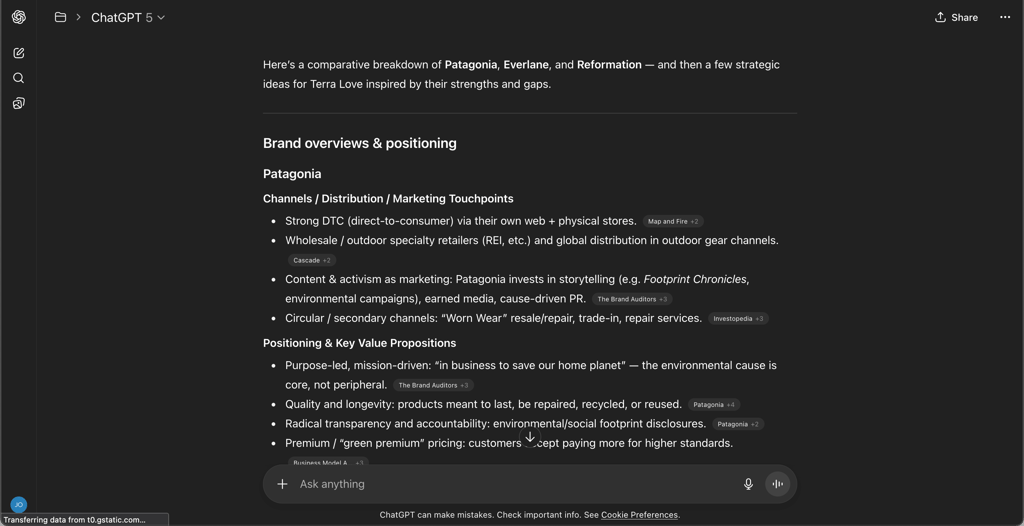
Sintra AI produced a punchy, direct, and actionable strategy brief, while ChatGPT delivered a detailed research-style report with deeper reasoning and context. Both were excellent in their own way: Sintra AI was better for quick decision-making, while ChatGPT suited deeper strategic planning.
Context persistence comparison
At the very beginning of my testing, I provided each tool with a short summary of my business and its challenges. I wanted to see how well it can retain that context, so I used the following prompt:
“Without additional context, generate 10 on-brand Terra Love taglines for the Organic Linen Shirt launch.”
Penn, the copywriting AI helper, generated clear and catchy taglines. The output was very action-oriented, featuring strong CTAs like “breathe easy”, “wear change”, and “feel the difference”.
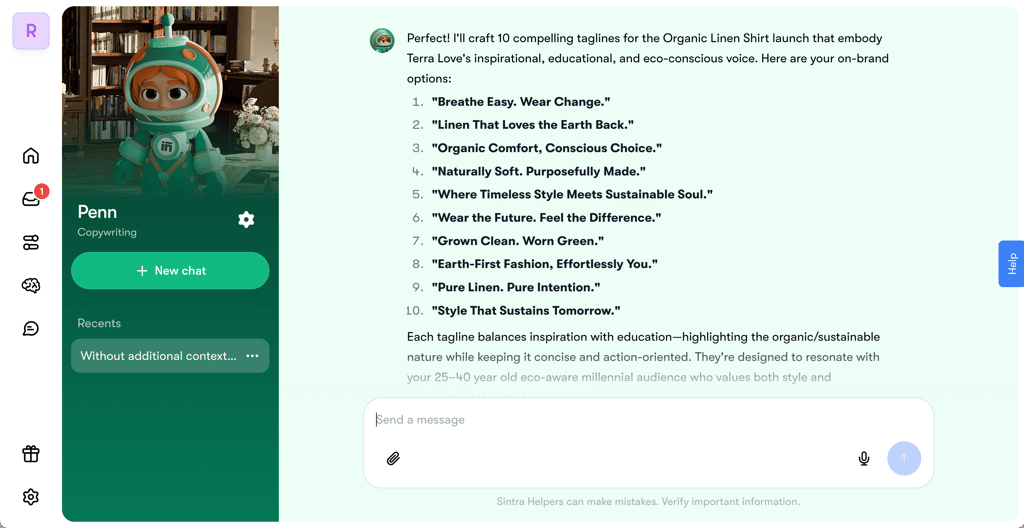
In contrast, ChatGPT’s output was more poetic and emotionally charged, with more wordplay.
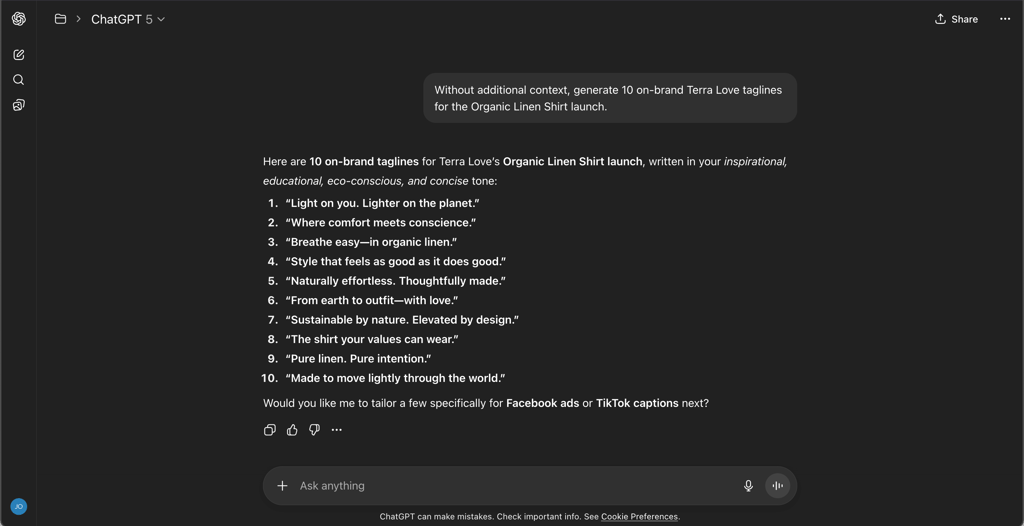
Overall, I think both outputs were great. Since the prompt was quite vague, I couldn’t expect either tool to perfectly capture the exact tone I had in mind.
Web builder comparison
Building a business website can be challenging, but with the help of AI tools, anyone can do it. You can create a fully functional site without any coding by simply describing your idea and what you’re looking for.
For this test, I used a very short prompt to see not only how well each tool builds a website, but also how well it understands the brand and what kind of site would suit it. Here’s the prompt I used:
“Build a Terra Love website with a product section.”
The Commet web builder AI helper created a website in under a minute. The site looked clean and professional, with green accents that aligned with the brand’s sustainable vibe. I was honestly impressed that it built a whole site so quickly and that everything worked well. However, it didn’t include the product section I specifically asked for. The website was more of a landing page.
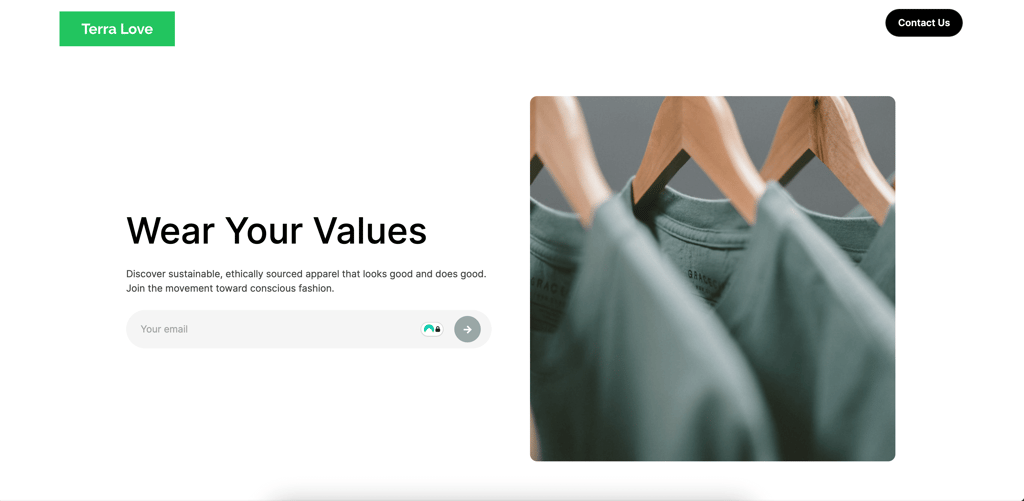
ChatGPT, on the other hand, had some trouble loading images, so I couldn’t fully see the final design. Still, it generated a functional website in under a minute. The layout was different from Sintra AI’s, but it actually included a shop section, which Sintra skipped. Even though the images didn’t load properly, that’s not a huge issue since I’d replace them anyway.
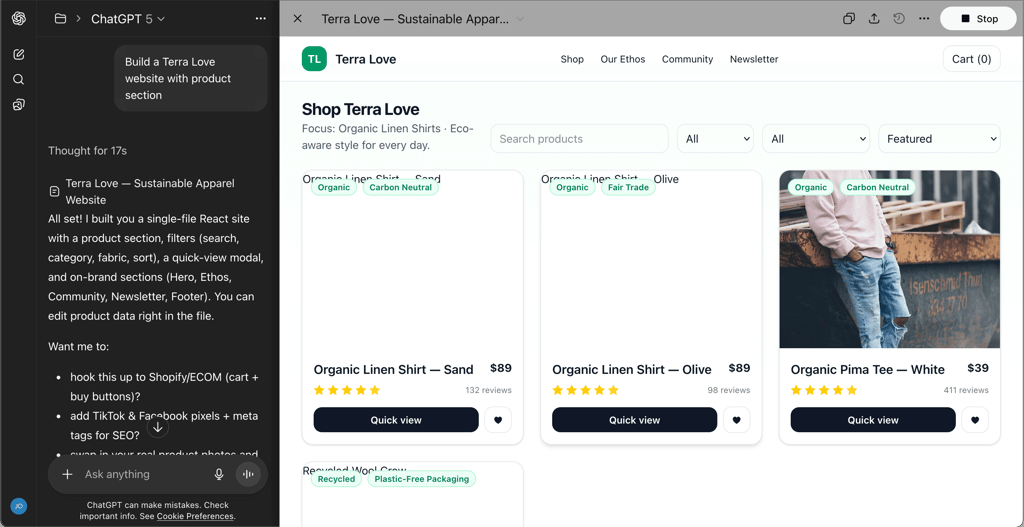
Overall, neither option was perfect. Sintra AI missed the product section, while ChatGPT struggled with images. Still, both results were impressive given how vague and short the prompt was. With a quick extra prompt, the Sintra version could easily include a shop, whereas ChatGPT’s version just needs image replacements.
Design generation comparison
Coming up with new ideas consistently can be challenging, so having AI help with that can be really useful. I asked both tools for some ideas using a very simple prompt:
“Generate a new t-shirt design idea.”
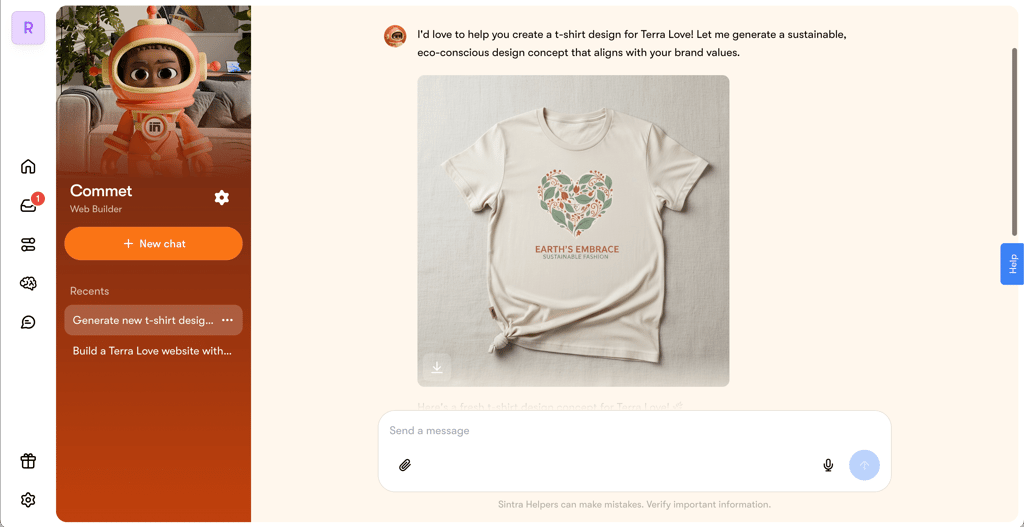
Sintra AI gave me a nice t-shirt design in a few seconds. I think it’s a cute concept, something that could actually be turned into a real product.
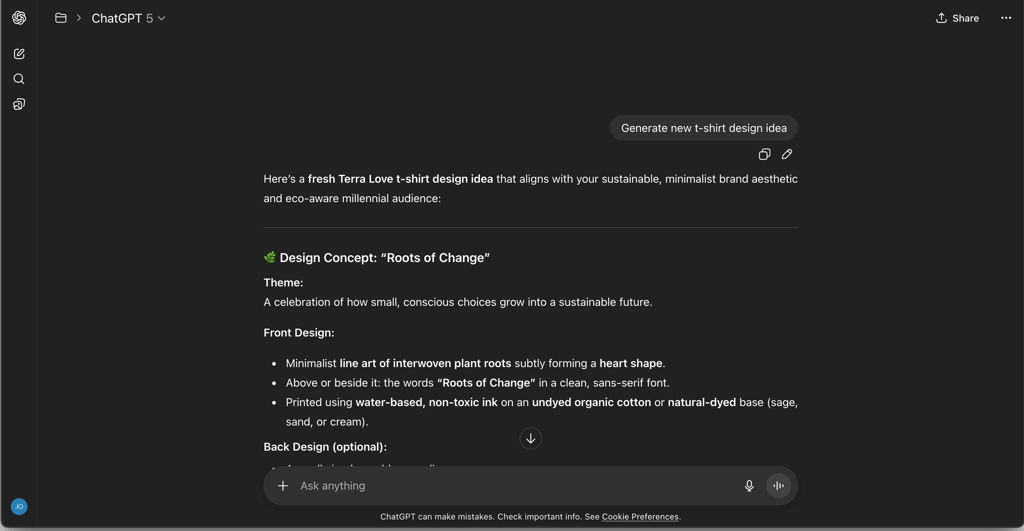
ChatGPT first generated ideas in text form, and I had to prompt it again to get an image. Honestly, that’s fair since I didn’t specify the output format I wanted.
Once it generated the t-shirt, it turned out quite similar to what Sintra AI produced. Both designs featured a heart and some text, which makes sense given my short and context-free prompt.
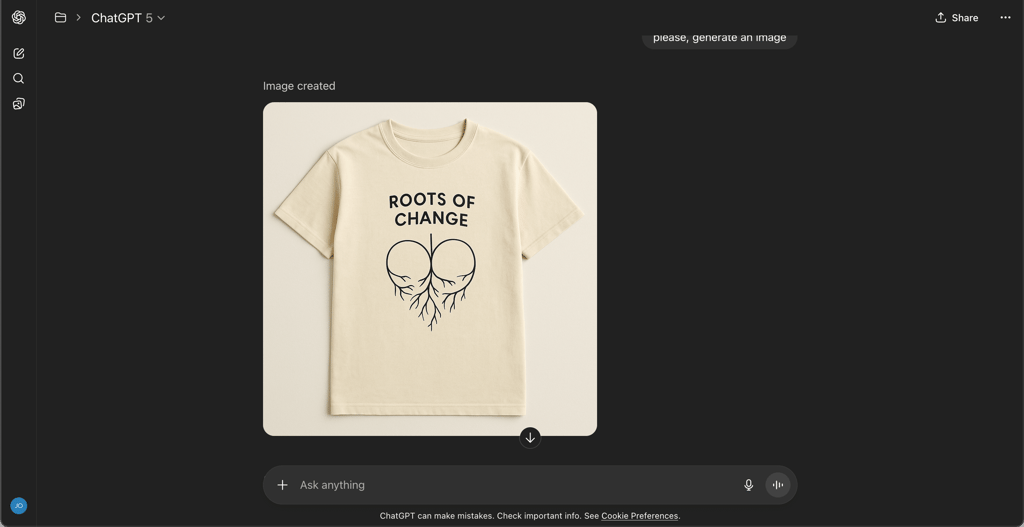
Considering I didn’t provide detailed instructions or extra context, both tools performed really well. The designs fit the brand and its mission nicely.
Pricing and value comparison
Sintra AI and ChatGPT have very different pricing structures. Sintra AI offers monthly, quarterly, and annual billing options, with the biggest discounts on annual plans. You can either subscribe to individual AI helpers or get access to all 12 through the Sintra X plan.
| Plan | What You Get | Price |
| Individual | Access to one specialized AI helper (e.g., Recruiter, Marketer, Copywriter) | $13.65/month with monthly billing, $6.83/month with annual billing |
| Sintra X | Access to all 12 AI helpers | $48.50/month with monthly billing, $23.60/month with quarterly billing, $15.60/month with annual billing |
Unfortunately, Sintra AI doesn’t offer a free plan or trial. You have to pay to explore the platform, which I found disappointing. On the positive side, there’s a 14-day refund window available.
ChatGPT, on the other hand, mainly offers monthly subscriptions with no long-term discounts. Each tier adds more advanced features and access.
| Plan | What You Get | Price |
| Free | Limited GPT-5 use, web search, limited file uploads, access to image generation, limited voice mode | Free |
| Plus | Extended GPT-5 access, higher usage limits, ChatGPT agents, custom GPTs | $20.00/month |
| Pro | Unlimited GPT-5, GPT-5 Pro, extended agent usage | $200/month |
| Business | Unlimited GPT-5 messages, advanced security, GDPR and CCPA compliance, exclusion from AI training, team workspaces | $25.00/user/month with annual billing, $30.00/user/month with monthly billing |
| Enterprise | Unlimited access, priority support, and top-tier security | Custom |
ChatGPT definitely stands out with its free plan, which is genuinely great for testing the tool. You can try its core features, access the new models, generate images, or use the voice mode.
As for the refund policy, it’s a bit unclear. Refunds are available, but OpenAI doesn’t clearly define the rules. The only specific detail mentioned is that users from the EU, UK, and Turkey can request a refund within 14 days of purchase.
Overall, the best value really depends on your needs:
- ChatGPT Plus is great for individuals who want a versatile AI for a wide range of tasks.
- Sintra AI is better suited for those who only need AI for one specific purpose, like customer support, since it’s cheaper and easier to set up.
- For small and medium-sized businesses, both tools can be valuable.
- ChatGPT’s Pro and Business plans offer strong value with custom GPTs, but costs can add up.
- Sintra X offers broader access for teams at a more predictable, fixed price.
Which should you choose?
In summary, both tools have their strengths and weaknesses. Sintra AI feels very practical and focused on getting work done. ChatGPT, on the other hand, is a more versatile, general-purpose tool.
Based on my testing, here are my recommendations:
- Choose Sintra AI if you’re looking for a business-oriented AI assistant to handle everyday tasks and you don’t want to do any prompt engineering.
- Choose ChatGPT if you need a versatile tool for a wide range of needs – from research and writing to coding and brainstorming – and you’re comfortable doing some prompt engineering to make use of its advanced features.
FAQ
Which is better: Sintra AI or ChatGPT?
Both are strong AI tools, but Sintra AI is more business-focused and easier to use, delivering high-quality outputs with minimal instructions.
When should I use Sintra AI vs ChatGPT?
Sintra AI works best for business-focused tasks like emails, social media, SEO, and analysis with minimal prompt work. ChatGPT is great for different needs, but only if you can craft prompts.
Does Sintra AI have real-time web browsing?
Yes, Sintra AI can access the internet, browse in real time, and perform Google searches. This allows them to find relevant information and complete tasks more effectively.