VideoGen AI review (2026): testing an AI video generator built from text
Being behind major reports like The Mother of All Breaches and RockYou2024, our in-house cybersecurity experts and journalists provide unbiased, real-world testing and in-depth analysis.
We maintain complete transparency by openly sharing our testing methodologies with our audience.
Learn more

In 2026, creating videos without filming sounds almost too good to be true – and that’s exactly the promise behind VideoGen AI. The tool is built to generate videos directly from scripts or text prompts, skipping cameras, editing software, and long production cycles altogether. For marketers, creators, and businesses under constant pressure to ship content fast, that’s an appealing pitch.
For this VideoGen AI review, I tested this provider, focusing on video quality, ease of use, creative control, pricing, and real-world practicality. This review breaks down whether VideoGen AI is a genuine time-saver in 2026 – or just another AI shortcut that looks better on paper.
What problem does VideoGen AI solve?
At its core, VideoGen AI is trying to kill one very specific pain. Like all top AI video generators, the provider tries to eliminate the painfully slow and skill-heavy video creation.
Traditional video production eats time fast. You need a camera (or at least decent footage), editing software, and someone who actually knows how to use it. Even simple short-form videos turn into a mini project – record, cut, caption, export, tweak, repeat. Do that a few times a week, and suddenly, video becomes a bottleneck instead of a growth channel.
VideoGen AI changes that workflow. Instead of starting with footage, you start with text – a script, an idea, a prompt. The platform then turns that input into a finished video, handling visuals, structure, and pacing for you. The goal isn’t cinematic storytelling – it’s speed, consistency, and scale, especially for repetitive formats like explainers, promos, social clips, or product videos.
This approach makes the most sense for marketers who need constant short-form content, creators who don’t want to live in editing software, and small businesses that want video without hiring a team. If your problem is that you need more videos, faster, with less effort, VideoGen AI is clearly built to answer that – by cutting production down to words on a screen.
How VideoGen AI works: from script to finished video
When you start using VideoGen AI, the first step is clicking New video. From there, you can choose between several input options – Idea to video, Script to video, Voiceover to video, recording yourself, uploading existing content, or generating a short video from a prompt.
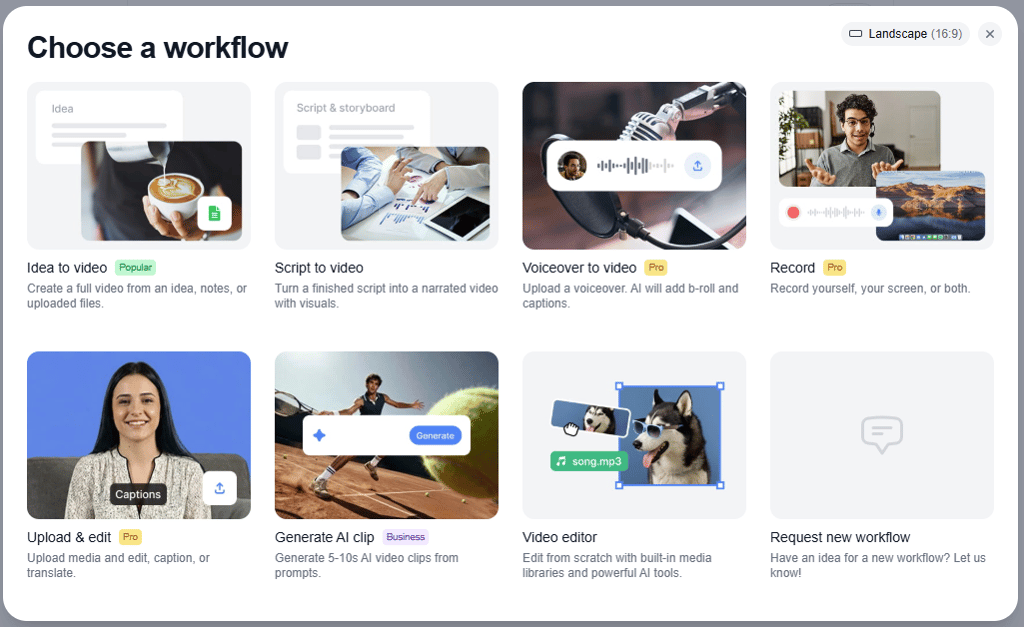
The main workflow revolves around the text-to-video idea. After selecting the input type, you simply enter your initial script or idea. VideoGen AI then expands that input into a complete script designed to be spoken aloud by an AI-generated voice, forming the foundation of the video.
It also selects visuals, scenes, and transitions that match the script’s flow. Then it pairs them with AI-generated narration or text overlays and assembles everything into a coherent video. The goal isn’t heavy customization upfront, but speed – getting a usable first version fast.
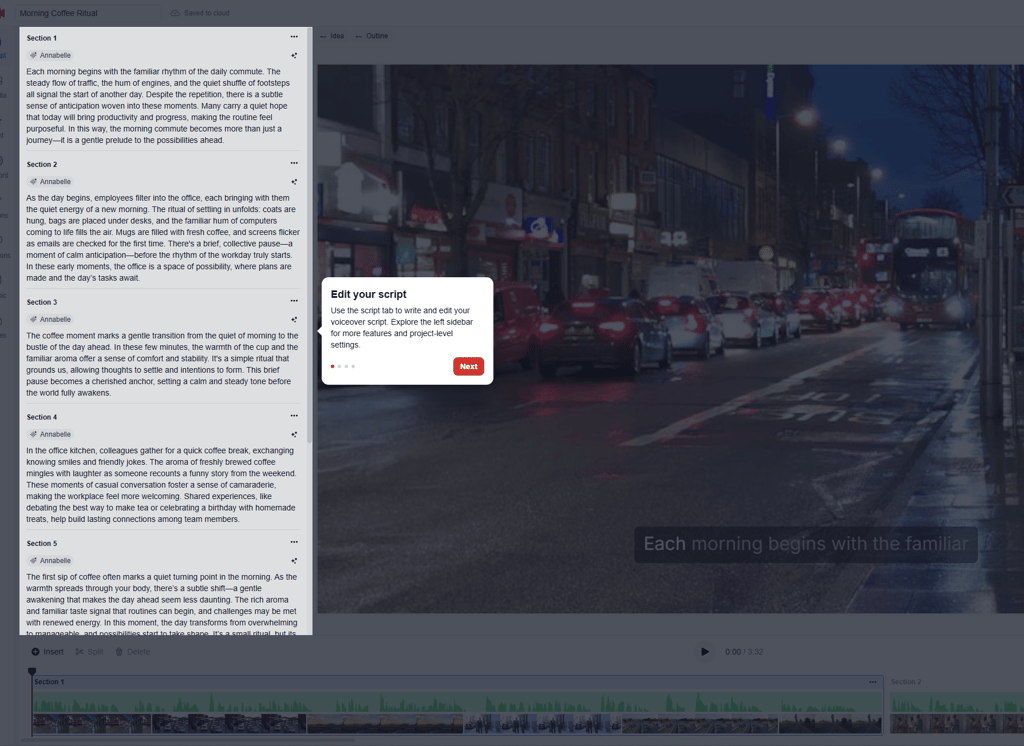
Once the draft is ready, you can make adjustments. This usually means tweaking the script, regenerating scenes, changing pacing, or refining the overall tone rather than frame-by-frame editing. VideoGen handles the technical side while you stay focused on the message.
In short, VideoGen AI turns video creation into a writing-first workflow – ideal for anyone who thinks in words but still needs consistent video output.
How I tested VideoGen AI
Video quality and realism: how good are the results?
When looking at VideoGen AI, video quality is very much a mixed bag – and that’s a pattern that comes up repeatedly in Reddit threads and user reviews, not just my own testing.
On the positive side, the visuals are generally clear. Scenes usually match the script logically, and text overlays and subtitles are mostly accurate.
I created several videos mainly for ads, since many AI tools are actually quite decent at producing short-form content that works well for social media. One video was made using the script-to-video approach – I wrote a script for a coffee ad. The other one was created using an idea-to-video workflow.
In both cases, the tool automatically generated or expanded the scripts, which I could either approve or edit before launching the video generation. As expected, the video based on the longer script ended up being slightly too long – it relied heavily on random stock footage to promote the coffee brand. The voiceover sounded noticeably AI-generated and a bit artificial, although there are options to choose more suitable voices.
The second video turned out shorter and more suitable for social media ads. The concept was a niche perfume ad. However, when stock footage is used, it’s normal that there’s no consistent product representation throughout the video – if needed, you can upload your own visuals to fix that.
One thing I noticed is that video quality can vary quite a bit from one output to another, which is another factor worth considering. In my opinion, stock footage works nicely for creating educational content. But if you want something more unique, you can film your own material and let VideoGen handle the rest.
That said, realism is where limitations show. Many users describe the output as “clearly AI-generated” – not broken, but generic. Visuals tend to rely on stock-style imagery, and while transitions are smooth, they can feel repetitive after a few videos.
The overall feel lands somewhere between usable and templated. For social posts, explainers, or internal content, most reviewers agree the results are good enough to publish with light tweaks. For brand-heavy or high-emotion storytelling, VideoGen’s videos often lack personality and depth.
Key features that define VideoGen AI
VideoGen combines script generation, voiceover, and video assembly into a streamlined workflow. During testing, I used these features myself to evaluate how they perform in real scenarios.
Text-to-video generation
VideoGen does a decent job translating scripts into visuals, but the results aren’t perfectly consistent. During testing, the tool generally understood the structure and intent of the script, matching scenes to key phrases and pacing the visuals according to the voiceover. For shorter, ad-style scripts, this worked fairly well – the videos felt cohesive enough for social media use.
That said, the platform relies heavily on stock footage, which can feel random at times. In longer scripts, especially. The visuals may drift into generic or loosely related clips that don’t always reinforce the message.

Product consistency is another limitation – unless you upload your own assets, the same product won’t appear uniformly across scenes.
Overall, VideoGen translates scripts into visuals effectively for quick, lightweight content, but for more branded or narrative-heavy videos, some manual tweaking is still needed.
Editing and customization options
VideoGen offers a reasonable level of editing and customization, but it’s clearly designed with speed over deep control in mind. You can edit the generated script, adjust on-screen text, and review or tweak individual scenes before finalizing the video. You can also regenerate specific scenes, swap visuals, and choose different voiceover options, which helps fine-tune the final output.

However, structural control is somewhat limited. You can’t fully redesign the video timeline or precisely control how each visual maps to specific script lines. Most of the creative decisions are still handled by the AI, which works well for fast turnarounds but may feel restrictive for advanced users.
Overall, VideoGen provides enough flexibility for short ads and educational clips, but creators looking for frame-by-frame control or highly custom storytelling will likely need to use their own footage or editing tools.
Speed and automation
VideoGen is clearly built with speed and automation as its core strengths. In testing, videos were generated quickly once the script was approved, making it easy to move from idea to a finished draft within minutes. This is especially useful for short-form ads or social media content where fast turnaround matters more than perfect polish.
That said, repeatability is a bit hit or miss. Using the same or very similar scripts can lead to noticeably different visuals each time, mostly because the tool pulls from stock footage. The structure and pacing usually stay the same, but the actual clips can vary in quality and relevance from one version to the next.
This makes VideoGen great for quickly creating and testing multiple variations, but less reliable if you need several videos to look almost identical or follow a very strict visual style.
Export formats and platform readiness
VideoGen is well set up for exporting videos across different platforms, especially for social media and marketing use cases. During testing, I could easily choose between common aspect ratios like portrait (9:16), landscape (16:9), and square (1:1), which cover most needs for TikTok, Instagram, YouTube, and ads. Resolution options range from 480p up to 4K, so you can scale quality depending on where the video will live.
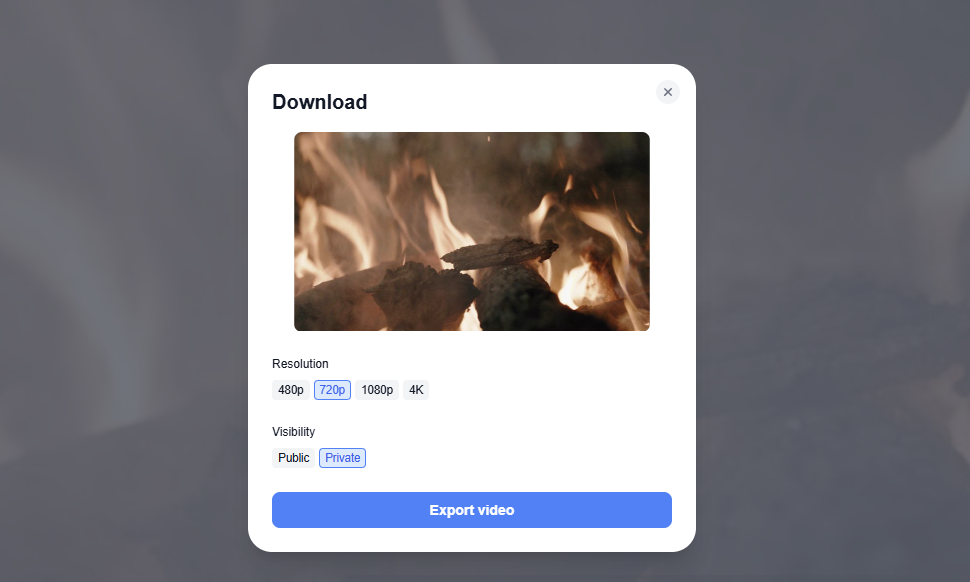
The export flow itself is simple and quick, with clear controls for resolution and visibility (public or private). For social platforms, the formats feel ready to post with minimal extra work. For presentations or internal use, higher resolutions like 1080p or 4K work well.
Overall, VideoGen makes exporting straightforward and flexible, though final polish may still be needed for more brand-heavy or high-stakes marketing campaigns.
Strengths and limitations of VideoGen AI
VideoGen AI is designed to prioritize speed and automation, making it appealing for quick video creation rather than deep manual editing. During testing, it proved especially useful for short-form content and early-stage drafts, but it also showed clear limitations when more control or consistency was needed.
Pricing and value for creators and marketers
VideoGen’s pricing is split into three tiers: Pro, Business, and Enterprise, each targeting a different type of user.
- The Pro plan starts at $12.00 per user per month when billed yearly and is best suited for individuals. It includes unlimited exports, standard AI usage under a fair-use policy, and basic workflows, with 50GB of storage. More advanced features, like AI video clips, avatars, and premium stock access, are not included.
- The Business plan costs $74.00 per user per month (billed yearly) and is aimed at teams producing content at scale. It adds priority AI usage, advanced workflows, AI video clips and avatars, up to 50 iStock downloads per month, and significantly more storage at 500GB.
- Enterprise pricing is custom and designed for large organizations that need tailored limits, top-priority AI access, dedicated support, and account management.
In practice, exports are unlimited in all tiers, but actual usage depends on fair-use or priority limits, especially for heavier workloads. Longer scripts also tend to result in more generic stock footage, which can impact visual consistency.
For solo creators, VideoGen offers good value as a fast way to produce social content and test ad ideas, with the trade-off of less creative control.
Marketing teams benefit from the speed and scalability of the Business plan, though brand-heavy projects may still need custom assets or post-editing.
Agencies will likely see the most value using VideoGen as a production accelerator for drafts and concepts rather than a full replacement for professional editing.
VideoGen AI vs other AI video tools
VideoGen AI sits somewhere between fully generative video tools and platforms designed mainly for repurposing existing content. To better understand where it fits, it helps to compare it with other popular AI video tools like Klap and Pictory. The table below breaks down how these platforms differ in terms of video generation versus repurposing, output consistency, ease of use, and the types of projects they’re best suited for.
| Feature/tool | VideoGen AI | Klap | Pictory |
| Primary focus | Script/idea-to-video generation | Script/idea-to-video + templated content | Repurposing long-form into clips |
| Video generation | Strong – can create from a script or an idea | Strong – similar generation model | Limited – mostly uses existing uploads |
| Video repurposing | Basic – not a core feature | Moderate – templates help reuse formats | Excellent – built specifically for it |
| Output consistency | Mixed – visuals from stock vary per run | Mixed to good – tends to reuse better templates | Better – based on your source video |
| Ease of use | Very easy – minimal inputs required | Easy – guided workflows | Very easy – drag-and-drop repurpose |
| Best for | Rapid idea-to-video drafts and social ads | Quick automated ads and templated campaigns | Repurposing webinars, long videos into clips |
| Brand control | Low to medium – relies on stock clips | Medium – templates help consistency | High – uses your own uploaded content |
Overall, VideoGen and Klap are great for idea-to-ad-ready visuals, while Pictory and dedicated repurposing/editing tools are better when you start with existing content you want to shape and polish.
Who should use VideoGen AI (and who shouldn’t)
VideoGen AI is a strong fit for people who care about speed more than pixel-level control. It works especially well for solo creators, marketers, and growth teams who need to produce a lot of short-form content quickly.
If you’re testing ad ideas, creating social media videos, or turning simple scripts into visuals without touching a traditional editor, VideoGen can save a lot of time. It’s also useful for teams that want fast drafts, early concepts, or multiple variations for A/B testing, without involving designers or video editors at every step.
VideoGen is not ideal for advanced video editors or brand-driven teams that need tight visual consistency, precise timing, or custom animations.
If your projects require detailed storytelling, strong product continuity, or full creative control over every scene, the automation will likely feel limiting. Agencies producing high-end client work or creators with an established visual style may find that the reliance on stock footage and AI decisions creates more cleanup work than it saves.
FAQ
Is VideoGen AI free to use?
Yes, VideoGen offers a free trial that lets you try the tool, but most of the more useful features, such as higher-resolution exports, longer videos, and advanced voice options, are locked behind a paid plan.
Can VideoGen AI replace video editors?
No, VideoGen can’t fully replace professional video editors. It works well for fast, automated video creation, but it lacks the fine-grained control needed for detailed edits, strong branding, or complex storytelling. For high-quality or custom projects, human editing is still important.
Does VideoGen AI work for social media?
Yes, VideoGen works well for social media. It supports short-form content and common aspect ratios like portrait, square, and landscape, making it suitable for platforms such as TikTok, Instagram, and YouTube.
Is VideoGen AI better than Klap?
Depends on your needs. Both tools focus on automated video creation, but they differ in workflow, visual style, and level of control. One may suit your use case better than the other, rather than one being clearly superior overall.