Best AI tools for email in 2026
Being behind major reports like The Mother of All Breaches and RockYou2024, our in-house cybersecurity experts and journalists provide unbiased, real-world testing and in-depth analysis.
We maintain complete transparency by openly sharing our testing methodologies with our audience.
Learn more
AI tools for email are designed to help with everyday tasks, such as writing replies faster, maintaining a consistent tone, and following up. Emails can quickly become harder to manage, especially as inboxes fill up or you have to manage campaigns across different tools.
Together with the Cybernews research team, I prepared this guide to share the best AI tools for email in 2026. I’ll explain which tools are best suited for different needs, which features are worth paying attention to, and how to choose the right option for your campaigns.
Best AI for email: shortlist
- MailerLite – best AI email marketing platform for simplicity and automation
- ActiveCampaign – best AI-driven solution for advanced segmentation and customer journeys
- nexos.ai – best AI tool for centralized email workflows and automation
- Rytr – best AI writing assistant for quick email drafts
- Writesonic – best AI email writer with versatile creative options
- Copy.ai – best AI tool for polished, on‑brand email copy
- Spike – best conversational email app with AI enhancements
The best AI for email compared
Before diving into individual reviews, it’s helpful to compare the tools side by side. The table below makes it easy to see how they differ in features, price, and overall suitability, so you can quickly narrow down the options that fit your needs.
| Tool | Rating | Standout features | Integrations | Starting price | Trial info | Best for |
| MailerLite | Simple automation, drag-and-drop editor | Zapier, Shopify, WordPress | $9.00/month | 14-day free trial and free plan | Newsletter creators | |
| ActiveCampaign | Advanced segmentation, customer journeys | Shopify, WordPress, Salesforce | $15.00/month | 14-day free trial | Marketing teams and CRM users | |
| nexos.ai | AI Agents, no-code automation, multi-model AI access | Slack, Google Workspace, SharePoint, Confluence | €18.00/month (~$21.04/month) | 7-day free trial | Marketing and operations teams automating workflows | |
| Rytr | Fast AI-generated email drafts | Gmail, Outlook | $7.50/month | Free plan available | Freelancers and quick emails | |
| Writesonic | Creative, versatile email content | Gmail, Zapier | $79.00/month | Trial with free credits | Small businesses and content teams | |
| Copy.ai | Polished, on-brand copy | Gmail, Zapier | $24.00/month | 7-day free trial | Professionals and brand-focused emails | |
| Spike | Conversational email interface, AI summaries | Google Workspace, Outlook | $6.00/month | Free plan available | Teams and collaborative inboxes |
7 best AI tool for email – our detailed list
Below is a closer look at the best AI email tools. I focused on how they help with day-to-day email tasks, such as writing, managing campaigns, and providing insights.
1. MailerLite – best AI email tool for newsletters and campaigns

| Overall rating: | |
| Standout feature: | Easy-to-use AI-assisted email editor |
| Starting price: | $9.00/month |
| Best for: | Newsletter creators and small teams |
MailerLite is an email marketing platform built for newsletters, basic automations, and audience growth. I picked it because it’s focused on emails and avoids overloading the tool with features.
Signing up is straightforward, the interface is easy to navigate, and core actions, such as creating campaigns, managing subscribers, and automations, are easy to find. Subscriber management includes segmentation, engagement history, and basic performance stats, which are enough for most newsletter-driven workflows.
MailerLite provides a drag-and-drop email editor, forms, landing pages, and rule-based automations. The automations are visual and easy to put together, but they’re limited to common email scenarios. It also includes some AI tools, but they’re not the main selling point. There’s an AI writing assistant for email copy, subject lines, and calls to action, with basic tone adjustments. When testing the assistant, I found the writing quality is good for quick drafts and ideas, but I needed to edit the output manually to sound natural.
Another advanced feature is MailerLite MCP, which lets you control your account using simple prompts. For example, you can ask an AI assistant to check campaign performance, review subscriber data, or manage automations without clicking through the dashboard. This saves time if you’re running multiple campaigns or different accounts. However, it requires connecting to a third-party tool, which adds additional costs and shares data outside MailerLite, which is important to keep in mind when considering privacy.
In terms of security, MailerLite is well-suited for newsletter creators and small teams. It keeps its data contained inside the platform, and AI tools are optional, so you’re not forced to share email content to external models unless you choose to do so.
Why MailerLite is useful for newsletter creators
MailerLite is a good choice for email creators, as its AI tools help speed up writing and generate subject lines, while the platform provides reliable delivery, segmentation, and smart send optimization. Automations reduce repetitive tasks without needing advanced CRM features. Its pricing is also affordable, and the free plan provides up to 12,000 monthly emails.
2. ActiveCampaign – best AI-driven platform for business automation and email campaigns

| Overall rating: | |
| Standout feature: | Advanced automation and AI-powered personalization |
| Starting price: | $15.00/month |
| Best for: | Businesses needing automated, AI-driven email campaigns |
ActiveCampaign is a platform that combines email marketing, automation, and CRM tools in one place. I picked it because it’s a strong option for businesses that need AI support to manage more complex campaigns and customer journeys.
The interface is clean and easy to get used to, but it’s a bit more crowded than tools like MailerLite. The campaign creation section includes templates, content tools, and message variables that let you reuse designs and automatically add personal details, which keeps emails personalized. On top of that, AI tools help with predictive sending, content suggestions, and personalization based on how contacts engage with your emails and website, and some plans even allow AI-generated images to enhance campaigns.
One of ActiveCampaign’s strongest areas is analytics. It has AI-assisted reports and predictive insights that make it easier to understand what in your campaigns is working and what isn’t. Automation workflows are flexible and use AI to adjust emails based on user actions, like clicking a link, making a purchase, or not opening previous messages
I found ActiveCampaign works well with tools like Shopify, WordPress, and Salesforce, and you can manage workflows across email, SMS, and WhatsApp. Its permission controls are useful for teams that need structured access and compliance-ready setups. The only downside is that it can feel a bit slow when running more complex automations.
In terms of security, ActiveCampaign is designed for businesses running sensitive, multi-step workflows. It has role-based access control, centralized CRM data, and controlled use of AI, which makes it easy to manage who can see and use customer information.
Why ActiveCampaign is useful for businesses needing AI-driven emails
ActiveCampaign helps your emails adapt automatically to customer behavior. Its AI predicts engagement, suggests content, and personalizes campaigns. Combined with advanced automation and CRM integration, it helps teams save time and maintain high-quality, targeted messaging.
3. nexos.ai – best AI platform for automating email workflows

| Overall rating: | |
| Standout feature: | AI-powered email automation and workflow management |
| Starting price (billed monthly): | €18.00/month (~$21.04/month) |
| Best for: | Automating email workflows and repetitive tasks |
Nexos is an all-in-one AI platform for teams wanting to automate workflows, not just write emails. I included it because it unifies AI tools, models, and automations into a single system. This makes it easier to manage email tasks and other processes together.
The platform lets you build custom AI agents without coding. These agents draft emails, summarize conversations, generate follow-ups, and trigger actions based on inputs. Ready-to-use templates also speed up setup if you don’t want to build workflows yourself.
Another key feature is access to multiple AI models in one place. Instead of relying on a single model, you can switch between different ones depending on the task, all within the same interface. This gives more flexibility when working with different types of email content or workflows.
Nexos also focuses on control and team-level management. Features like role-based access, usage tracking, and workflow guardrails help manage how AI is used across a team. This makes it more structured compared to standalone AI writing tools.
Why nexos.ai is useful for generating email drafts
Nexos shines when email joins a workflow. It automates tasks, connects processes, and manages everything in one place, instead of using many tools.
4. Rytr – best for quick email draft generation

| Overall rating: | |
| Standout feature: | Fast AI text generation for emails and other content |
| Starting price (billed monthly): | $7.50/month |
| Best for: | Quickly drafting email copy to use on any platform |
Rytr is a generative AI writing tool for emails, blogs, social posts, and ads. It’s designed purely for content creation, not sending emails or managing campaigns.
Using it is straightforward. You choose the content type, set the audience, purpose, tone, language, and creativity level, then add a few key points. In my testing, it generated multiple variations within seconds, which made it easy to compare options and fine-tune the wording. I especially liked that it supports over 30 languages, which is useful when drafting emails for international audiences.
The interface is simple, but it feels a bit unfinished. Some buttons and menus look visually unrefined, and certain sections aren’t easy to find. While the AI itself is flexible and produces usable drafts quickly, the overall experience would feel smoother with clearer labeling and more guidance for first-time users.
From a productivity standpoint, I found it useful for generating drafts I could then polish and move into my email platform of choice. Since Rytr doesn’t handle sending, automations, or performance tracking, it works as a standalone writing tool rather than a full email solution.
Rytr provides a lot of privacy as no subscriber data is involved, and there is no need to connect to external inboxes. Your content stays within the platform unless you choose to copy it elsewhere. This makes it a low-risk choice, especially if you’re handling sensitive data.
Why Rytr is useful for generating email drafts
Rytr helps you produce multiple email copy options quickly. Its AI handles tone, structure, and language suggestions so you can start campaigns faster. I found it particularly handy when I needed a quick draft without setting up a full campaign.
5. Writesonic – best for versatile email content creation

| Overall rating: | |
| Standout feature: | AI content generation across multiple marketing formats |
| Starting price: | $79.00/month |
| Best for: | Marketers creating versatile email campaigns |
Writesonic is a generative AI content platform designed for marketers and writers who need to create email copy, landing pages, blog posts, and ad creatives. I picked it because it’s flexible and useful for teams that send multiple types of campaigns.
I liked how extensive the email generation tools are. You can select an email type, such as newsletters or cold outreach, provide context about the recipient, choose the quality level, and generate multiple drafts. Subject lines and call-to-action suggestions are included, and the AI produces solid starting drafts that only need minor editing to match my tone.
Writesonic also integrates SEO and content optimization features, which are useful if your emails tie into larger campaigns, such as blog posts or landing pages. The interface is straightforward, though the amount of tools can feel overwhelming at first. I appreciated that everything is easily accessible on one platform, and the documentation helped me figure out workflows quickly.
While Writesonic doesn’t manage email sending or track engagement, it works well for content creation. I found it especially helpful when generating multiple email options for A/B testing, as it saved me a lot of time compared with writing each draft manually. Integrations, including WordPress and Zapier, make it easier to move content into campaigns, though you still handle sending in your email platform of choice.
Writesonic does not require access to your inbox or customer data, so your emails and content remain private. AI outputs are generated on Writesonic’s servers, so it’s important to avoid adding sensitive information if you want to minimize data exposure.
Why Writesonic is useful for marketers creating versatile email campaigns
Writesonic is most useful when you need high-quality email copy quickly for different use cases. Its AI helps create drafts, subject lines, and CTAs, while supporting content for other channels. I liked how it sped up my content workflow without replacing my existing tools or workflows.
6. Copy.ai – best for creative, on-brand email copy
| Overall rating: | |
| Standout feature: | AI-driven creative copywriting with brand consistency |
| Starting price: | $35.00/month |
| Best for: | Generating creative, on-brand email content |
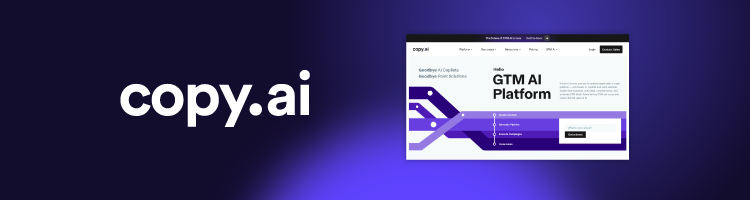
Copy.ai is an AI writing assistant designed for marketers, sales teams, and content creators who want to produce creative, polished email copy efficiently. I picked it because it emphasizes originality and brand voice, which is especially useful if you need consistent messaging across campaigns.
Copy.ai is built around workflows, which allows you to connect steps like researching a topic, drafting an email, rewriting it in your brand voice, and then reformatting it for different channels. You can also generate multiple outputs at once, which is great for testing different styles or subject lines.
In terms of AI, Copy.ai handles tone, style, and creativity well. I liked that it can adapt content for different audiences or marketing frameworks, making it easier to maintain consistency. The interface is clean and intuitive, so I didn’t feel lost even when exploring more advanced workflows.
Copy.ai also includes a simple data layer called Tables, allowing you to reuse product info, customer lists, or notes across multiple workflows. This is handy when scaling campaigns or maintaining consistency across multiple messages.
Similar to Rytr, Copy.ai doesn’t connect directly to your inbox and generates content without any subscriber data. AI outputs are processed on local servers, and you can choose the info you want to provide.
Why Copy.ai is useful for generating creative email copy
Copy.ai is particularly valuable when you need imaginative, on-brand content quickly. Its AI handles multiple outputs, tone adjustments, and structured workflows, allowing users to experiment with styles and ideas without rewriting everything from scratch. I liked how it helped me maintain a consistent brand voice while saving time.
7. Spike – best for smart inbox management and collaboration
| Overall rating: | |
| Standout feature: | Conversational email threads with AI-assisted productivity |
| Starting price (billed monthly): | $6.00/month |
| Best for: | Managing personal and team emails efficiently |
Spike is an email client and productivity app that turns traditional email into conversational, chat-like threads. I picked it because it combines email, chat, and collaboration tools in one place, which makes everyday communication easier to manage. It’s best suited for managing day-to-day email communication more efficiently.
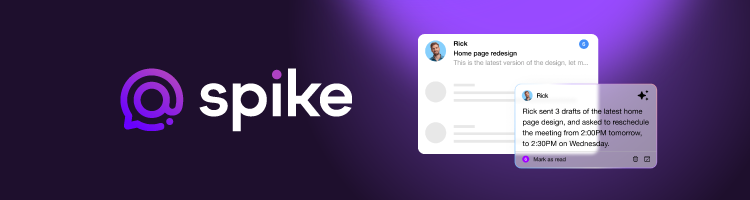
The interface is clean, though it took me a bit of time to discover all the features. The standout for me is the conversational email view, which makes long email threads feel more like instant messaging. It makes back-and-forth conversations much easier to follow, especially when multiple people are involved. AI features like email summaries, draft generation, and smart reply suggestions help speed things up. I often used the AI to draft quick, context-aware replies without opening every message.
Spike also handles prioritization well. It includes priority detection, a unified inbox, and smart sorting that highlights important messages while pushing less relevant ones aside. I found this useful for staying focused, since key emails didn’t get buried under newsletters or low-priority updates. On top of that, tools like shared inboxes, collaborative notes, and an integrated calendar reduce the need to switch between apps when working with a team.
The Spike AI Bot is useful for summarizing long threads, generating content, and helping with quick tasks like note-taking or reviewing attachments. I liked using it to get fast overviews of ongoing conversations, especially when I needed to catch up quickly.
Spike keeps emails on your servers and doesn’t share them with external AI models. Its AI features process your content within the platform, making it safer for sensitive communication. Permission controls also let you choose who can see and use what data.
Why Spike is useful for managing personal and team emails
Spike is most helpful if you want a smarter, AI-assisted inbox. It reduces repetitive tasks like reading long threads and drafting quick replies, while keeping messages organized. It’s perfect for anyone who handles high volumes of email or needs collaborative tools in their inbox.
What are AI email tools and what can AI bring to email?
AI email tools reduce manual, repetitive work. They help you write, review, and manage messages faster, especially if email is a big part of your day.
Some of these tools work inside email platforms or email-focused tools, such as MailerLite, ActiveCampaign, or Spike, where email is part of a broader system for newsletters, automations, or team communication. Others, like Rytr, Writesonic, and Copy.ai, are standalone writing tools you use alongside your inbox to draft and refine email copy before sending it.
AI mainly automates the mundane tasks, such as drafting replies, summarizing long threads, prioritizing messages, sorting emails, and reminding you to follow up. Writing-focused tools speed up copy creation, while email platforms use AI to help manage audiences, timing, and workflows.
The main benefit is efficiency. AI helps you respond faster, keep a consistent tone, and make emails clearer without changing how you communicate. Once you get used to these tools, they can make emails feel less time-consuming.
Common AI features in email tools
The main goal of AI tools for email is to help increase productivity and efficiency. Here are the main features usually found in AI email tools:
- Writing and replying. AI helps analyze your emails, draft replies, adjust tone, rephrase unclear sentences, and create reusable templates.
- Thread summarization and understanding. If you’re part of a team or manage multiple campaigns, many of these tools summarize long threads, highlight actionable points, find questions, and suggest next steps.
- Inbox organization and prioritization. These tools can help categorize, prioritize, label, filter spam, and nudge you to check emails that need attention.
- Workflow automation. Some tools also handle reminders, route emails to teammates, log interactions in CRMs, or trigger basic macros and integrations.
Not every tool provides all these features. Some focus mainly on content generation, while others prioritize automation and organization. The best tool for you depends on whether you need assistance writing emails or want to manage them more efficiently.
Why use AI email management tools?
Emails can take up a large part of your time when working closely with customers or sending out email campaigns. However, with AI tools surging, here are the main reasons to use them:
- Reduce time drafting replies. AI can analyze your past conversations or follow your guidelines to draft multiple reply options quickly.
- Improve clarity and tone consistency. Tools can follow your brand voice to make your emails sound personalized and professional, while also making them clearer and easier to read.
- Cut through long threads faster. Some tools, like Spike, analyze your email threads to make sure you get all the most important information without reading every single message.
- Lower risk of missing follow-ups. You can receive nudges to make sure you notice the most important messages in your inbox that need attention.
- Support non-native writing and accessibility needs. Tools like Rytr provide outputs in over 30 languages, helping you sound professional when communicating in different regions.
- Improve response speed for workflows. AI helps you respond faster in campaigns or ongoing conversations by suggesting the next actions or replies.
AI is most valuable if you handle large volumes of email, need to maintain consistent messaging, or want to save time on repetitive tasks. For casual email users or simple one-off messages, these tools may not be necessary, as manual replies can be just as efficient.
How to choose the best AI tool for emails
Choosing the right AI email tool depends on how you work and what you need it to do. Consider your workflow, security, output quality, integrations, and budget before making a decision. Here are my recommendations:
- Match the tool to your workflow. Think about whether you want it to manage your personal inbox, coordinate a team inbox, handle support requests, do sales outreach, or send executive communications.
- Check privacy and security. Look at how the tool stores and handles data, what training policies and admin controls it has, and whether it meets standards like SOC 2 or ISO compliance.Evaluate output quality and control. Make sure the AI can follow your tone, flag factual errors, allow edits, handle context properly, and support multiple languages if you work internationally.
- Confirm integrations and compatibility. If needed, check that the tool works with your existing platforms, like Gmail, Outlook, mobile apps, browser extensions, and see if it connects with your CRM or helpdesk software.
- Consider pricing and scalability. Review the limits of free tiers, per-seat pricing for growing teams, enterprise-level plans, and whether a trial is available so you can test before committing.
Best practices for AI emails
While AI can do a lot of the work for you, it’s important to learn to use these tools effectively to keep it efficient and avoid adding more work for you. Here are a few tips:
- Give better context without oversharing. Provide information that helps the AI write useful responses, such as the goal of your email, your relationship with the recipient, and any constraints, such as word count or tone. Avoid providing sensitive information, personal data, or confidential content.
- Use tone and intent prompts consistently. Include short phrases to guide the AI’s style. For example: “polite but firm,” “concise,” “apologize and propose next steps,” “friendly and informal,” “formal business tone,” or “persuasive call-to-action.” These prompts can help keep your emails on-brand.
- Always verify facts, dates, and attachments. AI can sometimes make mistakes and mix up names, provide the wrong times, invent details, or forget to include attachments. Double-check everything before sending.
- Build templates and reuse them. Create a small library of reusable drafts for common situations: follow-ups, meeting requests, support replies, or escalations. Over time, this saves time and ensures consistent messaging across emails.
The future of AI email assistants
AI email tools are steadily becoming smarter, helping users manage their inboxes more efficiently. Rather than just generating drafts, the next generation of assistants is likely to handle routine tasks automatically, such as sorting messages, suggesting replies, or highlighting important follow-ups. They will also assist with scheduling or linking emails to CRM systems, making everyday workflows smoother.
Personalization is another area set to improve. Future AI assistants could better match a team’s voice or brand tone while giving administrators control over what the AI remembers or applies. This ensures emails feel consistent and professional without risking sensitive data or miscommunication.
Privacy and compliance features are also expected to strengthen. Enterprise-ready tools may offer on-device processing, private AI models, and detailed audit logs. These updates will help teams use AI confidently while staying aligned with data protection standards and regulatory requirements.
Final verdict: which AI email tool should you choose?
Choosing the right AI email tool depends on what you need it to do and how often you use emails day-to-day. If you want the best all-around option, look for a tool that combines strong writing support, inbox management features, and integrations with other apps you use.
If your focus is mainly on improving writing, pick a tool that excels at tone control, rewriting, multilingual support, and reusable templates. For those managing a team inbox or support workflow, the best fit will offer email routing, macros, shared inboxes, and robust compliance features to keep operations smooth. If privacy is your top priority, prioritize tools with enterprise-grade controls, strict data retention policies, and minimal external data usage.
In short, choose based on your workflow and the integrations you need most to keep your emails running smoothly.
FAQ
Are AI email tools safe to use with sensitive information?
Yes, AI email tools can be safe. Tools built directly into your email client or inbox process content locally, which is generally lower risk. Platforms that connect to external AI providers may send text to a third‑party model, so you should review their privacy policy before use.
Can AI email assistants work inside Gmail and Outlook?
Yes. Many AI assistants integrate via browser extensions or native support, letting you draft or improve emails directly in your inbox.
Do AI email tools replace templates and canned responses?
Not completely. AI can generate or customize content faster, but templates are still valuable for maintaining consistency, standard responses, and brand voice.
How accurate are AI email summaries and action items?
AI summaries provide a helpful overview of threads and key points, but they aren’t perfect. They’re best for saving time and highlighting important details, not for replacing a careful read of critical emails.
What’s the best AI email tool for teams?
ActiveCampaign and Spike are solid options for teams. For automated campaigns and CRM workflows, ActiveCampaign is ideal. For team inbox management, collaboration, and AI-powered summaries, Spike is a strong choice.