Hailuo AI video generator review: everything you need to know
Being behind major reports like The Mother of All Breaches and RockYou2024, our in-house cybersecurity experts and journalists provide unbiased, real-world testing and in-depth analysis.
We maintain complete transparency by openly sharing our testing methodologies with our audience.
Learn more
AI video generators have rapidly changed how creators, marketers, and educators produce visual content. In this Hailuo AI video generator review, I take a close look at one of the newer AI tools aiming to make that process even faster. At its core, it turns text or a single image into a few seconds of motion, but its more cinematic presentation is what helps it stand out from many entry-level options.
To evaluate Hailuo’s performance, the Cybernews research team and I tested how it generates videos from different types of inputs and whether results matched its claims about realism and quality. We also compared it with other AI video generators to gain a complete picture of its capabilities, including analyzing its cost structure, credit, and subscription limits.
The goal is to provide a clear view that will help you determine whether Hailuo meets your needs for fast, simple video creation. If not, you can decide whether to consider more feature-rich alternatives.
Quick overview of Hailuo AI video generator
Hailuo AI is made for fast, simple short-form video generation with minimal effort. It’s best for quick social content or rough drafts, not long or highly polished productions.
| Category | Details |
| Overall rating | 3.5/5 |
| Description | Fast, user-friendly tool that turns text or images into short AI-generated clips. Suitable for quick social posts and concept drafts; less suited for reliable, long-form production |
| Key specifications | Resolution: up to 1080p (free plan offers 768p) |
| Pricing and access | Free plan with limited credits; paid plans from $7.99/month |
| Best suited for | Social media teasers, quick marketing visuals, and early concept drafts |
What is Hailuo AI video generator and how does it work?
Hailuo AI Video Generator is an AI-powered tool that creates short videos from text prompts or images. Developed by a Chinese company MiniMax, it uses advanced AI models to turn simple descriptions into animated clips featuring AI avatars, backgrounds, and narration. Similar to other AI video platforms, Hailuo automates much of the production process, making it accessible to users without video editing experience or software.
The platform offers three main ways to generate videos: text-to-video, transforming images into motion, or using a subject reference for consistent characters across scenes. This flexibility makes it suitable for various use cases such as marketing videos, educational content, and social media posts.
Users can input a script or upload an image, choose a template, and generate a short 6–10 second video. The tool works well for fast, simple clips or social content, but it isn’t designed for long-form or complex production workflows.
Key features of Hailuo AI video generator
Hailuo AI offers core video generation features with fast processing and decent prompt comprehension. Here’s a quick look at what it brings to the table:
- Brand customization. Lets users add logos, colors, and fonts for consistent branding. Customization is basic but sufficient for quick promos.
- AI avatars and voices. A range of preset characters and language options for on-screen talent and narration. Hailuo’s avatars aim for consistent appearance across clips, which helps when using the same character in multiple shots compared with many entry-level tools.
- Templates and custom scenes. Ready-made layouts and simple scene builders for ads, explainers, and social posts.
- Text-to-video conversion. Converts scripts or prompts into a short video quickly. Hailuo tends to follow detailed prompts more closely than some rivals, producing outputs that match instructions more reliably.
- Multilingual support. Accepts prompts and narration in multiple languages for wider reach.
- Video export and sharing. Exports short, social media-ready clips in resolutions up to 1080p.
Overall, Hailuo combines prompt fidelity and fast iteration with limited clip length and modest post-production control.
Plans and subscriptions of Hailuo AI video generator
Hailuo AI offers several plans that differ in credits, speed, and monthly limits. Here’s a quick look:
| Plan | Best for | Monthly price | Video quality | Export limit | Key features |
| Free | Trying the platform | $0.00/month | 768p | Short 6-second clips | Up to 3 queued tasks, 1 active task |
| Standard | Light social content | $7.99/month | 1080p | 83 videos (1,000 credits) | Fast-track, watermark removal, Veo 3.1, Sora 2, 600 agent images, 5-task queue |
| Pro | Regular creators | $27.99/month | 1080p | 375 videos (4500 credits) | 10-second clips, 2 running tasks, 900 agent images, queue grows to 8 tasks |
| Master | High-volume users | $63.99/month | 1080p | 875 videos (10,500 credits) | 1,500 agent images, queue grows to 10 tasks |
| Ultra | Teams needing broader model access | $124.99/month | 1080p | 1,000+ videos (12,000 credits + unlimited Hailuo 1.0) | Unlimited Hailuo 1.0, unlimited Image 01, 2 running tasks |
| Max | Enterprise workloads | $199.99/month | 1080p | 1,600+ videos (20,000 credits + unlimited Hailuo 1.0/2.x) | Unlimited Hailuo 1.0 and 2.x, unlimited Image 01, 2 running tasks |
The free tier is good for quick tests, while paid plans primarily boost speed, credits, and video quality. If you’re producing ads, reels, or short promos, the mid-tier is the sweet spot when it comes to value. Just note that subscriptions are non-refundable, though the platform does return credits for failed generations.
Trying out the Hailuo AI generator
When I tested the Hailuo AI generator, I focused on how easy it is to use and how well it handles different types of prompts. The interface made a good first impression. The dark layout is clean, and the large prompt box guides you right into the workflow. The menu on the left is simple to follow, so even without onboarding, I knew where to start.

I began with image-to-video because I wanted to see how Hailuo manages facial expressions. I first generated an AI portrait and uploaded it.

For the first test, I combined the “Misty Morning Forest” prompt preset with the “Right circling” camera control.
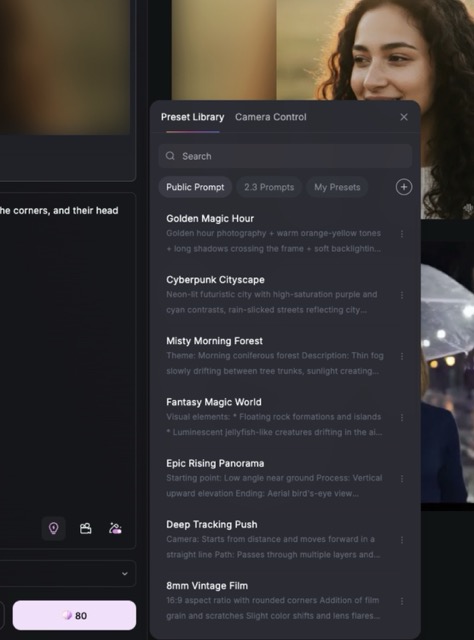
While the video started by animating the portrait well, the prompt preset caused it to suddenly cut to a forest scene instead.
So, for the second test, I removed the prompt preset and used only the camera preset with a custom prompt describing how the subject’s expression should change – from neutral to a joyful laugh with crinkling eyes and a slight head tilt. That worked much better. However, while the physics looked alright, Hailuo AI gave little more than I asked with the facial expression. Instead of joy, it delivered something closer to an ecstatic glee.
For text-to-video, I tested both Hailuo 2.0 and 2.3 versions to compare their behavior. Using Waltz dance presets, the platform generated a smooth clip that followed both the prompt and camera movement.
When I switched to a custom prompt about sunflowers moving in the breeze, to my surprise, the older model captured the motion better than the newer one. It produced more natural movement, while the newer model delivered a good-looking clip that felt a bit static. A solid reminder that model choice will influence style more than expected.
I also tried the subject reference feature, which requires uploading up to three images of the same person. I created a character in advance and imported all three angles.

Hailuo handled identity consistency well. The lighting, environment, and facial details matched my prompt, including a natural blink and a soft smile. The only thing it missed was a specific camera movement, but the overall clip still looked reasonably good.
Overall, Hailuo AI is capable of delivering the asked results, but as with every AI agent currently, it can be inconsistent. It’s a tool that can produce interesting results, but it definitely requires some trial and error.
How to use Hailuo AI video generator
Using Hailuo AI is simple and does not require prior editing experience.
-
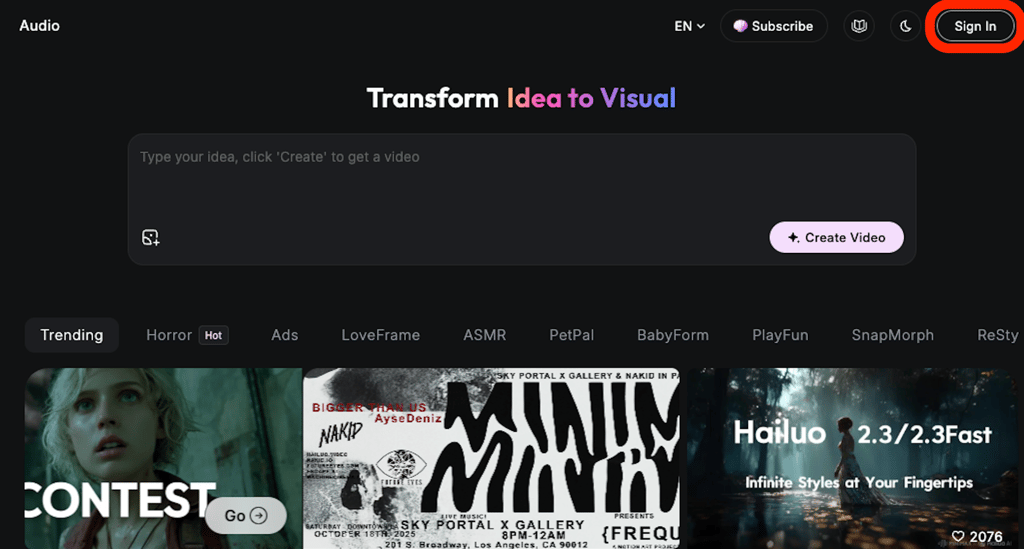
Visit the Hailuo AI platform and click Sign In in the top right corner
-
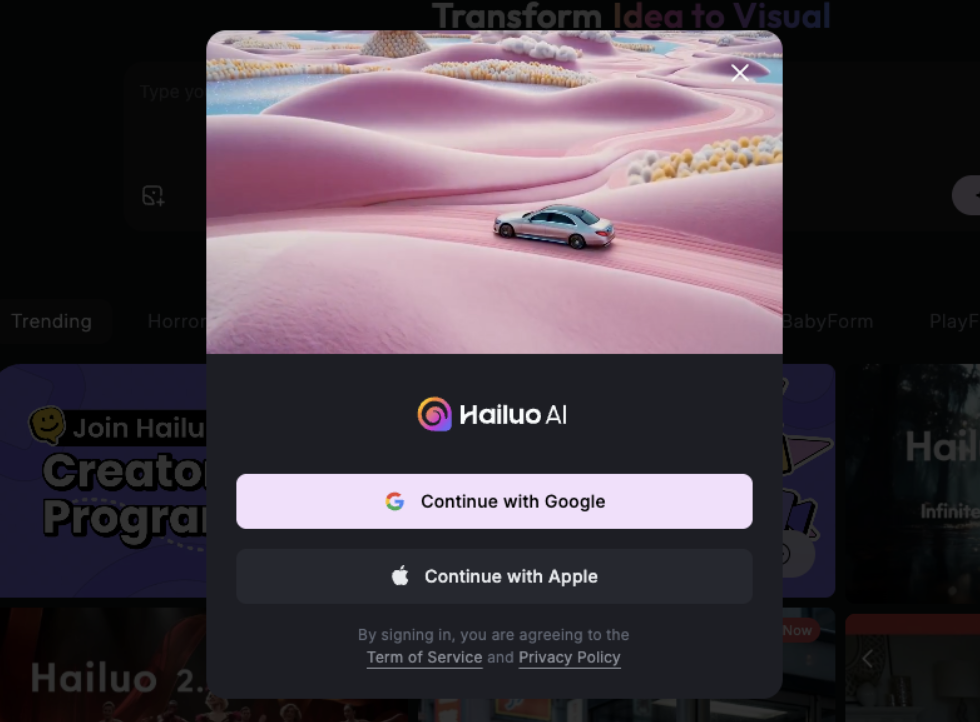
Log in or register by choosing either your Google or Apple account
-
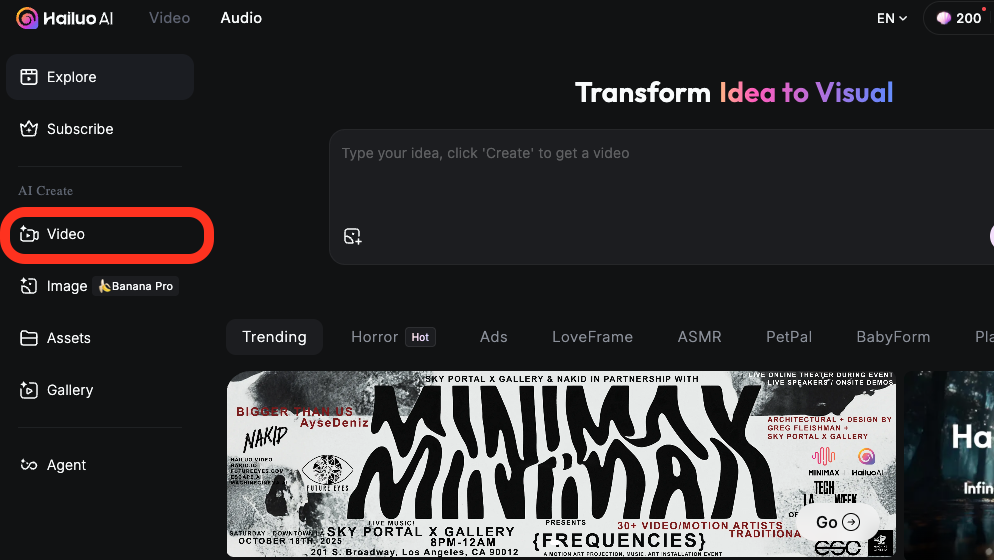
Head to the Video tab on the left sidebar
-
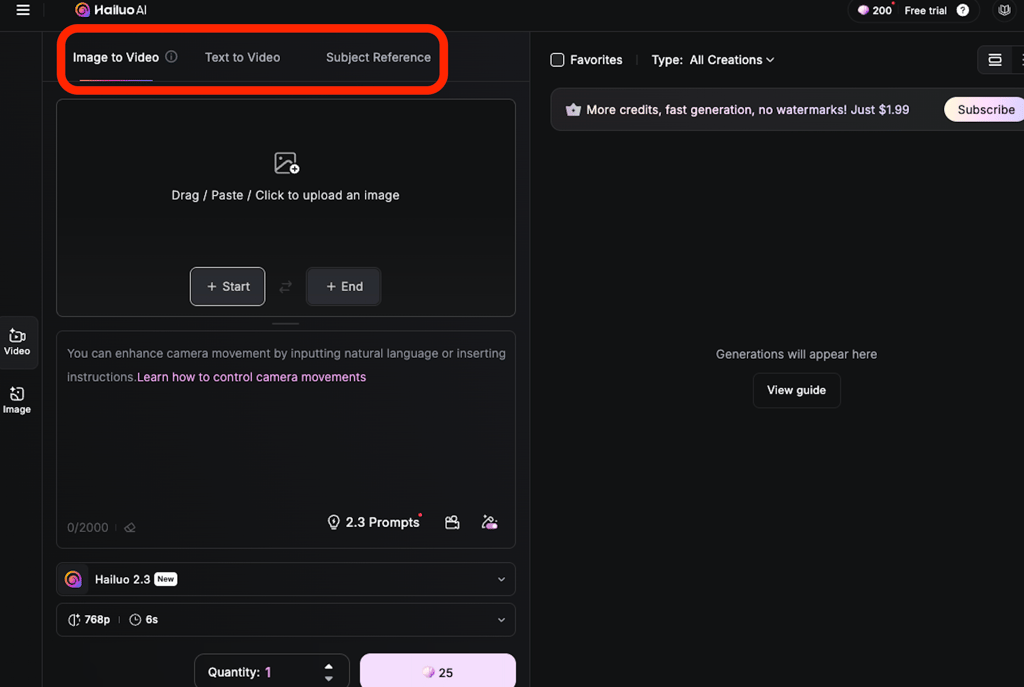
Pick Image to Video to animate an existing picture, Text to Video for fully AI creation, or Subject Reference to keep a character consistent across clips
-
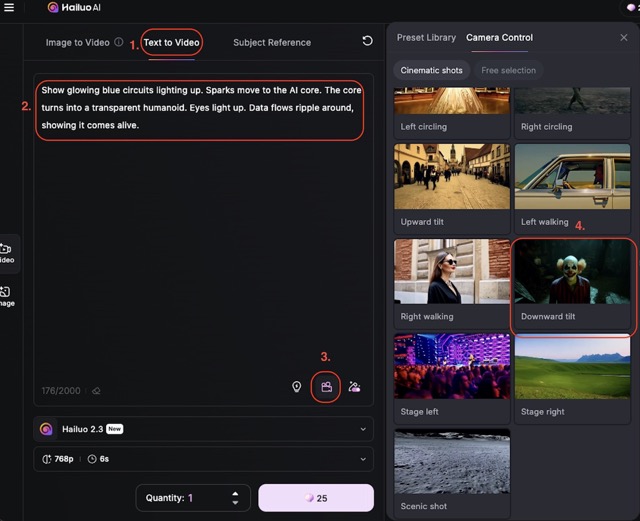
Enter a prompt or upload an image/character, then add presets and camera movements. Paid users can also extend clips up to 10 seconds and raise the resolution from 768p to 1080p.
- Submit the prompt and wait for the rendering to complete. Then preview the video and download it if it meets your needs
The process is intuitive, although users often require a few attempts to achieve the best result. Even on the free plan, the watermark is relatively unobtrusive compared to other AI video platforms. You can experiment freely and create videos that are usable for testing or small projects right away.
Tips and tricks to get the most from Hailuo AI video generator
Getting the most out of Hailuo AI is easier when you follow a few simple strategies. These tips can help improve video quality, maintain consistency, and save time:
- Use clear, detailed prompts. Include the subject, action, environment, lighting, and mood. For example: a red lipstick on a rotating pedestal, soft spotlight, cinematic style.
- Add presets and camera movements. Try instructions like slow push-in, tilt up, or wide shot to guide motion and atmosphere.
- Keep scenes simple and focused. Short clips with a single main action or subject usually render more reliably than complex setups.
- Use reference images or subject reference. A clear, well-lit image helps the AI maintain consistent characters or products.
- Test variations and iterate. Generate multiple versions, tweak prompts, and compare results to pick the best output.
- Match output settings to your platform. Adjust resolution, aspect ratio, and clip length depending on whether the video is for TikTok, YouTube, or social posts.
Hailuo AI video generator: user reviews
Public feedback about Hailuo AI is quite divided. Some users praise the ease of use and the occasional high-quality clip, while others are frustrated with unstable performance, credit issues, and inconsistent results.
Many users point out how easy it is to get started. Creating quick clips, testing ideas, and making early draft videos all feel smooth. When the prompts match what the model expects, it can produce attractive clips with smooth motion and consistent avatars.
However, some users report issues with video quality. Clips occasionally fail to render, appear distorted, or don’t fully match prompts. While common among AI video tools, this can be especially frustrating given Hailuo’s short clips and limited customization options.
A recurring issue in reviews is subscription management. While it’s difficult to verify every case, some users report being charged before their free trial ends, and others note that the cancellation button can be hard to find.
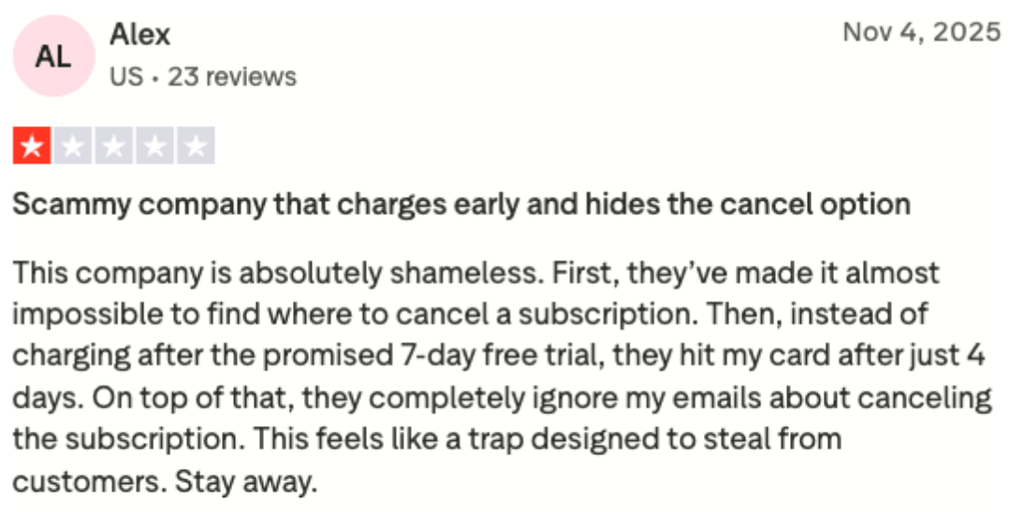
Not to defend corporations, but based on personal experience, it’s easy to forget that a trial is active. To avoid unexpected charges, it’s best to test the service briefly and cancel it yourself if you don’t plan to continue.
Hailuo AI video generator vs competitors
Hailuo AI occupies an interesting space between simple template-based editors and more advanced AI video systems.
| Feature | Hailuo AI | Kling AI | Sora AI | PixVerse AI |
| Max resolution | Up to 1080p | Up to 1080p | Up to 1080p | Up to 1080p |
| Inputs | Text and image | Text and image | Text and image | Text and image |
| Video length | 6–10 sec | Longer clips (max not specified) | 1–25 sec | 4–8 sec |
| Customization | Camera control, multiple models, first-frame guidance | Creative controls | Resolutions, aspect ratios, reference images | Medium-high: Turbo vs high-quality modes |
| Best use | Cinematic short clips with physics | Realistic professional-grade scenes | Story-driven short/medium clips | Fast social media content |
Compared with high-end AI video tools like Sora, Hailuo is easier to use, more affordable, and requires less setup. Its 6–10 second video length and occasional output inconsistencies, however, place it behind competitors that support longer and more realistic results.
That said, compared with more basic template-driven animation generators, Hailuo offers significantly more creative freedom. It supports detailed text prompts, first-frame image guidance, and camera movement control.
Final verdict: is Hailuo AI video generator worth it?
Hailuo AI Video Generator offers a fast and easy way to convert text or images into short clips, requiring bare minimal technical skills. It’s useful for casual creators looking to produce social media content or quick visual drafts.
That said, the platform has notable drawbacks. Clip length is limited, output quality can be inconsistent, and the credit and billing system has caused frustration among users. Customer support issues also make it less reliable for professional use.
That said, Hailuo AI works best for hobbyists and creators experimenting with short, simple projects. Those who need consistent, high-quality, or longer videos may find it too unpredictable for serious or professional workflows.
FAQ
What types of videos can Hailuo AI create?
Hailuo can make product ads, cinematic B-roll, animated intros, or any concept drafts using AI avatars, voiceovers, templates, and preset camera moves. These videos are 6–10 seconds long and work best for teasers, previews, and short social content.
Is there a free version of Hailuo AI?
Yes. The free plan lets you test the platform with 768p, 6-second short clips, and some free trial credits. The exact number of free credits may vary over time and by promotion, so it is best viewed as a way to try the service rather than as a plan for ongoing production work.
Can I upload my own voice or avatar to Hailuo AI?
Partly. You can upload subject-reference images (such as your face) to maintain consistency across clips, and Hailuo offers built-in AI avatars and voice options.
Does Hailuo AI support multiple languages?
Yes. The platform accepts prompts written in multiple languages. However, language quality can vary by model and voice option, so test short clips in your target language before committing credits to longer runs.
How long does it take to render a video?
It depends. Short 6–10-second clips often render within a minute under normal load, but times depend on resolution, model, queue length, and demand. Paid tiers offer faster or priority processing, while some users report occasional slow or stalled renders. I recommend starting with a low resolution for quick testing.