NordLayer AI Scout review: can companies govern AI they can’t see?
Being behind major reports like The Mother of All Breaches and RockYou2024, our in-house cybersecurity experts and journalists provide unbiased, real-world testing and in-depth analysis.
We maintain complete transparency by openly sharing our testing methodologies with our audience.
Learn more
AI adoption has outrun governance. These days, employees use AI tools that IT never approved and paste source code, API keys, and customer data into prompts without a second thought. When auditors, customers, or regulators ask for proof of oversight, most companies have none. Leadership can’t even tell whether the AI licenses it pays for are being used. Training and written policies rarely change behavior, and blocking AI outright only pushes usage underground.
NordLayer’s latest tool offers a middle path – see everything first, then decide what needs to be controlled. NordLayer AI Scout is an AI visibility and security tool that shows which AI tools employees use on the web and desktop and flags sensitive data in their prompts.
To see whether this tool actually delivers, the Cybernews research team and I put it to the test. In this NordLayer AI Scout review, I share our testing findings and cover its key features and setup. By the end of my review, you’ll know whether NordLayer AI Scout is worth adding to your security stack.
NordLayer AI Scout: an overview
The table below provides a quick look at what NordLayer AI Scout offers.
| ⭐ Rating: | 4.8/5 |
| 🎯 Best for: | Companies that want to see how employees use AI before deciding what to restrict. |
| 📝 Brief description: | A visibility and security layer for enterprise AI. A browser extension and a desktop sensor feed one admin console, showing which AI tools employees use and flagging sensitive data in their prompts. |
| 🌐 Web coverage: | Main web chats, including ChatGPT, Claude, Gemini, Microsoft 365 Copilot chat, Perplexity, and DeepSeek, plus additional tools such as Grok, Qwen Chat, and Mistral Le Chat. |
| 💻 Desktop coverage: | Coding agents including Claude Code, Cursor, Codex, GitHub Copilot, Google Antigravity, and Cline, plus Docker Sandboxes on macOS, Windows, and Linux. |
| 🛡️ Data protection: | API keys, PII, and customer data before submission on the main web chats. Desktop tools are logged for visibility. |
| 🔒 Privacy: | Prompts are scanned on-device, retention is configurable, and adoption views show aggregate trends without prompt content. |
| 📊 Key dashboards: | Security, Adoption, Knowledge, and Code Explorer, plus printable reports. |
| 🤖 MCP and agent visibility: | Inventories agent skills and Model Context Protocol (MCP) servers across coding tools. MCP server blocking, fleet-wide or per profile, is coming soon. |
| ⚙️ Deployment: | Silent rollout through Intune, Jamf, Workspace ONE, JumpCloud, or any other MDM, plus Group Policy or Ansible. No new app or login for employees. |
| 🔗 Integrations: | SIEM export; alerts via Slack, Microsoft Teams, email, or webhook; directory sync with Okta, Microsoft Entra ID, or HiBob. |
| ⚠️ Not covered: | Cloud coding agents apart from Devin and OpenHands Cloud (beta), Claude Desktop chat, and Copilot inside Microsoft 365 apps or the Edge sidebar. |
What is NordLayer AI Scout?
Simply put, NordLayer AI Scout is an AI usage visibility and security tool for enterprises. It comes from NordLayer, the business security arm of Nord Security, the company behind industry-leading products like NordVPN and NordPass.
NordLayer AI Scout runs on two components: a browser extension tracks web AI chats like ChatGPT, Claude, and Gemini, while a desktop sensor covers native apps and coding agents such as Cursor and Claude Code. Both send their data to a single admin console, where IT teams can see which AI tools employees use, how often they use them, and whether any sensitive data shows up in their prompts.
All scanning happens on-device, and employees don’t need to install a new app or create a new login. On web chats, NordLayer AI Scout can also warn, redact, or block sensitive data before it’s sent, acting as a preventative barrier. On desktop tools, it logs activity for visibility.
NordLayer AI Scout addresses the following key concerns regarding the use of AI in enterprise settings:
- Shadow AI. Employees adopt AI tools faster than IT can approve or inventory them.
- Data leakage. Source code, API keys, PII, and customer data end up in AI prompts.
- Coding agent risks. AI coding assistants and MCP servers get access to sensitive code and intellectual property.
- No proof of oversight. Auditors, customers, and regulators are now starting to ask for evidence that in-house AI use is governed.
- Unclear AI spend. Leadership can’t tell whether the AI licenses it pays for are actually being used.
NordLayer AI Scout: key features
NordLayer AI Scout brings visibility, data protection, and adoption analytics together in one admin console. Below, I cover the features that make it stand out.
Shadow AI discovery: see AI tools your workforce actually uses
Shadow AI discovery is the foundation of NordLayer AI Scout. The browser extension monitors web chats, like ChatGPT, Claude, Gemini, Perplexity, and DeepSeek. Meanwhile, the desktop sensor covers coding tools such as Claude Code, Cursor, Codex, Cline, and GitHub Copilot, as well as sessions running in Docker Sandboxes. Cloud coding agents Devin and OpenHands Cloud (beta) come in through cloud integrations.
All of this activity lands in the Adoption dashboard. There, your organization’s admins can see weekly and monthly active users, activation rates, and usage broken down by department, team, role, and tool.
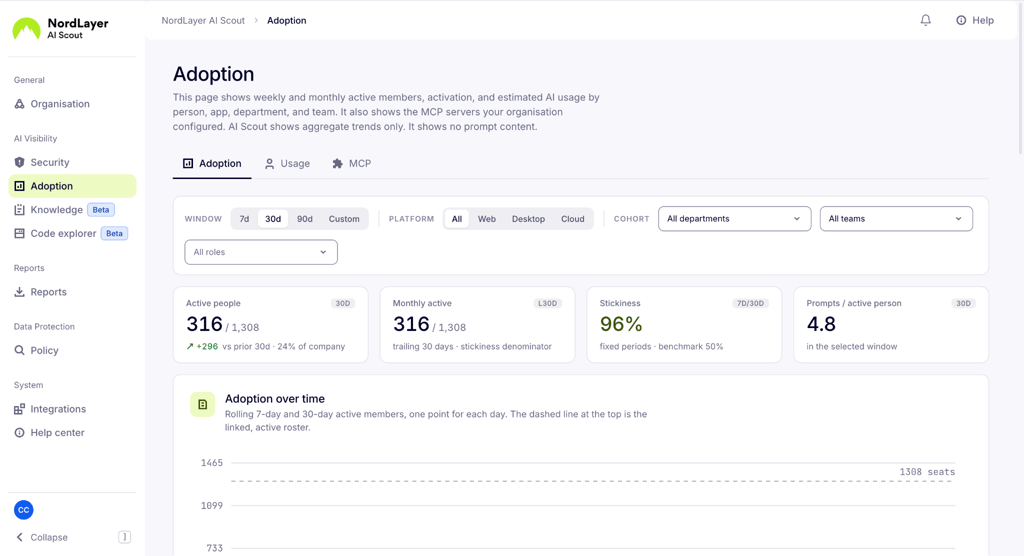
The Usage view provides conversation counts, token volume, and estimated public-rate token costs, so leadership can check whether the AI licenses it pays for are being used.
AI DLP controls: warn, redact, or block before data leaves
NordLayer AI Scout scans prompts on-device and flags sensitive data like API keys, PII, and customer data. On web chats, NordLayer AI Scout can step in before a prompt is even sent: warn the employee, automatically redact the sensitive part, or block the submission entirely.
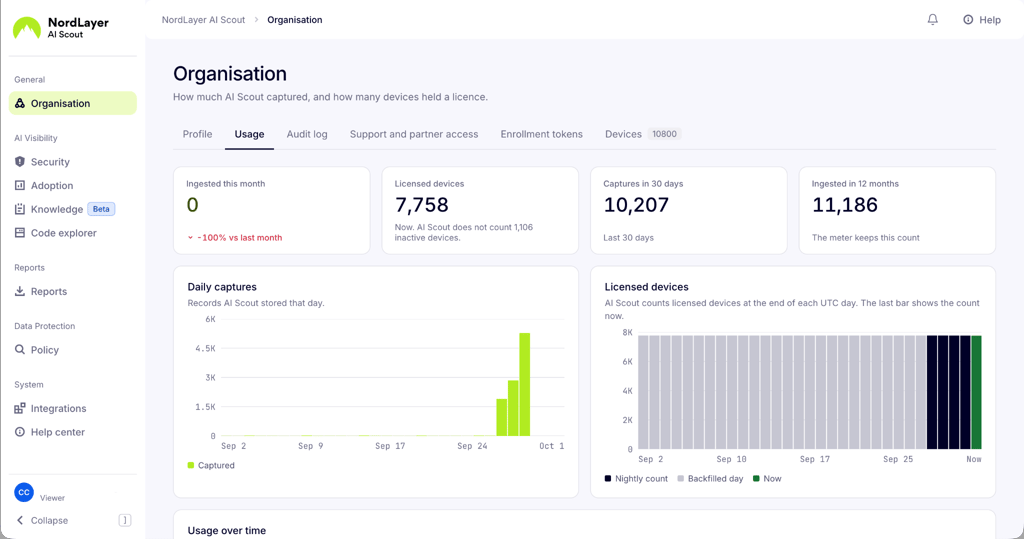
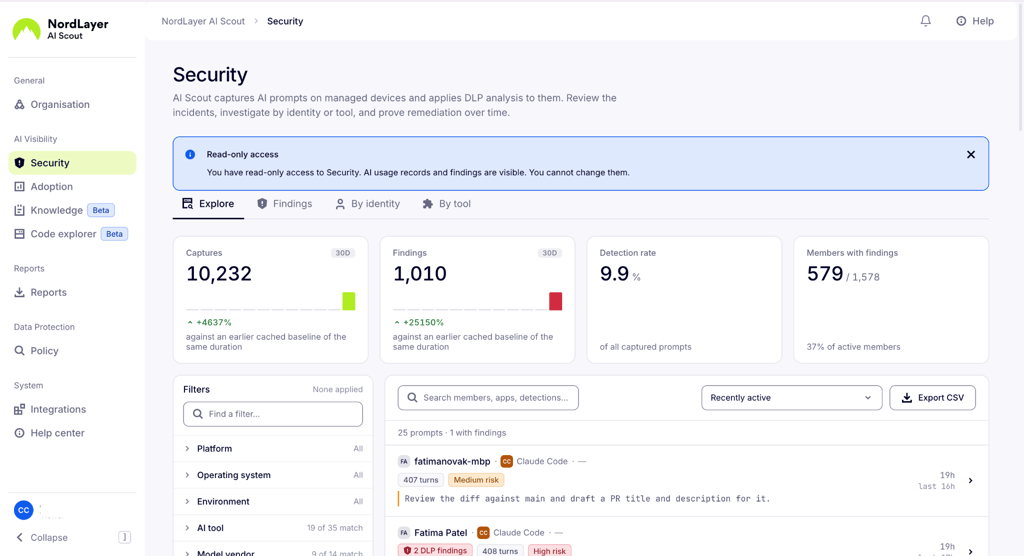
Every finding appears in the Security dashboard. IT admins see captured prompts, detection rates, and which users have findings, then narrow things down by severity, tool, platform, department, or review status. Opening an item shows the conversation context, the detected findings, and whether someone has already reviewed it. Alerts can also go straight to Slack, Microsoft Teams, email, or a webhook.
Coding agents and MCP visibility: the agentic layer IT can’t see
Coding agents can read files, run commands, and connect to external services through MCP servers, mostly out of IT’s sight.
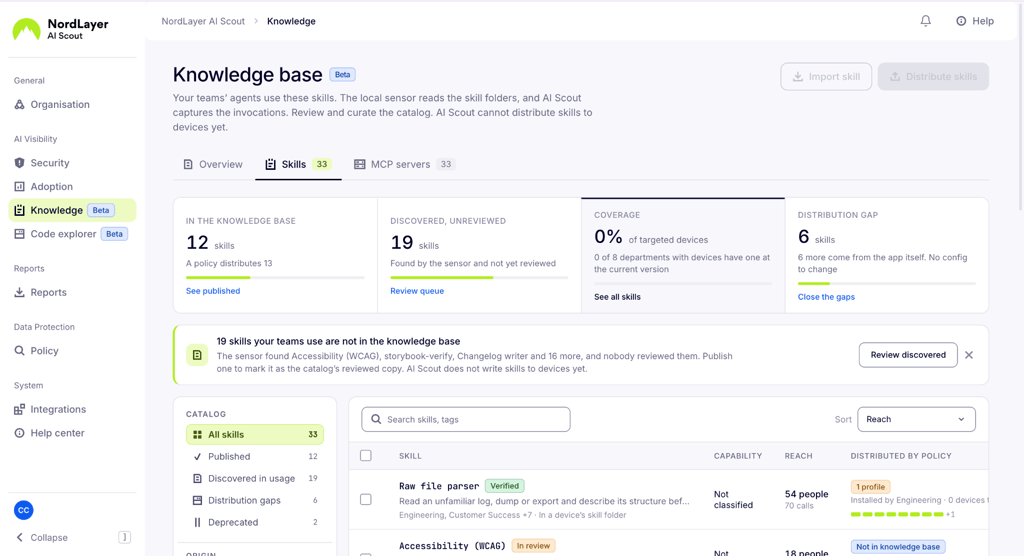
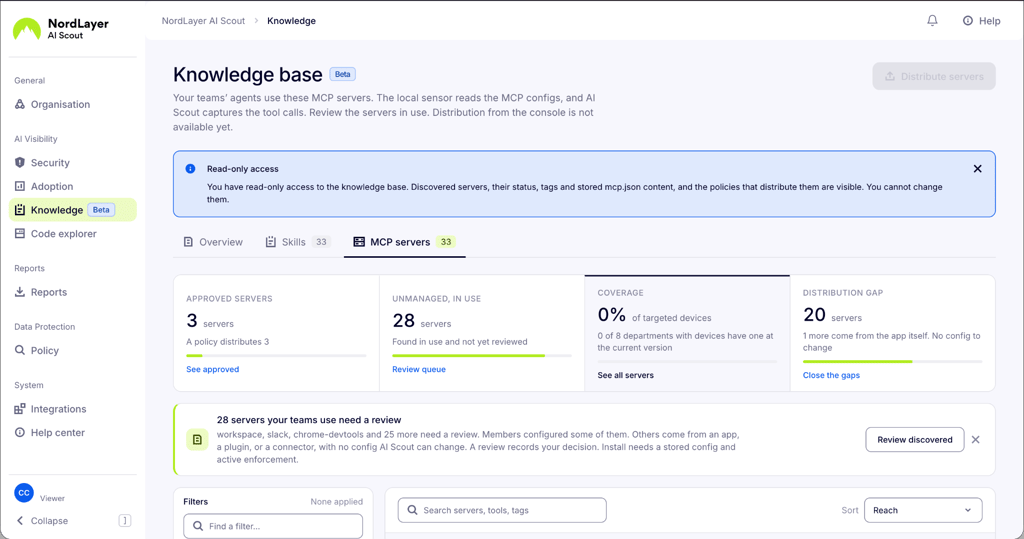
NordLayer AI Scout scans personal and project config files across desktop coding tools to inventory installed agent skills and MCP servers. The Knowledge dashboard sorts them into published, discovered in usage, deprecated, and distribution gaps. It also shows reach, call volume, capability types, and policy coverage across users, teams, and departments.
Admins will soon be able to block specific MCP servers fleet-wide or per profile. The catch is that blocking will work at the personal config level only. NordLayer AI Scout won’t change repository-level files or revoke remote credentials, so it’s designed as a guardrail rather than a full lockdown.
Code explorer: how much of your codebase AI wrote
Code Explorer shows every repository where an employee ran a coding assistant on a managed device. It records the Git origin and AI-edited lines, but not diffs or prompt text. Contributor attribution is coming soon.
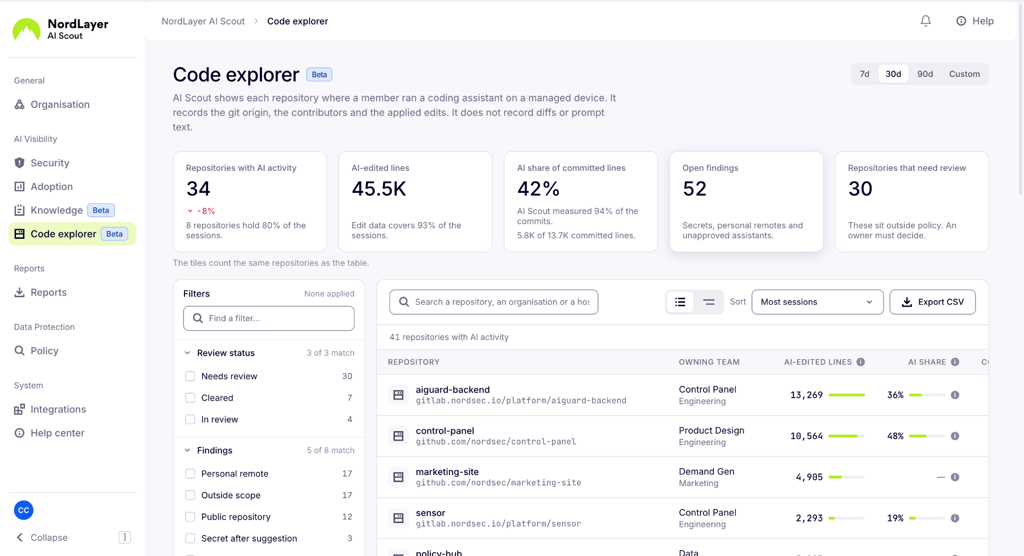
The dashboard highlights AI-edited lines, the AI share of committed lines, sessions, and open findings for each repository. Teams can filter repositories by review status, findings, assistant, Git host, or language.
More importantly, it surfaces risk signals like public repositories, personal remotes, unapproved agents, secrets appearing after AI suggestions. Prompt-injection signals are coming soon.
NordLayer AI Scout: other features worth knowing
Beyond the headline features I covered in the previous section, NordLayer AI Scout includes a few tools that help admins run AI governance from day to day. Here’s a quick rundown:
- Shadow AI inventory. Builds a running list of every AI tool employees use across the web and desktop. So, IT knows what’s in use before deciding what to approve or restrict.
- One console. Security findings, adoption data, agent inventories, and code activity sit in one admin panel, split into Security, Adoption, Knowledge, and Code Explorer sections.
- Agentic layer (MCP catalog and skills inventory). Lists every MCP server and agent skill installed across coding tools, and tracks which ones are published, deprecated, or used without approval.
- Adoption analytics. Tracks active users, stickiness, activation funnels, and token volume by department and role, alongside estimated public-rate token costs for measuring AI ROI.
- Audit trail. Logs administrative changes to members, roles, policies, devices, and permissions. That includes tracking who made each change, when, and the before-and-after state. Keep in mind that it doesn’t store prompts, responses, secrets, or detected values.
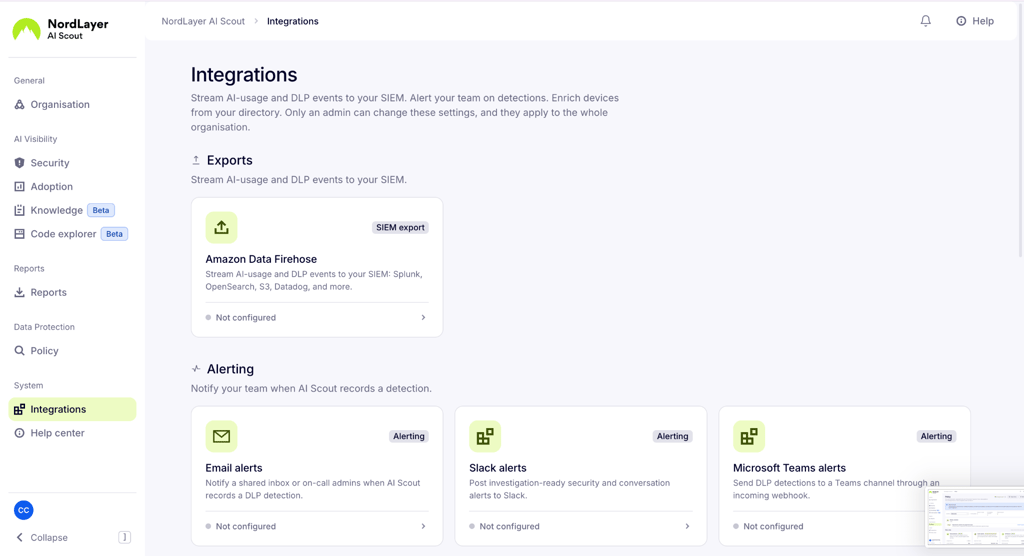
- Deployment and integrations. Rolls out through existing device management tools, sends AI usage events to a SIEM, routes alerts to Slack, Microsoft Teams, email, or a webhook, and pulls team details from Okta, Microsoft Entra ID, or HiBob.
- Ask Al. Answers plain-language questions about AI usage and security data, limited to what each member is allowed to see.
NordLayer AI Scout: supported AI tools
NordLayer AI Scout’s coverage depends on where an AI tool runs and which component monitors it. The table below depicts what’s supported and what level of protection each category gets.
| Category | Tools | Coverage level |
| Main web chats | ChatGPT, Claude (claude.ai), Gemini, Microsoft 365 Copilot chat, consumer Copilot, Perplexity, DeepSeek, Hugging Face Chat, Nexos | Full visibility, plus pre-submit protection (warn, redact, block) |
| Additional web tools | Qwen Chat, Mistral Le Chat, Google AI Studio, NotebookLM, Grok, Kimi | Visibility and audit logs |
| Desktop coding tools | Claude Code, Cursor (agent and composer modes), Codex, Google Antigravity, Cline, Roo Code, Kilo Code, opencode, Zoo Code, Pi, OpenHands | Visibility and audit logs |
| Other desktop coverage | Grok Bot (macOS and Windows), CrewAI library | Visibility and audit logs |
| Docker Sandboxes | Claude Code, Cursor, Codex, and GitHub Copilot sessions on macOS, Windows, and Linux | Visibility. Deleting a sandbox removes the session files needed for scanning |
| Cloud coding agents | Devin, OpenHands Cloud (beta) | Visibility and audit logs through cloud integrations |
NordLayer AI Scout deployment
In my experience, deploying NordLayer AI Scout doesn’t require a dedicated rollout project. The deployment process is fairly straightforward: admins create an enrollment token in the control panel and push the browser extension and desktop sensor to managed devices through their existing device management tool.
NordLayer AI Scout provides ready-made configuration payloads for Intune, Jamf, Workspace ONE, JumpCloud, Group Policy, and Ansible, plus a generic MDM option. So, it doesn’t lock you into a particular MDM vendor. For smaller setups, there’s also guided manual installation.
On managed devices, the rollout is effortless. Employees don’t need to install an app, create an account, or change how they work. Once installed, NordLayer AI Scout scans activity locally, and results start appearing in the control panel as prompts are processed.
To make the data more useful from the start, admins can connect to directories like Okta, Microsoft Entra ID, or HiBob. This pulls in each member’s department, team, and role, so adoption and security reports are grouped correctly. You can also route alerts to Slack, Microsoft Teams, email, or a webhook.
Privacy and employee monitoring concerns
Any tool that reads employee prompts raises fair questions about privacy and trust. To its credit, NordLayer AI Scout limits what it collects by design. Scanning happens on-device, adoption views show aggregate trends without prompt content, Code Explorer skips diffs and prompt text, and the audit log never stores secrets or detected values.
Here are the most challenging aspects companies should consider before rolling out NordLayer AI Scout:
- Employee trust. Even with zero friction, employees may see prompt monitoring as surveillance. I suggest telling employees what’s captured, why, and who can see it, since trust depends on that transparency.
- Access to prompt content. The Security dashboard shows conversation context for flagged prompts. Role-based permissions decide who can open these details, so access needs to be limited to the right people.
- Data retention. NordLayer AI Scout lets admins configure how long data is kept. Shorter retention reduces risk, but it also limits how far back investigations can go.
- Personal use on work devices. NordLayer AI Scout captures activity on managed devices, which may include personal AI use during work hours. Companies need a clear acceptable use policy to cover this.
- Legal requirements. In the EU and other regions with strict labor and privacy laws, monitoring employee activity may require informing staff, running a data protection impact assessment, or consulting a works council.
- Sensitive data in AI-generated answers. Ask Al can be set to Metadata only, Redacted content, or Matched values included. The last option gives more detail but widens exposure.
NordLayer AI Scout: pros and cons
Who is NordLayer AI Scout for?
NordLayer AI Scout is built for organizations where AI use has already spread. It works best for companies that manage their devices centrally and want to understand AI use before restricting it. For teams that need hard blocking everywhere, though, it may fall short.
I recommend NordLayer AI Scout to:
- Mid-sized and large companies with heavy AI use: organizations with dozens of AI tools in play get the most from a single inventory and one console.
- Engineering-heavy teams: MCP visibility and Code Explorer show what coding agents can access and how much of the codebase they touch.
- Regulated industries: finance, healthcare, and legal teams can use findings, reports, and audit logs as evidence of AI oversight, with a dedicated EU AI Act evidence pack report for compliance reviews.
- Companies paying for AI licenses: adoption analytics and token cost estimates show whether that spend pays off.
I don’t recommend NordLayer AI Scout to:
- Small teams without device management: deployment relies on managed devices, so unmanaged or BYOD environments won’t get full coverage.
- Organizations built around Microsoft 365 Copilot: at the time of writing, Copilot inside Word, Excel, Outlook, and Teams isn’t covered by NordLayer AI Scout.
- Teams relying on cloud coding agents beyond Devin and OpenHands Cloud: connections for other cloud agents aren’t available yet.
My verdict: is NordLayer AI Scout worth it?
In my opinion, NordLayer AI Scout is one of the most complete AI visibility tools available to businesses right now. It covers web chats and desktop coding agents, including Devin and OpenHands Cloud, in a single console. It also catches sensitive data on the main AI chats before it leaves and shows leadership exactly how AI licenses are being used.
From my perspective, only a few competitors match its MCP and Code Explorer visibility, which matters more as coding agents take on bigger roles.
NordLayer AI Scout fits a visibility-first approach: see everything first, then add controls where they matter. Add silent deployment, on-device scanning, and Nord Security’s track record, and NordLayer AI Scout is well worth it for any company serious about governing AI.
FAQ
Can NordLayer AI Scout block sensitive data in AI prompts?
Yes, NordLayer AI Scout can warn, redact, or block API keys, PII, and customer data before submission on main web chats, including ChatGPT, Claude, and Gemini. On desktop tools and other web interfaces, it logs activity for review.
Does NordLayer AI Scout monitor AI coding agents?
Yes, NordLayer AI Scout monitors desktop coding agents like Claude Code, Cursor, Codex, Cline, and GitHub Copilot through its desktop sensor, plus Devin and OpenHands Cloud (beta) through cloud integrations. It also inventories MCP servers and agent skills, and Code Explorer shows how much of each repository AI wrote.
Does NordLayer AI Scout store employee prompts?
Yes, NordLayer AI Scout captures prompts so it can scan them for sensitive data. That said, scanning happens on-device, and admins control how long data is kept. Adoption dashboards show aggregate trends only, and the audit log never stores prompts or detected values.