Best AI flashcard maker tools in 2026: tested for speed, accuracy, and study power
Being behind major reports like The Mother of All Breaches and RockYou2024, our in-house cybersecurity experts and journalists provide unbiased, real-world testing and in-depth analysis.
We maintain complete transparency by openly sharing our testing methodologies with our audience.
Learn more
Flashcards are an amazing learning tool, but creating them manually isn’t easy. You can spend 80% crafting flashcards and only 20% learning, when it should be the other way around.
AI is extremely good at automating repetitive processes and is now integral to education. Assisted by Cybernews researchers, I tried 6 AI flashcard makers to test flashcard accuracy, ease-of-use, and supported files (PDFs, lecture slides, etc) to help you choose the best one.
The best part is that all of my top recommendations offer free versions, so you can try them out yourself without any investment.
Best AI flashcard maker: our top list
- Quizlet AI Flashcard Generator – best AI flashcard maker for exams
- Revisely – best for content summaries
- StudyX – best AI study assistant
- Gizmo – best gamified flashcard maker
- NoteGPT – best timesaver flashcard maker
- Algor Education – best for visual learning
Why AI flashcard makers are worth using today
AI is reshaping the learning process, now creating flashcards from notes, PDFs, or simply whiteboard captures. Flashcards are an efficient learning method, energizing active recall brain functions instead of exhausting, and sometimes futile, passive reading.
But they are also tedious to make manually. You may spend the majority of your time creating them rather than learning. You also risk a false sense of confidence, as time spent creating flashcards does not necessarily transform into memorization. That's where AI jumps in.
Using natural language processing, AI understands your topic and automatically creates relevant flashcards. Optical character recognition technology lets it scan PDFs and pictures. But you can also upload video content, like YouTube lectures, and get informational quizzes, text summaries, and, of course, flashcards to test your knowledge.
That said, there are a few drawbacks to consider. In some cases, AI only scrapes the surface of your topic or provides misleading answers. Optical character recognition also heavily depends on quality, so not all captures are transformed into information.
Also, there's an inherent value in creating flashcards yourself, so don't let AI do all the job for you. AI helps you focus on understanding instead of formatting, but adding personalization to AI-generated flashcards helps the memorization process.
What we tested: methodology and study cases
I have thoroughly tested all 6 services to find the best AI flashcard maker for different needs. The Cybernews team fact-checked my information and also helped with mobile testing to see how these tools perform on multiple platforms.
I started by registering with the chosen AI flashcard maker and inspecting the onboarding process. Quick and easy onboarding is a major advantage, as students savor every minute to prepare for exams.
Then I created flashcards using each service. First, I used a maths document and a YouTube lecture to inspect how well flashcard makers extract data from texts and videos. I verified flashcard creation speed, accuracy, and available types.
For my second round of testing, I used a 60+ page PDF, "Global Cybersecurity Outlook 2026" by WEF. It revealed how well tools work with longer documents. As cybersecurity is my area of expertise, it was easier to evaluate the accuracy of flashcard questions and answers.
I proceeded with testing additional features, like Algor mind maps and AI chatbots, whenever available. I crafted flashcards on the free version to verify whether they are sufficient or quickly run out of free flashcards. Lastly, I checked each tool's pricing to see which offers the best value for your money.
Quick comparison: top AI flashcard makers
Before diving into detailed reviews, here's a side-by-side flashcard AI maker comparison for quick evaluation.
| Rating | Best for | Supported files | Study features | Free plan | Starting price (billed annually) | |
| Quizlet | Test preparation, topic-specific flashcards | Pdf, docx, txt, jpg, png, and more | Study material database, study guides, learning games | ✅ Yes, plus a 7-day premium free trial | $2.99/month | |
| Revisely | Document, video, and handwritten note summaries | Png, jpg, jpeg, pdf, docx, pptx | Spaced repetition | ✅ Yes | $2.99/month | |
| StudyX | Deep research, writing assistance | Pdf, docx, png, jpg, mp3, wav, and more | Customizable flashcard difficulties, question-aswer database | ✅ Yes | $2.99/month | |
| Gizmo | Gamified and group learning, highly accurate flashcard creation | Ppt, doc, txt, jpg, imports from Quizlet and Anki, and more | Gamified and group learning | ✅ Yes | Not officially publicized | |
| NoteGPT | Deep research, content summaries | Pdf, docx, pptx, mp3, mp4, jpg, and others | Numerous AI-powered learning features | ✅ Yes | $9.00/month | |
| Algor Education | Visual learning and creating mind maps | Pdf, doc, txt, mp3, wav, m4a | Highly accurate flashcards,, audio transcriptions | ✅ Yes | $5.49/month |
Best AI flashcard maker in 2026: detailed list
To find the best AI flashcard makers in 2026, I tested 6 popular tools myself. I uploaded the same study materials and assessed how quickly and accurately each generated flashcards. Each review focuses on usability, supported formats, learning modes, and how well the AI adapted to different types of content and study needs.
1. Quizlet AI Flashcard Generator – 500 million flashcards for tests
| Best for: | Test preparation, topic-specific flashcards |
| Supported file types: | pdf, docx, txt, jpg, png, and more |
| Free trial: | ✅ Yes, plus a 7-day premium free trial |
| Pricing: | From $2.99/month |
Quizlet AI flashcard maker is one of the oldest and most widely known in the industry. Over the years, it has built a massive repository of community-generated knowledge, including medicine, mathematics, languages, and other topics for SAT and MCAT tests.
Quizlet AI has a free version, but most advanced features require a paid subscription. Quizlet Plus lets you do 3 practice tests monthly and 20 rounds of questions in its Learn Mode. Plus, it removes ads. Quizlet Plus Unlimited ($3.74/month) removes all limitations.
I found it effortless to use. During my test, I uploaded a PDF about mathematics to make flashcards. Quizlet wasted no time and came up with 78 cards in total.
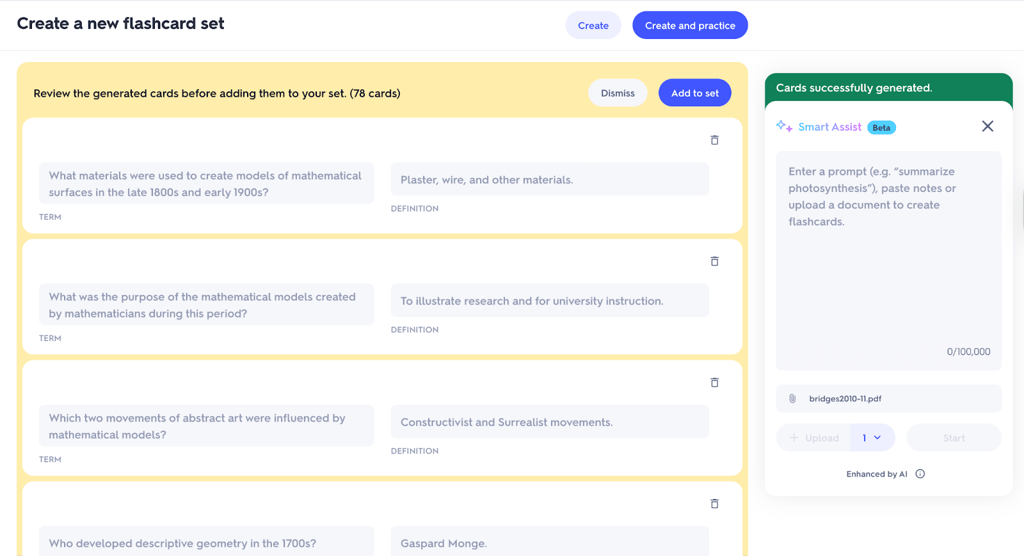
However, if you use the free version, it only extracts terms, and you must write the definition answers yourself. With the paid version, Quizlet AI does this for you. It has mobile apps with a 4.6 rating on Google Play and 4.8 on Apple App Store, both very easy to use.
2. Revisely – accurately reads handwritten notes
| Best for: | Document, video, and handwritten note summaries |
| Supported file types: | Png, jpg, jpeg, pdf, docx, pptx |
| Free trial: | ✅ Yes |
| Pricing: | From $2.99/month |
Revisely's strengths are AI flashcard making from PDFs or videos and accurately capturing handwritten notes. I found it similar to Quizlet, but Revisely is web-based, so you get the same tool across all devices.
It also offers a free version, but limits it to 50 AI-assessed answers and 5 pages per document. I uploaded the same math document I used for all tests, and Revisely generated flashcards within 10 seconds.
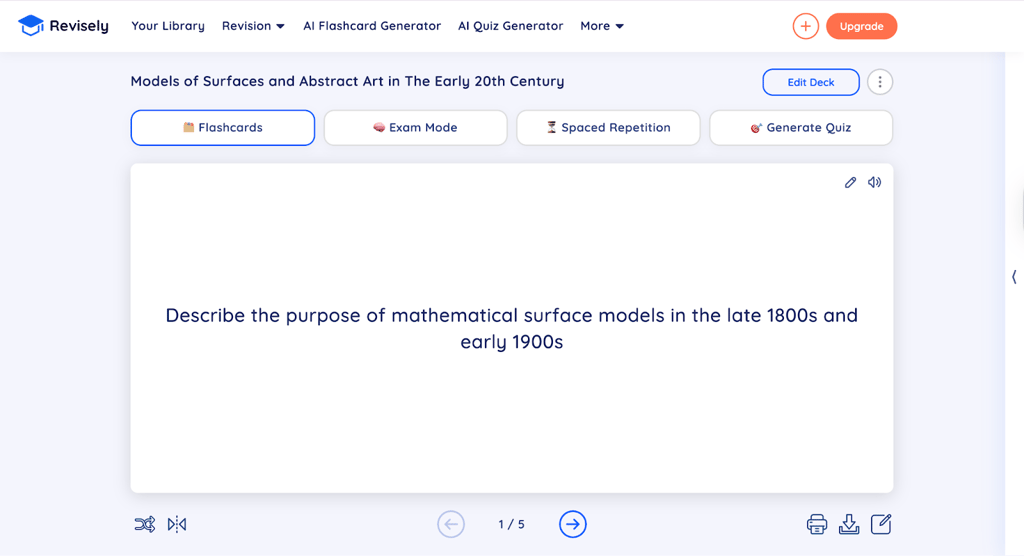
I like that Revisely offers 4 learning modes once it generates flashcards. Using different methods helps maintain focus, and you can switch to Exam Mode or generate a quiz with a few clicks. It also offers Spaced Repetition to repeat flashcards in selected time spans.
Keep in mind that Revisely supports 50 languages, so many non-English speakers will find their native tongue. On a less positive note, there is no free trial to test out its paid features.
3. StudyX – multiple flashcard difficulty levels
| Best for: | Deep research, writing assistance, flashcard difficulty level customization |
| Supported file types: | Pdf, docx, png, jpg, mp3, wav, and more |
| Free trial: | ✅ Yes |
| Pricing: | From $2.99/month |
StudyX is a fully fledged AI learning assistant you can also use to generate flashcards. It has a steeper learning curve compared to Quizlet or Revisely and uses a credit-based payment system, which is common among AI-helpers.
StudyX lets you upload files, recordings, YouTube videos, and texts to make flashcards. I uploaded a YouTube video explaining mathematical integrals, and it took about 20 seconds to generate 10 flashcards.

Notice that StudyX also opens a chat window where you can ask AI questions while solving flashcards. When prompting flashcard creation, you can also choose the difficulty level, like elementary school, high school, graduate, or even a working professional.
I found the free app quite limited and quickly ran out of credits. On the other hand, StudyX prices are competitive and unlock an 85M+ question-answer bank, which cross-references answers with AI models to make its chatbot highly accurate.
4. Gizmo – simplistic flashcard creator for group learning
| Best for: | Gamified and group learning, highly accurate flashcard creation |
| Supported file types: | Ppt, doc, txt, jpg, imports from Quizlet and Anki, and more |
| Free trial: | ✅ Yes |
| Pricing: | Not officially publicized |
Gizmo is the easiest AI flashcard maker I've tried out. It asked me a few questions upon registration and offered to upload files before landing me on its dashboard. It scanned the 50-page PDF in under 10 seconds, letting me choose which pages to process.
Flashcard generation was slower, and it took a bit more than half a minute to come up with 35 cards. However, the cards were highly accurate, and you can also issue AI crafting instructions. By answering questions correctly, you get experience points, and you can share flashcards with friends to compare and compete.
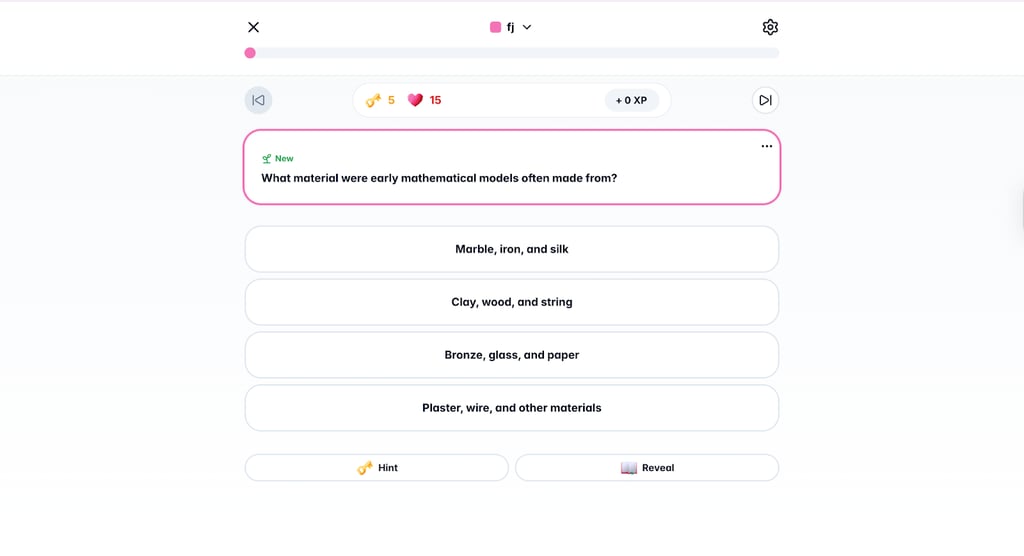
Contrary to StudyX, Gizmo doesn't involve a learning curve and allows you to focus on flashcard creation right away. You will only find your flashcard sets and profile details, but that's not a setback. If you're looking for a straightforward AI flashcard maker, Gizmo will set you up within a few minutes.
What I didn’t appreciate about Gizmo AI is that it’s not straightforward about Gizmo Unlimited pricing. Even the chatbot wasn’t able to give direct answers about pricing.
5. NoteGPT – content summaries with timestamps
| Best for: | Deep research, content summaries |
| Supported file types: | Pdf, docx, pptx, mp3, mp4, jpg, and others |
| Free trial: | ✅ Yes |
| Pricing: | From $9.00/month |
NoteGPT was released in 2024, so it was built with AI integration from the very start. The flashcard maker is only one of its many features, so it costs more in comparison.
But you also get more features, like an AI math solver, a quiz generator, various types of media summaries, and an image generator. NoteGPT relies heavily on AI, so its benefits stem from current AI capabilities.
Regarding flashcards, you can upload files, link to articles, and YouTube videos. Flashcard generation took about 30 seconds, including the tiny text document I uploaded. You can create flashcards in 60 languages.
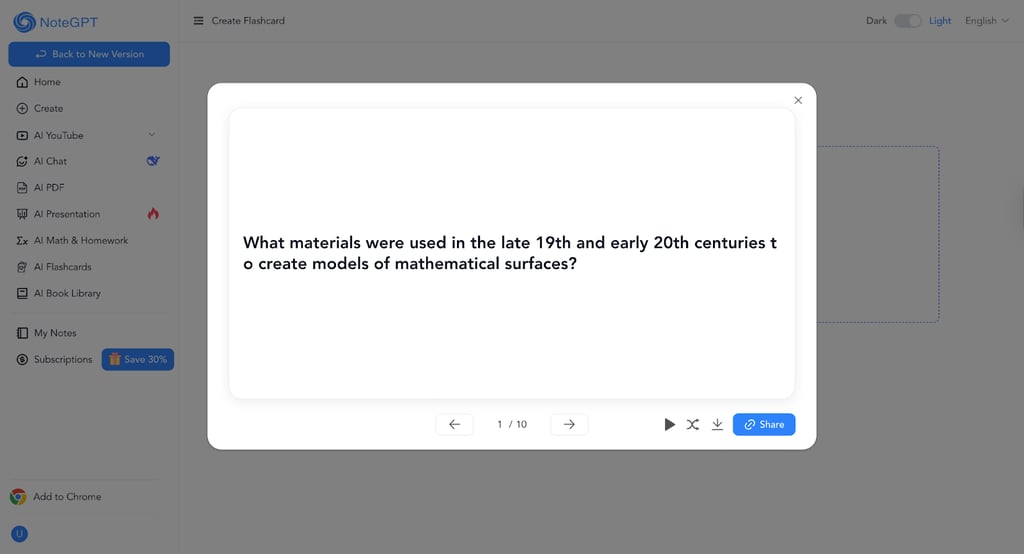
NoteGPT should also support cloze deletion, but I was not able to do that and kept bouncing between two NoteGPT dashboards. It's not the easiest tool to use, and I recommend it for students who require more than a few advanced AI features alongside flashcard creation.
6. Algor Education – flashcards with visual mind maps
| Best for: | Visual learning and creating mind maps |
| Supported file types: | Pdf, doc, txt, mp3, wav, m4a |
| Free trial: | ✅ Yes |
| Pricing: | From $5.49/month |
Algor makes flashcard generation easy, although it lacks some customization. First of all, it asks you some personal questions, like the level of education you are aiming for. It also lets you choose whether you want to create flashcards, quizzes, summaries, or presentations.
When choosing flashcards, you can select how detailed they should be. You can issue AI-written instructions or upload files, photos, and video links. However, it does not yet support PowerPoint imports.
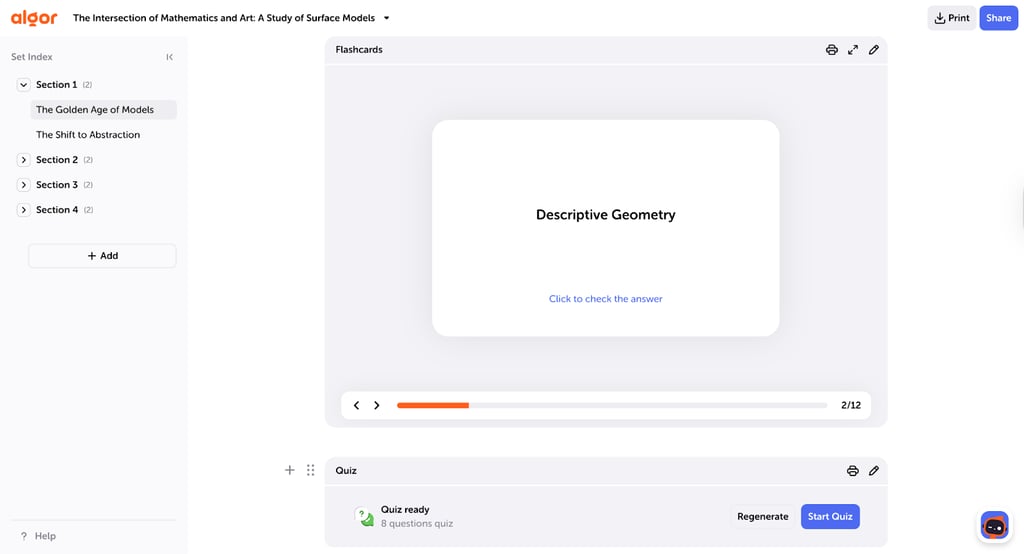
I found Algor flashcards up-to-date, but a bit awkwardly phrased. However, I uploaded the same YouTube video to make a mind map, and it was very informative. Combining the two not only helps you remember the chosen topic but also contextualizes it in a visually appealing way.
What makes a great AI flashcard maker
Now that we've got the best AI flashcard makers ranked, let's see what exactly makes them worth your money. Here's how we evaluated the AI integration and benefits:
- Flashcard accuracy. This is the most important feature. AI hallucinations are still a common issue, and you don't want to fail an exam because of AI's misleading answers.
- File type support. The best AI flashcard makers should extract data from PDF documents, notes, and audiovisual content. It is a significant advantage if the tool uses optical character recognition to craft flashcards from handwritten notes.
- Study reinforcement features. Straightforward question-answer flashcards are great, but your mind gets tired using only one learning method. Look for services that offer spaced repetition, cloze deletion, knowledge database, gamification, and group learning features.
- Mobile and offline access. For many students, smartphones are a primary gadget for internet access and apps. If you can create flashcards on it, you can do it during lectures or breaks. Also, offline access ensures you can learn wherever you are.
- Customization options. It's essential to get flashcards relevant to your education level. A worthwhile AI flashcard creator lets you choose a difficulty level, so that a middle school pupil does not get questions that require university-level knowledge.
During in-house tests, we looked for tools that include as many listed features as possible. For example, Quizlet lets you create study guides alongside flashcards, Algor Education provides you with mind maps, and StudyX has an AI assistant to answer your questions.
Pricing and value – free vs paid tools
All the AI flashcards we tested are freemium tools, which means they offer limited free versions and monetize selected features. I tested free versions and often found them too restrictive, running out of free flashcards and credits within a few tries. However, that might be enough for a quick study and short tests.
Luckily, these tools don't cost an arm and a leg, ranging from $2.99 to $9.00 per month. Keep in mind that these prices are for annual subscriptions, and if you choose to pay month by month, prices will be steeper.
I also noticed two types of payment models. Some rely only on a paid subscription, like Quizlet, Gizmo, and Revisely. Meanwhile, StudyX, NoteGPT, and Algor use a hybrid model that limits flashcard creation credits, and you must buy more if you run out.
The exact model depends on AI integration. Tools that offer advanced AI features, like writing assistance and chatbots, typically use a hybrid model with credit monetization. I recommend evaluating your needs before subscribing to avoid overpaying for features you do not need.
Who should use AI flashcards (and who shouldn’t)
Before wrapping up, let's see who benefits from AI-crafted flashcards most. Here's who should consider this learning tool:
- High school and college students. This is a challenging period with one lecture after another, and most involve so many notes that it can make your head spin. AI flashcard creators with optical character recognition let you upload handwritten notes to create flashcards within a minute.
- Lifelong learners preparing for certifications. Lifelong learners typically already have full-time jobs, so it's easy to forget study material. Flashcard makers offer spaced repetition, which repeats the most important flashcards or the ones you answered incorrectly. It helps overcome the forgetting curve, something I learned while preparing for my future information security certification.
However, flashcards are not universal. Here are two scenarios where you should avoid them:
- Flashcard personalization. Creating generic flashcards is one of the biggest AI setbacks. If you need deeply personalized flashcards that involve hand-crafted pictures and specific phrasing, you should avoid AI flashcard makers or use them lightly.
- Studying complex topics. As progressive as AI is, AI hallucinations are a serious issue. For example, if you study medicine and prepare for final exams, relying on AI poses a risk that is too serious to ignore.
Final recommendation: which AI flashcard maker should you use?
Listed AI flashcard makers have significantly different features. Choose Quizlet if you are preparing for exams – you will get a knowledge database and study guides. If you require something simple, Gizmo might be your tool. Meanwhile, StudyX offers the best AI learning assistant.
Students who prefer visual learning should opt for Algor Education. Revisely is best for content and handwritten note summaries. Lastly, NoteGPT is excellent for in-depth topic research.
FAQ
What is an AI flashcard maker?
An AI flashcard maker is a tool that uses artificial intelligence to create flashcards from different types of media. Such services can craft flashcards from PDF files, Word documents, pictures, handwritten notes, and audiovisual media like YouTube lectures.
Can AI flashcard makers improve retention?
Yes, AI flashcards help memorize topics. I recommend looking for a spaced repetition feature, which repeats the most important flashcards or the ones that you answered incorrectly, to fill the knowledge gaps.
Do these tools work on mobile?
Yes, most AI flashcard makers have good mobile apps. However, our list includes Revisely, which is the only one without smartphone applications.
Which tool is best for exam prep?
Quizlet AI flashcard maker is best for exam prep. It offers spaced repetition, Learn and Test Modes specifically designed for tests.