Softr vs Adalo (2026): full comparison of two no-code app builders
Being behind major reports like The Mother of All Breaches and RockYou2024, our in-house cybersecurity experts and journalists provide unbiased, real-world testing and in-depth analysis.
We maintain complete transparency by openly sharing our testing methodologies with our audience.
Learn more

No-code development tools have surged in popularity among entrepreneurs and creators seeking faster ways to launch digital products.
Both Softr and Adalo promise all-in-one, no-code platforms that let users design, build, and deploy functional web applications using only visual editors and pre-built components. However, they differ in focus, learning curve, and scalability, determining how well each one aligns with your specific project requirements.
Partnering with the Cybernews research team, I compared Softr vs Adalo to identify which platform best fits your project and team’s skill level in 2026. Keep reading to find my analysis, which covers each platform’s features, ease of use, and pricing models.
What are Softr and Adalo? Quick platform overviews
Both no-code platforms, Softr and Adalo make web and app development more accessible for individuals and teams, even without advanced technical expertise. Here are the key differences of Adalo vs Sofrt:
| Features | Softr | Adalo |
| Starting price | $49.00/month | $36.00/month |
| Best for | Organizations seeking fast, easy-to-build web apps and client portals with seamless integration and AI assistance | Organizations building customer-facing mobile apps or complex internal applications and those who don’t mind a steeper learning curve |
| Builder type | Block‑based interface | Drag-and-drop builder |
| Building blocks | Text, images, tables, lists, forms, grids, AI chatbot, and more | Text, images, tables, lists, forms, buttons, navigation, map, calendar, Google Sign In, and more |
| App deployment | Web-based deployment with Progressive Web Apps (PWA) | Google Play Store and Android App Store |
| Database support | External database | Internal and external database |
| File storage | Starts at 1GB | Starts at 5GB |
| Custom domain support | ✅ Yes | ✅ Yes |
| Custom code embed support | ✅ Yes | ❌ No |
| Version history | ✅ Yes | ✅ Yes |
| Users per workspace | Starts at 10 | Starts at 1 |
| AI features | AI app generator, co-builder, database assistant, chat support assistant | ChatGPT integration |
| Scalability | Up to 500 app users, unlimited user groups, 1 million database records, 10,000 AI credits, and priority customer support | Up to unlimited users, 10 published apps, 500GB storage, and priority customer support |

Softr vs Adalo: side-by-side feature comparison
Adalo and Softr each have their own approach to web and app development. Let’s dive deep into each platform’s features:
| Features | Softr | Adalo |
| Builder type | Block‑based interface | Drag-and-drop builder |
| App output | Web apps, Progressive Web Apps (PWAs) | Web apps, native mobile apps (iOS and Android) |
| Database | Supports external databases like Airtable, Google Sheets, SQL | Supports built-in and external database sources |
| Integrations | Zapier, Make, Stripe, Calendly, Google Analytics, PayPal, Facebook Pixel, and more | Zapier, Make, Stripe, HubSpot, Gmail, Google Maps, Airtable, Mailchimp, and more |
| Customization | Custom domain and embedded code | Custom domain and fonts |
Editor and learning curve
Adalo uses a drag-and-drop editor that lets you place different elements exactly where you need them. You can also control how your app behaves by connecting screens, setting actions, and adding rules, all without needing to write a single line of code.
With Adalo’s editor, you can use the following:
- Basic elements like static text and images
- Navigation elements like a tab bar, an app bar, side navigation, and top navigation
- Lists that can display text, cards, images, avatars, and chips
- Buttons for actions and toggles
- Forms that include text input, dropdown menus, and file and image pickers
- Marketplace components like a QR code scanner, Stripe integration, and Apple and Google sign-ins
Softr’s block-based editor simplifies app creation by letting users arrange and customize pre-built sections. Its AI assistant streamlines setup by letting you generate apps based on your prompts. For instance, you can generate a client portal using AI and then customize its elements afterward.
Softr’s builder allows the use of the following:
- Static blocks show fixed content like FAQ, call-to-action buttons, custom code, and simple text or images
- Dynamic blocks include lists, tables, calendars, grids, and charts that pull data from Airtable, HubSpot, SQL, and other databases
- Container blocks group different kinds of blocks for easier organization
App types and publishing
With Adalo, you can build both web and native mobile apps. It also lets you publish directly to the Google Play Store and Apple App Store. This support allows access to device features like cameras, geolocation, and push notifications, making it a strong choice for customer-facing applications.
Softr, on the other hand, focuses on web applications and PWAs, which are websites that behave like native apps on desktops and mobile devices. PWAs can work offline, send notifications, and be added to home screens without app store submission.
Data and integrations
Adalo offers a built-in relational database while also supporting external connections to tools like Airtable and Xano. This dual approach gives organizations flexibility to either manage data internally or use pre-existing data stored elsewhere. Integrations with Zapier, Stripe, and other third-party services further extend functionality and automation.
Meanwhile, Softr relies only on external databases. As such, it works best for organizations required to store data externally; for example, a startup can use Softr to display user accounts and subscription details maintained in Airtable. Softr supports integration with Zapier, Make, Stripe, various email platforms, and more.
Customization and logic
Adalo grants control over how apps behave through conditions and filtering, built on simple if-then logic. Conditions manage when actions occur or when components appear, while filters control which data records users can see. This setup makes it possible to create dynamic flows, such as showing different screens or content based on user input or stored data.
Softr approaches logic through conditional forms and formula-based rules. Features like step logic, section logic, and dropdown filtering allow forms to adapt in real time based on user responses. Its database formulas support functions such as IF, AND, OR, and SWITCH, enabling more structured and data-driven automation.
First-hand usability insights: what it’s like to build with each
Below, you’ll find the results of my hands-on experience with both Softr and Adalo. I tested their usability to see which platform is more user friendly.
Adalo hands-on testing
Developing an app with Adalo started with my choice of template and color, after which I was directed to the drag-and-drop builder. The overall experience can be pretty confusing, as I wasn’t sure where to start after I chose a template.
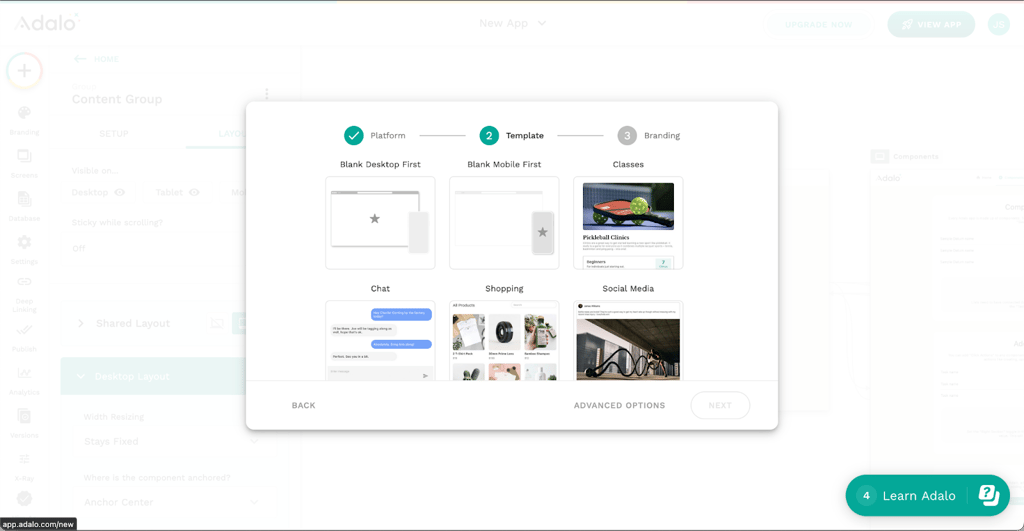
I liked that there was a checklist of tasks that led me to explore Adalo’s features. However, the checklist was more oriented towards database management and not app development.
I believe beginners can start building simple mobile apps using Adalo, but their progress will depend on understanding navigation, actions, and data relationships. Adalo provides documentation, yet much of the learning relies on external videos. As a result, the experience feels technical rather than guided.
Softr hands-on testing
Getting started with Softr was quicker – I had the choice of starting from scratch, choosing between 90+ templates, or generating with AI. I chose the option to generate an app with AI, and it took only one minute between me writing down the prompt and seeing the generated app.
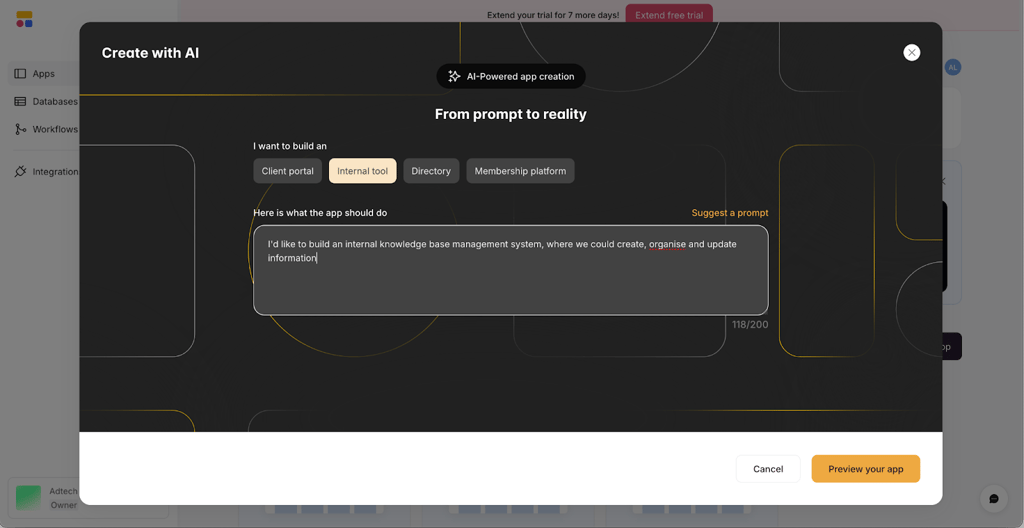
Softr’s AI wasn’t able to add all the functionalities I needed, so thankfully the editor is intuitive to use. I also like that the platform has a "Softr 101" course, extensive documentation, live chat support, and an AI chatbot trained on its knowledge base. While testing, I received responses from customer support within five minutes of sending my questions.
So while Softr’s AI generation isn’t perfect, I find that it provides a good starting point so beginners can more quickly finetune their app. Support will guide you through the rest of the process, resulting in a user-friendly development experience.
Pricing and value comparison
In this section, I share Adalo’s and Softr’s pricing plans and determine which one gives more value for its cost.
Adalo pricing
See Adalo’s plans with prices and features included on the annual subscription:
| Adalo plan features | Free | Starter | Professional | Team | Business |
| Pricing | Free | $36.00/month | $52.00/month | $160.00/month | $200.00/month |
| Published apps | None | 1 | 2 | 5 | 10 |
| Test apps | Unlimited | Unlimited | Unlimited | Unlimited | Unlimited |
| App screens | Unlimited | Unlimited | Unlimited | Unlimited | Unlimited |
| App editors | 1 | 1 | 5 | 10 | Unlimited |
| App push notification capability | ❌ No | ❌ No | ✅ Yes | ✅ Yes | ✅ Yes |
| Version history | ❌ No | ❌ No | ✅ Yes | ✅ Yes | ✅ Yes |
| Data storage | 200 database records per app | 5GB | 25GB | 125GB | 500GB |
| External database integration | ❌ No | ❌ No | ✅ Yes | ✅ Yes | ✅ Yes |
| Support response window | N/A | 3 days | 2 days | 1 day | 1 day |
Adalo provides reasonable value at higher tiers but limited value at entry level, since key features like published apps, push notifications, and version history only become available with the Professional plan. Its biggest advantage over Softr – internal and external database support – is also excluded from its starter plans.
Softr pricing
View Softr’s plans and pricing on a yearly subscription:
| Softr plan features | Free | Basic | Professional | Business | Enterprise |
| Pricing | Free | $49.00/month | $139.00/month | $269.00/month | Custom |
| Published apps | 1 | 3 | Unlimited | Unlimited | Unlimited |
| Soft branding | Badge | Footer logo | None | None | None |
| Progressive Web App (PWA) | ❌ No | ❌ No | ✅ Yes | ✅ Yes | ✅ Yes |
| App history | 1 week | 1 month | 3 months | 1 year | Custom |
| File storage per workspace | 1GB | 5GB | 50GB | 250GB | Custom |
| Softr API | ❌ No | ❌ No | ✅ Yes | ✅ Yes | ✅ Yes |
| Custom email sender | ❌ No | ✅ Yes | ✅ Yes | ✅ Yes | ✅ Yes |
| App editors | 10 | 20 | 100 | 500 | Custom |
| Roles per app | 2 | 2 | 5 | Unlimited | Unlimited |
| Monthly AI credits | 500 | 1,000 | 5,000 | 10,000 | Custom |
| Support | Live chat | Live chat | Live chat, personalized onboarding, monthly AMAs | 24/7 live chat, personalized onboarding, monthly AMAs | Premium support, product specialists, dedicated CS manager, Slack channel |
Softr is more expensive, but it provides better value as long as you don’t need an internal database and app market publishing. While the Basic plan is relatively expensive for such limited functionality, higher tiers justify their cost through generous editor limits, AI credits, storage, and hands-on support.
Best use cases: when to choose Softr vs Adalo
While Softr is my personal pick between the two, Adalo still provides a great no-coding experience. To help you choose which one is right for your project, review their benefits below:
Choose Adalo if:
- You want to publish directly to Google Play and Apple App Store
- You want to manage data internally without relying on external sources
- You want a drag-and-drop editor with your choice of different elements
- You want multi-platform flexibility across multiple projects
Choose Softr if:
- You want faster setup with AI assistance and 90+ templates to choose from
- You want PWA support and don’t need app store publishing
- You want extensive learning resources, including beginner courses and an AI chatbot
- You want scalability up to enterprise-level projects
Alternatives worth considering
No-code platforms come in many varieties, each designed for specific use cases. See how Adalo and Softr stack up against other popular options:
- Glide. Glide lets users build mobile-first apps directly from Google Sheets, making it ideal for data-driven projects, but it lacks native database support and advanced customization compared with Adalo.
- Bubble. Bubble offers deep customization, complex workflows, and full database control, surpassing Softr and Adalo in flexibility, though it has a steeper learning curve and slower onboarding for non-technical teams.
- Noloco. Noloco is a no-code platform with a focus on internal tools and database-driven applications, though it doesn’t support native mobile app publishing like Adalo.
- Thunkable. Thunkable focuses on native mobile app creation with drag-and-drop components and real-time testing. However, it offers fewer pre-built templates for web apps and portals compared to Softr.
Final verdict
For my final verdict, review which platform performs best in each category:
| Softr | Adalo | |
| Features | ✅ | ✅ |
| Hands-on testing | ✅ | ❌ |
| Pricing and value | ✅ | ❌ |
Softr wins by combining AI-assisted app generation, intuitive block-based editing, PWA support, and extensive integrations, enabling organizations to launch functional web apps quickly. If you want apps that scale alongside your team, choose Softr.
FAQ
Can Softr build native apps?
No. Softr builds web apps and Progressive Web Apps, which run in browsers and can be installed on devices, but it does not support publishing native apps to mobile app stores.
Does Adalo require coding?
No, Adalo uses a drag-and-drop builder and visual logic system, allowing users to create functional web and mobile apps without writing code.
Which is cheaper: Adalo or Softr?
Adalo is cheaper at the entry level, starting at $36.00/month. Softr starts at $49.00/month but offers better value.
Can I export data from either platform?
Yes, both Softr and Adalo allow data export, either through built-in tools or by exporting directly from connected external databases.