Originality AI review (2026): testing AI content detection accuracy
Being behind major reports like The Mother of All Breaches and RockYou2024, our in-house cybersecurity experts and journalists provide unbiased, real-world testing and in-depth analysis.
We maintain complete transparency by openly sharing our testing methodologies with our audience.
Learn more

Originality AI helps identify AI-written text and copied material. Publishers, marketing teams, and content agencies use it to avoid search engine penalties, keep writing quality consistent across many articles, and maintain readership trust in their work.
For this Originality AI review, together with the Cybernews research team, I tested the tool using real content samples. I measured detection accuracy, false positives, usability, pricing, and overall reliability.
Quick overview: who Originality AI is for
- Best for: publishers, content teams, and SEO agencies that need to check large volumes of text for AI writing and plagiarism
- Not ideal for: individuals who only need occasional checks or educators who dispense disciplinary measures based on AI use
Pros and cons of Originality AI
What is Originality AI designed to do?
Originality AI detects whether text was written by humans or by AI. It can also determine if text was plagiarized. Here are a few ways you can utilize Originality AI in your line of work:
- Content teams. Check large volumes of articles, whitepapers, or scripts quickly, keeping writing standards consistent.
- SEO agencies. Screen articles, blog posts, landing pages, press releases, newsletters, and guest posts to lower ranking risks tied to AI or duplicate text.
- Editors and publishers. Verify the originality of manuscripts before approval, thereby protecting the reader's trust.
With this AI checker, you can ensure better quality control and spot plagiarized or AI writing before publication.
How accurate is Originality AI?
I found Originality AI to be accurate and consistent. Although no AI checker can achieve 100% accuracy, Originality comes close. In a January 2026 report, it published the following accuracy and false positive rates for each of its available models:
| Originality AI model | Accuracy rate | False positive rate |
| Lite | 99% | 0.5% |
| Turbo | 99%+ | 1.5% |
| Academic | 99%+ | <1% |
| Multi-language | 97.8% | 2.4% |
I was pleased to see that my hands-on testing supports these numbers. I used the following types of text and received these results:
- Fully AI-generated content. Originality AI correctly flagged these as 100% likely AI-generated, even after I tried to humanize the text.
- Human-written content. These received 100% confidence as human-written content, with no false positives.
- Mixed or edited content. Partially rewritten AI text was still flagged as AI-generated, though confidence scores sometimes dropped slightly.
Repeated scans of the same files returned the same results, showing that Originality AI’s scanning is consistent and reliable. I also tested its bulk scanning capabilities and found that it clearly reports AI risks. Scanning multiple files or entire websites was also impressively fast.
I also like that it uses the term “confidence” to label AI content, as this acknowledges that AI detectors can produce false positives or negatives. Overall, I found that Originality AI can identify patterns effectively without overstating certainty.
How Originality AI works under the hood
Originality AI was trained on 160GB of text and millions of samples, labeled as either human-written or AI-written. It can now spot subtle patterns that reveal whether content was written by a person or an AI. It can also detect AI writing in 30 languages.
You can choose from 4 models depending on your content needs:
- Lite. This model allows for light AI editing, like Grammarly’s spelling and grammar suggestions. This is ideal for marketing and content agencies.
- Turbo. This model is built for strict zero-tolerance policies, detecting even tiny traces of AI. Originality AI recommends this model for editors and writers.
- Academic. This model delivers similar accuracy with <1% false positives, ideal for educators who want to allow spell-check tools while flagging AI-generated content.
- Multilingual. This is the default model for non-English languages and supports 30 languages, including Spanish, French, German, Dutch, Japanese, Thai, Vietnamese, Urdu, Hindi, Standard Arabic, and more.
Key features and tools included
In this section, I’ll break down Originality AI’s main features and highlight what sets it apart from similar tools.
AI content detection
Originality AI excels at detecting AI-generated content. Its interface is both visual and intuitive, highlighting detected AI at the sentence level for easy review. Its color-coded reports can help teams assess risk at a glance.
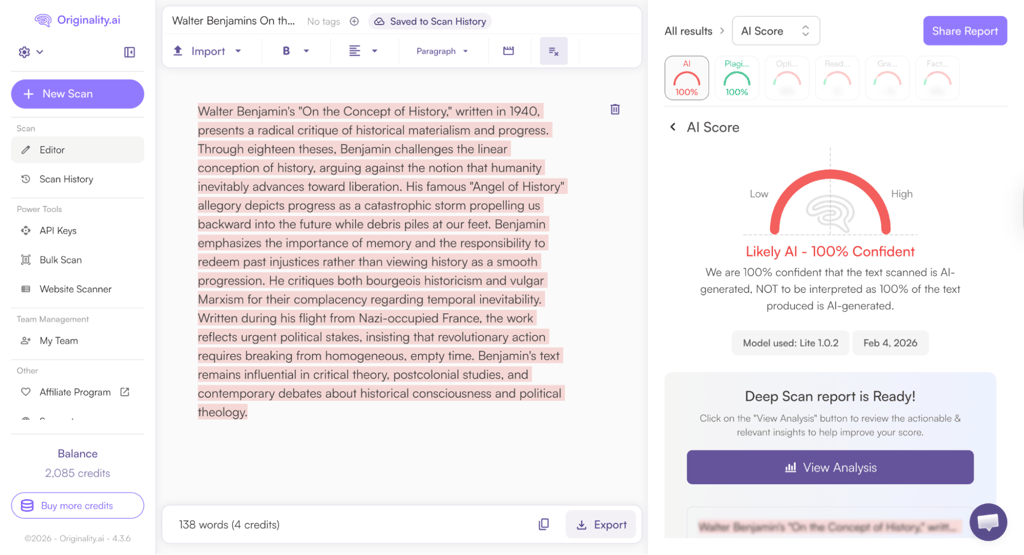
Compared with alternatives like Grammarly or GPTZero, Originality AI maintains higher accuracy, even on humanized or lightly edited AI text. The combination of sentence-level analysis and accuracy sets it apart for teams that require strict quality control.
Plagiarism checker
Originality AI’s plagiarism checker scans content deeply, identifying copied phrases and matching them to original sources. It provides detailed source links, percentages, and highlights – all of which are valuable for publishers and editors verifying originality.
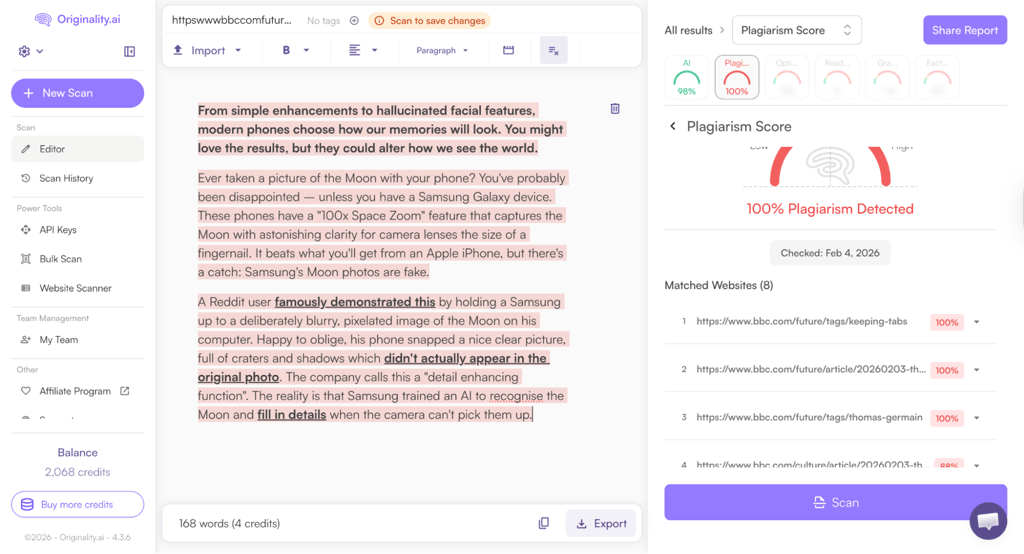
The depth of checks ensures that all plagiarized content is flagged, ideal for supporting stringent editorial or academic standards. By combining AI detection with plagiarism reporting in a single interface, Originality AI offers a more complete solution for content verification.
Website and batch scanning
Originality AI allows you to scan entire websites or large content sets. Users can upload CSV files containing multiple URLs or scan entire domains. You can refine your settings by choosing between selected pages, first-detected pages, or all pages. This makes it easy for agencies and large teams to audit multiple sites quickly and efficiently.
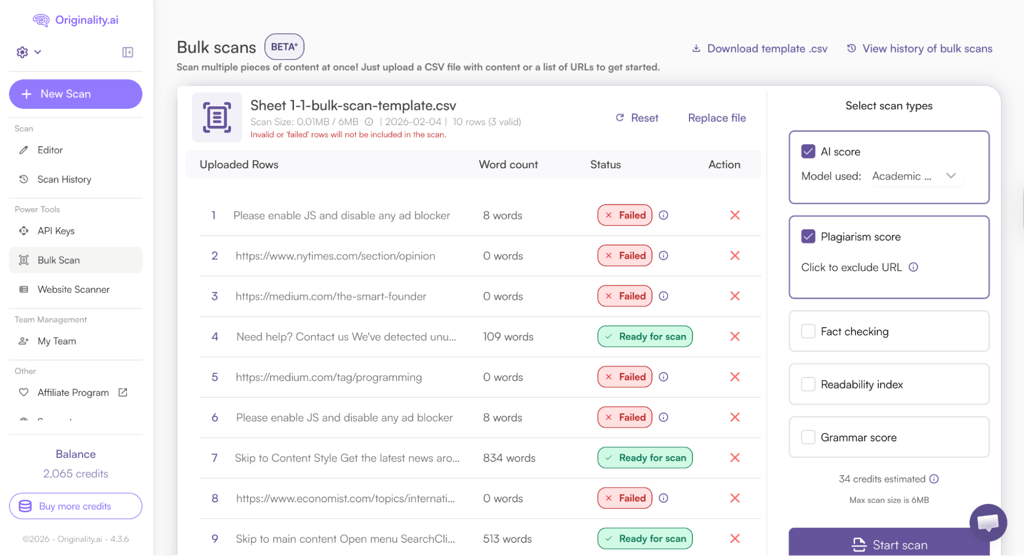
Unlike other AI checkers, Originality handles large volumes quickly, although paywalls or complex scripts can sometimes block scans.
Content managers will appreciate how bulk scanning, combined with website-level reporting, enables simultaneous monitoring of AI use and originality across multiple domains.
Team and workflow features
Originality AI uses role-based access to manage team workflows. Admins, Managers, and Editors each have tailored permissions to streamline scanning, reporting, and account management:
- Admin: full control over settings, billing, user roles, and organization-wide management
- Manager: oversees scans, reviews reports, and manages team members
- Editor: conducts scans and analyzes results
All activity is logged centrally, offering a complete audit trail of who scanned which content and when.
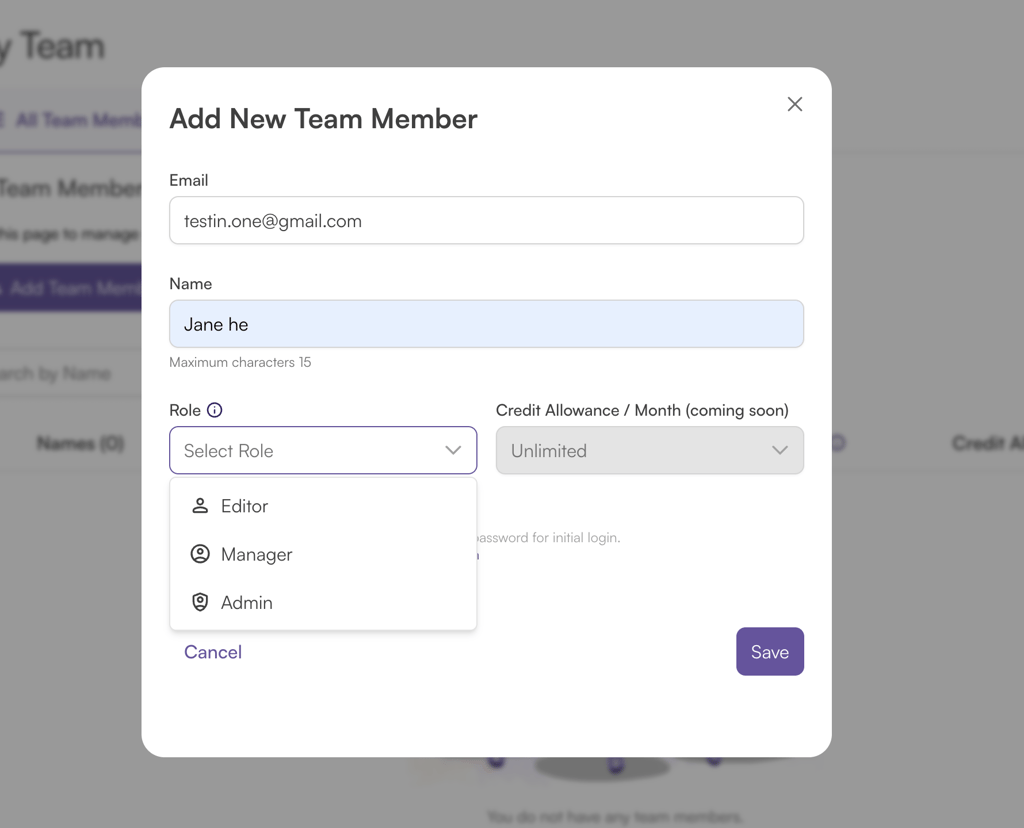
The Enterprise plan supports unlimited users and 15,000 credits per month, enabling bulk content checks across teams and clients. Priority support also ensures faster resolution than standard support.
API access allows integration into existing editorial workflows. It has a generous API limit of 500 requests per minute, and there’s detailed documentation for integrating Originality AI into your existing workflows.
Additional features
Originality AI also includes several extra tools that go beyond AI detection and plagiarism checks:
- Fact checker. This tool verifies statements and claims against reputable sources to ensure content accuracy. It’s ideal for journalists, editors, and marketers, as it cross-references published data and factual databases to flag potential errors before publishing.
- Readability checker. The readability checker assesses text for clarity, sentence structure, and reading level to help writers improve comprehension and engagement. It’s trained on a wide variety of web, academic, and editorial texts.
- Content optimizer. The content optimizer suggests improvements for SEO, keyword placement, and overall structure, boosting content performance.
Originality AI also offers an extensive library of free tools, including but not limited to:
- Grammar checker
- AI humanizer
- Company bio AI generator
- Case study analysis maker
- Argumentative essay writer
- YouTube script generator
- Webinar title generator
- Terms and conditions generator
- Meta description generator
- Blog post generator
Usability and day-to-day experience
Originality AI feels smooth and intuitive in daily use. The web-based dashboard is clean, with clear menus for AI detection, plagiarism, readability, grammar, and fact-checking.
Scans run quickly, usually in seconds, and the color-coded results make it easy to understand which parts of the text are flagged. New users can get started with basic scans almost immediately, though bulk scanning and team management require a brief learning curve.
While testing, I did run into some errors when scanning websites behind paywalls. These often resulted in “0 words” errors. Certain bulk scan workflows, like preparing CSV files, may also feel cumbersome at first.
The WordPress plugin scans articles directly within WordPress, allowing editors to check AI content as they write or publish. The Chrome extension can run AI detection within email clients, Google Docs, and other web apps. This makes it convenient for copywriters, marketers, and educators who prefer working outside the Originality AI platform.
Strengths, limitations, and common concerns
Originality AI stands out for its reliable AI content detection, delivering consistently accurate results across different types of text. On top of that, it also checks for plagiarism, so you’re not juggling multiple tools just to make sure your content is original. The bulk scanning feature is a huge plus, and the clean, no-nonsense interface makes it easy to jump in without a learning curve. The reports are also practical, giving editors and reviewers a clear overview instead of overwhelming them with data.
That said, Originality AI isn’t without its downsides. The pricing model can feel steep for solo creators or small-scale users, especially compared to lighter-weight alternatives. Since the platform runs on a credit system, repeated scans can add up quickly, which may be a concern for those who need to check content frequently or run multiple revisions through the tool.
A common concern among users is balancing accuracy with cost. While Originality AI delivers reliable detection and plagiarism checks, its credit-based pricing makes it best suited for professionals, agencies, or teams that regularly audit content quality. For occasional or one-off checks, the value may feel less compelling.
Pricing and value for different users
I find that Originality AI has great value for its price. All of its plans come with full access to the AI checker, plagiarism detector, readability checker, fact-checking tool, and SEO content optimizer.
You’ll find the differences between each plan in this overview table:
| Pay as you go | Pro | Enterprise | |
| Pricing | $30.00 one-time payment | $12.95/month | $136.58/month |
| Credits | 3000 (one time) | 2000/month | 15,000/month |
| Credit expiry | 2 years | 1 month (renews monthly) | 1 month (renews monthly) |
| Customer support | Standard | Standard | Priority |
| Chrome extension | ❌ No | ✅ Yes | ✅ Yes |
| File upload | ❌ No | ✅ Yes | ✅ Yes |
| Full site scans | ❌ No | ✅ Yes | ✅ Yes |
| Scan from URL | ❌ No | ✅ Yes | ✅ Yes |
| Team management | ❌ No | ✅ Yes | ✅ Yes |
| Tag scans | ❌ No | ✅ Yes | ✅ Yes |
| Access to future features | ❌ No | ✅ Yes | ✅ Yes |
| API access | ❌ No | ❌ No | ✅ Yes |
| 365-day scan history | ❌ No | ❌ No | ✅ Yes |
Note that 1 credit equals 100 words. As such, the Pro plan allows you to scan 200,000 words per month, while the Enterprise plan allows for 1.5 million words per month.
Here are some plan recommendations for different users:
- Solo creators. The Pay as you go plan is useful for individuals who produce smaller volumes of content. At $30.00 for 3000 credits, it provides affordable risk mitigation against accidental AI use or plagiarism.
- SEO teams. The Pro plan supports 200,000 words per month and includes site scans, file uploads, and tagging. This helps SEO teams manage large content pipelines.
- Content agencies. The Enterprise plan offers 15,000 credits per month, priority support, team management, and API access. Agencies can manage multiple client projects with one plan, ensuring strict compliance with zero-AI policies.
- Publishers with large sites. The Pro and Enterprise plans allow full website scans and bulk URL checks. Investing in these plans reduces the risk of publishing AI or plagiarized content across thousands of articles.
Unfortunately, Originality AI doesn’t offer a free trial, but its AI checker Chrome extension is free and lets you detect AI-generated content, check for copy-pasted text, and view activity by author.
Originality AI vs other AI detector tools
See how Originality AI compares against other AI writing detection tools in this table, which we also cover in our Copyleaks review and GPTZero review:
| Feature | Originality AI | Copyleaks | GPTZero |
| AI detection reliability | Very high, excels at distinguishing human, AI, and hybrid content | High, but no option to flag AI grammar and spelling corrections | Moderate, occasional false positives on polished human writing |
| Plagiarism detection reliability | High, with multi-layer source matching and web-wide scans | High, scans worldwide publicly available content and supports multiple languages | Moderate, mainly checks plagiarism as an add-on |
| Transparency of AI results | Color-coded sentence-level highlights, confidence scores | Visual AI highlights, clear differentiation of AI, human, and hybrid content | Probability score with confidence level, sentence-level highlights, simple visual reporting |
| Transparency of plagiarism results | Source URLs, match percentages | Detailed source matching with multiple paraphrase levels and omitted words info | Basic plagiarism results |
| Pricing model | Pay-as-you-go or monthly subscription | Subscription with monthly or annual billing, separate or bundled AI and plagiarism tools | Free plan with limits, paid plans with word caps |
| Pricing for AI + plagiarism checker | $12.95/month | $13.99/month | $12.99/month |
Between the three, Originality AI wins for its price-to-value ratio. It’s cheaper than the other two tools, but also offers better AI detection and transparency. In addition to its AI and plagiarism detector, Originality also includes a readability checker, a fact-checking tool, and an SEO content optimizer.
Final verdict
Originality AI is worth the subscription, as it delivers reliable AI and plagiarism detection. It’s a strong choice for content teams, publishers, and agencies that need content quality assurance at scale.
Its pros include highly consistent AI detection, comprehensive plagiarism checks, fast bulk scanning, intuitive reports, and support for multiple languages. The interface is clean and easy to navigate, while features like team roles, WordPress integration, and a Chrome extension streamline daily workflows.
On the other hand, pricing may feel steep for solo users, and occasional scanning errors due to paywalled sites or complex scripts can occur. Still, Originality AI is a good investment for professionals managing large content volumes who need accuracy, transparency, and efficiency.
FAQ
Is Originality AI accurate?
Yes, Originality AI is highly accurate, consistently distinguishing between human, AI, and hybrid content. Its Lite, Turbo, and Academic models achieve 99%+ detection rates, while multi-language scans remain reliable. Confidence scores help users gauge potential false positives.
Can Originality AI detect ChatGPT content?
Yes, Originality AI can effectively detect ChatGPT-generated content. Its models identify AI patterns even in humanized or lightly edited text, providing sentence-level highlights and confidence scores to help teams assess risk before publication.
Does Originality AI flag human content incorrectly?
No, Originality AI rarely misflags human-written text. In testing, fully human content consistently returned 100% human confidence, though mixed AI-human text may show slightly lower confidence, reflecting careful and transparent AI labeling.
Is Originality AI worth the price?
Yes, Originality AI is worth the investment for teams and agencies managing high volumes of content. Its speed, accuracy, transparency, and extra tools like plagiarism detection and readability checking justify the cost for professional use.