Kling O1 review: features, use cases, and real-world performance
Being behind major reports like The Mother of All Breaches and RockYou2024, our in-house cybersecurity experts and journalists provide unbiased, real-world testing and in-depth analysis.
We maintain complete transparency by openly sharing our testing methodologies with our audience.
Learn more

AI video generation tools are evolving fast. In a short time, we've moved from simple motion effects to advanced text-to-video models. These new models promise cinematic quality with a prompt. Naturally, tools like Kling O1 are getting noticed not just for their tech, but for their importance in content creation, storytelling, and production workflows.
Together with the Cybernews research team, I tested Kling O1 to see how it holds up in real-world use.
In this Kling O1 review, I’ll break down how it works. I'll review what sets it apart, the key features, pricing, and what you need to know about prompting. Additionally, I’ll go over user feedback and wrap it all up with a clear verdict on whether it’s worth your time.
Quick overview of Kling O1
| Best for: | Creators and developers looking for high-quality, AI-generated videos from text prompts or image and video references |
| Key features: | Text-to-video generation, realistic motion, style transfer, physics-aware animation, multi-shot workflows |
| Free version: | ✅ Yes |
| Starting price: | $6.99/month |
Kling O1 is a powerful AI video generation and editing tool. It turns text, images, and videos into realistic motion and cinematic visuals. It offers creators unified, multimodal tools for high-control AI-generated video.
Our methodology
What is Kling O1?
Kling O1 is an AI video model that creates smooth, realistic-looking motion from different inputs. It can generate both cinematic, realistic scenes and more stylized clips, making it useful for everything from creative experiments to commercial videos.
The model supports several input methods:
- Text prompts – describe the scene you want, and Kling O1 turns it into a short video
- Reference images – upload an image to guide the scene’s appearance, layout, or character design
- Video frames or motion references – provide frame sequences or short clips to control how objects or characters move
- Style control – apply visual styles to guide tone, color, and mood
What makes Kling O1 stand out is its ability to handle complex motion and depth, which many earlier models struggled with. This means that scenes and characters move like they actually belong in the space around them.
What makes the Kling O1 video model different?
Kling O1 stands out because of how it handles motion over time. Many text-to-video models can generate good-looking frames, but struggle once things start moving. Characters flicker, objects shift shape, or scenes lose consistency. Kling O1 does a better job treating motion as a continuous process, not a collection of separate images. Movements like walking, turning, or interacting with objects feel more natural and physically believable.
You can still tell the model isn’t perfect, as small details sometimes don’t match real life. For example, in my generated video, the way shoes are tied can look unnatural and not entirely logical.
Another key strength is temporal consistency. During testing, characters kept the same appearance, proportions, and position across multiple frames, even when the camera angle changed or several elements moved at once. This makes longer clips feel stable instead of glitchy or loop-like, which is a common issue with many competing models.
Conceptually, Kling O1 feels different from most text-to-video tools. It emphasizes realistic movement and scene logic. It doesn't rely on flashy visuals or heavy stylization. The result might seem less cinematic at first. Because of this, it’s much more practical for real-life situations. This includes human motion, product demos, or basic storytelling.
Overall, Kling O1’s strength lies in its balance – solid motion modeling, consistent frames, and reliable scene behavior. That combination is what makes it stand out from other text-to-video models.
Key features and highlights of Kling O1
Before going into specs and features, I tested the Kling O1 with generating realistic situations. I tried creating videos with busy places, human interactions, and simple emotional moments. I didn’t try to break the model with extreme prompts.
Instead, I focused on everyday use cases that a creator would actually need. This included people moving through cities, friends interacting, and making subtle edits to an existing scene. The results made it clear where Kling O1 shines, where it needs more guidance, and where it still feels unfinished.
Below is a breakdown of the features that stood out most during testing – the good, the impressive, and the parts that still need work.
High-fidelity motion generation
The first thing that genuinely impressed me was motion quality. I tested Kling O1 with a simple prompt: “a busy street in London, a tourist woman walking, red buses, crowds, city signs.” The result looked surprisingly realistic – smooth movement, natural pacing, and a scene that felt alive rather than staged.
Honestly, it leaned toward cinematic. One thing to watch out for, though – text in the background. Signs and written elements can turn into visual gibberish, so if readable text matters, Kling O1 still struggles there.
Style consistency across frames
Kling O1 handles references really well. You can feed it reference images or videos, and it sticks closely to them instead of drifting halfway through the clip.
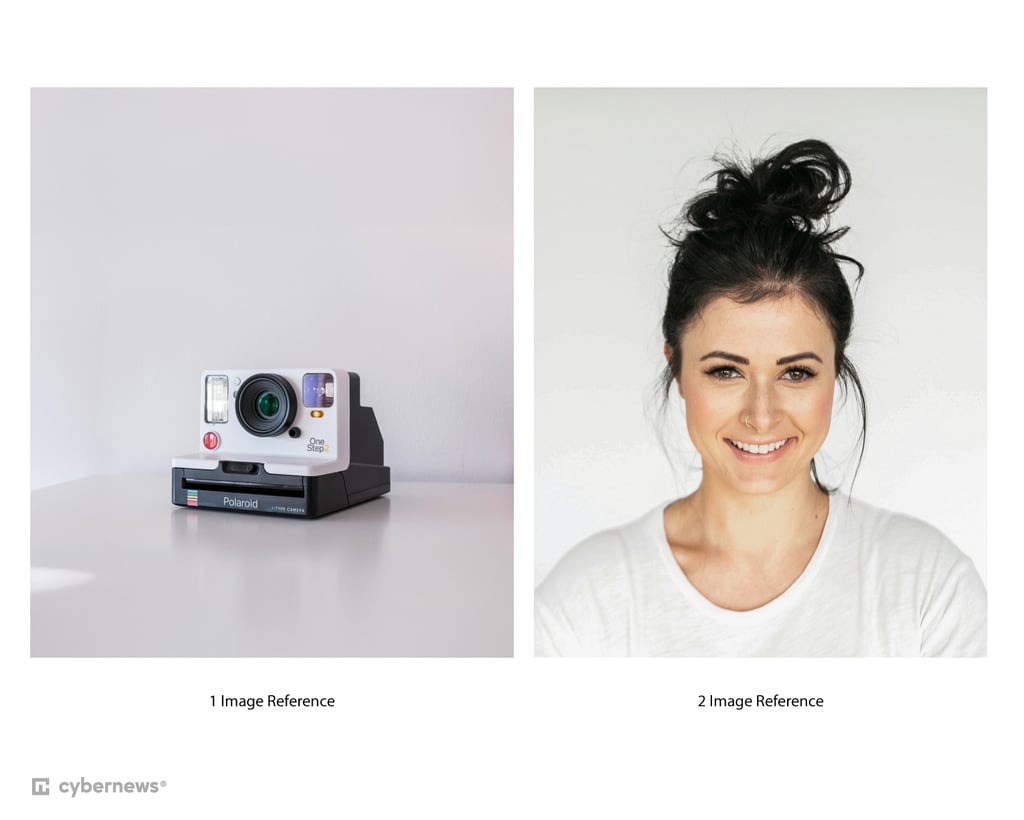
I tested this feature with two reference images and a prompt:
@image2 holding @image1 photo camera. The woman lifts the camera, aims, and takes a photo of her three friends standing together and smiling. Natural lighting, clear focus on the action of capturing the photo. Urban rooftop at golden hour - warm light, skyline behind the friends.
The result was simple but visually solid – lighting, faces, and overall style stayed consistent.
One slightly odd moment: the girl briefly looked at the viewer camera before turning to her friends. This showed me that Kling O1 benefits a lot from very precise prompts – the more detailed you are, the better the shot logic becomes.
Audio quality
Audio is where Kling O1 clearly falls behind. If you check out the same video again, you can hear that the sound feels slightly disconnected from the visuals. It’s usable, but noticeably weaker than the video itself – easily the model’s biggest drawback right now.
Image-to-video performance
Image-to-video was another strong point. I used a very basic prompt – asking the girls in a photo to hug and laugh – and Kling O1 delivered exactly that.
Even better, the people still looked like the original image, without weird face drift or identity loss. For simple emotional motion, it performs really well.
Prompt-based scene control
The much-praised feature of editing a video within the same scene felt only decent to me. I asked Kling O1 to remove one red bus from a generated tourist video, but instead, it removed both buses, and they never reappeared in the scene.
That said, the environment itself stayed intact – the street didn’t feel broken or empty, and there were still a few people visible. It’s still a solid result overall, but I’m not entirely sure how much clearer I’d need to be in the prompt to make it remove just one specific object.
Speed and generation limits
If you’re testing the free version, patience is required. You may run into system-busy messages, and waits can be long – sometimes very long. Paid users still have to wait a few minutes, but free users should expect even longer delays.
Overall, Kling O1 feels powerful, but it rewards precision – vague prompts get decent results, detailed ones unlock its real potential.
Kling O1 use cases
Since Kling O1 feels naturally suited for short-form video, I tested it as if I were creating a quick social media ad – in this case, a shampoo promo. The idea was simple: a clean bathroom setting, a premium-looking bottle, soft lighting, and subtle motion that would work well for a Reel or TikTok.
Two things went noticeably wrong during this test.
First, even though I already knew Kling O1 struggles with text, I still asked for the shampoo name to be visible on the bottle. As expected, the result was unreadable. That one’s on me – next time, a reference image would be the smarter approach if branding needs to be clear.
Second, I asked for those almost “magical” water droplets slowly running down the bottle. Instead, when the bottle tilted, it looked like shampoo or water was actually spilling out from the side. This is where Kling O1’s logic breaks a bit – visually it’s convincing at first glance, but physically it doesn’t quite make sense.
I recommend using Kling O1 for simple, low-risk scenes. These include someone sitting in a café, sipping coffee, or a person walking down the street. These moments are easy to capture and hard to disrupt. For complex product shots, like those with fluids or specific branding, you often need extra editing. You might even use more than one app to achieve a polished look.
This type of testing also highlights another strength of Kling O1 – its prototyping capabilities. Before shooting real footage, you can use it to explore how a scene might look, how the camera could move, or whether an idea works visually at all. It’s a low-effort way to validate concepts before investing time and budget in production.
Why should you use Kling O1?
Kling O1 isn’t a one-size-fits-all video model, and that’s exactly why it makes sense for certain use cases and not others. Its strengths are very specific – realistic motion, stable scenes, and controlled generation – which naturally shape who benefits most from it.
- Creators who need realistic AI video. If your priority is believable motion and stable visuals, Kling O1 is a strong choice. It handles human movement, everyday actions, and natural pacing better than many text-to-video models. That makes it useful for creators producing short cinematic clips, social videos, or realistic scenes where visual consistency matters more than flashy effects. It’s especially good when you already have reference images or a clear visual direction.
- Marketing and advertising teams. For marketing workflows, Kling O1 works best in early-stage creative production. It’s useful for generating concept visuals, mood-driven clips, or story ideas before committing to a full shoot. The realism helps pitches feel more grounded, but it’s not ideal for final, client-ready ads yet – especially if audio quality or precise brand elements (like readable text) are critical.
- Concept visualization and pre-production. This is where Kling O1 really shines. For storyboarding, pitch decks, or pre-production planning, it’s incredibly helpful. You can quickly explore camera movement, pacing, and scene flow without filming anything. Directors, designers, and creative teams can use it to align on a vision before real-world shooting begins.
- Experimental filmmaking and prototyping. Kling O1 is a great playground for experimentation. If you’re testing ideas, blocking scenes, or exploring new visual concepts, it offers a fast way to iterate without worrying about perfect polish. It rewards detailed prompts and curiosity.
On the other hand, you should have in mind that if you need fully polished videos with strong audio, perfect text rendering, or strict object-level control, Kling O1 may feel limiting. It’s also not ideal for users who want instant results on a free plan – generation queues can be long.
How to use Kling O1: brief prompting guide
Based on hands-on testing, Kling O1 responds best to prompts that are clear, structured, and specific.
- Start with the scene, then the action. Open with where the scene takes place, then describe what’s happening. For example: location → subject → movement → mood. This helps the model anchor the scene before animating it.
- Be explicit about motion. Don’t assume Kling O1 will guess how something moves. Words like “walks slowly”, “turns her head”, “pauses”, or “laughs naturally” noticeably improve realism. Motion cues matter more than visual adjectives.
- Use detail, but don’t overload. Descriptive language improves results, but cramming too many ideas into one sentence can confuse the model. If something is important (camera movement, interaction, pacing), say it clearly and directly.
- Avoid vague instructions. Phrases like “cinematic,” “nice,” or “beautiful” don’t do much on their own. Replace them with concrete details like lighting, time of day, or camera distance.
- Small prompt tweaks = big changes. Even minor edits – adding who looks at whom, what text needs to be shown in the newspaper, or how fast an action happens – can dramatically improve scene logic. If something feels off, refine the prompt rather than regenerating blindly.
Simple, intentional prompts consistently outperform clever ones.
Kling O1 AI: user reviews
Early reactions to Kling O1 on Reddit are surprisingly optimistic. Most users agree on one thing – it shows real improvement in motion and scene consistency.
Many users highlight that movement feels more grounded compared to older text-to-video models. Objects behave more predictably, lighting stays stable, and scenes don’t fall apart frame by frame. This has been a long-standing issue in AI video generation.
That said, the excitement is tempered with realism. Several users point out that results can still be uneven. Kling O1 may handle motion well, but it sometimes misinterprets prompts or makes odd logical decisions within a scene. Character likeness, object intent, and fine details aren’t always reliable, which means outputs still need human judgment and iteration.
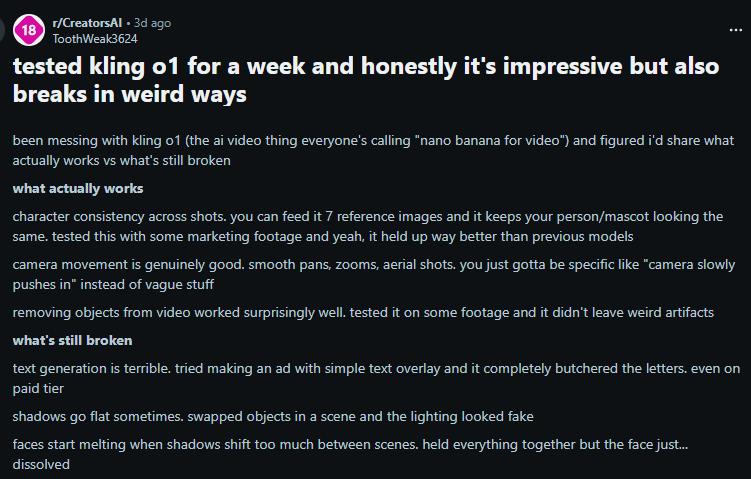
One recurring theme is workflow value. Rather than seeing Kling O1 as a final-production tool, many users view it as a powerful aid for experimentation, editing, and ideation. Overall, the community sentiment suggests Kling O1 isn’t perfect – but it’s a meaningful improvement that hints at where AI video tools are heading next.
Final verdict: is Kling O1 worth it?
After testing Kling O1 across multiple scenarios, its biggest strength is clear – motion and temporal consistency. Characters move naturally, and actions flow continuously, not stitched together frame by frame.
That said, Kling O1 still has clear limitations. Text rendering isn't reliable, audio seems disconnected, and logic can fail. This often happens with prompts about fluids, specific object behavior, or complex cause-and-effect.
Right now, Kling O1 is best for creators, marketers, and filmmakers who need a prototyping and visual exploration tool, not a final production solution.
It’s worth the price if you value realism and fast iteration over flashy visuals. I’d use it as a creative sketchpad for pre-production – that’s where it really shines.
FAQ
What type of videos can Kling O1 generate?
Kling O1 is best at realistic, short-form videos with natural motion. Think people walking, interacting, reacting, simple lifestyle scenes, or basic product shots. It’s not ideal for heavy text, complex visual effects, or highly stylized fantasy content, but it shines when realism and scene coherence matter.
How long can Kling O1 videos be?
Kling O1 currently focuses on short clips rather than long-form videos. Most outputs are designed to work as snippets for social media, concept previews, or scene tests, not full narrative sequences.
Does Kling O1 support commercial usage?
Yes, Kling O1 supports commercial use, but this depends on the plan you’re on. If you’re using it for paid projects, marketing, or client work, you should always double-check the current licensing terms of your subscription.
How does Kling O1 compare to other AI video models?
Compared to many text-to-video models, Kling O1 stands out for motion realism and temporal consistency. It’s less flashy than some competitors, but more stable and believable, especially for human movement and everyday scenes.
Is Kling O1 suitable for beginners?
Yes, but with a caveat. Beginners can get decent results quickly, but Kling O1 really rewards clear, detailed prompts. If you’re willing to experiment and iterate, it’s very approachable.