Bluehost AI Website Builder review
Being behind major reports like The Mother of All Breaches and RockYou2024, our in-house cybersecurity experts and journalists provide unbiased, real-world testing and in-depth analysis.
We maintain complete transparency by openly sharing our testing methodologies with our audience.
Learn more
Bluehost AI Website Builder is an AI-based tool designed for small businesses, freelancers, local service providers, and anyone who wants to launch a website without any coding or WordPress knowledge. Thanks to the integration within Bluehost’s ecosystem, you can also enjoy hosting, domains, security, backups, CDN, and SEO tools.
But this is not the full picture. Thus, with the help of the Cybernews research team, I put Bluehost AI Website Builder to the test. While you can access various services within a single workflow, there are some minor limitations. Switching between different Bluehost and WordPress dashboards is one of them.
Wondering whether Bluehost AI Website Builder is worth trying? In this Bluehost AI Website Builder review, I cover everything you need to know, from themes and features to performance and pricing. Keep reading to find out more about it.
| Rating: | |
| Overall rank: | #13 out of #45 |
| Price: | From $9.99/month |
| Ease of use: | Very simple to use, a bit limiting |
| Templates: | No traditional template library (it builds three custom website options for your business) |
| Business features: | SEO tools, eCommerce functionality, marketing tools |
| 24/7 live support: | Yes |
| Coupons: | Cybernews Website Builder Coupons |
Bluehost AI Website Builder pros and cons
What website is Bluehost AI Website Builder best for?
Bluehost AI Website Builder comes with both perks and some limitations. That’s why I decided to delve deeper and explore what site types it’s best for. Let’s check it out in my breakdown table below:
| Website type | Benefits | Limitations |
| Small business website | Generates business-focused pages, along with integration of hosting, domain, SSL, backups, and SEO tools | AI may not always create every requested page |
| Portfolio website | Quickly creates a professional and modern portfolio with a simple structure, images, and sections | Detailed design changes can be inconsistent |
| Local service website | Great for service businesses like landscapers, consultants, or other local providers, as you can describe your goals and get a tailored initial website | Customization of individual design elements can be unreliable, and unsuccessful edits may still use your AI credits |
| Informational website | Due to the ownership and portability that WordPress enables, you can easily establish your online presence | WordPress plugin and theme controls can be more restricted |
Bluehost for business websites
Bluehost claims that the AI Website Builder is a strong option for small businesses that want to build a professional website. And as soon as I tested this, I ensured that you don’t need any coding knowledge. All you have to do is describe your business and goals, and the AI starts generating the initial site structure, content, images, and design.
Plus, you’ll get hosting, domain registration, SSL, backups, CDN, and SEO tools, which are crucial for your overall website performance. What’s more, the AI assistance is present even after the setup. I managed to rewrite content, replace images, and make layout changes with ease.
However, some of my requests to fix overlapping elements, adjust branding, or make smaller visual changes did not produce the expected results. AI either ignored the requests or failed to change the elements. I don’t think it was a big issue since I could easily do it myself.
Bluehost for portfolio websites
Freelancers, creatives, and professionals who need a simple portfolio website without spending too much time setting everything up can benefit a lot from the Bluehost AI Website Builder. That’s because you’ll get a custom website for your business. Plus, WordPress gives you more flexibility and ownership than a completely proprietary website builder.
The main advantage is that the business features, such as SEO and marketing tools, help you sell your art, modern designs, and anything else in the best way. What I liked is how quick the setup is, taking only up to five minutes and not requiring any technical know-how.
Bluehost for local service websites
This website builder works great for local service businesses. Simply put, you can describe your services, target customers, location, and goals. The AI uses all of this to create your first website draft, which you can later on edit. You can even share a URL of a site you’re inspired by, and Bluehost’s builder will try to match the look.
For example, if you run a landscaping company, you can just provide information about lawn care, garden design, and seasonal maintenance, and Bluehost will use it to build the relevant structure and content.
You can then refine the website by using instructions, like requesting a more premium visual style, replacing a photograph, rewriting a service description, or emphasizing free estimates.
Bluehost for informational websites
If you need a website for your business, services, or professional activity, Bluehost AI Website Builder is a convenient option. It creates a starting point with a page structure, written content, images, and a design, so you don’t have to build your website from scratch.
This makes it especially useful for beginners who want to launch a website quickly without coding or extensive WordPress knowledge. However, you may still need to make manual adjustments to achieve your wanted design and performance.
Bluehost website pricing
One of the things I like the most about Bluehost AI Website Builder is that you can use it for free due to its 14-day free trial. Due to this, you can test the platform to see whether it suits your needs before paying for a subscription.
Speaking of the subscription, Bluehost currently offers one paid AI Website Builder plan, called Get Online. It costs $9.99/month for a 24-month term and renews at the same price.
Here’s a quick overview of Bluehost AI Website Builder pricing:
| Plan | Features | Price |
| Free trial | 14 days of access, temporary domain, up to 5 AI edits | $0 |
| Get Online | Free domain for 1 year, domain privacy for 1 year, SSL, hosting, CDN, weekly backups, malware detection and removal, 20 AI edits per month | $9.99/month |
Note: The Get Online price applies to the 24-month term.
Now, let’s break down the two Bluehost AI Website Builder plans to see what you get for your money and whether this website builder is worth considering.
Free trial plan
The Free trial plan won’t cost you anything, and you can use the Bluehost AI Website Builder for 14 days. What you receive is a temporary domain for your website and up to five AI edits, allowing you to experiment with the website creation and editing features without paying upfront.
However, the trial is quite short, as I’ve seen other website builders that offer a whole month of free trial. Plus, the number of AI edits can also be limiting. Thus, I’d recommend this option only as a way to test the builder before jumping into the long-term option.
Get Online plan
Get Online is the only paid plan that Bluehost AI Website Builder offers, and it costs $9.99/month when you commit to the 24-month term. Compared to the free trial, you’ll receive more perks, which include everything you need to launch and manage a basic website.
More precisely, the plan offers:
- Free domain for the first year
- Domain privacy for the first year
- SSL
- Hosting for one website
- CDN
- Weekly backups
- Malware detection and removal
- 20 AI edits per month
- 10 bonus AI edits during the first month
For someone looking to create a simple business, portfolio, local service, or informational website, this is a pretty well-rounded package that doesn’t require separate hosting or domain services. Bluehost also includes its AI Website Builder within the hosting package, so you can create and publish your website from the same ecosystem.
Still, keep in mind the AI edit allowance. You only get 20 AI edits per month, plus 10 bonus edits during the first month. Also, some of my tests showed that unsuccessful AI requests can still consume credits. So, you should use the prompts carefully and handle any smaller changes manually.
Additional costs
While doing my research, I didn’t encounter any additional or hidden costs, considering that the renewal price is the same as the initial one you’ll pay.
Is the Bluehost AI Website Builder easy to use?
Bluehost AI Website Builder is pretty straightforward. So, if your goal is to get a working website without dealing with themes, plugins, technical setup, etc., then it can be an ideal choice for you.
In my experience, the biggest advantage is how fast the builder turns a detailed description into a functional site. Bluehost's official claim is that initial website creation can take up to 5 minutes. However, my test website was done in around three minutes.
What’s more, the process is mostly automated, but you can still make changes with the assistance of AI prompts or the more traditional WordPress and visual editing tools.
Here’s a quick rundown:
- Getting started – Enter your business description, and Bluehost will turn it into an initial version of a website.
- Building the website – Quick and beginner-friendly, but the quality of the first result depends on the prompt you provide.
- Editing the website – AI can handle many changes through natural-language instructions, but more precise visual edits can be inconsistent.
- Managing the website – The interface is modern and integrates well with WordPress, although you may need to move between several dashboards for different tasks.
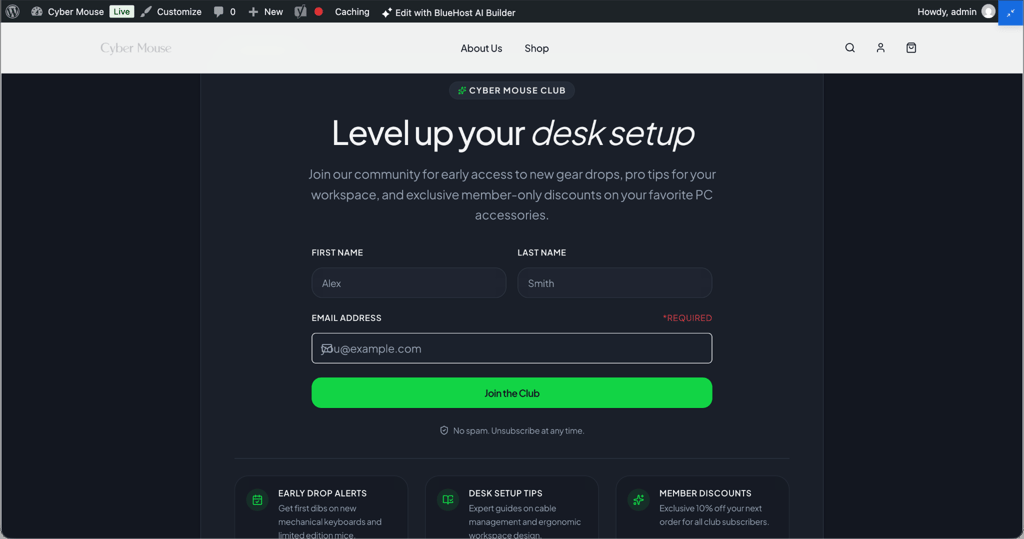
To test how easy Bluehost AI Website Builder is to use, I created an eCommerce test website for a fictional PC accessories brand called Cyber Mouse. Let’s dive deeper into the whole process and see how it all went.
Getting started with Bluehost AI Website Builder
Bluehost AI Website Builder lets you get started by simply providing details about the website you’d like to build.
For my test, I gave Bluehost an in-depth prompt describing Cyber Mouse:
- Products (keyboards, mice, and mouse pads)
- Target audience (computer users and PC gadget fans)
- Visual style (modern and approachable, incorporating green, neon green, red and white elements)
- Homepage structure (attention-grabbing headline, short explanation of what we sell, Shop Now CTA,etc.)
- Required pages (Shop, About Us, FAQ, Contact, Shipping & Returns)
- Style of copy I wanted (conversational, confident, helpful, and concise)
The AI then utilizes this information to determine the website’s structure, design, content, and imagery. In my case, it didn’t ask any additional questions, which I think was because my initial prompt was already quite detailed.
My website was completed in around three minutes.
That was noticeably faster than manually setting up a WordPress site, choosing a theme, creating pages, and filling them with content. The first version was ready to use immediately. All of the elements worked, navigation responded normally, and I didn’t experience any noticeable lag while using the editor.
One thing I especially liked about this process is that you don’t have to know exactly which WordPress settings you need to configure. You can start with what you want the website to achieve rather than thinking about themes, plugins, layouts, or technical settings.
However, the quality of the initial result depends on the prompt. That said, being specific about your business, audience, visual identity, pages, and goals gives the AI much more to work with.
Building a website with Bluehost AI
Bluehost created a modern-looking eCommerce website based on my description, including product categories, best sellers, benefits, reviews, FAQs, a newsletter section, and other elements I requested.
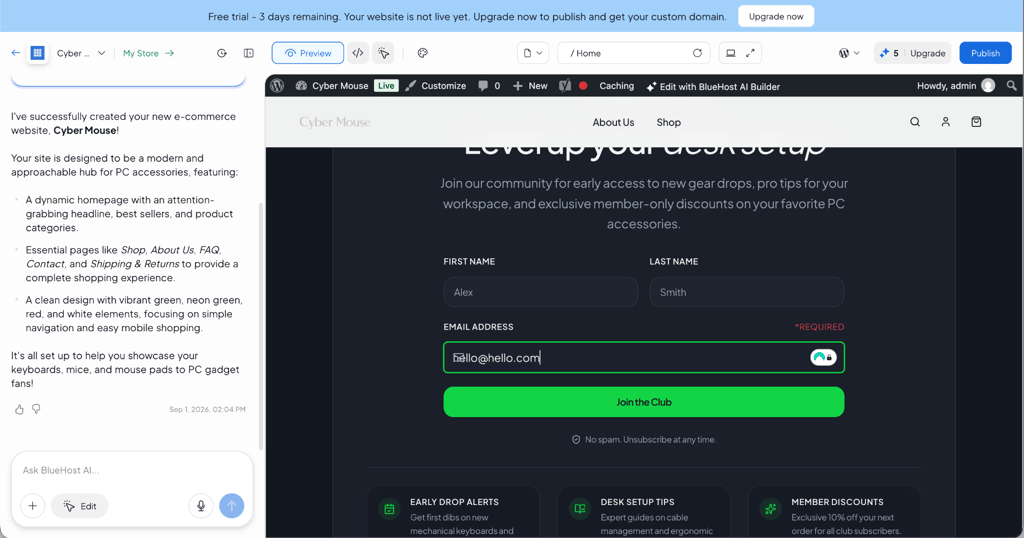
This website reminded me of the type of clean, AI-generated layouts that have become increasingly common with newer AI design tools. Still, there were some differences between what I asked for and what Bluehost actually created.
For example, I specifically requested separate Shop, About Us, FAQ, Contact, and Shipping & Returns pages. Only Shop and About Us were created as separate pages. The other content was incorporated into the main page.
This isn’t necessarily a major problem, but it shows why the generated website should be treated as a starting point rather than a finished product.
I also noticed a few smaller design issues. The newsletter subscription section had overlapping icons around the email field, creating a visual mistake that can make an otherwise polished AI-generated page look unfinished. The logo was also less noticeable than I expected. This is where Bluehost’s ease of use becomes more complicated.
Editing the website with AI
Bluehost’s AI editing is designed to let you describe changes in natural language instead of manually modifying everything. This should make the process extremely beginner-friendly. For example, you can ask AI to rewrite text, change colors, replace images, modify sections, or make broader changes to the layout.
I tested this by asking it to fix the newsletter field and improve the Cyber Mouse branding at the same time. The result wasn’t successful. Bluehost responded that the requested changes had not been applied and suggested trying again. More importantly, the request still consumed one AI credit.
I then simplified the request and asked only for the newsletter problem to be fixed. The builder made a code change, but I couldn’t see a meaningful visual difference, so the original problem remained.
I had a similar experience when I tried to improve the logo using a much more specific prompt. I got the response: “Unfortunately, redesigning the Cyber Mouse logo could not be completed at this time. This type of visual redesign isn’t directly supported by the current editing tools. You can update the logo manually via the WordPress admin if needed.”
This was the biggest weakness I found during testing.
Therefore, my verdict is that Bluehost AI web builder can build the website initially, but if there are details that need to be changed, there might be challenges in how many prompts it takes to edit the mistakes the AI might make. Also, it uses up credits with each request, so be careful what you request; it might be easier to edit some things manually.
Fortunately, Bluehost’s AI builder doesn’t limit you to AI prompts. Once it creates the website, you can access the visual editing environment to make changes yourself. You can preview the website on desktop and mobile, edit the generated code, and customize elements such as colors, fonts, border radius, and shadows.
Managing the website
When it comes to managing your site, the WordPress integration is one of the most important differences between Bluehost and completely proprietary website builders.
The generated website runs on WordPress, so you can access the WordPress admin area to manage things such as posts, products, categories, and other website content. Bluehost also provides a straightforward navigation to its store management dashboard for eCommerce functionality.
The workflow feels pretty smooth, but it isn’t all in one place. Depending on what you’re doing, you may need to move between the Bluehost AI Builder, WordPress admin, and Bluehost’s separate Store Dashboard.
It isn’t particularly difficult to use once you understand where everything is, but it can make the experience feel less straightforward than the initial AI generation suggests.
There are also some WordPress limitations to keep in mind. Bluehost’s AI Website Builder environment doesn’t give you the same level of plugin and theme control as a traditional WordPress setup. You can’t freely install, deactivate, or delete plugins, or install and switch themes.
For beginners, these restrictions may actually make WordPress less intimidating. On the other hand, more experienced WordPress users may find them limiting.
Bluehost AI Website Builder themes
Bluehost AI Website Builder takes a little bit of a different approach to themes than traditional website builders. Instead of making you choose a specific template before you start building, the AI builds the website’s overall look based on the description and information provided during setup.
This significantly speeds up the process because you don’t have to spend time browsing through dozens of templates before getting started. AI determines the layout, colors, typography, photography, and other visual elements based on your prompt. However, you can still edit any of them at any point.
Bluehost AI Website Builder marketing features
Bluehost AI Website Builder comes with only a few tools to help turn a newly created website into a more visible online presence. Rather than keeping marketing completely separate from the website-building process, Bluehost mostly focuses on features such as SEO tools.
Bluehost website SEO
SEO is one of the more useful features of the Bluehost AI Website Builder. Paid plans currently come with Yoast SEO Premium pre-installed. This gives you access to tools that will help you optimize your pages and posts for search engines.
The advantage here is that you don’t need to install and configure an SEO plugin by yourself. Yoast can help with elements such as SEO titles, meta descriptions, keyword optimization, readability, internal linking, and other on-page SEO tasks.
If you’re a beginner and don’t know where to start with SEO, this is the way to go. You won’t have to figure out the technical side. Instead, you can just rely on Yoast’s recommendations while creating and editing your website.
However, the presence of an SEO plugin doesn’t mean the website will automatically rank well. You will still need to choose relevant keywords, create useful content, optimize your pages, and build a website that provides a good experience for visitors. In other words, Bluehost gives you the tools, but the SEO strategy still requires additional work.
AI-assisted content creation
Bluehost’s AI features can also be useful from a marketing perspective, as they aren’t limited to generating the initial website.
After Bluehost creates the website, you can ask the AI to rewrite or modify website copy, create new sections, and adjust existing content. This can be helpful when preparing service descriptions, calls to action, introductions, or other marketing copy.
If you create your first business website, this will remove some of the pressure of having to write every piece of content from scratch.
Still, I recommend reviewing the AI-generated copy carefully, particularly if your business has a specific brand or voice.
Bluehost AI Website Builder performance
Since Bluehost AI Website Builder combines website creation and hosting, you might expect the automatically generated websites to perform exceptionally well. However, my PageSpeed Insights testing showed only average performance from the purely AI-generated site, especially on mobile.
On mobile, the website scored 56/100 for performance. More precisely, the Speed Index was 5.7 seconds, and Total Blocking Time was 270ms. However, the page didn’t experience any noticeable unexpected movement while loading.
The desktop results were slightly better for loading the main content, but the overall performance score was actually slightly lower at 50/100. In terms of the Speed Index, it was 3.0 seconds.
The main issue on the desktop was Total Blocking Time, which reached 890ms. This suggests that although the main content appeared relatively quickly, some page elements were keeping the browser busy and could make the site feel less responsive during loading.
In practice, these numbers indicate that the AI-generated website is functional but not well optimized.
However, this doesn’t mean that Bluehost websites will always be slow. The results are based on my purely AI-generated test website, before making additional manual optimizations. Images, sections, scripts, and other page elements generated by the AI can all contribute to the final performance.
These results can be acceptable for a simple portfolio or informational website. But if you prioritize speed, you must optimize the generated page before publishing it.
Alternatives to Bluehost AI Website Builder
During my Bluehost AI Website Builder review, I found the platform to be a convenient, straightforward way to quickly create a WordPress website, especially for beginners and small businesses.
Its biggest strengths are the fast AI generation, WordPress foundation, and integrated hosting and SEO tools. However, the platform also has some limitations, such as precise AI editing, WordPress flexibility, and the performance of entirely AI-generated pages.
If Bluehost isn’t quite the right fit, here are some alternatives worth considering.
Wix
Wix is a strong alternative if you want more design freedom and a more traditional website-building experience. Its editor gives you considerably more control over the placement and appearance of individual elements, while its AI tools can still help with website creation and content. This makes Wix a better choice for users who don’t want to rely as heavily on AI-generated layouts and want more control over the final design. You can pick from 2,000+ templates.
Hostinger Website Builder
Hostinger Website Builder is an ideal pick if you want strong AI features on a budget. Hostinger’s AI wizard can generate a solid website in just a few seconds and offers over 430 templates, a free domain, and fast hosting. Basically, you get an all-in-one tool without breaking the bank.
IONOS
The IONOS website builder is definitely one of the cheapest options, starting at only $1.00/month. However, you’ll still receive extras like a free domain and email, plus AI-powered templates. What I also liked is that you can enjoy personal support, which is especially helpful for first-time users.
Bluehost AI Website Builder review: final word
Bluehost AI Website Builder might not be the most flexible website builder on the market in 2026, but it’s certainly a convenient option for beginners and small businesses that want to get a functional WordPress website quickly.
The biggest advantage I identified is Bluehost’s fast AI-powered setup. In my testing, it created a complete website in around three minutes, while the built-in WordPress integration, hosting, and SEO tools make it a convenient all-in-one solution. However, AI editing can be inconsistent, unsuccessful requests may still use credits, and AI websites may require manual optimization.
Overall, whether Bluehost AI Website Builder is the right choice depends on your needs and preferences. It’s a good fit for simple business websites, portfolios, and informational sites, but if you’re looking for advanced customization, seamless WordPress functionality, or highly optimized eCommerce websites, you may check out some of the alternatives.
FAQ
Is Bluehost AI Website Builder good?
Yes, Bluehost AI Website Builder is good. Beginners, small businesses, and portfolio owners will especially benefit from the fast creation. Also, there’s a free trial that lets you test the website builder's most crucial features.
Does Bluehost AI Website Builder have a free version?
No, Bluehost AI Website Builder doesn’t have a free version. Instead, there’s a 14-day free trial that lets you try out the service and see whether it’s a good fit for your business. The trial includes one website, a temporary domain, and five AI edits. You can create and customize the website during the trial, but you need to upgrade to a paid plan to publish it with your own domain.
How much does it cost to build a website on Bluehost AI Website Builder?
To build a website on Bluehost AI Website Builder costs $9.99/month if you go for the 24-month billing option. The renewal price is the same, so you won’t pay anything extra.
Can I use an AI-only-generated website?
Yes, you can use the website even if it's entirely AI-built. However, I wouldn’t recommend doing so without at least reviewing it first. Based on my tests, the difference is significant. The AI-generated website was functional, but I found some smaller design issues, and the PageSpeed results were only average.