TotalAV vs Bitdefender: which antivirus is better?
Backed by leading cybersecurity experts and investigative journalists, we deliver independent, real-world antivirus testing and analysis, guaranteeing objective evaluations without undue influence or bias from outside parties.
Our transparent and consistent methodologies ensure objective, up-to-date reviews, empowering readers to make well-informed decisions.
Learn more
Picking between two market-leading antivirus software Bitdefender and TotalAV can be challenging. If you want to find out which one is better in 2026, I have you covered.
I joined the Cybernews research team and tested these antivirus suites for an in-depth Bitdefender vs TotalAV comparison. I compared their malware protection capabilities, features, lab test results, pricing, and performance impact. Keep reading to find out which antivirus is better in 2026.
Bitdefender vs TotalAV at a glance
During our tests, both Bitdefender and TotalAV performed well, delivering reliable protection and many useful additional features. It was a close call, but in the end, I have to give TotalAV the slight win. It offers easier use, slightly better PC performance, and more licenses on its cheapest plan.
| TotalAV | Bitdefender Antivirus | |
| ⭐ Rating: | ||
| 🥇 Overall rank: | #3 out of #30 | #1 out of #30 |
| 🔥 Coupons: | TotalAV coupon 80% OFF | Bitdefender coupon 78% OFF |
| 💵 Price: | From $19.00/year | From $12.99/year |
| ✂️ Free version: | Yes | Yes |
| 🖥️ Platforms: | Windows, macOS, iOS, Android | Windows, macOS, Android, iOS |





Our team of researchers thoroughly tests antivirus software following a well-established testing process. In unison, our experts combine in-house and independent testing lab findings with first-hand experience to help you make informed decisions about each product. Learn how we test antivirus software.
Bitdefender vs TotalAV: which offers better protection?
| TotalAV | Bitdefender | |
| AV-Test | Top Product | Top Product |
| AV-Comparatives | Advanced+ | Advanced+ |
Protection overall is the most important point to consider in antivirus software. It’s no different in this Bitdefender vs TotalAV comparison. According to the latest tests at the time of writing this article, TotalAV and Bitdefender both show excellent results when it comes to protection.
According to AV-Test, Bitdefender is only a slightly more secure option, compared to TotalAV. Bitdefender collected a maximum of 6 points throughout all testing – protection, performance, and usability. Therefore, it is rated as the Top Product.
TotalAV is also awarded with a Top Product badge. Same as Bitdefender, it’s got 6 points for protection and usability, only slightly falling short at performance with a rating of 5.5 out of 6.
Another test was performed by AV-Comparatives. While in previous tests, both providers were ranked as Advanced+, in the March 2025 test, TotalAV was downgraded to a Standard rating, and in the September 2025 test, it was further downgraded to a Tested rating, due to a larger number of false positives.
Additionally, both providers offer malware protection and virus scanners, making them equal contenders regarding protection.

Malware protection
It would be hard to find better options to protect your device from malware threats. Bitdefender and TotalAV have really solid real-time protection features that ensure your systems are protected in real time.
Bitdefender’s real-time protection feature is called Advanced Threat Defense, which constantly scans all of the downloaded files for threats. When it comes upon a threat, that file is deleted or placed in quarantine. However, this feature will not work to stop you from downloading malware files. Instead, it will detect files that are already on your computer.

Also, this feature adds anti-phishing, it scans the websites for any suspicious phishing attempts to protect you from malicious links.
TotalAV’s real-time protection from malware feature is enabled by default and is constantly monitoring your device for potential threats.
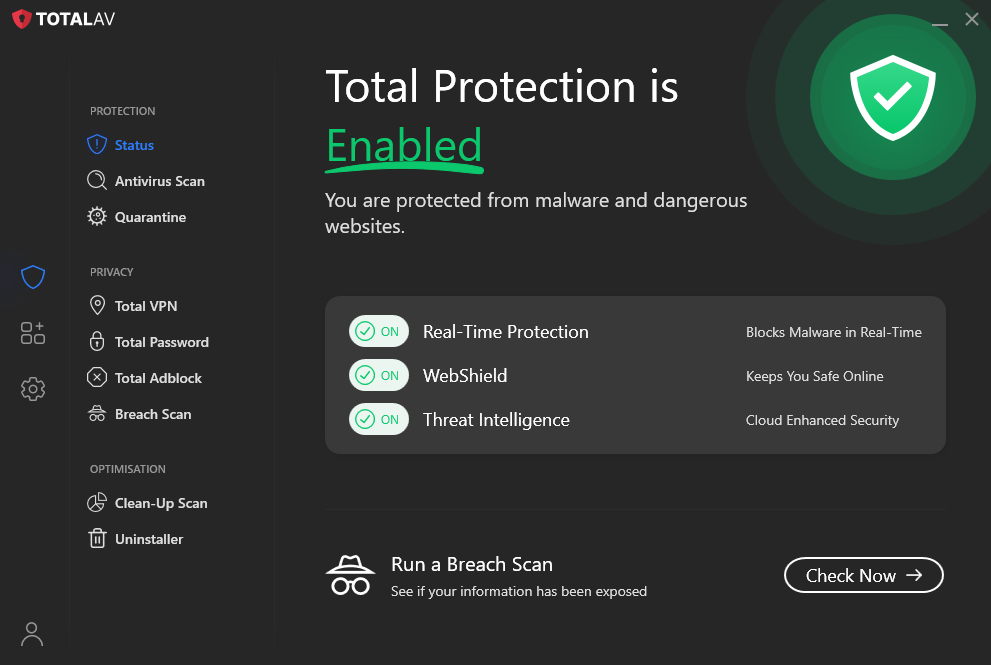
In addition to system scanning, TotalAV’s real-time protection uses cloud scanning. So, any programs that raise suspicion during scans are compared to the cloud database of known malware.
If the file appears malicious, TotalAV issues a warning to the user and places the file in quarantine. Additionally, the antivirus software provides a step-by-step guide on how to remove malware from your system.
Scanning
Both Bitdefender and TotalAV offer great virus scan tools. Each tool is efficient in catching both known threats and zero-day malware.
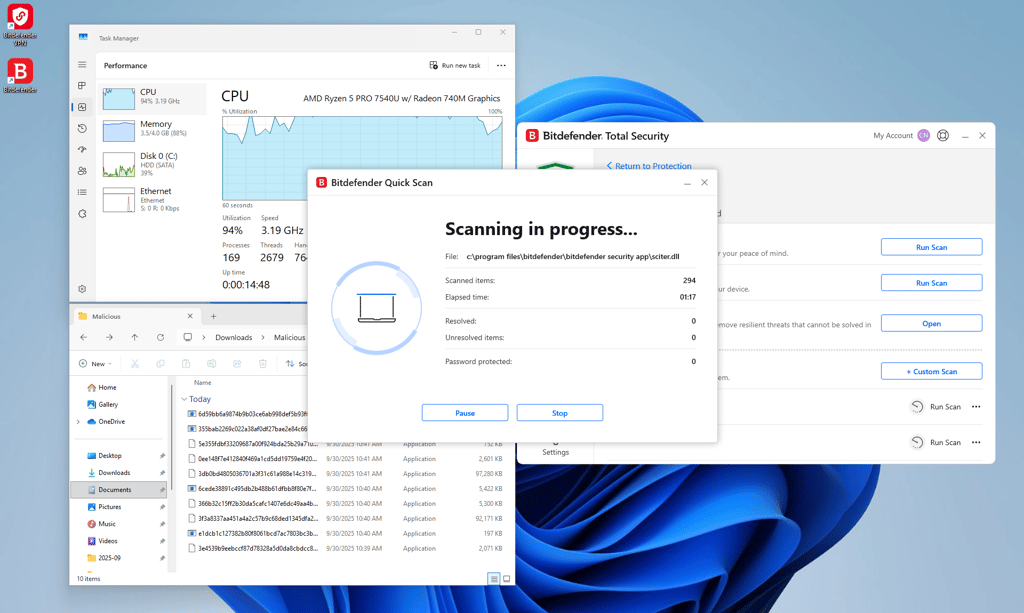
Bitdefender’s virus scanner is based on a malware directory and machine learning. Because the scans happen in the cloud, this feature has a minimal impact on your device systems.
There are four scan options available:
- Quick scan – scans locations where viruses usually appear. Doesn’t identify zero-day threats.
- System scan – scans the entire device system for malware threats. During our test, it caught 99% of zero-day threats.
- Vulnerability scan – checks the device for any vulnerabilities, like weak passwords, outdated applications or drives, and Windows updates.
- Custom scan – allows you to pick which system location needs to be scanned specifically.
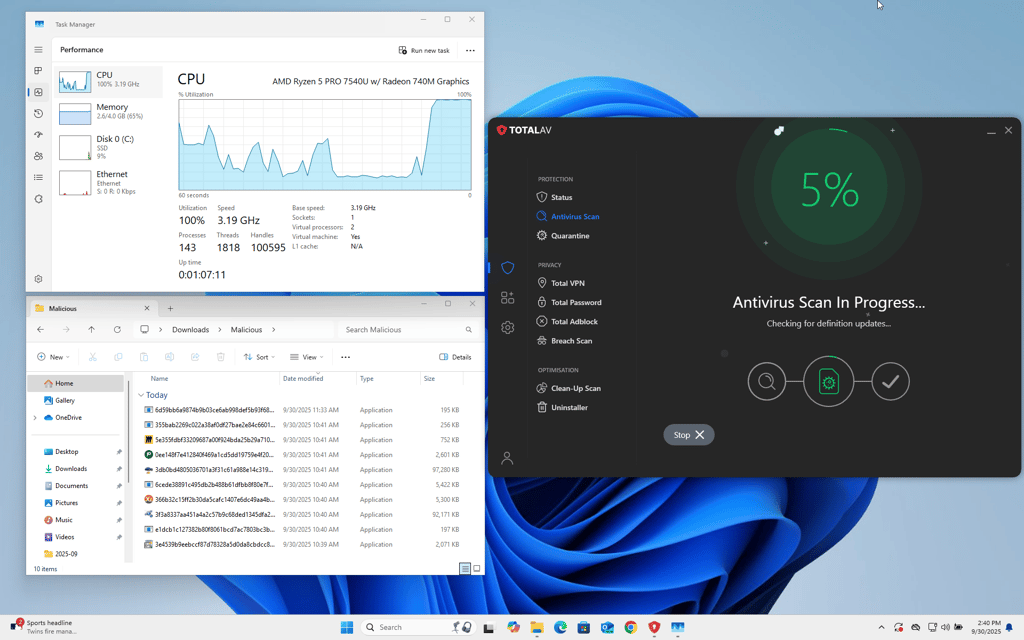
TotalAV virus scanner is a whitelisted version of Avira’s anti-malware engine, which is considered one of the best on the market.
There are four types of virus scans that TotalAV offers:
- Quick scan – scans the location where viruses are usually found. Doesn’t find zero-day threats.
- System scan – full system scan. During our test, it caught 99% of zero-day malware. It will affect your computer system during the scan.
- Smart scan – allows you to schedule scans for malware, tracking cookies, and junk files to run automatically.
- Custom scan – you get to pick a single file, folder, or disk to clean.
Overall, both Bitdefender and TotalAV provide reliable virus scan tools. However, Bitdefender’s scan tool is lighter on your device system and provides more reliable results.
Firewall protection
When comparing the firewall protection from both providers, I found that TotalAV doesn’t have firewall protection at all, and Bitdefender offers it only to Windows users.
I like that Bitdefender allows customization of its firewall feature. You can manually edit which apps or programs are allowed through the firewall. Also, you can enable port protection, so the firewall will block any attempts to scan your device’s ports.

There are also options for the alert mode, which lets the antivirus send a notification if any application is trying to access the internet. It’s a shame Bitdefender offers firewall protection only on Windows.
Bitdefender vs TotalAV feature comparison
Bitdefender and TotalAV have a truly impressive list of features. Both really deliver all the basics you’d expect from an antivirus suite. The lone difference is Bitdefender’s Windows firewall, which gives slightly more protection than TotalAV. That said, TotalAV’s anti-phishing tools are a bit more advanced than Bitdefender’s suite, so it’s not all that clear.
| Bitdefender | TotalAV | |
| Real-time protection | ✅ Yes | ✅ Yes |
| Anti-phishing protection | ✅ Yes | ✅ Yes |
| Virus scan | ✅ Yes | ✅ Yes |
| Wi-Fi protection | ✅ Yes | ✅ Yes |
| Safe browser | ✅ Yes | ✅ Yes |
| VPN | ✅ Yes | ✅ Yes |
| Password manager | ✅ Yes | ✅ Yes |
| Firewall | ✅ Yes, limited to Windows | ❌ No |
| Performance optimization tool | ✅ Yes | ✅ Yes |
Both of these antivirus software go above and beyond with their features, and I must say it’s hard to pick a winner, given that while Bitdefender has a firewall, TotalAV’s tools are a bit more polished.
Bitdefender features
With Bitdefender antivirus, even the free plan users get the same virus scan, real-time protection, and ransomware protection features as those with paid subscriptions. So, while the features are limited, they are performing like the top product.

With paid subscription plans, you get more features. That includes firewall protection (Windows only) and the SafePay browser that protects your banking details while shopping online. Anti-tracker ensures your safety from malicious scripts, and online threat protection prevents visiting unsafe websites.
Additionally, Bitdefender has its own built-in VPN tool, which limits your data to 200MB daily. Also, there’s a password manager for you to securely protect your login credentials, credit card data, or other important information.
Parental controls allow parents to block websites they don’t want children to visit. Another feature – profiles – is where you can activate different profiles depending on your activity or apps running for a better user experience.
Lastly, webcam and microphone protection will prevent unauthorized access to these tools. And to make your device work faster and get rid of old or not needed files quickly, there are system optimization and file shredder features.
Learn more in our Bitdefender review.
TotalAV features
TotalAV offers various device scan options to find and remove malware. Also, real-time protection is enabled by default, so the antivirus software is constantly checking your device’s security. Besides, TotalAV’s free plan offers more features, like a data breach monitor, compared to Bitdefender’s free version.
WebShield protects you from ransomware, scam, and phishing websites, and other online threats. It can be used both directly from the TotalAV app and as a browser extension. Also, TotalAV has an ad-blocker, which is a browser extension, to protect you from malicious ads.
Just like its competitor, TotalAV also offers a VPN and password manager features. For an antivirus VPN, it’s pretty decent, with multiple locations and unlimited data. The password manager also works great, helping you remember multiple passwords.
To clean your device quickly and efficiently, TotalAV also has a Clean-Up Scan, which quickly cleans junk like old cookies and trackers. Also, the Identity Theft protection monitors for data leaks, alerts you if any breach is found, and helps you restore compromised information.
To learn more about the features, visit the TotalAV review.
PC performance
When it comes to PC performance, TotalAV provides slightly better results than Bitdefender.
While running in the background, Bitdefender, on a regular computer, with 4GB RAM available, takes around 10% of RAM. While on a stronger PC, with 16GB RAM, the number drops to 2%. During scanning, Bitdefender takes almost full CPU usage and slightly raises the numbers in the RAM department. It will be noticeable to you when it starts taking longer to launch applications, and heavier apps, like games, may crash.
On the other hand, TotalAV, while running in the background, will take around 3-4% of the RAM available on a regular computer with 4GB RAM. And a little more than 1% on a stronger PC, with 16GB RAM. Scanning takes up 100% CPU usage and increases RAM usage slightly. On a weaker device, you might feel the impact of this since apps will take a longer time, but on a stronger device, there should be no issues.
Pricing and plans
Both TotalAV and Bitdefender offer three plans. Bitdefender offers plans, ranging from $12.99/month to $64.99/year, while TotalAV’s prices range from $19.00/month to $49.00/year.
Both also have a free plan. While it is limited, it’s still an excellent option for those who can’t afford the premium subscription. Additionally, both providers’ paid plans have a risk-free 30-day money-back guarantee.
| Bitdefender | TotalAV | |
| Free | $0.00 | $0.00 |
| Antivirus Plus/Premium | $12.99/year | $19.00/year |
| Total Security/Internet Security | $19.99/year | $39.00/year |
| Premium Security/Total Security | $42.49/year | $49.00/year |
| Get our discount | Get our discount |
TotalAV's most limited premium plan costs only $19.00/year for three licenses.
However, the more features you add, the more expensive the plans get. So the Internet Security plan already costs $39.00/year, and the Total Security plan is $49.00/year, offering a full list of features.
On the other hand, the most restricted premium plan of Bitdefender is cheaper than TotalAV. The starting price is much lower at $12.99/month for 1 license. Total Security is more expensive, while the most premium plan, Premium Security, is far more expensive than TotalAV’s most premium plan.
Bitdefender’s Total Security plan, with essential security features and a few additional tools, costs $19.99/year, while the full feature package that comes with Premium Security costs $64.99/year.
Apps and interface: which is more user-friendly?
When it comes to apps and their ease of use, TotalAV wins against Bitdefender. The download and set-up times were the same with Bitdefender and TotalAV. Both providers offer user-friendly apps that clearly group their features by the purposes they serve.
The mobile apps are also well-made, intuitive, and easy to use for beginners and experienced users. However, Bitdefender’s iOS app lacks several key features, while TotalAV offers a comprehensive range of features to protect your iOS devices from malware and online threats.
Desktop apps
Bitdefender’s desktop app is pretty simple and easy to use. Once set up, it’s really easy to navigate. The app groups the main features into Protection, Privacy, and Utilities groups.
The Dashboard tab allows for quick action access and displays your security status, Settings, and Notifications tabs.
The Protection tab is dedicated to your device security features, like real-time protection, device firewall monitoring, scanning, and more. The Privacy tab is where you can find the safe browser, VPN, or password manager. Lastly, the Utilities host the optimization tools, profile management, and file shredder.
The TotalAV desktop app is very clean-looking and groups all features in clear categories. On the main dashboard, you’ll see the three main tabs – Protection, Privacy, and Optimisation.
Additionally, the home screen provides quick information about your device's security level and the enabled features. There’s also a sidebar on the left, which you can use to navigate to Total Security, Settings, or My Account sections.
Mobile apps
The Bitdefender Android app is much better than the iOS version. The Android version mirrors the desktop one and has all the needed security features. Some of the features included are a malware scanner, web protection, VPN, app lock, anti-theft, and identity protection.
The iOS version only comes with very few features, like web protection, privacy monitoring, and a VPN. So, comparing the versions, this one is much more limited.
TotalAV mobile apps are both quite feature-rich. The features are very clearly displayed and the app is intuitive and easy to use even for beginners.
The Android version includes features like security scan, VPN, device tune-up tools, WiFi checker, and data breach checker.
The iOS version has a data breach checker, device locator, system security, secure browser, photo manager, web shield, and a VPN. So as you can see there are plenty of features for the iOS app as well.
Customer support
When it comes to customer support, Bitdefender and TotalAV both offer robust customer support options, including 24/7 live chat and phone support
| Bitdefender | TotalAV | |
| 24/7 live chat | ✅ Yes | ✅ Yes |
| Ticketing system | ✅ Yes | ✅ Yes |
| Phone line | ✅ Yes | ✅ Yes |
| Knowledge database | ✅ Yes | ✅ Yes |
The best thing about Bitdefender and TotalAV customer support is that it’s available regardless of whether you’re a free or a paying user.
Both providers offer live chat options, and the waiting times for a response are very low. I also found the agents very professional. There’s also an option to contact the support via phone line, or to send a ticket.
If you’re more independent, then both Bitdefender and TotalAV offer vast knowledge bases, community support, or FAQs where all your questions will be answered and the information provided.
Video review
Final verdict
After reviewing both products, I find that TotalAV is slightly better than Bitdefender – although they’re both really close. While Bitdefender performed slightly better in protection tests, TotalAV made up for it with its ease of use and pricing.
| Bitdefender | TotalAV | |
| Protection | ✅ | ❌ |
| Features | ✅ | ✅ |
| PC performance | ❌ | ✅ |
| Price | ✅ | ✅ |
| Ease-of-use | ❌ | ✅ |
| Support | ✅ | ✅ |
The competition between TotalAV and Bitdefender was pretty close. Even in the instances where the winner was TotalAV, Bitdefender still provided great results.
Overall, both of these antivirus suites are great, but TotalAV just had that edge needed to solidify itself as the number one antivirus software. It had the best protection features and was easier to use. Also, TotalAV’s various features are included in different plans, including a reliable VPN, password manager, and ad blocker. It also offers feature-rich apps that work better than Bitdefender’s. Additionally, with its premium plan being cheaper than Bitdefender’s, TotalAV costs less money if you need the full package.
Now, speaking about Bitdefender, this antivirus also has its advantages. Bitdefender, comparably, offers firewall protection. Also, it has great apps for both desktop and mobile users, only falling short on the iOS app.
So, while the TotalAV vs Bitdefender duel may have ended with TotalAV’s win, both providers are secure and reliable options to protect your device. You’ll be protected in real time, have good scanning options, and the additional features will solidify your device security.
Other antivirus software comparisons
Norton vs TotalAV: which antivirus is better in 2026?
Bitdefender vs Norton 360: the battle for the #1 spot
TotalAV vs McAfee: which one is better?
How we tested and compared Bitdefender and TotalAV
To evaluate Bitdefender and TotalAV, I worked with the Cybernews research team to run in-house tests using real-world malware samples to assess detection and removal efficiency. Our testing framework prioritizes relevance and accuracy, focusing on key areas like:
- Malware detection and removal
- Real-time protection
- Performance
- False positive detection rates
- Extra features
- Compatibility
- Customer support
- Price
We follow a rigorous testing process to ensure accurate results. If you want to learn more about how we evaluate antivirus software, check out our detailed testing methodology.
FAQ
Is TotalAV better than Bitdefender?
Yes, TotalAV is slightly better than Bitdefender. While you can’t go wrong with either, my review shows that TotalAV has a slight edge over Bitdefender in terms of PC performance and ease of use.
Is there a better antivirus than Bitdefender?
Yes, currently, we mark Norton 360 as the best antivirus software provider. This antivirus offers the best protection, great features, and comes at a very affordable price.
Is TotalAV a legit antivirus?
Yes, TotalAV is a legit antivirus software. It has been independently tested to prove that it offers great protection, reliable security tools, and is lighter on your device’s RAM.
Can TotalAV be trusted?
Yes, TotalAV is a completely trustworthy antivirus, even its free plan. Make sure you download it directly from the provider, to avoid scams. We currently rank TotalAV as the second-best antivirus on the market, which will continuously protect your devices from any cyber threats.
What antivirus is better than TotalAV?
Based on our research on protection, features, performance, and other crucial criteria, Norton 360 stands as the best antivirus.