Malwarebytes vs McAfee: which antivirus is better?
Backed by leading cybersecurity experts and investigative journalists, we deliver independent, real-world antivirus testing and analysis, guaranteeing objective evaluations without undue influence or bias from outside parties.
Our transparent and consistent methodologies ensure objective, up-to-date reviews, empowering readers to make well-informed decisions.
Learn more

In this Malwarebytes vs McAfee comparison, I look at two antimalware suites that have been around for a long time. With both of them being quite popular, you might be wondering which of them is a better choice in 2026.
To help answer that question, I tested both products along with the Cybernews research team. I looked at their lab test results, performed in-house tests, and analyzed their features, pricing, and customer support. In the end, I found McAfee to be a better choice, with Malwarebytes performing slightly worse in key categories. Keep reading to find out exactly why I made my decision.
Malwarebytes vs. McAfee at a glance
Malwarebytes and McAfee are both reputable antivirus suites with reliable features. To help you decide which one suits your needs better, I broke down their main features in a table. Both deliver reliable antivirus features. However, McAfee wins by being slightly more effective anad affordable.
| McAfee Antivirus | Malwarebytes | |
| ⭐ Rating: | ||
| 🥇 Overall rank: | #10 out of #30 | #4 out of #30 |
| 🔥 Coupons: | McAfee Antivirus coupon 67% OFF | Malwarebytes coupon 40% OFF |
| 💵 Price: | From $49.99/year | From $26.99/year |
| ✂️ Free version: | Yes (Android, iOS) | Yes |
| 🖥️ Platforms: | Windows, Mac, Android, iOS | Windows, Android, macOS, ChromeOS, iOS |




Our team of researchers thoroughly tests antivirus software following a well-established testing process. In unison, our experts combine in-house and independent testing lab findings with first-hand experience to help you make informed decisions about each product. Learn how we test antivirus software.
Malwarebytes vs McAfee: company background
Malwarebytes is an antivirus software suite developed by California-based Malwarebytes, Inc., founded by Polish-American programmer Marcin Kleczynski. Malwarebytes started off as one of the best freemium antimalware solutions, adding more features as its user base grew.
McAfee was founded by programmer John McAfee in 1987, making it one of the oldest malware protection brands on the market. Throughout its history, it changed hands multiple times, including being owned by Intel at one point. Currently, a group of American investors led by Advent International Group owns McAfee.
Malwarebytes vs McAfee: which offers better protection?
Both products are known for their solid malware protection. That’s why, in order to determine a winner, I first looked at lab tests from AV-Comparatives, AV-TEST, and SE Labs. McAfee earned top grades in two of the tests, while Malwarebytes wasn’t featured in AV-TEST and SE Labs reports for the past few years. The one standout result was the AV-Comparatives September 2025 Malware Protection Test, which saw both products score low due to false alarms.
Here are the ranks achieved in each of the lab tests in which the providers were tested in.
| Malwarebytes | McAfee | |
| AV-TEST | Certified (2023) | Top Product (2025) |
| SE Labs | AA (2021) | AAA (2025) |
| AV-Comparatives | Tested (2025) | Tested (2025) |
On top of the lab tests, I performed a series of in-house tests along with the Cybernews research team. These included a real-time malware protection test and a full system scan test. McAfee also performed better than Malwarebytes in those tests.

Wrapping upWinner – McAfee
With more lab test scores and better results in our in-house tests, McAfee is clearly a better pick for protecting your computer than Malwarebytes. While both programs failed our real-time malware protection test, McAfee’s scan found more malware.
Real-time malware protection
During my real-time malware protection tests, something surprising happened. Both products scored 0%, allowing every piece of malware tested to pass through. This was unexpected, as other antivirus suites, like Norton and Bitdefender, had no problem detecting malware on the same setup.
This might be because I didn’t use the products’ browser extensions, which definitely boost real-time protection. Nevertheless, these results are still surprising, especially since other products did not exhibit the same issues.
Firewall protection
While PC firewalls aren’t as important as they once were due to the increased protection embedded in Wi-Fi routers, they remain an essential tool for protecting your devices. That’s why I decided to compare firewall functionalities in each product.
Malwarebytes does not offer a separate firewall. Instead, it offers tools for managing the built-in Windows Firewall, allowing you to set custom rules. This isn’t bad by any means, as the Windows Firewall is a reliable solution, but if you want more advanced protection, Malwarebytes may be falling short.
McAfee also leverages the built-in Windows firewall, but unlike Malwarebytes, McAfee offers a proprietary solution for monitoring outbound traffic. It also provides a firewall feature on macOS, which Malwarebytes doesn’t have.
Scanning
To test each antivirus, I planted 150 malware files from bazaar.abuse.ch on a virtual machine running Windows 11.
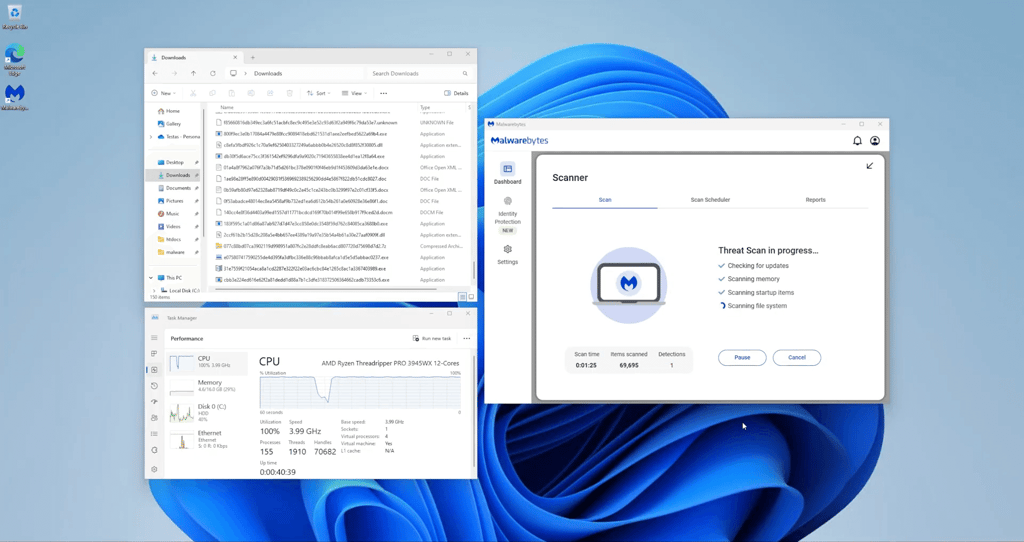
I started off by performing a full scan with Malwarebytes. It took only 2 minutes and 20 seconds, but unfortunately, Malwarebytes only detected 64.67% of the malware samples we planted in the device. This is quite disappointing, especially for a scan claimed to be a full system scan.
Malwarebytes scan in progress
McAfee, on the other hand, took 1 hour and 4 minutes to scan my entire virtual machine. It detected 90.67% of the planted malware, which is a decent score, considering that some of the planted malware was relatively new.

McAfee vs Malwarebytes: pricing
Both products offer 3 different paid plans. Malwarebytes also offers a free version that allows you to perform manual scans, but doesn’t feature real-time protection, making its use limited.
To help you see the differences between the products, I created a simple table that will help you see each antivirus suite’s offer:
| Plan | Malwarebytes price | McAfee price |
| Free | $0.00 | ❌ |
| Standard/Essential | $26.99/month for 1 device | $49.99/month for 5 devices |
| Plus/Premium | $47.99/year for 3 devices | $49.99/year for unlimited devices |
| Ultimate/Advanced | $139.99/year for 3 devices | $89.99/year for unlimited devices |
The cheapest plans, Malwarebytes’ $44.99/year Standard, and McAfee’s $39.99/year Eessential, feature, basic antivirus protection for both products, with very limited additional features.
Malwarebytes adds a VPN to its $79.99/year Plus plan, while McAfee adds personal data cleanup tools to its $49.99/year Premium plan. Additionally, Malwarebytes’ Ultimate plan features online data cleanup and $2 million identity protection insurance. Similarly, McAfee’s Advanced plan adds $1 million identity theft protection, along with credit monitoring.
In case you’re unsure whether you want to commit to either of the products, they both offer money-back guarantees. With Malwarebytes, you have 60 days to try it risk-free, while with McAfee, you’ll need to decide within 30 days.
McAfee vs Malwarebytes: features
Malwarebytes and McAfee are similar in terms of features. Both focus on core antivirus features, including real-time protection and system scans. They also both focus on the identity protection side of security, offering personal data deletion and identity theft insurance with their higher-tier plans.
Both products also offer VPNs, although Malwarebytes only offers it with its Plus plan and above, which requires an additional $20.00/year. If you're looking for a VPN, it's better to go for a VPN and antivirus combo instead, like Surfshark One+, as you’ll get a far better product for a similar price.
| Malwarebytes | McAfee | |
| Ransomware protection | ✅ Included | ✅ Included |
| Scam and phishing sites detection | ✅ Included | ✅ Included |
| Wi-Fi security | ✅ Included | ✅ Included |
| Anti-tracker technology | ✅ Included | ✅ Included |
| VPN | ✅ Included | ✅ Included |
| Protection against brute force attacks | ✅ Included | ✅ Included |
| Identity theft insurance | ✅ Included, up to $2 million | ✅ Included, up to $1 million |
| Personal data deletion | ✅ Included | ✅ Included |
| Password manager | ❌ Not included | ✅ Included |
| Proprietary firewall | ❌ Not included | ✅ Included |
As you can see, the two products don’t differ significantly in terms of their respective antivirus features. The advanced features are where any difference is noticeable. However, they’re mostly related to personal data and anti-fraud protection. If you’re looking purely for an antivirus solution, there’s not much to differentiate between the two other than McAfee’s firewall.
Impact on PC performance
To evaluate each antivirus’s system performance, I tested both products on a 4-core, 16GB RAM, 100GB SSD VMware virtual machine on a Lenovo ThinkStation featuring a powerful AMD Ryzen Threadripper PRO 3945WX 12-core processor.
During the full system scan, both products performed similarly. Malwarebytes used up from 37% to 100% of my CPU’s power, making it hard to use the device while scanning. Similarly, McAfee used from 50% to 100% of CPU capacity.
Real-time protection also delivered a heavy load. CPU load for Malwarebytes fluctuated from 21% to 66%, while McAfee had a big variance, between 3% and 79%.
Apps and interface: which is more user-friendly?
When it comes to compatibility, both Malwarebytes and McAfee are compatible with the top operating systems, both on desktop and mobile. Here’s a simple breakdown of where you can find Malwarebytes and McAfee:
| Malwarebytes | McAfee | |
| Supported OS | Windows, macOS, Android, ChromeOS, iOS | Windows, Android, macOS, iOS |
| Browser extensions | Chrome, Firefox, Safari, Edge | Chrome, Firefox, Safari, Edge |
| Simultaneous connections | 1, 3, or 5 devices | 3, 5, or unlimited devices |
When testing the software, I found that both products are straightforward to install and use on desktop and mobile alike. For both products, the Windows antivirus is the most feature-filled and polished product, while the mobile and iOS versions are slightly less advanced, but remain very usable.
Desktop apps
Malwarebytes offers a very clean interface that is pretty easy to navigate. That said, I must say that some settings could be hidden behind fewer clicks, although that would probably create more clutter.

McAfee, on the other hand, went the other way, providing one-click access to most of its features. I personally enjoy it, but it might be overwhelming to some people. Every feature like virus scans, scam detection, privacy management, and others, is easily accessible.

Overall, both products are usable, and while they have different approaches to showing information to users, I was able to easily learn to navigate them after only a few minutes.
Mobile apps
Both Malwarebytes and McAfee offer mobile apps on Android and iOS. This means that you’ll be able to easily protect your devices on the go.
Malwarebytes’ mobile app is clean and gives you easy access to all the functionalities you need. When you turn it on, the first thing you see is a protection score. This rates how well your device is protected and can be a good motivator to get you to improve your device security.

Other than the appearance, Malwarebytes on Android offers scam protection, a VPN, a threat scanner, and identity theft protection. All are pretty useful features on mobile devices. I particularly appreciate the scam guard, which can really come in handy when protecting less tech-savvy family members from scam calls and texts.
McAfee has a pretty similar app design, focusing most features in a bottom menu. That said, I did enjoy Malwarebytes’ protection score a bit more than McAfee’s more marketing-based dashboard.

Just like Malwarebytes, McAfee features a handy scam detector. It also includes a firewall, a VPN, and a password manager, all of which are very useful on the go.
Customer support
When using an antivirus, customer support is crucial in case something goes wrong. Both Malwarebytes and McAfee offer multiple support channels, which I’ve listed below:
| Malwarebytes | McAfee | |
| 24/7 live chat | ✅ Available | ✅ Available |
| Email support | ✅ Available | ✅ Available |
| FAQ | ✅ Available | ✅ Available |
| Guides | ✅ Available | ✅ Available |
| Phone support | ❌ Not available | ✅ Available |
The two products are pretty similar in terms of customer support. However, McAfee does offer phone support, which Malwarebytes doesn’t. This is particularly a big difference when it comes to less tech-savvy customers.
When testing both products’ customer support options, I found the agents to be helpful and prompt in their responses. Overall, there’s not much I could be complaining about.
Final verdict
After multiple tests, I can safely say that McAfee is a better product than Malwarebytes, winning in terms of antivirus protection, features, pricing, and customer support. However, I must note that many of these categories were close ones.
| Category | McAfee | Malwarebytes |
| Features | ✅ | ❌ |
| Protection | ✅ | ❌ |
| PC performance | ✅ | ✅ |
| Pricing | ✅ | ❌ |
| User interface | ✅ | ❌ |
| Support | ✅ | ❌ |
Malwarebytes isn’t a bad product by any means. Many of the categories could’ve gone their way if not for a few details. So, if you feel like Malwarebytes’ feature set or apps are more attractive to you, it’s definitely not a bad purchase. However, both independent lab testing and our in-house testing show that McAfee has an edge in protection, while keeping similar results in terms of performance impact.
How we tested Malwarebytes vs McAfee
To compare Malwarebytes and McAfee, I used the help of the Cybernews research team to set up multiple in-house tests. These focused on real-world malware samples and everyday scenarios. My evaluation focuses on key factors that matter most to users:
- Malware detection
- Real-time protection effectiveness
- Pricing and overall value
- System performance
- False positive rates
- Security features and extra tools
- Cross-platform compatibility
- Quality of customer support
We carefully test each antivirus to ensure our results are accurate and trustworthy. For more details on our evaluation methods, see our complete antivirus testing methodology.
FAQ
Is McAfee as good as Malwarebytes?
McAfee is better than Malwarebytes, offering more reliable protection and additional features.
Do I need Malwarebytes if I have McAfee?
No, you don’t need Malwarebytes if you have McAfee. The two products cover the same features.
What are the disadvantages of McAfee?
In my tests, McAfee struggled with real-time protection and used up a lot of system resources.