Best proxies for ad verification in 2026


Ad verification is a crucial step for running ad campaigns, but it’s not always simple. Advertisers and agencies often encounter significant challenges, including geo-restrictions that block access to region-specific campaigns, IP tracking, ad fraud detection, and limitations when managing multiple accounts.
That’s where the best proxies for ad verification come in. The right proxies allow you to see ads exactly as target audiences see them, uncover fraudulent activity, and run tests without getting flagged. But not all proxies are the same. Residential, datacenter, mobile, and ISP proxies each have their own advantages, and some clearly work better than others in ad verification.
In this article, I’ll share insights based on hands-on testing and research, so you know the best proxies for ad verification on the market. You’ll find a curated shortlist, in-depth reviews, side-by-side comparisons, and practical guidance to help you choose the right proxy provider for your ad verification needs.
Top 6 proxies for ad verification – shortlist
- Decodo (formerly Smartproxy) – best affordable ad verification proxy for seamless geo-targeting
- Oxylabs – most reliable enterprise-grade proxy
- Webshare – best for rapid, self-service ad verification proxy deployment
- SOAX – best ad verification proxy with the largest IP address variety
- DataImpulse – best budget proxy for ad verification with non-expiring traffic
- Bright Data – best proxy for global mobile ad verification
- Nimbleway – best for advanced API integration and real-time verification




We take proxy testing seriously – every service is put through real-world scenarios, benchmark checks, and hands-on feature evaluations. Our in-house team collects the data, and experts review and verify the results. Take a look at how we test proxies and what truly stands behind their performance.
Why do you need proxies for ad verification?
Ad verification can easily fail if you don’t use proxies. Geo-blocks can prevent you from seeing ads in certain regions, while IP tracking and bot detection systems may block or distort your view. Additionally, ad fraud risks make it hard to verify whether your campaigns are being delivered as intended.
Ad verification proxies solve these problems by allowing you to view ads as a real user would see them in different locations, ensuring accurate campaign monitoring. Here are the main benefits of using proxies for ad verification:
- Bypass geo-restrictions. Proxies allow you to access ads in any region, helping you to confirm that your campaigns appear where they should.
- Simulate real users. By masking your IP address, proxies make your activity appear as a legitimate visitor, thereby avoiding detection and blocking.
- Monitor multiple campaigns. Easily switch between IP addresses to manage and verify ads across different accounts or platforms.
- Enable large-scale testing. Proxies allow you to continuously monitor multiple ads using different proxies, making it possible to analyze ad delivery at scale.
Proxies for ad verification in 2026 – detailed list
Below, you’ll find my detailed list of the best proxies for ad verification. I tested each option in real ad verification scenarios and selected the ones that delivered the strongest performance.
1. Decodo (formerly Smartproxy) – best budget-friendly proxy for ad verification

| Main proxy types: | Residential, datacenter, ISP, mobile |
| IP pool size: | 125M+ |
| Price: | From $3.00/GB |
| Free trial: | ✅ Yes, 3-day with 100MB |
| Customer support: | 24/7 live chat, email |
Decodo is my go-to choice for ad verification because it offers great geo-coverage in over 195 countries, dependable session control, and low block rates. I found its performance monitoring and fraud analysis tools really helpful.
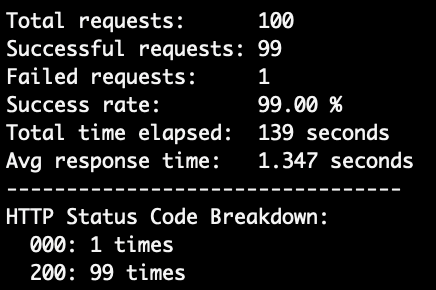
Proxy types and features. Decodo offers a wide range of proxies, including residential, datacenter, ISP, and mobile. With access to over 185 million IP addresses, I could easily simulate real users from almost any city or ZIP code to verify that ads displayed correctly and identify geo-targeted fraud. The automatic IP rotation and sticky sessions kept my testing smooth and stable, while granular targeting allowed me to verify ads in specific regions or devices. During my tests, it handled 99% of my requests, and averaged a 1.347s response time – the second-best result.
User experience and support. I found Decodo’s dashboard clear and beginner-friendly, making setup simple. The documentation guided me through the process step by step. There are great integration options for automating workflows, such as API, browser extensions, and an anti-detect browser. When I needed help, the support team answered quickly and clearly via live chat and email.
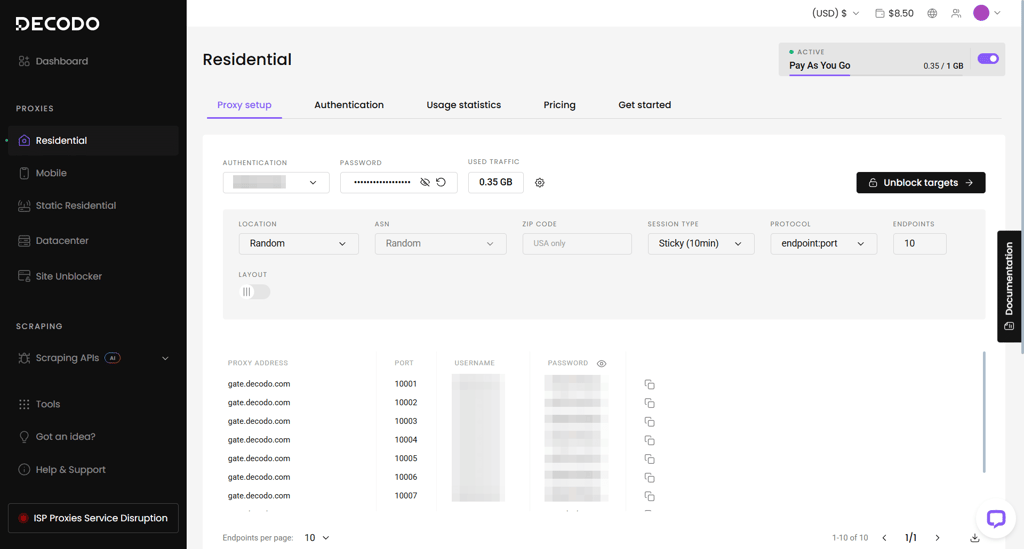
Pricing and plans. Decodo offers flexible subscription and pay-as-you-go plans. Residential proxies start at $3.00/GB, while mobile proxies start at $3.75/GB. There’s a 3-day 100MB free trial, a 14-day money-back guarantee, data rollover, and enterprise plans for businesses of any size.
2. Oxylabs – best reliable ad verification proxy for business

| Main proxy types: | Residential, datacenter, ISP, mobile |
| IP pool size: | 100M+ |
| Price: | From $3.49/GB |
| Free trial: | ✅ Yes, 3-day |
| Customer support: | 24/7 live chat, email |
Oxylabs is an excellent option if you’re looking for an enterprise solution for ad verification. With its huge IP pool, advanced geo-targeting, and reliable performance, I found it a trustworthy solution for verifying ad campaigns.
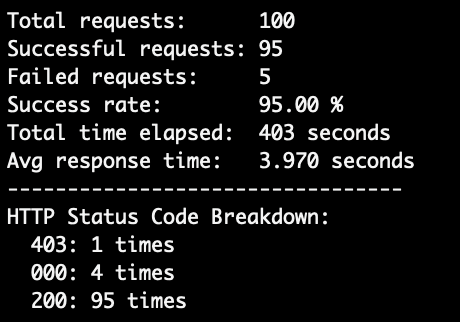
Proxy types and features. Oxylabs offers residential, datacenter, ISP, and mobile proxies, with over 100 million IPs in 195 countries. I was able to target ads to specific locations, utilize sticky or rotating sessions, and bypass CAPTCHAs thanks to the AI-powered Web Unblocker feature. This kept my work running smoothly, even when some sites tried to block automated access. During my testing, it handled 95% of my requests, with an average response time of 3.970s, which wasn’t the best result.
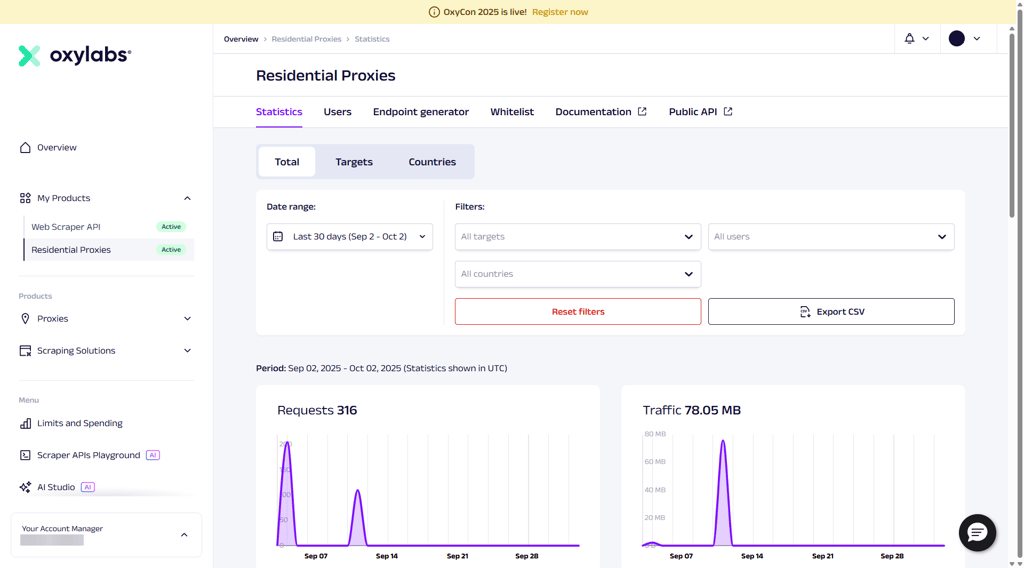
User experience and support. I found the Oxylabs dashboard polished and user-friendly, making it simple to scale up my ad testing. The API guides and setup documentation helped me get started quickly. Whenever I needed assistance, the support team responded quickly and resolved my issues within minutes, either through live chat or email.
Pricing and plans. Oxylabs isn’t the cheapest, but I liked the flexible options. Residential proxies start at $3.49/GB, while mobile proxies begin at $4.50/GB. There’s also a 3-day free trial and enterprise plans available.
3. Webshare – best beginner-friendly proxy for ad verification

| Main proxy types: | Residential, datacenter |
| IP pool size: | 80M+ |
| Price: | From $1.19/GB |
| Free trial: | ✅ Yes, 10 proxies for 1GB/month |
| Customer support: | 24/7 live chat, email |
WebShare is a great ad verification proxy for beginners. It stands out for its reliable geo-targeting capabilities and a vast network that helps advertisers verify ad placements globally.
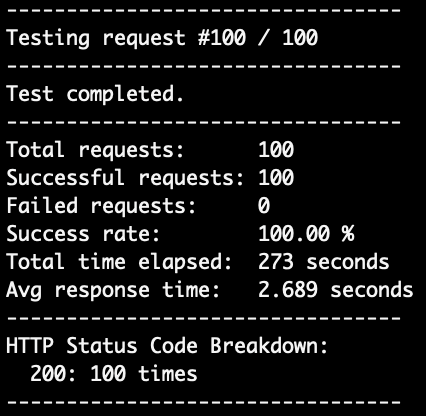
Proxy types and features. WebShare gives you access to both datacenter and residential proxies, including reliable static residential IPs from trusted sources. With more than 80 million IP addresses in over 195 countries, it’s easy to choose the location you need. WebShare’s proxies can act like real users and even bypass CAPTCHA – super useful for ad checks. It supports both SOCKS5 and HTTP, so it works with most ad verification tools. During testing, it handled all requests but showed somewhat average response time.
User experience and support. When testing WebShare, I found the dashboard easy to use and was able to set up my proxies quickly. I appreciated the real-time statistics showing how my proxies performed. All guides helped me to effectively use proxies for ad verification, while the support team was readily available via live chat.
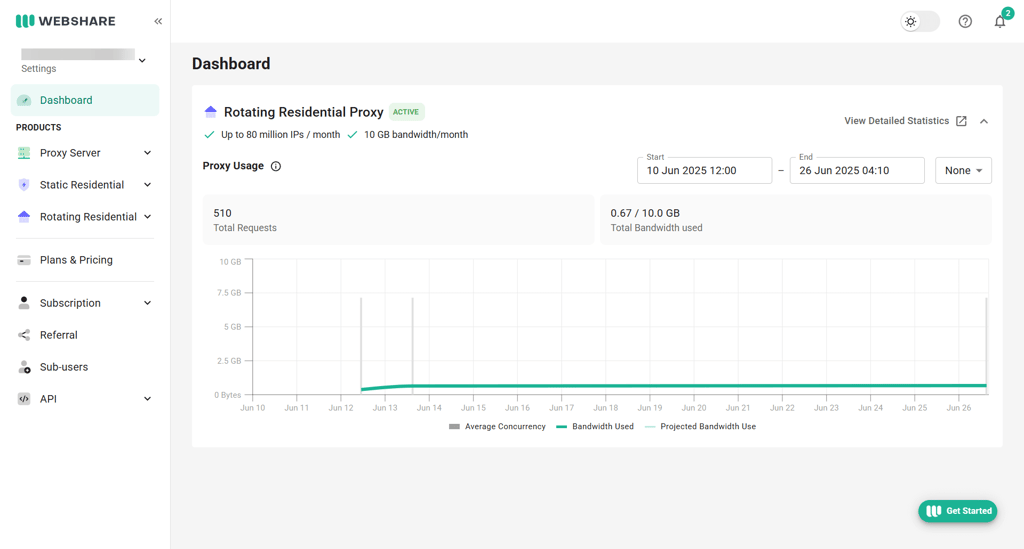
Pricing and plans. WebShare offers flexible plan options. Residential proxies start at just $2.98/GB, with discounts for bigger or longer-term plans. There’s also a free trial with 10 IPs and 1GB to test before buying.
4. SOAX – best ad verification with the most diverse IP pool

| Main proxy types: | Residential, datacenter, ISP, mobile |
| IP pool size: | 190M+ |
| Price: | From $2.00/GB |
| Free trial: | ❌ No |
| Customer support: | 24/7 live chat, email |
SOAX offers the largest number of IP addresses on this list. It features powerful geo-targeting tools, allowing you to easily spot ad fraud, test ads in various regions, and track campaign performance.
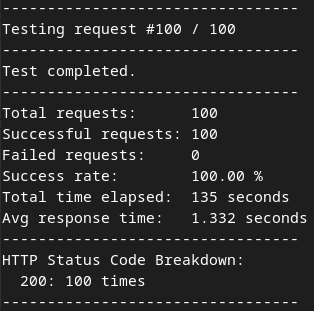
Proxy types and features. SOAX offers residential proxies with over 190 million IPs across 195 regions. Its advanced geo-targeting lets you filter by country, city, ASN, and ISP, so your ad tests can be as accurate as possible. Key features include rotating sessions, robust whitelisting, and compliance with GDPR and CCPA. During testing, it handled all requests and responded quickly.
User experience and support. I found the setup really simple. At first, I thought the interface looked dated, but I realized it's actually designed for easy use. I used the help center articles to set up targeting and found clear and helpful guides. Support responded quickly through live chat and email when needed.
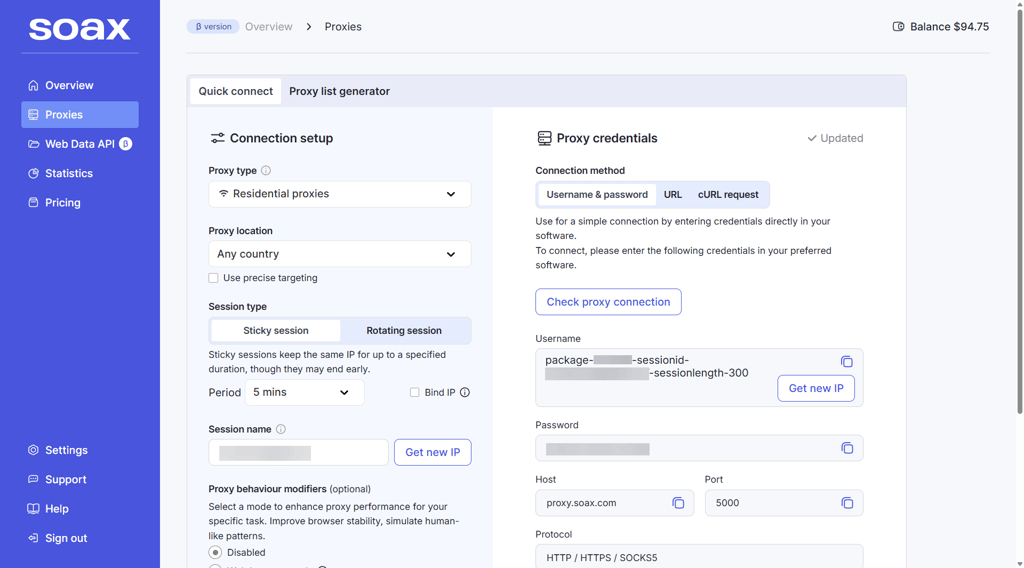
Pricing and plans. SOAX’s pricing is flexible, catering to both individuals and enterprises. Both residential and mobile proxies start at $2.00/GB, with lower prices per GB available when purchasing more data. SOAX doesn’t offer a free trial, which I found disappointing, but you can get a 3-day 400MB trial for $1.99.
5. DataImpulse – best pay-as-you-go proxy for ad verification

| Main proxy types: | Residential, datacenter, mobile |
| IP pool size: | 90M+ |
| Price: | From $1.00/GB |
| Free trial: | ❌ No |
| Customer support: | 24/7 live chat, email |
DataImpulse is a strong pick for advertisers, agencies, and small teams looking for flexible ad verification proxies without a large monthly subscription. I like its pay-as-you-go model since the unused traffic doesn’t expire, which makes it practical for checking ad placements, testing geo-targeted campaigns, and running occasional verification tasks.
Proxy types and features. With DataImpulse, you get the main proxy types: residential, datacenter, and mobile proxies. This gives you the flexibility to pick the proxy type based on the ad verification task. For instance, I used residential proxies for my check to look more like regular user traffic, while datacenter proxies proved better for fast, lower-cost testing. DataImpulse also supports HTTP(S) and SOCKS5 protocols, includes free country targeting, rotating and sticky sessions, API access, and IP authorization. On top of that, its 90M+ IP pool covers 195 locations worldwide for checking geo-targeted ads across different markets.
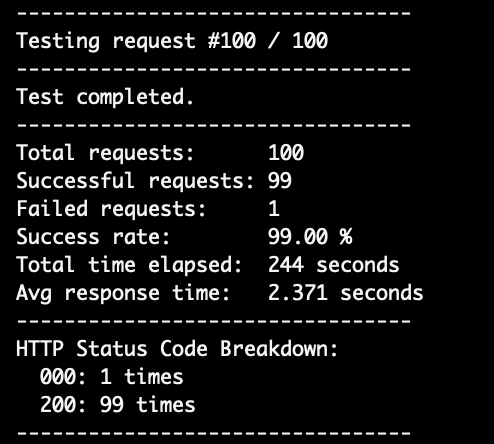
User experience and support. Based on my tests, DataImpulse is easier to manage than some proxy services I’ve seen. However, it’s not a no-code ad verification tool, so you’ll need to connect the proxies to your browser, scraper, or verification setup yourself. While it’s better suited for users with some proxy experience, the dashboard is clean and simple, making it easy to find proxy credentials, pick locations, and manage usage. Moreover, if you run into any issues, the 24/7 live chat and email support are available.
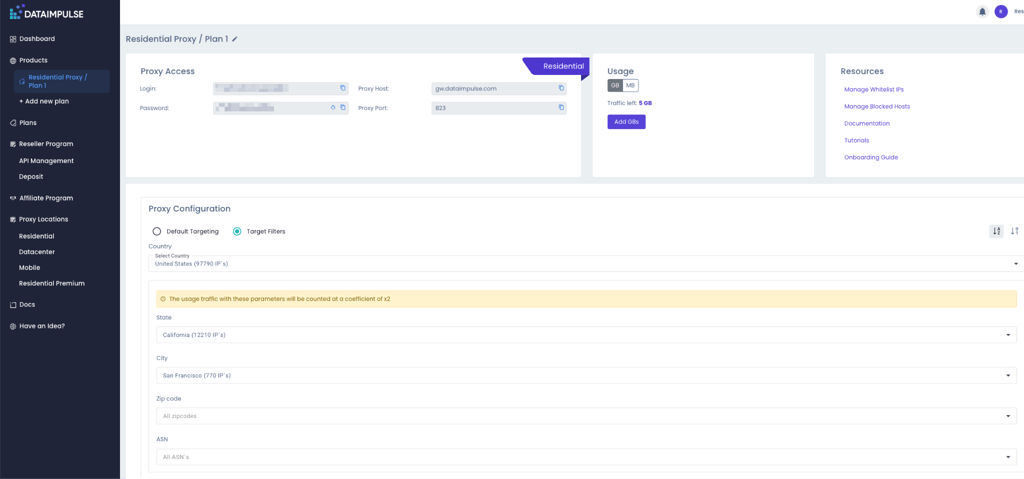
Pricing and plans. DataImpulse uses a pay-as-you-go model, with residential proxy pricing starting at $1.00/GB with a $5.00 minimum purchase. While the lack of a free trial was a bit disappointing, unused traffic doesn’t expire, so leftover data stays available for future ad verification checks.
6. Bright Data – best proxy for verifying mobile ads

| Main proxy types: | Residential, datacenter, ISP, mobile |
| IP pool size: | 150M+ |
| Price: | From $2.50/GB |
| Free trial: | ✅ Yes, 15 proxies for 2GB/month |
| Customer support: | 24/7 live chat, email, phone |
Bright Data stood out to me because of its numerous proxy options – including powerful mobile proxies – that help you view real ads like real users would, making it easier to spot fake ads or issues.
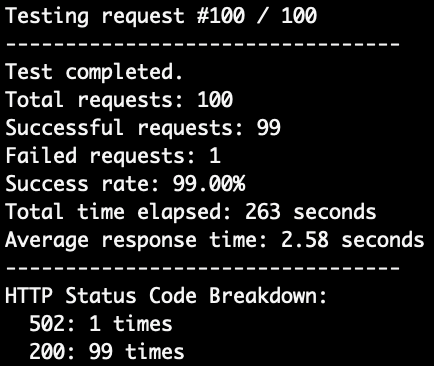
Proxy types and features. Bright Data gives you access to residential, datacenter, ISP, and mobile proxies. Mobile proxies are especially useful – I used them to check how ads appear on real devices and found it easy to detect mobile ad fraud. Helpful features include session management, geo-targeting, and API integration. During my test, it handled 99% of the requests but delivered average speeds.
User experience and support. The Bright Data dashboard is packed with helpful tools for managing proxies and analyzing ad performance. Although I found some options confusing at first, the step-by-step guides and quick support via live chat made it much easier for me to get started.
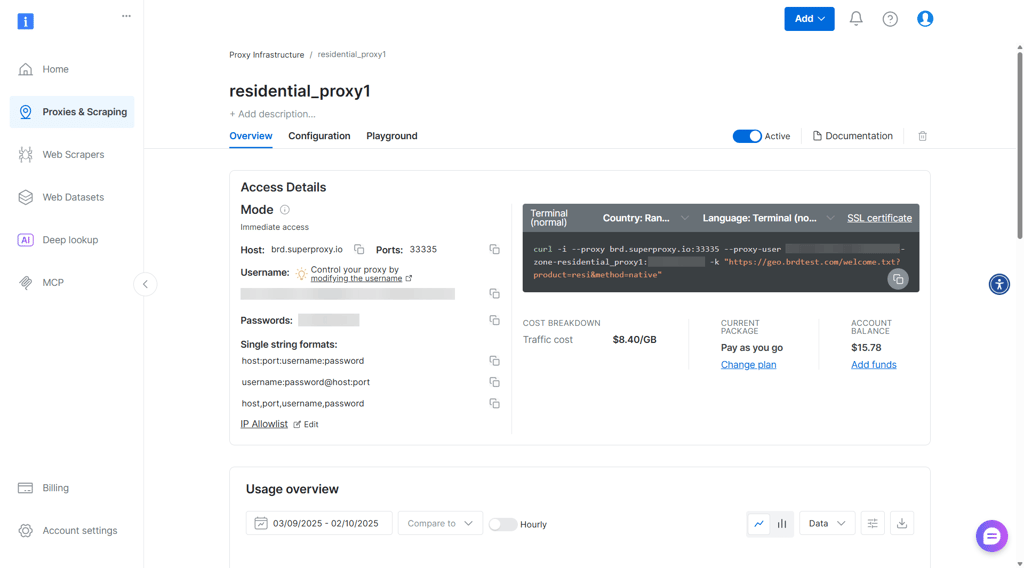
Pricing and plans. Bright Data offers flexible pricing. You can pay as you go or get a subscription and scale up as needed. Residential proxies start at $2.50/GB, while mobile proxies cost $5.00/GB, with discounts for plans with higher data volumes. There’s also a free trial, which includes 15 proxies for 2GB/month.
7. Nimbleway – best proxy for ad verification with API integration

| Main proxy types: | Residential |
| IP pool size: | Undisclosed |
| Price: | From $5.30/GB |
| Free trial: | ✅ Yes, 7-day |
| Customer support: |
Nimbleway caught my attention as an emerging proxy for ad monitoring and verification. It’s great for added security, detecting fraud, supporting global campaigns, and collecting accurate data. What really sets it apart is the API integration. It’s easy to set up and ideal if you need automated proxy management for testing ads worldwide.
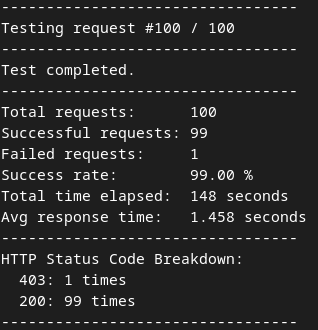
Proxy types and features. Nimbleway offers residential, datacenter, ISP, and mobile proxies. Residential proxies let you check ads from specific locations, while ISP proxies are great for frequent checks. During my tests, it handled 99% of requests and showed great performance in terms of speed.
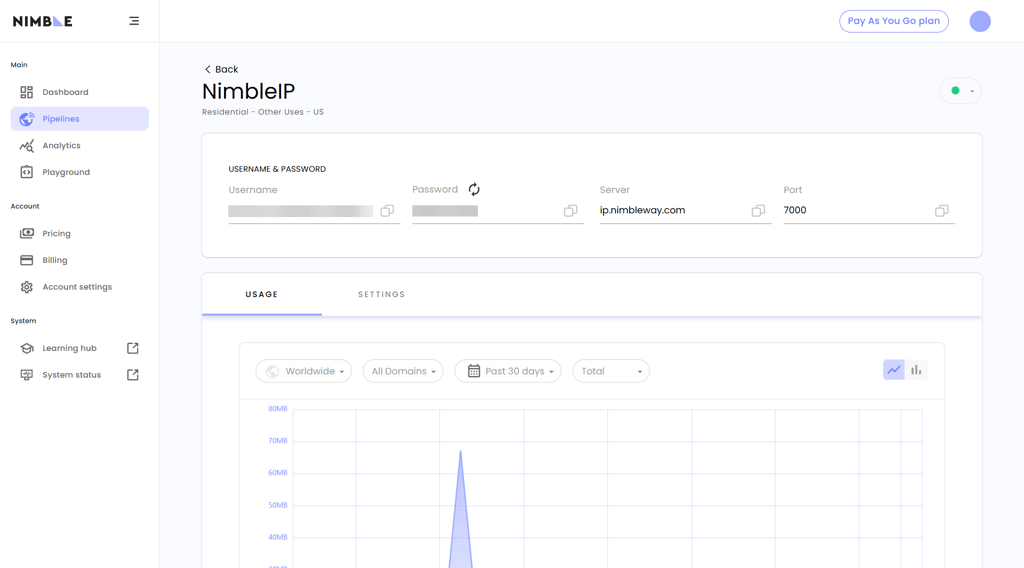
User experience and support. I found the setup incredibly simple. The dashboard helped me to manage multiple campaigns easily, while the pipelines feature allowed me to easily organize data. However, support is only available via email, which I found slightly inconvenient. But the documentation is very thorough, so I didn’t have to reach out for help when testing the platform.
Pricing and plans. Nimbleway offers flexible pricing options, including subscriptions and pay-as-you-go plans. The residential proxies start at $5.30/GB and decrease in price with a subscription that includes more credits. It’s definitely a premium option on this list. That said, you do get a 7-day free trial, which is a nice perk.
Proxies for ad verification compared
To help you compare all ad verification proxies more easily, I’ve put all the key details into a table. This gives you a quick overview, so you can decide which provider suits your needs best.
| Proxy for ad verification | Proxy type | Number of IPs | Location coverage | IP rotation options | Average response time | Anonymity and security | Price | Best for |
| Decodo (formerly Smartproxy) | Residential, datacenter, ISP, mobile | 125M+ | 195+ countries | Per request, sticky | 1.347s | High, site unblocker, APIs | From $3.00/GB | Affordable geo-targeting |
| Oxylabs | Residential, datacenter, ISP, mobile | 100M+ | 195+ countries | Per request, sticky | 3.970s | High, SOCKS5 with UDP, IP whitelist | From $3.49/GB | Enterprise reliability |
| Webshare | Residential, datacenter | 80M+ | 195+ countries | Per request, sticky | 2.689s | Moderate, easy switching | From $1.19/GB | Quick self-service setup |
| SOAX | Residential, datacenter, ISP, mobile | 190M+ | 195+ countries | Per request, custom session | 1.332s | High, credentials only | From $2.00/GB | Massive IP diversity |
| DataImpulse | Residential, datacenter, mobile | 90M+ | 195+ countries | Per request, sticky | 2.371s | High, SOCKS5, IP whitelist | From $1.00/GB | Pay-as-you-go flexibility |
| Bright Data | Residential, datacenter, ISP, mobile | 150M+ | 195+ countries | Every request, advanced rotation | 2.58s | Top-tier, custom rules, high privacy | From $2.50/GB | Mobile ad tracking |
| Nimbleway | Residential | Undisclosed | Undisclosed | Per request, sticky session | 1.458s | High, encrypted, but lacks HTTPS/SOCKS5 | From $5.30/GB | API automation |

How we tested proxies for ad verification
To make this review as honest and accurate as possible, I tested every proxy provider on this list using real ad verification scenarios. Together with the Cybernews research team, I checked ad placement accuracy, redirection paths, geo-targeted campaigns, and fraud detection. My goal was to see how each provider performs in practice, not just on paper. That’s why I focused on both raw performance metrics and how well the proxies actually fit into real-world ad verification workflows.
After thoroughly testing each provider, I rated them based on the following criteria:
- Proxy type (25%). I looked at the range of proxy types offered, including residential, mobile, datacenter, and ISP. I gave higher ratings to providers that offer residential and mobile proxies, since they’re best for geo-targeting.
- IP pool size (20%). A large and diverse IP pool is crucial for avoiding CAPTCHAs and ensuring reliable results. Providers with broader pools scored higher.
- Performance (20%). I tested the success rate, connection speed, and response time of each proxy provider.
- Ease of use (15%). I evaluated how intuitive each platform felt. I noted if I needed to constantly refer to documentation or contact support, or if it was smooth and straightforward. I also checked if integrations worked properly and whether the platform felt responsive.
- Pricing (10%). I believe proxies shouldn’t be overpriced. I reviewed pricing plans, discounts for long-term commitments, and flexible options like pay-as-you-go.
- Support (10%). I tested live chat to see how helpful the support team was and reviewed what other support options were available, such as email, phone, or knowledge bases.
Which proxy types work best for ad verification?
Different proxies serve different purposes, and the right choice depends on your needs and budget. Below are the main proxy types used for ad verification and how they perform:
- Residential proxies. These use IP addresses assigned by ISPs to real households. Since they look like genuine user traffic, they minimize blocks and CAPTCHAs, making them one of the most reliable options for ad verification.
- Mobile proxies. Sourced from real mobile devices, these proxies are excellent for verifying mobile ads. They offer the highest level of authenticity and are less likely to get blocked than residential proxies. However, they’re usually the most expensive option.
- Datacenter proxies. These proxies come from datacenters instead of ISPs. They’re cheap and easy to get, but they’re also the most likely to be blocked. While they can be used for ad verification, many apps and services recognize and restrict them.
- ISP proxies. These provide IP addresses assigned by ISPs but are hosted on datacenter servers instead of user devices. They perform better than datacenter proxies but still face more blocks than residential or mobile options. Pricing usually falls between datacenter and residential.
Overall, residential and mobile proxies are best for ad verification. They handle blocks better, bypass CAPTCHAs, and allow accurate geo-targeting. ISP and datacenter proxies can work, but they’re less reliable and often do not provide consistent results.
Final thoughts
When choosing a proxy for ad verification, it’s important to assess your needs and pick the option that suits you best. Things like the size of your ad campaigns, the regions you’re targeting, and the platforms you use all play a major role in finding the right solution.
From my research, Decodo stood out as the best all-around choice. It’s affordable, offers a wide range of proxies, delivers excellent results, bypasses CAPTCHAs, and integrates well with other tools. For larger enterprises, Oxylabs is a strong fit, while Webshare is a beginner-friendly option. Ultimately, the best proxy is the one that aligns with your specific needs.
FAQ
How do residential and datacenter proxies differ for ad verification?
Residential proxies are more reliable for ad verification because they use real IP addresses from ISPs. This makes them harder to detect, helps avoid blocks, and ensures accurate geo-targeting. Datacenter proxies are cheaper but easier to flag since they don’t come from ISPs, so they face more blocks.
Why not use free proxies?
Free proxies are unsafe and unreliable. They often log your data, get blocked quickly due to overuse, and rarely provide accurate results, which makes them ineffective for ad verification.
Is using proxies for ad verification legal?
Yes, proxies are legal to use for ad verification. In fact, advertisers often rely on them to confirm correct ad placement, prevent fraud, and make sure campaigns reach the intended audience.
What’s the cheapest reliable proxy provider for ad verification?
Decodo is the most affordable and reliable ad verification proxy provider. It offers strong geo-targeting, consistent performance, and easy integration across platforms while keeping prices low.