Hosting.com review 2026: my genuine thoughts
Our in-house experts conduct internal independent, hands-on testing and transparent reviews of web hosting providers by using custom-built tools or utilizing industry-recognized tools and methods to ensure impartial and evidence-based assessments.
Using the same criteria for all services, we share our detailed methodologies and practices to help customers make informed hosting decisions.
Learn more

Hosting.com is the new name for A2 Hosting, which went through a rebranding process in the first half of 2025. A2 Hosting is a pretty popular hosting provider that has been around since 2003. Based on Hosting.com reviews, it has been popular with users and websites requiring strong performance optimizations, and reliable and secure hosting services.
I have been using Hosting.com since before the rebranding, so for more than a year now. In this review, I share my genuine experience and provide some insights into what changed and what didn’t after the rebranding.
Hosting.com overview: my verdict
In my experience, Hosting.com is as good as it was before rebranding. The new account dashboard interface makes navigation and overall hosting product management much easier than before. However, the old A2 Hosting interface for hosting management could also get an upgrade. Besides the cosmetic updates, I would like to see more new or improved features. Overall, Hosting.com is a reliable provider for small to medium-sized businesses and personal projects like blogs and portfolios.
| ⭐ Rating: | |
| 💵 Price: | From $1.99/month |
| 📑 Uptime guarantee: | 99.9% |
| ⚙️ Hosting types: | Shared, managed WordPress, VPS, reseller, and dedicated hosting |
| 🌎 Server locations: | The US, the UK, Germany, the Netherlands, Canada, Mexico, India, Australia, and Singapore |
| 👨💻 24/7 live support: | Yes |
| 🔥 Coupons: | Hosting.com coupon 86% OFF! |




Our in-house research team and expert writers work hand in hand to regularly test hosting services and provide accurate and fact-checked information. Discover the ins and outs of how we test and evaluate website hosting providers.
Hosting.com pros and cons
Hosting.com plans and pricing
Hosting.com pricing starts at $2.99/month for a 1-year subscription term for shared and unmanaged WordPress hosting. The price for both monthly and longer-term plans is higher, starting at $8.39/month for a 3-year billing cycle. Unmanaged WordPress hosting is $10.99/month for the monthly plan, and $6.29/month for a 3-year cycle.
Even the cheapest shared and WordPress hosting plans include 2 websites, 30GB of storage, and 10 email accounts, and include free extras like a domain and SSL certificates. This is a pretty good offering, similar to Hostinger, which, at $2.69/month, offers 25GB of storage and 25 websites.
The host also offers VPS hosting (managed and unmanaged solutions), dedicated servers, and reseller hosting.
| Hosting type | Price from | Best for |
| Shared hosting | From $1.99/month (1-year billing cycle) | Personal projects like blogs, portfolios, business landing pages, or small business sites |
| WordPress Hosting | From $2.99/month (1-year billing cycle) | For (managed) WordPress hosting, any WordPress projects |
| VPS Hosting | From $9.99/month (1-year billing cycle) | Medium to large-sized businesses, gaming servers, web applications, and eCommerce projects |
The initial 1-year pricing of Hosting.com looks really good, but prices jump up quite significantly for the monthly and longer-term plans. For example, the monthly shared hosting starts at $13.99/month, the 2-year plan at $8.39/month, and the 3-year plan at $8.39/month.
The cheapest 1-year subscription renews at $11.99/month, which amounts to $143.88 for 1 year. Technically, such renewal pricing is common among most hosts, and Hosting.com’s isn’t considered to be very high. For example, Hostinger’s cheapest 1-year subscription renews at $13.99/month ($167.88/year).
Hosting.com, like many other providers, offers a 30-day money-back guarantee.
Overall, I think that Hosting.com offers very reasonable pricing for all of its plans and hosting types. The shared and WordPress hosting are some of the lowest I’ve seen in the industry – for example, Bluehost prices are similar, and IONOS offers plans from $1.00/month. Even the VPS plans could be considered one of the cheapest (Hostinger’s VPS plans also start at $5.84/month). In conclusion, Hosting.com is worth the price.
Hosting.com web hosting features and management
My overall impression of Hosting.com features and management is that it’s easy to use for beginners, but it doesn’t have anything very unique or extraordinary that sets it apart from other providers. I liked the new and improved design of the native account management dashboard and control panel. The old A2 Hosting branding left in cPanel threw me off a bit, but if I had to guess, this should also soon get an upgrade.
In general, I think that Hosting.com’s choice to combine a native control panel with cPanel was a logical one. For example, Bluehost has done the same, and in my experience, it has worked pretty well.
In this part, I review the setup process, the control panels, and the website creation process in more detail.
Hosting.com setup process
Hosting.com’s setup process and account dashboard were the major targets of the rebranding, it seems. Although the setup process itself didn’t change much, the new and improved interface made it easier and more pleasurable to move through the steps. I no longer had to look at an outdated, 2010s-style dashboard.
To set up, I first chose my hosting plan – the Plus shared cPanel hosting 1-year subscription.
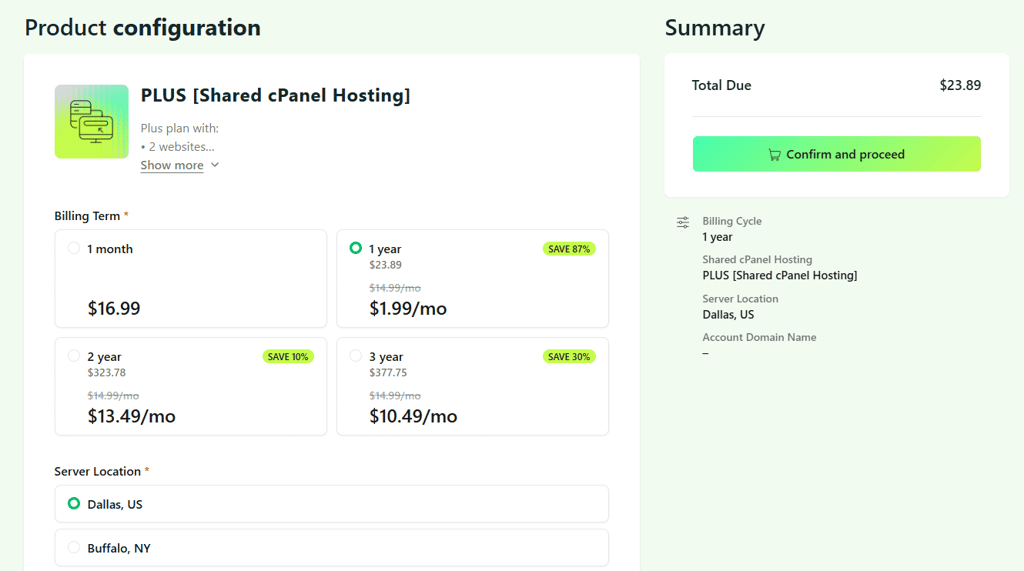
After completing the purchase, I logged in to the new and redesigned dashboard.

Hosting.com control panel
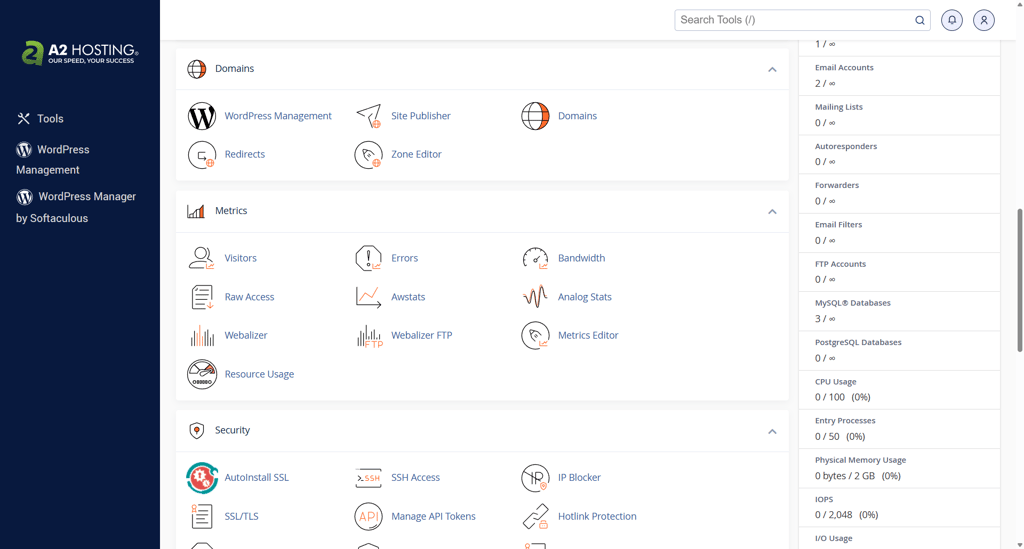
It seems that Hosting.com’s main dashboard also doubles as a kind of control panel, although for more complex server-level operations, cPanel is also used. For example, you can add sites and manage domains from both control panels, but the security settings are available only on cPanel.
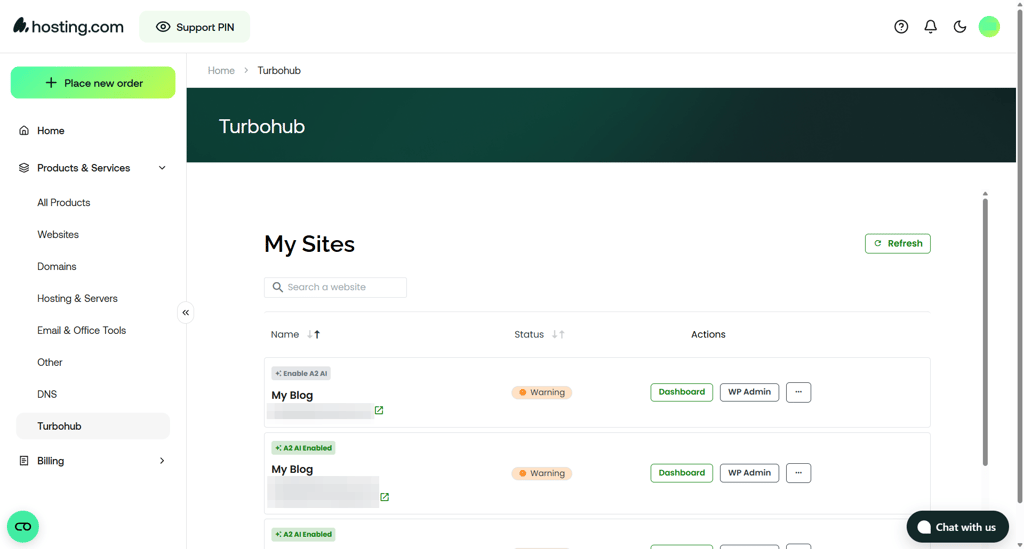
Overall, I really like the main Hosting.com dashboard design. The layout makes sense, and the widgets on the homepage make it easy to see what actions and products are available.
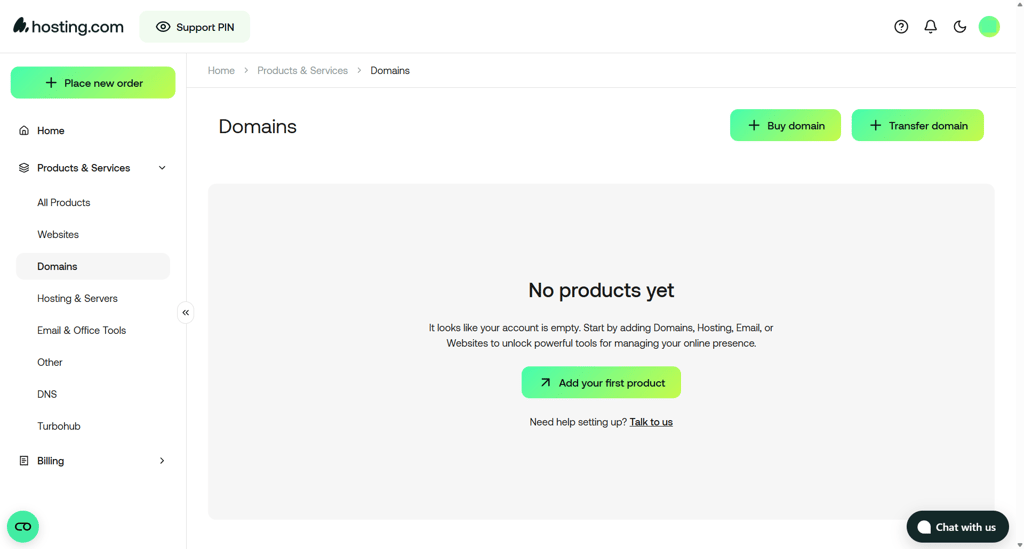
For example, I liked that from the Hosting & Servers section, I could see an overview of all the servers I had, and log in to the control panel for each of them easily.

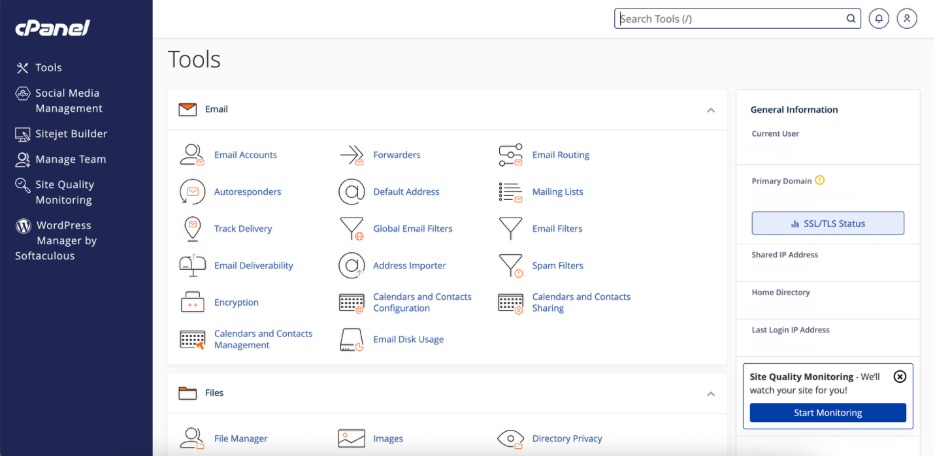
As for the server control panel, Hosting.com uses cPanel for almost all hosting types. I didn’t see anything out of the ordinary, just a standard and well-organized interface.
Creating a website with Hosting.com
Adding a new site with Hosting.com was easy and honestly took me just a few minutes. I chose to make a WordPress site, since I’m quite familiar with this CMS already.
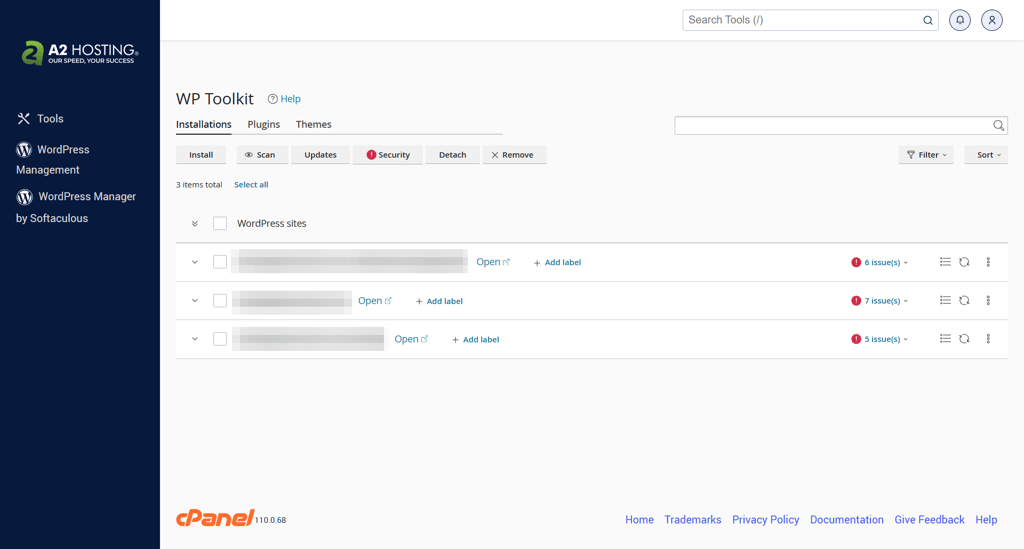
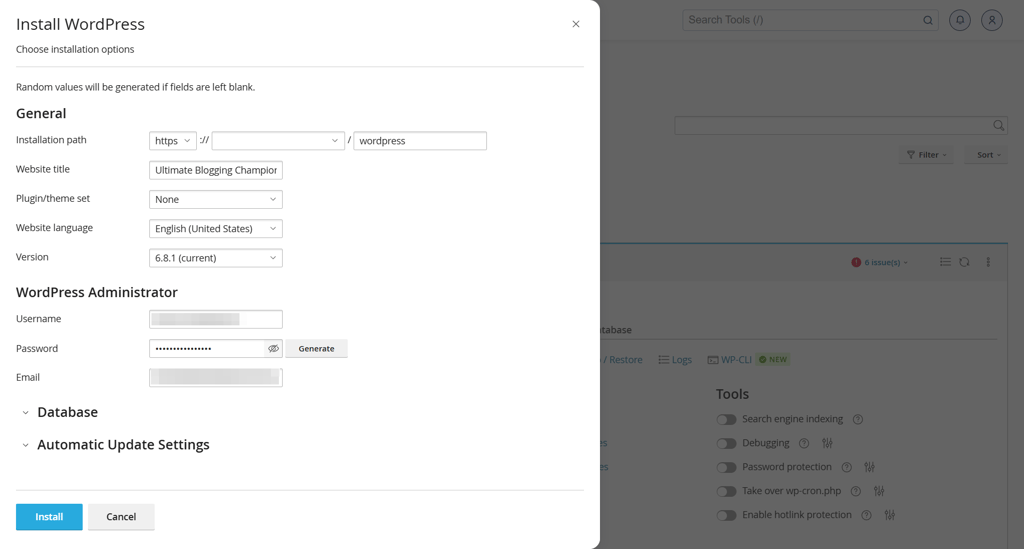
What I did was I logged into the cPanel, went to the WordPress Manager by Softaculous, and clicked on Install:
After that, I simply filled out all the required information, like my website title. I also set my administrator username and password.
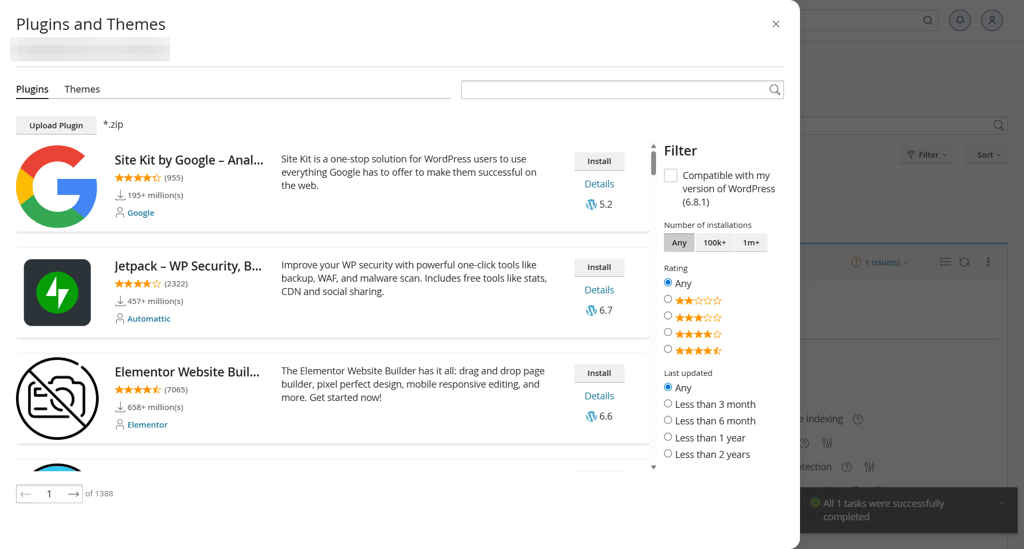
After the installation was complete, I got the option to set up the site further by installing some plugins or themes.
Overall, installing a WordPress website with Hosting.com was quite a simple process. I didn’t think it was particularly difficult, but I guess it could be different if you choose to use the Hosting.com AI website builder or a different content management system.
Hosting.com performance
Hosting.com overall showed a pretty good performance, even in comparison with other top providers in the industry. I conducted all of the tests using Hosting.com’s shared hosting servers.
I monitored the uptime and server response time, tested the load speed, and conducted a stress test. The results were quite good and prove that Hosting.com is a reliable shared hosting provider.
| Test | Results |
| Uptime | 100% |
| Server response time | 168ms |
| Speed | 939ms |
| Stress testing | 25/50 VUs, avg. response time at 1.6s, no failures |
Hosting.com server locations
Server location is important in Hosting because choosing a server that’s closer to your target audience will improve site load speed. For example, I am based in Europe but write primarily for the US audiences. It makes more sense for me to host my blog on one of the Hosting.com US servers. This way, I can make sure that the latency is as low as possible, and my blog loads faster for my readers.
Upon rebranding to Hosting.com, the host also expanded its server network. Right now, you can host a website in more than 9 different locations: US Central (multiple), US East (multiple), Toronto (Canada), Mexico City (Mexico), London (UK), Frankfurt (Germany), Mumbai (India), Singapore (Singapore), and Sydney (Australia).
By comparison, Hostinger offers 10 data center locations around the world, with multiple server locations in the US and Canada. It also offers data centers in more European locations, such as France and Lithuania. Nevertheless, Hosting.com’s server network is clearly on the same level as one of the best hosting providers in the industry.
Uptime and response time
To test Hosting.com’s uptime and response time, I monitored it for two weeks using the Grafana platform. In these 2 weeks, the host had zero outages, which resulted in 100% uptime. The average response time came out to be 168ms, which is a great result.

But what do these numbers mean for overall website performance? A 100% uptime from Hosting.com means that my site was up and running, and accessible to visitors, throughout the entire testing time. The provider itself offers a 99.9% uptime guarantee, and my tests showed that it delivers even better results.
A 168ms server response time falls under the <200ms benchmark for good performance. This means that the Hosting.com server “reacts” relatively quickly to any requests from the visitors’ devices.
Speed
To test the website load speed, I used the WebPageTest platform. While this tool returns a lot of different website speed results, I looked at the Largest Contentful Paint. This metric shows how fast the biggest element on the site loads. In other words, how fast a website becomes usable.
The Hosting.com website load speed was 939ms, which is barely under 1s, and falls well below the acceptable 2.5s benchmark. This is a very good result.

Stress testing
The stress tests are designed for evaluating a host’s ability to handle sudden spikes in visitor traffic. I tested Hosting.com using the aforementioned Grafana platform.
While usually in these tests I use 50 virtual visitors, it proved impossible to do so with Hosting.com, since the server response time immediately shot up to around 5 seconds, which is incredibly slow. I continued the test with 25 virtual visitors instead of 50. Even 25 visitors per minute would equal tens of thousands of visitors per month, which is a very heavy load for a shared hosting site.
Hosting.com’s stress test results were average. While there were no failures, the server response time was quite high towards the end, averaging out at around 1.6 seconds. While the server handled all requests relatively well, the server response time could’ve been more stable, in my opinion.
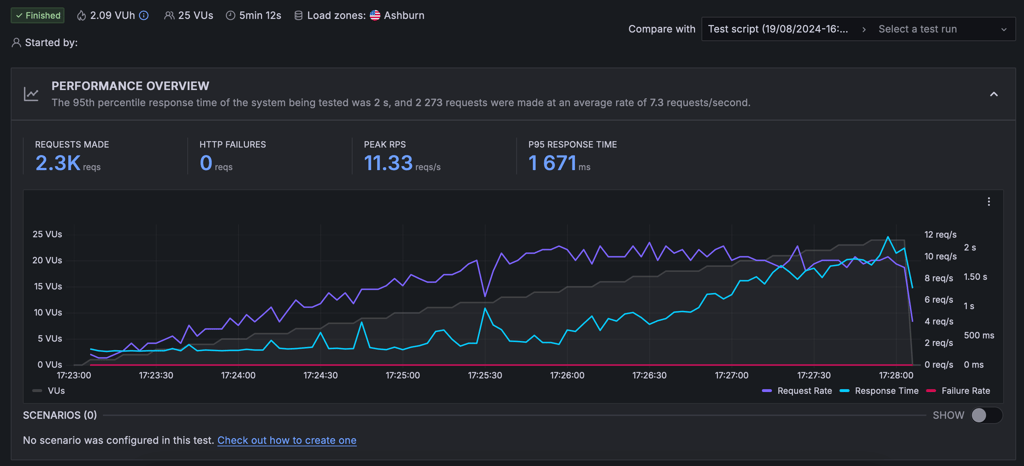
Overall, Hosting.com proves to be a good host in case your website goes viral. However, some other leading hosting providers, such as Hostinger or Bluehost, show much better performance even with 50 users, which, in my opinion, makes Hosting.com quite average by comparison.
Hosting.com security
Hosting.com is a secure hosting provider. Its shared hosting plans include basic as well as more advanced security features from the Imunify360 suite. I was quite pleased to find that’s the case, because some other popular providers like Bluehost tend to charge extra for additional security tools. And the basic protections are rarely enough.
Here’s what I found that Hosting.com includes to ensure your site and your hosting account’s security:
- SSL certificates. All shared hosting plans include a free Let’s Encrypt certificate. It is activated automatically and ensures essential encryption for all website traffic.
- DDoS protection. Hosting.com uses Imunity360 for advanced DDoS protection. It helps protect your site from malicious traffic designed to disrupt site operations.
- Firewalls. To protect against various attacks and filter web traffic, Hosting.com includes Config Server Firewall and ModSecurity.
- Patchman security tool. This Hosting.com security tool scans for vulnerabilities, outdated software, and automatically applies patches and quarantines infected files.
- Automatic backups. Automatic backups aren’t available with the basic plans. However, with higher-tier plans, backups are conducted daily – this allows for easy recovery in case of data loss or website damage.
- Two-factor authentication. A standard in the industry, multi-factor authentication adds an extra layer of security to your account, making unauthorized access less likely.
Hosting.com customer support
With rebranding, Hosting.com’s customer support also improved. As of this review, it offers 24/7 live chat, email, and ticketing support, a phone line, and a knowledge base. In comparison to other hosting providers like Hostinger, Hosting.com’s support options are the most complete and comprehensive I’ve seen.
| Support option | Hosting.com |
| 24/7 live chat | ✅ Yes |
| ✅ Yes | |
| Ticketing | ✅ Yes |
| Phone line | ✅ Yes |
| Knowledge base | ✅ Yes |
My experience with Hosting.com's live chat support was quite positive. I asked the technical department about the basic security measures included in the basic shared hosting plans. This information isn’t included in the plan overviews on pricing pages.
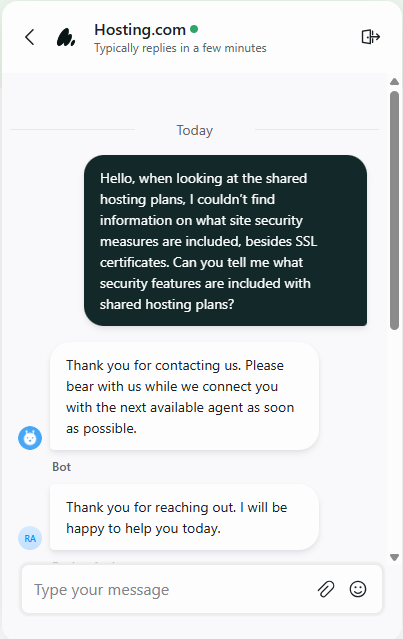
After entering my question, I first got an automated reply from a bot that told me an agent would be with me soon. After around two minutes, a support agent responded with a simple and easy-to-understand answer to my question.

Overall, I would say that the experience was pretty good. Nothing very extraordinary, but I liked that the agent responded quickly, without much delay, and in an easy-to-understand manner.
Hosting.com gallery
Is Hosting.com a good option for you?
Hosting.com is one of the fastest and most reliable providers in the industry. The new interface made it even easier to navigate, and the performance tests showed its exceptional reliability and fast performance. I also think that the comprehensive security suite makes it one of the most secure hosting providers.
However, it isn’t without flaws. While the initial pricing for 1-year subscriptions is very low, longer-term plans cost more, and renewal prices can make the costs even higher. Additionally, the leftover A2 Hosting branding in the cPanel just makes the overall visual experience a bit inconsistent.
Nevertheless, if you’re looking for a reliable provider for your business or personal project, I can confidently recommend Hosting.com as one of the best options.
| Feature | Rating | Review |
| Pricing | Hosting.com offers good initial pricing of $1.99/month for the cheapest plan. However, long-term subscriptions and high renewal prices make it one of the more expensive providers | |
| Ease of use | The new account management dashboard with the improved design and layout is easy to navigate. Standard cPanel and native control panel combination makes sense, and provides a functional and convenient experience. | |
| Performance | In my tests, Hosting.com showed excellent performance: 100% uptime, 168ms response time, and site load speed below 1s. However, it successfully handled only 25 out of 50 virtual users. | |
| Security | With the Imunify360 security suite, Hosting.com offers one of the most comprehensive and advanced security measures in the hosting industry. | |
| Customer support | Customer support is available through any channel. The live chat agents are timely, respectful, and provide excellent support. |
Hosting.com review FAQ
Is Hosting.com a reliable web hosting provider?
Yes, Hosting.com is a reliable web hosting provider. In my tests, it showed a 100% uptime, a 168ms response time, and a site speed that is below 1s. This is an excellent and reliable performance suitable for hosting any site.
Can I host a WordPress site on Hosting.com?
Yes, you can easily host a WordPress site on Hosting.com. It is easy to install WordPress or a WordPress site.
What do actual customers say about Hosting.com?
Existing customers have generally positive reviews of Hosting.com. They say that the new control panel and interface have not affected performance, which is good. However, some users noticed slower customer support responses, and some long-time customers still prefer using cPanel over the new Hosting.com control panel.
Does Hosting.com provide website migration services?
Yes, Hosting.com provides website migration services. You can request a migration by submitting a support ticket to the migrations department and including your domain, SSL certificates, and access details.