SiteGround vs Kinsta: which one is better?
Our in-house experts conduct internal independent, hands-on testing and transparent reviews of web hosting providers by using custom-built tools or utilizing industry-recognized tools and methods to ensure impartial and evidence-based assessments.
Using the same criteria for all services, we share our detailed methodologies and practices to help customers make informed hosting decisions.
Learn more

In my 2025 Kinsta vs SiteGround review, SiteGround came out as a winner. Its $2.99/month starting price is far more appealing than Kinsta’s $35.00/month subscription. Even though Kinsta offers more comprehensive security, SiteGround has an overall better value for money due to an abundance of features accessible even to budget users.
Kinsta is a Google Cloud managed hosting platform with extensive WordPress services. SiteGround is a bigger hosting provider, with more customers in the US than Kinsta has in total. However, bigger is not always better. As customers often go for known names over newer providers, I had to investigate which one is actually better.
Getting ready to test the two providers, I was certainly curious if Kinsta’s relative novelty would win over SiteGround’s experience. With the help of our research team, I also looked into each provider’s security, pricing, performance, ease of use, and features. All to help you determine if SiteGround or Kinsta is a better hosting provider for you.
Kinsta vs SiteGround 2026: overview
Judging by some key metrics alone, SiteGround wins over Kinsta due to better price and free domain. Because Kinsta’s premium price does not even include a single year of free domain, SiteGround is a better choice for people seeking a hosting provider. With SiteGround’s starting price of $2.99/month vs Kinsta’s $35.00/month, the affordable option is clear. However, more in-depth analysis is provided further in this article.
| SiteGround | Kinsta | |
| ⭐ Rating: | ||
| 💵 Price: | From $2.99/month | From $35/month |
| 📑 Uptime guarantee: | 99.9% | 99.9% |
| 🔥 Coupons: | Siteground coupon 83% OFF! | Cybernews Web Hosting Coupons |
| Storage space (from): | 10 GB SSD | 10GB |
| ✂️ Free domain (first year): | Yes | No |
| 💾 Automated backups: | Free (daily) | Free (daily) |
| 💰 Money-back guarantee: | 30-day | 30-day |





Our in-house research team and expert writers work hand in hand to regularly test hosting services and provide accurate and fact-checked information. Discover the ins and outs of how we test and evaluate website hosting providers.
Pricing comparison: SiteGround is much cheaper
SiteGround is a much cheaper hosting provider, even though Kinsta is free for the first month. That’s because SiteGround’s yearly plan amounts to $2.99/month, while Kinsta is $35.00/month if you pick the annual plan. There isn’t a huge difference in what they offer, either. Both Kinsta and SiteGround’s cheapest hosting plans cover a single website and offer 10GB of storage.
However, a single plan cannot accurately determine overall value. That is why I compared all of Kinsta and SiteGround’s plans below.
| Hosting type | SiteGround | Kinsta |
| Managed hosting | ✅ Yes, from $2.99/month | ✅ Yes, from $35.00/month |
| Cloud hosting | ✅ Yes, from $100/month | ❌ No |
| WordPress hosting | ✅ Yes, all plans, from $2.99/month | ✅ Yes, all plans, from $35.00/month |
| eCommerce hosting | ✅ Yes, all plans, from $2.99/month | ❌ No, though they offer custom business plans |
It is apparent that SiteGround offers more plans for less than Kinsta. While SiteGround’s Cloud hosting plans are not cheap, WooCommerce and WordPress hosting are included in the basic StartUp plan. Meanwhile, Kinsta is fully integrated with WordPress but does not offer as extensive features or as good a price as SiteGround.
Comparing purely what SiteGround and Kinsta’s cheapest plans offer, SiteGround’s list of features is more extensive. While both offer free SSL, free migration, and 10GB of storage, SiteGround has a free domain for the first year and WooCommerse, which Kinsta does not offer. However, Kinsta permits more monthly visits than SiteGround: 35,000 vs 10,000.
SiteGround vs Kinsta performance
Both SiteGround and Kinsta performed really well in our in-house tests. While both had no stress-testing failures and 100% uptime, SiteGround was slightly faster at website loading, but not enough to be noticeable for an average user. Meanwhile, Kinsta was slightly more stable, but also not by a lot.
| Brand | Uptime guarantee | Response time | Speed |
| SiteGround | 99.9% | 124ms | 1.023s |
| Kinsta | 99.9% | 6ms | 2.118s |
These results clearly show that SiteGround and Kinsta are about even. SiteGround may have a slower response time, but it’s overall faster, and both providers offer the same uptime guarantee. However, it’s best to compare them in greater detail.
Uptime and response time
Both Kinsta and SiteGround offer a 99.9% uptime guarantee. It’s pretty standard in the industry, where users are essentially guaranteed a continuous operation, leaving a slight margin for error. However, both providers delivered a perfect performance.
Just to explain why it’s important – uptime and response time are key performance metrics in hosting. Uptime shows how often the website remains operational. For example, 10% uptime would mean that your website will be down 9 out of 10 times. The higher this percentage is, the better.
Response time is how long it takes for the page or its elements to load. It has a lot of influence over user satisfaction, as the longer the response time, the more likely visitors are to give up on your website. Contrary to uptime, you want this number to be lower.

SiteGround delivered full 100% uptime. It means that the website was reachable all the time. However, its reachability and average latency were worse than Kinsta’s, but by such a small margin that neither you nor site visitors would ever notice the difference. Since we’re comparing decimal points and milliseconds, it was still worth the mention. For more detailed performance results, I would recommend reading our SiteGround review.

Kinsta’s uptime was also 100%, a result unchanged since we last tested it for our Kinsta review. With higher reachability and lower latency, it is arguably more stable than SiteGround. However, the difference is too insignificant to matter much when it comes to picking your hosting provider.
Website speed
There are two main metrics that determine how fast a website is: largest contentful paint (LCP) and fully loaded time (FLT). LCP determines how long it takes for a website to load fully. For example, it’s the time it took for the site to show you this text. Meanwhile, fully loaded time is LCP with the addition of the unseen, like cookies and code. It is expected that FLT will be lower than LCP, but that’s not always the case.
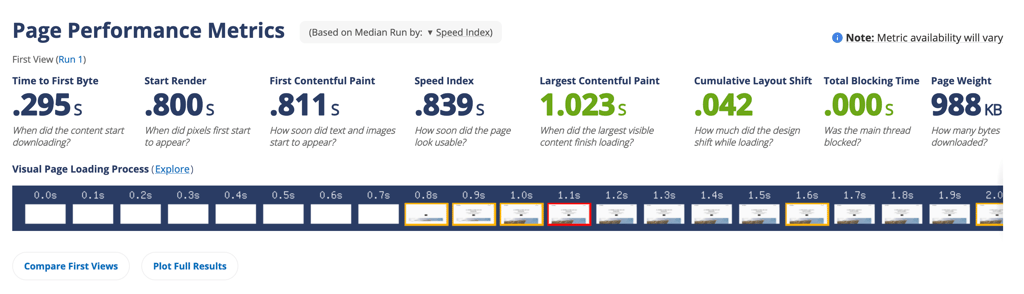
SiteGround’s fully loaded time is lower than that of the largest contentful paint. While the average page load time is 1.023 seconds, the FLT was just 0.839. If you’re worried about the speed, SiteGround puts those fears to rest.

Kinsta’s FLT is very similar to SiteGround’s, loading the entire website, including hidden elements, in 0.824 seconds. However, the difference between its fully loaded time and LCP is much more significant, with LCP being 2.118s – more than SiteGround’s. Again, it’s two seconds vs one, but for most visitors, it shouldn’t be very noticeable.
Stress testing results
The only way to truly determine how the hosting provider performs is by putting it through the most extreme circumstances. Our research team conducted such a test by artificially increasing visitors to Kinsta and SiteGround websites to put them under stress and see how they perform.

Over 5 minutes and 12 seconds 50 virtual users were sent to SiteGround, submitting 7147 requests. At its peak, SiteGround faced 47.67 requests per second. If you’re interested in getting SiteGround, you’ll be pleased to know that it had no failures, continuing to operate efficiently.

Kinsta did not fall behind. Over the same period, 5 minutes and 12 seconds, 50 virtual users submitted 7213 requests. At its peak, Kinsta handled 49 requests per second, even more than SiteGround. Like its competitor, Kinsta also had no failures, maintaining consistent and efficient performance.
Hosting features and ease of use: SiteGround offers more
Both SiteGround and Kinsta are easy to use and have simple-to-navigate dashboards. However, SiteGround has more to offer. For example, it includes a website builder in its hosting plans, while Kinsta does not have one at all. But let’s take a deeper look at the differences between SiteGround and Kinsta.
Control panel comparison
Both SiteGround and Kinsta use custom panels. Kinsta uses MyKinsta, which is fairly effortless to navigate. As it is fully linked with WordPress, new users need to set up a WordPress website. The overall setup process takes no more than a few minutes, and after that, you can immediately use the panel.

I found MyKinsta to be fairly beginner-friendly. All settings and features were easy to find, and Kinsta even offered a checklist of things you’d still need to accomplish. A particularly useful feature is site statistics – this is where you can manage your website’s performance.
SiteGround’s custom panel is called Site Tools. It’s fairly new, as up until 2020 the hosting provider used cPanel. The novelty paid off – Site Tools is a modern and simple option, suitable for beginners. But to get to this panel, you’ll first need to go through a fairly easy setup process. Just like with Kinsta, the process took me mere minutes.

The Site Tools interface is visually appealing, with clearly laid-out settings and even some informational articles. The standout feature is customization – users can pin the most used tools to create shortcuts. If you’re not new to hosting and have used cPanel, using Site Tools won’t be difficult.
WordPress features
Because Kinsta is linked with WordPress and all SiteGround plans include WordPress hosting, both provide a fair number of WordPress features. Kinsta and SiteGround both offer free WordPress migrations and when you’re setting up Kinsta, you need to immediately link or add a WordPress website.
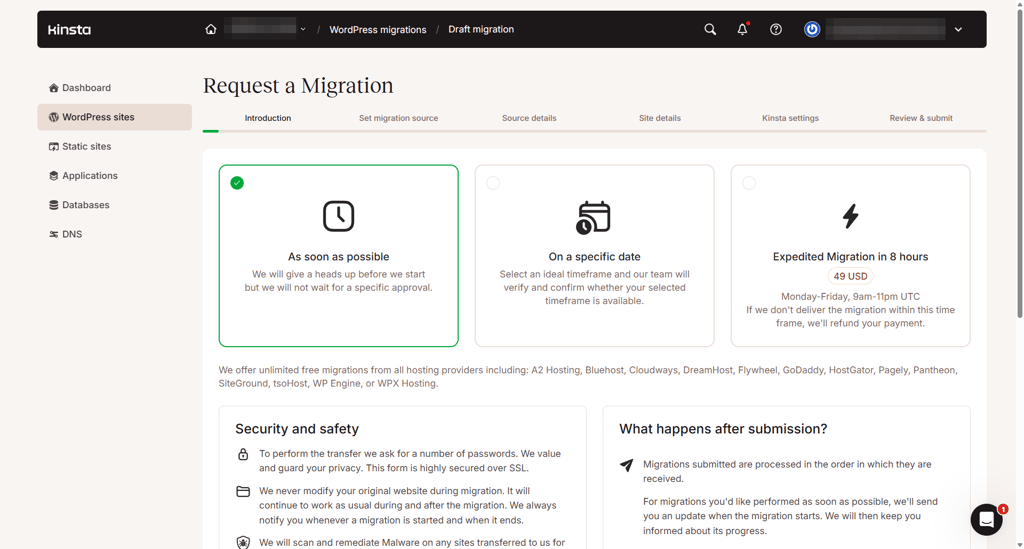
However, unlike Kinsta, SiteGround offers WooCommerce and more WordPress features. For example, WooCommerce can be automatically installed and there are speed and security optimizer plugins available. While Kinsta offers free, one-click stagings, there’s no showstopping features that could rival SiteGround’s automated installations.

Additional hosting management features
SiteGround includes numerous hosting features, even with its cheapest plan. Other than WordPress and WooCommerce, SiteGround also offers a website builder that includes AI content generator and built-in SEO. So, with SiteGround, you can create a beautiful website and fully manage it, monetizing it if need be. Free emails are also included.
Kinsta vs SiteGround security: Kinsta’s security runs deeper
Both hosting providers are highly secure, but Kinsta’s security system is more advanced. While in a lot of features both Kinsta and SiteGround go hand in hand, Kinsta’s isolation technology is more likely to prevent both existing and new threats. Essentially, everything runs in an isolated software container.
| Security features | Kinsta | SiteGround |
| Certificates/features | Free SSH and free one-click SSL with wildcard support | Free SSH and free SSL |
| Access control | Free malware removal (during migration and after), dedicated Malware Team, isolation technology, firewall, DDoS protection | Smart WAF protection to block malicious traffic, AI anti-bot brute-force protection, 24/7 server monitoring with checks every 0.5 seconds, WordPress security optimizer plug-in |
| Backups | System is hosted on Google Cloud platform, daily backups (or hourly as an add-on) | Geographically distributed backups, daily backups in general |
If I had to evaluate the safety levels of each provider, I’d say SiteGround offers reliable security, while Kinsta’s security is close to flawless.

Customer support: SiteGround goes the extra mile
SiteGround’s live chat customer support really impressed me. I’m used to getting generic redirection to available resources or pleasant step-by-step instructions, but this was the first time when I got offered to have something done for me. However, it’s worth noting that Kinsta’s customer support was pleasant to interact with, too.
| Customer support solution | SiteGround | Kinsta |
| 24/7 live chat | ✅ Yes | ✅ Yes |
| Phone call | ✅ Yes | ✅ Yes |
| ✅ Yes | ✅ Yes | |
| Knowledge base | ✅ Yes | ✅ Yes |
SiteGround’s 24/7 live chat agent joined almost immediately, and it took less than a minute to be transferred from a bot to a human agent. During our chat, the agent provided quick and valuable insights, clarified migration solutions, and even offered a free-of-charge migration completed by SiteGround’s team.
Kinsta’s 24/7 support is available in English, Portuguese, Spanish, Italian, French, German, Japanese, Danish, Dutch, and Swedish. Overall, chatting with an agent was an enjoyable experience, with bot-to-human transfer lasting 3 minutes. I received helpful advice, though personally, I appreciated SiteGround’s effortlessness more.
SiteGround vs Kinsta: final recommendations
While Kinsta is a great hosting provider, SiteGround is a better choice for an average user. It’s cheaper, and by a lot, has more features per plan, and its customer service doesn’t limit support to advice-only. It’s definitely clear why it’s one of the best web hosting providers. However, if you were to pick Kinsta, you would receive unparalleled security and WordPress integration. Both Kinsta and SiteGround are good options if you want a well-performing host.
| Feature | SiteGround | Kinsta | Verdict |
| Pricing | With more than a $20/month difference, SiteGround offers a much better value for money | ||
| Use and features | Both Kinsta and SiteGround have custom panels that are easy to use, but SiteGround has more features in general, like its own web builder | ||
| Performance | Both Kinsta and SiteGround performed really well, with no failures during stress testing | ||
| Security | Kinsta’s multi-level security system wins over SiteGround. However, both are highly secure hosting providers | ||
| Support | While both Kinsta and SiteGround offer extensive customer support options, SiteGround’s live chat agents are willing to help out beyond advising |
Overall, if you don’t mind spending more or if you’re a business client looking for a hosting provider, Kinsta is a great choice. However, if you’re a small business owner or simply don’t have the $35.00/month for hosting, SiteGround can offer you everything you need and more.
FAQ
Is SiteGround a good hosting provider?
Yes, SiteGround is a secure and affordable hosting provider. It’s one of the best services overall due to its efficient and stable performance, multiple customer support options, and WordPress compatibility.
Which is better, SiteGround or Kinsta?
SiteGround is better than Kinsta, because it is more affordable, also has WordPress integration, and more features in general. While Kinsta still provides a high-quality service with unparalleled security, users on a budget get more for their money with SiteGround.
Is SiteGround a Russian company?
No, SiteGround is not a Russian company. It was founded in Bulgaria in 2004. As of 2023, it had 11 data centers in 8 countries, not a single one of them in Russia.
Is Kinsta a good host?
Yes, Kinsta is a highly secure and well-performing hosting provider. However, it is quite pricey, with the cheapest annual subscription costing $35.00/month. But if that’s not an issue, then Kinsta is a solid choice for a hosting provider.