Kinsta review 2026
Our in-house experts conduct internal independent, hands-on testing and transparent reviews of web hosting providers by using custom-built tools or utilizing industry-recognized tools and methods to ensure impartial and evidence-based assessments.
Using the same criteria for all services, we share our detailed methodologies and practices to help customers make informed hosting decisions.
Learn more

Kinsta is a cloud-based hosting provider best known for its managed WordPress services. And while it also offers application and database hosting services with 37 data centers, WordPress remains the leading option for many.
The provider’s main selling points lie in its speedy performance and numerous security measures that are appreciated by over 120,000 current customers. Plus, if simplicity is another factor you value, Kinsta brings that to the table too. However, Kinsta's price tag is a little too steep, so if you’re looking for a more affordable provider, Bluehost will be a very good alternative.
In this review, we will be taking a closer look at what makes the host stand out from the crowd among other hosting providers. We'll explore everything from its pricing plans and security features to its response time.
| ⭐ Rating: | |
| 💵 Price: | From $35/month |
| 📑 Uptime guarantee: | 99.9% |
| ⚙️ Hosting types: | Managed WordPress, Application, Database hosting, Static Site hosting |
| 🌎 Server locations: | The Americas, Europe, Asia, Africa, and Australia |
| 👨💻 24/7 live support: | Yes |
| 🔥 Coupons: | Cybernews Web Hosting Coupons |


Kinsta pros and cons




Our in-house research team and expert writers work hand in hand to regularly test hosting services and provide accurate and fact-checked information. Discover the ins and outs of how we test and evaluate website hosting providers.
Outstanding Kinsta features
Kinsta's platform is a dynamic force in the hosting industry, continually evolving to incorporate modern features that meet the ever-changing needs of its users. This commitment to innovation sets Kinsta apart from the competition, offering one of the top hosting experiences that are both cutting-edge and user-centric.
High-performance servers. Kinsta utilizes the Google Cloud Platform, leveraging top-tier servers equipped with the highest CPUs to ensure exceptional speed and reliability. This infrastructure allows for seamless scaling and optimal performance, even during traffic surges.
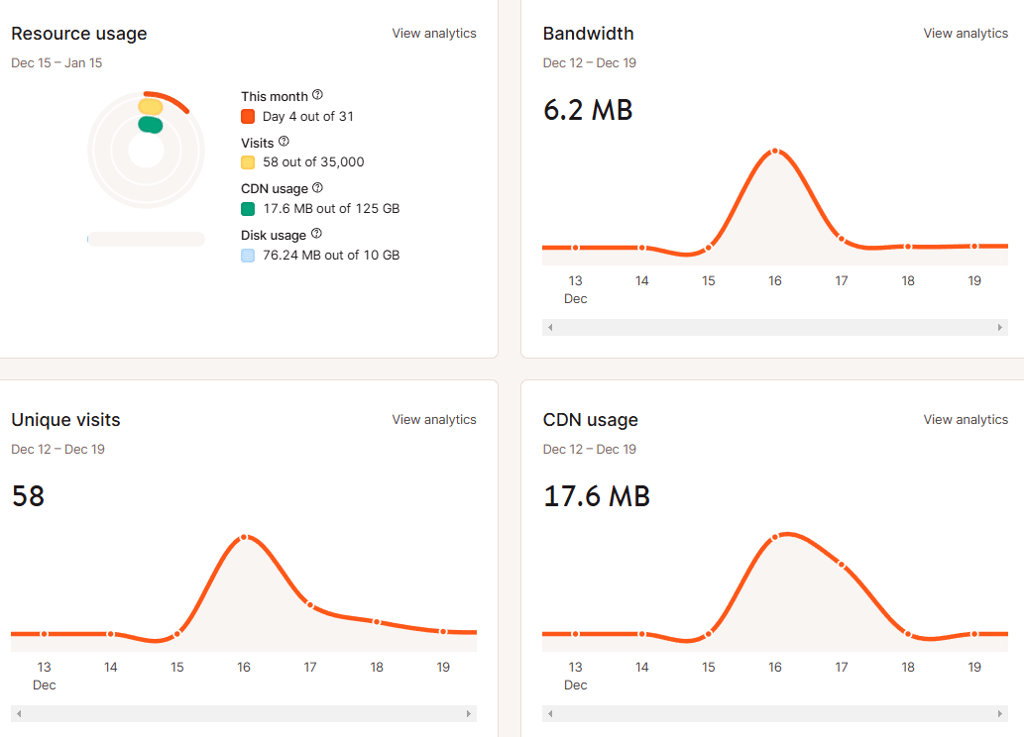
Advanced security measures. Security is a cornerstone of Kinsta's services. With features like free SSL certificates, DDoS attack detection, hardware firewalls, and continuous monitoring, Kinsta ensures that your website remains secure against potential threats. Their proactive approach includes regular uptime monitoring and a 99.9% uptime guarantee, providing peace of mind for website owners.
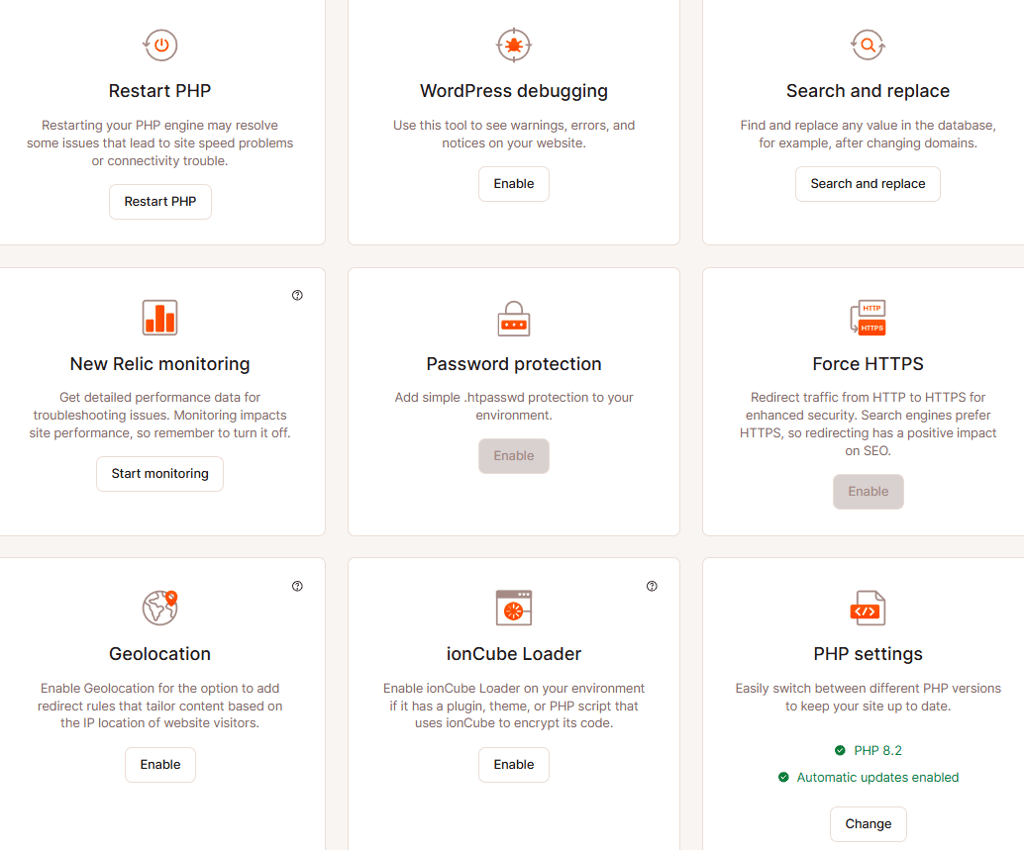
Developer-friendly tools. Kinsta offers a suite of tools designed to enhance the development experience. Features such as one-click staging environments, a choice of PHP versions, and a custom-built dashboard streamline workflows for developers. Additionally, Kinsta's integration with DevKinsta allows for local development with built-in database management and debugging tools, catering to the needs of both novice and experienced developers.

In summary, Kinsta's dedication to utilizing high-performance servers, implementing advanced security measures, and providing developer-friendly tools distinguishes it as a leader in the hosting industry. These features collectively contribute to a hosting environment that is robust, secure, and tailored to the needs of modern websites.
| Other feature | Fast managed WordPress hosting | |
| Pricing | Kinsta’s pricing is on a more premium end, with prices starting at $35.00/month for a single website. | |
| Ease of use | Kinsta comes with a native user interface called MyKinsta. The panel is very well organized and easy to use. Plus, WordPress installation is highly automized. | |
| Performance | Kinsta’s strongest virtue is its performance. The provider demonstrated an uptime of 99.99%, a response time of 461ms, and a fully loaded time of just 1.4s. | |
| Security | The host comes with the basics like an SSL and server firewall, as well as bonuses like automated backups, DDoS protection, malware monitoring, and more. | |
| Support | The provider has numerous support methods, including its 24/7 live chat, phone, email, and even WhatsApp. Its agents are very friendly, professional, and speedy. |
Kinsta pricing and hosting plans
While Kinsta has numerous hosting options to choose from, by far the most popular one remains managed WordPress hosting – starting at $35.00/month. Additionally, other options include Applications, Databases, and Static Site hosting.
| Type of hosting | Best for |
| Managed WordPress hosting | Any WordPress website (both personal and business-oriented) |
| Application hosting | Any application hosting |
| Database hosting | Any database hosting |
No matter whether you’d like to host a site, a specific application, or a database, Kinsta has something to offer. However, as mentioned before, managed Kinsta WordPress hosting is one of the most popular provider options, so we will be concentrating on that too.
The host offers different managed WordPress plans with prices going from $35.00/month all the way up to $1,650/month.
Now all WordPress hosting packages come with free automated SSL certificates, automatic backups, in-house developed Kinsta CDN, DDoS protection, and server-side caching. One thing to note, however, is that a custom domain is not included.
| Plan | Features | Price |
| Single-site plans | 1 WordPress website, 10GB storage, 35 000 monthly visits, 125GB CDN | $35.00/month |
| Multiple-site plans | 2 WordPress websites, 20GB storage, 70 000 monthly visits, 250GB CDN | $70.00/month |
| Agency program | Up to $10,000 in hosting credits for eligible agencies, free hosting for your agency site, Unbranded WordPress admin experience | $115/month |
You can pick the hosting plan that fits your needs, or request a custom one for up to 60+ websites. Every plan comes with free migrations and a 30-day money-back guarantee.
While Kinsta cost is not low, the host does offer powerful servers, managed services, scalability, and very reasonable resources.
In terms of best offerings, each user might pick a different plan. However, generally, Kinsta’s entry plan is all you’ll need if you’re looking to create a single site.
If you wish to run a single WordPress website, consider the Single-site plan. For $35.00/month, you’ll get a free SSL, automated daily backups, free CDN, DDoS protection, caching, 2 PHP workers per site, and 1 premium migration.
Kinsta allows you to choose between monthly and yearly subscriptions. And, naturally, the yearly one knocks a few bucks off of the monthly rate. Plus, the host makes scaling very easy, and all rates for additional resources can be found on the pricing page too.
Lastly, Kinsta hosting yearly subscriptions come with a standard 30-day money-back guarantee. So if the services are not up to your par, you can easily request a refund.
All in all, Kinsta prices are on a more premium end. However, the host delivers what you pay for – you get extensive security features, good server resources, and meticulously managed services.
Hosting management – is Kinsta easy to use?
Kinsta uses a custom-made MyKinsta user interface. The panel is very clean and well-structured. Generally speaking, this will be all you need to deal with everything from billing to applications, their resources and settings.
MyKinsta control panel
Kinsta’s user interface works both as a hosting account and your site/application hosting management panel. This means that everything you need to run your website can be easily found there in your dashboard.
First thing, once logged in, you’ll have to set up a WordPress website. This is a very streamlined process, which will not take you longer than a few minutes.
Once that’s done, you’ll be faced with MyKinsta Dashboard:
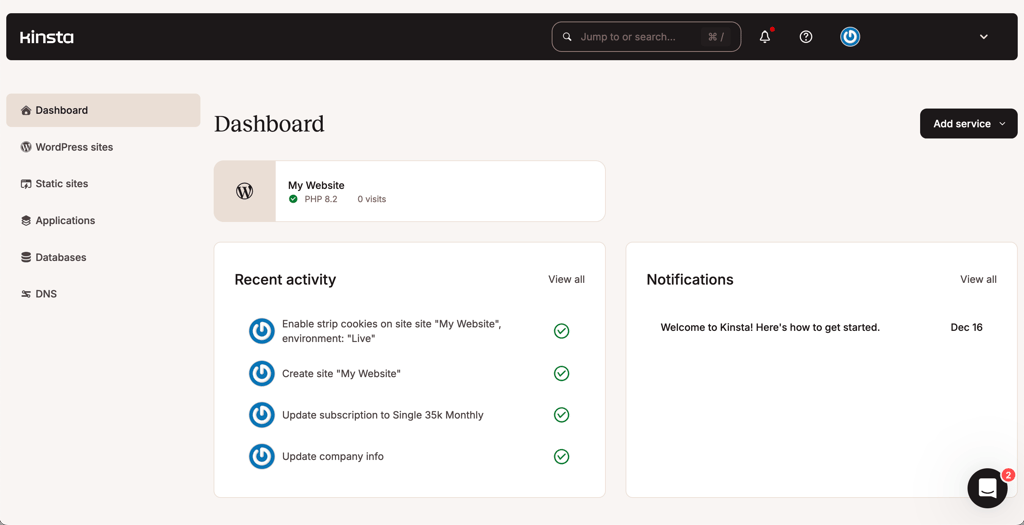
The dashboard will display all the services you have on your account as well as the main site statistics. This way, you will be able to check on your site’s performance first thing logged in.
To access more site-management-related settings, go to ‘WordPress Sites’ and choose a site you’d like to manage.
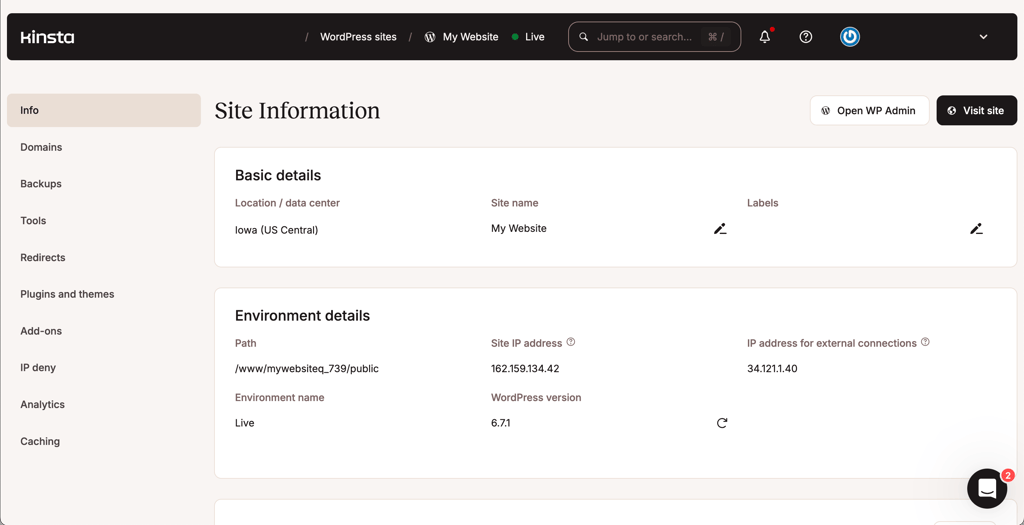
Here, on the left side menu, you’ll be able to access numerous hosting features, like:
- Domains – connect and set up your custom domain.
- Backups – access logged backups, perform manual ones, and recover any backup you wish.
- Tools – enable and set up features like caching, WordPress debugging, PHP version, and much more. In terms of caching, there’s an even more detailed section on the left-side menu, Edge Caching, where more customization options are available.
- Redirects – easily redirect traffic from one location to another to avoid 404 errors and improve user experience.
- Themes and Plugins – manage WordPress themes and plugins.
- IP deny – block unwanted IP addresses from accessing your site. If bots, spammers, or hackers are causing problems, blocking them can protect your visits and bandwidth.
- Analytics – here you can find plan usage, CDN bandwidth, and performance metrics.
- Caching – in this section you will find APM (Application Performance Monitoring), which helps you identify and fix what's causing your website to slow down. It tracks issues like slow transactions, database queries, external requests, and WordPress plugin performance. Similarly, Logs provide valuable insights for debugging and understanding your site’s activity.
In short, Kinsta is very easy to manage. The host made sure that its custom-made user panel is beginner friendly and includes everything from site management to performance statistics.
Performance – is Kinsta fast?
One of the main things that Kinsta is highly focused on is performance. The provider even has multiple speed-enhancing features like its own CDN and caching, plus your site will be hosted on the Google Cloud Platform. And it is all reflected in our testing since the host showed a very speedy and reliable performance.
Kinsta server uptime and response time
The uptime test results demonstrate good performance and reliability, with a perfect 100% uptime and near-perfect 99.99% reachability over the monitoring period (2 weeks).
While Kinsta issues a standard 99.9% uptime guarantee, our testing proved that much better results could be expected.
The service exhibits minimal average latency of 5.65 ms, with checks performed at a 1-minute frequency. There are no significant errors across all probes (London, Mumbai, New York), and response times remain consistently low. This indicates that the provider has really good CDN optimisation.

As for the average response time, it averaged at just 461ms. Both of these measures show that Kinsta’s servers are ‘healthy’ and not overcrowded.
Plus, Kinsta declares that it continuously monitors all its sites, performing checks every 2 min. And, if any issue is detected, the host jumps to solve the issue right away.
Kinsta speed
For the next test, we examined the host's ability to load both an empty and a full-build website in a timely manner.
The first thing worth noting, Kinsta offers data centers in 5 continents – covering 2 countries in North America, 10 in Europe, 8 in Asia, and 2 in South America; plus, there are 2 server locations in Australia too. However, for our testing, we decided to host our site in the Dulles, Virginia US.
Now there are two main metrics we took into consideration:
- Largest Contentful Paint – for the best user experience, LCP should be no longer than 600ms for a blank WordPress site and under 2.5s for a built one.
- Fully Loaded Time – for lower bounce rates and improved user experience, this time should remain under 3 seconds.
Kinsta, when tested in the US, showed great results, regardless of the distance. The host’s LCP reached barely 531ms in the US.
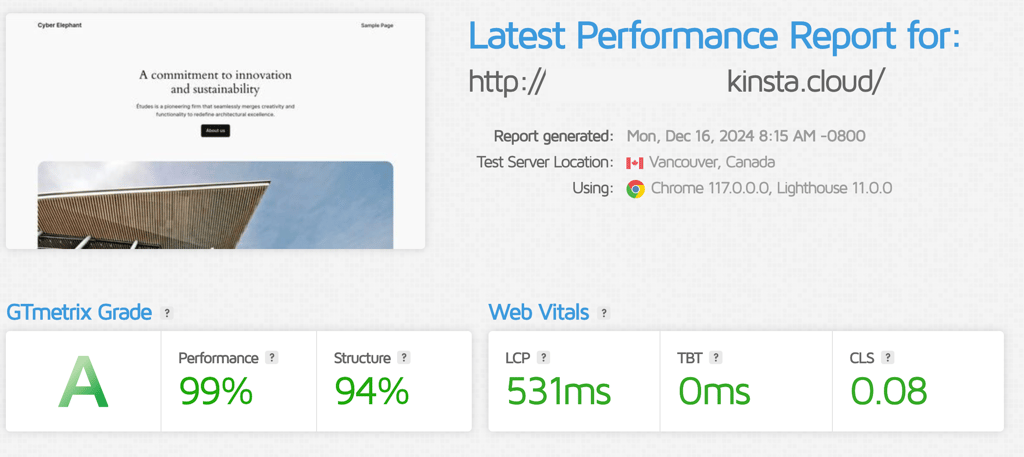
Plus, these can be further improved with the use of hosts CDN. But why does LCP matter? This is one of the measures Google considers when ranking sites on the search result page.
Now in terms of a fully built site, Kinsta was just as fast. The LCP rose to 2.118s (which is lower than Google’s suggested maximum of 2.5s), but still not perfect.

In sum, Kinsta loaded both an empty and a fully built WordPress site kind a fast, but I think there could be more improvement in this case.
Kinsta stress testing
Now for our last test, we’ve examined Kinsta’s ability to handle traffic spikes on the site.
For this examination, we sent 50 virtual users (VUs) to our site, and Kinsta did not even flinch and passed the test in full.

As seen in the graph above, the host kept a very stable and speedy response time (blue line), despite the increase in the number of visitors on site (grey line). In fact, the speed averaged at just 67ms, which is very fast.
To cocnlude, Kinsta has proved its dedication to good performance.
All things considered, Kinsta is a reliable provider that puts performance at the center of it all. You can be sure that its team will make sure your site won’t experience extensive downtime. Plus, the whole server infrastructure and additional speed-enhancing features guarantee fast site load time too.
Security – is Kinsta secure?
In terms of security, Kinsta made sure to include quite a variety of features.
- Free Wildcard SSL certificates. Kinsta includes free Wildcard SSL certificates with all its plans. This tool creates an encrypted connection between your site and your visitors, creating a layer of security in terms of data transferred.
- Firewall. Due to Kinsta’s integration with Cloudflare, the host offers a server-level firewall that will function as a first filter to block malicious traffic aimed at your server.
- DDoS protection. This, too, is another Cloudflare integration bonus that protects your website from being overwhelmed by malicious traffic.
- Malware scanning. Kinsta has pledged to inspect WordPress sites and perform a deep scan to identify any malware. In case of malware being detected, Kinsta will repair WordPress core by installing a copy of clean core files, and will identify and remove infected plugins and themes for no cost.
- Software isolation technology. Kinsta promises 100% site privacy by offering isolated software containers for each site. The container includes all software resources, such as Linux, NGINX, PHP, and MySQL, that are required to run the website.
- Automatic backups. For your own convenience, Kinsta offers automated daily backups. This way, you can be sure that the latest version of your site has been saved and can be recovered in case of emergency. Plus, you can also perform manual backups yourself.
- WordPress core updates. Due to its managed nature Kinsta takes care of WordPress core and plugin updates automatically for you. This way, there is no outdated software that could compromise your site.
In sum, Kinsta provides a number of useful security features. We were quite pleased with server-level security, as well as the inclusion of free automated backups and routinely WordPress core updates.
Will Kinsta customer support help me?
When it comes to customer support, you can choose to contact Kinsta via its 24/7 live chat, phone, email, and even WhatsApp. However, best of all, you can book a free demo where Kinsta’s agent will walk you through their offered services.
For this Kinsta review, we chose to test the provider's live chat option, and we were not disappointed.
I was curious to know what security features were included with all WordPress hosting plans. So I started the live chat, and in just under a minute, I was connected to an agent.
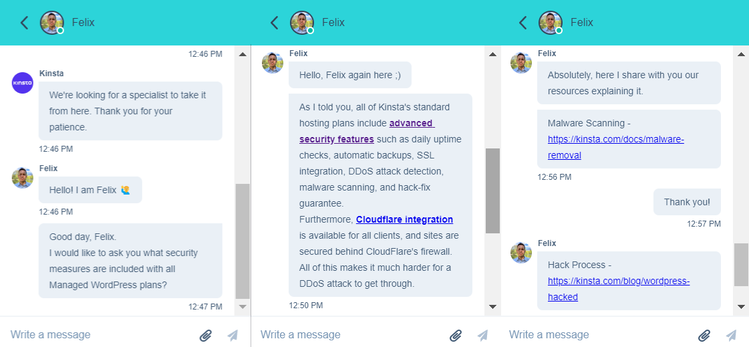
Now, not only was the initial wait time was short, but the agent was very speedy in replying too. In 3 minutes, I got a detailed reply, plus additional links to the knowledge base for more information if interested. Very professional and fast indeed.
However, if live chat is not something you prefer, the host has a pretty extensive knowledge base for you to explore too.
All in all, Kinsta’s customer support team was very fast and efficient; all questions were answered in just a few minutes. Plus, the knowledge base offers numerous articles and most often-asked questions for your convenience.
Kinsta review – the final verdict
Kinsta is a premium managed WordPress hosting provider known for its exceptional speed and fully managed features, making it ideal even for beginners.
While it’s a reliable and feature-rich option, alternatives like Bluehost and Hostinger offer affordable and versatile hosting solutions worth considering.
Alternatives to Kinsta
While Kinsta is a highly reliable and feature-rich WordPress hosting solution, it simply might not be what you’ve been looking for. In that case, we have a few alternatives to Kinsta for you.
Bluehost
Bluehost is an excellent alternative if you're looking for a trusted and versatile hosting provider. With plans starting at just $1.99/month, Bluehost offers a free domain for the first year, 24/7 support, and 1-click WordPress installation. It's a great choice for beginners and experienced users alike, thanks to its easy-to-use control panel and scalability options as your website grows.
Hostinger
If you’re looking for an affordable WordPress provider, Hostinger is exactly that. For just $2.69/month, you’ll get everything from a free SSL and generous disk space to LiteSpeed servers and automatic WordPress updates.
Kinsta FAQs
Is Kinsta only for WordPress?
Yes, Kinsta exclusively offers WordPress hosting services and doesn’t support hosting of any other platforms.
Is Kinsta a reliable source?
Yes, Kinsta is a reliable source that has a base of over 120,000 users from Fortune 500 companies and high-traffic eCommerce stores.
Is Kinsta GDPR compliant?
Yes, Kinsta is GDPR compliant. It applies necessary measures to handle data collection, processing, and storage that do comply with these guidelines. In turn, this makes Kinsta a suitable choice for users that need to host websites compliant with GDPR.
Does Kinsta offer email hosting?
No, due to commitment to be exclusively a managed WordPress hosting platform, Kinsta doesn’t offer email hosting. Kinsta strongly believes that to be the best, it’s necessary to focus on one type of service, and, due to this reason, doesn't offer other kinds of hosting but WordPress.