QuotaPath review: automating the chaos of sales commissions
Being behind major reports like The Mother of All Breaches and RockYou2024, our in-house cybersecurity experts and journalists provide unbiased, real-world testing and in-depth analysis.
We maintain complete transparency by openly sharing our testing methodologies with our audience.
Learn more

If you’re part of a sales team, you know the commission calculations often feel like a monthly scramble. The more the company’s compensation plans and headcount grow, the harder and more error-prone manual spreadsheet tracking becomes.
Formulas break, data ends up in silos, finance spends more time validating than analyzing numbers, and sales reps question payouts because the logic behind them isn’t visible. It’s a vicious circle. That’s why more and more companies are switching to modern commission-tracking software like QuotaPath.
This platform automates complex math calculations, provides performance transparency, and builds trust between sales and finance teams. To paint a clear picture for you, my Cybernews team and I have done the research and combed the web for user feedback. Our QuotaPath review will break down this platform’s use, features, pricing, and safety based on everything we’ve found.
What is QuotaPath, and who is it for?
QuotaPath is a sales performance management (SPM) platform designed to simplify commission tracking. It connects to your Customer Relationship Management (CRM) solution and automatically calculates earnings.
In this way, QuotaPath ensures that comp plan modeling, approvals, and payouts run within a centralized, structured system rather than various scattered files. It gives sales reps clear insight into their earnings, provides finance teams with reliable accuracy, and supports RevOps in planning and strategy, so everyone is on the same page.
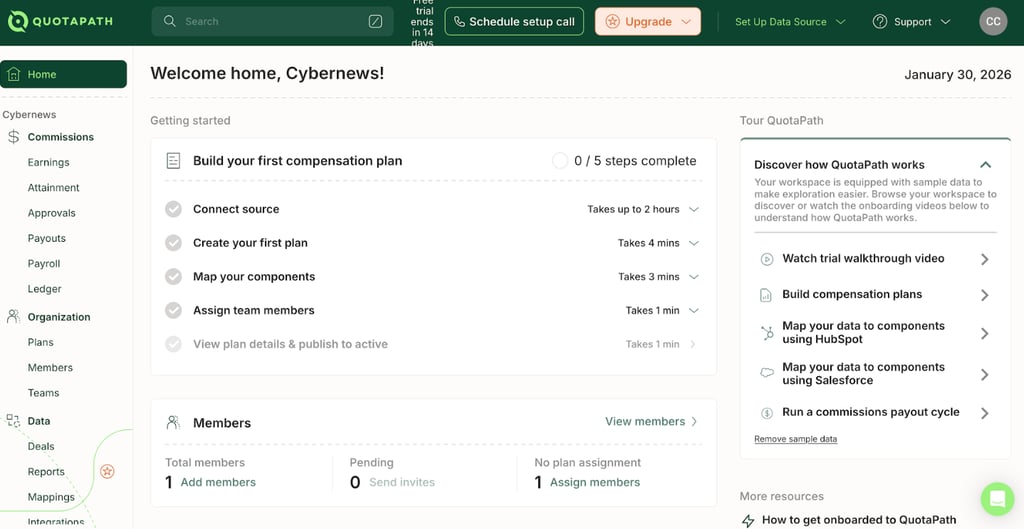
Smaller businesses can use QuotaPath for these benefits, but the change won’t be as impactful as it is at mid-market SaaS companies. At this scale, with 50 to 500 employees, the data volume and calculation complexity start to overwhelm Excel, leading to errors and slowdowns, which sales commission software like QuotaPath is made to address.
The core features that actually matter
What sets QuotaPath apart are the features that directly address the pain points sales teams face every month. Here are the ones that stood out as the most valuable to my fellow tech experts and me:
- Automated calculations. To automate sales commission, QuotaPath syncs with the company’s sales software and crunches numbers in real time. It takes into account bonuses, multi-year deals, accelerators, and varying commission rates to provide an instant, accurate view of quota attainment.
- AI plan builder. You don’t need a coder to help you make the most of QuotaPath. Its AI-powered plan builder lets you create a compensation plan on your own. Just upload your company’s old plan or describe in plain English what you want it to be, and the system will do the heavy lifting for you.
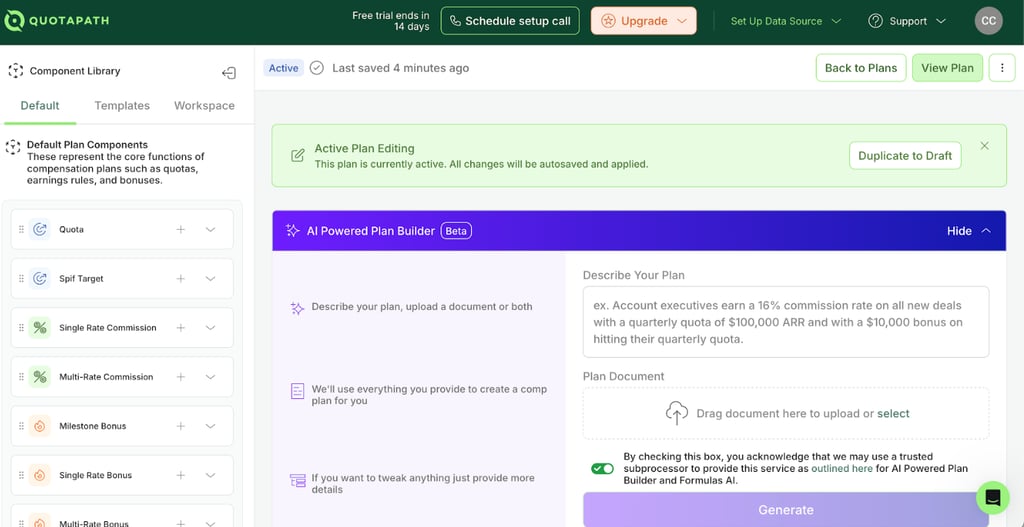
- Draft plans feature. QuotaPath offers a “sandbox” where your company can test a new pay plan before it rolls out. Performance analytics will provide insight into performance and commission rates, and compare them with last year’s sales to assess the budget impact and help you make informed decisions.
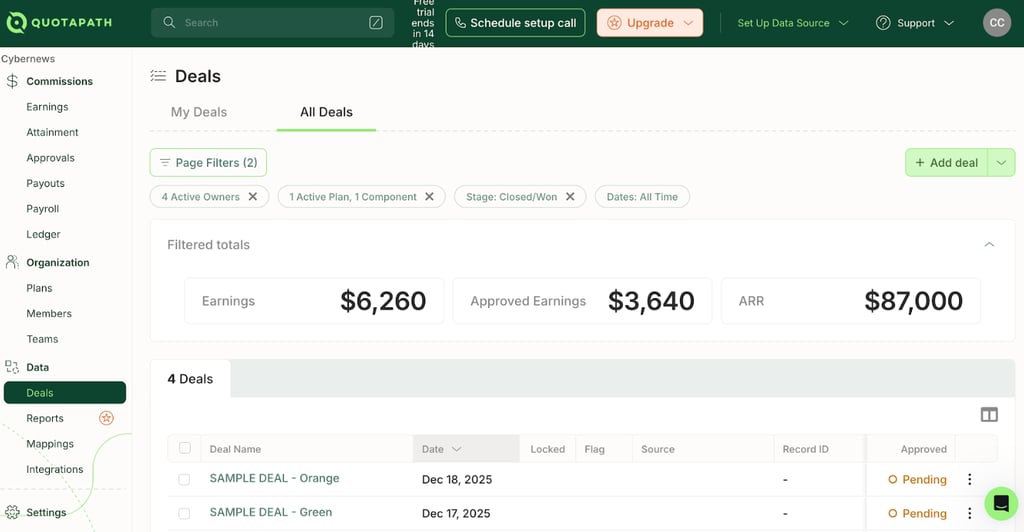
- Real-time insight into deals. QuotaPath offers an in-app dashboard that lets sales reps monitor closed and pending deals (OTE) in real time, which keeps motivation high and builds confidence in the company. A view into payment history also keeps the rest of the team on top of adjustments, clawbacks, and historical payouts.
Analyzing the User Experience
A steep learning curve is often what keeps companies from adopting innovative sales commission software. But that shouldn’t be a big issue with QuotaPath.
During my QuotaPath review and research, I’ve read quite a few comments on this platform’s ease of use and seamless integrations. Instead of the “wall of numbers” you can find in the CSV files, this platform has a clean dashboard and intuitive navigation tools. Plus, it offers blog content, webinars, and a learning center for guidance.
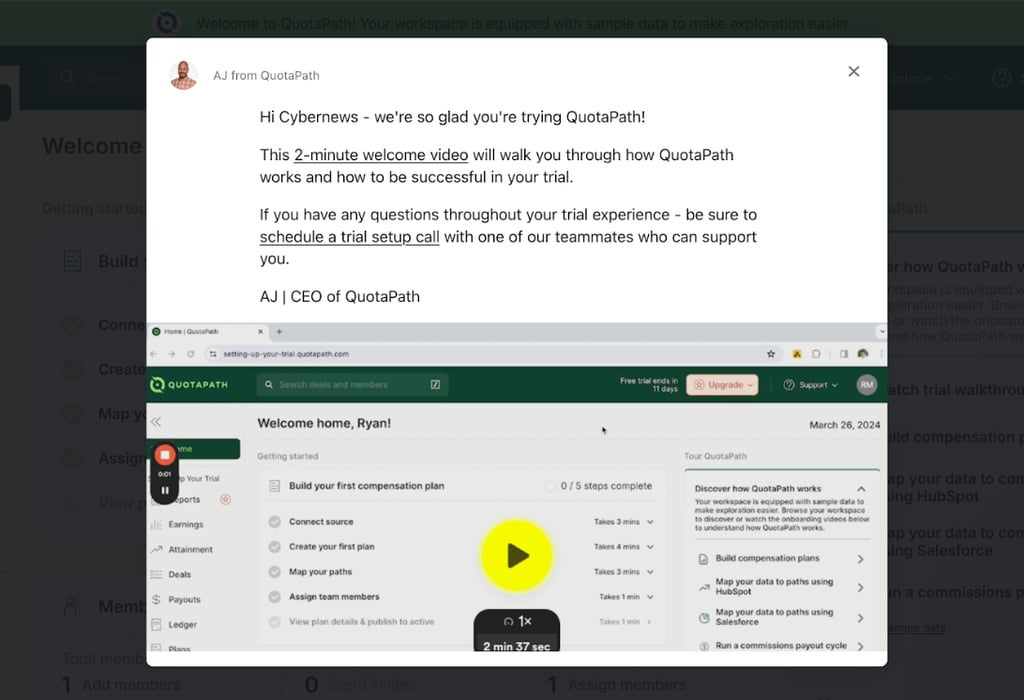
QuotaPath’s onboarding process is structured in simple steps and complemented with video instructions. Empty states and prompts tell you what to expect, and progress indicators show what else needs to be done and how much time it’ll take to complete.
- Sales representatives will learn to understand performance and earnings through progress indicators, percentages, charts, and leaderboards.
- Administrators will focus on creating and managing commission plans and payouts with the help of the AI Plan Builder and Draft Plans features.
Now, there are reports of delayed updates, syncing issues, and slow loading times. But these are pretty much commonplace with modern software, and too few and far between to be a real reason for concern.
QuotaPath Pricing and Value
How much QuotaPath will cost you depends on the pricing plan you choose. The brand offers three subscription tiers, curated for different needs and team sizes.
- Essential ($25/month per user). This plan covers all QuotaPath standard features, which makes it perfect for start-ups or smaller teams. You can access AI Plan Builder for easier plan creation, basic approvals for payouts and workflows, and integrations with the popular HubSpot and Salesforce.
- Growth ($35/month per user). This plan is a good choice if your company is looking to scale, as it covers everything in the Essential tier and then some. You can integrate with more CRMs (Cooper, Zoho, and Pipedrive) and spreadsheets (Google and Excel). There are also additional team features, such as leaderboards for running contests and tracking everyone’s performance, as well as tools to help with ASC 606 compliance and similar rules.
- Premium ($50/month per user). This is the QuotaPath pricing tier for larger companies. Besides all Growth plan features, you can test strategies in the Draft Plants sandbox, simplify multi-level approvals, get custom reporting of whatever data you need, and integrate with up to 11 CRM, 7 accounting, and 5 analytics solutions.
QuotaPath also imposes a separate Platform fee of $250–$800 per year, on top of all pricing plans listed above. While it’s not a small price to pay, this isn’t an empty extra. The fee covers the first 5 users, integration implementation, and ongoing support. It’s what ensures the platform is set up and working properly around the clock.
QuotaPath pros and cons
While QuotaPath has plenty going for it, it’s not without its flaws. Here’s a clear look at what it does well and where it falls short, so you can decide if it’s the right fit for you.
Is QuotaPath Safe? (Security and Compliance)
Given how much financial data it stores, my colleagues at Cybernews and I made it a point to check QuotaPath’s security.
At first glance, the brand instilled trust. We found no data leak scandals, past legal settlements, or reputational crises. The company seems to have built and maintained a pretty positive reputation within both the RevOps and sales reps communities in small to mid-market SaaS businesses.
A deeper look into QuotaPath’s data protection practices didn’t reveal anything concerning either. Yes, the company does use anonymized, aggregated data for product insights, but that’s pretty standard for benchmarking today.
Its Terms and Conditions reveal that the company complies with the General Data Protection Regulation (GDPR) and the California Consumer Privacy Act (CCPA). It also uses SOC 2 Type II certified data centers to meet enterprise security standards for availability and confidentiality.
QuotaPath also employs SSL/TLS encryption, firewalls, and cloud-hosted protection through providers such as Google Cloud to protect sensitive data.
Files aren’t downloaded, forwarded, or duplicated across inboxes and devices, which is a key difference between QuotaPath vs Excel and other spreadsheets. Instead, the platform's role-based access control, audit trails, and centralized storage of salary and commission data reduce exposure and limit the risk of unauthorized access.
Conclusion: Is It Worth the Spend?
After a thorough QuotaPath review, I can confidently say this sales commission software is worth a try, as long as you can afford it.
If you’re managing a sales team with more than 5 employees and dealing with a complex comp plan, then automation, analytics, and testing tools that QuotaPath offers can make a world of difference.
The tool basically pays for itself by helping you avoid errors caused by manual calculations in spreadsheets like Excel. But better math and centralized data isn’t all it brings to the table.
When used right, QuotaPath can also help your sales reps stay motivated, offering instant insights into their earnings. The finance team will also save time and energy on payroll validations, and revenue leaders will boost sales through faster plan design and testing processes.
FAQ
Does QuotaPath work with HubSpot?
Yes, QuotaPath has a native, bi-directional integration with HubSpot, along with other popular CRM platforms. It’s included in the Essentials pricing tier, so you can automate sales commissions without paying extra for a higher-end plan.
Can it handle clawbacks?
Yes, QuotaPath’s Ledger feature tracks deal history and adjustments in your connected CRM, flagging a need for a clawback. It shows commission reductions from clawbacks to keep financial reports accurate and help you manage overpayments and revenue risk.
Is there a free trial?
Yes, QuotaPath offers a free trial in the Essential and Growth plans. You can also get a demo by contacting customer support and providing some basic information about your company.
How long does implementation take?
The length of QuotaPath’s implementation process varies depending on the complexity of compensation plans, data structures, and integrations. However, it’s still far shorter and less resource-intensive than enterprise-grade tools like Xactly.
Does it pay the reps directly?
No, QuotaPath doesn’t pay the sales representatives directly. It circulates the commissions and syncs the approved amounts with payroll tools like Rippling and ADP for further processing.
Can I use it for non-sales roles?
Technically, yes, you can use QuotaPath for non-sales roles in your company. However, they have to earn at least part of their pay based on measurable performance or results.
What happens if my CRM data is messy?
If your CRM data is messy, QuotaPath may not be able to do its job well. The platform draws data from CRM, so missing, inaccurate, or poorly organized records can lead to incorrect circulations and delayed commission updates.