Best VPN for SBOBET in 2026
Our in-house cybersecurity experts and journalists, renowned for major reports like The Mother of All Breaches, conduct transparent, unbiased VPN testing and in-depth analysis.
With 750+ articles crafted based on real-world research, we empower readers to make informed purchasing decisions through first-hand expertise.

-
SBOBET is unavailable in several countries, including the United States and the UK, due to licensing restrictions and gambling regulations.
-
You can access SBOBET while traveling by using a VPN to connect to a server in a country where the platform operates, such as New Zealand or Thailand.
-
Based on my testing, NordVPN is the best VPN for SBOBET because of its fast speeds, extensive server network, and reliable performance for live betting.
SBOBET is an online sportsbook and casino platform that lets users wager on sports events, play live casino games, and access other gambling products through its website and mobile services. However, because the platform operates under specific gambling licenses, access is restricted in many countries and regions where online betting is prohibited or where SBOBET is not licensed to offer its services.
As a result, travelers or existing account holders may find that they cannot log in, place bets, or even open sbobet.com while abroad. A reliable VPN can help by routing your traffic through a server in a country where SBOBET is legally available, allowing you to access the platform as if you were browsing from that location.
SBOBET VPNs compared
| VPN for SBOBET | Rating | Best for | Servers | Servers in SBOBET-legal countries | Starting price |
| 1. NordVPN | Best overall VPN for SBOBET | Thousands of servers in 225 locations | Canada, New Zealand, Thailand, and more | $3.49/month | |
| 2. Surfshark | Best VPN for unlimited devices | 4,500+ servers in 100 countries | Canada, New Zealand, Thailand, and more | $2.49/month | |
| 3. Proton VPN | Best VPN for privacy | 20,700+ servers in 149 countries | Canada, New Zealand, Thailand, and more | $2.99/month | |
| 4. IPVanish | Budget-friendly VPN | 3,400+ servers in 150 locations | Canada, New Zealand, Thailand, and more | $2.39/month | |
| 5. Norton VPN | Best for ease of use | Undisclosed number of servers in 133+ locations | Canada, New Zealand, Thailand, and more | $3.33/month |
How to bet on SBOBET from the UK with a VPN
- Choose a VPN that reliably works with betting sites – I recommend NordVPN for its fast speeds and dependable servers
- Download and install the VPN on your computer, Android, or iPhone
- Connect to a VPN server in a country where SBOBET is available
- Visit SBOBET or open the SBOBET mobile app, log in to your account, and place your bets as usual
Best VPNs for SBOBET – my detailed list
To access SBOBET reliably, you need a gambling VPN with fast speeds for live betting, servers in countries where SBOBET is available, strong security and privacy protections, and apps for all major devices.
After comparing performance, reliability, server coverage, and ease of use, I found that NordVPN, Surfshark, Proton VPN, IPVanish, and Norton VPN are the best VPNs for SBOBET. They provide reliable, secure access to the platform, ensuring consistent performance for international users and travelers alike.
1. NordVPN – best overall VPN for SBOBET

| Rating: | |
| Based in: | Panama |
| Servers/countries: | Thousands of servers in 225 locations |
NordVPN is one of the best VPNs for SBOBET, consistently delivering secure access during my testing alongside the ultra-fast connection speeds required for real-time live betting. With thousands of servers in 224 locations, it provided more reliable access than most competitors, especially when I connected through Montreal, Canada, and Auckland, New Zealand, where SBOBET loaded without interruptions.
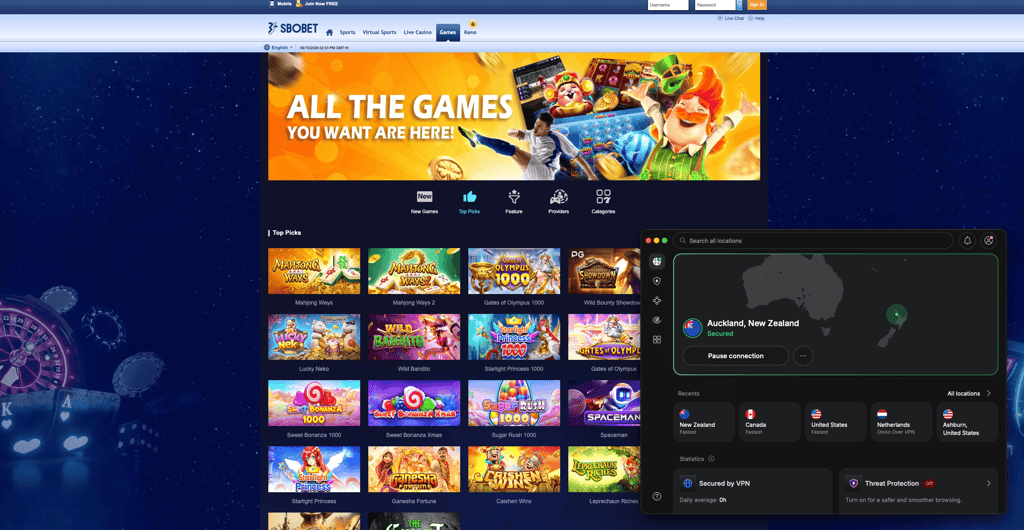
NordVPN achieved a 100% success rate, allowing me to access SBOBET on all servers I tested. Compared to Surfshark and Proton VPN, NordVPN delivered the most consistent results with fewer connection retries and no unexpected disconnections. Speed remained excellent throughout testing, with only a 16% performance drop that had no noticeable impact on browsing the platform.
| Best NordVPN server | Result |
| Montreal, Canada | ✅ Instant access |
| Auckland, New Zealand | ✅ Instant access |
| Bangkok, Thailand | ✅ Stable performance |
While testing NordVPN with SBOBET, its Montreal and Auckland servers worked immediately, allowing me to access the platform without repeated verification requests or blocked pages. I also checked for DNS and WebRTC leaks after switching between multiple servers and found none, which helped keep my real location hidden throughout each session.
This reduced the risk of location-based account checks while ensuring my ISP couldn't monitor my betting activity. Unlike some competing VPNs, I didn't have to cycle through several servers before finding one that worked, making the overall experience much smoother.
NordVPN is the best VPN for SBOBET if you want reliable access, strong privacy, and consistently fast performance. It also includes a 3-day free trial on Android and a 30-day money-back guarantee, so you can test it for free before committing. While it's slightly more expensive than budget alternatives with a starting price of $3.49/month, NordVPN delivered the most dependable SBOBET access during my testing.
2. Surfshark – affordable SBOBET VPN with support for unlimited devices

| Rating: | |
| Based in: | Netherlands |
| Servers/countries: | 4,500+ servers in 100 countries |
Surfshark is a great VPN for SBOBET if you're looking for an affordable option that still delivers reliable access. During my testing, it successfully accessed SBOBET on most servers I tried, with the best results coming from Auckland, New Zealand. While Surfshark wasn't quite as consistent as NordVPN, it still provided smooth access and fast enough speeds for live betting.
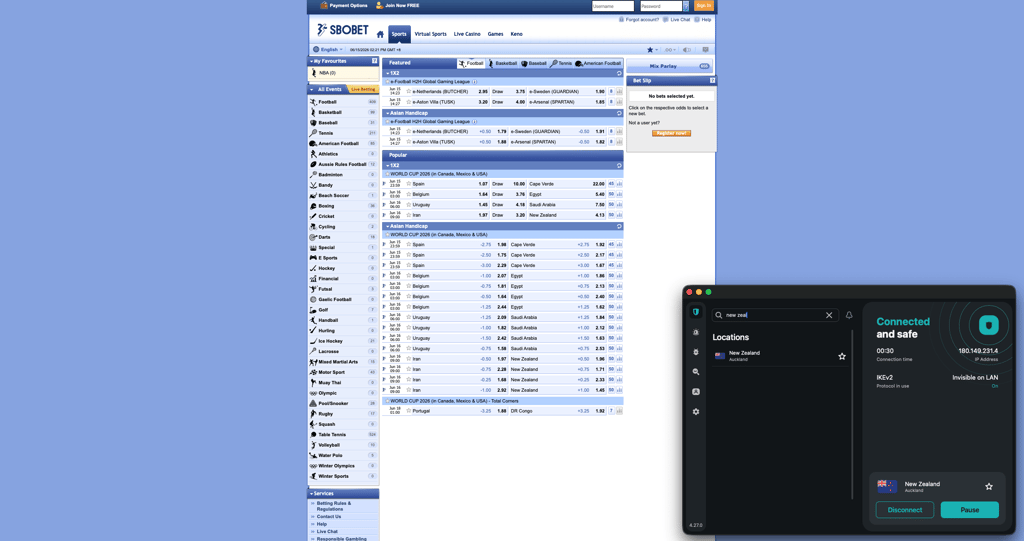
Surfshark achieved a 90% success rate, successfully accessing SBOBET on tested servers. Compared to NordVPN, I encountered more connections that required switching servers, but once connected, performance remained stable throughout my betting sessions. Speed remained more than adequate for loading markets, with an average drop of around 17%, which isn’t noticeable in everyday use.
| Best Surfshark server | Result |
| Auckland, New Zealand | ✅ Instant access |
| Montreal, Canada | ✅ Stable access |
| Jakarta, Indonesia | ✅ Stable performance |
During testing, the Auckland server consistently gave me the best results, allowing SBOBET to load immediately without verification checks. The Indonesian server in Jakarta and Canadian servers also worked reliably, although I occasionally had to reconnect after landing on a heavily used IP address.
Surfshark's kill switch proved useful by automatically blocking internet traffic whenever I manually interrupted the VPN connection, preventing my real location from being exposed. I also tested for DNS and WebRTC leaks while switching servers and didn't detect any, which reduced the likelihood of location-based account checks. Compared to Proton VPN, Surfshark offered more stable access and quicker server switching, although NordVPN remained slightly more consistent overall.
Surfshark is one of the best cheap VPNs for SBOBET, offering reliable access at a lower price than most premium competitors – $2.49/month. It also includes a 7-day free trial on up to 3 devices and a 30-day money-back guarantee, so you can try it for free.
3. Proton VPN – best SBOBET VPN for privacy-focused users

| Rating: | |
| Based in: | Switzerland |
| Servers/countries: | 20,700+ servers in 149 countries |
Proton VPN is a reliable VPN for SBOBET if privacy is your top priority and you want stable access to the platform. During my tests, it consistently provided secure access to the site, with the Montreal, Canada, server offering the smoothest performance. Although it wasn't quite as fast as NordVPN, it proved more dependable than many mid-range VPNs when accessing SBOBET.
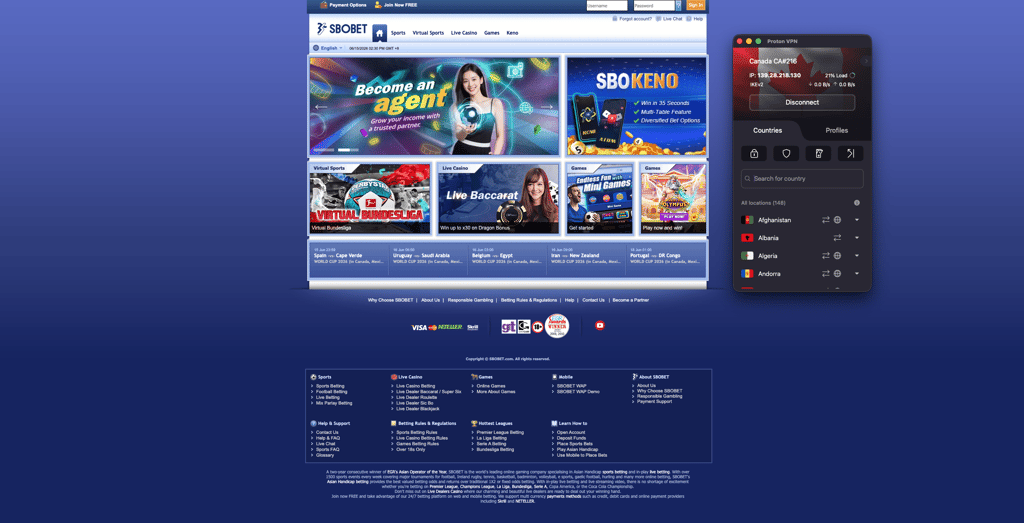
Proton VPN recorded an 84% success rate because it required more server switching than NordVPN and Surfshark. Once I found a working location, the connection remained stable throughout my betting session. Average speeds were slightly lower than those of the top two providers, with an 82% download retention rate. However, it’s still fast enough for live odds updates and account management without noticeable delays.
| Best Proton VPN server | Result |
| Montreal, Canada | ✅ Instant access |
| Auckland, New Zealand | ✅ Stable access |
| Tokyo, Japan | ✅ Stable performance |
Proton VPN’s Montreal server consistently gave me the smoothest experience, allowing SBOBET to load on the first attempt without login issues or repeated verification prompts. A couple of other servers initially returned unavailable pages, but reconnecting to a different location resolved the problem within seconds. With Proton VPN’s extensive server network of 20,700+ servers in 149 countries, this isn’t a problem.
I also ran DNS and WebRTC leak tests while switching between servers and didn't detect any leaks, so my actual location stayed hidden throughout testing. This extra layer of privacy helped reduce the chance of triggering location-based account checks. Compared with Surfshark, Proton VPN placed greater emphasis on privacy, though Surfshark achieved a slightly higher success rate in my tests.
Starting at $2.99/month, Proton VPN is a dependable VPN for SBOBET, especially if you value privacy alongside reliable access. It offers a free plan to test the service, while premium plans include a 30-day money-back guarantee. Although it occasionally required switching servers to find a working IP address, the Montreal server consistently provided secure, uninterrupted access during my testing.
4. IPVanish – budget-friendly VPN for SBOBET

| Rating: | |
| Based in: | The United States |
| Servers/countries: | 3,400+ servers in 150 locations |
IPVanish is a good VPN for SBOBET if you're looking for stable access and solid privacy, and it’s the cheapest VPN on my list. It reliably accessed SBOBET through its Auckland server, maintained decent speeds, and protected against IP leaks that could trigger location checks.
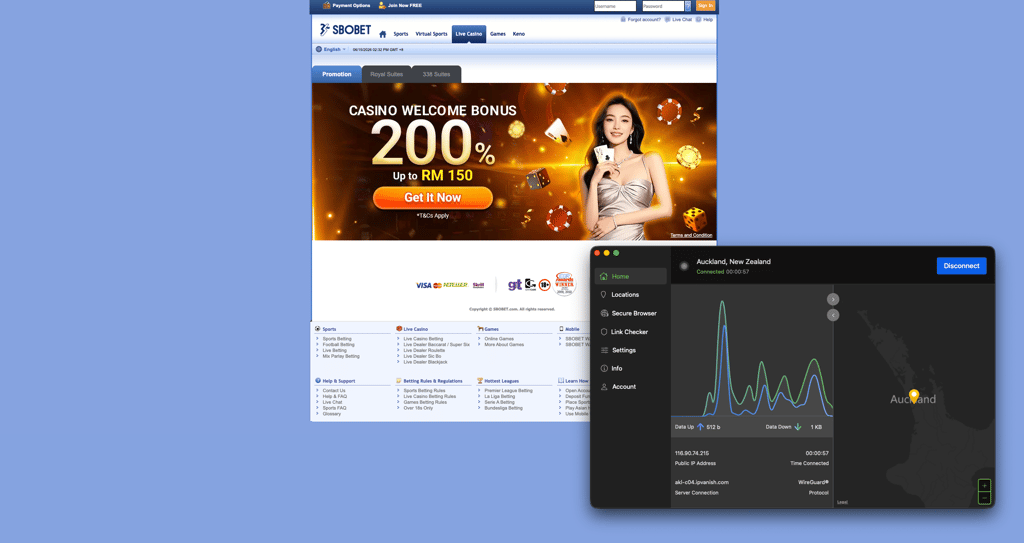
IPVanish achieved an 80% success rate when accessing SBOBET, successfully connecting on most tested servers. The Auckland, New Zealand, server consistently delivered the best results, loading SBOBET without prompting for repeated verification. Compared to Norton VPN, it was slightly more consistent on its best-performing server, but compared to NordVPN and Surfshark, it required more frequent server switches in busier locations.
| Best IPVanish server | Result |
| Auckland, New Zealand | ✅ Instant access |
| Montreal, Canada | ✅ Instant access |
| Bangkok, Thailand | ✅ Stable performance |
With 74% speed retention, IPVanish remained fast enough for live betting and in-play odds updates. While page loads were slower than with NordVPN, there were no noticeable interruptions once connected to the Auckland server.
IPVanish also showed no DNS or WebRTC leaks, and its kill switch immediately blocked internet traffic whenever the VPN connection was interrupted, preventing my real location from being exposed. This helped reduce the risk of SBOBET detecting an IP address change during active sessions. I did encounter occasional verification checks on a few Thai servers, but switching back to the Auckland location resolved the issue within seconds.
IPVanish subscription starts from $2.39/month, making it a cheap and reliable VPN for SBOBET with a free 7-day mobile trial and a 30-day money-back guarantee.
5. Norton VPN – great SBOBET VPN for beginners

| Rating: | |
| Based in: | The United States |
| Servers/countries: | Undisclosed number of servers in 133+ locations |
Norton VPN is a decent VPN for SBOBET if you value ease of use and secure, straightforward access rather than advanced VPN features. During testing, its Bangkok, Thailand, server consistently accessed SBOBET, delivering stable browsing and respectable speeds, although it wasn't as reliable or flexible as top providers on my list.
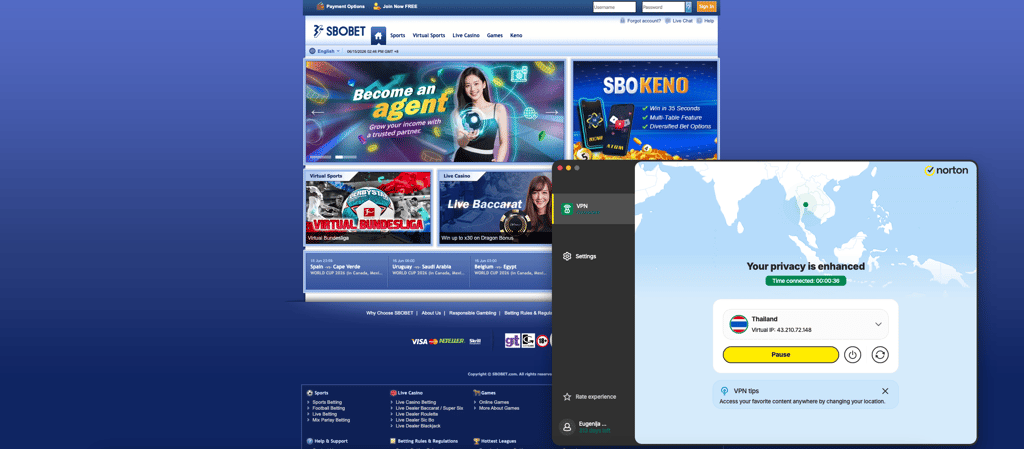
Norton VPN showed an 75% success rate when accessing SBOBET, successfully connecting on most tested servers. The Bangkok, Thailand, location consistently delivered the smoothest experience, loading the platform without repeated login or verification issues.
| Best Norton VPN server | Result |
| Bangkok, Thailand | ✅ Instant access |
| Auckland, New Zealand | ✅ Stable access |
| Montreal, Canada | ✅ Stable access |
Norton VPN maintained stable performance for live betting with 75% speed retention, allowing updates to load without noticeable lag. While speeds weren't the fastest among the VPNs I tested, they remained reliable enough for uninterrupted betting sessions.
During Norton VPN testing, I recorded no DNS leaks, helping keep my real location hidden while connected. On a few non-Thai servers, I encountered slower page loads and occasional connection retries, but switching back to the Bangkok server restored stable access almost immediately.
While its starting price is on the higher end, $3.33/month, Norton VPN is a solid VPN for SBOBET with a free 30-day mobile trial. There’s also a generous 60-day money-back guarantee, making it easy to test without risk. The Bangkok, Thailand server delivered the most reliable access, although Norton VPN’s smaller server selection and occasional verification prompts make it less consistent than NordVPN or Surfshark.
Can I use a free VPN to access SBOBET?
After testing both free and premium VPNs with SBOBET, I found that free options rarely provide consistent access. The platform quickly identifies heavily used VPN IP addresses, and most free services either failed to connect or repeatedly prompted for additional verification.
Among the free SBOBET VPNs I tested, Proton VPN was the only one that worked consistently. I was able to reach SBOBET using its free server in Tokyo, Japan, although it took a few connection attempts before the site loaded properly. Once connected, browsing was possible, but speeds were noticeably slower than with premium providers, and performance fluctuated during peak hours. Since Proton VPN's free plan automatically assigns a server from one of its 10 free locations, you also can't select a specific location that may work better for SBOBET.
Using a free VPN for SBOBET also comes with several limitations:
- Restricted server locations. You have very few locations available, reducing your chances of finding an IP address that isn't blocked.
- Lower performance. Slower connections can make live betting, odds updates, and page navigation less responsive.
- Single-device use. Free plans usually only support one active connection, so switching devices requires reconnecting.
Rather than relying on a free VPN for SBOBET, I recommend opting for a free trial of a premium VPN like NordVPN or Surfshark. Both delivered much more reliable access during testing and offered significantly better speeds. Moreover, they include a 30-day money-back guarantee, giving you plenty of time to test SBOBET risk-free before deciding whether to keep your subscription.
Where is SBOBET legal?
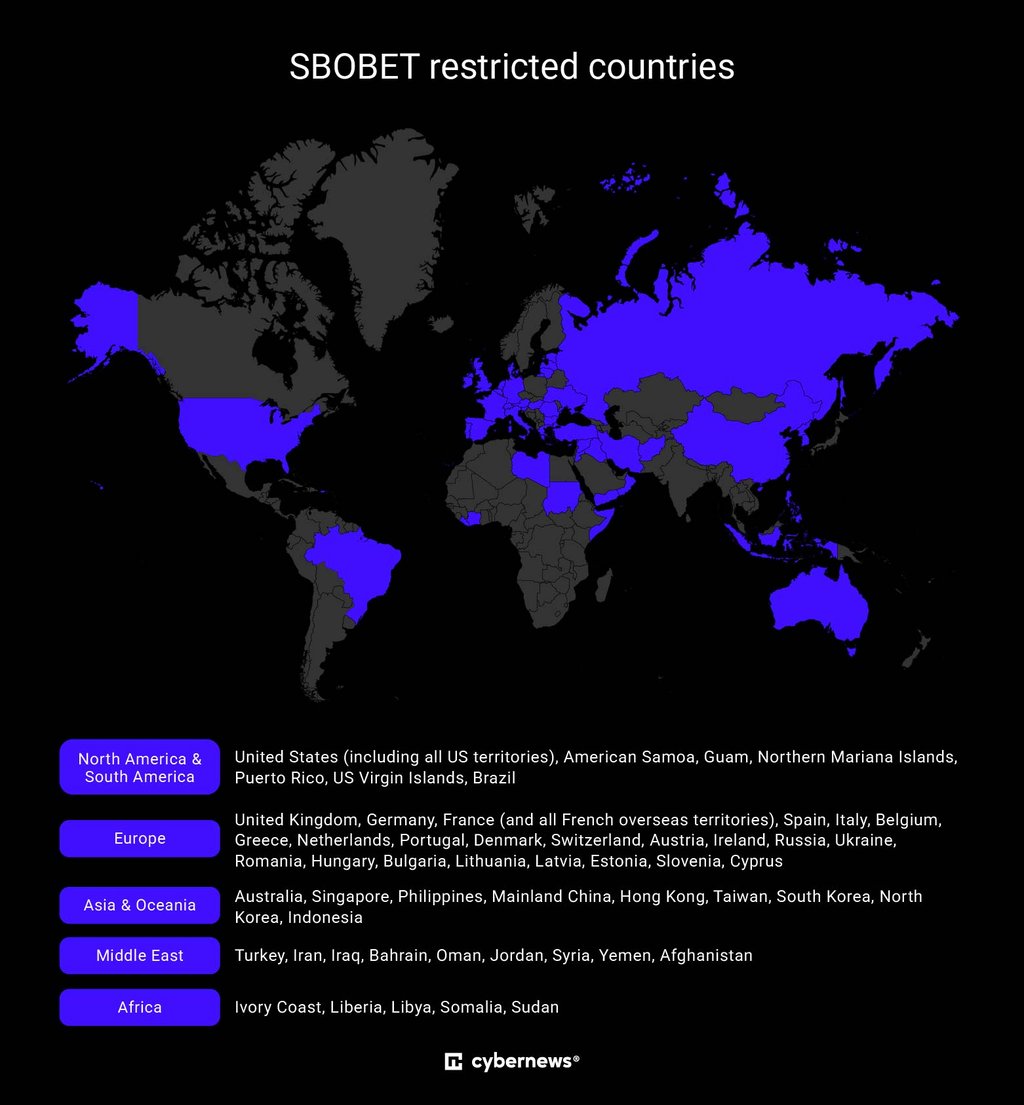
SBOBET is licensed to operate in several international markets, but its availability depends on local gambling laws. It primarily serves players across Asia, Europe, and Latin America through its licensed partners. However, the platform is not available in the United States, and it also restricts access from several other jurisdictions where online sports betting is prohibited or where local licensing requirements prevent it from operating.
Countries where SBOBET is generally available (subject to local regulations):
- Malaysia
- Thailand
- Vietnam
- Indonesia
- Singapore
- Mexico
- Various European and Latin American markets through licensed operators
Countries and regions where SBOBET is unavailable or restricted:
- United States
- United Kingdom
- Australia
- France
- Spain
- Netherlands
- Belgium
- Brazil
- Other jurisdictions where local gambling laws prohibit offshore betting platforms
Can you access SBOBET from the US?
No, SBOBET does not accept players from the United States. If you try accessing the platform from a US IP address, you'll typically receive an access restriction or be prevented from creating or using an account.
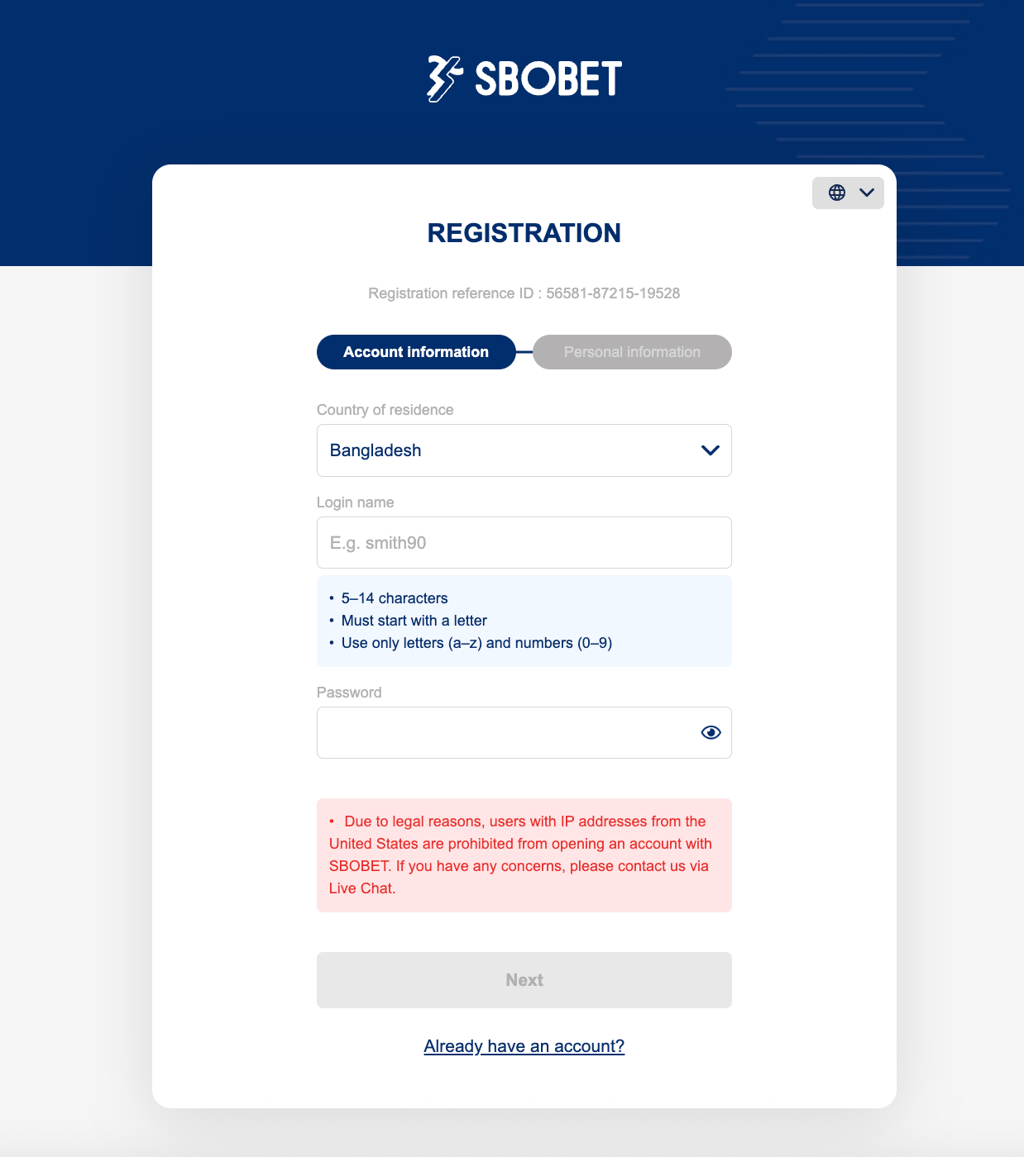
If you're traveling or located in a country where SBOBET is unavailable, a reliable VPN can help you regain access to your existing account by connecting through a server in a region where the platform is accessible. During my testing, providers like NordVPN and Surfshark consistently provided the most reliable access.
🔴 Note: Using a VPN is legal in many countries, but accessing an online gambling platform from a location where it isn't permitted may violate local laws or SBOBET's Terms of Service. Cybernews does not encourage bypassing gambling regulations or using a VPN to break the law. Before using a VPN with SBOBET, make sure you understand and comply with the laws in your jurisdiction and the platform's rules.
How to securely access SBOBET from any country: detailed guide
Since SBOBET is unavailable in many countries due to legal restrictions, a VPN is necessary to connect to the platform when you're away from home. Below, I’ll walk you through how to do exactly that.
Step 1. Choose a reliable VPN
SBOBET isn't available in every country, including the US, so you'll need a reliable gambling VPN with fast speeds, strong leak protection, and servers in countries where SBOBET is accessible, such as Thailand, New Zealand, Japan, or Malaysia.
Based on my testing, NordVPN is the most reliable option because it consistently ensures successful access to SBOBET, delivers the fastest speeds, and rarely requires changing servers.

Step 2. Download and install the VPN
Once you've subscribed, download the VPN app directly from the official NordVPN website or your device's official app store. Install the application and then sign in using your account credentials.
Always download VPN software from official sources rather than third-party websites to reduce the risk of installing modified or unsafe versions of the app.
Step 3. Connect to a server where SBOBET is available
SBOBET is available in several regions across Asia and in selected international markets, including Thailand, New Zealand, Malaysia, and more, subject to local regulations. Open your VPN and connect to a server in one of these supported locations to receive a local IP address before visiting the platform.
During testing, the most reliable servers for SBOBET were:
- Auckland, New Zealand
- Montreal, Canada
- Bangkok, Thailand
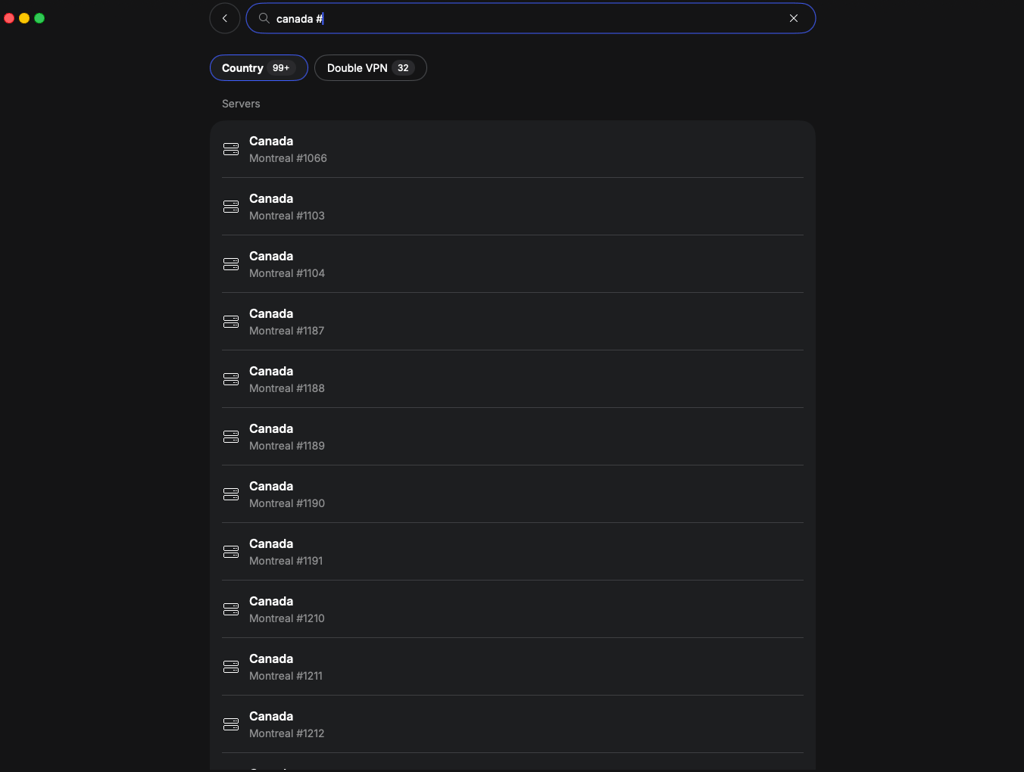
If the first server triggers additional verification or doesn't load the site, simply disconnect and reconnect to another server in the same country. Newly assigned IP addresses often work immediately.
Step 4. Visit SBOBET and sign in
With the VPN connected, open SBOBET in your browser or launch the mobile app and sign in as usual. For the best experience, enable the VPN's kill switch to prevent your real IP from being exposed and stay connected to the same server throughout your betting session.
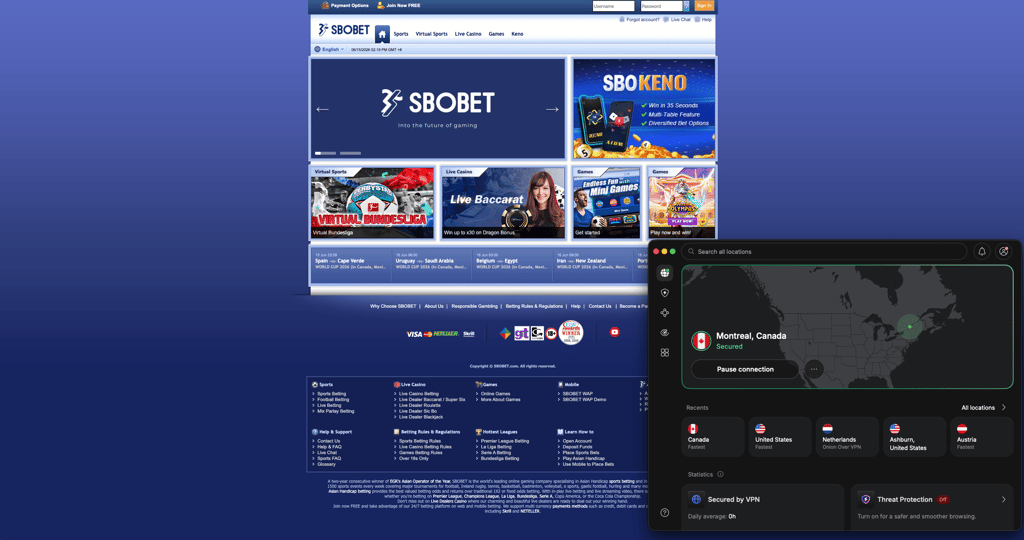
If you encounter verification prompts or a blocked IP address, switch to another server in the same country rather than disconnecting the VPN completely.
How to use SBOBET with a VPN on iPhone
SBOBET isn't available through the US App Store, and users in restricted regions may also be unable to access the website without changing their virtual location. The easiest way to use SBOBET on an iPhone is with a reliable VPN and the Safari browser. Here’s how:
- Choose a trusted VPN for SBOBET. Based on my testing, NordVPN provided the most consistent access thanks to its fast connections and reliable servers in countries where SBOBET is available.
- Download NordVPN from the Apple App Store and sign in to your account.
- Connect to a server in a supported location, such as New Zealand, Thailand, or Canada. During testing, New Zealand servers delivered the most reliable results for me.
- Open Safari and visit the SBOBET website while the VPN is connected.
- Add SBOBET to your home screen by tapping the share icon in Safari and selecting Add to Home Screen. This creates a Progressive Web App (PWA) that launches like a native iPhone app.
- Open the new shortcut and sign in to your SBOBET account. As long as your VPN remains connected, you can use the platform just as you would through a dedicated app.
Is it legal to use a VPN on SBOBET?
Yes, using a VPN itself is legal in most countries, and many people use one to protect their privacy or secure their internet connection. However, whether it's legal to use a VPN to access SBOBET depends on the gambling laws where you live and the platform's own Terms of Service.
If you're in a country where SBOBET isn't licensed or doesn't accept players, using a VPN to appear as though you're connecting from another location could violate the platform's rules. If SBOBET detects VPN usage or finds that your account was accessed from a restricted jurisdiction, it may request additional identity verification, limit account access, or delay withdrawals until your location is confirmed.
Laws governing online gambling differ significantly between countries, and in some places even between states or provinces. Before using a VPN with SBOBET, verify that online gambling is permitted in your jurisdiction and that you're in compliance with the platform's terms.
Final tips for using SBOBET with a VPN
Using a VPN with SBOBET can work smoothly, but only if you set it up carefully. Based on my experience testing different providers, the most important factor is server stability – not just speed. Stick to one reliable location (like New Zealand or Thailand) instead of constantly switching, as frequent IP address changes can trigger verification checks or temporary access blocks.
It also helps to keep your VPN connection active at all times while using SBOBET. If the connection drops even briefly, your real IP address could be exposed, leading to session interruptions or forced re-login. That’s why enabling the kill switch is essential.
Another useful tip is to clear cookies or use a private browser session if you run into loading issues, since stored location data can sometimes conflict with VPN routing. Compared to other VPNs, NordVPN performed best in maintaining consistent access without repeated verification prompts.
Finally, avoid switching between multiple countries too quickly – SBOBET tends to flag unusual login patterns. A stable, single-server approach is usually the most reliable way to maintain uninterrupted access and avoid detection issues.
FAQ
Is SBOBET legal in the US?
No, SBOBET is not licensed or legally available in the United States. Access from US IP addresses is blocked, and users are not permitted to register or place bets from the country.
Does SBOBET allow VPNs?
SBOBET does not officially support VPN use. While some users attempt to access the platform through VPNs, doing so may violate its Terms of Service and can result in verification requests, restricted access, or account limitations.
What is the best VPN for SBOBET?
Based on our in-house testing, NordVPN is the best VPN for SBOBET due to its consistent access, fast speeds, and reliable servers in locations like New Zealand and Thailand. Surfshark is a strong alternative, but NordVPN was more stable overall.
Can I use a free VPN with SBOBET?
Free VPNs rarely work reliably with SBOBET. Most are blocked due to shared IP addresses and limited infrastructure. Even when they connect, speeds are slow, and access is inconsistent.
How to use SBOBET in the UK?
SBOBET is restricted in the UK, but users traveling abroad can access it by connecting to a VPN server in a supported region, such as New Zealand or Thailand, before logging in.
Will a VPN slow down SBOBET?
Yes, a VPN can slightly reduce speed due to encryption and rerouting. However, premium VPNs like NordVPN typically maintain strong performance, with minimal impact on live betting and odds updates.
Can I use SBOBET while traveling?
Yes, but availability depends on your location. If SBOBET is blocked in the country you’re visiting, you may need a VPN to access it. Always ensure compliance with local laws and platform rules.
What should I do if SBOBET is not working with my VPN?
Try switching to a different server in the same country, clear your browser cookies, or enable your VPN’s kill switch. If issues persist, reconnecting or using a more stable provider like NordVPN usually resolves the problem.