Captain Compliance review 2026

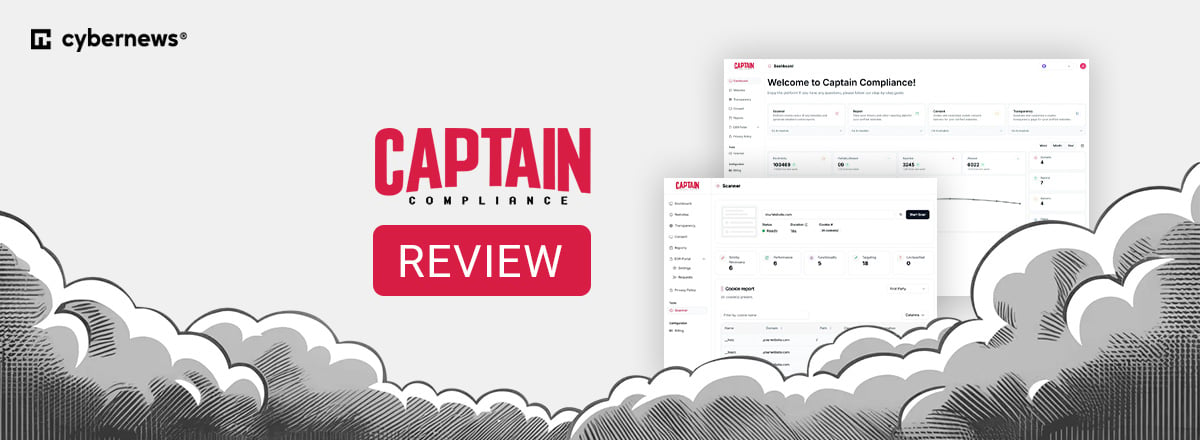
Businesses collect and process large amounts of personal data, such as names, payment details, IP addresses, location data, cookies, and tracking data. As they expand online and operate internationally, managing how they collect, store, and share this information becomes more challenging because they need to comply with multiple privacy regulations on how personally identifiable information (PII) is handled.
Tools like Captain Compliance can help businesses manage these data privacy requirements by automating tasks such as universal consent management, cookie compliance, privacy notices, privacy assessments, AI governance, and data-subject rights requests. Captain Compliance is a US-based but globally focused privacy technology company that combines these tools with complementary compliance integration services.
To see how well it works in practice, I reviewed its features, pricing, user experience, and main use cases with the help of the Cybernews research team. So keep reading to learn whether Captain Compliance is useful for businesses navigating increasingly complex privacy regulations.
Captain Compliance overview
| Captain Compliance | |
| Main focus | Data privacy, cookie compliance, and consumer data requests |
| Free plan | Yes |
| Starting price | From $499/month |
| Cookie scanner | Yes |
| Cookie consent management | Yes |
| Privacy notice generator | Yes |
| DSR/DSAR management | Yes |
| Privacy assessments | Yes |
| Regulations | GDPR, CPRA/CCPA, CIPA, VPPA, LGPD, PIPEDA |
| Key integrations | Shopify, WordPress, Google Tag Manager |
What is Captain Compliance?
Captain Compliance was launched in mid-2023 by serial entrepreneur Richart Ruddie in Fort Lauderdale, Florida. It offers multiple tools and services intended to help businesses manage privacy compliance.
These tools cover cookie scanning, tag and pixel tracking, consent management, privacy notices, Data Subject Requests (DSRs), assessments, a pixel scanning tool for privacy risk analysis, and a dynamic cookie policy tool that acts as a trust center that they call cookie transparency. All of this makes it suitable for businesses and privacy professionals such as attorneys, Data Protection Officers, and Chief Privacy Officers.
What’s more, the software supports compliance with various international privacy frameworks and regulations, including the GDPR, PDPA, PDPL, CNIL, CPRA, CIPA, VPPA, LGPD, PDPDA, DPDPA, and PIPEDA, as well as newer state and international privacy laws.
Captain Compliance is not a basic cookie-consent tool. Instead, it combines website scanning and consent management with privacy notices, data-subject request management, transparency pages, continuous tag and pixel monitoring with free integration support. I found it to be the best in class when compared to other CMPs.
The Company’s Background
Captain Compliance experienced rapid growth fueled by an explosion in privacy litigation, such as lawsuits over Meta Pixel tracking, and has a nearly perfect 5-star rating across hundreds of reviews on Capterra, G2, and other software review sites. Notably, the company won the Early Stage Showcase at Venture Atlanta in 2025 for its innovative approach to mitigating privacy litigation risks.
During my research, I also didn’t find any credible red flags about Captain Compliance. However, they have employees all over the world and a Delaware corporate registration, which is common in the states.
Captain Compliance features
As an all-in-one privacy and compliance software, Captain Compliance offers multiple features that help businesses and large enterprises manage compliance. So, let’s break down the most prominent features and see what you can benefit from.
Cookie Scanner
The Cookie Scanner is one of the main tools available at Captain Compliance. It’s an automated tool that scans websites, detects hidden cookies and tracking pixels, and builds a real-time data inventory.
More precisely, once you run the scan, it identifies and categorizes first-party and third-party cookies, as well as other trackers. Plus, it analyzes their behavior and purpose.
Afterward, the scanner classifies the cookies into categories such as Strictly Necessary, Functional, Performance, or Targeting. This can help you understand which data-collection technologies are active on your business site(s). They provide a free scanning tool, pictured below, and a more in-depth scanner called Patrol that has a before and after view of what network traffic flows as you navigate through the website and how you interact with a consent banner on the website.
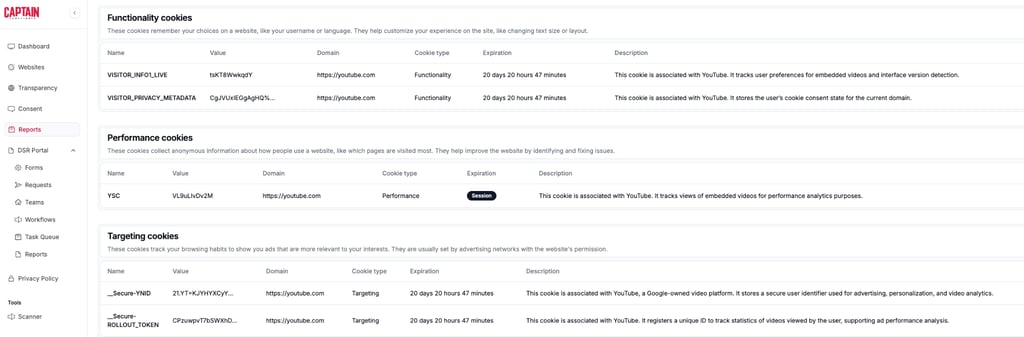
Also, you can use the scanner to evaluate third-party websites, which is useful for assessing the privacy practices of your competitors or other vendors.
What I liked during my testing is that using the scanner is very straightforward. You just need to enter the website URL, start the scan, and access a report showing the detected cookies, tracking technologies, and their categories.
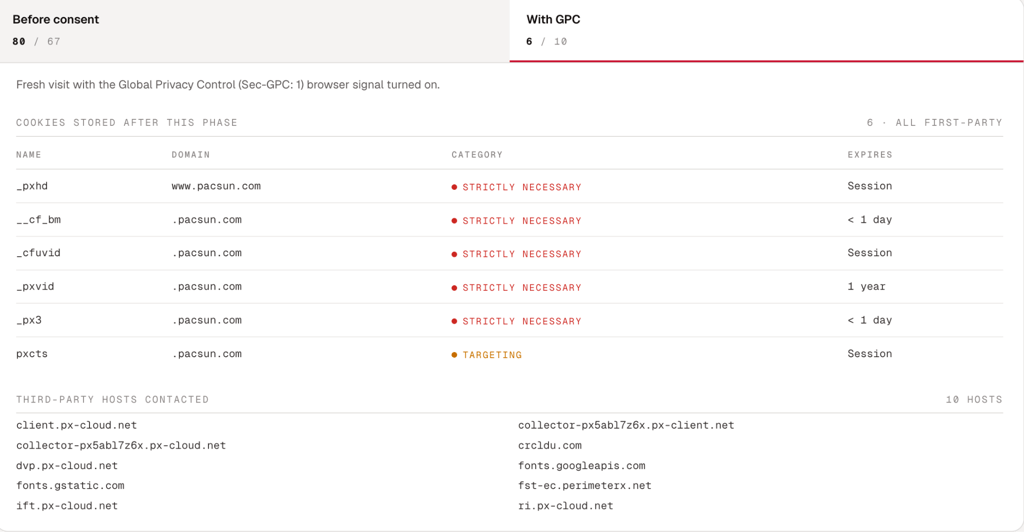
Additionally, the feature is mostly automated and performs the main functions just by adding a domain name and selecting to scan the full website or 100 random pages. The whole process takes about a minute, depending on the size of the website, and generates a risk and privacy assessment of that website.
Cookie Consent Manager
The Cookie Consent Manager is designed to manage geography-based dynamic cookie consent banners, so your business can automatically respect opt-ins or opt-outs. Thus, you can create customized consent banners and use geo-targeting so visitors receive privacy choices relevant to their region.
According to Captain Compliance, the consent banners can be deployed seamlessly via Google Tag Manager or a JavaScript snippet. They are also available as plugins (Shopify, WordPress).
However, while the banner itself is relatively straightforward to configure, implementation is more technical than the interface suggests. My tests showed that businesses need to add Captain Compliance’s script directly to their website or deploy it through Google Tag Manager.
Once you install it, the banner can apply the selected consent settings across the domain, or you can make it specific to each region. This means the tool can automate much of the ongoing consent process, though you may need help with the initial setup if you don’t have much technical experience.
Privacy Notice Generator
The Privacy Notice Generator is a centralized, hosted hub to manage and dynamically update privacy and cookie policies. It creates a privacy notice based on information you provide by completing a privacy assessment questionnaire on your business's data handling practices.
Then, Captain Compliance can host the resulting notice and use regional targeting to display relevant information depending on the visitor’s location. The notices can cover different areas, such as data collection, use, disclosure, retention, and individual privacy rights.
The questionnaire is pretty comprehensive. My testing revealed that it has 48 steps, so generating a notice involves providing detailed information about the business and its data practices. Additionally, the platform implements automatic adjustments as privacy requirements change, reducing the need to manually monitor every regulatory update.
However, the biggest advantage I discovered is that the Privacy Notice Generator tool handles different jurisdictions, which means you won’t have to work with a single generic privacy policy, and you no longer have to worry about an outdated privacy notice causing legal issues for your business.
DSR Portal
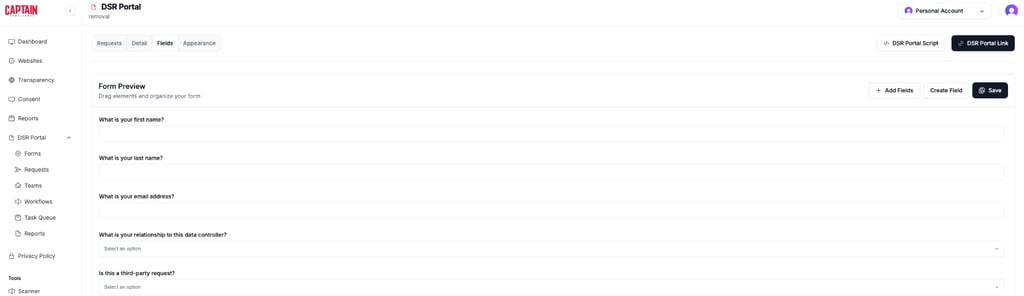
Captain Compliance’s DSR Portal is a Data Subject Access Request portal that automatically handles user requests to view, change, or delete their personal data. As a result, your business can benefit from a centralized system for receiving, tracking, logging, and responding to requests.
The DSR Portal also has streamlined workflows for monitoring requests that respond within legally required timeframes. This is especially useful if your company receives a high volume of privacy requests, as manually tracking each request through email can become difficult and time-consuming.
So I decided to test this and discovered that you can integrate the portal directly into your website via a script or a separate link you can share with customers. Then, the admin dashboard lets you customize the portal, including the information collected and the location of sent requests.
Cookie Transparency Page
The last core feature is the Cookie Transparency Page, which acts as a public-facing “trust center” that shows visitors the active cookies on a site.
What got my attention is that you can customize the page to match your business branding. Plus, it includes a section for adding context or additional explanations about its cookie practices.
Another benefit is that the maintenance is automatic. This means that Captain Compliance regularly scans the website and updates the transparency page with the latest active cookies and tracking technologies. So, you won’t have to manually update your company’s cookie policy whenever your website changes. Wrongful collection and improper disclosure of web tracking technology have become a tenet of regulatory fines and litigation. This tool stops that.
How does Captain Compliance work?
To understand how Captain Compliance works, I decided to delve deeper into this process and provide you with a step-by-step guide from signing up to setting up the platform, starting with their consent management solution. Here’s what you need to know:
- Sign up for Captain Compliance and access the dashboard.
- Connect your website to the platform.
- Captain Compliance deploys onto a website using a JavaScript snippet or Google Tag Manager and integrates with platforms such as Shopify and WordPress to initiate scanning and consent management.
- The scan identifies cookies, trackers, scripts, first-party, and third-party technologies.
- After cookies and data have been discovered and classified, Captain Compliance helps users set up consent notices.
- Captain Compliance records the website visitor choices when they allow or deny consent to cookies.
- Captain Compliance keeps records of visitor consent decisions, interactions with the cookie banner, cookie scan results, and the configuration state of the banner at the time a visitor interacted with it.
- Ultimately, the software provides additional modules such as universal consent and a DSR portal for visitors to make privacy requests, such as requests to access, delete, or correct personal information.
Account requirements
To create your account, you need:
- A website or web application to connect to the platform.
- Administrative access to deploy consent and compliance components.
- Domain verification and configuration.
- Privacy and data-processing information needed to generate notices and disclosures.
- Internal processes for handling assessment, DSARs, and privacy inquiries.
Keep in mind that if you’re using the free plan, you only need a website or web application. However, the Professional and Enterprise versions require all of the above information.
End-to-end onboarding
The setup is the final step of the process, which requires you to:
- Create the account and register the business website.
- Scan the website to discover cookies, trackers, and related technologies.
- Configure consent management. This includes publishing a banner, integrating Google Tag Manager, and testing.
- Integrate Captain Compliance with any third-party integrations, such as Salesforce, WordPress, Meta, or Marketo.
- Create and deploy a DSR portal.
Ease of use and user experience
The next step in my Captain Compliance review was to test the overall user experience. I did this by using the free Captain Compliance account, and here’s what I discovered:
- Website scan: it automatically checks tracking behavior, including both third-party and first-party tools. The feature is mostly automated, meaning you simply enter a domain and choose whether to scan the entire website or 100 random pages. In my testing, the scan took about a minute to complete, depending on the website’s size, and generated a detailed inventory for privacy and risk assessment.
- Consent management: this tool works as a cookie banner on your website, which requires users to either confirm or deny tracking. This banner can be configured based on the regional compliance in the user’s location. The setup is a bit trickier, requiring you to add the Captain Compliance script to your website using either Google Tag Manager or a direct HTML installation. Once installed, the consent management banner covers your whole domain seamlessly.
- Data Subject Requests (DSR): Ultimately, this feature allows you to file requests for data deletion or access directly from your website. Similar to the consent management banner, the DSR portal can be integrated into your website via a script, or Captain Compliance can provide you with a link to the portal that you can share with your customers. The DSR dashboard in the Captain Compliance admin panel provides a customizable portal editor, allowing you to choose which client data will be collected, the portal's appearance, and the destination of the request (your email). The Captain Compliance subject rights request tool can be fully automated for DSAR handling and is an enterprise-grade tool used by some of the biggest data brokers and companies in the world.
After you connect the Captain Compliance modules to your website, the main dashboard of the admin panel shows information on your website’s activity, such as allowed or rejected cookie requests, total visitors, added domains, and pages, as well as directions to the corresponding modules.
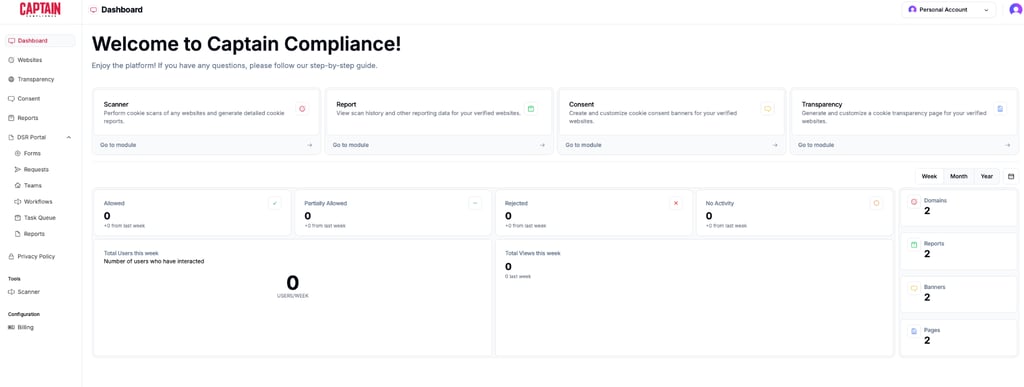
Considering all of the capabilities and use cases of the platform, the interface seems highly user-friendly and intuitive.
Security, privacy, and compliance
My research also showed that Captain Compliance has a strong focus on security, privacy, and compliance.
While I was going through the Terms and Conditions, I learned the following:
- Compliance shield guarantee: Captain Compliance features coverage on privacy claims, whether regulatory or from a litigator, to cover fines if the platform is deployed and does not do its job to protect the business. By contrast, competitors like Osano only cover regulatory claims, making Captain Compliance the only vendor on the market to guarantee coverage against private lawsuits.
- User indemnification: ultimately, the software imposes broad legal indemnity obligations on users to protect itself against claims arising from misuse of the service.
I also explored the privacy policy tool more in-depth, and here are my most prominent findings:
- Data collection and tracking: the dynamic privacy policy generator helps your business to disclose if there’s broad personal and technical data (including IP, device info, and payment or SSN data if provided) using tracking cookies and session replay technology on a site or mobile application.
- Data sharing and retention: Disclosures on whether or not your website or mobile application shares data extensively with affiliates, ad networks, service providers, and legal authorities, retaining information as long as operational or legal needs require, without a fixed time limit.
- Compliance framework: aligns with the EU-US Data Privacy Framework (DPF) and Standard Contractual Clauses (SCCs) for cross-border data transfers.
Across their platform offerings, Captain Compliance lists full support for the following compliance capabilities:
- Web consent management: this provides automated cookie scanning, tracker change detection, CSS banner customization, regional geo-targeting, Global Privacy Control (GPC), Google Consent Mode V2, IAB TCF 2.4 compliance, tracker tagging by litigation risk, and integrations with platforms like Shopify, WordPress, and GTM.
- Privacy notices: automated privacy notice generator with region-specific customization, pre-built jurisdictional disclosures (US states and international), multilingual display, and auto-updates for new legal requirements.
- Consumer rights and DSAR: dedicated Data Subject Request (DSR) portal, managed workflows, and automated response processing (automated on Enterprise).
- Privacy and AI assessments: Native tools to run privacy and AI risk impact assessments.
- Customer trust: public-facing Privacy Trust Centers and hosted transparency pages.
- Operations and agency tools: unified privacy management dashboard featuring bulk domain management and agency workflow tools.
As for compliance coverage, the tool aligns with over 200 privacy laws worldwide and accelerates compliance for key regulations, such as:
- CPRA: California Privacy Rights Act
- GDPR: General Data Protection Regulation
- ECPA: Electronic Communications Privacy Act
- CIPA: California Invasion of Privacy Act
- VPPA: Video Privacy Protection Act
- LGPD: Lei Geral de Proteção de Dados
- PIPEDA: Personal Information Protection and Electronic Documents Act
- New Regulations: States with New Privacy Laws
Captain Compliance Pricing
Captain Compliance offers three subscription tiers structured by business scale, domain allowance, and automation depth. Let’s go through the subscription’s breakdown together:
| Plan | Price | Features | Best for |
| Personal | Free | 1 domain, 2,500 monthly views, 50 cookie scans, limited team invitation access, standard support, basic DSR portal (no custom integrations) | Personal blogs and portfolio sites |
| Professional | $499/month | 1 domain, 150,000 monthly views, 500 scanned pages, 3 team seats, access to 5 core privacy modules, dedicated support (“Dedicated Hero”), standard software integrations | Growing businesses |
| Enterprise | Custom (by request) | Multiple domains, enterprise-grade traffic, unlimited scanned pages, unlimited user seats, automated DSAR workflows, fully customized CMPs, dedicated support, and bespoke integrations | Complex web applications and multi-domain operations |
Pricing is not just about the cost; it's also about what you get for the price you pay. That said, the Personal plan is suitable for basic websites, while the Professional plan offers higher limits, multiple privacy modules, integrations, and dedicated support. Therefore, smaller businesses may find it expensive if they only need basic cookie consent or privacy policy tools.
Ultimately, the Enterprise plan is great for larger organizations that need advanced automation and customization.
Who is Captain Compliance best for, and its use cases
Captain Compliance primarily targets enterprise businesses that collect user data online and are legally required to adhere to global privacy regulations.
- Legal and compliance teams: professionals who need to manage enterprise-level governance, risk, and compliance without doing manual tasks.
- Website owners: SMB owners who do not have dedicated legal teams and need an easy solution to avoid fines and lawsuits.
- IT and data security teams: professionals tasked with mapping data flow, handling data subject requests, and ensuring no unauthorized third-party trackers are used on their sites.
As for the main use cases, they include:
- Global regulation compliance: ensuring a single site is legally compliant with various global and state laws simultaneously, such as CIPA, ECPA, GDPR, CPRA, VPPA, LGPD, Quebec Law 25, and PIPEDA.
- Lawsuit prevention: mitigating regulatory risks and avoiding class-action lawsuits related to data privacy violations for wrongful collection or faulty cookie banners.
- Automated trust building: allowing businesses to transparently show users exactly what data is being collected without requiring manual updates to privacy policies.
- Handling user data requests: giving businesses a workflow to receive, verify, and fulfill data deletion or access requests within legally mandated timeframes.
User sentiment
Before I wrap up my Captain Compliance review, I couldn’t skip the feedback of actual users. Here’s what my research of sites like Capterra and G2 revealed.
Conclusion
After thoroughly researching and testing Captain Compliance, I can say it’s a strong option for businesses that need more than a basic cookie-consent solution. The software combines in-depth scanning, consent management, privacy notices, DSR handling, and compliance support, which helps you manage privacy requirements across multiple jurisdictions.Captain Compliance
However, the final choice depends on your needs and preferences. So, before you make a decision, make sure you carefully evaluate everything.
FAQ
What does Captain Compliance do?
As a privacy/compliance software, Captain Compliance helps businesses manage data privacy and compliance through multiple tools. These include cookie scanning, consent management, universal consent, privacy notices, Data Subject Requests, AI governance, assessments, and dynamic cookie policy software. It also covers compliance across different jurisdictions around the world.
How much does Captain Compliance cost?
Captain Compliance has three subscription tiers to choose from. There’s a free Personal plan, a Professional plan that costs $499/month, and an Enterprise plan with custom pricing.
Does Captain Compliance come with a free plan?
Yes, Captain Compliance comes with a free plan. This is best for personal blogs and portfolio sites because it offers only one domain, 2,500 monthly views, limited cookie scans, standard knowledge base support, and a basic DSR portal without custom integrations.
Does Captain Compliance support GDPR?
Yes, Captain Compliance supports GDPR compliance requirements. It works for multiple international regulations, as well as US state laws.
Is Captain Compliance suitable for enterprise clients?
Yes, Captain Compliance is well-suited for enterprise clients who require comprehensive risk protection and multi-domain compliance management. Small businesses can use it as well, though the cost and extensive feature set are tailored toward larger organizations with complex privacy needs.